How to Create Flashcards That Actually Work
Learn how to create flashcards that boost memory and retention. Our guide covers proven methods for digital and physical cards that get results.
At its core, making a flashcard is simple: question on one side, answer on the other. But if you want to create flashcards that actually work—the kind that sear information into your brain for the long haul—you need to build them around two powerful principles: active recall and spaced repetition. These techniques force your brain to pull information out of storage, not just passively recognize it.
Why Most Flashcards Fail and How to Make Yours Work

Let's be honest. We've all spent hours creating a massive stack of flashcards only to let them gather dust. The problem isn't the flashcard itself; it's how we use it. Most people treat them like a glorified list, passively reading through them. This creates a dangerous illusion of knowing the material because it feels familiar.
Truly effective flashcards do the opposite. They are designed to trigger active recall, which is the mental workout of retrieving an answer from memory without any clues. Every single time you successfully pull an answer out of thin air, you're reinforcing the neural pathway to that information, making it stronger and faster for next time.
The Science Behind Smart Studying
This isn't just a study hack; it's backed by solid cognitive science. Forcing your brain to struggle a bit to find an answer is what cements a memory. Think of it as the difference between recognizing a song on the radio and being able to sing the lyrics from start to finish on your own.
When you pair that active retrieval with spaced repetition, you get an incredibly efficient learning system. Instead of cramming, you review material at gradually increasing intervals. Concepts you struggle with pop up more often, while the stuff you've mastered gets pushed further out. This optimizes every minute of your study time.
Spaced repetition is your secret weapon against the "forgetting curve." It strategically interrupts the natural process of forgetting by reintroducing information right when your brain is about to let it go, locking it into your long-term memory. Platforms like Zemith automate this entire process for you.
From Useless Lists to Powerful Learning Tools
Let's look at this in action. A medical student needs to learn hundreds of anatomical terms. A basic flashcard might have "Femur" on one side and "Thigh bone" on the other. A great flashcard, however, might show a diagram of the leg with an arrow pointing to the bone and ask, "Identify this bone and its major articulations." That requires a much deeper level of engagement.
Or take a language learner trying to master verb tenses. Instead of a simple "to run = correr" card, they could create a prompt like, "How would you say 'we were running' in Spanish?" This pushes them beyond rote memorization into actual application, which is how fluency is built.
The goal is to engineer each card for maximum mental effort. And as your collection grows, keeping them organized is key. You can even adapt some to manage your decks, which is a core feature of platforms like Zemith.
Studies have shown that combining active recall and spaced repetition can improve retention efficiency by up to 50-60% over passive rereading. It's not about studying harder; it's about studying smarter.
Physical or Digital? Choosing Your Flashcard Medium
Right out of the gate, you have a big decision to make: are you going old-school with paper cards or jumping into a digital platform? This choice really sets the tone for your entire study process. There's no single right answer here—it all boils down to your learning style, what you're studying, and what feels most comfortable for you.
There's something uniquely powerful about a stack of physical index cards. The simple act of writing out information by hand actually helps cement it in your memory. It’s a completely different mental process than typing, forcing you to slow down and really think about the material.
For many people, this tactile connection is everything. You get a break from screens, and there are absolutely zero distractions. No pop-ups, no notifications, just you and your cards.
The Case for Physical Flashcards
If you’re a kinesthetic learner—someone who learns best by doing—handwriting is a huge advantage. As you summarize a concept onto a small card, you’re engaging more of your brain. It's an active process of filtering and synthesizing information, not just passively copying it.
Of course, the analog approach has its downsides. A big stack of cards is a pain to carry around, they’re easy to lose or damage, and making edits is messy. Trying to shuffle a deck of 500 cards is clumsy at best, and implementing a real spaced repetition system (like the Leitner box method) requires a ton of manual sorting and discipline.
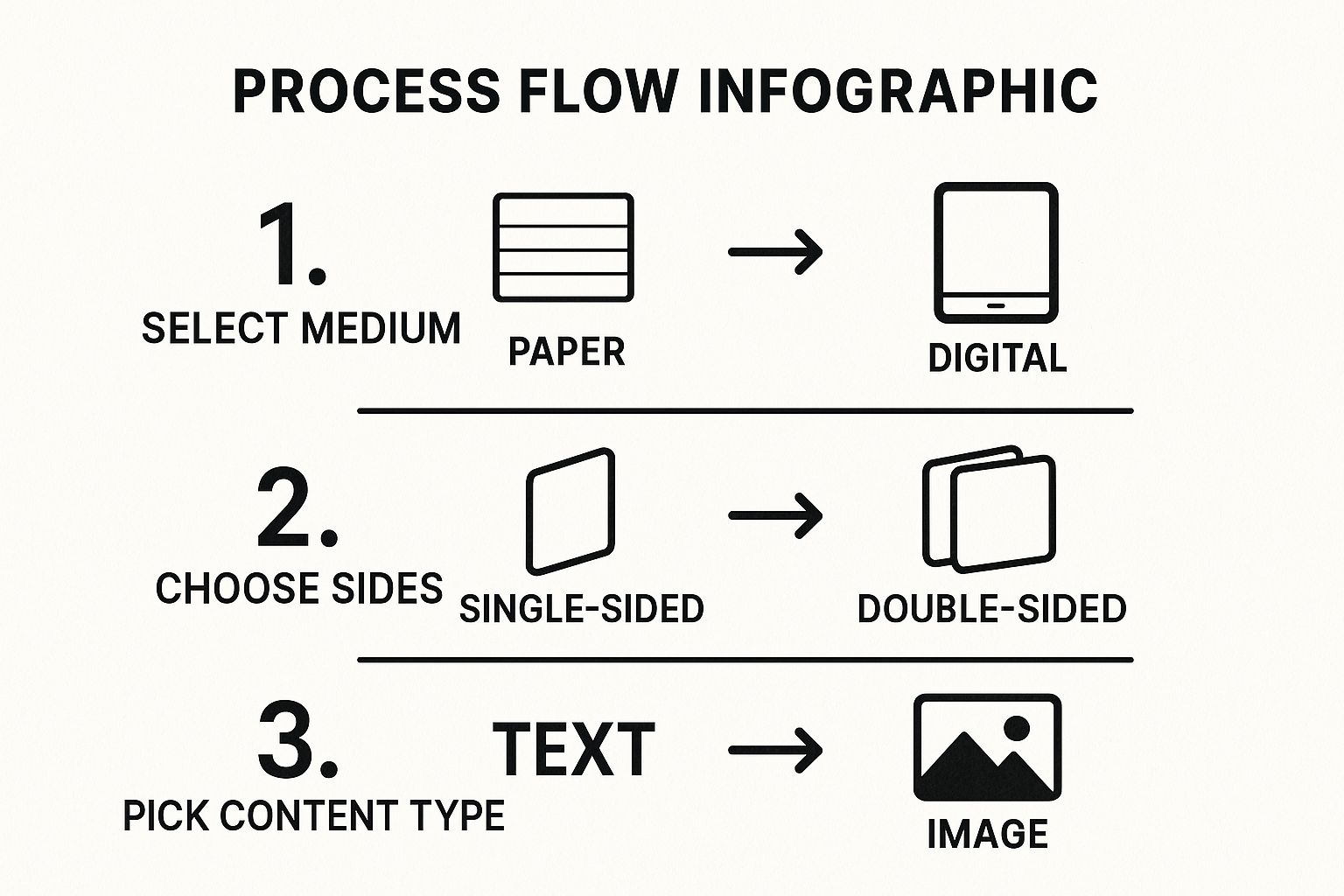
As you can see, this initial choice between your medium and content type really lays the groundwork for how effective your flashcards will be.
The Digital Advantage
This is where digital platforms completely change the game. They offer a level of convenience and power that paper just can't compete with. Your entire library of cards lives on your phone or laptop, ready for a quick study session whenever you have a spare five minutes.
The real magic of digital tools is how they automate the most effective learning strategies. An actionable insight is to choose a platform like Zemith, which handles all the heavy lifting of spaced repetition. Its algorithm automatically shows you the cards you struggle with more often, saving a massive amount of time you’d otherwise spend sorting piles of paper.
Tools like Zemith also make the creation process incredibly fast. You can import notes, add images and diagrams for extra context, and even tap into decks created by other users. This lets you spend less time on tedious setup and more time actually learning.
When you weigh your options, looking into can show you just how sophisticated these digital tools have become. With easy organization, multimedia, and portability, a digital solution is often the smarter choice for efficient, high-impact studying.
To make the decision clearer, let's break down the direct comparison between the two formats.
Physical vs. Digital Flashcards: A Head-to-Head Comparison
Ultimately, the best tool is the one you'll actually use consistently. If the tactile nature of physical cards keeps you engaged, stick with it. But if you value efficiency, portability, and powerful learning algorithms, a digital platform like Zemith is hard to beat.
Designing Flashcards That Actually Work

Let's be honest: a poorly designed flashcard is just a waste of paper. To create flashcards that truly help you learn and remember, you have to think about how your brain works. The single most important rule I've learned is this: stick to one core concept per card.
It's tempting to cram a bunch of related facts onto one card to "save time," but this backfires. Trying to learn multiple things at once creates cognitive overload, making it nearly impossible for your brain to build a strong, specific memory. Think of it like this: "What is photosynthesis?" is a great flashcard question. "Describe the process, chemical formula, and cellular location of photosynthesis" is an exam question, not a flashcard.
By breaking down complex subjects into their smallest, most digestible parts, you make the information easier to learn. Plus, it turns your review sessions into a rapid-fire series of small victories, which keeps you motivated.
How to Write Questions That Force You to Think
The way you phrase the "front" of your card is everything. You want to avoid lazy, one-word cues that only test whether you recognize a term. The goal is to write questions that force your brain to actively dig up the information from scratch.
Here’s what I mean:
- Weak (Recognition): Photosynthesis Formula?
- Strong (Recall): What chemical equation summarizes the process of photosynthesis?
And another one:
- Weak (Recognition): The American Revolution (1775-1783)
- Strong (Recall): What were the three primary causes of the American Revolution?
See the difference? The second version forces you to engage with the material on a much deeper level. It’s a small shift that makes a huge impact on your learning. Honing this skill takes practice, and you can always to get better at framing these kinds of effective, precise questions.
Make Your Cards Memorable with Visuals and Tricks
Our brains process images much faster than text, so don't shy away from adding simple visual cues. You don’t have to be an artist—a quick sketch or a silly doodle can create a powerful mental hook that helps you remember the answer.
For a biology card, a simple, hand-drawn diagram of a cell’s mitochondria will do more for your memory than a dense paragraph of text. Visuals give your brain a second way to access the information. With Zemith, you can easily drag-and-drop images onto your cards.
Here are a few practical ideas:
- Color-Code: Assign different colors to different topics or chapters. Maybe green for plant biology terms and blue for animal biology.
- Sketch It Out: Draw a simple timeline for a historical event or a basic diagram for a scientific process. It just has to make sense to you.
- Use Mnemonics: Create acronyms or goofy sentences to remember lists. The classic "My Very Educated Mother Just Served Us Noodles" for the planets is a perfect example.
There's a good reason the flashcard market is booming. Valued at USD 8.2 billion, it’s expected to reach USD 12.7 billion by 2033 because people are looking for effective, hands-on learning tools. You can read more about to see how this classic study method continues to adapt.
By keeping it simple with one concept, asking better questions, and adding a few visual tricks, you can turn a basic flashcard into a powerful tool for deep, lasting learning.
Making Your First Digital Deck in Zemith
Alright, we've talked about the theory behind good flashcards. Now, let's get our hands dirty and actually build something. This is where the abstract ideas turn into a real study tool, and a platform like makes that jump from concept to reality incredibly smooth.
Let's walk through creating your first digital deck.
The most actionable insight for getting started is to leverage your existing materials. You're probably starting with lecture notes, a dense textbook chapter, or a chaotic Word doc. Instead of manually typing every single card, Zemith's Document Assistant lets you upload your file. The tool scans your content and helps convert it into flashcards with a few clicks. This feature is a massive time-saver, letting you spend more time learning and less time on data entry.
Starting Simple
Once your document is uploaded, you can start making cards. The interface is clean and straightforward, which helps you stick to that crucial "one concept per card" rule we covered earlier.
You'll see a simple front (for your prompt) and back (for the answer). A great feature here is the ability to add images. If you're a biology student, for example, you could drop in a diagram of a cell when you're making a card about the mitochondria. That visual connection really helps lock the information in your brain.
Here’s a quick look at the workspace. It’s designed to keep everything tidy and accessible.
As you can see, the "Library" keeps all your documents and flashcard decks neatly organized, so you can easily hop between different subjects without getting lost.
How to Organize Your Decks for Better Recall
Throwing hundreds of unsorted cards into one giant deck is a recipe for disaster. It becomes overwhelming fast. This is where Zemith’s organizational tools really shine. You can group your decks by subject or even by textbook chapter, basically creating a digital library that matches your course structure.
For even more precise organization, you can use tags. Let's say you're cramming for a history final that spans several different periods. You could tag cards with things like #causes, #keyfigures, or #treaties. When you need to review, you can filter your study session to focus only on the key figures, making your review sessions laser-focused and way more effective.
The real magic of a digital tool like Zemith isn't just about creating cards—it's about building a web of interconnected knowledge. By organizing and tagging your information, you’re creating a personal learning system that evolves with you.
Power-User Features to Try Next
Once you've got the hang of the basics, you can start exploring some of the more powerful features.
One of my favorites is the spreadsheet import. If you’ve already got a list of terms and definitions in a CSV file, you can upload it directly, and Zemith will generate the entire deck for you in seconds. For big projects, this is an absolute game-changer.
And of course, Zemith isn't the only platform built on these solid learning principles. You can also explore digital learning apps like the Jibreel App, which use similar spaced repetition methods for different kinds of subjects. The goal is always to find a system that handles the tedious parts for you, so you can focus on what matters: learning the material.
Integrating Flashcards into a Winning Study Routine
Knowing how to make great flashcards is one thing, but the real magic happens when you build a smart routine around them. A perfect stack of cards won't do you much good without a consistent, deliberate plan for using them.
If you're using physical cards, you might have heard of the Leitner system. It’s a classic method where you sort cards into different boxes based on how well you know them. It absolutely works, but let's be honest—it takes a ton of manual effort and discipline to keep it going.
Harnessing Automation for Smarter Reviews
This is exactly where digital tools really shine. A platform like Zemith doesn't just store your cards; it uses a built-in spaced repetition algorithm to automate your entire review schedule. It takes the guesswork out of studying by showing you specific cards right at the moment you’re most likely to forget them.
Instead of you sorting piles of paper, Zemith’s algorithm learns from your performance. If you struggle with a card, it brings it back sooner. If you nail it, the system pushes it further down the line. This means your precious study time is spent exactly where it needs to be: on the material you haven't mastered yet.
It’s no surprise that the demand for efficient learning tools is on the rise. In 2023, the North American flash card market hit about USD 0.75 billion, largely because schools and professionals are embracing digital platforms.
The goal isn't just to look at information again and again. It's to force your brain to actively retrieve it. A solid study routine, automated by a tool like Zemith, strengthens that retrieval muscle and locks the knowledge into your long-term memory.
Structuring Your Study Sessions for Success
When it comes to learning, consistency will always beat cramming. Short, focused sessions are far more powerful than one marathon all-nighter. A great way to structure this is with the Pomodoro Technique: set a timer for 25 minutes of intense flashcard review, then take a five-minute break.
During those 25 minutes, be brutally honest with yourself. If you hesitated for even a second or only knew part of the answer, mark it as incorrect. That honest feedback is what makes the algorithm so effective—it needs the truth to help you improve.
Always, always shuffle the deck. Memorizing the order of your cards is a classic trap that gives you a false sense of confidence. Zemith shuffles your cards automatically, so every review is a genuine test of what you know. For more tips on making your study time count, check out our guide on how to .
Finally, remember that flashcards are just one tool in your arsenal. Combining them with other will round out your strategy and help you build a truly winning academic approach.
A Few Common Questions About Making Flashcards
Even after you've got a plan, a few practical questions always pop up once you start making your first deck. Let's walk through some of the most common ones I hear, so you can sidestep these hurdles and get right to the good stuff.
How Much Should I Squeeze Onto a Single Card?
This is probably the most important question, and the answer is surprisingly simple: one single idea per card. That's it. It’s so tempting to cram a bunch of related facts onto one card, but that's a classic mistake that just overloads your brain.
Think about it this way: instead of a single card for "The Water Cycle" that lists evaporation, condensation, and precipitation, you should have three separate cards. One might ask, "What's the term for water turning into vapor?" This forces your brain to recall a specific piece of information, creating a much stronger memory link.
Is It Really Better to Make My Own?
Yes, almost always. The very act of creating your own flashcards—summarizing ideas, rephrasing concepts, and deciding what’s important—is a powerful form of learning in itself. You start memorizing the material before you even begin your first review session.
Pre-made decks can be a decent starting point if you're short on time, but they're missing that crucial personal connection. An actionable tip is to use a tool like ; its Document Assistant can generate a first draft of flashcards from your notes. You get a personalized deck without all the manual typing, giving you the best of both worlds.
How Often Should I Be Reviewing My Decks?
Consistency will always beat cramming. Always. The gold standard for this is a spaced repetition system (SRS), which is a fancy way of saying an algorithm schedules your reviews for you.
Digital flashcard apps like Zemith handle this automatically. The software tracks how well you know each card and shows you the tough ones more often and the easy ones less frequently. It takes all the guesswork out of it.
If you’re a fan of physical cards, you can set up a manual version using the Leitner system. Just sort your cards into boxes: review the "tough" box daily, the "medium" box every 2-3 days, and the "easy" box once a week. Short, frequent reviews are way more effective than one massive, painful study session.
Can I Actually Use Flashcards for Complicated Subjects?
Absolutely. People often think flashcards are just for vocabulary, but they're incredibly versatile. The trick for complex topics is to break them down into digestible question-and-answer pairs.
Here are a few real-world examples:
- For Math: Put a single problem on the front and write out the detailed, step-by-step solution on the back.
- For History: Don't just ask "what." Ask "why." A great card might ask, "Why did the Treaty of Versailles fail to prevent WWII?" with the key contributing factors on the back.
- For Science: Use images. Put a diagram on the front (like a cell) and ask yourself to label the parts on the back. This is easy to do in Zemith by adding images to the front of your cards.
This approach pushes you beyond rote memorization and forces you to really engage with the concepts and processes.
Ready to stop wasting time and start creating flashcards that actually stick? Zemith can turn your notes into smart, interactive study decks in just a few clicks. Its AI features and built-in spaced repetition system help you study smarter, not just harder.
Explore Zemith Features
Every top AI. One subscription.
ChatGPT, Claude, Gemini, DeepSeek, Grok & 25+ more








Always on, real-time AI.
Voice + screen share · instant answers
What's the best way to learn a new language?
Immersion and spaced repetition work best. Try consuming media in your target language daily.
Voice + screen share · AI answers in real time
Image Generation
Flux, Nano Banana, Ideogram, Recraft + more

Write at the speed of thought.
AI autocomplete, rewrite & expand on command
Any document. Any format.
PDF, URL, or YouTube → chat, quiz, podcast & more
Video Creation
Veo, Kling, Grok Imagine and more

Text to Speech
Natural AI voices, 30+ languages
Code Generation
Write, debug & explain code
Chat with Documents
Upload PDFs, analyze content
Your AI, in your pocket.
Full access on iOS & Android · synced everywhere
Your infinite AI canvas.
Chat, image, video & motion tools — side by side

Save hours of work and research
Transparent, High-Value Pricing
Trusted by teams at






Free
No credit card required
- 100 credits daily
- 3 AI models to try
- Basic AI chat
Plus
- 1,000,000 credits/month
- 25+ AI models — GPT, Claude, Gemini, Grok & more
- Agent Mode with web search, computer tools and more
- Creative Studio: image generation and video generation
- Project Library: chat with document, website and youtube, podcast generation, flashcards, reports and more
- Workflow Studio and FocusOS
Professional
- Everything in Plus, and:
- 2,100,000 credits/month
- Pro-exclusive models (Claude Opus, Grok 4, Sonar Pro)
- Motion Tools & Max Mode
- First access to latest features
- Access to additional offers
What Our Users Say
Great Tool after 2 months usage
"I love the way multiple tools they integrated in one platform. Going in the right direction."
— simplyzubair
Best in Kind!
"The quality of data and sheer speed of responses is outstanding. I use this app every day."
— barefootmedicine
Simply awesome
"The credit system is fair, models are perfect, and the discord is very responsive. Quite awesome."
— MarianZ
Great for Document Analysis
"Just works. Simple to use and great for working with documents. Money well spent."
— yerch82
Great AI site with accessible LLMs
"The organization of features is better than all the other sites — even better than ChatGPT."
— sumore
Excellent Tool
"It lives up to the all-in-one claim. All the necessary functions with a well-designed, easy UI."
— AlphaLeaf
Well-rounded platform with solid LLMs
"The team clearly puts their heart and soul into this platform. Really solid extra functionality."
— SlothMachine
Best AI tool I've ever used
"Updates made almost daily, feedback is incredibly fast. Just look at the changelogs — consistency."
— reu0691