


Every top model, with tools built in.
Search the web, run deep research, read files, create images and run code with GPT, Claude, Gemini, Grok and more.
Learn how to write SEO articles that rank high on Google and connect with readers. Get actionable tips on keyword research, writing, and AI-powered workflows.
Writing an SEO article feels a bit like being a chef and a food scientist at the same time. You need to create something that search engines can understand and rank, but it also has to be a delicious, satisfying meal for your human readers. It’s a craft that mixes smart keyword strategy, a clear structure, and genuinely helpful writing to solve a reader's problem—and solve it well.
Let's be real. Hitting 'publish' on a new post and hearing nothing but internet crickets is one of the most soul-crushing feelings for a writer. You pour hours into crafting what feels like a masterpiece, only to see it get buried on page ten of Google, a place where only the most desperate searchers (and maybe your mom) will ever find it.
This guide is your rescue plan. We’re going to skip the fluffy, abstract jargon and dive straight into a practical workflow for writing SEO articles that both search engines and actual humans will devour.

Forget everything you’ve heard about old-school SEO—the kind that led to robotic, keyword-stuffed articles that read like a VCR manual. The modern approach is so much smarter and, frankly, more rewarding. I'll walk you through how to find out what your audience is desperately searching for, structure your posts to keep them hooked from the first sentence to the last, and write in a way that feels authentic and helpful.
To get started, we're going to build our foundation on three core ideas:
Think of this as your friendly, slightly-caffeinated guide to finally getting your voice heard. For more on this, our guide on how to write engaging content is a great next step. To further refine your approach, consider another perspective on how to write SEO-friendly blog posts.
Ready to stop writing for the void? Let’s get started.
Before you even dream of writing a headline, you have to play detective. Seriously. Writing a brilliant article on a topic no one is looking for is like throwing a huge party and forgetting to send out the invites. It’s a lonely, pointless exercise. You'll have plenty of snacks, but no one to share them with.
This isn’t about guessing what people want. It’s about digging in and finding the exact phrases your future readers are punching into Google. This is the only way to make sure all your hard work actually gets seen.

If you remember one thing from this guide, make it search intent. This is the why behind the search. What problem is that person trying to solve right now?
Getting this right is everything. If you misunderstand the user's intent, your article will never rank, no matter how beautifully you write it. It's like bringing a calculus textbook to a kindergarten show-and-tell. Wrong audience, wrong content.
Matching your article's purpose to what the user wants is the secret sauce of SEO. Here’s a simple breakdown of the main types of search intent and the content that wins.
For a search like "how to write seo articles for my SaaS blog," the intent is crystal clear: informational. Someone is looking for a step-by-step guide, not a sales pitch for a writing service. Your content absolutely must deliver on that promise.
So, where do you find these magic phrases? It's easier than you think. You don't need a deerstalker hat—just a few smart approaches and the right tools.
The game is to find a sweet spot between search volume (how many people search for it) and keyword difficulty (how hard it is to rank for). If your blog is new, aiming for a keyword with 100,000 monthly searches is a recipe for disaster. Instead, we hunt for long-tail keywords.
What are long-tail keywords? They're longer, more specific search phrases (usually three or more words). Think "how to write seo articles for a new blog" instead of just "seo articles." They have lower search volume but much higher conversion rates because the searcher's intent is so specific. They're basically screaming, "This is exactly what I need help with!"
You can uncover these gems by:
This whole process can get a bit messy, especially when you're juggling spreadsheets and trying to make sense of all the data. This is where a smart assistant can be a lifesaver. For a deeper look at this, check out some of the most effective AI tools for research that can seriously speed up this discovery phase.
Don't just pick one keyword and call it a day. A truly great SEO article ranks for hundreds of related terms. Your mission is to build a "keyword cluster."
First, you need your primary keyword—the main focus of your article.
how to write seo articlesNext, find secondary keywords that support and broaden the main topic.
seo writing tips, on-page seo checklist, keyword research for blogsFinally, sprinkle in long-tail keywords. These are perfect for subheadings or for answering very specific questions within your text.
how long should an seo article be, what is the best keyword density for seo in 2024By the end of this process, you won't just have a single keyword. You'll have a complete content map. This map guides your entire outline, ensuring you create the most comprehensive resource on the topic—answering every question your reader has before they even think to ask it. A tool like Zemith can actually automate this clustering for you, grouping related keywords so you can build out a truly comprehensive outline effortlessly.
Okay, you've done the keyword research and have your treasure map. Now it's time to build the ship. A solid, logical structure isn't just a nice-to-have; it's the absolute foundation of any article that stands a chance of ranking. It's the skeleton that holds your content together, making it easy for both people and search engines to understand.
Get this right, and readers will effortlessly glide through your content. Get it wrong, and they'll smash that back button before you can even think about your bounce rate.
It all starts with your headline. It's arguably the single most important sentence you'll write.
Your headline, which is also your H1 tag, has one simple job: earn the click.
Out there on the search results page, your article is just one blue link in a sea of competitors. Your masterpiece could be the most insightful article ever written on the topic, but a boring headline will guarantee it dies a lonely, unread death. It's the digital equivalent of wearing a beige tracksuit to a neon party.
A great headline is a delicate balance. It has to be compelling enough to pique curiosity but clear enough that people know exactly what they're getting. Think of it as the mini-advertisement for your entire post.
Here are a few ingredients I always try to include:
Crafting the perfect headline is definitely an art form, but it's a skill you can absolutely build. If you want to really get into the nitty-gritty, we have a whole guide on how to write better headlines that's worth a read.
Once you've nailed that irresistible H1, the real work of outlining begins. Let's be honest: nobody wants to be greeted by a massive wall of text. It's intimidating, and it screams "hard work." This is where subheadings (your H2s and H3s) become your best friends.
They chop your article into logical, bite-sized pieces that are easy for people to scan. And trust me, people scan. They don't read every single word; they jump around looking for the specific info they need. Your subheadings are the signposts that guide them right to it.
Pro Tip: Your subheadings are prime real estate for your secondary and long-tail keywords. If an H2 is "Building a Scannable Outline," a relevant H3 could be "How to Use Long-Tail Keywords in Your Headings." This layering helps Google see the true depth of your topic.
I like to think of an outline as a conversation. The H1 makes a big promise. The H2s introduce the main talking points. The H3s dive into the supporting details, examples, and evidence for each of those points.
A simple, effective outlining process can look like this:
This is one area where an AI tool like Zemith is a massive timesaver. You can give it your main keyword, show it a couple of competitor articles, and it'll generate a comprehensive outline in seconds. It gives you a fantastic starting framework you can then refine and make your own.
Want to know the real secret to ranking in 2024? Depth.
The days of ranking with thin, 500-word blog posts that barely scratch the surface are long gone. Google's one and only goal is to give its users the single best, most complete answer to their question. That means it heavily rewards articles that are incredibly comprehensive.
This isn't about fluffing up your word count. It's about covering a topic so thoroughly that your reader has zero reason to go back to Google. You want to answer every single follow-up question they might have before they even think of it. What's your take on this? Have you noticed longer articles ranking better in your niche? Let me know in the comments!
The data on this is crystal clear. A study from AIOSEO.com found that SEO articles over 3,000 words perform wildly better than shorter content. Specifically, they generate three times more traffic, 3.5 times more backlinks, and four times more social shares.
When you create a resource this deep, it establishes you as an authority. It becomes a cornerstone piece of content that people naturally want to link to and share. That's the kind of signal that tells Google you're the real deal, making your content far more likely to rank at the top.
Okay, you've got your keywords and a solid outline. Now for the fun part—turning that blueprint into a piece of content that people actually want to read.
Let's be clear: the old-school trick of stuffing keywords into every other sentence is dead. Thank goodness. Today, it’s all about a perfect marriage between compelling, human-first writing and smart SEO.
The secret? Always write for your reader first. Seriously, forget the algorithms for a minute. Picture the person on the other side of the screen. What story can you tell? Is there an analogy that will make a complex topic finally click for them? Your unique voice is your biggest advantage, so use it.
Weaving in keywords shouldn't feel like you're checking boxes. If you've done your homework and built a comprehensive outline, your primary and secondary keywords will pop up naturally as you explain the topic.
It’s less about forcing phrases and more about thoroughly answering the user's questions.
Instead of thinking, "I need to squeeze in 'seo writing tips' three more times," shift your mindset to, "What are the most important seo writing tips this person needs to know right now?" When you genuinely focus on providing value, the keywords just fall into place.
Key Takeaway: A well-researched article on "how to write seo articles" is going to naturally include terms like "on-page seo," "meta description," and "keyword research." You simply can't explain the topic properly without them.
Here’s a hard truth: people don't read online, they scan. Their eyes jump from headings to bullet points to bolded text, hunting for the specific answer they need. Your job is to make that hunt as easy as possible.
A massive wall of text is the fastest way to send someone running back to the search results.
Here are a few simple but incredibly powerful formatting tips to keep them on the page:
This isn't just about making things look pretty. It's about engagement. A scannable article is a readable article, and readability is something both your audience and Google will thank you for.
Once your reader-focused draft is done, it's time to put your SEO hat back on for a final polish. These on-page SEO elements are the technical signals that help search engines understand what your content is about and why it deserves a top spot.
Think of it as adding the finishing touches that make your article irresistible to Google. Here’s a quick rundown of the absolute must-haves:
This "write first, optimize second" workflow is where a tool like Zemith can really shine. You can get your thoughts down in a clean editor, then use its built-in SEO features to score your content, check for keyword usage, and perfect that meta description without ever breaking your creative stride. As search engines get smarter with things like AEO, knowing how to frame your content for conversational queries is becoming more important than ever. You can learn more about SEO for Answer Engine Optimization to make sure you're staying ahead of the curve.
We’ve all been there—staring at that blinking cursor on a blank page. It’s like trying to start a car in the middle of a blizzard. You feel stuck, frustrated, and you start to question every creative decision you've ever made. But what if you could just skip that part and get straight to the good stuff?
This is where a platform like Zemith becomes your secret weapon. I’m not talking about letting a robot churn out some soulless, generic article that sounds like it was written by a microwave. That's a one-way ticket to getting ignored by both people and search engines.
Instead, think of AI as a brilliant co-pilot. It’s there to handle the tedious, heavy-lifting parts of the process, which frees you up to focus on the uniquely human touches that make an article truly great.
Let's walk through a real-world scenario. You need to write an article on "how to choose the best running shoes for beginners." The old way involves spending hours sifting through competitor articles just to piece together a decent outline.
The new way is much smarter.
This hybrid approach lets you delegate the research and structuring so you can pour your energy into what actually matters—adding your personal insights, nailing the tone, and making the final piece something you’re genuinely proud of. You keep full creative control but get to the finish line way faster. If you want to see what’s possible, our post on the best AI writing assistant is a great place to start.
There's no doubt that AI has completely changed how we write SEO articles. Recent research shows that 73% of businesses now use AI for tasks like generating outlines and drafting text. But here’s the important part: 93% of marketers still meticulously review and edit that AI-generated content before it ever sees the light of day. This ensures a high-quality, human touch remains.
This really highlights the perfect partnership. The most effective workflow puts you, the human writer, in the driver's seat, using AI as a powerful navigation system.
This simple, human-first process is what we should all be aiming for.
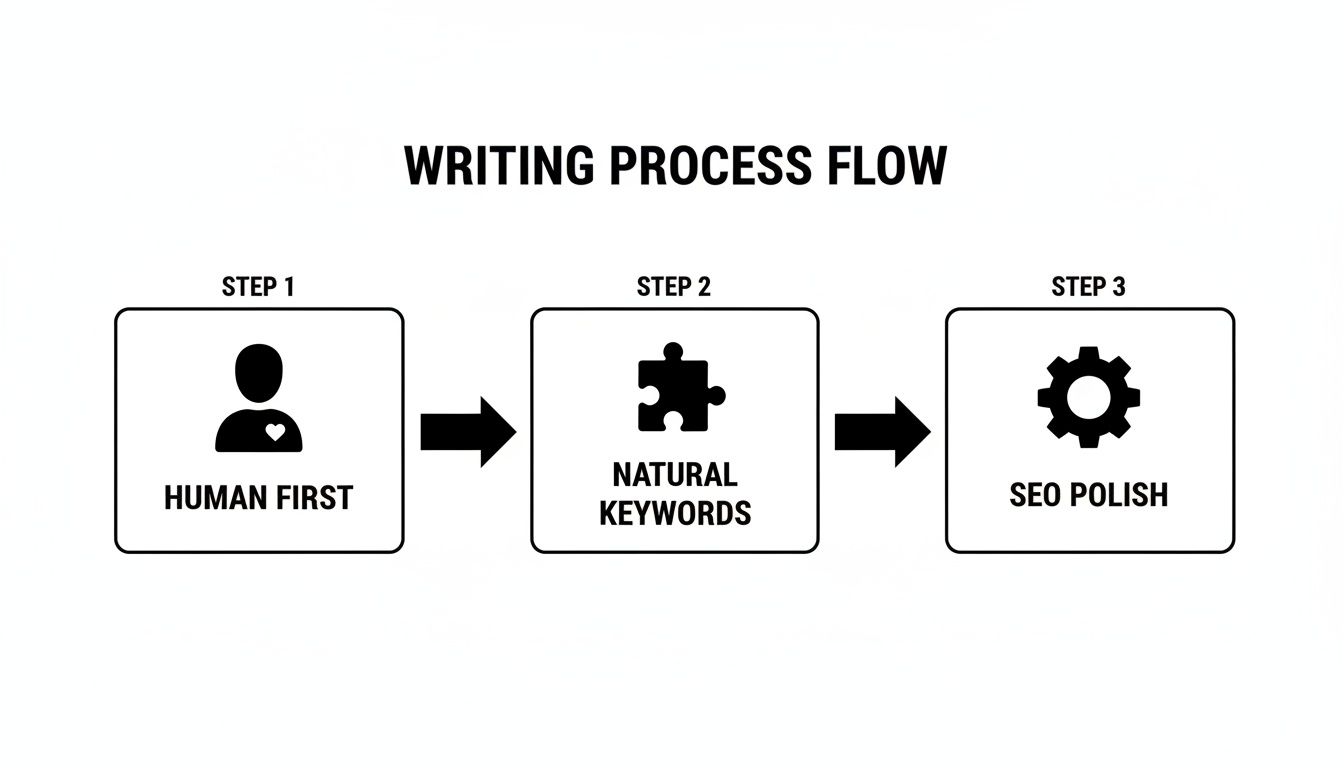
The key takeaway here is that technology should support, not replace, your expertise and creativity.
The Hybrid Advantage: The goal isn’t to automate your job away. It's to automate the most boring parts of your job so you have more time and brainpower to be creative, strategic, and insightful.
By embracing an AI assistant like Zemith as a partner, you're not just learning how to write SEO articles faster. You're building a smarter, more sustainable system that helps you produce higher-quality content, consistently. It’s all about working smarter, not harder—and finally getting a leg up on that dreaded blank page.
So you hit "publish." That’s a great feeling, but the work isn't over. In fact, it's just getting started. Hitting publish is the starting pistol, not the finish line. An incredible article that nobody sees is really just a well-written diary entry.
Think about it like launching a new product. You wouldn't just put it on a shelf and hope people stumble upon it, would you? Of course not. Your content needs a promotion plan to get that initial momentum, which is what helps it eventually gain organic traction.
You don't need a huge marketing budget or a complex strategy to get your article in front of the right people. A little bit of smart, focused effort can make a massive difference.
Here are a few tactics I’ve seen deliver big results time and again:
Once you start promoting, you need to figure out if your efforts are actually paying off. This is where you put on your data-scientist hat for a bit (I promise, it's not as scary as it sounds).
Your two best friends for this are Google Analytics and Google Search Console. They’re free, and they give you a direct window into how people are finding and engaging with your content. This is how you stop guessing and start making informed decisions.
This data is pure gold. It tells you exactly what your audience loves and what topics you should double down on in the future, taking the guesswork out of your content strategy.
Don't get overwhelmed by all the numbers. Just focus on a few key metrics to start:
This simple loop—publishing, promoting, and then measuring—is what separates the pros from the hobbyists. It’s how you continuously refine your process and learn how to write SEO articles that consistently bring in results.
Still have a few questions buzzing around? You're not alone. When you're just getting the hang of writing for SEO, the same kinds of "what ifs" and "how comes" tend to pop up. Let's tackle some of the most common ones I hear all the time.
Ah, the million-dollar question! The honest, if slightly frustrating, answer is: it depends. Generally speaking, you can expect it to take anywhere from 3 to 6 months for a solid, well-written article to really gain traction and start showing up for its main keywords. SEO is definitely a long game, not a quick win. It's more of a crock-pot situation than a microwave dinner.
A few things can speed this up or slow it down:
Okay, first things first: please, please forget the old-school idea of "keyword density." Modern SEO has nothing to do with hitting some magic number. In fact, stuffing your keyword into every other sentence is a surefire way to sound like a malfunctioning robot and will probably do more harm than good. It's the content marketing equivalent of a dad joke—everyone knows you're trying too hard.
Instead of counting, think about your keywords in layers:
When you shift your focus from counting keywords to just answering every possible question a reader might have, you'll find you start ranking for hundreds of related terms without even trying.
Both! But seriously, don't sleep on the power of updating your old content. This strategy, often called a "content refresh," is one of the most effective and weirdly overlooked tactics in SEO. Go find an older post on your site that’s lost its mojo, add fresh information, expand on key points, and re-optimize it for better keywords.
Google loves seeing that you're keeping your content current. You can often get a major ranking boost much faster than with a brand-new article because the URL already has some age and authority. It’s like renovating a good house instead of building a new one from scratch.
Ready to stop staring at a blank page and start creating content that actually ranks? Zemith pulls all the AI tools you need—from research and outlining to drafting and optimizing—into one clean workspace. Stop juggling a dozen different subscriptions and start building a smarter workflow at https://www.zemith.com.







Trusted by teams at






The top models, plus image, video and voice tools, in one plan.
Without Zemith
ChatGPT PlusUS$20.00Claude ProUS$20.00Google AI ProUS$19.99SuperGrokUS$30.00Perplexity ProUS$20.00 MidjourneyUS$10.00
 ElevenLabsUS$6.00Le Chat ProUS$14.99
 RunwayUS$15.00Kling StandardUS$8.80
 Gamma PlusUS$12.00
 Otter ProUS$16.99
 QuillBot PremiumUS$19.95
 Photoroom ProUS$12.99
 Quizlet PlusUS$7.99
Total if paying separatelyUS$234.70/mo
"I love the way multiple tools they integrated in one platform. Going in the right direction."
— simplyzubair
"The quality of data and sheer speed of responses is outstanding. I use this app every day."
— barefootmedicine
"The credit system is fair, models are perfect, and the discord is very responsive. Quite awesome."
— MarianZ
"Just works. Simple to use and great for working with documents. Money well spent."
— yerch82
"The organization of features is better than all the other sites — even better than ChatGPT."
— sumore
"It lives up to the all-in-one claim. All the necessary functions with a well-designed, easy UI."
— AlphaLeaf
"The team clearly puts their heart and soul into this platform. Really solid extra functionality."
— SlothMachine
"Updates made almost daily, feedback is incredibly fast. Just look at the changelogs — consistency."
— reu0691
Hand off the research, writing, design and follow-ups. Zemith picks the tools it needs and brings back finished work.
Search the web, run deep research, read files, create images and run code with GPT, Claude, Gemini, Grok and more.
Zemith keeps working in the cloud and pings you when it's done.
Notion, Linear, Canva, Airtable and more. It asks before it creates or changes anything.
Docs, slides, sheets and PDFs, ready to send.
Chain models and tools on a visual canvas, from one prompt to a finished promo video.
Briefings, reports and reminders run on a schedule and are ready when you need them.
Real-time voice that can see your camera or screen.
The best image and video models, in one studio.
Turn PDFs, links and YouTube videos into podcasts, quizzes, flashcards and mind maps.














 Podcast
 Quiz
Quiz Flashcards
 Mind map
 Infographic