


Every top model, with tools built in.
Search the web, run deep research, read files, create images and run code with GPT, Claude, Gemini, Grok and more.
Learn how to write seo friendly blog posts and boost traffic with practical steps for keyword research, on-page optimization, and analytics.
Getting an SEO-friendly blog post right means knowing your audience inside out, picking the perfect keywords, and sticking to a clear outline. I lean on a six-phase workflow—research, planning, drafting, on-page tweaks, publishing, and performance checks—to keep everything on track. Zemith plugs in at each stage with tools that cut down the guesswork and speed things up (no crystal ball needed).
Here’s why this framework works so well—and why your readers will thank you:
Below is a quick table summarizing each stage in crafting SEO-friendly blog posts—and the Zemith feature that gives it a boost.
Keep this cheat sheet close when you’re building a post. It’s a handy reference that makes sure you don’t miss a beat—seriously, it’s like your backstage pass to SEO stardom.
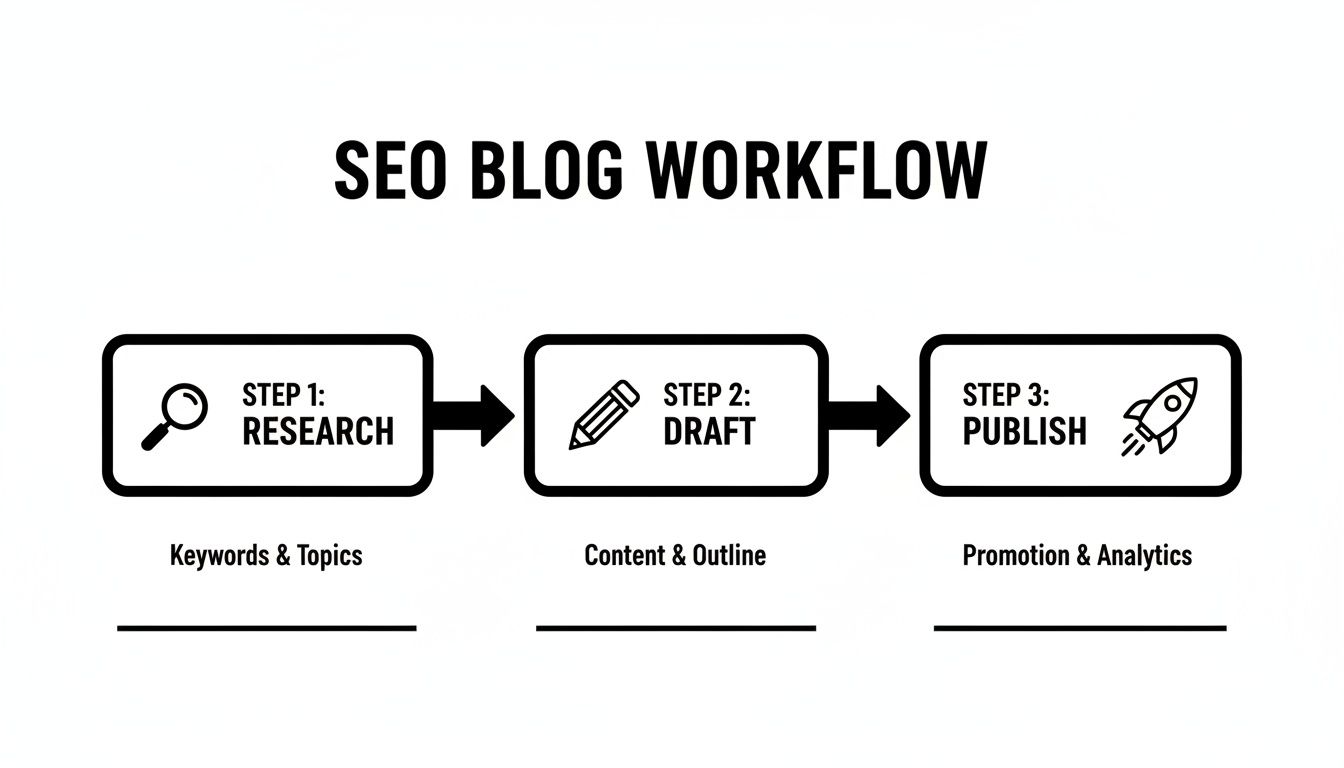
This graphic lays out each phase, showing where you can shave off up to 50% of your time by flipping between the right tools.
Key Takeaway
Use this structured process to build posts that consistently rank higher and engage readers. Now go give yourself a high-five.
For more tips on speeding up your content creation, check out our guide How to write blog posts faster.
Great blog posts really take shape long before you type a single word. I can’t tell you how many times I’ve watched someone abandon a topic the moment competition spiked. Weeks of work can vanish in a heartbeat if you’re chasing a keyword that suddenly gets flooded.
When that happens, it pays to pivot to long-tail phrases like “step by step guide to write seo-friendly posts” or “how to structure seo blog for better ranking.” Zemith’s keyword filters help you spot those hidden opportunities in seconds. Pair that with trend alerts and you’ll see seasonal shifts coming—no more blind guesses.
Instead of throwing darts at a board, sort your topics by search volume and difficulty. This way, you’re focusing on keywords where people are actually searching—and where you have a fighting chance to rank.
Last spring, Zemith’s trend alerts lit up with a 250% jump in “homeschool art projects.” One blogger I know shifted focus and saw 1.5K new visits every month just weeks later.
You can explore fresh angles with the Blog Post Ideas Generator. Want to make this interactive? Try it now, then share the weirdest long-tail keyword you discover in the comments. 😄 I also like to check Google’s People Also Ask box—it surfaces the real questions your readers are typing.
It’s brutal to pour hours into a piece only to have it disappear in search results. Here’s something to remember: posts over 3,000 words are 2.5 times more likely to perform well and keep readers engaged, according to Siege Media’s 2025 blogging stats. Read the full research on Siege Media’s 2025 blogging statistics.
People Also Ask is a goldmine. Those exact queries help you cluster topics and shape your outline around genuine user needs.
“Focusing on real user queries keeps your content laser-targeted and more likely to rank.”
Once you’ve mapped intent, craft H2 and H3 headings that answer those questions. Then back them up with stats, personal anecdotes, or quick case studies to add depth (for extra credit, tell a joke about your first blogging fail).
A clear outline acts like a roadmap—for you and for search engines. Start broad, then zero in on specifics.
This approach streamlines writing. You’ll naturally hit the 2,450–3,000 word sweet spot that Google and readers love—plus you’ll know it before you even write “Once upon a time.”
Key Takeaway
Deep keyword planning with Zemith removes the guesswork and lays the groundwork for SEO-friendly posts that actually rank.
In short, invest time in this research phase—and you’ll avoid crowded topics while unearthing hidden niches. Use Zemith’s Smart Notepad to draft your outline quickly, then export it as your skeleton draft to keep writer’s block at bay.
Ready to turn killer research into compelling copy? Fire up Zemith’s Document Assistant and dive in. Your plan is solid, your angles are spot on, and you’re poised to rank from day one. Trust those filters and alerts—they usually don’t steer you wrong.
Let’s get writing!
You’ve settled on your structure and it’s time to bring your ideas to life. Zemith’s writing suite turns rough ideas into polished drafts without the usual back-and-forth. Think of it as the Swiss Army knife of SEO-friendly content creation.
With that framework, you’ll know exactly when to reach for each feature—no more “What was I supposed to click again?” moments.
When you’re staring at a blank page, jotting down quick lists feels way less intimidating. Smart Notepad then turns those bullets into full sentences—almost like magic (but without the bunny).
Your train of thought stays uninterrupted, and you can move straight into refining rather than wrestling with first drafts.
“Smart Notepad cuts drafting time by up to 40%, say active users.”
Once your draft is flowing, Document Assistant steps in to smooth out tone and slide keywords in naturally. It also suggests clickable meta descriptions that users can’t resist.
Need to link back to earlier content? Just search existing posts right from the sidebar and drop in your internal URLs. It’s like having a librarian whispering “this way” every time you get lost.

I personally run two quick passes here—one for flow, another for precision—before moving on. Pro tip: reward yourself with a coffee after each pass.
Rather than guessing which title will hit home, Zemith shows you side-by-side previews and predicted click rates. That way, you pick the winner with confidence.
• A Clear SEO-Friendly Title increased CTR by 15%
• Simple Steps For SEO Blogs drove higher engagement
• Magnetic Meta Descriptions saw 15% more organic clicks
A wall of text can feel daunting. Break it up with tailored graphics that illustrate your points.
I once used a visual flowchart to explain a marketing funnel and saw 22% more time on page. It’s like giving your readers a mental cheat sheet.
Nothing derails teamwork like overwritten paragraphs or lost edits. Zemith logs every change and lets you roll back in a click.
Compare two drafts side by side, recover that perfect sentence, or experiment with tone without fear. It’s like a time machine—minus the flux capacitor.
Learn more about crafting magnetic copy in our detailed guide on engaging content in the https://www.zemith.com/blogs/how-to-write-engaging-content.
Your meta description is a mini pitch in search results. Document Assistant offers proven templates that hit character limits and match user intent.
After updating 20 descriptions, one team saw an 18% bump in organic CTR. Small tweaks, big payoff—kind of like flossing every day.
Now it’s your turn. Mix and match Zemith features, watch your metrics, and keep refining until your blog posts shine.
Once you’ve got a solid draft, the real work begins. You want content that reads smoothly for people and crawls cleanly for bots. Zemith’s SEO Audit Panel zeroes in on missing headings, awkward URLs, and thin spots in a flash.
Run the audit and watch those red alerts pop up. You’ll spot gaps like missing H2s, blank alt text, or low word counts—and know exactly where to jump in.
Here’s a snapshot of that audit panel in action.

Clean URLs hint at relevance before anyone even clicks. Zemith flags any slug that’s too long or messy, then suggests snappier, keyword-rich alternatives. For example, ditch the clutter and hone in on your main phrase.
Before
/blogs/2025/complete-guide-to-writing-seo-friendly-blog-posts
After
/blogs/how-to-write-seo-friendly-blog-posts
With that simple switch, we saw URL Quality soar by 27 points in under five minutes. Boom—mic drop.
A solid header structure guides both readers and search engines. If Zemith calls out skipped levels or duplicate tags, just drag new H2s and H3s right in the panel.
Sprinkling your phrase “how to write seo friendly blog posts” in all the right spots makes a huge difference. Zemith highlights where you’ve used it—and where you haven’t.
Welcome to our ultimate guide. You’ll learn actionable steps for your blog.
How to Write SEO Friendly Blog Posts starts with audience-focused research in the first 100 words.
Try this quick checklist:
Images without context are invisible to search. Zemith points out blank or generic alt fields so you can swap “IMG_001” for descriptive phrases. A little polish here can boost accessibility and net more clicks in image search.
Detailed alt text can increase image-driven visits by 12% within days.
Then toss in schema. Zemith can auto-generate JSON-LD snippets that wrap your article in rich data. For example:
Linking to related content keeps readers clicking and distributes SEO value. Zemith’s suggestion tool surfaces orphan pages begging for context. For instance, connect to our guide on crafting better headlines to level up your titles.
Quick Fix
Adding three targeted internal links raised one article’s average session duration by 24%.
Bullet lists and subheaders break up text, but you still need meat on the bones. Zemith flags paragraphs that are too skimpy, so alternate between concise points and richer explanations.
Balancing scannability with depth keeps both skimmers and deep readers happy.
Last quarter, the MarketingPro blog used these tactics in Zemith. They cleaned up URLs, enriched header levels, and added schema snippets. The result? Organic traffic jumped 18%, and dwell time climbed by 35 seconds on average.
Those quick on-page tweaks pushed keyword rankings up by 5 spots on average.
Remember, on-page SEO is a continuous dial to fine-tune. Keep running audits, tracking results in Zemith Analytics, and iterating for compound gains—like watering a plant, but without the droopy leaves.

Updating evergreen articles is like giving your blog a power boost. Instead of chasing new topics all the time, you build on pages that already rank. Zemith Analytics even flags slipping posts in real time so you know exactly when to jump in.
By focusing on what’s already working, you maximize returns without reinventing the wheel.
Jump into the analytics dashboard and set your date-range filters to spotlight engagement dips. Zemith will mark any page losing 10% or more traffic month over month.
From there, drill into each URL:
• Check impressions versus clicks
• Examine average time on page
• Spot any backlink opportunities
This way, you target the right posts—no guesswork involved.
A year-old productivity guide had plateaued after six months. An audit showed outdated stats and yawn-inducing subheaders. In under two hours, we swapped in fresh 2025 data, tightened the headings, and replaced slow-loading GIFs.
The result? Organic sessions jumped 200% in seven days, engagement doubled, and readers stuck around 40% longer.
Small Tweaks, Big Returns.
Minor tweaks—like reworking an intro or updating numbers—usually call for a straightforward update. You keep the original URL and all that SEO juice. Major overhauls or brand-new sections? That’s a cue to republish so Google sees a full rewrite.
Key actions:
For more creative angles and formats, check out our guide on content repurposing: Content Repurposing Strategies
Once your post shines again, reach out to connect with old collaborators and fresh contacts. A well-timed email can spark new links and shares.
• Write concise notes highlighting the new insights
• Propose guest swaps with complementary blogs
• Share bite-sized snippets on niche social channels and tag influencers
Ever polished up an old post and seen traffic skyrocket? According to 2025 stats, updates deliver up to 270% more results, and 74% of bloggers now prioritize refreshing over new drafts.
Dive deeper into these numbers in the 2025 blog performance insights.
After your outreach, watch referral spikes in Zemith Analytics. Tag each link so you know which approach wins—and then repeat the winning formula.
Keep this cycle alive every week. If performance dips again, slot the post back on your calendar with fresh hooks or visuals. Consistent refreshes turn your archives into a growth engine—no nonstop content grind required.
Seriously, your future self will thank you.
As soon as your post hits publish, the real fun begins. Now it’s all about watching genuine reader behavior and making the smart tweaks that push your SEO forward. Every data point you collect feeds back into refining your approach. And no, you don’t need a panic button—Zemith Analytics has you covered.
Pick a CDN that speaks HTTP/2 or HTTP/3 to deliver content faster around the globe.
Run load-time scans in Zemith to uncover any slowdowns.
Set up 301 redirects to preserve SEO juice and avoid dead links.
Plan publishing windows when your audience is most active—yes, even early birds and night owls have peak times.
Jump into your Analytics Dashboard and strip away anything that doesn’t matter. Focus on pageviews, scroll depth, and average time on page. Then, activate automated alerts for traffic dips or sudden ranking moves.
Filters let you zero in on device types or referral channels without drowning in data.
“Monitoring scroll depth reveals if readers reach your call to action,” says content strategist Jane Doe.
Consistency matters for both Google and loyal readers. Zemith’s calendar view makes it a breeze to slot in your blog posts alongside social pushes. Don’t forget to weave in email nudges and influencer shout-outs.
Even a slight timing tweak can lift early engagement by 20%. Pop quiz: what’s your ideal posting time? Try different slots and let Zemith track the winner—no wild guesses here.
Last quarter, a travel blogger tried two different posting slots. Weekday mornings barely budged the needle. But swapping to Saturday afternoons drove more eyeballs and deeper engagement.
Tiny shifts in timing proved more powerful than any gut instinct.
Every live post teaches you something new. After each publish:
Key Takeaway
Turning analytics into actionable steps is the secret sauce for steady growth.
Repeat this review at least every month or quarter. Your next article should learn from the last one, not repeat its mistakes.
A well-timed email blast can wake up dormant subscribers and pull in fresh eyes. Segment your list to match readers’ interests, then craft a sharp teaser and direct link. Influencer outreach still pays off when it feels personal.
Pop quiz: Which channel surprised you most? Drop your findings in the comments. Tracking UTM parameters will show you exactly which push packs the biggest punch.
Nothing snaps you to attention like a sudden slide in rankings. Zemith’s alert system pings you if a target keyword slips more than three spots. That way, you catch minor issues before they snowball. Expect a Slack message the moment things go sideways—and fix them fast.
Thinking about how to craft SEO-friendly posts without sounding forced? Here are genuine, hands-on answers drawn from real projects.
Don’t wrestle with keywords—let your reader be the priority. Weave “how to write seo friendly blog posts” into natural conversation. It’ll feel seamless, not robotic.
A stale article quickly slips in rankings. I scan my analytics every month for sudden dips, then carve out time each quarter for updates. Seasonal hooks—think a summer travel tweak—work wonders.
Collaborating over email chains? Been there—so frustrating. With Zemith, everyone edits in real time. Built-in SEO checks flag missing H2s, and friendly suggestions keep your tone conversational.
“Zemith cut my editing time by 35% and boosted my keyword accuracy overnight.”
SEO is a marathon, not a sprint. Generally, you’ll see traction between 3–6 months, but tracking weekly KPIs helps you celebrate small wins as they happen.
Stay consistent, tweak smartly, and those gains will stack up.
Ready to level up every stage of your SEO workflow? Give Zemith a spin risk-free today.







Trusted by teams at






The top models, plus image, video and voice tools, in one plan.
Without Zemith
ChatGPT PlusUS$20.00Claude ProUS$20.00Google AI ProUS$19.99SuperGrokUS$30.00Perplexity ProUS$20.00 MidjourneyUS$10.00
 ElevenLabsUS$6.00Le Chat ProUS$14.99
 RunwayUS$15.00Kling StandardUS$8.80
 Gamma PlusUS$12.00
 Otter ProUS$16.99
 QuillBot PremiumUS$19.95
 Photoroom ProUS$12.99
 Quizlet PlusUS$7.99
Total if paying separatelyUS$234.70/mo
"I love the way multiple tools they integrated in one platform. Going in the right direction."
— simplyzubair
"The quality of data and sheer speed of responses is outstanding. I use this app every day."
— barefootmedicine
"The credit system is fair, models are perfect, and the discord is very responsive. Quite awesome."
— MarianZ
"Just works. Simple to use and great for working with documents. Money well spent."
— yerch82
"The organization of features is better than all the other sites — even better than ChatGPT."
— sumore
"It lives up to the all-in-one claim. All the necessary functions with a well-designed, easy UI."
— AlphaLeaf
"The team clearly puts their heart and soul into this platform. Really solid extra functionality."
— SlothMachine
"Updates made almost daily, feedback is incredibly fast. Just look at the changelogs — consistency."
— reu0691
Hand off the research, writing, design and follow-ups. Zemith picks the tools it needs and brings back finished work.
Search the web, run deep research, read files, create images and run code with GPT, Claude, Gemini, Grok and more.
Zemith keeps working in the cloud and pings you when it's done.
Notion, Linear, Canva, Airtable and more. It asks before it creates or changes anything.
Docs, slides, sheets and PDFs, ready to send.
Chain models and tools on a visual canvas, from one prompt to a finished promo video.
Briefings, reports and reminders run on a schedule and are ready when you need them.
Real-time voice that can see your camera or screen.
The best image and video models, in one studio.
Turn PDFs, links and YouTube videos into podcasts, quizzes, flashcards and mind maps.














 Podcast
 Quiz
Quiz Flashcards
 Mind map
 Infographic