


Every top model, with tools built in.
Search the web, run deep research, read files, create images and run code with GPT, Claude, Gemini, Grok and more.

Learn how to test AI models like ChatGPT, Claude, and Gemini with our 6-step framework. Compare AI models side-by-side using real tasks—no technical skills required.
I started testing AI models obsessively about one year ago when I was building Zemith. Not because I'm some ML researcher—I'm not. But because I kept getting burned by the hype.
Everyone said GPT-4 was the best. Then Claude came out and people said that was the best. Then Gemini. Then some new model would drop and suddenly that was the king. The goalposts kept moving, and I realized: if you want to know which AI model actually works for your needs, you have to test AI models yourself.
Not read benchmarks. Not trust marketing claims. Actually test them.
This isn't a technical guide about perplexity scores or BLEU metrics. This is how real people—founders, creators, developers, anyone using AI daily—should evaluate AI models and figure out which one delivers.
While some folks prefer looking at charts for comparison, often the actual real world result differs greatly. The only way to know for certain what and how the model response is through actual usage testing.
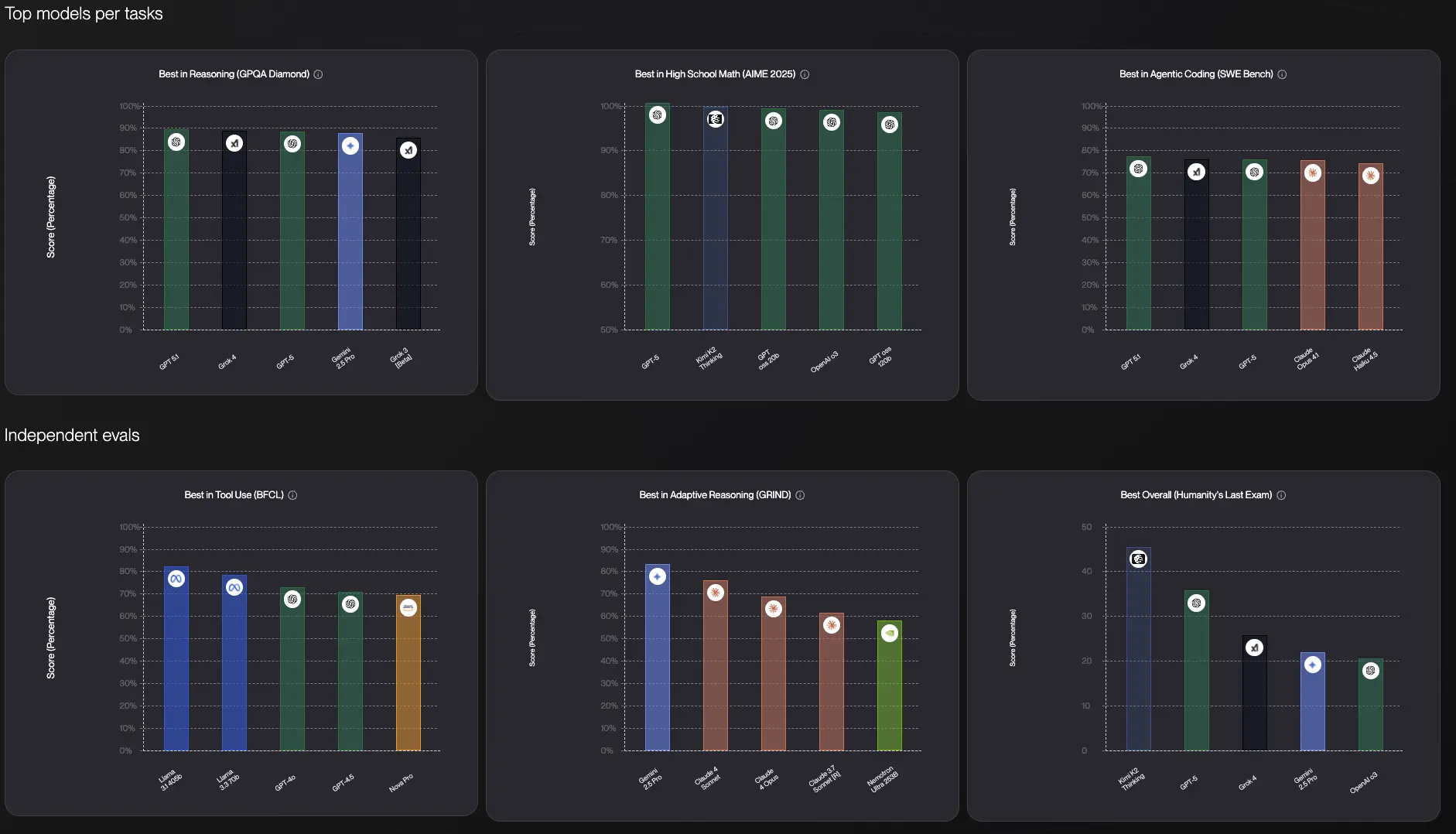
Here's what I learned the hard way: AI model benchmarks are basically useless for your actual work.
A model might dominate some academic test, but that doesn't tell you if it'll write emails in your voice, understand your industry's jargon, or handle the weird edge cases your business deals with every day.
I've been reading Reddit discussions about AI models for months now, and there's this recurring theme: someone asks "which AI should I use?" and the responses are all over the place. One person swears Claude is unbeatable for coding. Another says ChatGPT is more creative. Someone else insists Gemini is the most accurate. They're all right, and they're all wrong.
After testing these models thousands of times, here's the truth: there is no single "best" AI model. Each one has different strengths, and those strengths matter differently depending on what you're actually trying to do.
ChatGPT might give you creative, engaging content that feels human. Claude might provide more structured, thoughtful responses perfect for analysis. Gemini excels at factual research and has an enormous context window for long documents.
The only way to know which model works best for you is to test AI models with your actual use cases. Not hypothetical ones. Not generic prompts. Your real work.
Before we get into how to test AI models, let me address the questions I see constantly on Reddit and in DMs:
"Can I just use ChatGPT for everything?"
You could, but you'd be leaving a lot on the table. It's like using a Swiss Army knife when sometimes you really need a proper screwdriver.
"Aren't the benchmarks enough?"
Not really. I saw a Reddit thread where someone pointed out that Claude scored lower on some benchmark but gave them way better code explanations. Benchmarks measure what researchers think matters, not what actually helps you get work done.
"How do I even know if one response is better than another?"
This is the real question, and honestly, it's simpler than you think. If you can use the answer to accomplish your task better, faster, or with less frustration—that's your answer.
"Isn't this just overthinking it?"
Maybe, if you're using AI casually. But if you're building a business, writing content daily, or relying on AI for actual work? Testing isn't overthinking—it's due diligence.
Forget about technical metrics. Here's how to actually test language models and compare AI models in a way that matters:
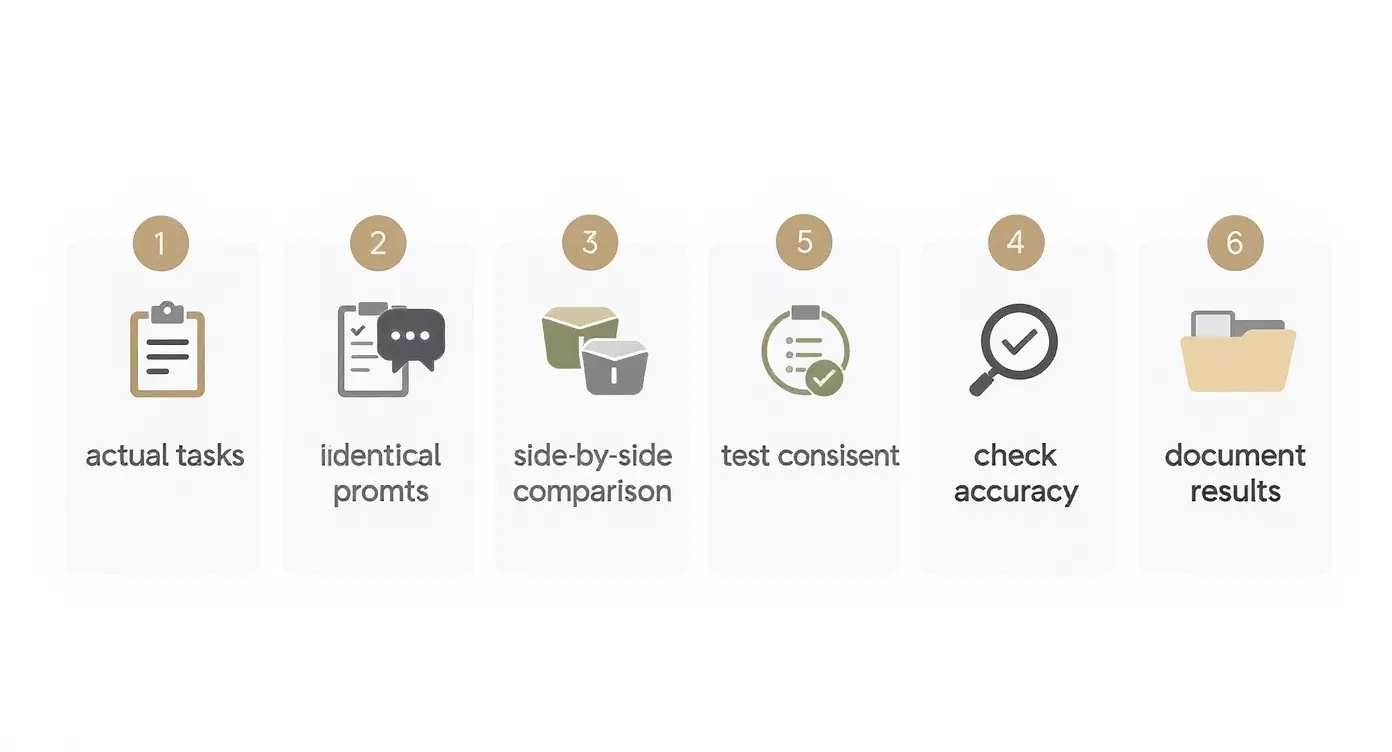
Don't test AI models with generic prompts like "write a story about a cat." That's useless.
Instead, grab three to five tasks you actually do regularly:
The more specific and real these tasks are, the better your AI model evaluation will be.
This is critical when you test AI models. Take the exact same prompt and run it through ChatGPT, Claude, Gemini, and whatever other models you're considering.
Don't change the wording. Don't adjust it for each model. Use identical inputs so you can fairly compare the outputs.
When I first did this at Zemith, I was shocked. For creative brainstorming, ChatGPT consistently gave me more interesting angles. For analyzing data or breaking down complex topics, Claude was clearer and more organized. For factual research with current information, Gemini pulled ahead.
I saw a great Reddit post where someone tested all three models with the same riddle: "How is it possible for a doctor's son's father not to be a doctor?" All three got it right, but their approaches were completely different. Claude gave the most detailed breakdown and even called out potential biases in how we think about the problem. ChatGPT was concise and to the point. Gemini gave the right answer with a brief explanation.
All correct, all useful, but each with a different style. That difference matters when you're deciding which one to use for your actual work.
Human memory is terrible at comparisons. If you test ChatGPT today and Claude tomorrow, you'll forget the nuances of what each one said.
This is exactly why I built FocusOS on Zemith because trying to remember which model said what across multiple tabs is a nightmare.
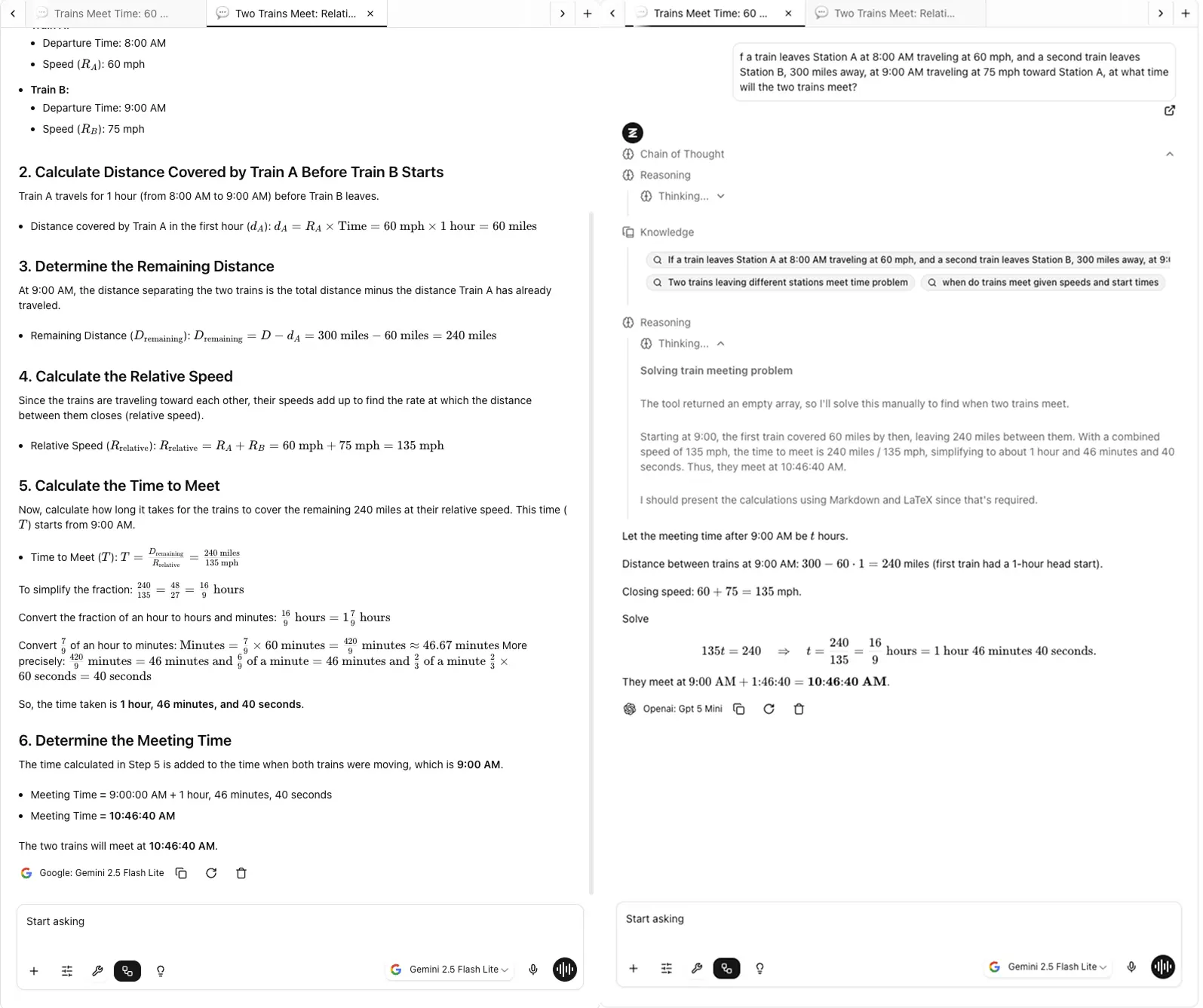
At Zemith, I designed Focus OS with a Chrome-like tab system so you can switch tab quickly without losing context from one page without juggling browser tabs, no losing track of which answer came from which model.
Looking at responses together reveals patterns you'd otherwise miss:
This is the best way to test AI models because you're seeing the differences in real-time, not trying to reconstruct them from memory.
Run the same prompt through each model a few times. AI models are probabilistic—they don't always give the same answer.
Some models are more consistent than others. If you're using AI for production work or customer-facing content, consistency matters. You don't want one response to be brilliant and the next one to be mediocre.
When you evaluate AI models, consistency is a key metric that benchmarks don't capture well.
This is especially important if you're using AI for anything factual.
AI models sometimes make things up confidently. They'll cite studies that don't exist, reference features that products don't have, or state "facts" that are completely wrong.
Test this by asking questions where you know the correct answer, or by asking the model to cite sources. Then verify those sources actually exist and say what the model claims.
In my experience testing language models, they differ significantly here. Some are more prone to confident hallucinations than others, and you need to know which ones you can trust for factual work.
Keep notes on what worked well and what didn't. Your future self will thank you. You could save the notes within Zemith note as well, by going to the note page or just opening a new note tab within FocusOS again
I keep a simple spreadsheet:
After a few weeks of testing AI models this way, patterns emerge. You'll start to see which model consistently wins for which type of task.
When you're staring at responses from three different models, here's what actually matters for your AI model evaluation:
Response Quality: Does it actually answer what you asked? Is the information accurate? Is it complete, or did it miss important aspects?
Tone and Style: Does it match how you want to sound? Some models are more formal, others more casual. I've noticed Claude tends to be more measured and thoughtful. ChatGPT can be more dynamic and conversational. One Reddit user said ChatGPT has become "more engaging and likeable" but warned that makes it a "sophisticated yes-man" that agrees with everything. If you need real criticism, you have to explicitly ask for it.
Depth vs. Brevity: Do you need comprehensive explanations or concise answers? Different models default to different levels of detail. I tested the same prompt across all three—ChatGPT gave me the most concise answer you could read at a glance, Claude provided step-by-step instructions, and Gemini gave an overview without steps.
Creativity vs. Accuracy: For creative tasks, you might want unexpected ideas. For analytical work, you want precision. Models optimized for one often struggle with the other.
Speed: If you're using AI interactively, response time matters. When I test AI models, speed varies significantly between models and even between different versions of the same model.
Does It Actually Cite Sources?: This one's huge if you're doing research. Gemini is consistently better at providing links to actual sources. ChatGPT will sometimes give you outdated info (it only knows up to late 2023 in the free version). Claude historically hasn't been great at linking to sources, which is frustrating when you need to verify something.
Here are the patterns I've noticed when comparing AI models for different use cases:
ChatGPT excels at creative, engaging content. It's great for blog posts, marketing copy, and anything that needs personality. One user testing Twitter hooks said "none of them are great" but Claude gave the best result—not too verbose, no unnecessary hashtags.
Claude is better when you need thoughtful, nuanced writing or want to match a specific style closely. I use it to edit my writing, especially when I feed it examples of my best work first.
This is where things get interesting when you test AI models head-to-head.
In tests I've seen, when asked to "create a full-featured Tetris game," Claude built a gorgeous, fully functional game with scores and controls. ChatGPT created something basic that works. Gemini did well but wasn't quite at Claude's level.
However, Claude Sonnet costs 20x what Gemini Flash costs. If you're building an AI product where cost matters, Gemini might be the smarter choice. Claude consistently produces cleaner code with better documentation for complex tasks though.
Gemini shines with its huge context window and tends to be more factually accurate. It can digest enormous documents and pull out key information efficiently.
One reviewer who tested all three found Gemini "the most consistent all-rounder" and particularly strong with factual, contextual queries. It also has actual web search built in, unlike Claude.
The reasoning models (like OpenAI's o1) break down complex problems systematically. They're excellent for planning, strategy, and multi-step thinking. But they're slower—sometimes taking minutes to respond.
Claude provides structured, logical analysis when you evaluate AI models for this purpose. It's particularly good at breaking down complex ideas and explaining them clearly. Several Reddit users mentioned Claude is great for "thoughtful, balanced arguments" especially on controversial topics.
Here's something that surprised me when testing language models—in 2025, only ChatGPT has memory. It remembers details about you across conversations. Gemini and Claude don't.
If you need an AI that remembers your preferences, your projects, your writing style from session to session, ChatGPT is currently your only option. I find this wild because it creates these "magical moments" where ChatGPT suggests things based on past conversations.
| Feature | ChatGPT | Claude | Gemini |
|---|---|---|---|
| Best For | Creative content, general tasks | Code, analysis, editing | Research, long documents |
| Strengths | Engaging tone, memory | Structured thinking, clean code | Factual accuracy, context |
| Weaknesses | Can be a "yes-man" | No memory, fewer sources | Less creative |
| Context Window | 128K tokens | 200K tokens | 1M tokens |
| Web Search | With plugins | Built-in | Built-in |
| Cost | Mid | Highest | Lowest (Flash) |
| Speed | Fast | Fast | Varies |
But here's the most important insight: your mileage will vary. What works for my use cases might not work for yours. That's why you need to test AI models with your own prompts.
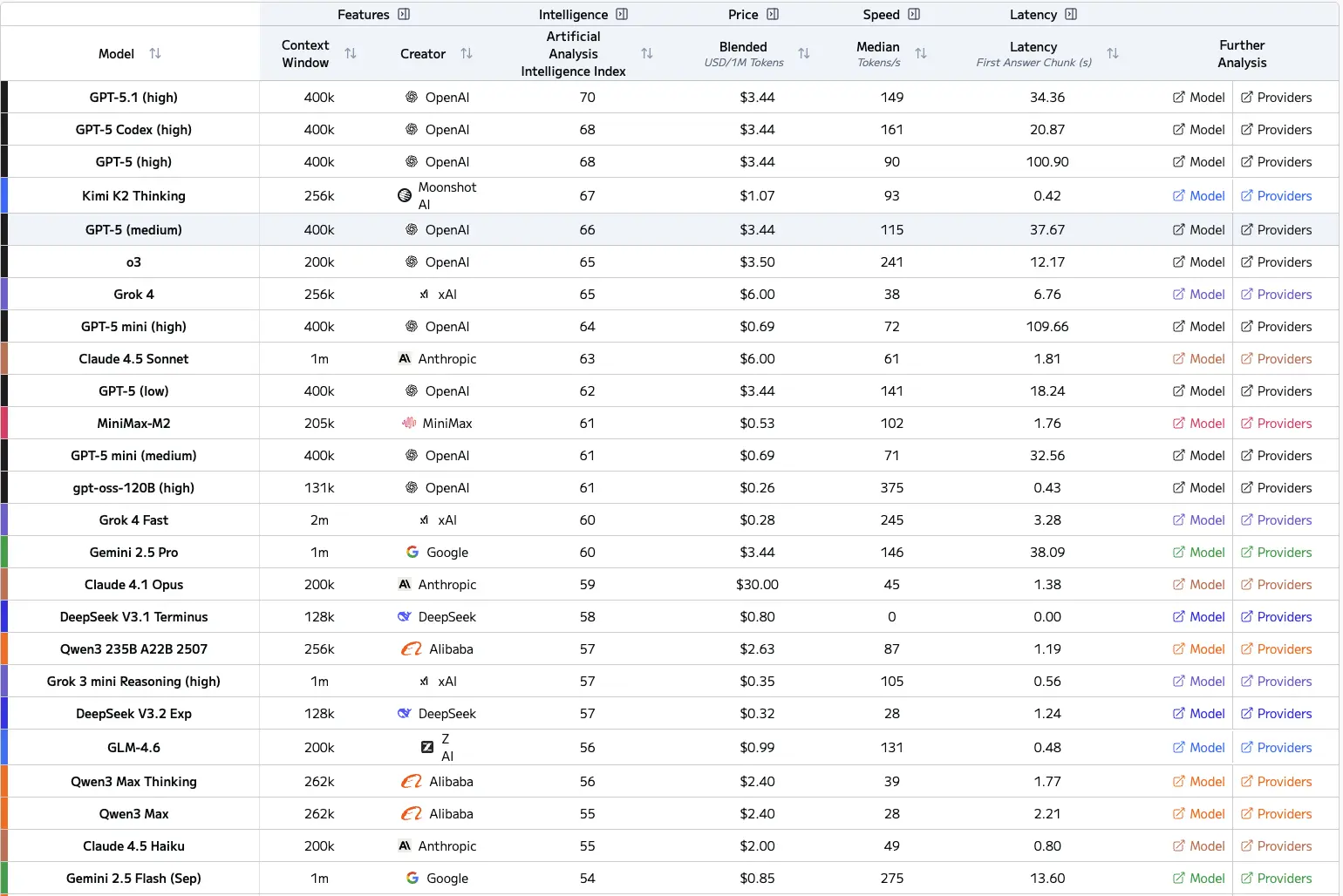
Below represents the chart of frontier LLM for reference as well including intelligence index
The easiest way to test different AI models is to use them side-by-side. Here are your options:
Option 1: Open Multiple Tabs - Free but annoying. Copy-paste your prompt into ChatGPT, Claude, and Gemini in separate tabs. Compare manually.
Option 2: Use Zemith's Focus OS - This is what I built specifically for this problem. Use different models inside our FocusOS tabs, see results side-by-side with our Chrome-like tab system. You can quickly switch between model responses without losing context or juggling windows. Saves time and makes comparison obvious.
Option 3: API Access - If you're technical, you can write scripts to test AI models programmatically. Good for bulk testing but requires coding knowledge.
Option 4: Other Comparison Tools - There are a few other platforms like Poe or nat.dev that let you compare models, though features vary.
The key is having a systematic way to compare AI models, not just bouncing between them randomly. Zemith's Focus OS makes this dead simple with its tab-based interface—think Chrome tabs, but each tab is a different AI model's response to your prompt.
I've made all of these mistakes. Learn from my pain:
Mistake 1: Testing with different prompts - You change the wording slightly for each model and then wonder why results differ. Use identical prompts.
Mistake 2: Testing only once - You run one test and declare a winner. AI models have variability. Test multiple times.
Mistake 3: Ignoring cost - You find the "best" model but it costs 20x more. For production use, cost per token matters.
Mistake 4: Not testing edge cases - Everything works great with simple prompts, then your real use case breaks everything. Test the weird stuff.
Mistake 5: Trusting subjective "feel" - You like one model's personality so you use it for everything. That's fine for casual use, terrible for business decisions.
Mistake 6: Not documenting results - You test thoroughly but don't write anything down. Three weeks later, you can't remember which model was better for what.
Honestly? About a week of real use will give you 80% of what you need to know.
Here's what I recommend:
After that, you'll have a solid sense of which model to reach for when. You'll keep learning over time, but the initial investment is just a week of paying attention.
The best way to test AI models isn't to spend a month on formal evaluation. It's to be intentional about testing during your normal work for a short period.
Here's what I actually do now, and what I recommend after you test AI models:
Don't try to pick one "best" model. Use different models for different tasks.
I use ChatGPT for brainstorming and first drafts of creative content. I use Claude when I need careful analysis or editing. I use Gemini when working with large documents or when I need current information from the web.
This is why I built Zemith to support multiple models. The future isn't about finding the one perfect AI—it's about having the right tool for each job.
Think of it like having different apps on your phone. You don't use Instagram for email or Gmail for photos. Different tools for different purposes.
When you compare AI models and evaluate AI models properly, you realize that specialization beats generalization.
Start Small: Don't try to test everything at once. Pick three common tasks and test those thoroughly first.
Be Specific: Vague prompts give vague results. Test with the actual, specific prompts you'll use in real work.
Test Edge Cases: Don't just test the happy path. Try prompts that are ambiguous, complex, or unusual. That's where you'll see real differences in AI model performance.
Consider Cost: Some models are more expensive than others. If you're doing high-volume work, factor in pricing when you evaluate AI models. A slightly worse model that costs 10x less might be the better choice.
Iterate Your Prompts: Sometimes what seems like a model weakness is actually a prompt problem. If results aren't good across any model, revise your prompt.
Stay Updated: Models improve constantly. What's true today might change next month. Retest periodically with important use cases. The best way to test AI models includes regular reevaluation.
Share Your Findings: Join communities where people discuss testing language models. You'll learn from others' experiences and discover use cases you hadn't considered.
Do I need technical skills to test AI models?
No. If you can copy-paste text, you can test AI models. The approach I've outlined requires zero coding or technical knowledge.
What's the best free way to test AI models?
Open free accounts for ChatGPT, Claude, and Gemini. Use multiple tabs. It's clunky but works. Most models have free tiers that are good enough for testing.
How often should I test AI models?
Do a thorough evaluation when you first start using AI for work. Then retest every 3-4 months as models improve. Also test when new major models launch.
Can I trust AI model benchmarks at all?
They're not useless, just limited. Benchmarks tell you theoretical capabilities. Your testing tells you practical performance for your specific needs. Use both.
Should I test AI models for every single task?
No. Test your most common tasks and your most important tasks. You'll quickly develop intuition for which model to use for variations.
What if the "best" model is too expensive?
Then it's not actually the best model for you. The best model is the one that gives you good enough results at a price that makes sense for your use case.
Testing AI models doesn't have to be complicated. You don't need technical expertise or fancy evaluation frameworks.
You just need to use the models with your actual tasks, compare the results side-by-side, and pay attention to what works.
I saw someone on Reddit describe their testing process perfectly: "I've been bouncing between AI tools like a caffeine-fueled pinball. One minute I'm asking Claude to rewrite a paragraph, next minute I'm debugging with ChatGPT, then handing a PDF to Gemini." That's exactly how most of us use these tools—pragmatically, switching based on what we need right then.
The AI that gives you the best results for your specific needs—that's your answer. Not the one with the highest benchmark score. Not the one everyone's talking about. The one that actually delivers for you.
When you properly test AI models and compare AI models, you stop relying on hype and start relying on data from your own experience.
That's why I built Zemith. Because choosing AI models should be based on real testing with real tasks, not marketing claims or theoretical benchmarks.
Try multiple models. Compare them directly. Find what works. It's that simple.
And honestly? You might find that using multiple models—each for what it does best—is better than trying to force one model to do everything.
That's been my experience, anyway. And I'm betting it'll be yours too once you start testing for yourself.
Want to test AI models the easy way? Check out Zemith where you can use ChatGPT, Claude, Gemini, and more side-by-side with our Focus OS interface. The all in one AI App that lets you flip between model responses in seconds with one subscription plan only







Trusted by teams at






The top models, plus image, video and voice tools, in one plan.
Without Zemith
ChatGPT PlusUS$20.00Claude ProUS$20.00Google AI ProUS$19.99SuperGrokUS$30.00Perplexity ProUS$20.00 MidjourneyUS$10.00
 ElevenLabsUS$6.00Le Chat ProUS$14.99
 RunwayUS$15.00Kling StandardUS$8.80
 Gamma PlusUS$12.00
 Otter ProUS$16.99
 QuillBot PremiumUS$19.95
 Photoroom ProUS$12.99
 Quizlet PlusUS$7.99
Total if paying separatelyUS$234.70/mo
"I love the way multiple tools they integrated in one platform. Going in the right direction."
— simplyzubair
"The quality of data and sheer speed of responses is outstanding. I use this app every day."
— barefootmedicine
"The credit system is fair, models are perfect, and the discord is very responsive. Quite awesome."
— MarianZ
"Just works. Simple to use and great for working with documents. Money well spent."
— yerch82
"The organization of features is better than all the other sites — even better than ChatGPT."
— sumore
"It lives up to the all-in-one claim. All the necessary functions with a well-designed, easy UI."
— AlphaLeaf
"The team clearly puts their heart and soul into this platform. Really solid extra functionality."
— SlothMachine
"Updates made almost daily, feedback is incredibly fast. Just look at the changelogs — consistency."
— reu0691
Hand off the research, writing, design and follow-ups. Zemith picks the tools it needs and brings back finished work.
Search the web, run deep research, read files, create images and run code with GPT, Claude, Gemini, Grok and more.
Zemith keeps working in the cloud and pings you when it's done.
Notion, Linear, Canva, Airtable and more. It asks before it creates or changes anything.
Docs, slides, sheets and PDFs, ready to send.
Chain models and tools on a visual canvas, from one prompt to a finished promo video.
Briefings, reports and reminders run on a schedule and are ready when you need them.
Real-time voice that can see your camera or screen.
The best image and video models, in one studio.
Turn PDFs, links and YouTube videos into podcasts, quizzes, flashcards and mind maps.














 Podcast
 Quiz
Quiz Flashcards
 Mind map
 Infographic