Boost Your Skills: How to Improve Writing Ability Effectively
Learn proven tips to improve writing ability. Discover daily habits, AI tools, and editing techniques to enhance your writing skills today!
If you really want to get better at writing, it's not about some grand, sweeping gesture. It's about building small, smart habits that you can actually stick with. Think less "write more" and more "write smarter." The trick is to swap out those sporadic, all-night writing sessions for focused, daily routines. This turns writing practice from a dreaded chore into a satisfying, almost automatic process.
Build Writing Habits That Actually Stick

We’ve all heard the advice: "just write more." It sounds simple, but it's fundamentally flawed. Writing more without a plan is a fast track to burnout, not improvement. The real secret to improving your writing lies in creating sustainable habits that fit into your actual life—not some fantasy version where you have endless free time.
So, let's forget the pressure to produce a masterpiece every time you sit down. Instead, the focus should be on consistency through small, manageable actions. It's this mental shift that lays the groundwork for real, lasting skill.
Start with Micro-Writing Bursts
One of the best ways to build a solid routine is through "micro-writing." It’s simple: set a timer for just 10-15 minutes and write without stopping. This little burst is short enough to sidestep procrastination but long enough to actually get something down on the page.
You can use this time for a few different things:
- Journaling: Just free-write about your day. Don't worry about it being good; the goal is to get thoughts flowing without the pressure of an audience.
- Topic Exploration: Grab a random subject and see where it takes you. If your mind is blank, a good prompt can be a lifesaver. For endless ideas, you might find our guide on using a helpful.
- Sentence Drills: This sounds technical, but it’s just about playing with words. Try writing the same idea using a simple sentence, then a complex one, then a compound one. It’s like a workout for your stylistic muscles.
The real win here isn't the word count—it's the consistency. A daily 15-minute habit is infinitely more powerful than one heroic three-hour session a month. You're building the mental muscle needed to write on demand.
Deconstruct Writing You Admire
Here’s another habit that pays dividends: read like a writer. Don't just consume content for pleasure or information. Dissect it. When you read something that really lands, stop and ask yourself why it works. Is it the author's sharp word choice? The rhythm of their sentences? The way they structure their argument?
Give this little exercise a try:
- Find an article or blog post you think is brilliant.
- Copy and paste a paragraph you love into a blank document.
- Now, rewrite that paragraph in your own voice, trying to capture the same feeling and impact.
This kind of reverse-engineering is incredibly insightful. It helps you internalize the techniques that make great writing tick. For more practical exercises on this, check out this excellent resource on .
This sort of deliberate practice is more valuable than ever. As businesses pour more resources into content, the demand for skilled writers is climbing. In fact, content marketing budgets have jumped by over 60% in the last five years alone, creating a massive opportunity for writers who can deliver.
To keep all your practice organized, a platform like Zemith can be a game-changer. Use its powerful organizational tools to create a dedicated project for your skill development. You can store your micro-writing exercises, save snippets of writing you admire, and track your progress—all in one place. It creates a tangible record that motivates you by showing how far you’ve come.
Write with More Clarity and Precision

Great writing is, first and foremost, clear writing. If your message is buried under a mountain of jargon, filler words, and tangled sentences, it simply won't connect. The real goal is to make every single word earn its place on the page. Getting this right is a huge step toward being able to improve writing ability and truly engage your audience.
To get there, you have to become a merciless editor of your own work. I'm talking about actively hunting down and destroying anything that doesn’t add real value. Think of yourself as a sculptor—you're not adding clay, you're chipping away the excess marble to reveal the powerful form hidden inside.
The Paramedic Method for Sentences
One of my favorite techniques for this is called the "paramedic method." It’s designed to resuscitate weak, bloated sentences and give them some punch. It’s a straightforward way to cut the fat and make your point with confidence.
I dug up an example from one of my own early drafts to show you what I mean:
- Before: It is absolutely essential for writers to make a conscious effort to eliminate unnecessary words from their writing in order to be more clear. (24 words)
- After: Writers must eliminate unnecessary words to be clear. (8 words)
See the difference? The second version is punchier, quicker, and far more direct. It respects the reader's time by cutting straight to the chase. This applies everywhere, from long-form articles to something as short as a product title, where clarity is everything, as explained in this guide on .
Swap Weak Verbs for Strong Ones
Here’s another simple trick that adds instant energy to your writing: replace weak verbs with strong, active ones. Weak verbs often need adverbs to prop them up, but a strong verb packs all the action into a single word.
- Weak: He walked slowly and quietly across the floor.
- Strong: He crept across the floor.
Notice how "crept" does all the work? It paints a picture of both slowness and stealth without needing any help. It’s more vivid and efficient, making your writing feel more dynamic in an instant.
This kind of disciplined word choice is a game-changer. Even for more formal, structured writing, these rules of precision are non-negotiable. You can explore more strategies like this in our guide on .
Let AI Sharpen Your Editing Skills
Applying these techniques by hand definitely takes practice. But if you want to fast-track your progress, an AI tool can be an incredible co-pilot. For example, Zemith can analyze your text in seconds, giving you immediate feedback on clunky sentences and wordiness.
It’s like having a writing coach looking over your shoulder. You can paste a bloated sentence into Zemith and ask it to "Make this more concise" to see actionable alternatives instantly. Using a platform like Zemith doesn't just help you fix the piece you're working on; it trains your brain to catch these mistakes on your own. It's an effective way to make precision second nature to your writing process.
Use AI to Supercharge Your Writing Workflow
Artificial intelligence isn't some far-off concept anymore; for many of us, it’s become an indispensable writing partner. The key to improving your writing today isn’t about letting AI take over, but rather learning how to use it to sharpen your own skills. Let's talk about how you can practically use AI to find fresh angles, build solid outlines, and obliterate writer's block—all while keeping your unique voice front and center.
I like to think of AI as a very capable assistant, not the author. It can take on the more monotonous tasks, which frees me up to focus on the bigger picture: creativity, strategy, and storytelling. When I’m stuck on a topic, for instance, I often turn to a tool like Zemith to spitball a list of potential ideas. This alone can slash my initial research time and, more often than not, surface an angle I would’ve never thought of myself.
Brainstorming and Outlining with an AI Partner
We’ve all been there—staring at that dreaded blinking cursor on a blank page. Instead of waiting for inspiration to strike, you can use AI to get the ball rolling. But here’s the catch: the output you get is only as good as the input you provide.
To get truly useful results, it all comes down to mastering AI prompts. If you give a lazy command like "write about marketing," you'll get a bland, generic response. A detailed, specific prompt, on the other hand, turns the AI into a brilliant collaborator.
Here's a real-world example:
- Vague Prompt: "Blog ideas for a coffee shop."
- Specific Prompt: "Generate five blog post titles for a local coffee shop that wants to attract more remote workers. Focus on community, high-quality coffee, and a quiet work environment. The tone should be welcoming and professional."
See the difference? That level of detail gives the AI clear guardrails. From there, using a platform like Zemith, you can grab your favorite title and immediately ask it to flesh out a structured outline, complete with H2s, H3s, and the key points for each section. In just a few minutes, a fuzzy idea becomes a concrete plan.
A Modern Look at the Writing Workflow
The integration of AI doesn't just add a step; it fundamentally changes the flow of work, making the entire process more dynamic and efficient. It shifts the focus from manual grunt work to strategic direction.
The table below contrasts the old-school approach with a more modern, AI-assisted workflow.
This shift allows writers to move faster and spend more time on what truly matters—infusing the content with their expertise and voice.
Refining Drafts and Maintaining Consistency
AI's usefulness extends far beyond just getting started. It's also an incredible tool for polishing your work. The emergence of AI-powered writing assistants marks a huge change in how we can develop our skills. In fact, a recent market analysis that surveyed over 2,500 businesses showed these tools increase productivity and are especially good at keeping the tone of voice consistent, a huge challenge when producing content at scale.
This image really drives home the point that improvement comes from a structured process, something AI can help you stick to.
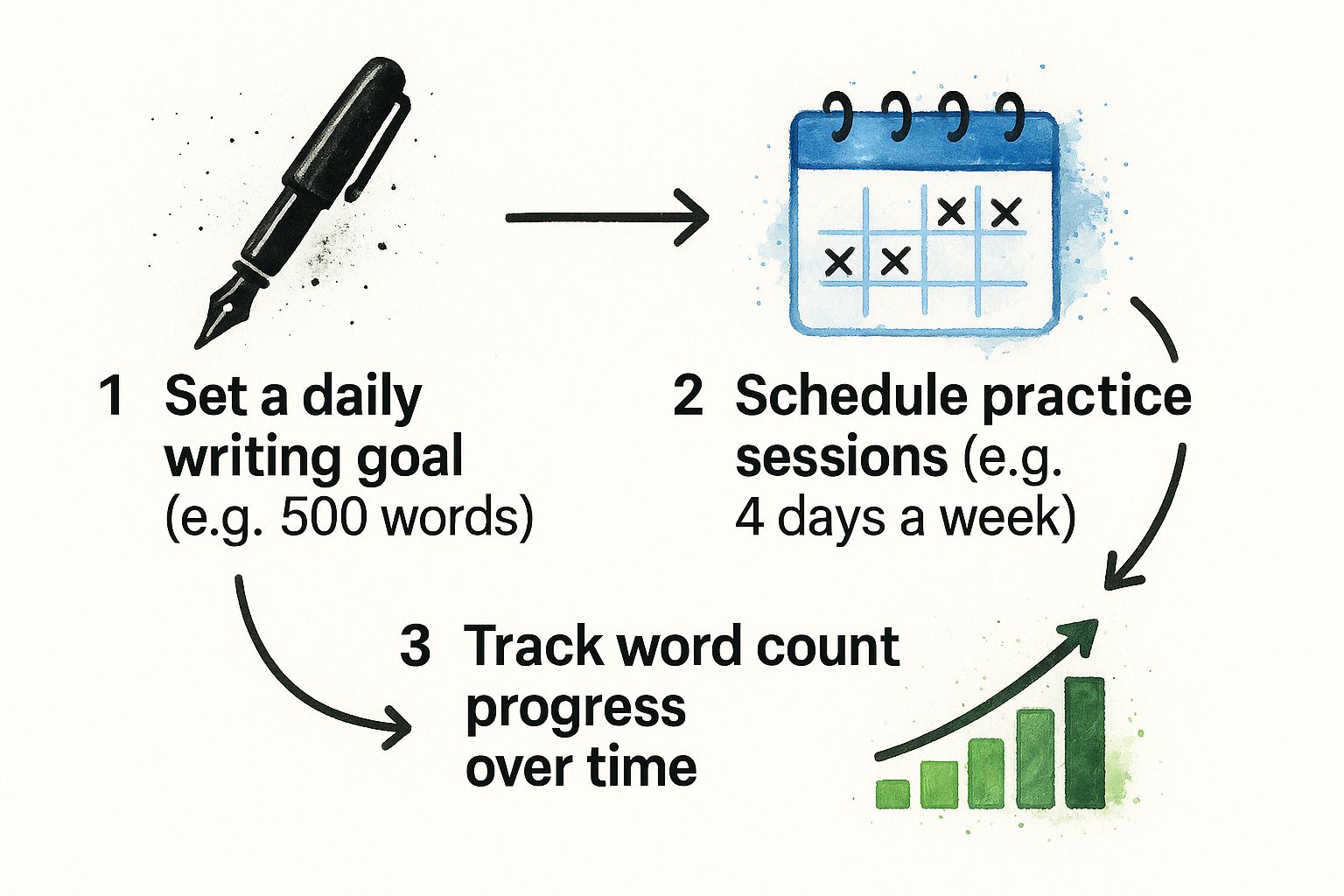
A systematic approach—setting goals, practicing deliberately, and tracking your progress—is the bedrock of getting better, and AI tools can support every part of that cycle.
The real power of AI isn't just about text generation; it's about making you a better, more efficient writer. It's a tireless editor, a creative partner, and a productivity booster all rolled into one.
After I hammer out a first draft, I’ll run it through Zemith for a check-up. The tool is great at spotting tonal inconsistencies, flagging awkward sentences, and suggesting clearer ways to say something. If you're curious about other options, our guide on the 12 best AI content generators gives a solid overview of what's out there. By building these systems into your routine, you can elevate your entire writing process from start to finish.
Find the Writing Voice That Is Truly Yours

Getting the technical stuff right—clarity, grammar, structure—is just the price of entry. But what makes someone stop scrolling and actually read? It’s your voice.
Your writing voice is that special something, the personality that shines through your words. It’s a mix of your unique perspective, your choice of tone, and the words you use to connect with your audience. This isn’t about creating a fake persona; it’s about figuring out how to sound like you on the page. When you find that authentic voice, your readers will feel it, and your message will hit home that much harder.
Play Around with Tone and Cadence
Finding your voice isn't a passive process. It requires some intentional experimentation and a willingness to just play around with words. You need to get a feel for how different styles sound and which ones feel most natural to you.
Try a few of these exercises:
- Rewrite the same idea: Grab a simple concept, like making a cup of coffee. First, write a short, formal paragraph about it. Then, try again, but this time make it funny and casual. For a third version, go for an enthusiastic or even quirky tone.
- Vary your sentence rhythm: Write a passage using only short, sharp sentences. Now, rewrite that same passage with longer, flowing, more descriptive sentences. Feel the difference? The cadence completely changes the mood.
The goal here isn't to create a masterpiece. It's about exploring the full spectrum of your expressive range and discovering what feels right.
Learn From Writers You Love
Just like you read to learn about story structure or article flow, you should also be reading to understand voice. Pinpoint a few writers whose style you genuinely admire. Maybe it’s a sharp-witted tech blogger, a thoughtful journalist, or a novelist who paints incredible pictures with their words.
Don’t just read their stuff—dissect it. Ask yourself what makes their voice so memorable. Is it their dry humor? Their blunt honesty? The way they use metaphors?
By breaking down what you admire in their style, you can find elements to adapt and weave into your own writing. This is about finding inspiration, not just imitating someone else. Seeing how others have successfully let their personalities shine through their writing can give you the confidence to do the same.
Track Your Progress as You Evolve
As you keep writing and experimenting, your style will naturally change and sharpen. It’s incredibly valuable to keep a record of this journey to really understand what makes your voice unique.
This is where a dedicated workspace can make all the difference. For instance, using a platform like , you can set up a specific project just for your personal writing development.
Actionable step: Create a new project in Zemith titled "My Voice Lab." Inside, create documents for your experimental drafts, save snippets from writers that inspire you, and maintain a portfolio of your best work. This becomes more than just a file cabinet—it’s a visual timeline of your growth, allowing you to see clear proof of how much stronger and more distinct your voice has become.
Master the Art of Editing and Revision
Ask any seasoned writer, and they’ll tell you a secret: the first draft is just the starting point. The real work—the part where good ideas become great writing—happens during the edit. This is where you roll up your sleeves and transform a rough sketch into a polished, impactful piece of content.
It's easy to get overwhelmed by the thought of editing. The trick is to stop thinking of it as one massive task. Instead, I’ve learned to break it down into three distinct passes. By tackling editing in focused stages, you can systematically improve your work without the stress.
First Pass: The Developmental Edit for Big-Picture Clarity
Before you obsess over a single comma or word, take a huge step back. This first pass is the developmental edit. Think of yourself as an architect reviewing the blueprint of your article. You’re looking at the overall structure, the flow of your argument, and the core message.
At this stage, ask yourself the tough questions:
- Does this piece actually deliver on the promise I made in the headline?
- Is my argument logical? Can a reader follow my train of thought easily from beginning to end?
- Are there any glaring holes in the information? Any sections that feel thin or rushed?
- Does my conclusion wrap things up nicely and give the reader a clear next step?
This is all about making sure the bones of your article are solid. If the foundation is weak, no amount of cosmetic polishing will save it.
Second Pass: The Line Edit for Style and Flow
Okay, your structure is sound. Now it's time to zoom in and work on the prose itself. Welcome to the line edit, where you get granular, focusing on how your sentences sound and feel. The goal here is to make your writing not just clear, but genuinely enjoyable to read.
Here’s what I hunt for during a line edit:
- Clunky sentences or awkward phrasing that makes a reader stumble.
- The same sentence structure used over and over again.
- Weak, passive verbs that could be replaced with something more dynamic.
- Any shifts in tone that feel jarring or inconsistent.
This is exactly where an AI-powered writing assistant becomes invaluable. At this stage, I paste my entire draft into . I use its "Improve Writing" function to get instant, actionable suggestions on rhythm and flow. It catches stylistic hiccups I’ve become blind to after hours of writing.
A line edit is what elevates your writing from merely functional to truly compelling. It's the difference between a reader understanding your point and feeling it.
Third Pass: The Final Proofread for a Flawless Finish
The final step is the proofread. This is your last line of defense against the typos, grammar goofs, and formatting mistakes that can undermine your credibility. You’re no longer making creative changes; you’re on a search-and-destroy mission for objective errors.
The demand for clean, professional writing has exploded, which is why the market for writing enhancement software is growing so rapidly. AI advancements have made these tools a must-have for anyone producing content. If you're interested in the data, you can explore the full analysis of the writing enhancement market.
For me, using a tool like for this final check is non-negotiable. Its built-in grammar and spell checker is brilliant at catching those sneaky errors our brains tend to skip right over—the extra space, the misplaced comma, the subtle typo. It’s that final polish that gives you the absolute confidence to hit publish.
Answering Your Most Common Writing Questions
As you start getting serious about improving your writing, you're bound to run into a few common roadblocks. I've seen them trip up writers at all levels. Let's tackle some of the most frequent questions head-on with some practical, no-nonsense advice.
"How Often Should I Actually Be Writing?"
Forget the marathon sessions once a week. The real magic happens with consistency. Writing every single day, even if it's just for 15-20 minutes, builds the kind of momentum that a single, long slog can't match.
Think of it like exercise. A short daily workout is far better for building muscle than one grueling gym session on a Saturday. This daily practice trains your brain to slip into a writing mindset more easily. It stops feeling like a chore and starts becoming second nature. The key is consistency over intensity.
"I'm Staring at a Blank Page. What Do I Do?"
Ah, writer's block. It’s usually not a lack of ideas, but a fear of not writing them perfectly. The trick is to stop trying to write the final product and just get something on the page.
Instead of wrestling with that opening paragraph, try a different angle:
- Switch to an outline. Can't write sentences? Use Zemith to build a quick bullet-point structure for your idea.
- Use a random prompt. Ask Zemith: "Give me a creative writing prompt about [topic]." Write about it for ten minutes.
- Talk it out. Seriously. Grab your phone, hit record, and explain what you want to write. Play it back and transcribe the good parts. You’ll be surprised at what comes out.
The biggest mistake I see is writers trying to edit as they draft. That’s a surefire way to get stuck. Give yourself permission to write a truly terrible first draft. The real work is in the editing, and you can't edit a blank page.
"How Do I Stop My Writing from Sounding So Stiff?"
If you want your writing to feel more natural, you have to know what natural sounds like. The best way? Read your work out loud.
Your ear will catch things your eyes miss. You'll stumble over clunky phrases, notice when a sentence drags on for too long, and hear when your word choices sound more like a textbook than a conversation.
To make this actionable, paste a paragraph into Zemith and ask it to "Rewrite this to sound more conversational." This provides a direct comparison that trains your ear for a more natural tone. For most online content, aiming for a 4th to 8th-grade reading level is a smart move to ensure clarity.
"Can AI Help Me Without Making Me Sound Like a Robot?"
Absolutely, but you have to use it as a collaborator, not a ghostwriter. The goal is to let AI assist your process, not replace your voice.
This is where a tool like becomes incredibly useful. You write the draft, then use its Smart Notepad to refine it. For example, you can ask it to:
- "Suggest 3 alternative ways to phrase this sentence" when you're struggling.
- "Analyze the tone of this text" to ensure it's consistent with your goal.
- "Summarize this dense paragraph in one sentence" so you can see your core point and say it more directly.
This way, you're always in control. You're using the technology for targeted feedback, which sharpens your own judgment and helps you improve faster without losing what makes your writing yours.
Ready to turn scattered practice into a focused system for improvement? With Zemith, you can brainstorm ideas, refine drafts with AI feedback, and organize all your work in one place. Stop switching between tools and start writing more effectively today. .
Zemith Funktionen entdecken
Jede Top-KI. Ein Abo.
ChatGPT, Claude, Gemini, DeepSeek, Grok & 25+ mehr








Immer aktiv, Echtzeit-KI.
Sprache + Bildschirmfreigabe · sofortige Antworten
Wie lernt man am besten eine neue Sprache?
Immersion und verteilte Wiederholung funktionieren am besten. Versuchen Sie, täglich Medien in Ihrer Zielsprache zu konsumieren.
Sprache + Bildschirmfreigabe · KI antwortet in Echtzeit
Bildgenerierung
Flux, Nano Banana, Ideogram, Recraft + mehr

Schreibe in Gedankengeschwindigkeit.
KI-Autovervollständigung, Umschreiben & Erweitern auf Befehl
Jedes Dokument. Jedes Format.
PDF, URL oder YouTube → Chat, Quiz, Podcast & mehr
Videoerstellung
Veo, Kling, MiniMax, Sora + mehr

Text-zu-Sprache
Natürliche KI-Stimmen, 30+ Sprachen
Code-Generierung
Schreiben, debuggen & Code erklären
Chat mit Dokumenten
PDFs hochladen, Inhalte analysieren
Deine KI in der Tasche.
Voller Zugang auf iOS & Android · überall synchronisiert
Deine unendliche KI-Leinwand.
Chat, Bild, Video & Motion-Tools — nebeneinander

Sparen Sie Stunden an Arbeit und Forschung
Einfache, erschwingliche Preise
Vertraut von Teams bei






Kostenlos
Keine Kreditkarte erforderlich
- 100 Credits täglich
- 3 KI-Modelle zum Ausprobieren
- Einfacher KI-Chat
Plus
- 1.000.000 Credits/Monat
- 25+ KI-Modelle — GPT, Claude, Gemini, Grok & mehr
- Agent Mode mit Websuche, Computer-Tools und mehr
- Creative Studio: Bildgenerierung und Videogenerierung
- Project Library: Chat mit Dokumenten, Webseiten und YouTube, Podcast-Erstellung, Lernkarten, Berichte und mehr
- Workflow Studio und FocusOS
Professional
- Alles in Plus, plus:
- 2.100.000 Credits/Monat
- Pro-exklusive Modelle (Claude Opus, Grok 4, Sonar Pro)
- Motion Tools & Max Mode
- Erster Zugang zu den neuesten Funktionen
- Zugang zu zusätzlichen Angeboten
Was unsere Benutzer sagen
Great Tool after 2 months usage
"I love the way multiple tools they integrated in one platform. Going in the right direction."
— simplyzubair
Best in Kind!
"The quality of data and sheer speed of responses is outstanding. I use this app every day."
— barefootmedicine
Simply awesome
"The credit system is fair, models are perfect, and the discord is very responsive. Quite awesome."
— MarianZ
Great for Document Analysis
"Just works. Simple to use and great for working with documents. Money well spent."
— yerch82
Great AI site with accessible LLMs
"The organization of features is better than all the other sites — even better than ChatGPT."
— sumore
Excellent Tool
"It lives up to the all-in-one claim. All the necessary functions with a well-designed, easy UI."
— AlphaLeaf
Well-rounded platform with solid LLMs
"The team clearly puts their heart and soul into this platform. Really solid extra functionality."
— SlothMachine
Best AI tool I've ever used
"Updates made almost daily, feedback is incredibly fast. Just look at the changelogs — consistency."
— reu0691