A Guide to Organize Computer Files Software
Tired of digital chaos? This guide shows you how to use organize computer files software to create a streamlined system with actionable tips and AI insights.
The most effective way to organize your computer files isn't just about creating more folders. It's about using software with AI-powered automation to build a smart, searchable system that practically manages itself. Tools like can analyze the content of your documents to automatically categorize, tag, and file them, saving you countless hours of tedious manual work.
Conquering Digital Chaos for Good
Is your desktop a minefield of random icons? Is your 'Downloads' folder a black hole where files go to disappear? If you're nodding along, you're definitely not alone. The constant, frustrating search for that one specific file is a universal time-waster that kills focus and adds a layer of stress we could all do without.
This guide is designed to tackle that frustration head-on. We're going to dig into why the old-school method of dragging and dropping files into endless nested folders just doesn't cut it anymore. The sheer volume of digital information we handle every day calls for a much smarter approach, one that you can implement with tools like Zemith.
Why Manual Filing Fails
Trying to manually organize your files is like trying to bail out a sinking boat with a teaspoon—it's a constant, losing battle against digital clutter. Every new download, email attachment, and document draft just adds to the mess. This is exactly where dedicated software for organizing computer files becomes a game-changer. An actionable solution is to automate this process.
Let's quickly compare the old way with the new.
Manual vs. Software-Based File Organization
The difference is night and day. One method traps you in a cycle of cleanup, while the other frees you to focus on your actual work.
The market for these solutions is booming for a good reason. In the U.S. alone, the file sharing software market, which includes these powerful organization tools, was valued at USD 750 million and is expected to climb to USD 2.5 billion by 2035. You can explore this trend further in this detailed market growth analysis of file sharing software. This massive shift shows how many people are moving toward smarter, automated systems.
The real cost of a disorganized computer isn’t just the wasted hard drive space; it’s the cumulative loss of focus and productivity. Every minute spent searching for a file is a minute not spent on what actually matters.
Instead of constantly fighting the digital tide, you can build a system that manages itself. AI-driven platforms like can completely change your digital workspace, turning it from a source of stress into a model of efficiency. The ultimate goal is to create an intelligent, self-organizing system that works for you, finally putting an end to the digital chaos for good.
Building a Smarter Filing Foundation
Before you let any software work its magic, you need a solid game plan. Just dropping files into broad folders like 'Work' and 'Personal' is a surefire way to create a mess you'll have to deal with later. The real goal is to build a logical, scalable structure that actually mirrors how you think and work. This gives powerful organize computer files software like Zemith a solid framework to build on.
A well-thought-out foundation makes any automated tool ten times more effective. Think of it as laying down the tracks before you try to run the train. When a smart tool knows the logic behind your system, its ability to automatically sort, tag, and file new documents becomes incredibly sharp.
Designing Your Core Structure
The trick is to shift from vague categories to a system based on actions, projects, or entities. Your main folder structure should be a clear reflection of the distinct parts of your life and business. An actionable first step is to map out your primary work categories before creating any folders.
For instance, a freelance graphic designer could ditch the notoriously messy 'Projects' folder. Instead, they could create a top-level folder for each client.
- /Clients/
- /Client A/
- /Project X/
- /Project Y/
- /Client B/
- /Project Z/
- /Client A/
This structure is instantly intuitive. Now, instead of hunting for a file named "logo final v3," the designer navigates directly to the client and project. All the related assets—briefs, drafts, invoices—are right there in one place.
A researcher could do something similar, organizing their digital library by field of study and then breaking it down by publication year.
- /Neuroscience/
- /2024/
- /2023/
- /Cognitive Psychology/
- /2024/
- /2023/
It's this kind of simple, logical hierarchy that keeps files from getting lost and makes finding them feel effortless. This upfront planning is a crucial step that many guides on emphasize for a reason.
Your folder system shouldn't be a random storage closet; it should be a clear map of your professional and personal responsibilities. A logical structure is the single most important factor in maintaining long-term digital order.
Preparing for Automation
Once you have these foundational folders in place, you’ve created the perfect environment to bring in automation. When you introduce a tool like Zemith, you can set up rules that are far more powerful and precise. For example, you could create a rule that automatically moves any new file containing the words "Client A" directly into the correct client folder.
This same principle works wonders for your cloud storage, too. Beyond just your local hard drive, you might look into a specialized to apply this structured thinking to all your cloud-based files.
By taking the time to build this framework first, you’re not just cleaning up a mess. You're creating a resilient, self-sustaining system that practically runs itself. This initial prep work ensures that any software you bring in will genuinely improve your workflow, not just put a bandage on the existing chaos.
Putting AI to Work on Autopilot
With a solid folder structure in place, you can stop playing file clerk. This is where you shift from doing the grunt work to managing the system, letting intelligent software take over the daily grind. The best modern tools use AI to make filing a background process that just happens.
With Zemith, you can set up simple rules that tell the software how to think for you. Every new download, every client invoice, every project brief—they can all be sorted, renamed, and tagged automatically based on their content. You don't have to lift a finger.
This graphic breaks down the basic flow of setting up one of these automated systems.
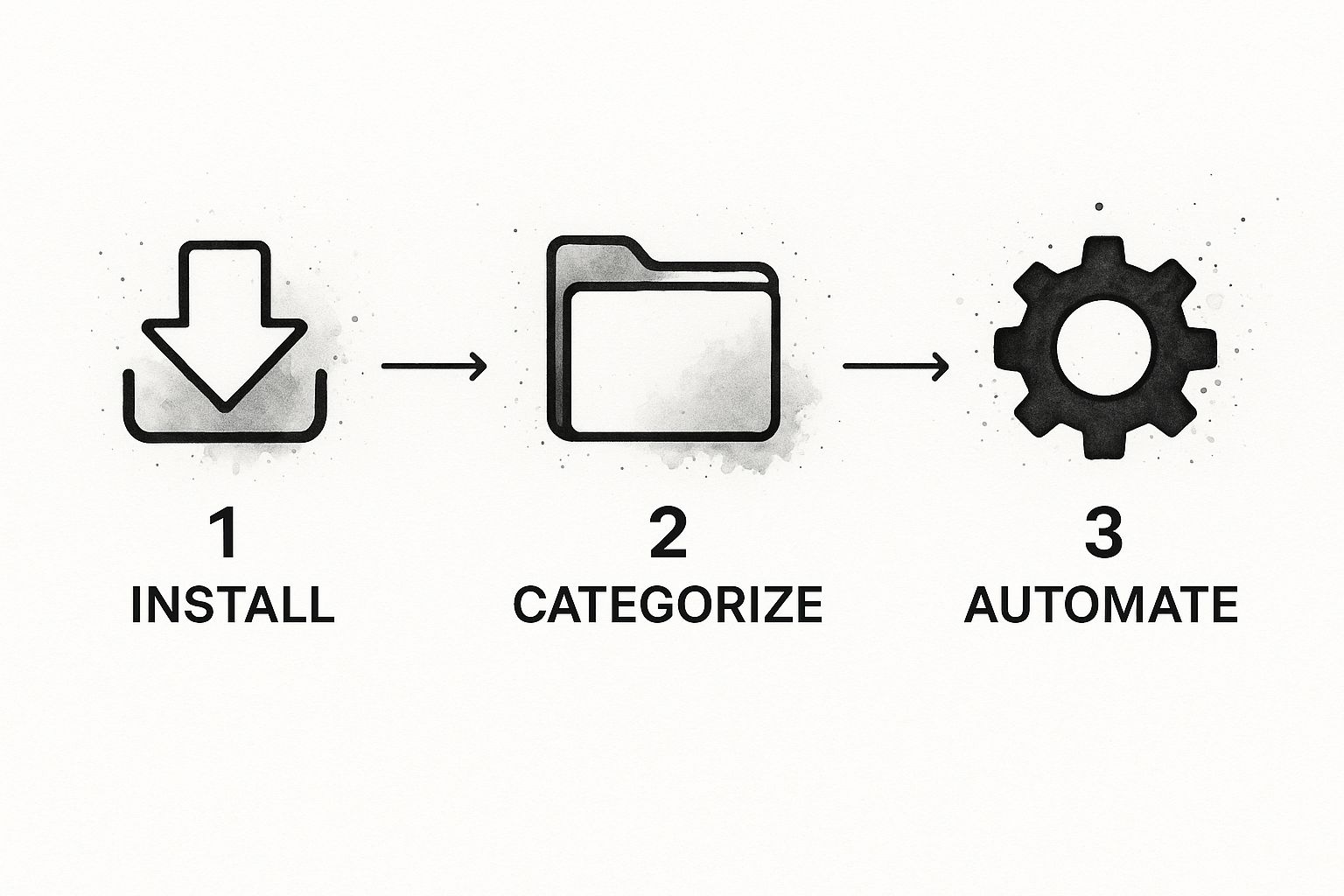
As you can see, a few steps up front unlock a powerful workflow that practically manages itself.
Creating Intelligent Automation Rules
The real magic behind AI-powered organization is its ability to actually read and understand your files. Tools like use intelligent document processing to pull key details from PDFs, images, and text files, then act on the rules you’ve created. This is an actionable strategy you can implement immediately to save time.
Let’s walk through a real-world example. Imagine you're a consultant who gets dozens of PDF invoices and project reports every month. Instead of dragging, dropping, and renaming each one by hand, you could set up a simple rule in Zemith:
- Trigger: A new PDF lands in your "Incoming" folder.
- Action: The AI scans the document for the client's name and the invoice date.
- Result: The file is instantly renamed to
[ClientName] - Invoice - [YYYY-MM-DD].pdfand moved into that client’s specific project folder.
Just like that, one rule eliminates a tedious, error-prone task for good. To get the most out of this, it helps to start thinking in terms of workflows. Taking some time for can really open your eyes to just how many small tasks you can get off your plate.
Automating file organization isn't just about being tidy. It's about strategically reclaiming your time and mental energy. Each automated task frees you up to focus on the work that actually matters.
Reclaiming Space by Eliminating Duplicates
Beyond just sorting and filing, AI is incredibly effective at finding and purging digital clutter. We all have them: duplicate files lurking in different folders, often with different names, quietly eating up gigabytes of storage space.
Trying to find these manually is a nightmare. But AI tools like Zemith don't just look at filenames; they analyze the file's actual content or its unique digital fingerprint (the hash) to identify true duplicates with pinpoint accuracy. This provides an actionable way to clean your drives and reduce clutter.
You're not just organizing; you're also optimizing your storage. This is becoming more critical every day. The global document management system market was valued at USD 7.16 billion and is expected to balloon to USD 24.34 billion by 2032. It's a clear sign that businesses and individuals are leaning heavily on these solutions to stay efficient. By turning on these "autopilot" features, you’re adopting a smarter way to work.
Finding Any File in Seconds

Let’s be honest, a perfectly organized file system is worthless if you can't find what you need when you need it. We’ve all been there, frantically digging through folders for a document you know is there somewhere. The truth is, standard search bars that just scan filenames are relics. To get real value from your digital library, you have to think beyond basic search and start using the advanced tools that professional organize computer files software like Zemith offers.
This is the point where you stop asking where a file is and start asking what is in it. The best tools don't just see a filename; they see the data inside.
Moving Beyond Filenames
Modern file organizers let you search with a level of precision that feels almost like magic. Instead of one simple search term, you can layer different criteria to pinpoint the exact file you need in a sea of thousands.
Picture this: you need a specific proposal you sent to a client last year. Instead of guessing filenames or browsing through endless folders, you could use Zemith's search to find:
- All proposals from Q3 related to Client ABC.
- That also mention a "12-month retainer".
- And are tagged as "Final Version".
This kind of layered, contextual search is simply not possible with a standard operating system, but it's a cornerstone feature in dedicated software. It effectively turns your file system from a messy digital closet into a powerful, searchable database.
A smart filing system isn’t about storage; it’s about retrieval. If you can't find a file in under 30 seconds, it's a sign that your system needs a tune-up.
Unlocking Content with OCR
One of the biggest game-changers for file search has been Optical Character Recognition (OCR). If you work with scanned documents, receipts, PDFs, or even photos of whiteboards, this technology is indispensable.
Tools like use OCR to read the text within these image-based files, making every single word searchable. That scanned contract from three years ago? Suddenly, you can search for a specific clause. The photo of a whiteboard from that big brainstorming session? You can find it by searching for a note someone scribbled in the corner. OCR turns these digital dead ends into fully accessible assets.
This capability is becoming more crucial every day. The related market for file reader software is projected to hit around USD 8.0 billion by 2025, a clear indicator of how important it is to access information across all formats. You can dive deeper into this trend in a on file accessibility.
Supercharging Search with a Tagging Strategy
Folders give you a rigid hierarchy, but tags create a flexible, interconnected web. A file can only live in one folder, but it can have an unlimited number of tags linking it to various projects, clients, or ideas.
When you develop a consistent tagging strategy in a tool like Zemith, you multiply the power of your search. Here’s a simple, actionable framework you can use today:
- Project-Based Tags: Think
#ProjectAlphaor#Q4-Marketing-Campaign. This lets you group all related files instantly. - Status Tags: Use action-oriented tags like
#Draft,#NeedsReview, or#Approved. This is great for managing workflows. - Content Tags: Apply simple, descriptive tags like
#Invoice,#Contract, or#MeetingNotes.
By applying tags as part of your workflow, you build an intelligent library where related information is always just a click away, no matter where the files are actually stored.
Keeping Your System Organized for the Long Haul

Getting your files organized is a huge win, but the real victory is keeping them that way without a ton of effort. A tidy system doesn't maintain itself; it’s the result of small, consistent habits. The idea is to shift from a massive, one-time cleanup to a simple, sustainable routine that stops digital clutter before it starts.
This isn’t about blocking out hours every week for file management. It's about building quick, repeatable actions into your workflow that take just a few minutes but pay off big time. Using the features in your organize computer files software is the secret to making these habits stick.
The Power of a Weekly Reset
One of the most effective habits you can adopt is the weekly reset. Think of it as a quick, scheduled check-in to process all the digital odds and ends that pile up during a busy week. You’ll want to focus on the usual clutter magnets: your 'Downloads' folder and any 'Inbox' or 'To-File' folders you use as a temporary holding area.
Just set aside 15-20 minutes every Friday afternoon. The routine is straightforward: open those folders and make a decision on every single file. You only have three options:
- File it: If it's important, move it to its permanent home. (Zemith can automate this for you.)
- Delete it: If it was a one-time download or is no longer relevant, get rid of it.
- Act on it: If it's tied to a task, add that task to your to-do list and then file the document.
The goal is to hit zero. Ending the week with these folders completely empty prevents a few stray files from snowballing into a digital avalanche.
A weekly digital reset is like clearing your kitchen counter before bed. It takes a few minutes but prevents a chaotic mess the next morning, ensuring you start fresh and focused.
Archiving Old Projects the Smart Way
Finished projects can quickly clog up your active workspace, making it harder to find what you’re actually working on now. A good archiving strategy keeps your day-to-day folders lean and relevant while making sure you can always find past work when you need it. As soon as a project is officially wrapped, move the entire folder into a dedicated 'Archive' directory.
I like to structure my archive by year, and then by client or project. For example: Archive > 2024 > Client-ABC-Project.
This does two great things. First, it clears your active project list, which reduces mental clutter. Second, it creates a clean historical record that stays out of your way but is easy to navigate. A powerful platform like can index this archive, which means you can find a file from five years ago in seconds without it ever cluttering up your current work folders.
Automating Your Maintenance Routine
Building new habits is hard, so let your tools do some of the heavy lifting. Many file organization platforms, including Zemith, have features for setting up automated tasks or simple reminders. It's easy to create a recurring notification that nudges you to do your weekly reset or prompts you to run a search for large, unused files once a quarter. This automates the habit-building process itself, making sure these small but crucial tasks never fall through the cracks.
A simple, repeatable routine is the best way to ensure your digital space stays clean over time. Here’s a little checklist you can adapt to build your own sustainable habit.
Sustainable Digital Organization Routine
By committing to this small schedule, you turn a daunting task into a series of manageable, almost effortless actions. It’s the difference between a system that works for you and one you constantly have to work to maintain.
Common Questions About File Organization Software
Jumping into a dedicated file management system can feel like a big commitment, and it's totally normal to have some questions. People often ask me if the effort is really worth it or if these tools are just another complicated thing to learn. Let's tackle those common concerns head-on.
The whole point here isn't just about having a cleaner desktop. It's about building a system that actively saves you time and cuts down on the daily friction of finding what you need. Getting your questions answered first makes the whole process a lot less intimidating.
Is It Really Worth Paying For This Software?
Look, I get it. Your computer already has a file system, and there are free tools out there. But those built-in options are missing the one thing that makes a real, measurable difference: smart automation.
A paid tool is an investment in your own efficiency. Think about all the minutes you waste every single day dragging files around, renaming things, or hunting for that one lost document.
Premium organize computer files software like uses AI to handle those repetitive tasks for you. For a small business owner or any busy professional, getting back even 30 minutes a day is a massive win. That time saved pays for the software almost immediately, not to mention the reduction in stress.
Think of it less as a software expense and more as an investment in reclaiming your most valuable asset: your time. The return on investment is measured in hours saved and focus gained.
How Long Will the Initial Organization Take?
This is probably the biggest hesitation I hear, but it's often much quicker than you'd think. The honest answer is: it depends on the current state of your digital life. If you're reasonably organized, you could be done in an afternoon. If it's a digital wasteland... maybe set aside a weekend.
But here's the key: you don’t have to do it all by hand. Your job is to set up the main folder structure—the "buckets" where you want things to go. After that, you create rules in Zemith and let the software's AI do the heavy lifting of sorting your existing files into those buckets. An AI can categorize thousands of documents in minutes, a job that would take a human days of tedious work.
Can I Trust AI to Sort My Files Correctly?
AI sorting is impressively accurate right out of the box, but it’s not magic. At first, it's best to think of the AI as a new assistant you're training. When you first get your automation rules running in Zemith, just spend a few minutes each day spot-checking its work.
If you see a file in the wrong place, just move it. This quick correction teaches the system your specific needs and preferences. It's amazing how quickly the AI learns and adapts. Within a very short time, its accuracy will be dialed in perfectly to your workflow.
If you want to dive deeper into how this technology works, check out our guide on the best .
We've put together a quick FAQ to answer a few more common questions that come up.
Frequently Asked Questions
Hopefully, that clears things up! These tools are all about making your life easier, not more complicated.
Ready to stop searching and start finding? Zemith integrates powerful AI file organization with a full suite of productivity tools, creating a central hub for all your work. Transform your digital chaos into a model of efficiency and reclaim your focus. .
Explora las Funcionalidades de Zemith
Toda la IA top. Una suscripción.
ChatGPT, Claude, Gemini, DeepSeek, Grok y 25+ más








Siempre activa, IA en tiempo real.
Voz + pantalla compartida · respuestas instantáneas
¿Cuál es la mejor manera de aprender un nuevo idioma?
La inmersión y la repetición espaciada funcionan mejor. Intenta consumir medios en tu idioma objetivo diariamente.
Voz + pantalla compartida · La IA responde en tiempo real
Generación de imágenes
Flux, Nano Banana, Ideogram, Recraft + más

Escribe a la velocidad del pensamiento.
Autocompletado IA, reescritura y expansión por comando
Cualquier documento. Cualquier formato.
PDF, URL o YouTube → chat, quiz, podcast y más
Creación de video
Veo, Kling, MiniMax, Sora + más

Texto a voz
Voces IA naturales, 30+ idiomas
Generación de código
Escribir, depurar y explicar código
Chat con documentos
Sube PDFs, analiza contenido
Tu IA en tu bolsillo.
Acceso completo en iOS y Android · sincronizado en todas partes
Tu lienzo infinito de IA.
Chat, imagen, video y herramientas de movimiento — lado a lado

Ahorra horas de trabajo e investigación
Precios sencillos y asequibles
Empresas que confían en nosotros






Gratis
No se requiere tarjeta de crédito
- 100 créditos diarios
- 3 modelos de IA para probar
- Chat de IA básico
Plus
- 1,000,000 créditos/mes
- Más de 25 modelos de IA — GPT, Claude, Gemini, Grok y más
- Agent Mode con búsqueda web, herramientas informáticas y más
- Creative Studio: generación de imágenes y generación de video
- Project Library: chatea con documentos, sitios web y YouTube, generación de podcasts, tarjetas de estudio, informes y más
- Workflow Studio y FocusOS
Professional
- Todo en Plus, y:
- 2,100,000 créditos/mes
- Modelos exclusivos Pro (Claude Opus, Grok 4, Sonar Pro)
- Motion Tools y Max Mode
- Primer acceso a las últimas funciones
- Acceso a ofertas adicionales
Lo Que Dicen Nuestros Usuarios
Great Tool after 2 months usage
"I love the way multiple tools they integrated in one platform. Going in the right direction."
— simplyzubair
Best in Kind!
"The quality of data and sheer speed of responses is outstanding. I use this app every day."
— barefootmedicine
Simply awesome
"The credit system is fair, models are perfect, and the discord is very responsive. Quite awesome."
— MarianZ
Great for Document Analysis
"Just works. Simple to use and great for working with documents. Money well spent."
— yerch82
Great AI site with accessible LLMs
"The organization of features is better than all the other sites — even better than ChatGPT."
— sumore
Excellent Tool
"It lives up to the all-in-one claim. All the necessary functions with a well-designed, easy UI."
— AlphaLeaf
Well-rounded platform with solid LLMs
"The team clearly puts their heart and soul into this platform. Really solid extra functionality."
— SlothMachine
Best AI tool I've ever used
"Updates made almost daily, feedback is incredibly fast. Just look at the changelogs — consistency."
— reu0691