How to Write a Summary of an Article Like a Pro
Tired of dull summaries? Learn how to write a summary of an article that's clear, concise, and actually useful. Get actionable tips and real examples.
Let's be real—you're drowning in information. From academic journals and industry reports to the endless firehose of online news, who actually has the time to read it all? This is where mastering the art of the summary comes in. It’s not just some stuffy skill you flunked in high school; it’s a modern-day superpower for anyone trying to stay informed and get ahead without losing their mind.
A killer summary helps you slice through the noise, letting you grasp complex ideas quickly, remember what actually matters, and share those insights with your team without making their eyes glaze over. Think of it as the ultimate productivity hack, turning a dense, time-sucking report into knowledge you can actually use.
The Problem is Real: Information Overload
The sheer volume of content we face every single day is staggering. To put it in perspective, global scientific publications alone hit around 3.3 million articles in 2022. That's a 59% jump in just one decade. You can dive deeper into the data, but the conclusion is obvious: just "keeping up" has become a full-time job.

This is precisely why knowing how to properly summarize an article is so valuable. It gives you the power to:
- Learn Faster: You can absorb the core message of a lengthy article in the time it takes to brew your coffee.
- Improve Your Memory: The process of deconstructing and rephrasing an article's points forces your brain to engage with the information on a much deeper level. No more reading 10 pages and immediately forgetting everything.
- Communicate with Impact: Need to update your team? A crisp summary lets you share key findings clearly and concisely, making you look like the smartest person in the room.
A well-crafted summary isn't just a shorter version of the original. It's a strategic tool for managing knowledge. It sharpens your own understanding and makes it incredibly easy to share that clarity with others.
Good Summaries vs. Bad Summaries
Of course, not all summaries are created equal. We've all seen the bad ones—they misrepresent the author's point, get bogged down in useless details, or sneak in the writer's personal opinions. A bad summary is like a bad joke: it's confusing and nobody gets the point.
A strong summary, on the other hand, is a thing of beauty. It's a masterpiece of clarity and precision that boils an article down to its absolute essence, making the information portable and powerful.
This skill is also the cornerstone for so many other tasks. For instance, creating a solid summary is the first step in most , turning one big asset into a dozen smaller ones.
To help you nail it every time, here's a quick breakdown of what makes a summary work—and what makes it fall flat.
The Core Components of a Great Summary
Think of this table as your north star. If you stick to the "Essentials" and steer clear of the "Pitfalls," you're already 90% of the way to a perfect summary.
And you don't have to go it alone. Tools like Zemith's Document Assistant can give you a massive head start. Just upload your article, and it will help you quickly pull out key themes and arguments, providing a solid, accurate foundation before you even start writing your own draft.
How to Read an Article for Maximum Understanding
Let's be honest. If you just glance over an article and jump straight into writing, you're not really summarizing. You're just creating a jumbled echo of the original. The secret to a killer summary doesn't even start with writing—it starts with how you read.
Think of yourself as a detective arriving at a crime scene. You wouldn't just give the room a once-over and start scribbling a report, right? No way. You'd methodically search for clues, piece together the main story, and figure out which pieces of evidence actually matter. Reading for a summary demands that same active, investigative approach.
The First Pass: Get the Lay of the Land
Before you get bogged down in the details, give the article a quick flyover. This isn't about deep understanding just yet; it's about creating a mental map of the territory. This initial skim usually takes just a minute or two and gives you a huge advantage.
On this first pass, your eyes should be scanning for a few specific things:
- The Title and Subheadings: These are the author's signposts, telling you exactly where the article is going and what the main topics are.
- The Introduction and Conclusion: The first and last paragraphs are pure gold. The intro almost always lays out the main argument (the thesis), and the conclusion wraps it all up with the key takeaways.
- Anything That Pops: Pay close attention to bolded text, bullet points, or images. Authors use these visual cues to scream, "This part is important!"
This quick scan gives you the "shape" of the article. When you go back for a closer look, you’ll already know where the most critical information is likely hiding.
The Deep Dive: Read with a Purpose
Okay, now it's time for the real detective work. On your second read, you’re no longer just scanning; you're actively hunting for the article's core components. Your mission is to find the central nervous system of the text.
Here's what you're looking for:
- Pinpoint the Thesis Statement: This is the single most important sentence in the whole piece. It's the author's core argument or central point, and you'll usually find it hiding in plain sight in the introduction. Everything else is just there to back it up.
- Uncover the Supporting Arguments: For every big claim, there should be evidence. Your job is to find these main pillars holding up the thesis. Don't get distracted by minor details, fluffy anecdotes, or tangents just yet.
- Note the Conclusion: What's the final word? The conclusion should tie everything together and reinforce the main point, sometimes offering a final thought or a call to action.
The biggest mistake I see people make is treating every sentence as if it has equal weight. Active reading is all about filtering. You have to consciously separate the foundational arguments from the decorative fluff.
The Secret Weapon: Annotation and Smart Notes
As you do your deep dive, you need a system to capture what you find. Simply highlighting everything in yellow is a classic rookie mistake that just creates a colorful, useless mess. You need an active annotation method.
This is where a tool like Zemith's Smart Notepad can be a total game-changer. Instead of juggling sticky notes or a separate chaotic document, you can grab quotes, jot down your thoughts, and organize key points all in one place, right alongside the article. It's the productivity boost you didn't know you needed.
This screenshot shows just how easy it is to instantly pull a key concept from the source and start building out your summary's main points directly in your workspace.
By tagging key info as you go—labeling the thesis, numbering the supporting arguments, and flagging the conclusion—you're basically building the skeleton of your summary in real-time. This prep work is what makes the actual writing process feel almost effortless. Plus, this entire process sharpens your ability to digest information, a key skill we cover more in our guide on . When you’ve read and annotated this way, the summary practically writes itself.
Drafting Your Summary Without the Stress
Okay, you've done the hard work of reading and organizing your notes. Now it's time to actually write the thing. If the thought of a blank page gives you a cold sweat, just relax. This part is less about creating a perfect masterpiece and more about assembling the pieces you’ve already found.
Think of it like you're explaining the article to a friend who's short on time. You wouldn't use the author's exact, sometimes complicated, phrasing. You'd cut straight to the chase in your own words. That’s all we’re doing here.
Nailing the Opening Sentence
Your first sentence is critical. It does all the heavy lifting by introducing the article's title, the author, and their main point (the thesis). Get this sentence right, and the rest of the summary flows so much more easily.
Here’s a simple formula that works almost every time:
In "[Article Title]," author [Author's Name] argues that [the article's main thesis].
Let's say we just read an article called "The Sleep Deficit" by Dr. Anya Sharma, where she claims that modern work culture is the main culprit behind our collective exhaustion.
- Our opening sentence would look like this: In "The Sleep Deficit," Dr. Anya Sharma argues that the 'always-on' expectations of modern work culture are the main driver behind widespread chronic sleep deprivation.
And just like that, you're off to a running start. Your reader knows exactly what the article is about and what point it's trying to make.
Weaving in the Supporting Details
Once your opening is solid, it's time to build out the body of your summary. Head back to your notes and pull out those key supporting arguments you identified. Your goal is to arrange them logically, showing how each one backs up the main thesis you just introduced.
The golden rule here is to use your own words. This is what makes a summary, a summary. It's not about swapping a few words around—it’s about showing that you've processed the ideas and can explain them yourself.
- If the original article says: "The proliferation of digital communication tools has effectively dismantled the traditional nine-to-five workday."
- You could rephrase it as: The author points out that tools like email and instant messaging have blurred the lines between work and personal time.
If you hit a wall and find yourself just staring at the screen, don't sweat it. Writer's block is completely normal. Sometimes, checking out a few tips on is all you need to get the words flowing again.
This whole pre-writing process is about gathering your raw materials before you start building.
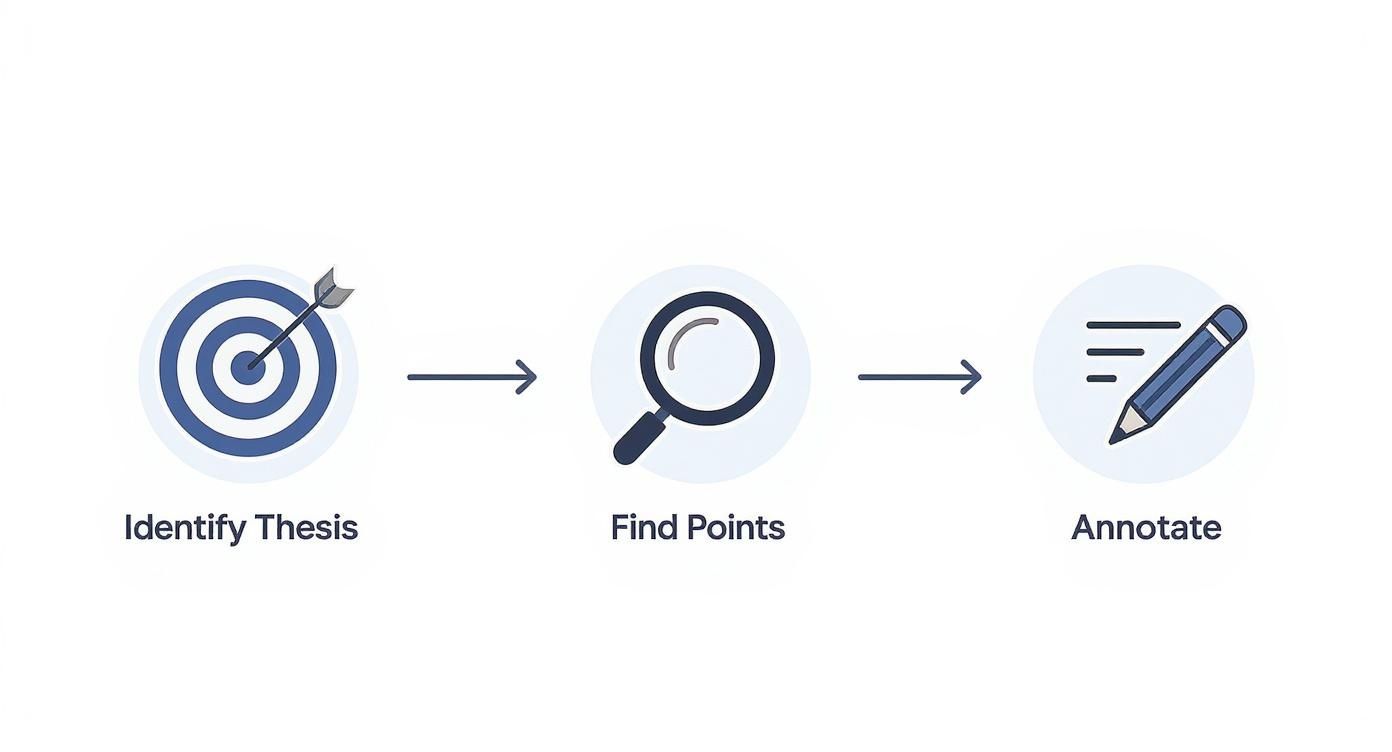
Breaking it down into these three steps—finding the thesis, locating the supporting points, and annotating—ensures you have everything you need before you even write that first sentence.
How Long Should a Summary Be?
"So, how long should this be?" It’s the classic question, and the honest answer is... it depends. The right length is tied to the original article’s length and complexity, plus what you need the summary for.
A summary for your own notes will be way shorter than one you’re turning in for a grade. But as a general rule of thumb, aim for your summary to be about 10% to 25% of the original text's length.
Summary Length Guidelines by Article Type
To give you a better feel for it, here’s a quick guide that breaks down summary length by the type of article you’re working with. This can help you find that sweet spot between being too brief and too long-winded.
Ultimately, your summary needs to be concise but accurate. Don’t get too hung up on the word count during your first draft—just focus on getting the key points down. You can always trim the fat later.
Just as a great summary gets to the heart of a topic, knowing can help you communicate those key points with maximum impact in a different format.
Refining Your Draft Until It's Crystal Clear
Alright, you’ve got a first draft. That's a huge win! But don't fire it off just yet. The first draft is really just for you—it’s where you get all the main ideas down on the page. The real work, the part that makes a summary shine, happens during the editing process.
This is where you sharpen a rough collection of points into a clear, compelling summary that anyone can understand instantly. Think of it like bringing a blurry photo into sharp focus. The final result is worth the effort.
This final polish is what separates an okay summary from a great one. Let's walk through a few passes that will make all the difference.
First Pass: The Accuracy Check
Before you start fiddling with words and flow, you need to put on your fact-checker hat. Ask yourself one brutally honest question: Does my summary faithfully represent the author's ideas?
It's surprisingly easy to accidentally let your own opinion slip in or misinterpret a key argument. Put your summary side-by-side with the original article and double-check a few things:
- Did you nail the main thesis?
- Are the supporting points accurate and placed in the right context?
- Have you resisted the urge to add your own two cents? Remember, this is a summary, not a critique.
If anything feels even a little off, fix it now. An inaccurate summary is worse than no summary at all.
Second Pass: Be Merciless with Your Words
Facts are straight? Good. Now it's time to get ruthless. Your goal is to hunt down and destroy every single unnecessary word, clunky phrase, and repetitive point. Great summaries are lean.
This is the core challenge of knowing how to write a summary of an article for work or how to write an article summary for college. For example, news articles often have a median length of 664 words, but their own single-paragraph briefings average just 87 words. The takeaway is clear: you have to make every word pull its weight.
Here’s what to look for:
- Jargon and Overly Complex Words: Did the author use a ten-dollar word where a fifty-cent one would do the trick? Simplify it. Clarity trumps vocabulary every time.
- Filler Phrases: Words like "in order to," "basically," "the fact that," and "actually" are almost always just padding. Cut them out.
- Repetition: Did you say the same thing in two different ways? Pick the stronger sentence and delete the other one.
This isn't just about making your summary shorter; it's about making it more powerful. Each word you cut makes the ones that remain stand out even more.
Third Pass: Smooth Out the Flow
Now for a pro tip: read your summary out loud. Seriously. Your ears will catch awkward phrasing and abrupt transitions that your eyes skim right over. Does it sound natural, like something a person would actually say? Or does it sound like a robot stitched it together from a list of facts?
This is where you connect the dots. Use transitional words and phrases to guide the reader seamlessly from one point to the next.
Before: The author says work culture is a problem. They mention technology. They conclude sleep is important.
After: The author argues that a toxic work culture is the primary issue. Furthermore, they explain that technology has worsened the problem by erasing boundaries. Ultimately, they conclude that prioritizing sleep is the only viable solution.
See the difference? A few simple tweaks can turn a choppy list into a coherent story. If you want to dive deeper into this, check out our complete guide on .
The Final Polish: Proofread Everything
You're in the home stretch! You've done the heavy lifting—you checked for accuracy, trimmed the fat, and smoothed out the flow. The last step is to catch those sneaky typos and grammar goofs that can sabotage all your hard work.
Use a grammar checker, but don't blindly trust it. Your own eyes are still the best tool for the job. One last, careful read-through will ensure your summary comes across as professional and polished.
Don't skip this. A single typo in an otherwise perfect summary is like finding a bug in a great salad. It just ruins the whole experience.
Summarizing Different Types of Articles
Not all articles are created equal, so why would you summarize them the same way? A one-size-fits-all approach is a fast track to a weak, generic summary. The strategy you use for a dense scientific paper just won't work for a fiery opinion piece.
Think of it like being a chef. You wouldn't use the same cooking method for a delicate fish as you would for a tough cut of meat. To really master how to write a summary of an article, you’ve got to adapt your technique to the specific "ingredient" you're working with. That means identifying the article type first, then homing in on what truly matters within that structure.
Let's break down the game plan for three of the most common article types you'll run into.
The Academic Research Paper
Ah, the academic paper. Often dense, filled with jargon, and structured with military precision. Trying to summarize one of these without a plan is like trying to assemble IKEA furniture without the instructions—frustrating and likely to end in a mess.
Your mission here is to slice through the fluff and extract the scientific core. It's easy to get bogged down in the lengthy literature review or the super-specific details of every experiment, but you have to resist.
Instead, zero in on these four key areas:
- The Research Question/Hypothesis: What specific question were the researchers trying to answer? This is the entire reason the paper exists.
- The Methodology: Briefly, what did they do? You don’t need to detail every step, just the overall approach. Think "surveyed 500 college students" or "conducted a double-blind study."
- The Key Findings: What was the answer to their question? This is the good stuff. Stick to the major results, not every minor statistical fluctuation.
- The Conclusion/Implications: So what? What do these findings mean for the real world or for future research?
When summarizing academic work, your job is to be a translator. You're taking complex, specialized information and making it accessible and concise without losing the essential scientific narrative.
The News Report
News articles are a completely different beast. They’re designed for speed and clarity, built around a structure known as the "inverted pyramid." This just means the most critical information—the who, what, when, where, and why—is packed right into the first couple of paragraphs.
This structure actually makes your job way easier. Your summary should mirror it.
Focus your energy on clearly stating the main event or finding. Dig into those first few paragraphs to pull out the essential facts, then lightly touch on the key context or consequences mentioned later in the article. You can safely ignore most of the quotes from random eyewitnesses or lengthy background details unless they are absolutely critical to understanding the main point.
The world of academic writing is also constantly changing, presenting new challenges for summary writing. For example, a recent analysis showed a major thematic shift in publications between 2020 and 2025, with a huge focus on generative AI and concerns about academic integrity. You can learn more about these emerging complexities and how they impact the field.
The Opinion Piece or Editorial
Opinion pieces, or op-eds, are all about the argument. Unlike a neutral news report, the author is actively trying to persuade you to see the world their way. Your summary needs to capture the heart of that argument, not just the topic.
Forget about objectivity in the source material; it's not there. Instead, concentrate on these elements:
- The Author's Core Argument: What is the single, central point they are trying to convince you of? State it clearly and up front.
- The Main Justifications: What are the 2-3 key reasons or pieces of evidence they use to support their claim?
- The Call to Action (if any): What do they want the reader to do, think, or believe after reading?
When tackling non-traditional content, like videos, specific tools like a dedicated can extract the key information for you. Your summary should be a neutral report on their argument, not an agreement with it.
Common Questions About Writing Article Summaries
Alright, you've got the process down and you've seen what a good summary looks like. But maybe a few questions are still bouncing around in your head. It’s completely normal to wonder about the finer points or specific "what if" scenarios.
Let's clear up some of that confusion. Here are the answers to the most common questions people ask when they're learning to summarize articles. This should give you that extra bit of confidence before you dive in.
Can I Include My Own Opinion?
This is a hard no. In fact, it's probably the biggest rule of all. A summary needs to be a completely objective and neutral reflection of what the original author said.
The second you start injecting your own analysis, thoughts, or critiques, you're no longer writing a summary. You've veered into writing a review or a response paper. Your only job here is to accurately report on the source material. Save those brilliant insights for another type of assignment!
What's the Difference Between a Summary and a Paraphrase?
Great question. They're related, but they do very different jobs.
- Paraphrasing is when you take a specific sentence or a small chunk of text and rephrase it in your own words. The length usually stays pretty close to the original.
- Summarizing, on the other hand, is about condensing the main ideas of the entire article into a much shorter package. It’s all about the big picture.
You’ll definitely use your paraphrasing skills while writing a summary, but remember that the summary itself is a condensed version of the whole piece, not just a rewritten sentence.
Think of it this way: a summary is the movie trailer, while a paraphrase is like reshooting a single scene in your own style. Both use your words, but their purpose and scope are worlds apart.
Can I Use AI Tools to Write the Summary for Me?
Yes... but you have to be smart about it. AI tools can be incredible time-savers for getting a first draft on the page. They’re fantastic for spotting key points you might have overlooked or helping you find new ways to phrase complicated ideas.
However, you should never just copy and paste an AI-generated summary. Always treat it as a rough starting point. You still need to read the original article to make sure the AI got it right, then edit the summary for clarity, flow, and tone. For tricky formats, our guide on how to offers some specific strategies.
Think of AI as a very capable assistant, not a replacement for your own brainpower and writing skills.
Ready to stop juggling tools and start summarizing faster and smarter? Zemith integrates a powerful Document Assistant and Smart Notepad into one seamless workspace. Interact with any article, pull key points instantly, and draft your summary without ever leaving the page. .
Zemith की विशेषताओं का अन्वेषण करें
जो चाहिए वो सब। जो नहीं चाहिए वो नहीं।
एक सब्सक्रिप्शन पाँच की जगह लेता है। हर टॉप AI मॉडल, हर क्रिएटिव टूल, और हर प्रोडक्टिविटी फीचर, एक फोकस्ड वर्कस्पेस में।
हर टॉप AI। एक सब्सक्रिप्शन।
ChatGPT, Claude, Gemini, DeepSeek, Grok और 25+ मॉडल








हमेशा ऑन, रियल-टाइम AI।
वॉइस + स्क्रीन शेयर · तुरंत जवाब
नई भाषा सीखने का सबसे अच्छा तरीका क्या है?
इमर्शन और स्पेस्ड रिपीटिशन सबसे अच्छे काम करते हैं। रोज़ाना अपनी लक्ष्य भाषा में मीडिया देखने का प्रयास करें।
वॉइस + स्क्रीन शेयर · AI रियल टाइम में जवाब देता है
इमेज जनरेशन
Flux, Nano Banana, Ideogram, Recraft + और भी

सोच की गति से लिखें।
AI ऑटोकम्पलीट, रीराइट और कमांड पर एक्सपैंड
कोई भी डॉक्यूमेंट। कोई भी फॉर्मेट।
PDF, URL या YouTube → चैट, क्विज़, पॉडकास्ट और बहुत कुछ
वीडियो क्रिएशन
Veo, Kling, MiniMax, Sora + और भी

टेक्स्ट टू स्पीच
प्राकृतिक AI आवाज़ें, 30+ भाषाएँ
कोड जनरेशन
कोड लिखें, डीबग करें और समझाएं
डॉक्यूमेंट्स से चैट
PDF अपलोड करें, कंटेंट का विश्लेषण करें
आपका AI, आपकी जेब में।
iOS और Android पर पूरा एक्सेस · हर जगह सिंक
आपका अनंत AI कैनवास।
चैट, इमेज, वीडियो और मोशन टूल्स — साथ-साथ

काम और अनुसंधान के घंटों की बचत करें
सीधा, किफायती मूल्य निर्धारण
इन कंपनियों की टीमें भरोसा करती हैं






मुफ्त
क्रेडिट कार्ड की आवश्यकता नहीं
- 100 क्रेडिट प्रतिदिन
- 3 AI मॉडल आज़माने के लिए
- बुनियादी AI चैट
प्लस
- 1,000,000 क्रेडिट/माह
- 25+ AI मॉडल — GPT, Claude, Gemini, Grok और अधिक
- Agent Mode वेब सर्च, कंप्यूटर टूल्स और अधिक के साथ
- Creative Studio: इमेज जनरेशन और वीडियो जनरेशन
- Project Library: दस्तावेज़, वेबसाइट और YouTube के साथ चैट, पॉडकास्ट निर्माण, फ्लैशकार्ड, रिपोर्ट और अधिक
- Workflow Studio और FocusOS
प्रोफेशनल
- प्लस में सब कुछ, और:
- 2,100,000 क्रेडिट/माह
- Pro-एक्सक्लूसिव मॉडल (Claude Opus, Grok 4, Sonar Pro)
- Motion Tools और Max Mode
- नवीनतम सुविधाओं तक पहली पहुँच
- अतिरिक्त ऑफ़र तक पहुँच
हमारे उपयोगकर्ता क्या कहते हैं
Great Tool after 2 months usage
simplyzubair
I love the way multiple tools they integrated in one platform. So far it is going in right dorection adding more tools.
Best in Kind!
barefootmedicine
This is another game-change. have used software that kind of offers similar features, but the quality of the data I'm getting back and the sheer speed of the responses is outstanding. I use this app ...
simply awesome
MarianZ
I just tried it - didnt wanna stay with it, because there is so much like that out there. But it convinced me, because: - the discord-channel is very response and fast - the number of models are quite...
A Surprisingly Comprehensive and Engaging Experience
bruno.battocletti
Zemith is not just another app; it's a surprisingly comprehensive platform that feels like a toolbox filled with unexpected delights. From the moment you launch it, you're greeted with a clean and int...
Great for Document Analysis
yerch82
Just works. Simple to use and great for working with documents and make summaries. Money well spend in my opinion.
Great AI site with lots of features and accessible llm's
sumore
what I find most useful in this site is the organization of the features. it's better that all the other site I have so far and even better than chatgpt themselves.
Excellent Tool
AlphaLeaf
Zemith claims to be an all-in-one platform, and after using it, I can confirm that it lives up to that claim. It not only has all the necessary functions, but the UI is also well-designed and very eas...
A well-rounded platform with solid LLMs, extra functionality
SlothMachine
Hey team Zemith! First off: I don't often write these reviews. I should do better, especially with tools that really put their heart and soul into their platform.
This is the best tool I've ever used. Updates are made almost daily, and the feedback process is very fast.
reu0691
This is the best AI tool I've used so far. Updates are made almost daily, and the feedback process is incredibly fast. Just looking at the changelogs, you can see how consistently the developers have ...