Boost Development with an AI Powered Coding Assistant
Enhance your workflow with an AI powered coding assistant. Accelerate coding, improve quality, and solve complex problems faster. Try it today!
What if you had a senior developer sitting next to you, ready to jump in whenever you needed help? That's the best way to think about an AI-powered coding assistant. It’s not just a fancy autocomplete; it’s a true collaborator that understands your project, writes entire blocks of code, and helps you squash stubborn bugs.
Your New AI Pair Programmer

Picture this: instead of starting your day with a blinking cursor on a blank screen, you just describe a feature in plain English. Seconds later, the foundational code materializes. This isn't science fiction anymore; it’s the new normal for developers. We've watched these tools grow from simple syntax highlighters into intelligent copilots, and it’s completely changing how software gets built.
These modern assistants have gone way beyond suggesting the next variable name. They have a deep, contextual awareness of your entire project, understanding how different files and functions connect. This allows them to offer suggestions that are actually relevant and fit perfectly with your existing code style and logic, a core strength of platforms like .
From Repetitive Tasks to Creative Solutions
So much of a developer's day can get eaten up by tedious, low-value work. Think writing boilerplate code, generating documentation, or building out unit tests. An AI-powered coding assistant takes over these chores, essentially multiplying your output.
By automating the grunt work, these tools free you up to focus on what really matters:
- Creative problem-solving for tricky business logic.
- High-level architectural design and system planning.
- Innovating new features and polishing the user experience.
When a tool like Zemith handles the routine stuff, it does more than just make you faster—it elevates your entire role. You can operate more strategically, shifting your focus from just writing code to becoming an architect of elegant, durable software.
This change is huge for staying efficient and competitive. You're no longer stuck in the weeds of implementation details, which allows you to keep a bird's-eye view of the project and ensure the final product is built to last.
To get a fuller picture of how these assistants can slot into your workflow, check out this . Bringing a smart assistant like Zemith on board is like adding a powerful new member to your team.
What Can an AI Coding Assistant Really Do?
To get the most out of an AI coding assistant, it helps to stop thinking of it as a fancy autocomplete. It's much more than that. Imagine having a junior developer, a seasoned code reviewer, and a documentation expert all rolled into one, available 24/7. This "partner" has a specific set of skills designed to make your life easier and your code better.
Let's break down what these core abilities actually look like in your day-to-day workflow.
Beyond Simple Suggestions: Intelligent Code Completion
At its most basic, an AI assistant is fantastic at intelligent code completion. I'm not just talking about suggesting the next variable name. A tool like Zemith actually reads and understands the context of your entire project—your existing functions, libraries, and coding patterns.
This allows it to suggest entire blocks of relevant, multi-line code that fit perfectly with what you're trying to build. You spend less time writing boilerplate and more time thinking about the bigger picture.
It also excels at generating code from scratch. You can literally write a comment describing the function you need, and the assistant will spit out a working implementation. This is a massive time-saver, especially when you're prototyping or tackling a new part of an application.
From Writing Code to Perfecting It
Where these assistants truly shine, though, is in their ability to improve the code you've already written. This is where you start to see the real productivity gains.
- Real-Time Bug Squashing: Forget spending an hour chasing down a typo or a simple logic error. The assistant often highlights bugs as you write, suggesting fixes on the fly before they ever become a problem.
- Painless Code Refactoring: Have a clunky, hard-to-read function? Just ask the assistant to refactor it. It can restructure the code to be more efficient and readable, all while following established best practices.
- Automatic Documentation: Writing docs is a chore for most of us. Tools like Zemith can instantly generate docstrings and comments for your functions, making your codebase clean and easy for your team to navigate.
This isn't just theory; the impact on developer productivity is real and measurable.
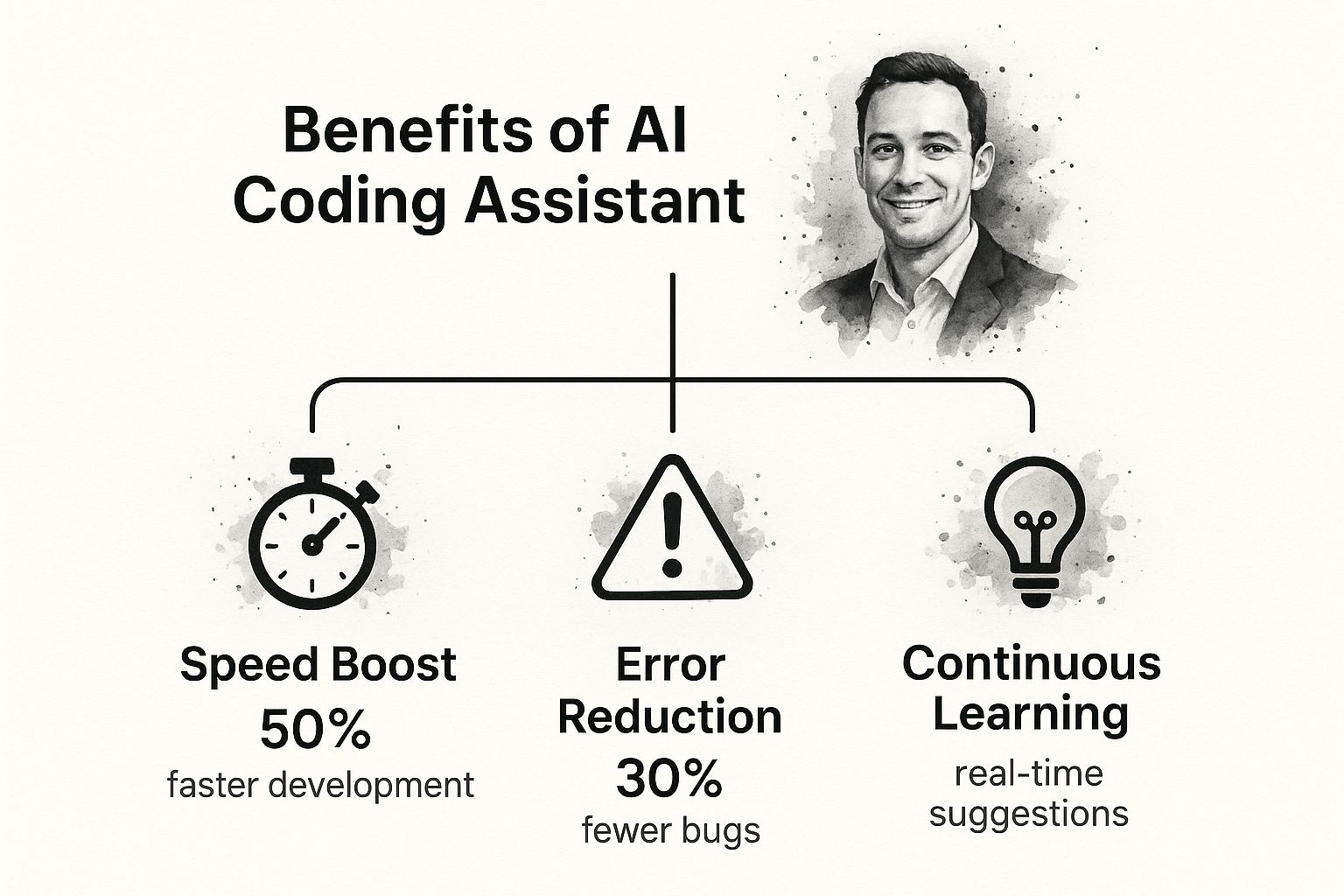
The data speaks for itself. These tools provide significant boosts in speed and accuracy while also serving as a constant learning resource right inside your editor.
This trend isn't going unnoticed. The market for AI code assistants was valued at around $1.16 billion in 2025 and is on a trajectory to potentially hit over $20 billion by 2033. This explosive growth shows just how integral these tools are becoming to modern software development.
Key Features of a Modern AI Powered Coding Assistant
So, what are the must-have capabilities that define a top-tier AI coding assistant? Here's a quick breakdown of the core features and why they matter.
Each of these features works together to create a seamless experience, turning the assistant from a simple tool into an indispensable part of your workflow.
A modern AI assistant serves as a quality gatekeeper. By understanding the context of your entire project, a platform like Zemith doesn't just offer code—it offers the right code, helping you avoid common pitfalls and maintain a high standard of quality across your entire application.
This deep contextual understanding is what separates a gimmick from a genuine game-changer. If you're interested in seeing what's out there, you can explore more options in our guide to the 12 best AI tools for developers to use in 2025.
By letting the AI handle the repetitive tasks of generation, debugging, and documentation, you're freed up to focus on what really matters: creative problem-solving and building great software.
Speed Up Your Workflow and Ship Better Code

Let's get straight to the point. Developers are turning to AI-powered coding assistants for two big reasons: to build software faster and to build it better. It’s that simple. These tools cut right to the heart of what slows us down, offering real, measurable gains in both development speed and the quality of the final product.
Think about all the time you lose to the little things—searching for the right syntax, cranking out repetitive boilerplate code, or hunting down a pesky typo. An AI assistant handles that grunt work for you, freeing up hours every week. That reclaimed time is huge. It means you can focus less on routine implementation and more on what really matters: architecting solid systems and cracking complex business problems.
This isn't just a perk for large enterprises; it's a game-changer for smaller teams, too. Generative AI is leveling the playing field, making expert-grade programming tools accessible to startups and SMEs. The market reflects this shift. Valued at $25.9 million in 2024, the industry is expected to rocket to $97.9 million by 2030. That explosive growth shows just how quickly developers are embracing these tools.
A Partner in Code Quality
Speed is great, but a top-tier assistant like Zemith does more than just help you write code faster—it helps you write good code. It acts as a constant guardian of your codebase, actively flagging potential issues before they ever make it into a commit.
This quality-first approach shows up in a few key ways:
- Smart Suggestions: The AI has been trained on mountains of high-quality code, so it can recommend modern, efficient patterns and best practices as you type.
- Proactive Bug Squashing: It spots common pitfalls—like potential null pointer exceptions or subtle logic errors—in real time, so you can fix them on the spot.
- Consistent Style: It helps keep the coding style uniform across the entire project, which is a lifesaver for team collaboration and long-term maintenance.
Of course, even the smartest AI can’t replace human oversight. For major refactoring projects, a process like is still the gold standard for tackling deep-seated issues.
Bringing an AI assistant into your workflow is like adding an automated quality checkpoint. Zemith doesn't just help you get the code written; it helps you write clean, efficient, and reliable code that will be easier to maintain down the road, cutting down on technical debt from the very beginning.
This proactive stance on quality is critical. We all know that fixing a bug after deployment is way more painful (and expensive) than catching it early. An AI assistant is your first line of defense, making sure your code is not only functional but also robust and well-documented. An actionable step you can take today is to explore how a tool like can start improving your code quality from the very first line.
Seeing AI Coding Assistants in Action
It’s one thing to talk about the benefits of AI coding assistants, but it’s another to see them solve real-world problems. That’s where the value really clicks. So, let's step away from the theory and look at how developers are actually using these tools on the job every single day.
These examples aren't edge cases; they're common, everyday tasks. We'll follow a few developers to see how an AI assistant can completely change how they approach their work from start to finish.
Building a Web Component in Minutes
Picture this: a web developer needs to spin up a new, interactive user profile card in . The old way? You'd have to create the component file, write out all the JSX for the structure, add your CSS for styling, and then make sure the props are wired up correctly for the data. It's a familiar routine, but it's filled with small, time-consuming steps.
With an AI partner like Zemith, the whole process gets turned on its head. Instead of writing all that code, the developer can just leave a detailed comment describing exactly what they need.
Generate a React component named 'UserProfileCard'. It needs to take 'name', 'avatarUrl', and 'bio' as props. Make the avatar a circle, put the name in a bold heading, and display the bio text underneath. Use styled-components for some basic styling—give it a light box-shadow and rounded corners.
In seconds, the assistant spits out a complete, well-structured component. We're talking the functional component itself, the prop definitions, and even the CSS-in-JS code. The developer’s role instantly shifts from being a line-by-line coder to a reviewer, just tweaking and refining a nearly finished product. This completely changes the pace of building new features.
Untangling Complex Data Analysis Scripts
Now, let's switch gears to a data scientist deep in a large dataset using . Their task is to clean up the data, run some statistical analysis, and create a few visualizations with . This kind of work usually involves constantly breaking your concentration to look up specific functions or remember the exact syntax for a tricky plot.
An AI assistant acts like a seasoned expert sitting right next to you. When the scientist needs to filter the dataset based on a few complicated conditions, they can just ask in plain English. The assistant provides the exact Pandas code, saving a trip to the documentation. When it's time to create a chart, a simple prompt like "create a scatter plot of column A vs. B and add a regression line" gets the job done instantly.
Crafting Secure API Endpoints
Finally, let's check in with a backend engineer who is building a new API endpoint. Getting security and error handling right is absolutely critical, but it can feel repetitive and tedious to implement correctly for every single route. Say they need to create a POST endpoint that adds a new user to a database, making sure the input is validated and the response is secure.
Instead of writing all that boilerplate from scratch, the engineer can just prompt their assistant.
Create a Node.js Express route for
POST /api/users. It needs to validate the request body to make sure it has 'email' and 'password' fields. Hash the password with bcrypt before saving it. Then, return a 201 Created status with the new user's ID, but make sure to leave the password out of the response.
The AI generates the entire route handler, complete with input validation, password hashing, and the correct HTTP status codes. This doesn't just save a ton of time; it also helps enforce security best practices from the get-go. In all these scenarios, the AI powered coding assistant takes a manual, often tedious task and makes it a quick, interactive one.
How to Choose the Right AI Coding Assistant

The market for AI coding assistants is exploding, and with so many options popping up, it's easy to feel a bit lost. Picking the right tool isn’t a one-size-fits-all situation. What works for one team might be a terrible fit for another, depending on your workflow, your tech stack, and what you’re trying to build.
Getting this right is a big deal. It’s more than just a convenience—it’s a strategic move that directly impacts your team’s productivity and, just as importantly, the security of your code. These tools are quickly becoming essential. The U.S. market was valued at around $1.8 billion in 2024 and is expected to hit $12.4 billion by 2034. You can dig into more market data from a report on .
Core Evaluation Criteria for Your Next Assistant
To cut through the noise, you need a solid framework for judging these tools. Focus on the features that will actually help you write better code and make your life easier. A great AI powered coding assistant should feel like a natural part of your setup, not another clunky app you have to wrestle with.
Here are the absolute must-haves to look for:
- Seamless IDE Integration: Does it plug right into your go-to editor, like VS Code or a JetBrains IDE? An assistant that lives where you work is an assistant you’ll actually use. It keeps you in the zone.
- Broad Language and Framework Support: The tool has to speak your language—literally. Whether you're all-in on Python, JavaScript, Go, or some obscure framework, you need an assistant that can keep up and give you relevant help.
- Contextual Accuracy: This is a big one. How well does it actually understand your project? A top-tier tool like Zemith doesn't just look at the line you're on; it analyzes your entire codebase to give you suggestions that fit perfectly, saving you from a ton of rework.
Prioritizing Security and Data Privacy
Now for what might be the most crucial factor: how the assistant handles your code. When you’re using a cloud-based tool, you’re essentially sending your company’s secret sauce to a third party. This makes security a dealbreaker, especially for businesses.
When evaluating an AI coding assistant, always ask: "Where does my code go, and who has access to it?" A tool that trades your intellectual property for a bit of convenience is a gamble you can't afford to take.
Look for platforms with clear, enterprise-grade security measures. A trustworthy assistant will be upfront about its data policies, making it clear that your code is only used to generate suggestions for you and is never stored or used to train other models without your explicit permission. Zemith, for instance, was designed with this security-first mindset, so you can get powerful assistance without putting your IP at risk.
Choosing wisely means you can not only but also do it with complete peace of mind.
Getting Started with Zemith in Minutes
Ready to see what all the fuss is about? Getting a powerful AI coding assistant up and running in your workflow shouldn't be a chore. With Zemith, you can get from sign-up to your first "aha!" moment in just a few minutes. We've made it as simple as possible.
First things first, you'll create an account and then install the Zemith extension right into your favorite IDE. It’s a one-and-done setup. This way, the assistant is baked directly into your coding environment, ready to help without you ever having to switch windows or break your focus.
Your First Task: Generating a Unit Test
So, where do you start? Let's tackle a task that every developer knows but few enjoy: writing unit tests. It’s the perfect first job for your new AI partner because it’s essential, a bit repetitive, and shows off the assistant’s power immediately.
The secret to getting great results is writing a great prompt. Don't be vague. Be specific and give it all the context it needs to do the job right.
"Generate a complete Jest unit test for the
calculateTotalfunction inutils.js. It should include test cases for positive numbers, zero, and an empty input array to check for edge cases."
See the difference? A prompt like that gives Zemith everything it needs to generate a genuinely useful, comprehensive test file in seconds. Just like that, you’ve saved yourself time and made your code more robust.
This simple exercise is a perfect example of how you can start handing off the more routine parts of your job. The whole idea is to get you a tangible win right away, proving how an AI assistant can make a real difference from the moment you install it.
Ready to stop wasting time on routine coding tasks? Visit to begin your free trial and feel the productivity boost for yourself.
Common Questions About AI Coding Assistants
Whenever a new tool lands on a developer's desk, a healthy dose of skepticism is expected. It's only natural. When it comes to something as significant as an AI powered coding assistant, a few key questions almost always come up. Developers want to know how it will affect their jobs, whether their code is safe, and what the ramp-up time looks like.
Let's tackle the big one first: "Will this replace me?" The short answer is a hard no. It’s better to think of these tools as a partner, not a replacement. They're fantastic at handling the grunt work—the boilerplate code, the repetitive unit tests—which frees you up to focus on the really interesting stuff, like system architecture and creative problem-solving. Your expertise and critical thinking actually become more important, not less.
Is My Code Secure?
Right behind the job security question is the one about data privacy. "What happens to my proprietary code?" It’s a huge concern, and rightly so. With a platform like , the security of your code is paramount. Your intellectual property is never, ever used to train public models. Strict privacy controls are in place to make sure your data stays yours, used only to give you secure, context-aware suggestions for your specific project.
The real value of an AI partner is its ability to augment your skills without compromising your work. It's designed to be a secure, intelligent tool that elevates your capabilities, letting you build better software, faster.
Finally, developers always ask about the learning curve. Is this another complex framework I have to spend weeks learning? Thankfully, no. Getting started is much easier than you’d think. The main skill is learning how to write clear, specific prompts. It's a shift in thinking, but you can get the hang of it in a few hours, not weeks. The productivity boost is almost immediate.
Ready to see for yourself? Zemith is built to slide right into your existing workflow, giving you powerful, secure help from the get-go. Kick the tires and see how it can change your coding process. You can start a free trial at .
Zemith 기능 탐색
모든 최고 AI. 하나의 구독.
ChatGPT, Claude, Gemini, DeepSeek, Grok & 25+ 모델








항상 켜진 실시간 AI.
음성 + 화면 공유 · 즉각적인 답변
새로운 언어를 배우는 가장 좋은 방법은 무엇인가요?
몰입과 간격 반복이 가장 효과적입니다. 매일 목표 언어의 미디어를 소비해 보세요.
음성 + 화면 공유 · AI가 실시간으로 답변
이미지 생성
Flux, Nano Banana, Ideogram, Recraft + 더보기

생각의 속도로 쓰세요.
AI 자동완성, 다시쓰기 & 명령으로 확장
모든 문서. 모든 형식.
PDF, URL 또는 YouTube → 채팅, 퀴즈, 팟캐스트 등
영상 제작
Veo, Kling, MiniMax, Sora + 더보기

텍스트 음성 변환
자연스러운 AI 음성, 30개 이상 언어
코드 생성
코드 작성, 디버그 및 설명
문서와 채팅
PDF 업로드, 콘텐츠 분석
주머니 속의 AI.
iOS & Android 전체 이용 · 어디서나 동기화
무한한 AI 캔버스.
채팅, 이미지, 영상 & 모션 도구 — 나란히

업무 및 연구 시간을 절약하세요
간단하고 합리적인 가격
신뢰하는 기업 팀






무료
신용카드 불필요
- 매일 100 크레딧
- 3개의 AI 모델 체험
- 기본 AI 채팅
플러스
- 1,000,000 크레딧/월
- 25개 이상의 AI 모델 — GPT, Claude, Gemini, Grok 등
- Agent Mode: 웹 검색, 컴퓨터 도구 등 포함
- Creative Studio: 이미지 생성 및 비디오 생성
- Project Library: 문서, 웹사이트, YouTube와 채팅, 팟캐스트 생성, 플래시카드, 리포트 등
- Workflow Studio 및 FocusOS
프로페셔널
- 플러스의 모든 것, 그리고:
- 2,100,000 크레딧/월
- Pro 전용 모델 (Claude Opus, Grok 4, Sonar Pro)
- Motion Tools & Max Mode
- 최신 기능 우선 이용
- 추가 혜택 이용 가능
사용자 후기
Great Tool after 2 months usage
"I love the way multiple tools they integrated in one platform. Going in the right direction."
— simplyzubair
Best in Kind!
"The quality of data and sheer speed of responses is outstanding. I use this app every day."
— barefootmedicine
Simply awesome
"The credit system is fair, models are perfect, and the discord is very responsive. Quite awesome."
— MarianZ
Great for Document Analysis
"Just works. Simple to use and great for working with documents. Money well spent."
— yerch82
Great AI site with accessible LLMs
"The organization of features is better than all the other sites — even better than ChatGPT."
— sumore
Excellent Tool
"It lives up to the all-in-one claim. All the necessary functions with a well-designed, easy UI."
— AlphaLeaf
Well-rounded platform with solid LLMs
"The team clearly puts their heart and soul into this platform. Really solid extra functionality."
— SlothMachine
Best AI tool I've ever used
"Updates made almost daily, feedback is incredibly fast. Just look at the changelogs — consistency."
— reu0691