


Every top model, with tools built in.
Search the web, run deep research, read files, create images and run code with GPT, Claude, Gemini, Grok and more.
Discover how AI report writing tools like Zemith simplify your data narratives. Learn to craft impactful reports effortlessly and efficiently.
AI report writing is all about using smart technology to turn raw data into a polished, professional document. Think of it less as a robot writing for you and more as an intelligent partner that handles the grunt work—like processing endless data points and creating a first draft—so you can focus on the big-picture analysis and strategic insights.
We've all been there: staring at a blank page, trying to make sense of complex data. Traditionally, building a report has been a manual, painstaking process that's slow and often riddled with small errors. But AI report writing tools are completely flipping that script. They're more than just text generators; they're active collaborators in the entire process, from analysis to storytelling.
The idea isn't to take your expertise out of the equation. It's to enhance it. A platform like Zemith is built to do the heavy lifting for you, whether that's organizing scattered information, spotting key trends, or drafting initial summaries. This frees you up to concentrate on what really matters—interpreting what the data means, adding crucial context, and building a narrative that actually persuades people and drives decisions. It shifts the work from tedious to truly insightful.
This change is part of a much bigger wave. The AI market is expected to hit a value of around $391 billion in 2025 and continue its explosive growth. It’s no surprise that 83% of companies say AI is a top strategic priority, making its use in data analysis and automated documentation a new standard.
The image below breaks down the differences in time, accuracy, and cost when you compare the old way of doing things to an AI-assisted approach.
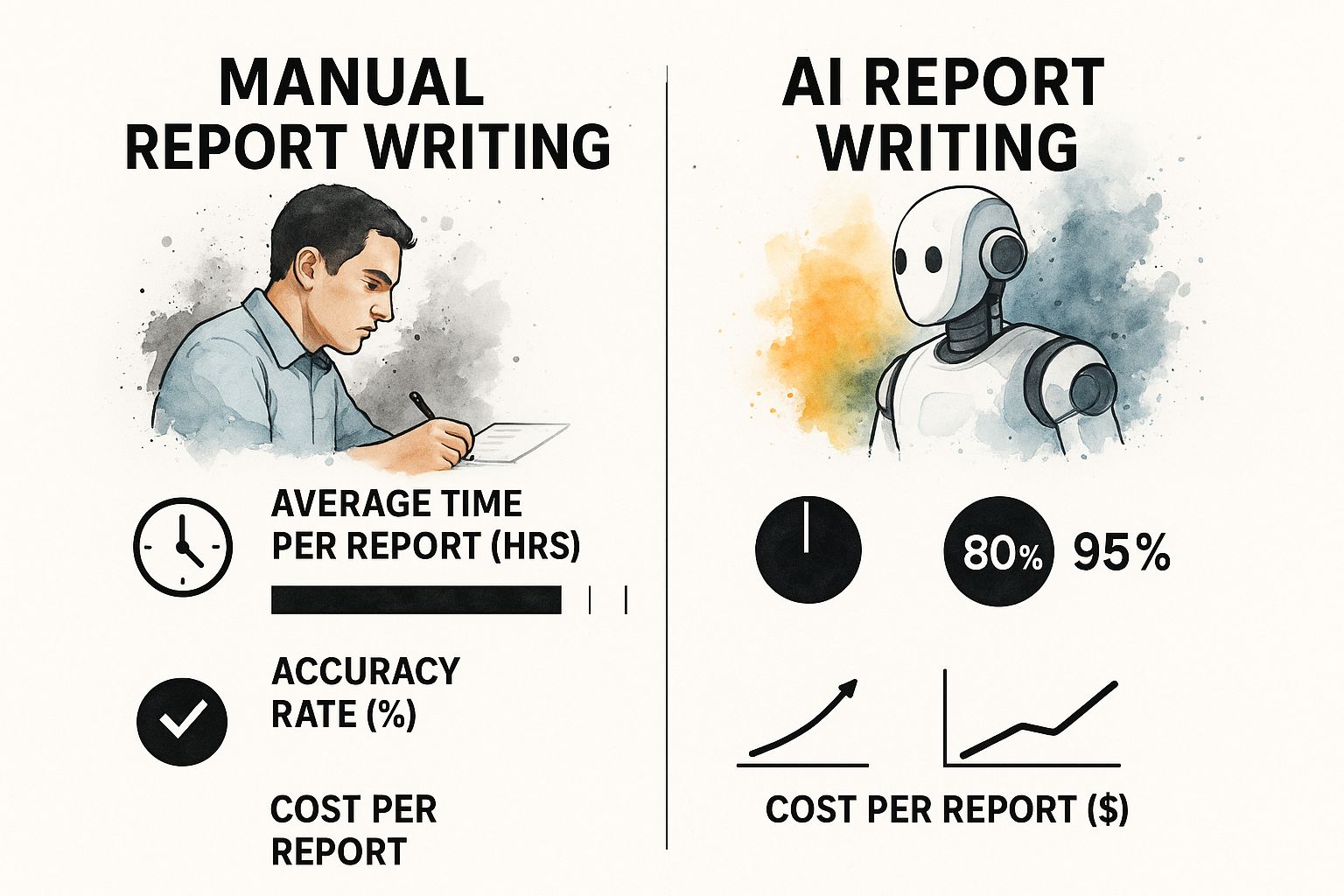
The numbers speak for themselves. AI-powered methods slash the time and cost involved in creating a report while significantly boosting accuracy.
To really see the contrast, let’s break down the old versus the new way of building a report.
This table clearly shows how the AI approach with a tool like Zemith streamlines nearly every part of the reporting workflow, saving time and improving the quality of the final product.
By automating the repetitive parts of the job, AI gives professionals back their most valuable resource: time. This allows for a much deeper focus on strategic thinking—the kind of value that a machine simply can't add on its own.
This boost in efficiency is driven by a new generation of sophisticated platforms. If you're curious about the technology making this all possible, you can explore various AI workflow automation tools that are changing how reports get made. By bringing these systems into your process, you can build a more responsive and data-driven reporting cycle.

Here’s a truth about AI report writing that’s easy to overlook: the most important work happens before you even think about writing a prompt. The final report will only be as good as the raw materials you provide. This initial prep work is what separates a generic, fuzzy summary from a sharp, relevant analysis.
Think of your AI tool as a brilliant but incredibly literal research assistant. It can’t read your mind or guess what a successful report looks like for your specific needs. So, your first job is to give it a laser-focused objective. What question, exactly, is this report meant to answer? What decision will it help someone make?
A vague goal like "analyze sales data" is going to get you a vague, unhelpful report. On the other hand, something specific like "Identify the top three drivers of customer churn in Q3 using support tickets and subscription data to build our Q4 retention strategy" gives the AI a clear mission.
Once your objective is set in stone, it’s time to gather and wrangle your data. An AI can't work magic on a messy, disorganized pile of files.
Your main goal here is to make the information dead simple for the AI to process. This means cleaning up your spreadsheets, documents, and notes before you ever upload them. A bit of housekeeping now will save you from a mountain of revisions later.
Modern platforms like Zemith are built to handle this. You can drop multiple documents, spreadsheets, and even messy notes into a single project. This creates a unified knowledge base for the AI, which is far more powerful than feeding it scraps of information one at a time.
With your data organized and your objective clear, the next step is to create a "report brief." This isn't just a simple prompt; it’s a detailed set of instructions that serves as the blueprint for your entire report. This brief is the crucial link between your raw information and the polished narrative you need.
The process is a lot like creating a project scope document. If you want to get better at this, our guide on how to write technical documentation covers many of the same principles for structuring complex information, a skill that pays off big time when you're directing an AI.
Your brief should clearly spell out a few key things:
When you put in this upfront effort, you’re essentially programming the AI for success. You’re ensuring the first draft it produces is already 80% of the way there, freeing you up to focus on high-level strategic edits instead of basic assembly.
Alright, you’ve done the prep work. Your data is clean, and your brief is solid. Now for the exciting part: moving from planning to actual production. This is where you’ll really feel the power of an AI assistant, as it takes your structured inputs and spins them into a coherent first draft. Forget staring at a blank page; your job now is to direct the AI and let it do the heavy lifting.
The secret here is moving past simple commands. If you just type "write a report," you're going to get a generic, soulless document that’s of no use to anyone. The real skill is in building detailed, layered prompts that guide the AI with precision—a technique people are calling prompt engineering.
Think of yourself as the architect and the AI as your construction crew. You're not just telling them to "build a house"; you're handing them a detailed blueprint that defines the structure, sets the tone, and even specifies how certain data points should be presented. That's how you get a first draft that's actually on point.
Getting a quality report from an AI all comes down to the quality of your instructions. A great prompt isn't just a command; it's the start of a conversation. It gives the AI all the context it needs to build a draft that hits the mark right out of the gate.
Let's look at a practical example. Say you're working on a quarterly sales report.
A weak prompt would be something like: "Write a report on Q3 sales data."
This is far too vague. The AI has no clue who the audience is, what format you need, or what story you're trying to tell. It’s a recipe for a useless draft.
Now, here's a strong prompt: "Using the attached sales data, generate a 5-section report on Q3 performance for an executive audience. Section 1 should be an executive summary. Section 2 must compare Q3 performance against Q2, highlighting the 15% growth in the APAC region. Use a formal tone and create a markdown table for regional sales breakdowns in Section 3."
See the difference? This prompt is a clear roadmap. It dramatically improves the relevance of the AI's first attempt. Platforms like Zemith are built for this kind of detailed interaction, letting you upload your data and give complex instructions just like this one.
Let’s be real: the first draft the AI spits out is almost never the final one. The next phase is all about refining it through follow-up prompts. This is your chance to fine-tune the narrative, ask for a deeper dive into the numbers, or tweak the language.
For example, you could follow up with prompts like these:
This back-and-forth is how you collaboratively shape the report into something polished and professional. If you want to speed things up even more, you can utilize speech-to-text capabilities within ChatGPT to get your raw ideas and edits into the system without having to type everything out.
The reason these tools are getting so good, so fast, is thanks to the incredible pace of development. The commercial world is driving AI innovation, with industry players dominating model development. In fact, nearly 90% of significant AI models created in 2024 came from companies, a huge jump from 60% in 2023. This corporate leadership is directly improving the natural language processing (NLP) that makes high-quality report writing possible.
Think of your AI-generated draft as a fantastic head start, not a finished product. It’s the raw clay. The real magic happens when you, the expert, step in to shape it. A report’s true authority comes from your strategic insight, your experience, and your nuanced understanding of the subject matter. This is where you turn a good draft into a great one.
First thing's first: fact-check everything. Seriously. Treat every statistic, date, and figure the AI provides as a claim that needs to be verified against your original sources. The AI is your co-pilot for structuring the information, not the ultimate source of truth.
Once you're confident in the data's accuracy, it's time to make the report sound like you. An AI can mimic a professional tone, but it can’t replicate your unique analytical style or pull from your years of industry knowledge. This is your chance to elevate the report from a simple summary to a truly insightful document.
Refining the tone is key. For instance, understanding the difference between styles like copywriting vs. content writing can help you decide if your report should be purely informative or if it needs a persuasive edge to drive action.
I like to think of the AI draft as a perfectly assembled skeleton. It's my job to add the muscle of my analysis, the personality of our brand, and the heartbeat of a compelling story. That human layer is what gives the report its real value.
Tools like Zemith are built for this part of the process, with intuitive editing features that let you get hands-on. You can easily tweak sentences, rephrase sections to match your company’s voice, and weave in those specific anecdotes or examples that an AI simply wouldn't know.
A solid report presents data, but a brilliant one interprets it. An AI might tell you that revenue increased by 15%, but it takes a human expert to explain why it happened and what that means for the business moving forward. Your job is to connect the dots.
Imagine a financial analyst gets a draft from Zemith that flags a dip in quarterly profits. The AI did its job. But the analyst then steps in to add the crucial context: that dip was the direct, planned result of a major R&D investment poised to drive massive growth over the next two years.
That single piece of context changes everything. It reframes an alarming data point as a story of smart, strategic investment.
Here are a few ways I add that layer of insight into my own reports:
In the end, your expertise is the report's most valuable ingredient. This final, human-led refinement is what ensures your AI report writing creates documents that are not just accurate, but genuinely insightful and persuasive.
Once you're comfortable with the basics of drafting and refining with AI, you can start making it a real strategic partner. It’s about moving beyond one-off reports and weaving AI into your regular workflows. That’s where you’ll see the biggest gains in time and quality.
A fantastic way to do this is by creating your own custom prompt templates. Think about the reports you write over and over again—monthly marketing updates, quarterly financial summaries, you name it. Instead of reinventing the wheel every time, you can build a master prompt that has everything you need: your go-to structure, preferred tone, key metrics, and even the audience profile.
With a tool like Zemith, you can save these prompts as templates. Imagine a monthly sales report. Your template could tell the AI to always kick things off with a high-level KPI summary, then dive into a regional breakdown, highlight key wins, and finish with a solid analysis of challenges. This keeps everything consistent and can literally save you hours every single month.
Here’s where AI gets really powerful: creating multiple versions of a single report from one dataset. Let's be honest, a CEO doesn't need the same nitty-gritty details as a department head. Instead of manually rewriting your findings for every stakeholder, you can use AI to do the heavy lifting.
Just give the AI some simple follow-up prompts to adjust the output:
Suddenly, one report becomes several targeted, high-impact documents with very little extra work on your part.
AI isn't just for number-crunching. It can add a rich, qualitative layer to your reports that really brings the data to life. Sentiment analysis is a perfect example of this in action. You can feed the AI hundreds of customer comments—from surveys, support tickets, or online reviews—and ask it to find the common threads.
Prompt Example: "Analyze these 500 customer reviews. I need the top three positive themes and the most common negative complaint. Pull a few representative quotes for each point."
This kind of analysis quickly uncovers the "why" behind your numbers, adding a crucial human dimension to your data. The technology behind this, natural language processing (NLP), is exploding. In fact, the NLP market is on track to hit $48.46 billion by 2026, largely because of its power in areas like automated content creation and document analysis.
If you're interested in exploring other platforms that excel at this, we’ve put together a guide on the best AI tools for research. By adding these advanced techniques to your toolkit, AI stops being just a drafting assistant and becomes a core part of your analytical process.

As AI report writing becomes a go-to for professionals, it's completely normal to have a few questions. Getting a handle on how these tools work—and where they fit into your workflow—is key to using them with confidence. Let's tackle some of the most common concerns I hear.
The whole point is to use AI like Zemith effectively and ethically. Think of it less as an autopilot and more as an expert co-pilot. It’s there to help you produce better work, faster, but you’re still the one flying the plane.
This question comes up a lot, and the answer is pretty simple: it's not unethical when you use it responsibly. An AI is just a tool, not much different from a spell checker or a powerful calculator. The ethics all boil down to transparency and your own oversight.
At the end of the day, you are the author.
That means you’re on the hook for fact-checking the content, shaping the narrative, and owning the final insights. The buck stops with you.
AI platforms are brilliant at handling the heavy lifting—processing data and creating a solid first draft—which frees you up to focus on strategy. They don't replace your critical thinking. The conclusions and recommendations must always come from you.
Ethical use is about being honest about the tool's role while never stepping away from your professional accountability.
Simple: never take an AI-generated fact at face value. Ever.
The best way to guarantee accuracy is to feed the AI your own verified data right from the start. Treat its first draft as a beautifully structured starting point, not a finished piece of research.
Your next step is absolutely non-negotiable: you have to meticulously cross-reference every single statistic, claim, and data point against your trusted sources. An AI’s job is to organize and articulate the information you give it, not to be the source of truth itself. A human-in-the-loop process isn't just a good idea; it's essential for maintaining credibility.
It absolutely can, but it needs you to be a good director. Modern AI platforms like Zemith are incredibly flexible, but they aren't mind readers. The output you get is a direct reflection of the input you provide.
To nail the tone, you have to give it detailed context.
By being crystal clear in your prompts, you guide the AI to generate content that sounds like it was written by an expert in your field—because it was guided by one.
Ready to stop wrestling with drafts and start unlocking deeper insights from your data? With Zemith, you get a single, powerful AI platform built to manage your entire reporting workflow. From initial analysis to the final polish, our tools help you create professional, accurate, and impactful reports in a fraction of the time. Explore Zemith and see how much faster you can get to the finished product.







Trusted by teams at






The top models, plus image, video and voice tools, in one plan.
Without Zemith
ChatGPT PlusUS$20.00Claude ProUS$20.00Google AI ProUS$19.99SuperGrokUS$30.00Perplexity ProUS$20.00 MidjourneyUS$10.00
 ElevenLabsUS$6.00Le Chat ProUS$14.99
 RunwayUS$15.00Kling StandardUS$8.80
 Gamma PlusUS$12.00
 Otter ProUS$16.99
 QuillBot PremiumUS$19.95
 Photoroom ProUS$12.99
 Quizlet PlusUS$7.99
Total if paying separatelyUS$234.70/mo
"I love the way multiple tools they integrated in one platform. Going in the right direction."
— simplyzubair
"The quality of data and sheer speed of responses is outstanding. I use this app every day."
— barefootmedicine
"The credit system is fair, models are perfect, and the discord is very responsive. Quite awesome."
— MarianZ
"Just works. Simple to use and great for working with documents. Money well spent."
— yerch82
"The organization of features is better than all the other sites — even better than ChatGPT."
— sumore
"It lives up to the all-in-one claim. All the necessary functions with a well-designed, easy UI."
— AlphaLeaf
"The team clearly puts their heart and soul into this platform. Really solid extra functionality."
— SlothMachine
"Updates made almost daily, feedback is incredibly fast. Just look at the changelogs — consistency."
— reu0691
Hand off the research, writing, design and follow-ups. Zemith picks the tools it needs and brings back finished work.
Search the web, run deep research, read files, create images and run code with GPT, Claude, Gemini, Grok and more.
Zemith keeps working in the cloud and pings you when it's done.
Notion, Linear, Canva, Airtable and more. It asks before it creates or changes anything.
Docs, slides, sheets and PDFs, ready to send.
Chain models and tools on a visual canvas, from one prompt to a finished promo video.
Briefings, reports and reminders run on a schedule and are ready when you need them.
Real-time voice that can see your camera or screen.
The best image and video models, in one studio.
Turn PDFs, links and YouTube videos into podcasts, quizzes, flashcards and mind maps.














 Podcast
 Quiz
Quiz Flashcards
 Mind map
 Infographic