Contract review, research and first drafts for lawyers
Zemith reads and summarizes long documents, compares drafts, researches with cited sources and drafts memos and letters as Word files. It does not give legal advice: you check the output and advise your client.
- Clause-by-clause summaries of an uploaded agreement
- Two drafts compared, with what each change means
- Memos and letters drafted as Word files you edit
4.6on the App Store and Google Play

Review this MSA and flag anything unusual in liability, termination and IP
Five clauses are flagged, including uncapped indemnity and a 7-day termination notice, with suggested redlines.
Contract review - Acme MSA.docx
Four jobs lawyers hand to Zemith
Open the tool, paste the prompt and upload the document. Verify every point against the source before you rely on it.
Review a contract faster
Upload an agreement and get a clause-by-clause summary with the terms that need your attention.
Prompt to tryReview this NDA from the recipient's side. List the definition of confidential information, term, carve-outs and anything one-sided.
Compare two versions
Upload both drafts and get a list of what changed and what each change means for your client.
Prompt to tryCompare our draft lease with the landlord's markup and list every change, with a note on which ones shift risk to the tenant.
Get a head start on research
Deep research reads about two dozen pages and returns a cited report. Check cases and statutes against primary sources.
Prompt to tryResearch how courts have treated non-compete clauses for software engineers in California since 2020 and cite your sources.
Draft the first version
Turn your notes into a memo, client letter or summary as a Word document, then edit it in your own words.
Prompt to tryDraft a client letter explaining the three main risks in this supplier agreement in plain English, under one page.
Research with every source listed
A screenshot from Zemith.
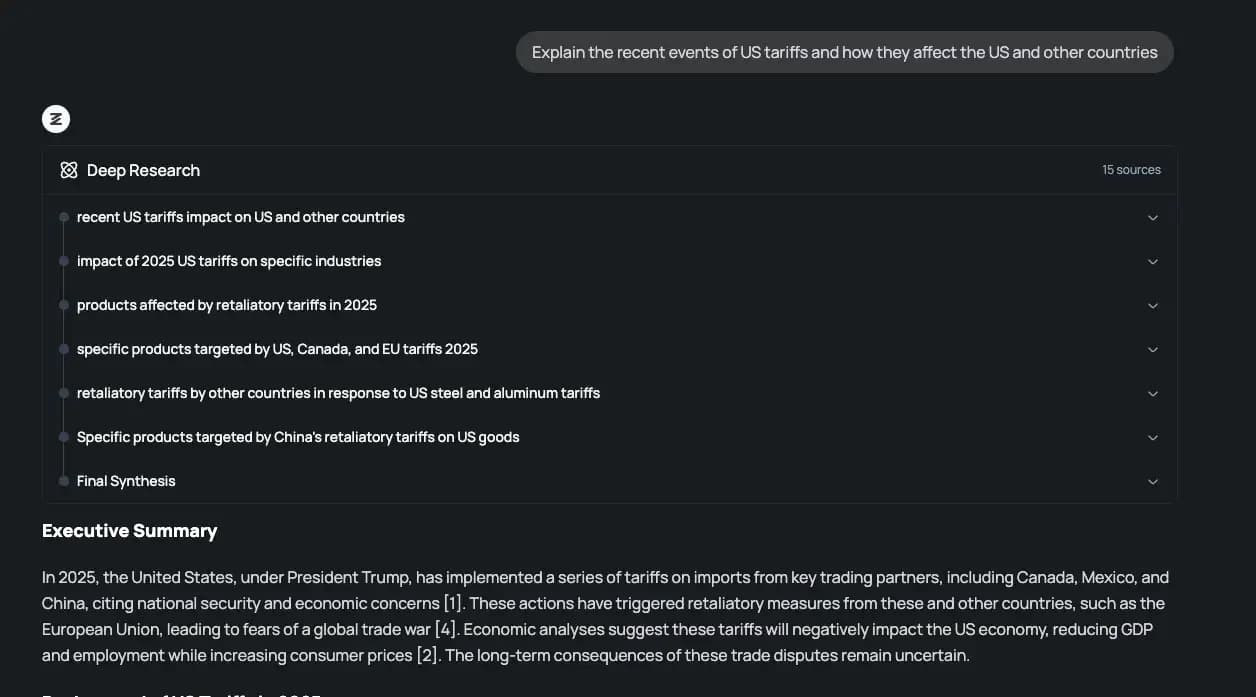
A deep research run lists the searches and sources it read, and the summary carries numbered citations to check.
Pricing
Document review and drafting on one plan
Zemith Plus is $15.99 a month with 1.5M credits and includes file creation, deep research, Library projects for each matter and the paid models. A deep research run costs 100,000 credits. Zemith is not a legal advice service.
The Free plan is chat with the free models. Tools, files and Creative Studio need Plus.
- $15.99a month for Zemith Plus
- 1.5Mcredits every month
- $10for a top-up of 800k credits. Top-ups never expire.
What Our Users Say
Great Tool after 2 months usage
"I love the way multiple tools they integrated in one platform. Going in the right direction."
— simplyzubair
Best in Kind!
"The quality of data and sheer speed of responses is outstanding. I use this app every day."
— barefootmedicine
Simply awesome
"The credit system is fair, models are perfect, and the discord is very responsive. Quite awesome."
— MarianZ
Great for Document Analysis
"Just works. Simple to use and great for working with documents. Money well spent."
— yerch82
Great AI site with accessible LLMs
"The organization of features is better than all the other sites — even better than ChatGPT."
— sumore
Excellent Tool
"It lives up to the all-in-one claim. All the necessary functions with a well-designed, easy UI."
— AlphaLeaf
Well-rounded platform with solid LLMs
"The team clearly puts their heart and soul into this platform. Really solid extra functionality."
— SlothMachine
Best AI tool I've ever used
"Updates made almost daily, feedback is incredibly fast. Just look at the changelogs — consistency."
— reu0691
Questions, answered
Can Zemith review contracts?
Zemith can read uploaded contracts, summarize clauses, flag unusual terms and compare versions. It does not give legal advice, so a lawyer should check its output.
Can Zemith do legal research?
Deep research reads many web pages and writes a report with citations. Always verify cases and statutes against primary sources before relying on them.
Can Zemith draft legal documents in Word?
Yes. Zemith creates Word documents and PDFs you can download and edit, such as memos, letters and first drafts of agreements.
Can I keep each matter's documents together?
Yes. A Library project keeps a matter's files, chats and instructions in one place, up to 50 sources on paid plans, so you do not have to re-upload documents for every question.
What legal teams open next
Features
Also made for


Ready when you are.
Start free on the web, iOS or Android.
Get Started for Free →No credit card required