Regex Pattern Generator Guide for AI Devs
Master the regex pattern generator workflow with AI. Learn to build, test, and debug robust expressions using Zemith's Coding Assistant for real-world data.
You're staring at a regex that looked perfectly reasonable five minutes ago. It passed the sample in your browser, accepted the obvious input, and then production found a string containing a newline, an accented character, or one extra delimiter. Suddenly the pattern is either rejecting valid data or matching half the log file. Regex has a special talent for making a tiny punctuation mark feel like a career decision.
A regex pattern generator can speed up the first draft, but “generate and copy” isn't a production workflow. The reliable approach is to generate from concrete examples, select the target runtime, inspect every token, and test both expected matches and deliberate false positives. AI is useful here, provided you treat its output as a candidate to audit rather than an oracle wearing a hoodie.
Why Natural Language Prompts Fail At Regex Generation
Natural language is flexible. Regular expressions are not. If you ask an AI to “match valid email addresses,” you haven't defined what valid means for your application. Should plus-addressing be accepted? Are international characters allowed? Must the entire input match, or is an address embedded inside a sentence enough? A model can produce a plausible expression for any of those interpretations, and all of them can be wrong for your form.
That ambiguity explains why a conversational prompt often creates an overbuilt pattern. The generator fills in missing requirements with assumptions, sometimes adding nested groups, broad character classes, and lookarounds that nobody asked for. The result may look clever while accepting foo@bar, rejecting a legitimate address, or behaving differently in the runtime where your code really runs.
Regular expressions have always demanded this kind of precision. Regular expressions originated in the 1950s, when Stephen Cole Kleene formalized regular languages, entered practical computing in the 1960s through Ken Thompson's QED editor, and became part of Unix text-processing tools. POSIX had standardized Basic Regular Expressions and Extended Regular Expressions by 1986, helping unify behavior across Unix systems. The syntax feels compact because it encodes strict rules, not because the underlying problem is simple.
Examples are a better specification
The strongest prompt usually looks less like a question and more like a small test file:
- Should match:
INV-2026-0042,INV-2026-7811 - Should not match:
INV-26-0042,invoice-2026-0042,INV-2026-42 - Match scope: the entire string
- Runtime: JavaScript
- Input conditions: no leading or trailing whitespace
This format removes interpretation from the important boundaries. Research on example-driven synthesis supports the general strategy. One study reported that 100 examples were sufficient to push F-measure above 90%, while exposing more subexpressions improved solve rates from 41.1% with 10 queries to 47.7% with 20 queries in the cited regex pitfalls guidance. The practical lesson is simple: richer specifications give a generator less room to improvise.
If you're experimenting with AI-assisted development more broadly, these principles also apply to testing AI prompts in apps. Test the prompt as an input to a system, not as a magic spell. A prompt that produces a neat answer once may still fail when examples, locales, or runtime constraints change.
For a useful companion, see these prompt engineering tips. The same discipline applies here: state the context, define the output, include counterexamples, and make the model explain its assumptions.
Practical rule: If you can't write a convincing negative example, you probably haven't defined the pattern yet.
Building Reliable Patterns From Messy Real World Samples
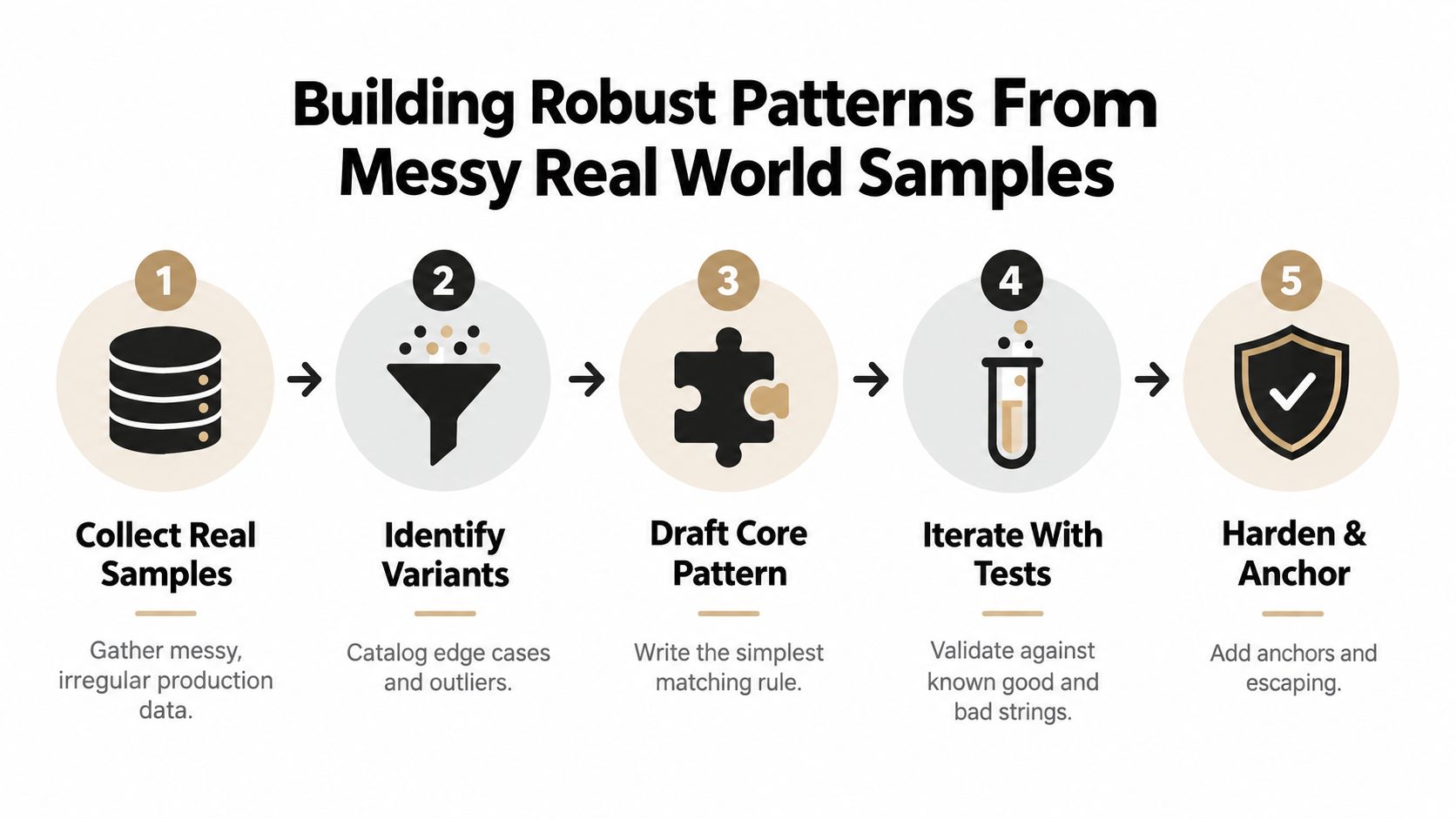
Production data rarely arrives as a tidy row of identical values. Logs contain optional fields, users paste inconsistent whitespace, exports mix delimiters, and multilingual text introduces characters a first draft never considered. A generator can turn that variation into a candidate pattern, but the useful work starts by converting messy input into explicit evidence.
Start with the boundary, not the syntax
Collect samples from the same input path your application uses. Remove secrets and personal data, while preserving meaningful variation. A log identifier may sit beside punctuation, at the start of a line, or after a label. A user-entered name may contain apostrophes, accents, or repeated spaces. The sample set should describe the values the application accepts, not the cleanest input users might submit.
Organize the cases into three groups:
- Positive examples, values that must match.
- Negative examples, values that resemble the target but must fail.
- Boundary examples, values exposing whitespace, line breaks, empty fields, casing, Unicode, or adjacent text.
State the role of each group in the prompt. For example: “Generate a JavaScript regular expression that matches the complete identifier. It must match these positive examples, reject these near-misses, explain each token, and provide executable tests. Do not broaden the accepted format without identifying the change.”
Example-driven prompts give a generator less room to invent rules. That matters in logs and multilingual text, where a lookalike character or unexpected separator can alter the result. The regex generator from Olaf Neumann provides a useful reference for an example-first workflow, but its output still needs review against your runtime and data contract.
Turn raw text into controlled cases
Do not paste an entire production dump into a model and hope it discovers the specification. Extract representative lines and label them. For a log field, include a valid line with surrounding context, a valid standalone value, a malformed value, and a value containing a misleading prefix or suffix.
Extraction and validation require different boundaries. If the pattern extracts a field, define what belongs inside the capture group and what remains outside it. Guidance on using regex in data extraction reinforces this distinction. Tell the generator whether it should find a substring or validate the complete field.
Use a focused iteration loop:
- Generate: request the simplest candidate that satisfies the labeled cases.
- Explain: require a token-by-token breakdown and the assumptions behind it.
- Test: run positives, negatives, and boundary cases in the target runtime.
- Revise: add one failing case at a time, then check that earlier matches still behave correctly.
- Freeze: store the examples beside the pattern as regression tests, and run them in CI whenever surrounding normalization code changes.
The goal is a pattern whose behavior the next developer can explain during a Friday incident, not a code-golf trophy. That standard catches false positives before they become production data.
Navigating Quantifiers And Cross Runtime Syntax Traps
Quantifiers and engine differences are where generated patterns break in production. A token may consume more text than intended, or rely on a feature that the target language does not support. Those failures often survive a quick tester and appear only with longer input or a different runtime.
Start with quantifiers. A greedy quantifier consumes as much as possible, then backtracks when later tokens fail. A lazy quantifier takes the shortest match and expands when necessary. A possessive quantifier refuses to give characters back in engines that support it. These choices affect both the winning substring and the amount of work the engine performs. This guide to regex quantifiers explains the operational differences.
Suppose an AI-generated extractor places a broad token between two delimiters. Greedy behavior can run to the final delimiter on a line, while lazy behavior may stop at the first. The right choice depends on the data contract. Supply examples containing repeated delimiters so the generator has to show its intended boundary instead of guessing.
The small symbols with large consequences
JavaScript assigns specific meanings to common operators. The dot matches one character except line terminators. * permits zero or more repetitions, + requires one or more, and ? makes the preceding token optional. Ranges such as {n}, {n,}, and {n,m} specify exact, minimum, or bounded repetition. Use the MDN regular expression cheatsheet to verify an explanation that sounds more certain than the test results.
Inspect anchors and character classes as well. ^ targets the start of a string and $ targets its end. In common regex usage, \d, \w, and \s represent digits, word characters, and whitespace, as summarized in this regular expressions quick start. Without anchors, a validator can accept a valid fragment inside an invalid value. Broad classes can also admit characters that a downstream parser rejects.
Portability is a separate requirement
A pattern tested in JavaScript may fail in Python, Go, Java, or PHP. Lookaheads, backreferences, Unicode handling, escaping rules, and quantifier support differ among engines. The host-language string literal may reinterpret backslashes before the regex engine receives them, creating a particularly annoying class of bug.
Name the runtime before asking an AI tool to generate the pattern. Compile and test the actual expression there, rather than relying on a browser sandbox. Request a portability note that lists unsupported constructs and offers a simpler alternative where possible.
Keep the pattern, runtime assumptions, examples, and explanation together. Clear code documentation best practices help preserve that behavioral contract when someone changes the surrounding code months later. A short regex should come with tests, not a folklore lesson.
Integrating Regex Workflows With Zemith Coding Assistant
A browser tester, an IDE, a chatbot, and a documentation tab can turn a five-minute regex task into a small expedition. Keep the specification, candidate pattern, tests, explanation, and implementation together instead. Zemith's Coding Assistant supports that workflow with AI-generated snippets, debugging, live previews, code explanations, and access to models including Gemini-2.5 Pro and Claude 4 Sonnet.
A practical workspace loop
Start in Smart Notepad with a compact specification. State the target language, whether the pattern validates or extracts, positive and negative examples, whitespace rules, case sensitivity, and Unicode expectations. Request three outputs: the regex, a plain-language explanation, and tests covering every supplied example.
Send the candidate to Coding Assistant with the surrounding function or variable names from your project. Ask it to integrate the expression without changing the input contract. A regex can be correct while the surrounding code trims, normalizes, escapes, or splits the input in a way that changes the result.
Then work through failures using the exact input string. State whether it should match and request the smallest safe change. Require an explanation of which new strings the change might admit. That question helps prevent the familiar fix where one edge case gets repaired by turning a validator into a welcome mat.
The AI-powered coding assistant workflow is useful when the regex needs surrounding boilerplate, tests, error handling, or comments. Let the assistant draft those pieces, while keeping the examples as the source of truth.
After a substantive test pass, inspect the expression in the intended language through the live preview or project context. A green preview is not proof of security. Review nested repetition, broad wildcards, and unbounded input before merging. Teams reviewing AI-generated code can also use OWASP-safe AI code practices for guardrails around review, data handling, and verification.
A short walkthrough can help orient the workflow:
Export only after the candidate passes tests in the target runtime. Keep the prompt or specification beside the implementation, so future changes begin with known requirements rather than reverse-engineering punctuation from a dusty code review.
Debugging Edge Cases And Avoiding False Positives
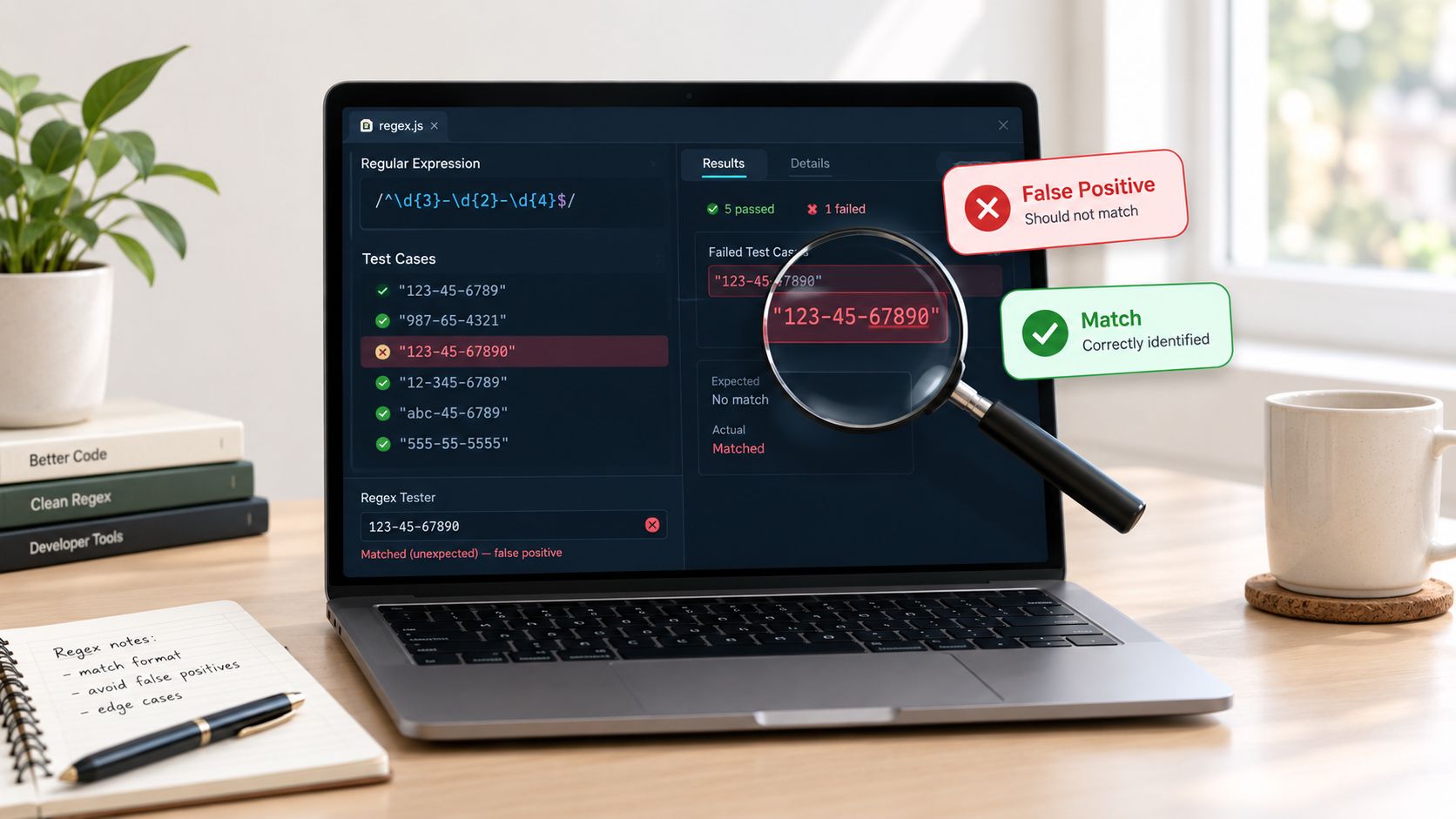
A generated regex usually fails in one of two directions. It rejects a value your users reasonably expect to submit, or it accepts a value that should have been rejected. The second failure is harder to notice because the application appears to work until a downstream parser, database constraint, or security check objects.
I once spent too long debugging a pattern that matched the intended identifier but also matched the identifier when embedded inside a longer token. The expression itself looked fine in isolation. The missing piece was match scope. Once the test included surrounding characters and required a complete-string match, the problem became obvious: the pattern needed explicit boundaries rather than optimism.
Make the test set adversarial
Ask the AI to generate cases designed to break the pattern, but review those cases yourself. Useful categories include:
- Empty input: empty strings and strings containing only whitespace.
- Boundary changes: one character too short, one character too long, and valid text with an extra prefix or suffix.
- Formatting noise: tabs, line breaks, repeated separators, and non-breaking spaces.
- Unicode variation: accented letters, non-Latin scripts, visually similar characters, and mixed normalization.
- Abuse-shaped input: unusually long strings, nested delimiters, and repeated near-matches that could trigger excessive backtracking.
Each test needs an expected result and a reason. “Should fail” isn't enough. Write “fails because the field is missing its required prefix” or “fails because the value contains an unapproved separator.” That makes future maintenance much less mysterious.
Explainability beats cleverness
A major gap in regex generator content is explainability and language-flavor selection. Users need to know why a pattern fails in JavaScript, Python, or Java, and how to adapt it without blindly replacing syntax. Tools such as regex101's interactive explanations demonstrate why token-level feedback matters, especially when the same-looking expression behaves differently across engines.
Ask the generator to annotate every group, class, anchor, and quantifier. If it uses a lookahead or backreference, require a plain-language explanation and a fallback that avoids the feature when portability matters. Then compare the explanation with the actual runtime behavior. The code wins every argument.
For a broader debugging routine, these code debugging practices are useful beyond regex. Log the input safely, isolate the smallest failing case, reproduce it in the target environment, and add a regression test before changing the pattern.
Your Production Ready Regex Validation Checklist
A production-ready regex is the smallest understandable pattern that meets a defined matching goal, works in the target runtime, and survives inputs designed to break it. AI can draft that pattern quickly. Shipping it still requires inspection, compilation, and tests.
Example-driven synthesis has a strong practical case. A 2025 systematic comparison reported that reuse-by-example reached 98.11% accuracy on full-matching tasks, ahead of formal synthesis tools in that comparison, including RFixer at 88.00%. On partial-matching tasks, reuse-by-example reached 65.13%, while RFixer reached 55.88%. The distinction matters because validating a complete value and extracting a substring require different test contracts. See the regex benchmark comparison for methodology and context.
Run the final review
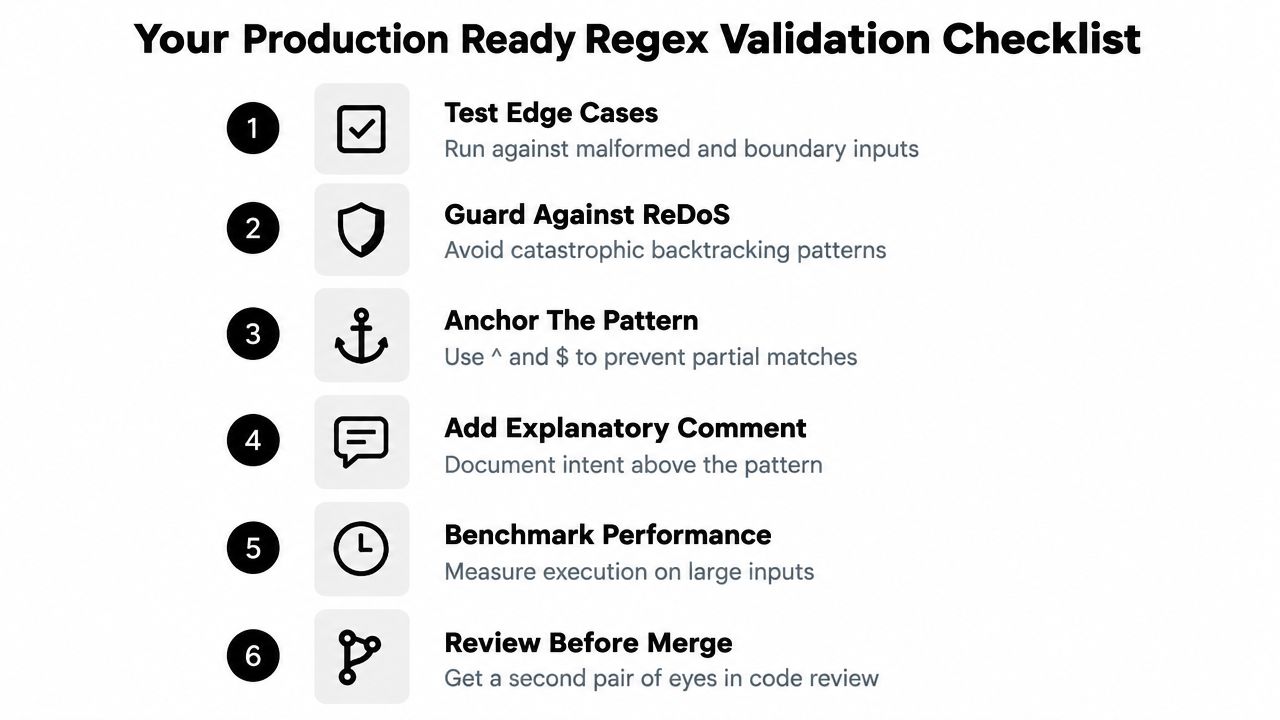
Use this checklist before committing a generated expression:
- Confirm the objective: State whether the pattern validates a complete value, extracts a fragment, or searches within text.
- Verify the runtime: Compile and execute it in production's language and engine. For example, compile the pattern with Go's
regexppackage to confirm RE2 semantics before shipping. - Check the boundaries: Add
^and$for complete-string validation, then test valid content with adjacent junk. - Inspect quantifiers: Identify nested repetition, broad wildcards, and unnecessary backtracking paths. Choose greedy, lazy, or possessive behavior deliberately.
- Test the negatives: Include malformed values, near-misses, whitespace variants, Unicode cases, and long inputs.
- Document the contract: Record what the expression accepts, rejects, and why unusual constructs exist.
The JavaScript regex cheatsheet helps verify basic operators, while runtime documentation settles engine-specific behavior. A generator's confidence is not a substitute for compilation.
Review the surrounding code too. Confirm that normalization occurs before matching, error messages describe the actual rule, and callers do not treat a successful match as proof of semantic validity. Regex establishes shape. Business rules usually need code.
Use these software testing best practices to make the final pass repeatable: generate, inspect, test adversarial inputs, verify the runtime, and review. AI makes the first draft cheaper. It does not make the contract optional.
Zemith combines regex generation, code explanations, debugging, live previews, and multi-model AI access in one workspace. Try the Zemith Coding Assistant with messy inputs, request positive and negative tests, and keep the final pattern readable enough for your future self.
Explore Zemith Features
Every top AI. One subscription.
ChatGPT, Claude, Gemini, DeepSeek, Grok & 25+ more








Always on, real-time AI.
Voice + screen share · instant answers
What's the best way to learn a new language?
Immersion and spaced repetition work best. Try consuming media in your target language daily.
Voice + screen share · AI answers in real time
Image Generation
Flux, Nano Banana, Ideogram, Recraft + more

Write at the speed of thought.
AI autocomplete, rewrite & expand on command
Any document. Any format.
PDF, URL, or YouTube → chat, quiz, podcast & more
Video Creation
Veo, Kling, Grok Imagine and more

Text to Speech
Natural AI voices, 30+ languages
Code Generation
Write, debug & explain code
Chat with Documents
Upload PDFs, analyze content
Your AI, in your pocket.
Full access on iOS & Android · synced everywhere
Your infinite AI canvas.
Chat, image, video & motion tools — side by side
Transparent, High-Value Pricing
Free
No credit card required
- Limited daily usage
- Selected AI models to try
- Limited features
Plus
- Choose from multiple leading models — GPT, Claude, Gemini and Grok.
- 25× more usage than Free.
- Create and edit images with Creative Studio.
- Connect your favorite apps and get work done in one place.
- Research the web and turn sources into clear answers.
- Turn documents, websites and YouTube into podcasts, flashcards and reports.
- Build repeatable workflows and stay focused with FocusOS.
Professional
- Everything in Plus, and:
- Unlock every model on Zemith, including GPT 6 Astra, Claude 5 Opus and Sonar Pro.
- 50× more usage than Free.
- Create more with the full Creative Studio toolkit.
- Let agents work in the background — run Cloud tasks and schedule recurring work.
- Push further on complex work with Max Mode.
- Unlimited GPT 5.4 Mini usage.
- First access to new features.
Trusted by teams at






What Our Users Say
Great Tool after 2 months usage
"I love the way multiple tools they integrated in one platform. Going in the right direction."
— simplyzubair
Best in Kind!
"The quality of data and sheer speed of responses is outstanding. I use this app every day."
— barefootmedicine
Simply awesome
"The credit system is fair, models are perfect, and the discord is very responsive. Quite awesome."
— MarianZ
Great for Document Analysis
"Just works. Simple to use and great for working with documents. Money well spent."
— yerch82
Great AI site with accessible LLMs
"The organization of features is better than all the other sites — even better than ChatGPT."
— sumore
Excellent Tool
"It lives up to the all-in-one claim. All the necessary functions with a well-designed, easy UI."
— AlphaLeaf
Well-rounded platform with solid LLMs
"The team clearly puts their heart and soul into this platform. Really solid extra functionality."
— SlothMachine
Best AI tool I've ever used
"Updates made almost daily, feedback is incredibly fast. Just look at the changelogs — consistency."
— reu0691