Your Go-To Writing Style Guide Template Steal This and Start Today
Stop the content chaos. Grab our free writing style guide template (DOCX/Markdown) and learn how to build a consistent brand voice that actually works.
A good writing style guide template is more than just a document; it's your brand's personality captured on paper. It lays out the ground rules for everything from voice and tone to the nitty-gritty of grammar and formatting. The goal? To make sure everyone on your team sounds like they're singing from the same hymn sheet, instead of a chaotic karaoke night.
Why Your Brand Needed a Writing Style Guide Yesterday

Let's be honest. Does your content sometimes suffer from multiple personality disorder? One blog post sounds like a formal academic paper, while the next one reads like a text from your perpetually-caffeinated intern. If that sounds familiar, you're not alone.
This kind of inconsistency is more than just a minor annoyance—it's quietly chipping away at your brand's credibility.
Without a central source of truth, chaos reigns. Your marketing team might use "e-commerce," while the sales team insists on "ecommerce." The support folks are super casual in their emails, but your blog posts are buttoned-up and stiff. It all adds up to a jarring customer experience that breeds confusion and erodes trust. What kind of writing style guide for brand consistency are you even aiming for if everyone's playing a different game?
From Content Chaos to Brand Consistency
A writing style guide template is your first real step toward ending the madness. It's the foundational document that aligns every single piece of content, from a tweet to a whitepaper, with who you are as a brand. Think of it as the constitution for your content.
This table gives you a quick look at the common content headaches a style guide solves, contrasting the 'before' and 'after' scenarios for your team and brand.
Ultimately, a style guide transforms your content from a jumbled mess into a cohesive voice that builds real authority.
It's the difference between a garage band and a symphony orchestra. Both make noise, but only one creates a masterpiece.
The Real-World Benefits of a Unified Voice
And here's the best part: a well-made guide doesn't just fix problems; it makes everyone's job so much easier. It provides clear answers, which means less time spent second-guessing and more time creating. No more endless Slack debates over whether it's okay to start a sentence with "And."
When your voice is predictable and reliable, your audience knows exactly what to expect. This builds a much stronger connection and positions you as a trustworthy authority in your space. This is a critical first step, and you can dive deeper into best practices for documentation in our dedicated guide.
The numbers back this up, too. A well-crafted style guide can slash content inconsistencies by up to 70%. We've seen teams that use them publish 25% faster and watch their audience engagement climb by a whopping 40%. If you're curious, you can read the full research on content style guides on HubSpot to see just how powerful this can be.
In short, a style guide solves these all-too-common headaches:
- Mixed Messaging: It gets everyone telling the same brand story, the same way.
- Wasted Time: It kills painful editing cycles by providing clear rules from the get-go.
- Brand Dilution: It protects your brand's unique personality from being watered down.
Creating this document is a genuine investment in your brand's future. It makes sure every single word works for you, not against you. And with a platform like Zemith, you can host this living document in a shared workspace, making it dead simple for your entire team to find, use, and follow. It’s how you turn a dusty document into a daily driver.
What Goes Into a Truly Useful Style Guide
Alright, so you're sold on the idea. But staring at a blank document labeled "Style Guide" can feel a bit like facing Mount Everest in flip-flops. What actually goes into this thing to make it useful? This is where we stop talking theory and start building the actual blueprint for your brand's voice.
A great style guide isn't just a dusty list of grammar rules. It’s a living document that captures your brand's unique personality. It’s the difference between vaguely telling a writer to "make it sound professional" and giving them the specific tools they need to nail it every time.
Defining Your Voice and Tone
Before you get lost in the weeds of punctuation, you have to define your brand’s soul. Think of it this way: voice is your brand's personality, and it should always be consistent. Tone is the emotional inflection you use in different situations—it can, and should, change.
So, are you a witty sidekick, a wise mentor, or a cool older sibling? Answering that question is the first and most critical step. Don't just settle for buzzwords like "friendly" or "authentic." Dig deeper.
- We are... (e.g., "curious, encouraging, and clear").
- We are not... (e.g., "academic, condescending, or bubbly").
- Our voice sounds like... (e.g., "a knowledgeable friend explaining a complex topic over coffee").
Once you nail this down, every other decision becomes way simpler. You can even host these core principles in a Zemith project space, making them instantly accessible to anyone creating content. This ensures your brand's core personality is never forgotten.
The Nitty-Gritty Grammar and Mechanics
This is the section that settles all those tiny, time-wasting arguments once and for all. Consistency here is what makes your writing feel polished and professional. You don’t need to reinvent the wheel—just make some firm decisions and stick to them.
Here are a few key things to document in your writing style guide template for content creators:
- Punctuation: Are you Team Oxford Comma or not? How do you use em dashes versus hyphens? Settle the debate.
- Capitalization: Do you use title case or sentence case for blog post headlines? What about feature names?
- Numbers and Dates: When do you spell out numbers (one through nine) versus using numerals (10 and up)? What's your standard date format? (e.g., January 1, 2024 vs. 1 Jan 2024).
These might seem like small details, but they add up to create a seamless reading experience. Making these calls upfront saves countless hours in editing down the line.
"A good style guide doesn't restrict creativity; it removes the boring decisions so writers can focus on the creative ones."
The Forbidden and Encouraged Word List
Every organization has its own lingo—a unique set of terms, acronyms, and industry jargon. Your style guide is the perfect place to create a master list of these words, clarifying how they should (and shouldn't) be used.
A simple "Do/Don't" table works wonders here:
This is also where you get to banish words that just don't fit your brand voice. Maybe you're tired of seeing corporate jargon like "synergy" or cliches like "circle back." Put them on the "forbidden" list. Think of it as your brand’s bouncer, keeping the unwanted words out of the party.
Formatting and SEO Guidelines
How your content looks is just as important as what it says. This section of your style guide should provide crystal-clear instructions on formatting everything from blog posts to knowledge base articles and social media updates.
Be sure to specify rules for:
- Headings: When to use H2s, H3s, and H4s.
- Lists: How to format bulleted versus numbered lists.
- Visuals: Guidelines for image alt text, file naming conventions, and when to use bold or italics for emphasis.
For content creators, clear SEO instructions are an absolute gift. Detail your approach to keywords, meta descriptions, and internal linking. This ensures every piece of content is created with visibility in mind from the get-go. A smart way to manage this is by embedding these rules directly into your content templates on Zemith, so creators never have to guess.
Inclusive Language and Legal Must-Haves
Modern brands communicate with a diverse global audience, and your language must reflect that. Dedicate a section to inclusive language, providing guidelines on using gender-neutral terms, avoiding ableist language, and writing about people with dignity and respect.
This section also houses the boring but critical stuff. Include boilerplate copy for legal disclaimers, affiliate disclosures, or privacy policy mentions. Having these ready to copy and paste ensures you stay compliant and protects your brand.
To see just how crucial this is, consider that 72% of teams using style guides for market analysis reports cut their revision cycles by 45%. That clarity directly impacts high-stakes business decisions.
Ultimately, to make your style guide truly effective, it shouldn't just be a document; it needs to be a core part of a practical content governance framework. This elevates it from a simple reference sheet to a strategic tool that governs all content creation, ensuring consistency and quality at scale.
Your Free, Downloadable Writing Style Guide Template
Alright, theory is great, but it's time to actually build this thing. I’ve put together a free, ready-to-use writing style guide template to get you started.
No email signup required, no strings attached. Just a straightforward template you can grab and start molding into your own.
I've made it available in two popular formats, so you can pick what works best for your team:
- DOCX: Perfect if your team lives in Microsoft Word. It's the classic format that everyone knows how to use and share.
- Markdown (.md): This one’s for the more modern teams. It's ideal for developers and content folks who work in platforms like GitHub, Notion, or right inside your Zemith workspace.
Grab the version you prefer, and let's make it your own.
How to Customize Your Template (The Fast Way)
A template is just a starting point. Don't just download it and let it collect digital dust. Here’s a quick-and-dirty guide to customizing it in less than an hour.
First up, head straight to the Voice and Tone section. This is the absolute soul of your brand's personality. Avoid generic descriptions like "friendly and professional"—that’s a given. Dig deeper. Are you the witty, clever friend who makes complex topics fun? Or the trusted, reassuring advisor who breaks things down simply? Get specific.
Next, find the Forbidden and Encouraged Word List. This is your biggest quick win. Immediately add your company and product names, common misspellings you always see, and any specific industry jargon. I’m not kidding when I say this one simple list can instantly fix 50% of your most frequent edits.
The goal right now isn't perfection. It's to create a "good enough" guide that you can put into action today. You can refine it later, but getting started is what counts.
Finally, start cutting. A B2B tech company has totally different needs than an e-commerce brand selling handmade soap. If you’re in tech, you probably need rules for formatting code. If you're in finance, you need strict guidelines around compliance language. Be ruthless and delete any section that doesn't apply to you. A shorter, relevant guide that people actually read is a million times better than a massive one that gets ignored.
If you want to see other ways to structure your documentation, checking out resources like these Notion writing templates can offer some great inspiration for getting organized.
Bringing Your Style Guide to Life with Zemith
Alright, you've downloaded the template, maybe even tweaked it a bit. That’s awesome! But let's be real for a second: a style guide template saved in a random Google Drive folder is where good intentions go to die. It's not helping anyone collect digital dust.
The real challenge isn't creating the guide; it's getting your team to actually use it without you having to be the dreaded "style police." This is the point where you stop managing a document and start building a living, breathing resource for your team.
The secret? Integration. The easier it is for your team to find the guide right where they work, the more they'll actually lean on it. A static PDF is a roadblock. A searchable, collaborative hub is a game-changer.
This little flow chart nails the journey from a simple file to a core part of your daily workflow.
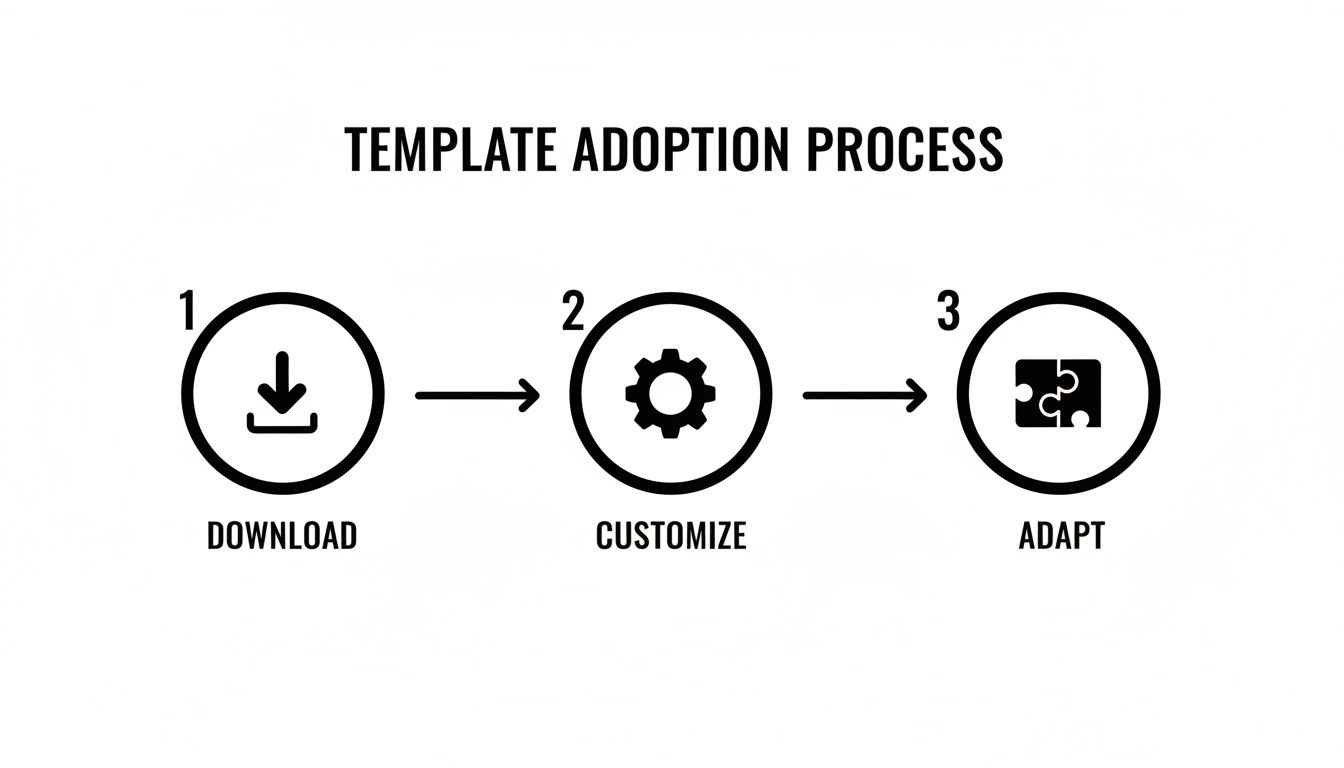
Moving from a downloaded file to a fully adapted workflow is exactly where a tool like Zemith makes all the difference.
Build Your Single Source of Truth
First thing's first: get that guide out of isolation. Instead of letting it languish as a lone file, you can build a dedicated knowledge base right inside Zemith. Think of it as your brand's central nervous system for all things content.
You can easily break it down into pages for each section of your guide:
- Voice and Tone: Your brand's personality, front and center.
- Grammar & Punctuation: Settle the Oxford comma debate once and for all.
- The No-Fly List: An always-updated list of words to use (and which ones to avoid).
- Formatting Rules: Clear instructions on headings, lists, blockquotes, and more.
The best part is that it’s completely searchable. When a writer has that "Wait, do we capitalize this feature name?" moment, they can find the answer in seconds instead of Slacking three different people. That alone cuts down on countless tiny interruptions and gives everyone more time to focus.
A style guide isn't a rulebook meant to be memorized; it's a safety net meant to be accessible. The easier you make it to find an answer, the less people will need to ask the question.
Create Content Templates with Baked-In Rules
Now for the really cool part. You can use your knowledge base in Zemith to create pre-built content templates that already have your rules applied. Imagine a writer firing up a new blog post, and the template already includes:
- The correct H2 and H3 headline formatting.
- A placeholder for the meta description with a character count reminder.
- A pre-written boilerplate for your standard CTA or legal disclaimer.
- Handy checklists for SEO and inclusivity guidelines.
This isn’t about boxing anyone in; it's about getting rid of the boring, repetitive tasks. It frees up your writers' brainpower to focus on what actually matters: telling a great story. They can spend less time sweating the small stuff and more time on the quality of their ideas.
Turn Your Guide into a Living Document
A style guide should never be a "set it and forget it" project. Language changes, your brand messaging evolves, and new questions will always come up. Using collaborative tools turns your guide from a static document into a dynamic conversation.
With Zemith, team members can leave comments right on specific guidelines. "Hey, should we add a rule for how we write about our new AI feature?" This kind of feedback loop is priceless. It keeps your guide relevant and ensures it reflects the real-world challenges your team is actually facing.
Suddenly, the style guide becomes a community-owned resource instead of a top-down decree. This shared ownership is the secret sauce for getting genuine buy-in from your team. When people feel like they have a say in shaping the guide, they're way more invested in following it.
For writers, having an AI partner makes this whole process even smoother. Integrating your guide with a smart platform means you can get real-time suggestions that already match your brand's voice. If you're looking to pair your new guide with powerful writing aids, check out our deep dive on how to choose the best AI writing assistant. Combining a solid guide with smart tools is how you scale great content.
Keeping Your Style Guide Fresh and Relevant

So, you’ve built your shiny new writing style guide. High-fives all around! But here's a little secret I've learned over the years: a style guide is more like a garden than a statue. You can’t just build it and expect it to stay perfect forever. You have to tend to it.
Language evolves, your brand messaging will shift, and new communication channels will pop up out of nowhere. If you just "set it and forget it," your guide will quickly become an outdated relic that people actively ignore. Keeping it fresh is the real key to getting long-term value from it.
Creating a Practical Maintenance Schedule
Don't panic—this doesn't mean you need a full-time style guide librarian (though that does sound kind of cool). A simple, consistent review schedule is all you need to keep things in tip-top shape. Think of it as a regular check-up to make sure your brand’s voice is still healthy.
Here’s a practical rhythm that I've seen work for most teams:
- Quarterly Check-ins (30 minutes): A quick huddle with key content creators and stakeholders. The goal is just to address any new questions, weird edge cases, or common mistakes that have cropped up. Is everyone confused about how to format posts for that new social media platform you joined? Let's add a rule for it.
- Annual Refresh (Half a day): This is a more thorough, page-by-page review. Does the voice and tone section still reflect your company’s mission today? Are there outdated product names or jargon that need to be scrubbed? This is your chance to do a deep clean.
Your style guide is a living document, not a historical artifact. Its job is to reflect who your brand is today, not who it was a year ago.
Who Owns the Style Guide?
"Who’s in charge of this thing?" It's a question you absolutely need to answer from day one. Without a clear owner, updates become a game of hot potato that nobody wants to play.
While the whole team should contribute feedback, you need a designated "keeper of the guide." This is often the Head of Content, a lead editor, or a marketing manager.
Their responsibilities should be crystal clear:
- Schedule and lead the quarterly and annual reviews.
- Gather feedback from the team on an ongoing basis.
- Make the final call on any proposed changes or additions.
- Announce updates to the entire organization so everyone stays in the loop.
This structure prevents the guide from becoming a free-for-all while still encouraging team-wide participation. When everyone knows who to go to with a question or suggestion, the whole process becomes much smoother. And when you host your guide in Zemith, that owner can easily manage permissions and update the central document in real-time.
Handling New Content Challenges
Your guide will inevitably face new challenges. A couple of big ones right now are the explosion of AI-generated content and the constant addition of new social media platforms. Your guide needs to have an answer for them.
When a new challenge emerges, don't just improvise. Add a section to your guide.
- AI Content Guidelines: Establish clear rules of engagement. Can your team use AI for brainstorming? For first drafts? What are the hard requirements for human review and fact-checking? Documenting this now will save you from major headaches later.
- Platform-Specific Tone: Your voice should be consistent, but your tone must adapt. Your LinkedIn posts should sound different from your TikTok videos. Create mini-guides for each major channel, outlining the specific tone, formatting, and a few "do/don't" examples.
By treating your style guide as a dynamic knowledge hub, you ensure it remains a genuinely useful tool. To learn more about turning static documents into active resources, check out our guide on building a knowledge base management system. This approach keeps your team aligned and consistently on-brand, no matter what new challenges come your way.
Common Questions About Writing Style Guides
You’ve made it this far, which probably means you’re either incredibly committed or you just woke up after dozing off on your keyboard. Either way, you're in the right place! Even with the best template in hand, a few questions are bound to pop up. You're not alone in wondering.
We've pulled together some of the most common questions we hear about creating and actually using a writing style guide. Let's get you some clear, no-fluff answers.
How Long Does It Take to Create a Writing Style Guide?
Honestly, that depends. If you're a small team with a pretty good grip on your brand voice already, you could hammer out a solid first draft in a single afternoon. Seriously. Just lock yourselves in a room, fire up some good tunes, and start making decisions.
For a larger organization with more stakeholders chiming in, it might stretch into a few weeks of meetings and revisions. The key is to aim for progress, not perfection.
A simple, 5-page guide that your team actually uses is infinitely better than a perfect 100-page encyclopedia that never sees the light of day.
Start with the absolute must-haves—voice, tone, core grammar rules—and build it out from there. You can always flesh out the finer details later on.
Style Guide vs. Brand Guide: What’s the Difference?
Great question! This one trips people up all the time. The easiest way to think about it is like a set of Russian nesting dolls.
- The Brand Guide: This is the biggest doll—the mothership. It covers everything about your brand, both visual and conceptual. Think logo usage, color palettes, your mission statement, and core company values.
- The Writing Style Guide: This is the next doll inside. It’s laser-focused on your "verbal identity," which is just a fancy way of saying the words you use. This is where you'll find rules on grammar, punctuation, word choice, and formatting.
- The Tone of Voice Guide: This is the smallest doll. Often, it's just a section within the main writing style guide. It defines your brand’s personality—are you quirky and fun, or serious and authoritative? Helpful but not condescending? That all goes here.
Our writing style guide template is designed to help you build that crucial middle doll, with a dedicated spot for the little one inside.
How Do I Get My Team to Actually Use the Style Guide?
Ah, the million-dollar question. Building the guide is one thing; making sure it doesn't become a digital paperweight is a whole other challenge. The secret? You have to make using it easier than not using it.
First, involve your team in creating it. Don't just hand down the rules from on high like stone tablets. When people have a say in the guidelines, they feel a sense of ownership and are way more likely to follow them.
Second, make it ridiculously easy to access. Don't bury it in a forgotten sub-folder on a shared drive. Put it somewhere central and searchable, like a Zemith knowledge base, where finding a rule takes just a few seconds.
Third, weave it into your daily workflow. Make it a required reading for all new hires. Reference it directly when giving feedback during content reviews. If you need a hand building that feedback loop, our guide on how to edit writing effectively can help you create a process that naturally reinforces your guide's rules.
Finally, lead by example. When leadership and senior editors consistently reference the guide, it signals to everyone else that it's important. A quick, fun kick-off meeting to launch the guide will get way more buy-in than a dry, all-staff email that everyone immediately archives.
Can I Use AI to Help Create My Writing Style Guide?
Absolutely! In fact, you probably should. Think of AI as your co-pilot for this project.
You can use it to brainstorm a list of tone words, generate "do" and "don't" examples for your team, or even simplify complex grammar rules into plain language. It can do a lot of the initial heavy lifting and really speed things up.
But—and this is a big one—don't let it fly the plane solo. Your brand’s voice is uniquely human. It’s a direct reflection of your people, your mission, and your values. Let AI help you build the scaffolding, but the final calls on personality and what your brand stands for have to come from you. The goal is an authentic guide, not a robotic one.
Ready to stop chasing down documents and start building a smarter content workflow? Zemith is your all-in-one AI platform to create, host, and integrate your style guide into a living, collaborative workspace. Bring your content, documents, and team together to build a consistent brand voice that truly connects with your audience. Get started with Zemith today.
Explore Zemith Features
Every top AI. One subscription.
ChatGPT, Claude, Gemini, DeepSeek, Grok & 25+ more








Always on, real-time AI.
Voice + screen share · instant answers
What's the best way to learn a new language?
Immersion and spaced repetition work best. Try consuming media in your target language daily.
Voice + screen share · AI answers in real time
Image Generation
Flux, Nano Banana, Ideogram, Recraft + more

Write at the speed of thought.
AI autocomplete, rewrite & expand on command
Any document. Any format.
PDF, URL, or YouTube → chat, quiz, podcast & more
Video Creation
Veo, Kling, Grok Imagine and more

Text to Speech
Natural AI voices, 30+ languages
Code Generation
Write, debug & explain code
Chat with Documents
Upload PDFs, analyze content
Your AI, in your pocket.
Full access on iOS & Android · synced everywhere
Your infinite AI canvas.
Chat, image, video & motion tools — side by side

Save hours of work and research
Transparent, High-Value Pricing
Trusted by teams at






Free
No credit card required
- 100 credits daily
- 3 AI models to try
- Basic AI chat
Plus
- 1,000,000 credits/month
- 25+ AI models — GPT, Claude, Gemini, Grok & more
- Agent Mode with web search, computer tools and more
- Creative Studio: image generation and video generation
- Project Library: chat with document, website and youtube, podcast generation, flashcards, reports and more
- Workflow Studio and FocusOS
Professional
- Everything in Plus, and:
- 2,100,000 credits/month
- Pro-exclusive models (Claude Opus, Grok 4, Sonar Pro)
- Motion Tools & Max Mode
- First access to latest features
- Access to additional offers
What Our Users Say
Great Tool after 2 months usage
"I love the way multiple tools they integrated in one platform. Going in the right direction."
— simplyzubair
Best in Kind!
"The quality of data and sheer speed of responses is outstanding. I use this app every day."
— barefootmedicine
Simply awesome
"The credit system is fair, models are perfect, and the discord is very responsive. Quite awesome."
— MarianZ
Great for Document Analysis
"Just works. Simple to use and great for working with documents. Money well spent."
— yerch82
Great AI site with accessible LLMs
"The organization of features is better than all the other sites — even better than ChatGPT."
— sumore
Excellent Tool
"It lives up to the all-in-one claim. All the necessary functions with a well-designed, easy UI."
— AlphaLeaf
Well-rounded platform with solid LLMs
"The team clearly puts their heart and soul into this platform. Really solid extra functionality."
— SlothMachine
Best AI tool I've ever used
"Updates made almost daily, feedback is incredibly fast. Just look at the changelogs — consistency."
— reu0691