


Every top model, with tools built in.
Search the web, run deep research, read files, create images and run code with GPT, Claude, Gemini, Grok and more.
Learn how analysis of video works: object detection, tracking, frame sampling, temporal models, metrics and a workflow you can use today.
You've got a long recording to review, and the summary sounds polished. But did the speaker say that before or after the chart changed? Was the key action a brief moment the system skipped between sampled frames? And can you point to the exact part of the video that supports the answer? Those details separate useful analysis of video from a confident guess.
Video analysis can help you find objects, actions, words and patterns without scrubbing through every second by hand. The hard part isn't producing an answer. It's preserving what happened, when it happened, and what evidence supports it.
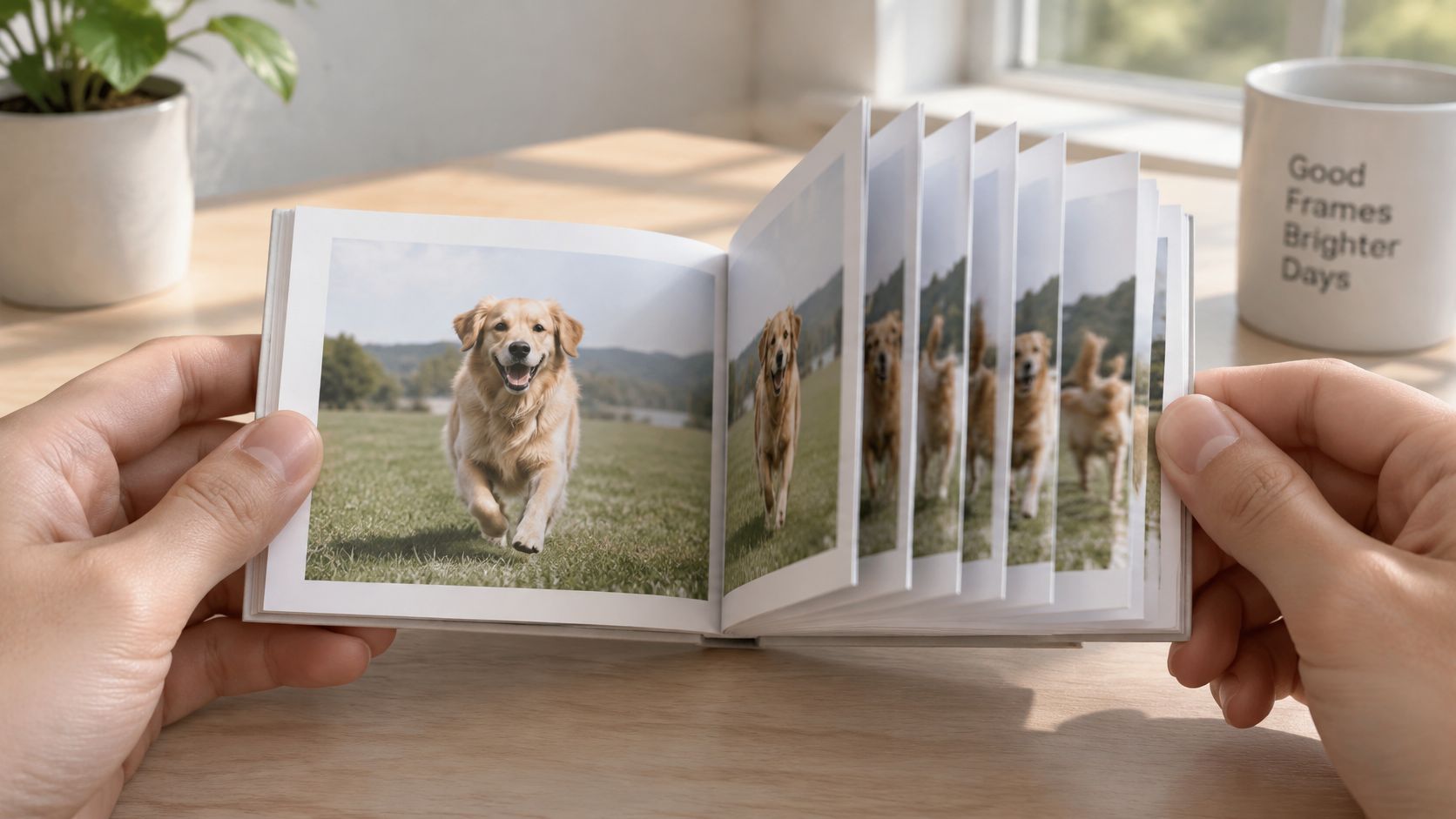
Analysis of video is like reading a flipbook. A photo is one page; a video is the whole flipbook. Analysis notices what changes between pages. A still image can tell you what's there, while video can also show when something happened, how fast it moved, the order of events, and how long they lasted.
A traffic camera might count cars in one frame, or track one van's speed across a junction. A tennis coach might review a serve to see whether the player's wrist snaps before the ball leaves the racket. In both cases, the sequence matters more than any single image.
That time dimension is also what makes quick summaries risky. A product demo can look perfect in one frame, while the app crash happens three seconds later. If the system samples the wrong moments or loses the order of events, it can produce a neat account of a video that misses the point.
Depending on the task, the output may include labels for recognized objects or actions, bounding boxes showing where objects appear, and timestamps that locate an event. It may also include trajectories that track movement, event segments with start and end times, or transcripts aligned to speech.
Those outputs are building blocks, not guarantees. A box can be accurate while the object's identity is wrong; a transcript can capture the words but miss what appears on screen. The value comes from connecting the right evidence across time.
The commercial interest is substantial: Grand View Research valued the global AI video analytics market at USD 12,630.2 million in 2024 (Grand View Research's AI video analytics market report).
Video analysis equals recognition plus time.
The practical path runs from choosing a task to building a pipeline, selecting models, checking metrics, fixing common errors and setting up a repeatable workflow.
Detection identifies objects in individual frames. Tracking links detections over time, so the system can follow one forklift rather than treating each sighting as a different vehicle. Action recognition labels what happened, and temporal action localization adds the start and end timestamps that make the label useful.
Some tasks work well without a complex visual model. For lectures, meetings and tutorials, OCR and audio analysis are often low-effort ways to capture slide headings, spoken explanations and key phrases already present in the file. A text-heavy demo may become searchable once you extract its on-screen labels and transcript.
If your question is only what appears, detection plus OCR may be enough. If you need to know what happened and when, add tracking and temporal localization. For related approaches to interpreting still images, see Zemith's guide to artificial intelligence image analysis.
A dependable pipeline starts by understanding the file, then turns its frames and audio into evidence that can be checked. Skip those checks and even a strong model may faithfully analyze the wrong version of the video.
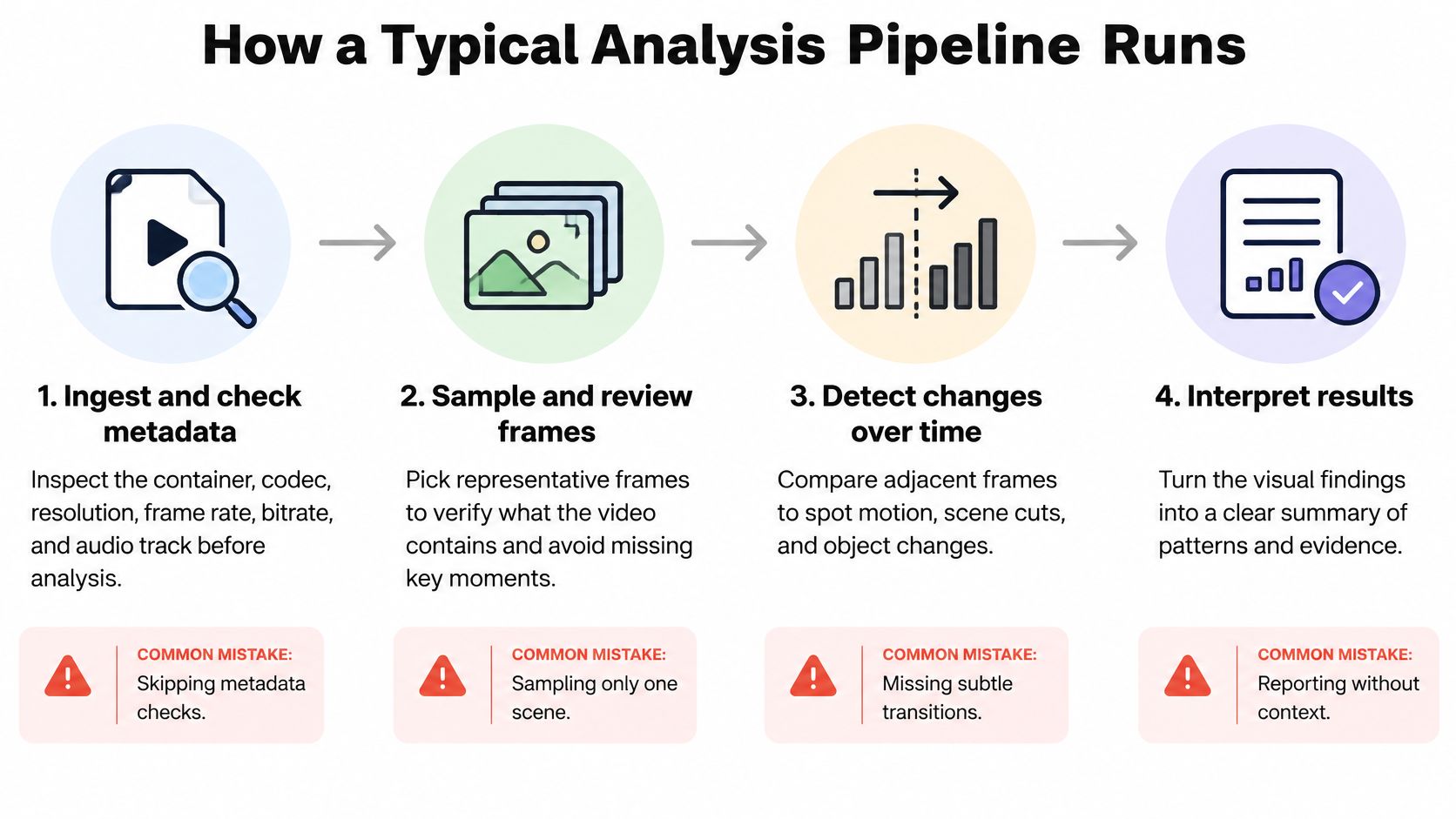
Ingest and check metadata. Inspect the container, codec, resolution, frame rate, bitrate, audio track and subtitle tracks before interpreting the footage. Adobe explains that MP4 is a container that can hold video, audio, subtitles and other data, while metadata can include resolution, bitrate and creation information, so an “MP4” filename alone tells you little about what's inside (Adobe's guide to formats and containers). Common slip: trusting the extension and missing a subtitle track or a lower-quality re-encode.
Preprocess the media. Decode the file, trim dead borders, resize frames to the model's input dimensions, normalize colour and stabilize shaky footage where appropriate. Common slip: shrinking a frame before OCR, which can erase the small text you need to read.
Sample frames. Use a light sampling rate for slow scenes, denser sampling when motion is fast, and keyframes around scene cuts; short sliding windows can supply context to clip-based models. Common slip: sampling at a steady rate without checking whether it skips the moment you care about.
Run per-frame models. Apply detectors or image encoders to selected frames to identify objects, text or visual features. Common slip: treating a detection on one frame as proof that an object stayed present throughout the clip.
Add the temporal layer. Link detections with a tracker, use a video model that processes clips, or smooth predictions across adjacent frames. Common slip: smoothing too aggressively, which can erase a brief but important action.
Fuse audio, transcripts and OCR. Put speech, sound events and extracted text on the same timeline as the visual findings. Common slip: summarizing each modality separately and combining the results without checking whether their timestamps line up.
Post-process the output. Suppress duplicate boxes, merge adjacent event segments and set confidence thresholds for each class. Common slip: applying one threshold to every class, even when a subtle event needs different treatment from a clearly visible object.
Store results with evidence. Save timestamps, confidence and references to the source frames so a reviewer can inspect each claim. Common slip: keeping only the final summary, which makes errors hard to locate and correct.
Video models handle time in two broad ways. Some inspect frames individually and add temporal reasoning afterward. Others process short clips so they can learn motion and event order more directly. The right choice depends on whether your bottleneck is cost, movement, ambiguous meaning or precise timing.
A frame detector plus tracker is a practical first choice for counting or following visible objects. It reuses image models and keeps compute manageable, but long occlusions can break identity: when a forklift disappears behind shelving, the tracker may assign it a new ID when it returns.
Clip-based models capture motion more directly. A 3D CNN processes space and time together, while a two-stream network adds optical flow to emphasize movement. That can help distinguish actions that look similar in a still frame, but the added computation and data preparation can make deployment harder.
Video transformers can model relationships across frames and patches, but memory use and training data needs are real constraints. Vision-language models are flexible when you need to ask open questions without training a task-specific model. Their fluent responses can still misplace an event, so treat timing claims as something to verify, not as a finished annotation.
If you're comparing different model types for a particular task, Zemith's multimodal AI agent guide offers another way to think about how models combine inputs.
Start with the cheapest method that meets your metric on a labelled sample of your own footage. Move to a heavier model only when motion order or ambiguous semantics are the actual bottleneck.
A single score can hide a weak boundary, a missed short action or a model that succeeds only on familiar-looking scenes. Temporal action localization makes the problem clear: the system must identify the action and predict its start and end times. Its segment counts as correct only when its temporal overlap with the ground-truth segment clears a chosen temporal Intersection-over-Union (tIoU) threshold.
That's why localization performance is reported as mean average precision (mAP) across multiple tIoU thresholds, not just one. A result can look acceptable at a lenient threshold but fall apart when the predicted boundaries need to be tighter. Check short and long actions separately, and inspect false positives near segment edges.
On THUMOS14, a graph-convolutional temporal localization module reached 50.9% mAP at tIoU 0.5, compared with 42.8% for the cited prior state of the art, illustrating how modelling relationships between temporal proposals can affect results (the temporal localization study).
For video question answering, a correct multiple-choice answer doesn't prove the model can explain its reasoning or find the supporting moment. For tracking, strong object detection won't reveal whether the system repeatedly loses an object's identity. Choose metrics that expose the failure mode you care about.
When comparing models, keep the evaluation setup consistent and read the metric definition before comparing scores. Zemith's AI model comparison tool can support a side-by-side review, but the test still needs to represent the footage and task you'll use.
Always reserve a held-out slice of your own videos for testing. Public benchmarks may not reflect your camera angles, lighting, language or editing style.
Three budgets shape a video analysis system: how quickly the answer must arrive, how much compute you can spend, and how many labelled examples you can prepare. A useful design starts with the deadline, not the fanciest available model.
For live security alerts, plan for a response around a second. A lightweight detector on an edge device can inspect a small sample of frames, with edge hardware and false alarms as the main costs. This setup favors fast, clear conditions over subtle interpretation.
Live sports or broadcast tagging can tolerate a short delay of a few seconds. A GPU server running a tracker and an action model can label plays or events, with GPU hours driving the cost. Meeting or lecture indexing can run in batch and take minutes to an hour; transcription, sampled frames and storage are the main components.
For research dataset labelling, there may be no hard response deadline. The central expense is annotator time, so model-generated pre-labels followed by human correction can reduce repetitive work. Before scaling, have two annotators label the same sample and compare their decisions; disagreements often reveal unclear instructions rather than a model problem.
Long-form archive search can accept hours of batch processing. Generate embeddings, store them in a vector index and retrieve likely matches later; storage and embedding compute become the main cost. These are planning ranges, not performance guarantees. Actual latency depends on video length, hardware, model and how much of the content you inspect.
Write down the latency target first. It determines the sampling rate, model size and hardware more than any model leaderboard does.
A summary of a long recording can sound convincing while missing a connection made much later. Preserve order by attaching a timestamp to every finding and keeping an event log that lets you connect related moments across a meeting, lecture or extended recording.
Don't confuse two events appearing together with one causing the other. Check what happened immediately before and after the claim, and ask for the exact evidence span that supports the conclusion. If the system can't point to a moment, treat the answer as unverified.
Audio carries meaning that visual-only review misses: speech, music, ambient sound and sometimes information supplied through captions or audio description. Check whether captions exist and match the spoken words, and whether an on-screen claim is supported by what the speaker says. For multilingual material, transcribe in the source language first, then translate while preserving timestamps.
A useful test is to take a lecture you know and ask for three claims with timestamps. Verify each claim against both the audio and the picture, including whether a visual change alters the meaning. For a noisy recording where crowd reaction matters, recovering crowd reactions from noisy footage can help focus attention on sound that a standard visual summary might ignore. Zemith's audio-to-text AI guide is another useful starting point for turning speech into reviewable text.
The most frustrating output is a model that sounds confident and is wrong. Don't polish the wording first. Find the failure in the evidence, then change the part of the pipeline that caused it.
Resolution alone doesn't determine whether text, facial expressions or product defects survive compression. Bitrate controls how much visual information is delivered each second. Adobe's reference estimates about 6.5 Mbps for 720p video at 24–30 frames per second and about 44–56 Mbps for 4K video at 2160p at lower frame rates (Adobe's video bitrate reference). Those examples aren't universal quality targets, but they show why a heavily compressed social-media copy may hide the fine detail an analysis needs.
When you care about evidence, upload the original or the clearest practical version. If you need text from a slide, crop and inspect that region at a size the OCR model can handle instead of hoping a tiny, blocky frame will cooperate.
Make timestamps and evidence mandatory for every claim. That habit catches errors earlier than another layer of confident prose.
Once the file and sampling plan are ready, keep the review work together instead of scattering transcripts, notes and model outputs across separate tools.
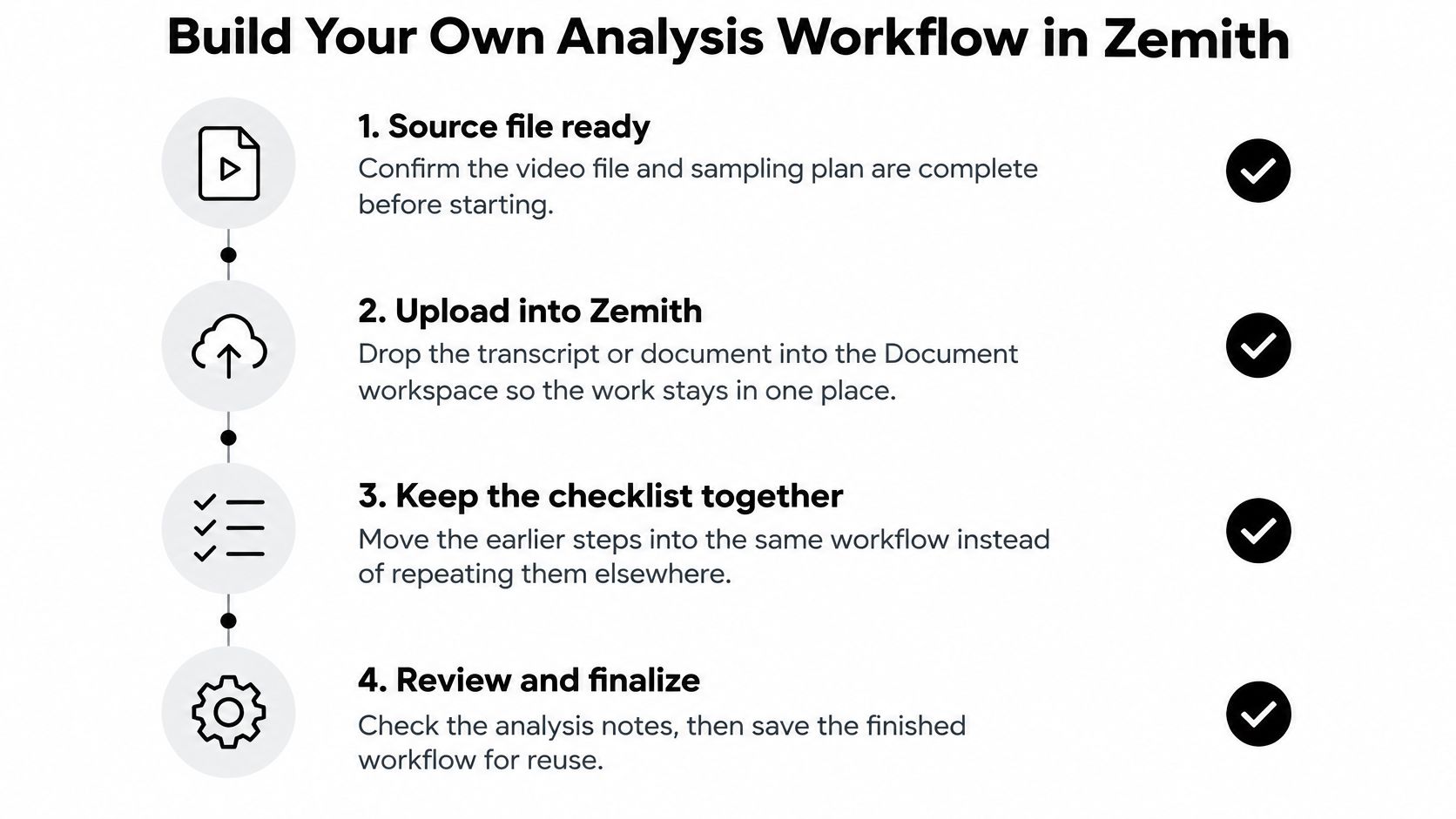
Upload the transcript or related document to Zemith's Document Assistant to chat with it, create summaries, and make quizzes or flashcards for a team. Use AI Live Mode to talk through what's on screen during a review, then draft findings in Smart Notepad and turn rough bullets into a report for the right audience.
Compare model answers to spot disagreements, and keep notes, transcripts and evidence together in a Project so the team can find them later. For long recordings, ask for suggested chapter titles with timestamps. YouTube's manual chapter requirements call for a description that begins at 00:00, includes at least three timestamps in ascending order, and gives each chapter a minimum length of 10 seconds (YouTube's chapter instructions).
A guide to AI workflow optimization can help you organize repeatable steps without turning every review into a fresh setup exercise. Start with one video you already know well, run it through the workflow, and check whether the timestamps match what you remember.
Use Zemith to bring transcripts, notes and AI-assisted review into one workspace, then compare the findings against the video's timestamps and evidence. Pick a familiar recording today and test whether the workflow gets the important moments right.
Pay less than one AI subscription and get GPT, Claude, Gemini and more, plus 50+ AI tools.







Trusted by teams at






The top models, plus image, video and voice tools, in one plan.
Without Zemith
ChatGPT PlusUS$20.00Claude ProUS$20.00Google AI ProUS$19.99SuperGrokUS$30.00Perplexity ProUS$20.00 MidjourneyUS$10.00
 ElevenLabsUS$6.00Le Chat ProUS$14.99
 RunwayUS$15.00Kling StandardUS$8.80
 Gamma PlusUS$12.00
 Otter ProUS$16.99
 QuillBot PremiumUS$19.95
 Photoroom ProUS$12.99
 Quizlet PlusUS$7.99
Total if paying separatelyUS$234.70/mo
"I love the way multiple tools they integrated in one platform. Going in the right direction."
— simplyzubair
"The quality of data and sheer speed of responses is outstanding. I use this app every day."
— barefootmedicine
"The credit system is fair, models are perfect, and the discord is very responsive. Quite awesome."
— MarianZ
"Just works. Simple to use and great for working with documents. Money well spent."
— yerch82
"The organization of features is better than all the other sites — even better than ChatGPT."
— sumore
"It lives up to the all-in-one claim. All the necessary functions with a well-designed, easy UI."
— AlphaLeaf
"The team clearly puts their heart and soul into this platform. Really solid extra functionality."
— SlothMachine
"Updates made almost daily, feedback is incredibly fast. Just look at the changelogs — consistency."
— reu0691
Hand off the research, writing, design and follow-ups. Zemith picks the tools it needs and brings back finished work.
Search the web, run deep research, read files, create images and run code with GPT, Claude, Gemini, Grok and more.
Zemith keeps working in the cloud and pings you when it's done.
Notion, Linear, Canva, Airtable and more. It asks before it creates or changes anything.
Docs, slides, sheets and PDFs, ready to send.
Chain models and tools on a visual canvas, from one prompt to a finished promo video.
Briefings, reports and reminders run on a schedule and are ready when you need them.
Real-time voice that can see your camera or screen.
The best image and video models, in one studio.
Turn PDFs, links and YouTube videos into podcasts, quizzes, flashcards and mind maps.














 Podcast
 Quiz
Quiz Flashcards
 Mind map
 Infographic