


Every top model, with tools built in.
Search the web, run deep research, read files, create images and run code with GPT, Claude, Gemini, Grok and more.
Tired of confusing data? Our guide to data analysis and report creation shows you how to turn raw numbers into clear, actionable insights your team will love.
Data analysis isn't just about crunching numbers; it's the art of turning raw, chaotic data into a story that drives real-world decisions. It’s the entire process—inspecting, cleaning, modeling, and then presenting what you've found in a way that actually makes sense to people. You’re aiming to deliver actionable insights, not just a spreadsheet full of figures that puts everyone to sleep.
We’ve all been there. A colleague drops a request: "Let's look at the sales data." Before you know it, you're drowning in spreadsheets and pivot tables, clicking around without a clear purpose. The problem isn't the data itself. It's that no one stopped to figure out what we were trying to solve in the first place.
Any good data project starts long before you open a single CSV file.
Jumping straight into the data without a clear goal is like starting a road trip with no destination in mind. You’ll burn through gas (and sanity), and you probably won't end up anywhere meaningful. The trick is to formulate sharp, specific questions that will guide you through the entire analysis. They become your North Star.
Before you touch a single cell, you have to know what success looks like. Are you trying to pinpoint why customer churn spiked by 15% last quarter? Or maybe you need to figure out which marketing channels are actually delivering high-value leads. Vague goals only ever produce vague, unhelpful results.
Get specific by asking a few pointed questions upfront:
I once spent weeks on a deep dive into website traffic patterns, creating what I thought were brilliant charts. I presented it to the leadership team, who stared back blankly. Their only concern was lead quality, not traffic volume. The report was a total flop because we answered a question nobody was asking. It was a tough lesson, but it taught me everything about knowing your audience.
To avoid that mistake, it helps to map out your strategy from the get-go.
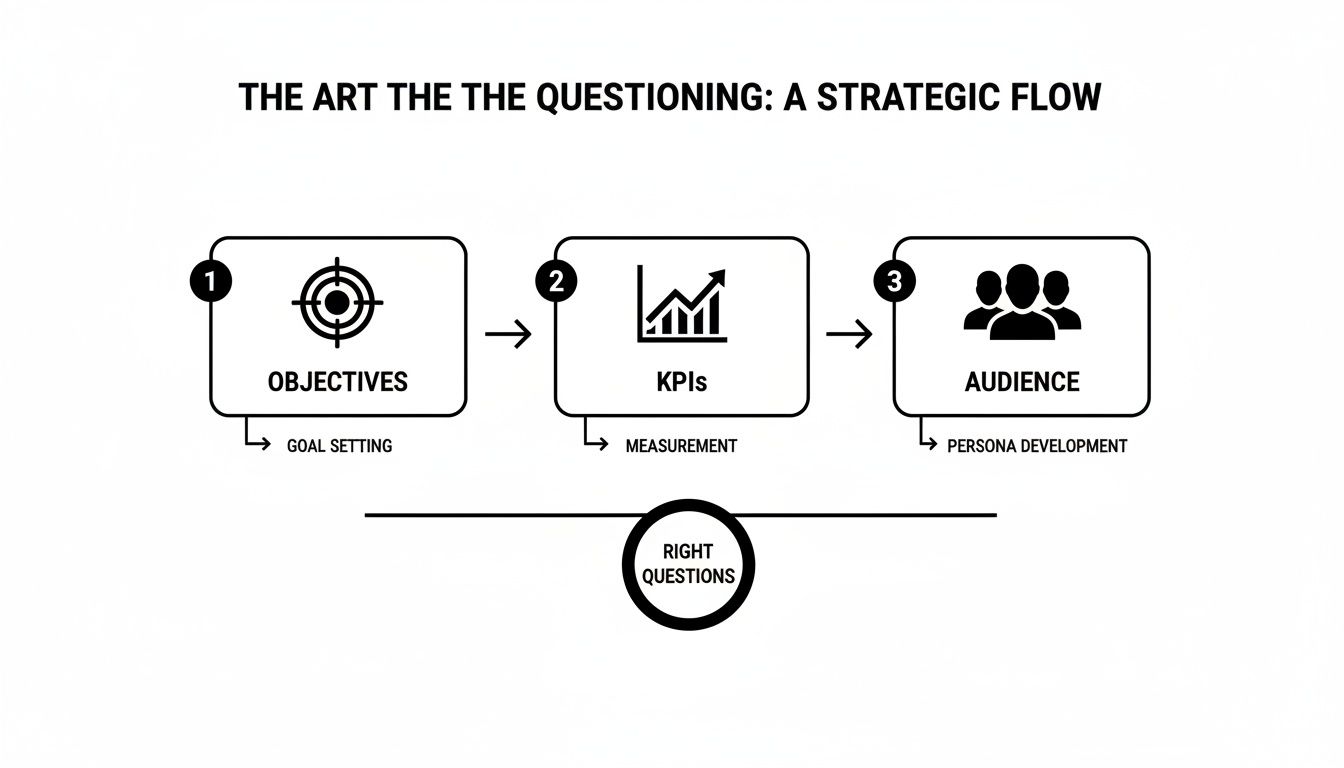
Following a flow like this ensures every piece of your analysis is directly linked to a business outcome and built for the people who will use it.
This whole questioning phase is a team sport, not a solo mission. Talk to your stakeholders. The folks in marketing, sales, and product have on-the-ground context you’ll never find in a database. Getting aligned from the very beginning saves a ton of rework and frustration later on.
This is where a tool like Zemith's Whiteboard really shines. You can get everyone in a shared virtual space to brainstorm questions, map out KPIs, and agree on the audience. It’s all about creating alignment before a single data point gets pulled. No more building reports in a vacuum only to find out you solved the wrong problem.
This groundwork is absolutely essential for making smart business choices. If you want to dig deeper into this philosophy, check out our guide on evidence-based decision making. When you nail down the right questions first, you transform data analysis from a technical chore into a powerful strategic tool.
Alright, let's talk about data cleaning. You've probably heard the old saying: data science is 80% cleaning data and 20% complaining about cleaning data. Okay, maybe I added that last part. But seriously, this is the unglamorous, behind-the-scenes work that makes or breaks your entire analysis.
Think of it like this: you wouldn't build a house on a shaky foundation, right? Same thing here. If your data is a mess, your data analysis and report will be too, and nobody trusts a report built on bad data. Raw data is almost never ready to go. It's a jumble of different formats, missing pieces, and typos. Your first job is to bring some order to that chaos.
After you've done this a few times, you start to see the same problems crop up again and again. You'll run into missing values, inconsistent text, and duplicate entries that mess with your counts.
Here are the usual suspects and how I typically handle them, especially if I'm working in Python with the Pandas library.
df.dropna(), but be careful—you might be throwing away a ton of good information. A smarter move is often to fill them in. You could use the mean or median for numerical data, or even just a placeholder like 'Unknown' with df.fillna(value).df['Country'].replace(['US', 'U.S.'], 'United States', inplace=True) does the trick nicely.df.drop_duplicates(inplace=True) is usually all you need to make sure every record is unique.This is where having a smart assistant comes in handy. For instance, Zemith's Document Assistant can quickly scan a messy spreadsheet for inconsistencies or convert raw data into clean Markdown without all the manual copy-pasting. It’s a huge time-saver.

Having tools like this in one place means you're not constantly jumping between different apps just to get your data into a usable state.
Let's be honest, writing cleaning scripts from scratch for every single project is a massive time-drain. You want to get to the interesting part—the analysis—not spend days just prepping the data. This is where automation becomes your best friend.
A clean, well-managed dataset is the foundation of any reliable analysis. Investing time here prevents you from making critical decisions based on flawed information.
I've found that tools like Zemith’s Coding Assistant can really speed things up. Instead of hunting through Stack Overflow for the right command, you can just tell it what you need— "write a Python script to remove outliers from my sales data"—and it generates the code for you. It turns a tedious, manual chore into a much faster, more interactive process.
If you want to dig deeper into organizing your data for the long haul, check out our guide on effective research data management. It's full of strategies that go beyond just the initial cleanup.
Alright, your data is squeaky clean and ready for its big debut. Now for the fun part: making it actually mean something to someone. A great data analysis and report isn't about dumping numbers on a page; it's about telling a story that people can follow and act on. This is where we go beyond the old "just use a bar chart" advice and get into the real craft of visualization.
Raw numbers are, let's be honest, pretty boring. But a well-designed chart? That can spark an "aha!" moment in seconds. Your goal is to guide your reader’s eye straight to the most important takeaway, turning a dense spreadsheet into a clear, convincing argument.

This isn't just a nice-to-have skill; it's a massive business advantage. The global data analytics market is absolutely exploding, projected to rocket past USD 302 billion by 2030. That number tells you one thing: companies everywhere are betting big on data to make smarter decisions, and presenting that data effectively is central to the entire process.
Not all charts are created equal. Using the wrong one is like trying to explain a movie plot using only interpretive dance—it’s confusing and, frankly, a little awkward for everyone involved. The secret is to match the chart type to the specific story you need to tell.
Here are my go-to choices for a clear and effective data story:
If you're really looking to up your game, especially with financial data, digging into the top financial data visualization techniques can give you some powerful new ways to present complex information.
The best visualizations don't just present data; they provoke questions and drive conversation. If your chart makes someone in the room say, "Huh, that's interesting," you've won.
Want your report to stand out in a sea of identical, boring corporate PowerPoints? It’s time to add a little personality. This is where you can get creative and give your work a professional polish that makes it memorable.
Instead of grabbing generic icons, why not create custom ones that fit your brand? With a tool like Zemith's Image Generation, you can create unique, on-brand graphics for your report in seconds. Just type "a simple icon representing customer growth" and watch the magic happen. It’s a small touch that shows you’ve gone the extra mile, making your final data analysis and report feel less like a default export and more like a carefully crafted, professional document.
You've done the hard work. Your data is clean, your charts are looking sharp, and everything is organized. So… what now?
A stunning chart showing a sales dip is just a pretty picture until you can explain why it happened and what to do about it. This is where the real magic happens—turning all those observations into game-changing actions.
The goal isn't to become a statistician overnight. It’s about picking the right tool for the job to connect your findings back to those original business questions we obsessed over earlier. This means pushing past the "what happened?" and getting to the "so what?" and, finally, the "now what?"

This is the moment you bridge the gap between just seeing a trend and confidently recommending a course of action.
Let's not overcomplicate this. There are a handful of core analysis methods that will help you find the story hidden in your data. You don't need a Ph.D. to use them, just a clear objective.
For instance, descriptive stats (like mean, median, and mode) give you the basic lay of the land. But what if you need to know if your marketing spend is actually driving sales? That’s where something like regression analysis comes into play, helping you spot relationships between different variables.
Want to group your customers into distinct buying personas? Clustering analysis is perfect for finding those natural segments. The key is always to match the technique to your question.
This systematic approach isn't just for business data. It’s the same logic used when learning how to analyze the stock market for investment decisions. It’s all about finding patterns that suggest a clear path forward. And if you're dealing with less structured info like customer feedback, exploring different qualitative data analysis methods can offer a whole new perspective.
The real value of an analysis isn’t the complexity of the model you used; it’s the clarity of the recommendation it produces. If your insight doesn’t lead to a clear "next step," it's not an insight—it's just an observation.
Not sure where to start? This table can help you pick the right method based on what you're trying to figure out.
Think of this as your quick-reference guide. Once you have your initial results, you can take things a step further.
Once you have your initial findings, it’s time to build a rock-solid case for them. This is where modern tools can give you a massive advantage.
Imagine you’ve found that customer churn is highest among a specific demographic. Instead of stopping there, you can instantly validate that finding against broader market trends.
This is exactly what you can do with a feature like Zemith's Deep Research. Just feed it your initial conclusion—"our churn is highest with customers in the 18-24 age group"—and ask it to find supporting market data, run a quick competitor analysis, or even pull up academic papers that back your theory. This transforms your conclusion from a hunch into an evidence-backed recommendation.
This approach is quickly becoming the new standard. With nearly 90% of organizations using AI regularly, these kinds of advanced tools are more accessible than ever, letting you get powerful insights without a massive research team.
Ultimately, a great data report doesn't just present facts; it builds a compelling argument for change. By combining sound analytical techniques with the power of AI, you can deliver insights that don't just get noticed—they get results.
This is it—the moment of truth. After all the data wrangling, visualizing, and late-night analysis, your report is where it all comes together. A great data analysis and report is more than just a document; it’s a tool of persuasion. It has to be clear, compelling, and powerful enough to make people actually do something.
You've spent days, maybe even weeks, living in the data. Your audience? They have five minutes to spare between meetings. That's why you have to lead with the good stuff.
Nobody has time to read a novel. Before you even think about showing off your methodology or detailed charts, give them the bottom line right up front. Think of your executive summary as a one-page powerhouse that quickly answers three questions:
Get straight to the point. If someone only reads this single page, they should walk away knowing everything they need to make a decision.
Here’s the single most important piece of advice I can give for writing a report that actually connects: avoid jargon like the plague. You might be really proud of your regression model's R-squared value, but trust me, your CEO doesn't care. What they care about is what it means for the business.
So instead of saying, "The p-value was statistically significant," try something like, "The data strongly suggests our new ad campaign is working." It’s the exact same finding, just translated into a language everyone in the room understands. This is where AI tools can be a lifesaver.
I constantly use Zemith's Smart Notepad to rephrase my technical findings for a non-technical audience. I can dump a complicated sentence in, and it gives me simpler, clearer ways to say it. It’s like having a personal editor on standby to make sure my message lands every time.
Weaving a narrative is also crucial. Don't just throw a series of disconnected charts at your reader. You have to guide them through the story. Start with the problem, walk them through the key insights, and finish with a clear, confident recommendation. If you want a more detailed blueprint, our article on how to write technical reports is a great resource.
Your job isn't done when you hit "send." A truly effective report should be effortless to consume and even easier to act on. It's time to think beyond the static PDF.
Different people absorb information differently. The CEO wants the highlights, while the project team needs the nitty-gritty details.
This is how you create a data analysis and report that doesn't just get filed away. It gets discussed, debated, and ultimately, drives real change in your business.
Alright, you've stuck with me this far, which tells me you're serious about leveling up your data reports. Even so, a few common questions always seem to pop up. Let's tackle some of the most frequently asked questions about data analysis and reporting.
This is a classic question, and getting the answer straight is crucial. I like to think of it like a visit to the doctor.
Data reporting is the nurse taking your vitals. It’s the "what." It tells you, "Your blood pressure is 140/90," or in business terms, "Sales dropped by 10% last month." It’s a clean, organized presentation of the facts as they are.
Data analysis is the doctor’s diagnosis. It’s the "why." The doctor doesn't just read the numbers; they interpret them. "Your blood pressure is high because of stress and diet, so we need to adjust your lifestyle." In our example, it's, "Sales dropped by 10% because a competitor launched a huge ad campaign that siphoned away our target audience."
Reporting shows you the symptom; analysis finds the cause and suggests a cure.
Honestly? As long as it needs to be, and not one word more. This isn't a college essay where you're trying to hit a word count.
The single biggest mistake I see is burying the important stuff on page seven. Your stakeholders are busy. They don't have time to hunt for the punchline. That's why you should always start with a one-page executive summary that gets right to the point: core findings and what to do next.
A report's value isn't measured in pages, but in clarity. If you can deliver a game-changing insight in three bullet points, your report is the perfect length.
The rest of the document can be an appendix with all the detailed charts, methodology, and deep-dive data for anyone who wants to nerd out. But the critical message? Make sure someone can grasp it in less than five minutes.
I've touched on a few throughout this guide, but there are three main pitfalls that can absolutely sink an otherwise great report. If you can sidestep these, you’re already way ahead of the curve.
Starting without a clear question. This is the cardinal sin of data analysis. Without a specific question guiding you, you're just wandering through the data hoping to stumble upon something interesting. It’s a massive waste of time.
Using the wrong visualizations. Please, don't just pick a chart because it looks pretty. A pie chart trying to show month-over-month growth is a crime against data. Every chart should serve the story you're telling, so choose wisely.
Forgetting the "so what?". This one drives me crazy. A report that just presents a series of observations without offering a recommendation is incomplete. It's your job to connect the dots and tell your audience what action they should take based on the insights you've uncovered.
Ready to turn messy data into reports that actually get things done? Zemith brings all the tools you need—from data cleaning and visualization to AI writing help—into one streamlined platform. Forget juggling five different subscriptions and start creating powerful insights today. Explore Zemith and supercharge your entire workflow.







Trusted by teams at






The top models, plus image, video and voice tools, in one plan.
Without Zemith
ChatGPT PlusUS$20.00Claude ProUS$20.00Google AI ProUS$19.99SuperGrokUS$30.00Perplexity ProUS$20.00 MidjourneyUS$10.00
 ElevenLabsUS$6.00Le Chat ProUS$14.99
 RunwayUS$15.00Kling StandardUS$8.80
 Gamma PlusUS$12.00
 Otter ProUS$16.99
 QuillBot PremiumUS$19.95
 Photoroom ProUS$12.99
 Quizlet PlusUS$7.99
Total if paying separatelyUS$234.70/mo
"I love the way multiple tools they integrated in one platform. Going in the right direction."
— simplyzubair
"The quality of data and sheer speed of responses is outstanding. I use this app every day."
— barefootmedicine
"The credit system is fair, models are perfect, and the discord is very responsive. Quite awesome."
— MarianZ
"Just works. Simple to use and great for working with documents. Money well spent."
— yerch82
"The organization of features is better than all the other sites — even better than ChatGPT."
— sumore
"It lives up to the all-in-one claim. All the necessary functions with a well-designed, easy UI."
— AlphaLeaf
"The team clearly puts their heart and soul into this platform. Really solid extra functionality."
— SlothMachine
"Updates made almost daily, feedback is incredibly fast. Just look at the changelogs — consistency."
— reu0691
Hand off the research, writing, design and follow-ups. Zemith picks the tools it needs and brings back finished work.
Search the web, run deep research, read files, create images and run code with GPT, Claude, Gemini, Grok and more.
Zemith keeps working in the cloud and pings you when it's done.
Notion, Linear, Canva, Airtable and more. It asks before it creates or changes anything.
Docs, slides, sheets and PDFs, ready to send.
Chain models and tools on a visual canvas, from one prompt to a finished promo video.
Briefings, reports and reminders run on a schedule and are ready when you need them.
Real-time voice that can see your camera or screen.
The best image and video models, in one studio.
Turn PDFs, links and YouTube videos into podcasts, quizzes, flashcards and mind maps.














 Podcast
 Quiz
Quiz Flashcards
 Mind map
 Infographic