


Every top model, with tools built in.
Search the web, run deep research, read files, create images and run code with GPT, Claude, Gemini, Grok and more.
Master Dynamics 365 HR with our 2026 guide. Explore core features, architecture, pricing, and how AI tools like Zemith streamline your HR workflows.
Buying Dynamics 365 HR does not magically fix HR chaos. If your leave balances are wrong, your employee IDs are messy, and payroll is already nervous, software just gives you a more expensive place to make the same mistakes.
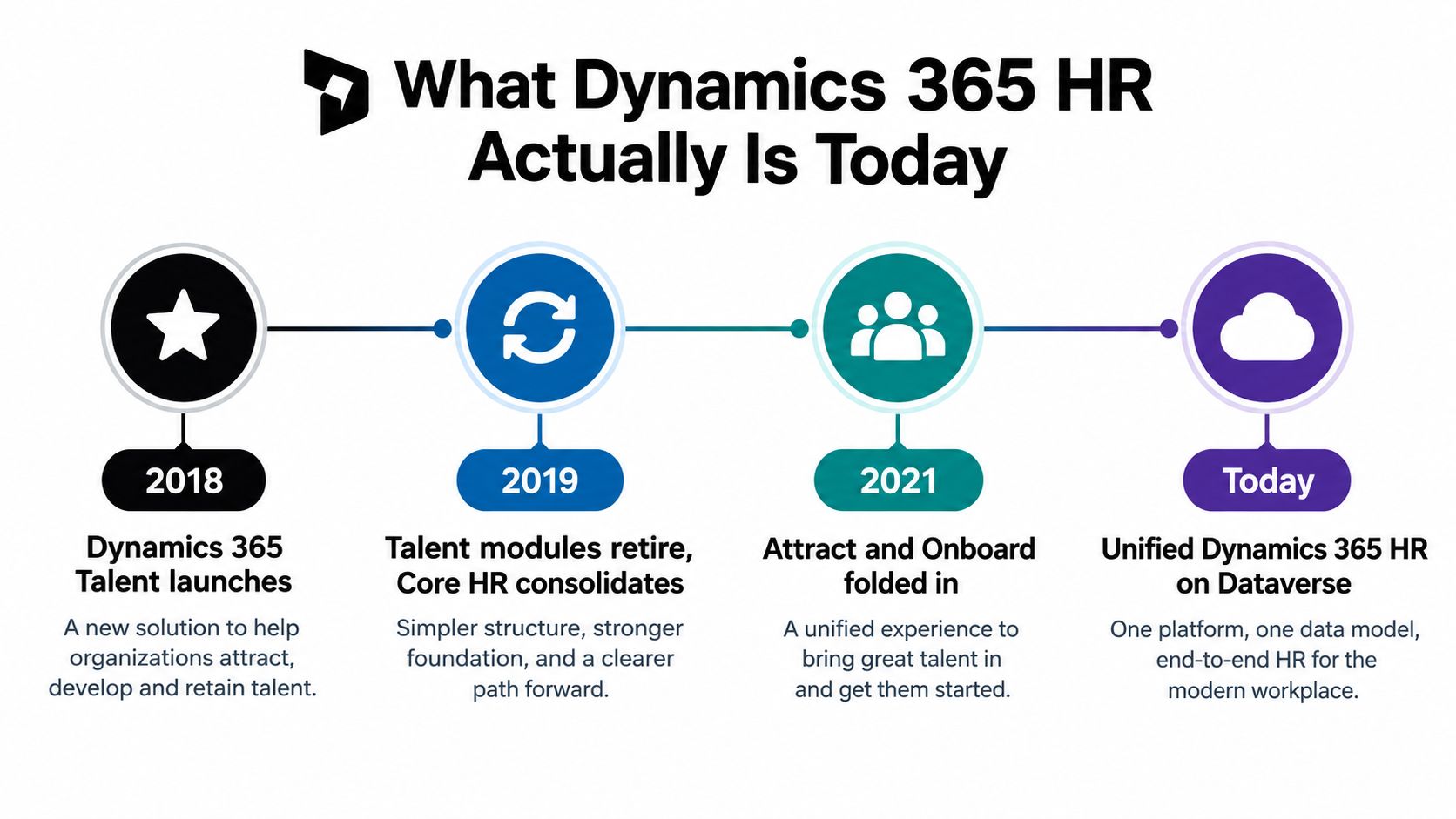
What Microsoft ships today is a cloud-based human capital management application that grew out of older Dynamics 365 Talent and Core HR branding, then became Dynamics 365 Human Resources in 2020 Microsoft's product history. That naming trail matters because older integrations, screenshots, and internal docs still use the old terms. If you've ever spent an afternoon reconciling “Talent” in one note, “HR module” in another, and “Core HR” in a third, you already know why this is not a small detail.
The practical reality is simple. Dynamics 365 HR is strongest when it sits inside a governed Microsoft stack, especially where HR data must connect to finance, operations, and workflow tools Microsoft documentation. It's not a silver bullet, and it's definitely not a substitute for data discipline. It's a platform that rewards teams who know their process, their security model, and their release tolerance.
[blocked]
A procurement team can shortlist Dynamics 365 HR expecting a tidy self-service app. The first sandbox session usually clears that up fast. What Microsoft ships today is a core human-capital-management application that sits inside a broader Microsoft stack, where it is meant to connect people data with operational workforce processes Microsoft product history.
[blocked]
Older Microsoft materials still use Dynamics 365 Talent, Core HR, and sometimes recruiting-adjacent names such as Attract and Onboard. That is not just cosmetic history. It reflects a real shift in product boundaries, and Microsoft's lifecycle documentation places the platform launch on November 1, 2016 Microsoft documentation.
For buyers, that matters when you assess old integrations and internal documentation. A connector written for “Talent” may still point in the right direction, but the labels, data entities, and support assumptions can be out of step with the current product. I have seen teams lose time because one group was still using the old suite language while the implementation team was already planning around the newer model.
[blocked]
Microsoft now frames Human Resources around connecting people and operations data, with attention to workforce cost, employee care, compliance, and enterprise processes Microsoft documentation. That makes the platform more than a record store. It reaches leave, benefits, compensation, organizational structure, and the administrative rules around them.
Practical rule: if a process affects payroll, finance, or compliance, treat it as an operational design choice, not an HR-only setting.
That is the core buying question. Which parts of your HR operation should live natively in Dynamics 365 HR, and which parts should sit in adjacent tools or workflow layers? In production, the system works best as the authoritative source for workforce records, while AI platforms such as Zemith can handle document-heavy, repetitive work that does not need to live inside the core HR database.
[blocked]
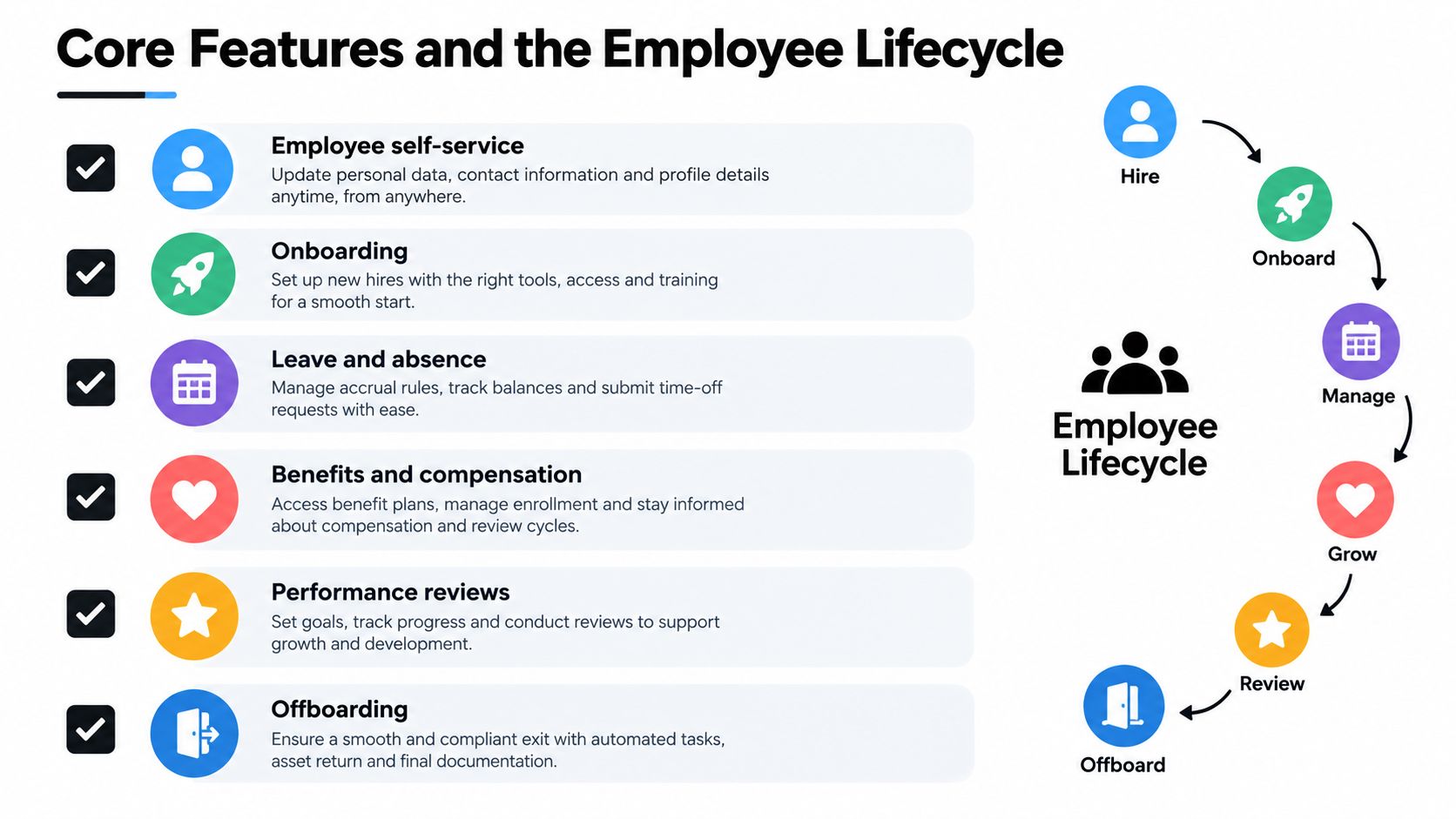
Dynamics 365 HR pays off in the parts of HR work that are easiest to ignore until they break. Absence tracking, onboarding, offboarding, approvals, and audit trails are not flashy features, but they are where bad setup creates the most cleanup. If you have ever watched payroll stall because one request sat in the wrong queue, you already know why the boring work matters.
[blocked]
Microsoft's leave and absence workspace depends on sequence, and skipping steps is how teams end up with bad balances and frustrated managers Microsoft leave and absence overview. The setup starts with leave and absence types, then leave plans, then worker enrollment, then the accrual process, followed by alerts and analytics.
That order matters because requests only behave well when the rules already exist. If you launch with weak categories or untested approval paths, the problem will not stay inside HR. It spills into payroll, scheduling, and employee confidence.
A practical launch checklist looks like this:
The same module supports request workflows and employee self-service submissions, which cuts down manual follow-up. In production, though, the automation only works as well as the policy design underneath it.
[blocked]
Recent release work introduced entities such as LeaveBankTransactionAuditTrailEntity, LeaveTypeSecurityRoleEntity, and LeaveOfAbsenceRequestEntity Microsoft data entity documentation. Those names sound dry because they are. They are the hooks for traceability, access control, and structured request handling.
If compliance needs proof of what changed, when, and by whom, these entities make that conversation concrete. If integration teams need to move leave requests in and out cleanly, these are the records that matter. Treating “HR data” as one blob is the mistake.
Onboarding and offboarding follow the same rule. Standardize the record, test the workflow, preserve historical data, and wire in recruiter-focused workflows like those covered in Zemith for recruiters.
[blocked]
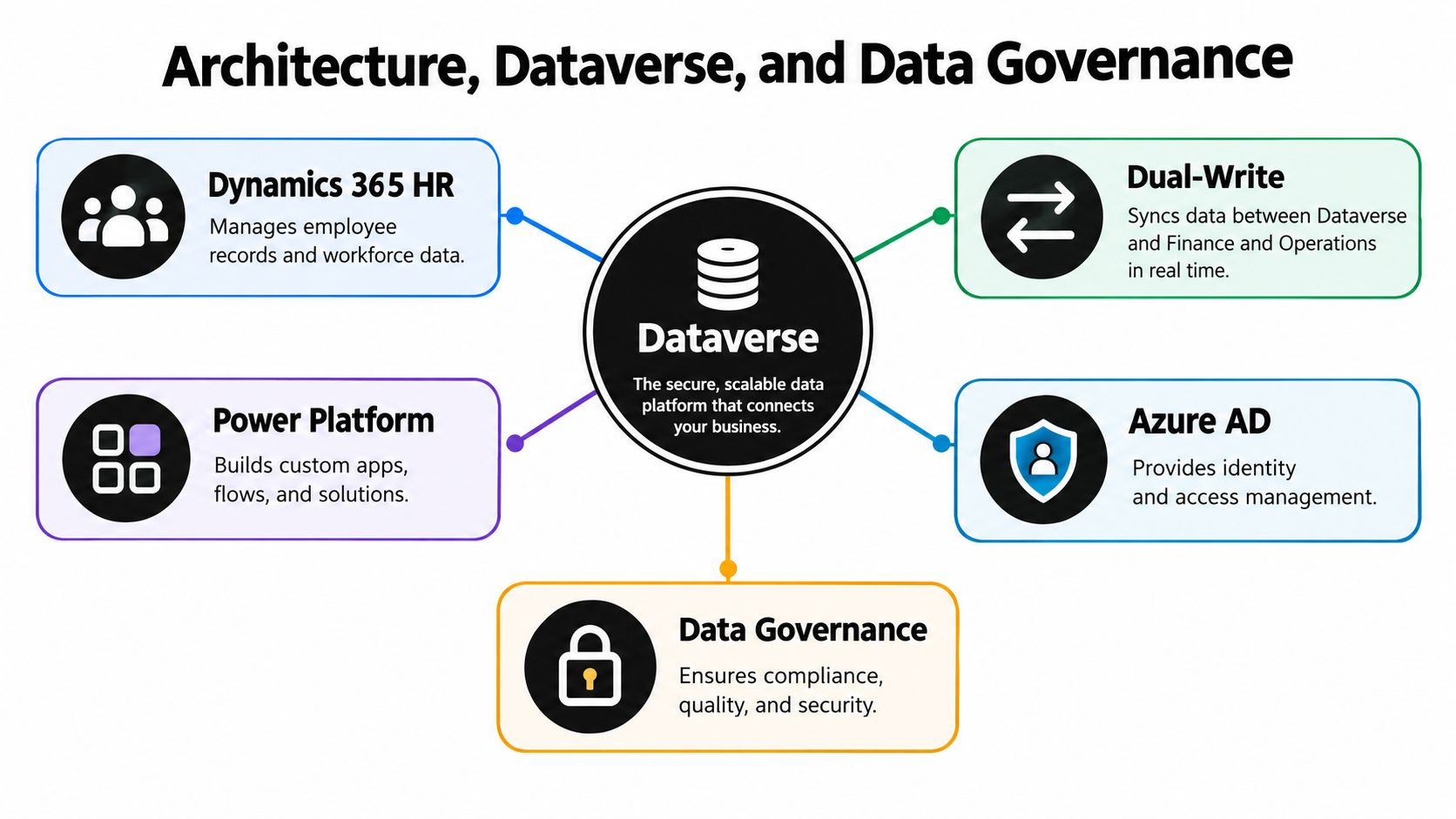
Dynamics 365 HR becomes useful, and risky, once it starts functioning as an operational data hub. Workforce records rarely stay inside one app. They flow into reporting, custom apps, workflows, and downstream finance or project processes, and weak governance shows up fast when that happens.
[blocked]
Microsoft's Human Resources-to-Dataverse integration template synchronizes core workforce data such as jobs, positions, and workers through dual-write behavior Microsoft integration documentation. Changes can move in both directions, and each write is validated by the receiving system. If validation fails, the change is not committed in either system.
That atomic behavior helps keep records aligned. It also means a bad reference, a missing mapping, or a custom rule mismatch can stop transactions instead of letting bad data slip through. For implementation teams, that is a trade-off worth respecting.
The practical checklist is straightforward:
[blocked]
Microsoft distinguishes the standalone Dynamics 365 Human Resources app from the Human Resources module in Dynamics 365 Finance. The Finance-based module supports dual-write connections, while the standalone app does not support the same setup described for Finance and Operations environments Microsoft dual-write setup guidance. That difference affects migration paths, environment governance, and whether your architecture matches the way your team expects data to move.
Microsoft also ties the current dual-write model to a one-to-one relationship between a Finance and Operations environment and a Dataverse environment in the current plan of record Microsoft dual-write setup guidance. If your ecosystem already has multiple Dataverse connections, inventory that before you assume a clean cutover.
[blocked]
Microsoft's virtual-table security model maps an adapter identity to a specific Finance or Human Resources user through Azure Active Directory applications, then relies on the customer to assign the right roles, duties, and privileges Microsoft security configuration documentation. Integration security is least privilege, explicit access design, and proof that the adapter can only touch what it should.
An over-permissioned adapter identity once let a test environment read live compensation records, which triggered a full access review.
The governance problem usually shows up in identity and history. Employee-name changes can create duplicate personnel numbers and records in data entities, while historical leave records still need to survive Microsoft employee self-service overview. Canonical employee IDs, effective-dated corrections, and reconciliation checkpoints matter more than cosmetic cleanup.
[blocked]
A lot of Microsoft-centric HR buyers end up comparing native Dynamics capabilities with specialist partners that sit neatly inside the same ecosystem. HR Management 365 is one of those options, and its appeal is pretty clear when the business wants a modular HR layer tied to Microsoft tools rather than another separate island.
It focuses on recruitment, employee records, leave, time and attendance, performance, learning, and self-service inside the Microsoft stack, with integrations that support Dynamics 365, Microsoft 365, and Power BI. For teams that need a practical hire-to-retire setup without rebuilding every workflow from scratch, that kind of packaging can be useful. It's especially relevant when the core problem is not “lack of software” but “too many disconnected spreadsheets, inbox approvals, and manual updates.”
If you want a closer look at how a Microsoft-aligned HR setup is positioned for business central environments, the vendor overview for Dynamics 365 HR gives a useful reference point.
The stronger fit tends to be organizations that want phased adoption, local support, and a more opinionated implementation path. It's less about chasing every feature and more about getting the basics right: records, requests, governance, and reporting. That's the stuff that keeps HR from turning into a weekly scavenger hunt.
[blocked]
Microsoft pricing is where a lot of otherwise sensible projects go sideways. Teams read “HR software” and assume one license fits everyone, then find they have assigned full seats for tasks like checking leave balances. That is an expensive way to hand out a digital VIP badge.
The distinction is straightforward. Microsoft lists the full Dynamics 365 Human Resources application at $135 per user per month, paid yearly, while Human Resources Self Service is $4 per user per month, also paid yearly Microsoft pricing page. If the job is only employee or manager self-service, the full license is usually the wrong buy.
Cost modeling should start with role groups, not wish lists. Employees who only request time off, view balances, or handle simple approvals should map to self-service where possible. Managers, HR ops staff, and payroll-adjacent roles usually need broader access, but even there, the license should match the actual duty set.
Before you model user groups, benchmark the per-seat economics against Zemith's pricing as a comparison point for AI workspace costs.
For planning and pricing comparisons, model the user groups before you buy. The spreadsheet should show who edits records, who approves, who reports, and who only consumes self-service.
[blocked]
Microsoft's release cadence only helps if you treat it as a moving target. Teams get into trouble when they design around preview features, then discover that compliance owners will not sign off on something that can still change.
Microsoft's 2026 release wave 1 covers capabilities slated for release between April 2026 and September 2026, and Microsoft says planned delivery dates and functionality may change or may never ship. In the Human Resources track, the roadmap points to recruitment, onboarding, reporting, and integrated workforce management. That is still a roadmap, not a production commitment.
[blocked]
For HR processes that carry compliance risk, the key question is not whether a feature looks good in a demo. It is whether it is general availability, preview, or only a planned item. If a feature touches benefits enrollment, leave synchronization, or onboarding approvals, preview status is usually not enough for a live control environment.
A practical internal matrix should track:
Track that readiness matrix alongside a shared roadmap workspace so status decisions stay auditable. That matters when auditors or security teams ask why a feature went live and who approved it.
Microsoft's wave 1 notes also point to broader integration across the ecosystem. That is the direction of travel. HR and ERP are getting more connected, which raises the need for sandbox validation rather than reducing it.
[blocked]
The better approach is to separate native current-state functionality from future roadmap ideas. Keep a short list of features that are useful later but are not required for day-one production. That keeps launch scope honest and avoids reworking deployment plans because a promised capability slips.
If you need a place to manage roadmap ideas, sign-off logs, and test evidence, keep it outside the ERP itself. A separate research workspace with the wave plan PDF, your sign-off log, and per-feature test evidence gives compliance a clean trail for every go-live decision.
[blocked]
Even a well-run Dynamics 365 HR rollout leaves a trail of document work behind. Policies arrive as PDFs, managers ask for summaries, new hires need readable packets, and recruiters keep asking for one more version of the same file. That is the part ERP rarely handles well, and it is where an AI workspace earns its place.
[blocked]
HR teams spend too much time translating policy into something people can use. Onboarding packets, leave summaries, manager guidance, and research across local rules or internal procedures all create the same drag. A tool like Zemith helps because it is built for document assistant workflows, not just chat prompts.
The practical uses are straightforward. Upload a dense benefits policy, then generate a plain-English summary for employees. Turn an onboarding handbook into flashcards for HR coordinators. Build a cleaner knowledge base from scattered Word files, PDFs, and meeting notes without copy-pasting across tabs all day.
That is also where the roadmap gap matters. Microsoft may keep improving the core HR stack, but production teams still need a place to handle the writing, summarizing, and knowledge cleanup that sit outside the ERP.
[blocked]
Start with the work that does not belong in the ERP.
A good workflow setup also reduces rework. A benefits update that previously took an afternoon of rewording becomes a one-prompt summary plus a checklist. That is the sort of gain HR teams feel immediately, because nobody joined the function to rewrite the same leave policy fourteen times.
[blocked]
ERP systems are strong at governed records and structured transactions. They are poor at turning a 19-page compliance memo into something a manager can read before lunch. Zemith fills that gap well, especially for document summaries, research comparisons, and fast internal drafts.
If you want the workflow layer that sits above the ERP, the AI workflow builder is the place to start. The value is not the interface itself. It is the way it cuts manual cleanup between the policy owner and the employee who needs a straight answer.
[blocked]
A successful Dynamics 365 HR rollout starts with restraint. The fastest way to break it is to turn on too much, too soon, and assume the records will sort themselves out later. They won't.
[blocked]
Start in a sandbox and decide what system owns each core workforce object. Clarify what belongs in HR, what belongs in finance, and what should never be duplicated across systems. If employee IDs, positions, and job structures are messy, fix them before integration enters the picture.
Set up security with least privilege from the start, and test access with non-production accounts. For virtual-table or adapter-based integration, map identities correctly and assign only the roles each user needs. The point here is discipline, because weak access design becomes an incident review later.
[blocked]
Once the master data is stable, move into Dataverse and dual-write testing. Validate alternate keys, confirm your environment assumptions, and watch for failures caused by reference mismatches, as detailed in the architecture section. If an employee-name update creates duplicate personnel records, stop and correct the design before production inherits the problem.
Practical rule: never cut over with unresolved data exceptions that affect payroll, leave, or employee identity.
Test the leave and absence flow end to end at the same time. Check that leave types, plans, enrollment, accruals, and approvals match the policy the business wants to run.
[blocked]
Now lock in release readiness and support ownership. Separate general availability from preview features, and keep anything compliance-sensitive out of provisional functionality. Build rollback notes, a support triage path, and a simple evidence trail for HR, IT, and finance.
Use this window to add an AI workspace for document-heavy work. Standardize onboarding packets, policy summaries, and internal reference material so HR is not stuck rewriting the same material every week. Once that layer is in place, the ERP stays the structured core, and the document work gets handled outside it.
Pair the sandbox work with a document workspace for policy summaries and onboarding packets, and measure the drafting time saved in week one.







Trusted by teams at






The top models, plus image, video and voice tools, in one plan.
Without Zemith
ChatGPT PlusUS$20.00Claude ProUS$20.00Google AI ProUS$19.99SuperGrokUS$30.00Perplexity ProUS$20.00 MidjourneyUS$10.00
 ElevenLabsUS$6.00Le Chat ProUS$14.99
 RunwayUS$15.00Kling StandardUS$8.80
 Gamma PlusUS$12.00
 Otter ProUS$16.99
 QuillBot PremiumUS$19.95
 Photoroom ProUS$12.99
 Quizlet PlusUS$7.99
Total if paying separatelyUS$234.70/mo
"I love the way multiple tools they integrated in one platform. Going in the right direction."
— simplyzubair
"The quality of data and sheer speed of responses is outstanding. I use this app every day."
— barefootmedicine
"The credit system is fair, models are perfect, and the discord is very responsive. Quite awesome."
— MarianZ
"Just works. Simple to use and great for working with documents. Money well spent."
— yerch82
"The organization of features is better than all the other sites — even better than ChatGPT."
— sumore
"It lives up to the all-in-one claim. All the necessary functions with a well-designed, easy UI."
— AlphaLeaf
"The team clearly puts their heart and soul into this platform. Really solid extra functionality."
— SlothMachine
"Updates made almost daily, feedback is incredibly fast. Just look at the changelogs — consistency."
— reu0691
Hand off the research, writing, design and follow-ups. Zemith picks the tools it needs and brings back finished work.
Search the web, run deep research, read files, create images and run code with GPT, Claude, Gemini, Grok and more.
Zemith keeps working in the cloud and pings you when it's done.
Notion, Linear, Canva, Airtable and more. It asks before it creates or changes anything.
Docs, slides, sheets and PDFs, ready to send.
Chain models and tools on a visual canvas, from one prompt to a finished promo video.
Briefings, reports and reminders run on a schedule and are ready when you need them.
Real-time voice that can see your camera or screen.
The best image and video models, in one studio.
Turn PDFs, links and YouTube videos into podcasts, quizzes, flashcards and mind maps.














 Podcast
 Quiz
Quiz Flashcards
 Mind map
 Infographic