


Every top model, with tools built in.
Search the web, run deep research, read files, create images and run code with GPT, Claude, Gemini, Grok and more.
Discover how to brainstorm ideas with actionable techniques and modern tools. Go from a blank page to your next big idea with this practical guide.
Figuring out how to brainstorm ideas effectively really begins with setting the right stage for creativity. The key is to clearly define your problem first, then let the solutions flow without any initial judgment. This simple shift in mindset can turn a daunting blank page into a field of endless possibilities, especially when you have the right tools, like an integrated workspace from Zemith, to capture every thought.
Staring at a blank page can be paralyzing. We’ve all been there. The pressure to come up with something brilliant right out of the gate is often what stops us from coming up with anything at all.
But here’s the thing: truly great ideas rarely show up perfectly formed. They're cultivated in an environment that’s built for free-thinking and exploration.
The secret sauce to a killer brainstorming session is separating the act of generating ideas from the act of evaluating them. This isn't some new-age concept; it was formalized way back in the 1940s by an advertising exec named Alex Osborn. He found that when his teams focused on sheer quantity over quality—without any criticism allowed—their creative output went through the roof.
To give you an idea of the scale, his agency ran 401 of these sessions and came up with a staggering 34,000 ideas. Out of that massive pool, 2,000 were good enough to move forward. That really shows you the power of just letting the ideas fly.
Before we dive into specific techniques, it’s helpful to understand the core principles that make brainstorming work. I like to think of them as the three pillars holding up any successful session.
Getting these fundamentals right is more important than any specific tool or technique you use. They create the psychological safety needed for true creativity to emerge.
Before you jump into solving your big problem, you need to warm up your creative muscles. Think of it like stretching before a run. Diving headfirst into a complex challenge without a little prep can leave you feeling stuck.
A great way to do this is with a simple, low-stakes creative exercise. For instance, grab two completely random objects—say, a "coffee cup" and a "cloud"—and give yourself five minutes to list every possible connection between them. An actionable tip is to do this right on a digital whiteboard, like the one in Zemith, so you can visually map the connections as they pop into your head. This game forces your brain to switch from its rigid, analytical mode into a more fluid, associative state, making it much easier to spot unexpected connections later.
The goal of a warm-up isn't to solve the actual problem. It's about waking up the parts of your brain that thrive on curiosity and connection, building that creative momentum before you really need it.
The single biggest killer of a good brainstorming session is the fear of being judged—by others, or even more often, by yourself. To really get the ideas flowing, you have to build a space where every single idea is welcome, no matter how off-the-wall it seems at first.
This means you have to actively put all criticism on hold. During the idea-generation phase, your only goal is quantity. You're just building a raw list of material to work with. You'd be surprised how often a seemingly ridiculous thought can be the spark that ignites a genuinely practical and innovative solution down the line.
Sometimes the real challenge is just getting past your own mental roadblocks. For anyone feeling stuck, there are some great strategies for overcoming writer's block and unlocking creativity that apply just as well to brainstorming. This "no-judgment" mindset is absolutely critical, whether you're working alone at your desk or hashing things out with a team.

Knowing the rules of brainstorming is one thing, but putting them into practice with proven methods is where the magic really happens. The right technique can unlock entirely new ways of thinking, turning a stubborn problem into a playground of possibilities. Think of these methods as different keys—you just need to find the right one for the lock you're trying to open.
One of the cornerstones of modern brainstorming is the deliberate separation of idea generation from criticism. This isn't a new concept; it traces all the way back to Alex Osborn's work in the 1930s and 40s. He championed the freedom to suggest wild, even outlandish, concepts by suspending all judgment during the session.
This simple but powerful rule encourages a higher volume of creative thoughts. With that core principle in mind, let’s dive into some specific techniques you can use today.
Mind mapping is a classic for a reason. It’s a visual brainstorming technique that helps you explore the connections between different concepts in a way that linear lists just can't match. You start with a central idea and then branch out with related thoughts, words, and tasks. It's a much more natural approach because it mirrors how our brains make associations.
For example, imagine a content creator planning a new video series. They might start with "Healthy Meal Prep" as the central topic. From there, branches could sprout for:
Each of these branches can then be expanded, creating a rich visual map of potential content. This is where a digital tool with an infinite whiteboard, like the one in Zemith, really shines. It gives you an endless canvas to capture and organize sprawling ideas without running out of paper, ensuring no brilliant thought gets lost.
Sometimes, the best way forward is to think backward. Instead of asking "How do we achieve X?" Reverse Brainstorming flips the script and asks, "How could we completely fail at X?" or "What would make this problem even worse?"
Let's say a software team wants to improve user onboarding. Using this method, they’d brainstorm how to make their onboarding process as confusing and frustrating as possible.
Ideas might pour out: Hide the setup guide. Use unclear technical jargon. Make the 'next' button impossible to find.
Once you have a solid list of "failure points," you just flip each one into a positive action item. "Hide the setup guide" becomes "Make the setup guide the very first thing a user sees." It's a fantastic way to proactively identify risks and weaknesses before they ever become real issues. Capturing this process in a unified workspace like Zemith allows you to instantly turn those failure points into actionable project tasks.
In any group, some voices are naturally louder than others. The Round Robin technique levels the playing field, ensuring everyone gets an equal chance to contribute. It’s simple: each person takes a turn sharing one idea. No interruptions, no critiques.
The process continues in a circle until everyone has shared all their initial thoughts. This structured format is especially effective for remote teams using a collaborative platform like Zemith, or for tackling sensitive topics where you need to gather a wide range of perspectives without pressure. It systematically builds a pool of ideas while making every participant feel heard.
For writers, this kind of structured approach can be a powerful way to generate new angles. If you are a writer, you can use Zemith to brainstorm topics, outlines, and full-fledged articles.
And if you’re looking for even more structured ways to gather direct feedback, learning how to conduct focus groups for actionable insights can be a game-changer.

When your team is spread out, the right digital tool isn't just a nice-to-have—it's your brainstorming superpower. While there's a certain charm to a room full of sticky notes, technology is what keeps creative momentum going for remote and hybrid teams. The trick is finding a platform that actually supports your flow instead of getting in the way.
I've seen it happen too many times. You're bouncing between a whiteboarding app, a separate notes tool, and then a project management platform to assign tasks. By the time you switch apps for the third time, the creative spark is gone. Ideas get lost in the shuffle.
This is where an all-in-one workspace like Zemith is a game-changer. It brings all the essential pieces together, so your ideas can move from a chaotic sketch to an organized plan without friction.
Visual methods like mind mapping are fantastic for exploring ideas, but they need room to breathe. A physical whiteboard eventually runs out of space. A digital one doesn't.
Think of Zemith’s whiteboard as the perfect playground for your biggest concepts. You can drop a central idea in the middle and just keep building outwards, branching off in any direction without ever hitting a wall. This kind of freedom is exactly what teams need to map out complex thoughts and see connections they might have otherwise missed.
Let's say a marketing team is cooking up a new campaign. On a digital canvas, they can map out the entire strategy visually:
This creates a living, shared picture of the plan that a simple document could never capture. Everyone sees how the pieces fit together in real-time.
The real magic of a digital whiteboard isn't just the endless space. It's how it connects to your other tools. An idea you sketch out can become the skeleton of an actionable plan without ever leaving the platform.
A productive brainstorming session always leaves you with a flurry of raw, half-formed ideas. The most critical step is capturing and organizing that creative chaos before it disappears. This is where having a connected notepad is non-negotiable.
With a tool like Zemith, you can literally drag the best ideas from your whiteboard and drop them straight into an attached notepad. Just like that, your sprawling visual map starts turning into a structured list of action items. From there, it's easy to start refining, prioritizing, and adding detail to each point.
Imagine your team just wrapped up a reverse brainstorming session and identified all the ways a project could fail. You can pull those "failure points" directly into the notepad and immediately start outlining solutions. What began as a purely creative exercise transforms into a concrete risk mitigation strategy. This seamless workflow is what turns a good idea into a great project.
This process gets even faster when AI lends a hand. Many of the best AI tools for content creation can help turn those raw notes into polished drafts, summaries, or social media posts, bridging the gap between brainstorming and execution.
So, the whiteboard is covered in sticky notes. You’ve got a mountain of incredible ideas. That’s a great feeling, but the session isn’t over. Honestly, this is where the real work begins—and where many teams drop the ball. A pile of great ideas is useless until you turn that creative energy into a focused plan.
The first move is to tame the chaos. You need to start finding the patterns. Begin by clustering similar ideas together. If you're using a digital tool like Zemith, this is as simple as dragging and dropping related notes into groups. What once looked like a hundred random thoughts will quickly start to merge into a handful of powerful, overarching themes.
Once you’ve got your clusters, it's time to figure out which ideas are actually worth pursuing. Two of my favorite, time-tested methods for this are dot voting and the impact/effort matrix.
Dot voting is beautifully simple and democratic. Give everyone on the team a few votes—say, three to five "dots"—and have them place them on the ideas they believe in most. It’s a fast, visual way to see where the team's energy and consensus lie. The ideas that attract the most dots are your natural front-runners.
For a more analytical approach, you can’t beat the impact/effort matrix. This is a game-changer. You just draw a simple four-quadrant grid and map out each idea based on its potential impact versus the effort it would take to execute.
This method cuts through the noise and helps you make smart, objective decisions instead of just going with the loudest voice in the room.
This visual shows how you can move from a jumble of ideas to a short, prioritized list.
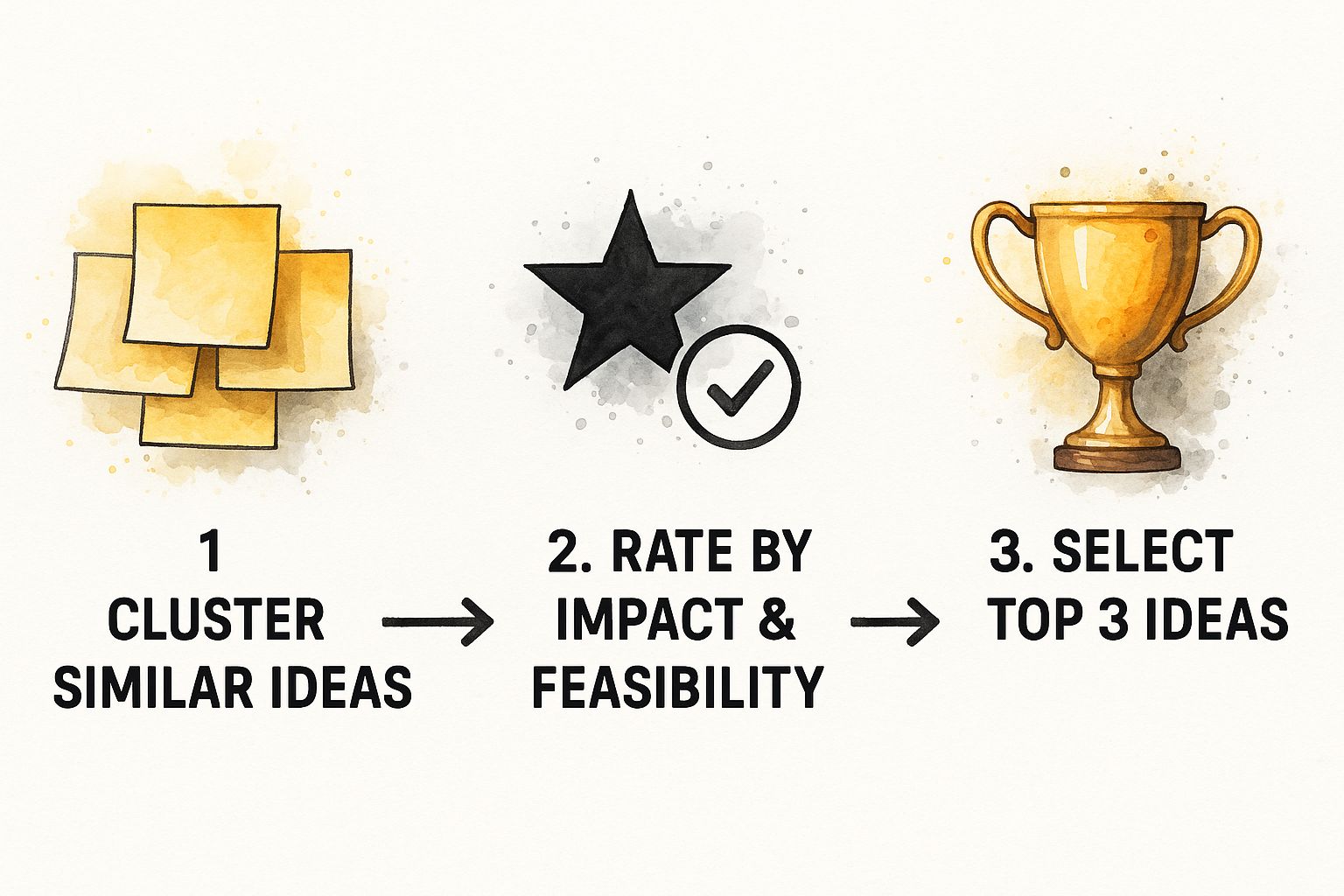
Following a flow like this ensures that by the end of your session, you have a clear, focused list of contenders ready for the next step.
Now you have your winners. The final, critical step is to assign them a life beyond the whiteboard. Every single prioritized idea needs to become a tangible project brief. To help give these raw ideas some structure, I often rely on a marketing strategy planning template.
A great idea without an owner and a deadline is just a wish. The goal is to leave the meeting with zero ambiguity about what happens next.
For each idea, make sure you have answers to these four questions before anyone leaves the room:
Capturing this in a shared document within an all-in-one platform like Zemith keeps everyone accountable and ensures momentum isn't lost. This is how you transform a fun creative exercise into the first stage of real, meaningful results.

Let's be honest: truly game-changing ideas almost never come from a scheduled, two-hour meeting that happens once a month. The best teams I've worked with get this. They know brainstorming isn't just an item on the agenda; it's a culture you have to build from the ground up. The real goal is to weave creative problem-solving into the very fabric of your team, making it a daily habit instead of a rare, high-pressure event.
So, where do you start? It all begins with psychological safety. This is the bedrock. It’s that shared feeling in the room that you can toss out a half-baked idea, ask a "stupid" question, or admit a mistake without fear of being shut down or embarrassed. When people feel genuinely safe, they’re far more likely to share the weird, unconventional thoughts that often spark the biggest breakthroughs.
Leadership has a huge part to play in this. Managers and team leads have to set the tone by openly welcoming off-the-wall ideas, celebrating what was learned from a "failed" experiment, and actively protecting the idea-generation phase from premature criticism.
Forget about those long, draining brainstorming sessions. The key is to encourage short, frequent bursts of creative thinking. I like to call them "micro-brainstorms." They keep everyone's creative muscles sharp and make innovation feel much more approachable.
Here are a few practical ways to get this going:
This isn't just a hunch; it's backed by solid research. Studies have shown that regularly using brainstorming techniques leads to significant, measurable improvements in creative skills. If you want to dive into the data, you can read the full research on brainstorming's impact on creative thinking.
An idea-driven culture doesn't just happen. It's built brick by brick through consistent actions that make every single person feel like they have a creative stake in the team's success.
For this kind of culture to actually work, your ideas need a place to live. If they're scattered across random notebooks, email threads, and personal documents, they'll die on the vine. You need a central, accessible hub where ideas can be seen, discussed, and expanded upon by the whole team.
This is where a tool like Zemith really shines. Its built-in whiteboard and notepad features act as a permanent, always-on brainstorming space. Someone can drop a seed of an idea in the morning, and by that afternoon, a few other team members might have jumped in to add their own notes, links, or sketches.
This allows ideas to grow and evolve naturally, outside the constraints of a formal meeting. That kind of asynchronous collaboration is a game-changer for modern teams, ensuring a brilliant idea never gets lost just because the right people weren't in the same room at the same time.
Even when you have a solid plan, brainstorming can hit a few snags. It's totally normal. Think of this section as your quick-reference guide for navigating those common hurdles and keeping the ideas flowing.
If you take away only one thing, let it be this: defer all judgment. Seriously. The moment you start picking apart ideas—your own or someone else's—is the moment the creative process stalls.
The whole point of the initial session is to get as many thoughts on the table as possible. You're going for quantity, not quality, at this stage. Some of the wildest, most out-there suggestions often hide the seed of a truly brilliant solution. Save the analysis and critique for after you're done generating ideas.
Brainstorming solo can be just as powerful as working in a group, you just need a bit of structure. First, get crystal clear on the problem you're trying to solve.
From there, you can jump into a few proven techniques. I'm a big fan of Mind Mapping, especially on a digital canvas like Zemith’s whiteboard, because you never run out of room to connect your thoughts visually.
Another great method is freewriting. Just set a timer and write nonstop about your topic without worrying about grammar or making sense. You could also use the SCAMPER method to prod your brain from different angles by asking questions like: What can I Substitute? Combine? Adapt?
When you're brainstorming alone, your biggest enemy is your own inner critic. You have to consciously tell that voice to take a backseat. Give yourself permission to explore every single thought, no matter how ridiculous it seems at first.
This is a classic challenge. To make sure one person doesn't steamroll the entire session, structured techniques are your best friend.
Try one of these approaches:
If you're facilitating, a gentle redirect works wonders. Something simple like, "That's a fantastic point. To build on that, let's hear from someone who we haven't heard from yet." Setting these ground rules from the very beginning is also a huge help.
It's less about which one is "better" and more about which is right for the situation. Both have their place. A physical whiteboard is great for generating that kinetic, in-the-room energy.
But for modern teams, digital tools offer some serious advantages. A platform like Zemith is built for remote and hybrid collaboration, letting people contribute in real-time from anywhere. You get an infinite canvas, so you’ll never hit a creative wall, and every idea is automatically saved, organized, and ready to share.
While you can't beat the feel of a marker in your hand, digital tools offer unmatched flexibility, accessibility, and the ability to plug directly into your project workflows.
Ready to turn those brainstorming sessions into real, actionable results? Zemith pulls everything you need—an infinite whiteboard, a smart notepad, and a powerful suite of AI tools—into one clean workspace. Stop switching between apps and start building your next great idea. Explore what you can do at Zemith.com today.







Trusted by teams at






The top models, plus image, video and voice tools, in one plan.
Without Zemith
ChatGPT PlusUS$20.00Claude ProUS$20.00Google AI ProUS$19.99SuperGrokUS$30.00Perplexity ProUS$20.00 MidjourneyUS$10.00
 ElevenLabsUS$6.00Le Chat ProUS$14.99
 RunwayUS$15.00Kling StandardUS$8.80
 Gamma PlusUS$12.00
 Otter ProUS$16.99
 QuillBot PremiumUS$19.95
 Photoroom ProUS$12.99
 Quizlet PlusUS$7.99
Total if paying separatelyUS$234.70/mo
"I love the way multiple tools they integrated in one platform. Going in the right direction."
— simplyzubair
"The quality of data and sheer speed of responses is outstanding. I use this app every day."
— barefootmedicine
"The credit system is fair, models are perfect, and the discord is very responsive. Quite awesome."
— MarianZ
"Just works. Simple to use and great for working with documents. Money well spent."
— yerch82
"The organization of features is better than all the other sites — even better than ChatGPT."
— sumore
"It lives up to the all-in-one claim. All the necessary functions with a well-designed, easy UI."
— AlphaLeaf
"The team clearly puts their heart and soul into this platform. Really solid extra functionality."
— SlothMachine
"Updates made almost daily, feedback is incredibly fast. Just look at the changelogs — consistency."
— reu0691
Hand off the research, writing, design and follow-ups. Zemith picks the tools it needs and brings back finished work.
Search the web, run deep research, read files, create images and run code with GPT, Claude, Gemini, Grok and more.
Zemith keeps working in the cloud and pings you when it's done.
Notion, Linear, Canva, Airtable and more. It asks before it creates or changes anything.
Docs, slides, sheets and PDFs, ready to send.
Chain models and tools on a visual canvas, from one prompt to a finished promo video.
Briefings, reports and reminders run on a schedule and are ready when you need them.
Real-time voice that can see your camera or screen.
The best image and video models, in one studio.
Turn PDFs, links and YouTube videos into podcasts, quizzes, flashcards and mind maps.














 Podcast
 Quiz
Quiz Flashcards
 Mind map
 Infographic