


Every top model, with tools built in.
Search the web, run deep research, read files, create images and run code with GPT, Claude, Gemini, Grok and more.
Learn how to build AI agents with reliable architecture, tool integration, and safety guardrails. Step-by-step guide with code examples and real workflows.
The most popular advice about how to build AI agents is backwards: give a model tools, add memory, then keep increasing its autonomy. Start instead with a narrower question: what's the smallest amount of autonomy that safely completes this task? An agent that prepares an accurate report and stops is more useful than one that confidently emails an inaccurate report to your entire company.
An agent isn't a chatbot wearing a tool belt. It's a system that makes decisions while interacting with software, documents, and people. Once those decisions can change something outside the conversation, prompt quality is only part of the engineering problem.
The practical target is minimum viable autonomy: enough discretion to handle ambiguity, but not enough freedom to invent its own operating procedure. A document assistant might choose which passages to retrieve. It doesn't need permission to delete the document afterward.
Beginners tend to make the same architectural mistakes:
There's evidence for building something less theatrical. A study of production agents reported that 68% executed 10 or fewer steps before requiring human intervention, 70% used prompted off-the-shelf models, and 74% relied primarily on human evaluation, with reliability identified as the leading development challenge. Those findings describe constrained systems, not digital employees left alone with administrator access.
Practical rule: Give the agent responsibility for a decision only when you can recognize an acceptable decision and contain an unacceptable one.
Platform-specific walkthroughs can still help. Agentcentral's explanation of how to build an Amazon AI agent is a useful companion when you want an implementation-oriented resource. Read tutorials with a separate checklist for scope, failure handling, and acceptance criteria.
For solo builders, a multi-model workspace also removes a mundane distraction: switching interfaces and managing separate experiments. That convenience helps you compare behavior, but it doesn't replace a task contract.
Before choosing a framework, write down what the agent may decide, what it must ask, and what it must never attempt. If those answers are fuzzy, adding another planner won't sharpen them.
Consider a research agent that answers a question using approved documents. Its goal isn't “research this thoroughly.” Its goal is to produce a supported answer, identify missing evidence, and finish without taking unrelated actions.
The underlying architecture needs a goal, a perception–reasoning–action loop, tools, memory, and a termination rule.
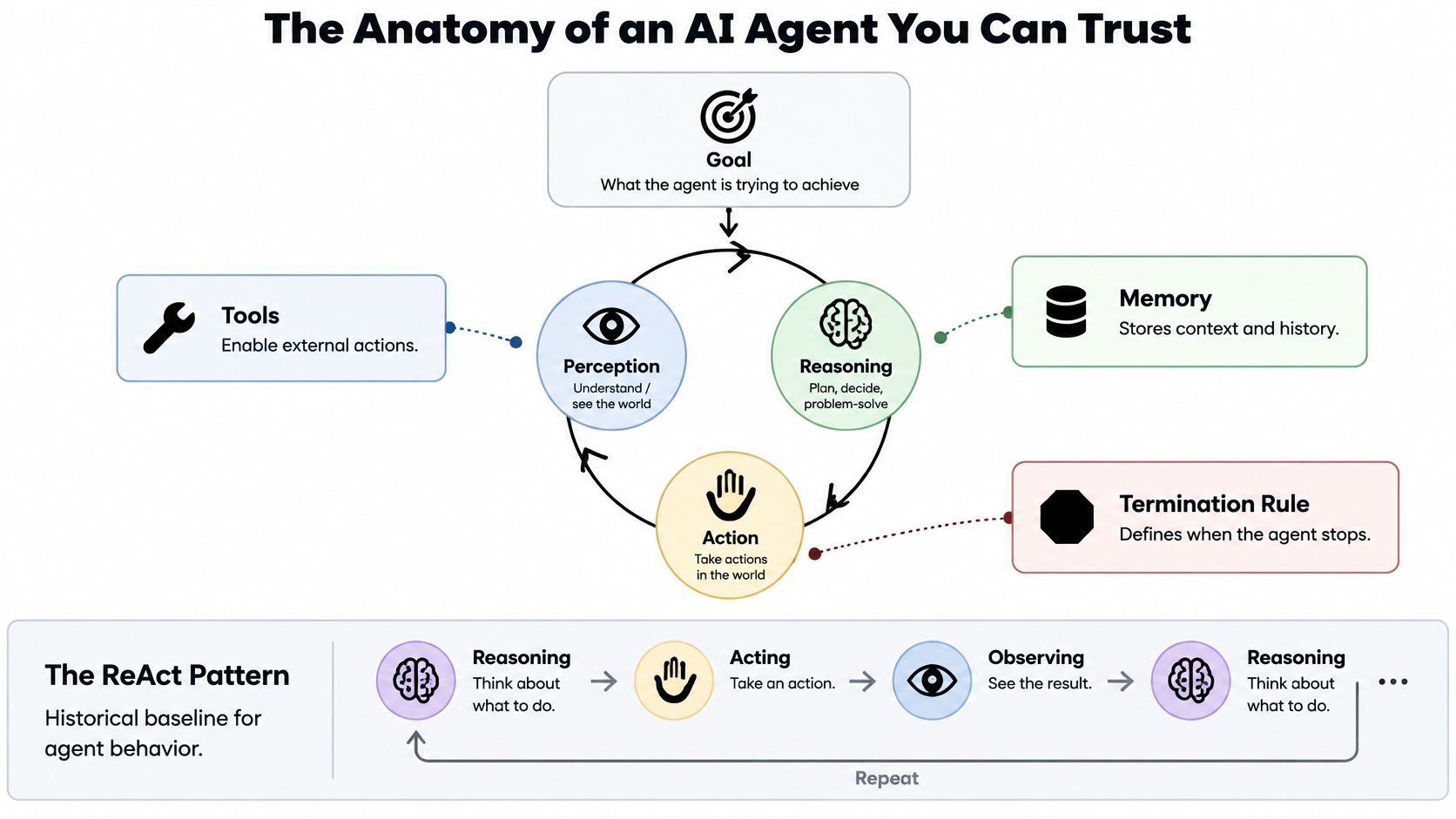
The foundational ReAct research paper, introduced in 2022, combined language-model reasoning with external actions and observations. Instead of generating an entire answer from internal knowledge, the system can select an action, inspect the result, and decide what to do next.
For a document question, that might mean retrieving a relevant passage, noticing that it refers to an appendix, retrieving the appendix, and then answering. The important feature isn't an elaborate internal monologue. It's the ability to update the next action using evidence.
Python-style pseudocode makes the control boundary explicit:
These are placeholder functions, not a production library. The important detail is that application code owns validation, execution limits, and completion checks. The model proposes; the surrounding system decides what can execute.
For the distinction between conversational interfaces and the machinery around them, see this explanation of how AI assistants work.
Store durable task state separately from chat history. A task record should distinguish the current stage, collected evidence, unresolved questions, and pending approval. Otherwise, a long conversation becomes an unreliable substitute for a database.
Typed tool schemas make the boundary concrete. A retrieval function should accept a document identifier and a query, not an unrestricted instruction to “find whatever you need.”
Before implementation, settle these decisions:
An agent that stops with a useful explanation of missing evidence has completed a valid workflow. Endless searching isn't persistence. Sometimes it's just a loop with excellent grammar.
Don't confuse choosing a model with committing your architecture to it. Keep model calls behind an adapter so you can change the implementation without rewriting task state, tool permissions, or evaluation logic.
That doesn't mean every workflow needs a committee of models. Start with a straightforward baseline, then add routing only where testing shows a reason. Extra calls introduce latency, expense, and another opportunity to lose context.
Treat this as an experiment design, not a universal ranking. Compare candidates on the same inputs using the model comparison guide as a starting point for your shortlist.
A useful prototype pattern is draft, critique, specialize. A fast candidate produces a draft. A more capable candidate checks specific weaknesses. A specialist handles a bounded domain task if the workflow needs it.
The critique needs a rubric: unsupported statements, missed constraints, contradictory evidence, or invalid output fields. “Make this better” usually produces another version, not a reliable inspection.
A multi-model workspace lets you rehearse that pattern manually without juggling API keys. Keep the source material and acceptance criteria unchanged while switching candidates. You're testing whether a route improves the outcome, not whether you prefer its writing style.
Don't assume that agreement between models proves correctness. They can agree on an unsupported answer. Use source evidence, executable tests, or another external check when the task permits it.
Switch when a candidate repeatedly misses a defined requirement, exceeds your acceptable turnaround time, or makes completed tasks unnecessarily expensive. Keep the simpler route when it meets the same standard. Architectural restraint is a feature, even if it looks less impressive in a diagram.
Start with tool interfaces you can explain on a whiteboard. A tool should expose a specific capability, not hand the model a vague invitation to operate your business.
These tool archetypes provide a useful starting map.
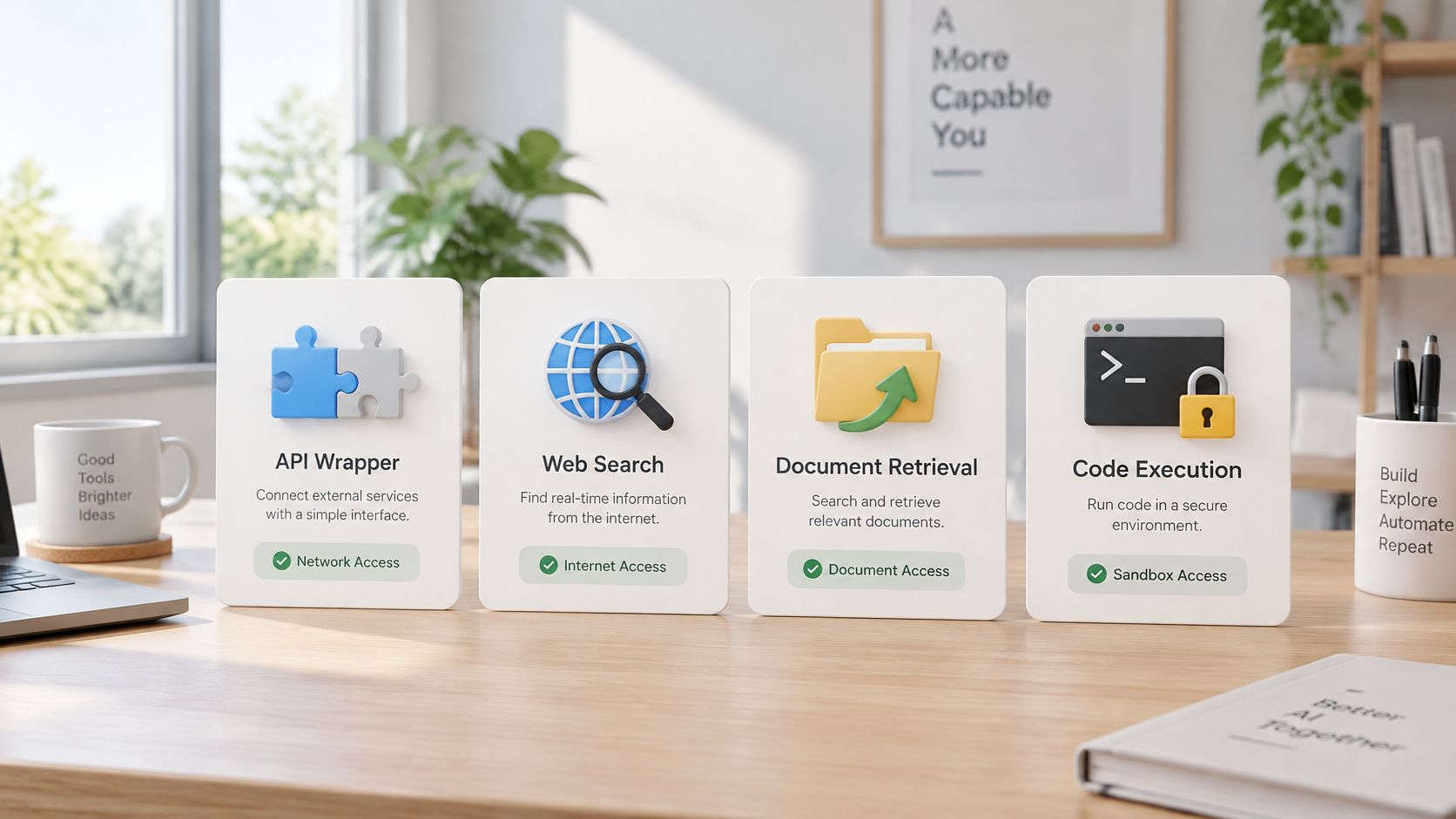
For external information, Fetchin's guide to live data APIs offers additional implementation context. Your wrapper still needs its own typed arguments, response validation, and failure handling.
Set timeouts so a stalled dependency can't hold the task indefinitely. Classify failures before retrying: an unavailable service may justify another attempt; invalid credentials usually require intervention. Use idempotency keys for operations that could otherwise create duplicate effects.
These are reliability controls, not prompt instructions. Put them in the execution layer, following the bounded workflow approach described by ReliabilityBench.
Take a PDF containing a supplier proposal. The agent retrieves the relevant terms, summarizes them, identifies unanswered questions, and prepares an email draft. It then stops at an approval checkpoint.
A Document Assistant is useful for the reading and question-answering stage. A Coding Assistant can help draft the schema or inspect the wrapper code. Neither capability, by itself, establishes that an external action is authorized.
The broader knowledge-management workflow matters because the agent needs a controlled collection of relevant material, not access to every file someone has ever uploaded.
Keep the email recipient, subject, body, and supporting passages visible to the reviewer. Approval should apply to that exact draft, not to whatever the model generates afterward.
For a visual companion to the workflow, use the walkthrough below.
After an approved action, verify the result independently when possible. Querying the destination system is stronger evidence than accepting a tool's cheerful “success” message. Keep document extraction, drafting, approval, and execution as distinct stages so a failure has an identifiable home.
A successful demonstration proves that the workflow can succeed under those conditions. It doesn't establish that it will behave consistently when a document changes, a dependency fails, or a user phrases the request differently.
Release criteria need to measure the workflow, not just the final prose. An answer can sound excellent while the agent used the wrong file or attempted an unauthorized action.
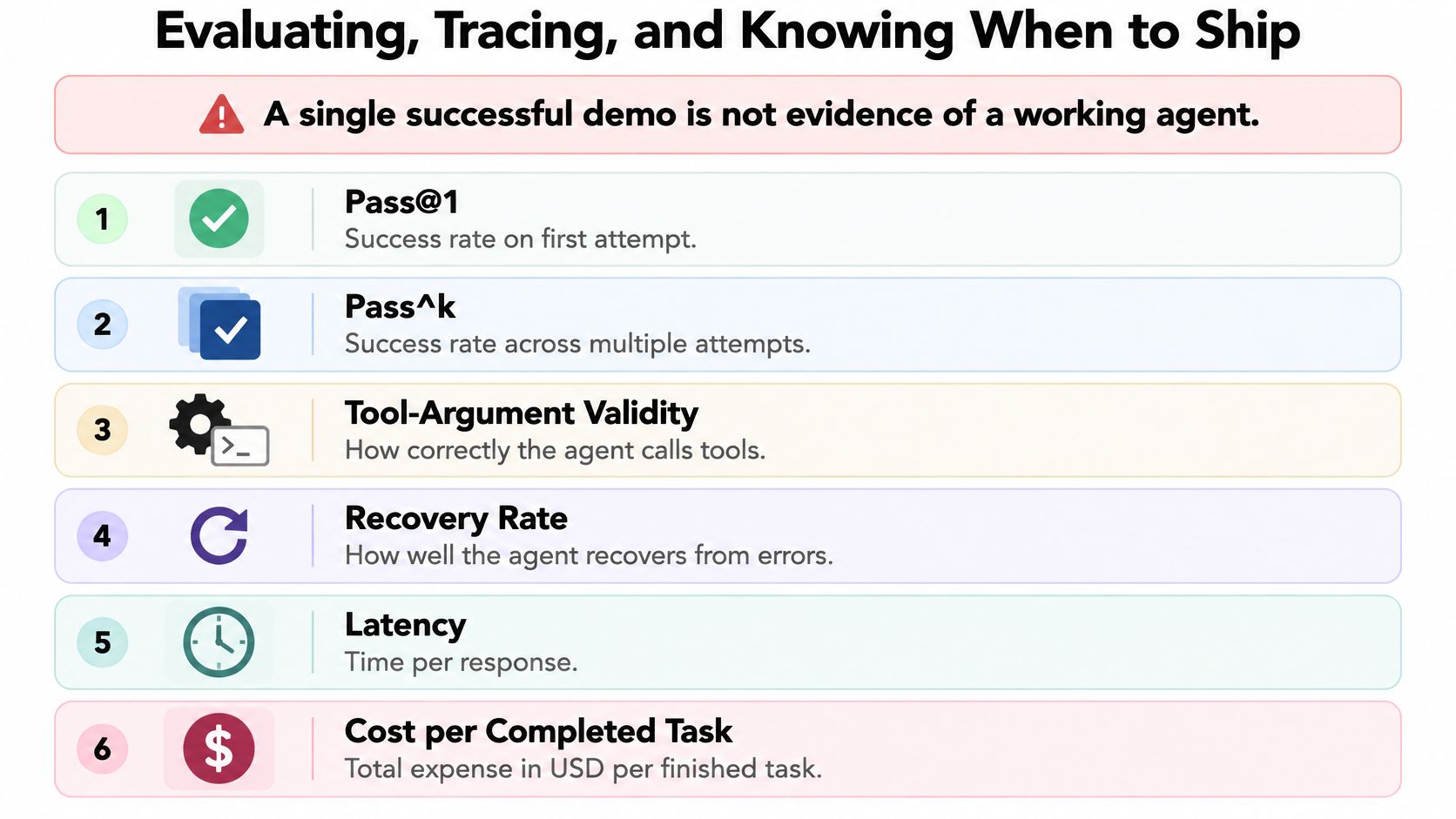
Use these metrics as separate signals:
Define success before grading. A document summary might require supported claims, coverage of specified topics, and explicit acknowledgment of missing information. A schema-valid answer that invents a deadline should fail.
The principles behind software testing best practices still apply: preserve regression cases, isolate changes, and test failure paths instead of concentrating on the happy path.
Use the Library to organize representative documents and chats. Alongside each case, save its expected behavior and the unacceptable outcomes. Include ambiguous requests, missing attachments, conflicting evidence, and unavailable dependencies.
Replay the same cases after changing a prompt, model, retrieval setting, or adapter. Manual comparison is fine for an early prototype. Don't mistake organized examples for an automated regression runner; production checks need repeatable execution and recorded results.
Without a trace, debugging an agent can feel like investigating a missing sock in a washing machine. You know something disappeared, but you can't explain where.
Record stage transitions, tool names, validated arguments, outcomes, and verification results. Decide what to redact before collection: tracing systems may capture model and function inputs and outputs, including sensitive material, as described in the tracing documentation.
Restrict access and retention. A debugging archive should not become a second copy of the company private document collection.
A malicious instruction inside a PDF is still document content. It must not become an authorization to access another account, disclose private files, or execute a transaction.
That distinction is the foundation of agent threat modeling. The model may misunderstand the content; the execution layer must still enforce the boundary.
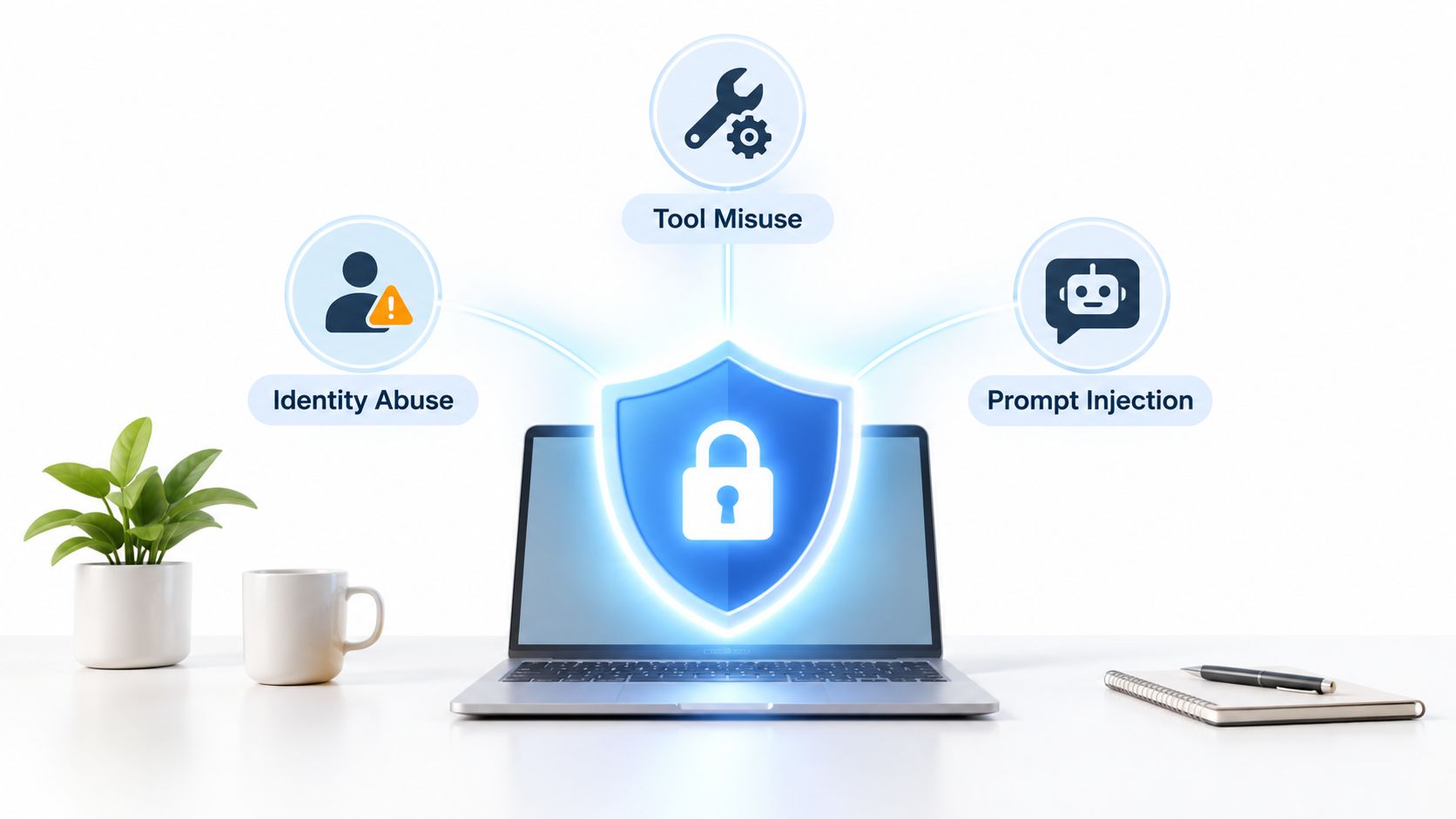
The OWASP guidance for agentic application security identifies threats including agent behavior hijacking, tool misuse and exploitation, and identity and privilege abuse. These categories move the discussion beyond whether the assistant produces an inappropriate answer.
A compromised agent might request a legitimate tool with an illegitimate target. It might also attempt to turn retrieved text into a new instruction. Argument validation alone won't catch that if authorization checks are missing.
Use a permission template that names the tool, allowed resources, allowed operations, approval requirements, and credential owner. Keep credentials in the server-side execution environment, outside the model's direct context.
For interface-level enforcement, apply the same discipline used in API design best practices: explicit contracts, authenticated callers, validated inputs, and predictable errors.
Agent-SafetyBench evaluated 16 agents across 349 interaction environments and 2,000 test cases, and none achieved a safety score above 60%. That result doesn't prove your application is unsafe, but it's a strong reason not to treat model behavior as your security boundary.
Run adversarial checks against the actual tools:
Security test: Assume the document has persuaded the model. Can the surrounding system still prevent the forbidden action?
A refusal in the chat isn't sufficient evidence. Inspect the trace and destination system to confirm that no prohibited operation occurred. Security depends on what executed, not on how reassuring the answer sounded.
Your first release should have an intentionally unexciting definition of done: a narrow task completes within its operating limits, failures remain visible, and consequential decisions reach a human.
Use NIST's Govern, Map, Measure, and Manage functions as a lifecycle reference. The AI Risk Management Framework connects responsibility, operating context, measurement, and mitigation rather than treating safety as a final review.
Assign an owner to each failed case. Otherwise, the evaluation set becomes a museum of bugs everyone recognizes and nobody fixes.
Developers should build a bounded ReAct-style loop against a sandbox API. Keep the first task read-only. Make the tool unavailable deliberately and confirm that the system terminates with a useful handoff rather than improvising a different operation.
Knowledge workers should configure a Project around a Document Assistant workflow. Choose a real document task, define the required answer format, and preserve the passages supporting the result. Keep the output as a reviewable draft until you can judge its consistency.
Students should reproduce a public ReAct example and add a narrowly defined tool. Record how the agent behaves when the tool returns incomplete information. Explaining that failure is a more valuable learning outcome than making the demo look flawless.
Don't begin by connecting your entire workspace. Begin with a task you understand well enough to grade. Expand only when you can explain the new failure modes and who will handle them.
The boring work is the useful work: contracts, evaluations, and permission boundaries. That's how you build AI agents that earn trust instead of merely generating a convincing screen recording.
Zemith offers multi-model access, Document Assistant, Coding Assistant, and organized Projects in a shared workspace. Visit Zemith to prototype a bounded document workflow, compare candidate models against the same task, and keep the result reviewable before connecting consequential actions.
Pay less than one AI subscription and get GPT, Claude, Gemini and more, plus 50+ AI tools.







Trusted by teams at






The top models, plus image, video and voice tools, in one plan.
Without Zemith
ChatGPT PlusUS$20.00Claude ProUS$20.00Google AI ProUS$19.99SuperGrokUS$30.00Perplexity ProUS$20.00 MidjourneyUS$10.00
 ElevenLabsUS$6.00Le Chat ProUS$14.99
 RunwayUS$15.00Kling StandardUS$8.80
 Gamma PlusUS$12.00
 Otter ProUS$16.99
 QuillBot PremiumUS$19.95
 Photoroom ProUS$12.99
 Quizlet PlusUS$7.99
Total if paying separatelyUS$234.70/mo
"I love the way multiple tools they integrated in one platform. Going in the right direction."
— simplyzubair
"The quality of data and sheer speed of responses is outstanding. I use this app every day."
— barefootmedicine
"The credit system is fair, models are perfect, and the discord is very responsive. Quite awesome."
— MarianZ
"Just works. Simple to use and great for working with documents. Money well spent."
— yerch82
"The organization of features is better than all the other sites — even better than ChatGPT."
— sumore
"It lives up to the all-in-one claim. All the necessary functions with a well-designed, easy UI."
— AlphaLeaf
"The team clearly puts their heart and soul into this platform. Really solid extra functionality."
— SlothMachine
"Updates made almost daily, feedback is incredibly fast. Just look at the changelogs — consistency."
— reu0691
Hand off the research, writing, design and follow-ups. Zemith picks the tools it needs and brings back finished work.
Search the web, run deep research, read files, create images and run code with GPT, Claude, Gemini, Grok and more.
Zemith keeps working in the cloud and pings you when it's done.
Notion, Linear, Canva, Airtable and more. It asks before it creates or changes anything.
Docs, slides, sheets and PDFs, ready to send.
Chain models and tools on a visual canvas, from one prompt to a finished promo video.
Briefings, reports and reminders run on a schedule and are ready when you need them.
Real-time voice that can see your camera or screen.
The best image and video models, in one studio.
Turn PDFs, links and YouTube videos into podcasts, quizzes, flashcards and mind maps.
while state.can_continue(): action = propose_next_action(state) validated = validate_action(action, allowed_tools) observation = execute_with_limits(validated) state = record_observation(state, observation) if verify_completion(state): return build_answer(state)return prepare_handoff(state)














 Podcast
 Quiz
Quiz Flashcards
 Mind map
 Infographic