


Every top model, with tools built in.
Search the web, run deep research, read files, create images and run code with GPT, Claude, Gemini, Grok and more.
Discover how to improve research skills with our guide. Learn actionable frameworks and AI-powered strategies to find better information, faster.
Want to know the secret to improving your research skills? It's not about being a genius; it's about having a solid game plan before you even think about typing a query into Google. The trick is to define your question, pick your tools wisely, and focus on connecting ideas rather than just hoarding links. This is how you turn a frantic, chaotic search into a focused journey of discovery.
We’ve all been there. You start with one simple question, and three hours later you've got 37 tabs open, you’re now a reluctant expert on the mating rituals of the South American tree frog, and you’ve made exactly zero progress on your actual project. It’s the digital equivalent of going to the grocery store for milk and coming home with a kayak. That feeling of drowning in information isn't a personal failure; it's a process failure.
This guide is your official intervention. I still have flashbacks to a brutal project early in my career where my "research" involved opening a new tab for every single thought that popped into my head. The result? A jumbled mess of half-read articles, conflicting stats, and a final report that was, to be charitable, a complete disaster. That painful experience taught me a lesson I’ll never forget: brilliant research isn't about finding more information. It’s about finding the right information and knowing what to do with it.

If your research process feels like a high-speed game of digital whack-a-mole, you’re probably stuck in a few common traps that absolutely tank your productivity. All that frantic tab-switching isn't just distracting; it creates a massive drain on your focus. Learning about the high cost of context switching makes it painfully clear just how much mental energy we waste with disorganized habits.
It's time to build a better system from the ground up. We're going to ditch the old, chaotic methods for a smarter, more structured approach to finding answers. Here's a quick look at the frustrating habits we're leaving behind and the powerful, AI-driven methods you'll master in this guide.
See the difference? We're making a conscious choice to move past old habits that leave us feeling overwhelmed and unproductive.
The goal is to move from being a simple collector of digital junk to becoming an architect of genuine understanding. It’s a shift in mindset that pays huge dividends in clarity and efficiency.
We'll walk through building this framework step by step. A huge part of this is creating a central command center for your work. Tools like Zemith's 'Projects' feature are built for exactly this, letting you corral all your sources, notes, and AI-driven conversations into one clean space. It’s your best defense against getting lost in the chaos of the open web ever again.
Every great answer begins with a great question. We've all been there: you open a browser with a fuzzy goal like "find out about AI for marketing" and quickly find yourself buried under a mountain of irrelevant tabs. That’s not a research plan; it’s a recipe for a wasted afternoon. The secret to getting better at research is to start before you even type a single word into a search bar. You need a sharp, specific question to act as your North Star.
A well-crafted question gives you focus, boundaries, and a clear finish line. Without one, you're just wandering aimlessly. A vague goal gives you permission to click on anything that looks remotely interesting, which is how you end up watching videos about competitive cheese rolling when you were supposed to be analyzing market trends. A specific question forces you to measure every potential source against one simple standard: "Does this actually help me answer my question?"

So, how do you get from a foggy idea to a powerful question? You have to dig. One of my favorite techniques for this is the "5 Whys." It's a classic for a reason—it’s surprisingly good at getting to the heart of what you really need to know.
Let's walk through an example. Your starting point might be: "I need to research AI."
And there it is. In just a few steps, we've gone from a vague topic to a concrete problem: "How can I consolidate my research and writing workflow to cut down the time spent manually gathering and synthesizing data for blog posts?" Now that is a question you can actually tackle.
Once you've found the core problem, you can sharpen your question even more. For more formal projects, a framework like PICO (Population, Intervention, Comparison, Outcome) is a game-changer. It’s common in medical research, but you can easily adapt it for just about anything, including business or marketing.
Let’s use it to refine our question:
Put it all together, and you get a laser-focused research question: "For marketing content creators, how do integrated AI platforms like Zemith improve data synthesis and reduce creation time compared to using separate single-model tools?" See how much more powerful that is? It gives you exact terms to search for and a clear goal for your project.
A great research question is your most powerful filter. It instantly tells you which articles to read and which ones to ignore, saving you hours of wasted effort before you even start.
Visual brainstorming is a fantastic way to work through this process. Instead of just scribbling in a notebook, try mapping it out. A tool like Zemith’s Whiteboard lets you throw all your initial ideas onto a digital canvas. You can use virtual sticky notes for your "5 Whys," draw connections between ideas, and even work with your team to refine your PICO elements. It helps you build a clear roadmap for your project and keeps you on track from the get-go. For more inspiration, check out our guide on what kind of questions to ask AI to get the best results.
With your killer question in hand, it’s time to hunt for answers. This is where we separate the pros from the folks who just type things into Google and hope for the best. Most people's idea of research is a single search bar, but to really become an information detective, you need to know where to look and how to dig deeper.
Let’s start with a simple power-up: advanced search operators. Think of these as secret cheat codes for your search engine. Using quotation marks "like this" tells Google to search for that exact phrase, which filters out a ton of irrelevant noise. You can also use a minus sign - to exclude terms (e.g., "electric cars" -Tesla) or site: to search within a specific website (e.g., market trends site:forbes.com). These little tricks alone will make you feel like a master hacker.
The real game-changer is moving beyond a single search bar. Some of the most valuable information isn't indexed in a way that’s easy to find. Your goal is to become the specialist who knows exactly where the hidden gems are buried.
This means expanding your toolkit to include a variety of sources:
Becoming a great researcher isn't just about finding data; it's about synthesizing it. To get good at this, mastering 9 Effective Note Taking Methods is a huge step forward for capturing and recalling info. And once you have your notes, knowing how to structure them is key—check out our guide on how to organize research notes for a deeper dive.
This is where things get really interesting. What if you could ask one complex question and get a single, synthesized answer that draws from the strengths of multiple AI models all at once? That’s the entire idea behind Zemith’s Multi-Model Search.
Instead of running the same query in different AI chats and trying to piece the answers together, you just ask Zemith once. It intelligently queries models like GPT, Claude, and Gemini at the same time, then combines their best insights into one comprehensive response, complete with cited sources. It’s like having a team of brilliant research assistants who never need a coffee break.
Here’s a look at what the Multi-Model Search interface looks like when it provides a consolidated answer.
This screenshot shows how Zemith can deliver a cohesive response by blending outputs from different AI models, saving you from the tedious work of comparing results yourself.
The ability to move beyond a single source of truth—whether it's one search engine or one AI model—is what separates surface-level research from deep, insightful discovery.
This skill is becoming more important than ever. In fact, recent data shows that up to 49% of workers could see half or more of their research-related tasks impacted by large language models and AI tools. This shift means that improving your research skills with modern platforms isn't just a nice-to-have; it's an economic necessity for staying relevant.
You can explore the full findings of the Coursera Global Skills Report 2023 to understand the global impact. The message is clear: mastering these tools is critical for navigating the modern knowledge economy.
It’s easy to feel productive when you’re just gathering information, but the real magic in research happens when you stop hoarding and start connecting. The goal isn’t to collect the most sources; it’s to wade through that mountain of messy notes, stats, and quotes to find a clear, genuine understanding. This is called synthesis, and it’s what separates a novice from someone who truly knows their stuff.
A lot of us were taught to just highlight, copy, and paste. But passively collecting facts is like having a pile of bricks—it’s not a house until you start putting them together. To get real insights, you have to actively engage with your material.
Let’s start by moving past simple highlighting and into more structured note-taking. There’s a reason systems like Cornell Notes or the Zettelkasten method are so popular: they force you to actually process what you're reading, not just copy it down. The basic idea is to put complex ideas into your own words, which is a fantastic way to check if you really get it.
But let's be real, who has time to manually summarize a 50-page academic paper? This is where a little AI assistance can become your secret weapon.
The real breakthrough in research isn't just finding information faster; it's understanding it deeper. AI tools can handle the grunt work of summarizing and extracting, freeing you up to do the high-level thinking that leads to real insights.
Imagine you've just downloaded a dense industry report. Instead of dedicating an hour to reading it cover-to-cover, you could use a tool like Zemith's Document Assistant to pull out the core ideas in seconds. You can ask it to find key statistics, identify the main arguments, or even list the counterarguments presented in the text. This isn't cheating; it's just working smarter.
Here’s what that looks like in practice. You can literally chat with your document.
As you can see, this turns a passive reading session into an active conversation, letting you get summaries or specific data points instantly.
Once you have these extracted insights, the real work begins. You’re trying to build a web of knowledge, not just a list of facts. An integrated tool like Zemith's Smart Notepad is perfect for this. As you pull summaries and stats from different documents, you can start weaving them together.
Try these active synthesis techniques:
This process transforms your research from a collection of isolated notes into a dynamic, personal knowledge base. In Zemith, you can save these synthesized notes and their source documents right into your Library. You're creating a rich repository where information isn't just stored—it's understood and interconnected. To take these skills even further, check out our guide on effective data analysis and reporting.
Getting good at analysis and synthesis isn't just for school; it’s a massive boost for your career. After you’ve carefully gathered your information, the next step is applying solid qualitative data analysis methods. And let me tell you, the demand for people who can do this well is just soaring.
Don't just take my word for it. Recent workforce development reports show that analytical thinking is set to make up 10% of all corporate training initiatives between 2023 and 2027, making it the single highest priority for skills training. The data is clear: improving your research skills is essential for getting ahead.
By actively synthesizing information instead of just collecting it, you're building one of the most valuable professional skills you can have. You become the person who doesn't just deliver data—you deliver meaning.
Theory is great, but let's be honest—seeing a process in action is what makes it stick. It's time to move past individual tips and actually build a complete, high-octane research workflow from scratch. This isn’t just about listing features; it’s a real-world demonstration of how an integrated system can eliminate the usual friction so you can focus on what actually matters: thinking.
Imagine you're a content creator tasked with a big project: a deep-dive article on "The Future of Remote Work." The topic is massive, opinions are all over the place, and you need to produce something smart and well-supported.
Here’s how you’d tackle it without drowning in 50 browser tabs.
Before anything else, you need a command center. Instead of scattering files across your desktop, Google Drive, and random folders, you'll start by creating a dedicated 'Project' in Zemith. Think of this as your digital war room for this specific topic. Every document, note, and AI conversation about remote work will live right here, creating an organized, instantly searchable knowledge base from day one.
Next, you'll jump into the Zemith Whiteboard. This is your space to map out core questions before you even think about searching. You might start with a big, broad question like, "What are the biggest challenges of remote work?" and then use the "5 Whys" technique to drill down to something more specific, like, "How does asynchronous communication impact team cohesion for fully distributed tech companies?" This visual map becomes your project's constitution, guiding every step.
With your questions defined, it's time to gather intel. Instead of just defaulting to a standard search engine, you'll fire up Zemith's Multi-Model Search. You can ask a complex question like, "Summarize recent studies on the productivity of hybrid versus fully remote teams," and get a synthesized answer that pulls from the best of several AI models at once. This approach gives you a much more nuanced starting point than a single model ever could.
As you find compelling academic papers, industry reports, and insightful articles, don't just bookmark them to be forgotten. Save them directly to your Project's Library. This does more than just keep you organized; it builds a contextual memory for the project. Every tool you use within this project—from the notepad to the document assistant—now has access to this curated library, making your AI assistant progressively smarter about your specific topic.
This is the core process of moving from raw data to real, actionable insights.
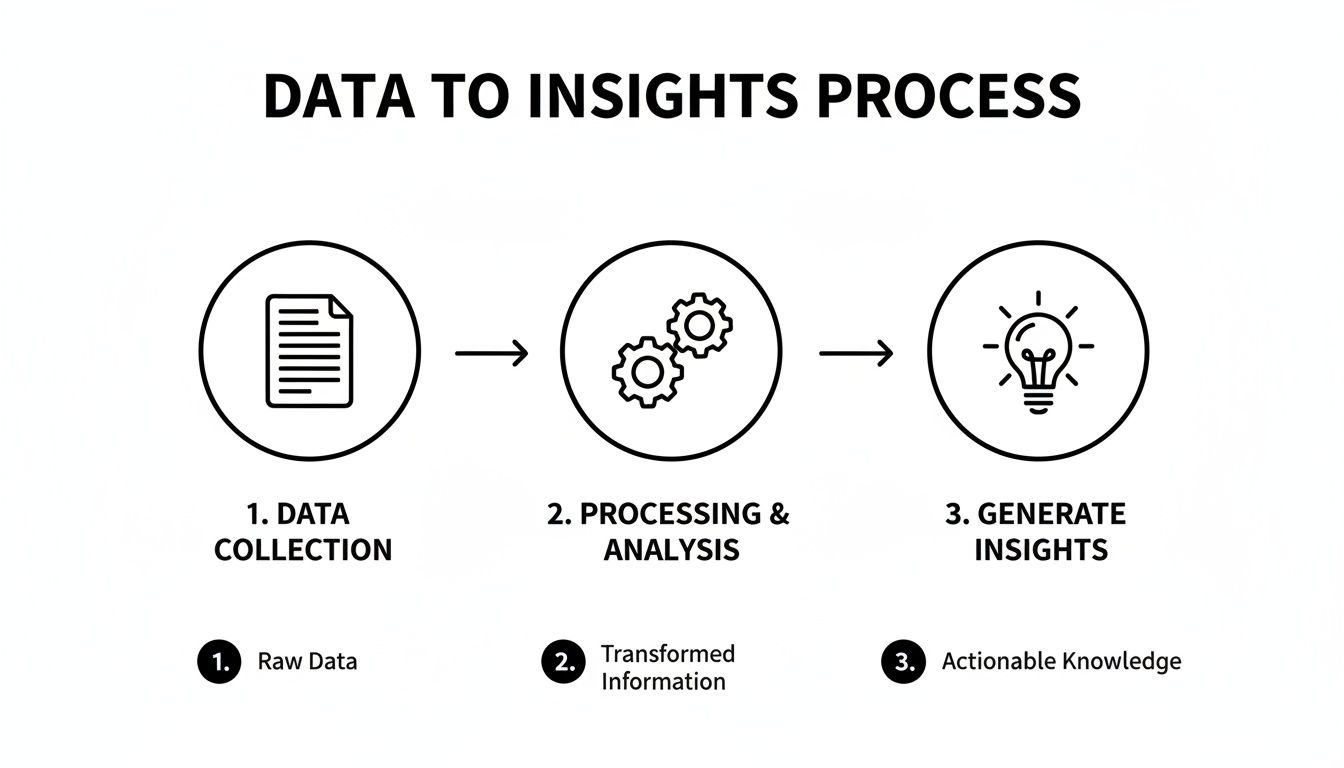
The flow here—from documents to gears to a lightbulb—perfectly shows how the right tools are essential for turning raw information into genuine understanding.
Now for the fun part. You have a beefy, 40-page PDF report from a major consulting firm. Instead of grinding through it word-for-word, you upload it and fire up the Document Assistant.
You can ask it direct, pointed questions, just like you would a human research assistant:
In seconds, the assistant pulls the exact information. You can copy these key insights directly into your Smart Notepad, which is where you start connecting the dots. As you pull quotes from one source and stats from another, you can lean on the AI right inside the notepad to help you weave them into a coherent argument.
An integrated AI workspace turns research from a linear, frustrating task into a dynamic conversation. You're not just finding information; you're actively building understanding with a powerful assistant at your side.
Your Smart Notepad is now buzzing with validated insights, summaries, and key data points. From here, you can highlight all your notes and ask the AI to generate a preliminary outline for your article. It will structure your points logically, creating a solid skeleton to build upon.
Find a sentence that sounds a bit clunky? Highlight it and ask the AI to rewrite it for clarity. Need to double-check a claim? Use the built-in fact-checking feature to verify its accuracy against real-time web results. This entire process—from initial question to final draft—happens in one fluid workspace. You’re no longer killing your momentum with constant context-switching.
This is what building a research superpower looks like in the real world. Many professionals are ready for this shift; a recent study found that 71% of professionals believe AI will improve their job performance. However, that same study revealed that 55% feel they have training gaps in technical skills, underscoring the need for intuitive, all-in-one tools. You can read the full research from the Market Research Institute International to see just how crucial this upskilling is becoming. For more ideas, check out our guide on other powerful AI tools for research that can fit right into your workflow.
Alright, we've walked through the entire research process, from asking the right questions to building a system that works. But I know from experience that once you start trying this stuff out in the real world, a few common roadblocks always seem to pop up.
Let's tackle a couple of the most frequent questions I hear. Think of this as the final pep talk before you go out and crush your next research project.
This is the big one, isn't it? In an ocean of information, spotting the reliable stuff is everything. I've found the simplest, most effective way to cut through the noise is by asking three quick questions: WHO, WHAT, and WHY.
Pro Tip: Don't automatically dismiss non-academic sources. A firsthand account from an industry veteran on a niche forum can be pure gold. It’s all about context.
This is also a great place to let AI do the heavy lifting. Instead of opening a dozen new tabs to investigate an author, you can use Zemith’s real-time web search and fact-checking features to get a quick background check on a person or publication on the spot.
We've all been there—a desktop littered with PDFs, a notes app full of random thoughts, and links scattered across emails and bookmarks. The best organization system is always the one you'll actually stick with, but the foundational principle is centralization.
My entire workflow is built around the "Project" method. For any new topic I'm digging into, I create a single, dedicated home for it.
This simple system transforms a chaotic pile of information into an organized, searchable knowledge base that you can build on for years. It's an absolute game-changer.
Ready to stop chasing down rabbit holes and start building real, actionable insights? Zemith pulls all the tools we've talked about—from multi-model search and document analysis to organized projects and a smart notepad—into one cohesive workspace. No more juggling a half-dozen different apps. It's time to build your research superpower. Try Zemith for free and see the difference.







Trusted by teams at






The top models, plus image, video and voice tools, in one plan.
Without Zemith
ChatGPT PlusUS$20.00Claude ProUS$20.00Google AI ProUS$19.99SuperGrokUS$30.00Perplexity ProUS$20.00 MidjourneyUS$10.00
 ElevenLabsUS$6.00Le Chat ProUS$14.99
 RunwayUS$15.00Kling StandardUS$8.80
 Gamma PlusUS$12.00
 Otter ProUS$16.99
 QuillBot PremiumUS$19.95
 Photoroom ProUS$12.99
 Quizlet PlusUS$7.99
Total if paying separatelyUS$234.70/mo
"I love the way multiple tools they integrated in one platform. Going in the right direction."
— simplyzubair
"The quality of data and sheer speed of responses is outstanding. I use this app every day."
— barefootmedicine
"The credit system is fair, models are perfect, and the discord is very responsive. Quite awesome."
— MarianZ
"Just works. Simple to use and great for working with documents. Money well spent."
— yerch82
"The organization of features is better than all the other sites — even better than ChatGPT."
— sumore
"It lives up to the all-in-one claim. All the necessary functions with a well-designed, easy UI."
— AlphaLeaf
"The team clearly puts their heart and soul into this platform. Really solid extra functionality."
— SlothMachine
"Updates made almost daily, feedback is incredibly fast. Just look at the changelogs — consistency."
— reu0691
Hand off the research, writing, design and follow-ups. Zemith picks the tools it needs and brings back finished work.
Search the web, run deep research, read files, create images and run code with GPT, Claude, Gemini, Grok and more.
Zemith keeps working in the cloud and pings you when it's done.
Notion, Linear, Canva, Airtable and more. It asks before it creates or changes anything.
Docs, slides, sheets and PDFs, ready to send.
Chain models and tools on a visual canvas, from one prompt to a finished promo video.
Briefings, reports and reminders run on a schedule and are ready when you need them.
Real-time voice that can see your camera or screen.
The best image and video models, in one studio.
Turn PDFs, links and YouTube videos into podcasts, quizzes, flashcards and mind maps.














 Podcast
 Quiz
Quiz Flashcards
 Mind map
 Infographic