


Every top model, with tools built in.
Search the web, run deep research, read files, create images and run code with GPT, Claude, Gemini, Grok and more.
Learn how to use AI for brainstorming without everyone landing on the same idea. Practical prompts, a simple workflow and scoring tips you can use today.
The shared doc has been open for twenty minutes and it contains three bullets. Two of them are the same bullet. Somewhere around minute twenty-five, someone says the line every team eventually says: should we just ask ChatGPT?
You could, and you'd have twenty ideas in twelve seconds. Four of them would be the same idea wearing different hats, which is the part nobody warns you about. The tool is good at this and it's also the fastest way to make a whole room think one thought.
Getting that balance right is most of the skill in how to use AI for brainstorming. Creators already treat it as standard kit: 48% of surveyed global creators reported using creative generative AI for ideation and brainstorming in 2025, per Adobe's survey of more than 16,000 creators. The question stopped being whether to use it. It's where in the session it belongs, and how much rope to give it.
Forty minutes in, the whiteboard is full and every note says a version of the same thing. Nobody decided to converge. It happened because the loudest early idea set the frame and the rest of the room spent the hour decorating it. Swapping in a chatbot doesn't fix that. Sequence does.
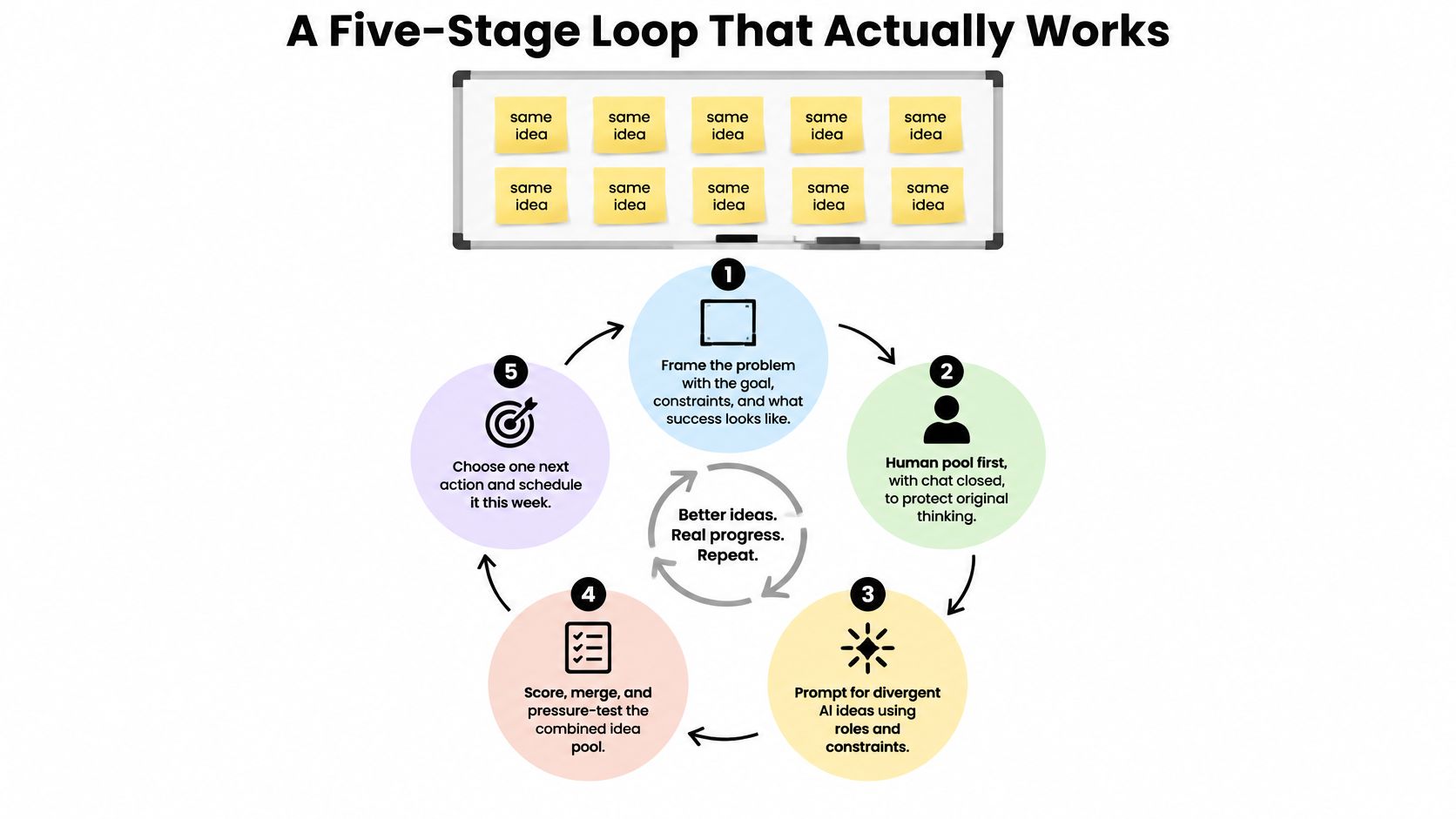
The order isn't aesthetic. A 2025 experiment published in Business & Information Systems Engineering put 75 participants either alone or in human-AI pairs and found the pairs scored better on fluency, flexibility, novelty and value. The twist is what happened to the humans themselves: judged as solo thinkers, they didn't beat the people who worked without any AI. Of the 283 ideas participants selected as their best, 224 (79.2%) started with a human and 59 (20.8%) came from the language model. The model improved the session without replacing the session.
Read the table again and notice where the AI sits. It shows up in the middle. The framing and the final call stay with you, and that division of labor is what keeps a brainstorm from becoming a group hallucination.
At a brainstorming session, a chatbot can produce a tidy list before anyone has written a messy one. That tidy list may also pull the group toward the same concepts. A study published in Nature Human Behaviour found that AI-assisted ideas were significantly less diverse across the study's experiments, as the Mack Institute's summary of the research reports.
The practical risk is early convergence: people see a plausible suggestion, then build variations around it instead of exploring their own directions.

Give the group a short solo round before opening the AI tool:
Let each person write before showing the group an AI-generated list. Shared examples can anchor everyone on the same set of starting points. For more ways to get ideas flowing before prompting, try these creative brainstorming techniques.
The model works best as a second pass. Let people make the first marks.
A dynamic experiment with more than 800 participants from over 40 countries tested what happens when people see AI-generated examples before they start ideating. High exposure didn't improve the creativity of individual ideas, but it did change the collective spread of them. The authors summed it up as AI made ideas different, not better (the arXiv paper on AI exposure and idea diversity).
Read that carefully, because it changes what a prompt is for. You aren't prompting for the best answer. You're prompting for range, and sorting happens later with human eyes.
Three habits do most of the work. Name the constraint explicitly, because "cheap and fast" produces different ideas than "premium and slow." Say what to reject, such as "nothing that overlaps with my list." And ask for the assumption behind each idea, since an idea whose assumption you can name is an idea you can test.
Reusable prompt: "Here's my brief: [paste five lines]. Here are the ten ideas I already wrote: [paste]. Give me twelve directions I did not write, spread across six unrelated mechanisms. For each, name the mechanism, the assumption it depends on, and who it's for. Reject anything that overlaps with my list. Then give the strongest objection to each idea you proposed."
Paste that once and you'll notice the difference immediately: the output stops sounding like a horoscope and starts reading like a set of options you could pick. For more on structuring requests so the model does the work you meant, these prompt engineering tips are worth ten minutes.
Generation and evaluation are different jobs. Run them in the same breath and you'll fall for whichever idea sounded smoothest, which is usually the one the model wrote.
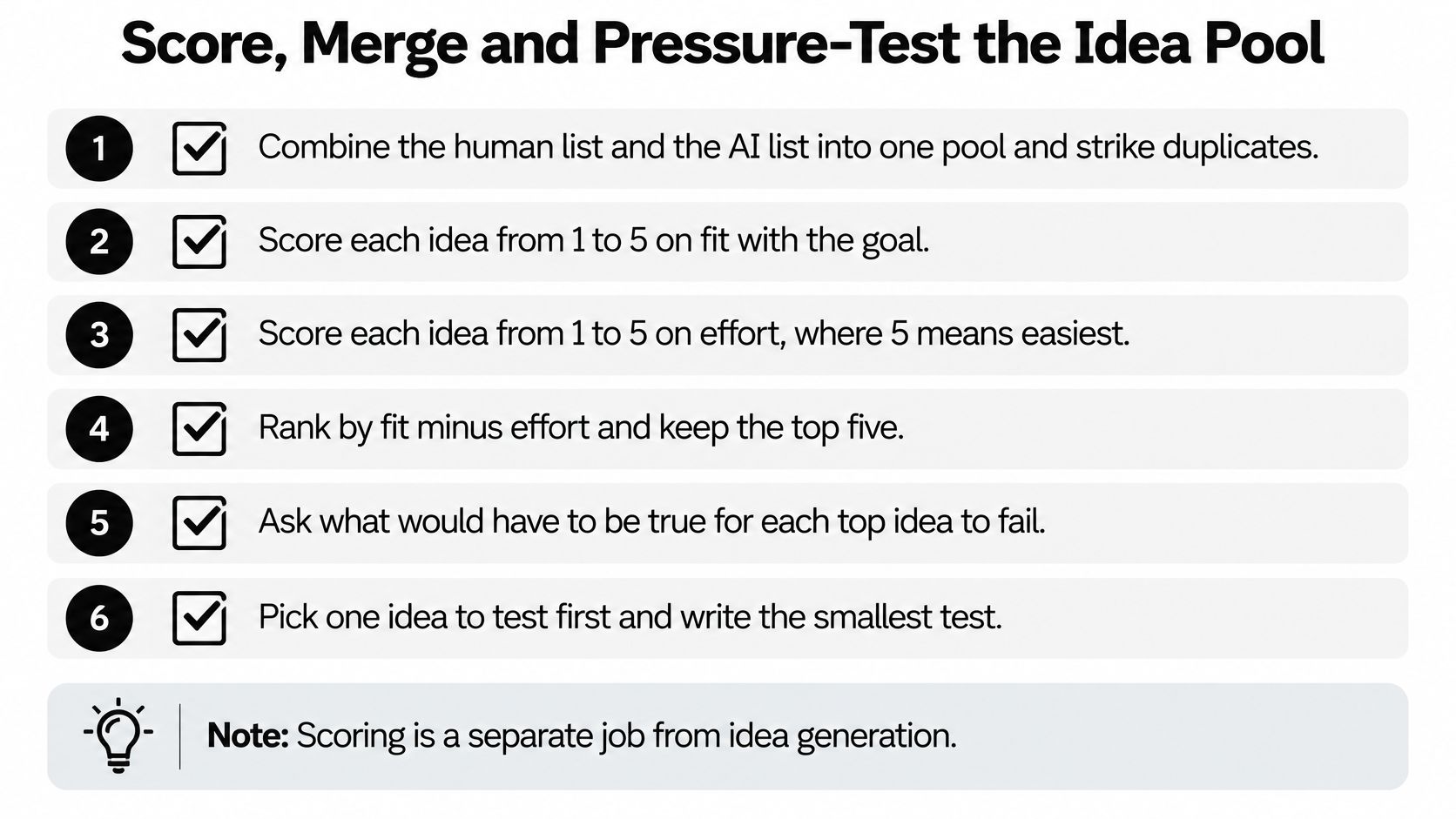
Here's the sequence that keeps the scoring honest. Combine the human list and the AI list into one pool and strike near-duplicates, because the same idea in two costumes will dominate any ranking. Write the rubric down before any scores exist, so nobody reverse-engineers weights to rescue a favourite. Then have two or three people score blind, with no label showing whether an idea came from a person or the model. After that, ask the AI to score the same pool and demand a written reason plus an uncertainty level on every mark. Finally, change the evaluator or the prompt and rerun it to see whether the same ideas still win.
The reason to separate the roles shows up in the data. MIT Sloan Management Review's analysis of AI-assisted creativity reports that AI users generated up to 43% more ideas early on, but the advantage disappeared once both groups received later AI support. AI-assisted participants also identified their own best output correctly only 32% of the time, against 40% for people working solo. The same analysis found that leaning on AI mainly for selection keeps diversity closer to human-only work, while leaning on it for generation narrows the pool.
When the pool gets large, a mind mapping approach beats a spreadsheet for clustering, and keeping the whole pool visible on a whiteboard or in a project folder keeps the argument on the concept instead of on whose idea it was.
A single confident ranking is a red flag. What you want out of the second pass is disagreement you can see, with reasons attached.
The failure mode that does the most damage isn't bad output. It's good output arriving fast enough that nobody bothers to select anymore. People copy what the model hands them and still end up choosing their own ideas as the best ones, which tells you something useful about where the value lives.
Moderation beats enthusiasm. A 2025 study of 139 business professionals and 319 working adults found a curvilinear effect: moderate human-AI collaboration produced better creative performance than either low or high collaboration, with the gain tied to greater knowledge diversity (the study on collaboration intensity and creative performance). Cap the model's turns instead of letting it fill the board.
Electronic brainstorming research tested groups of 4, 6, 8, 10 and 12 people across 15-minute and 25-minute sessions. Larger groups produced more unique and original ideas overall, though group size didn't improve how well each individual performed. The timing detail is the useful one: a memory instruction hurt performance in 15-minute sessions and helped it in 25-minute sessions (the ERIC record of the electronic brainstorming study). Use a short round when speed matters and a longer one when people need to build on earlier notes.
Then there's the factual side. Generative AI can produce false claims with total confidence, a problem NIST calls "confabulation," covering content that is erroneous yet presented confidently, including output that contradicts the prompt or earlier statements (the NIST publication on confabulation). Keep verification as a separate pass. Ask for assumptions, evidence and an uncertainty level, then check any factual claim against an independent source before it goes anywhere near a deck. A steady fact-checking routine for AI output turns that second pass into something you finish instead of something you mean to do.
Pick one real problem you'd otherwise solve badly this week: a blog series that's gone stale, a feature nobody can name, a research question that keeps sliding sideways.
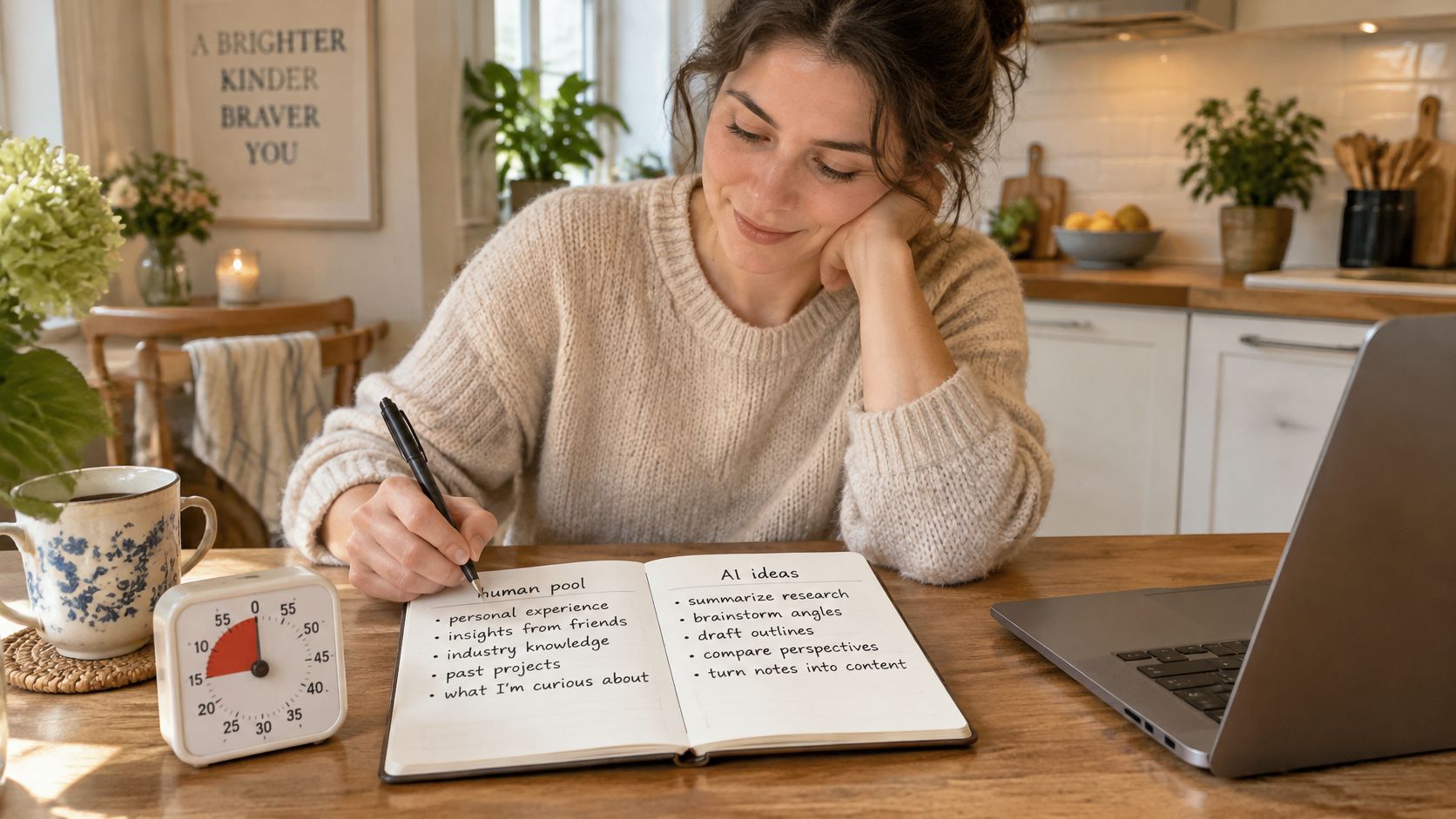
One conversation, one place to land it. Zemith's chat holds the back and forth, the smart notepad holds your private list before the timer ends, and the whiteboard is an infinite canvas for clustering what comes back, so a second round builds on earlier concepts instead of relearning them. You can also switch models mid-chat, which is a cheap way to find out whether an idea survives a different reader.
If you learn better by watching, start here.
The appetite is already there. Adobe's 2024 Creative Frontier study found that 90% of surveyed creators said generative AI could support their creative brainstorming process. Support is the operative word. If you want a wider kit around the loop, this list of AI tools covers the rest of the workflow.
Your starter, word for word: "Here's my brief and my own ten ideas. Give me twelve directions I did not already write, then the strongest objection to each one."
Run that session once this week and put the shortlist next to whatever your usual method produced. Compare range, not polish. If the AI-assisted list is longer but narrower, you'll see it immediately, and you'll know exactly which stage to fix next time.
Zemith puts more than 20 AI models in a single workspace, alongside the whiteboard, AI notepad and document library that carry a brainstorm from first scribble to final shortlist. Bring the brief you've been avoiding and run the 25-minute loop: human list first, divergent sprint second, human selection last. Head to Zemith and see whether the shortlist beats your usual method.
Switch models mid-chat, search the web, build Word, PowerPoint, Excel and PDF files, and generate images and video, on web, iOS and Android with one plan.
Free $0 (chat with the free models) · Plus $15.99/month · Professional $29.99/month. Prices in USD.
Pay less than one AI subscription and get GPT, Claude, Gemini and more, plus 50+ AI tools.


Trusted by teams at






The top models, plus image, video and voice tools, in one plan.
Without Zemith
ChatGPT PlusUS$20.00Claude ProUS$20.00Google AI ProUS$19.99SuperGrokUS$30.00Perplexity ProUS$20.00 MidjourneyUS$10.00
 ElevenLabsUS$6.00Le Chat ProUS$14.99
 RunwayUS$15.00Kling StandardUS$8.80
 Gamma PlusUS$12.00
 Otter ProUS$16.99
 QuillBot PremiumUS$19.95
 Photoroom ProUS$12.99
 Quizlet PlusUS$7.99
Total if paying separatelyUS$234.70/mo
"I love the way multiple tools they integrated in one platform. Going in the right direction."
— simplyzubair
"The quality of data and sheer speed of responses is outstanding. I use this app every day."
— barefootmedicine
"The credit system is fair, models are perfect, and the discord is very responsive. Quite awesome."
— MarianZ
"Just works. Simple to use and great for working with documents. Money well spent."
— yerch82
"The organization of features is better than all the other sites — even better than ChatGPT."
— sumore
"It lives up to the all-in-one claim. All the necessary functions with a well-designed, easy UI."
— AlphaLeaf
"The team clearly puts their heart and soul into this platform. Really solid extra functionality."
— SlothMachine
"Updates made almost daily, feedback is incredibly fast. Just look at the changelogs — consistency."
— reu0691
Hand off the research, writing, design and follow-ups. Zemith picks the tools it needs and brings back finished work.
Search the web, run deep research, read files, create images and run code with GPT, Claude, Gemini, Grok and more.
Zemith keeps working in the cloud and pings you when it's done.
Notion, Linear, Canva, Airtable and more. It asks before it creates or changes anything.
Docs, slides, sheets and PDFs, ready to send.
Chain models and tools on a visual canvas, from one prompt to a finished promo video.
Briefings, reports and reminders run on a schedule and are ready when you need them.
Real-time voice that can see your camera or screen.
The best image and video models, in one studio.
Turn PDFs, links and YouTube videos into podcasts, quizzes, flashcards and mind maps.














 Podcast
 Quiz
 Flashcards
 Mind map
 Infographic