


Every top model, with tools built in.
Search the web, run deep research, read files, create images and run code with GPT, Claude, Gemini, Grok and more.
How to Use AI Image Generator. Learn how to use an AI image generator effectively. Step-by-step guide to prompts, model selection, settings, and pro tips
You've got a campaign deadline, a blank visual brief, and a perfectly reasonable idea: “I'll just type a prompt and let the AI handle it.” Ten seconds later, the product has six fingers, the headline is almost readable, and the supposedly white background has developed a mysterious beige personality.
That result doesn't mean AI image generation is useless. It means the tool needs a workflow. The strongest images usually come from clear constraints, several drafts, targeted edits, and human review, not from one heroic prompt.

A common first attempt looks like this: “A modern product photo of a stylish coffee maker in a bright kitchen.” The generator understands the broad idea, but it still has to invent the camera angle, surface materials, lighting direction, composition, color palette, and intended use. You asked for a concept. The model supplied a guess.
AI image generation is best understood as an iterative workflow rather than a one-command process. Modern systems typically use diffusion. The model first adds noise to training data, then learns to reverse that process step by step until a requested image emerges. This approach became especially influential after diffusion research was proposed in 2015, DDPM work appeared in 2019 and improved in 2020, and text-to-image systems such as GLIDE advanced substantially in 2021. IBM's overview of generative AI provides useful technical context.
That technical background matters because the output isn't a photograph waiting inside the machine. It's a generated interpretation of your description. If the description leaves important decisions open, the system fills those gaps with probability, not intent.
A more reliable process looks like this:
This approach also makes image analysis useful. When you find a composition that feels close but can't explain why, an AI image analysis workflow can help identify visible elements and turn them into a more precise prompt.
The practical lesson is simple: a generated image is a draft until a person checks it. That review matters even more for marketing, education, research, and professional design, where a polished visual can still communicate something false.
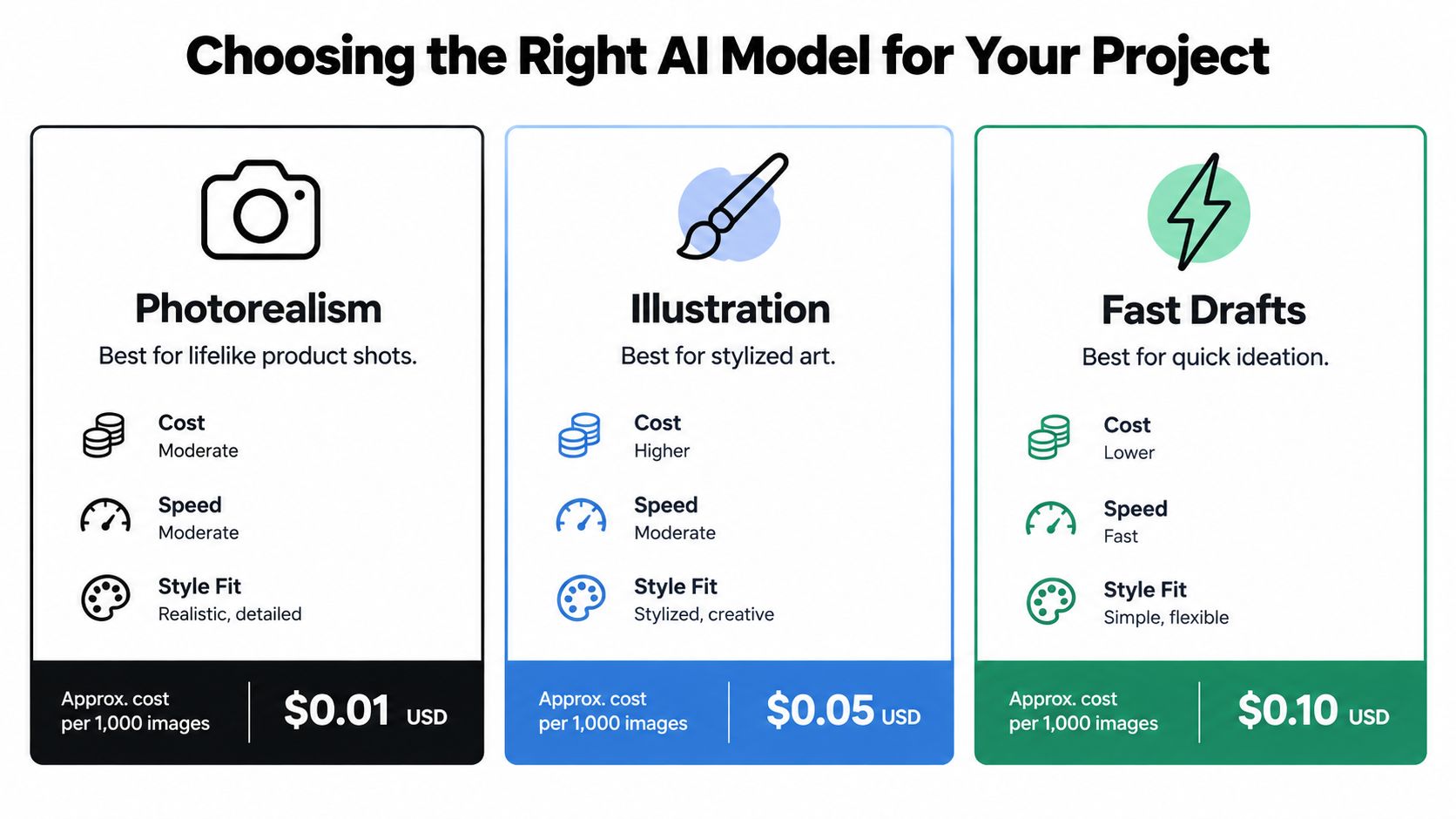
The right model depends on the job, not on whichever tool is receiving the most attention this week. A model that creates convincing editorial portraits may be awkward for a diagram with labels. A system that handles illustration beautifully may struggle with a consistent product shape across several images.
The major access shift happened in 2022. DALL-E 2 was announced in April, while Stable Diffusion was released in August with publicly downloadable model weights. That made high-quality text-to-image generation more accessible than earlier closed systems. A history of AI image generation explains why this period changed practical experimentation.
Start with the output, then work backward:
Don't compare models with different prompts and settings, then declare a winner. Use the same brief, format, and review criteria. Score each output for prompt adherence, visual quality, brand fit, typography, and editability.
For visual teams working with products such as bedding, a specialist resource like BEDHEAD's CGI guide for bedding is useful because it connects computer-generated imagery with the practical concerns of product presentation, materials, and commercial context.
Create a short evaluation set:
You're not trying to prove that one system is universally superior. You're finding out which model creates the fewest expensive corrections for your actual work. Zemith's AI image generator model guide can help structure that comparison across common use cases.
A fast draft model may be ideal for exploring ten compositions. A more controlled model may be worth using for the final asset. Separating ideation from production prevents you from demanding finished quality from the tool that was only meant to help you think.
A useful prompt behaves like a design brief, not a wish. “Make a cool image of a laptop” gives the generator enormous freedom. That freedom can be entertaining, but it's not dependable when you need a repeatable asset.
Build the prompt in layers:
A practical template is:
Create [number] [subjects] performing [action] in [environment], viewed from [camera angle], with [lighting and visual style], using [color palette], aspect ratio [ratio], for [intended use].
For example:
Create one matte-black insulated water bottle standing on a pale stone surface in a quiet morning kitchen, viewed at a three-quarter angle, with soft side lighting, natural product photography, muted green and cream accents, landscape aspect ratio, for a sustainable-living blog header.
That prompt gives the model decisions it can act on. It also gives you a checklist for review.
Counting, spatial relationships, and attribute binding remain difficult compositional tasks, even for advanced text-to-image systems. A human-evaluation benchmark reported that DALL-E 2 handled counting prompts correctly 65.7% of the time, compared with 54.4% for Stable Diffusion, while face-related prompts scored 81.7% and 70.2%, respectively. These figures come from a specific benchmark, not a universal guarantee of performance. The benchmark paper shows why task-specific testing matters.
If you need three identical bottles arranged in a precise triangle, don't hide that requirement inside a paragraph of decorative language. Generate the base scene first, then use masking, inpainting, or object replacement for the difficult relationship.
Practical rule: If the image fails because of one variable, fix that variable. Don't rewrite the entire prompt and lose the useful parts.
Prompt length alone won't rescue a confused brief. For more examples of how to improve your AI prompts, focus on the visual decision you're trying to control, then test it in isolation. Zemith's prompt engineering tips can also help turn vague creative direction into reusable prompt patterns.
Your first output tells you what the model understood, not what you intended. The professional move is to diagnose the gap instead of immediately starting over.
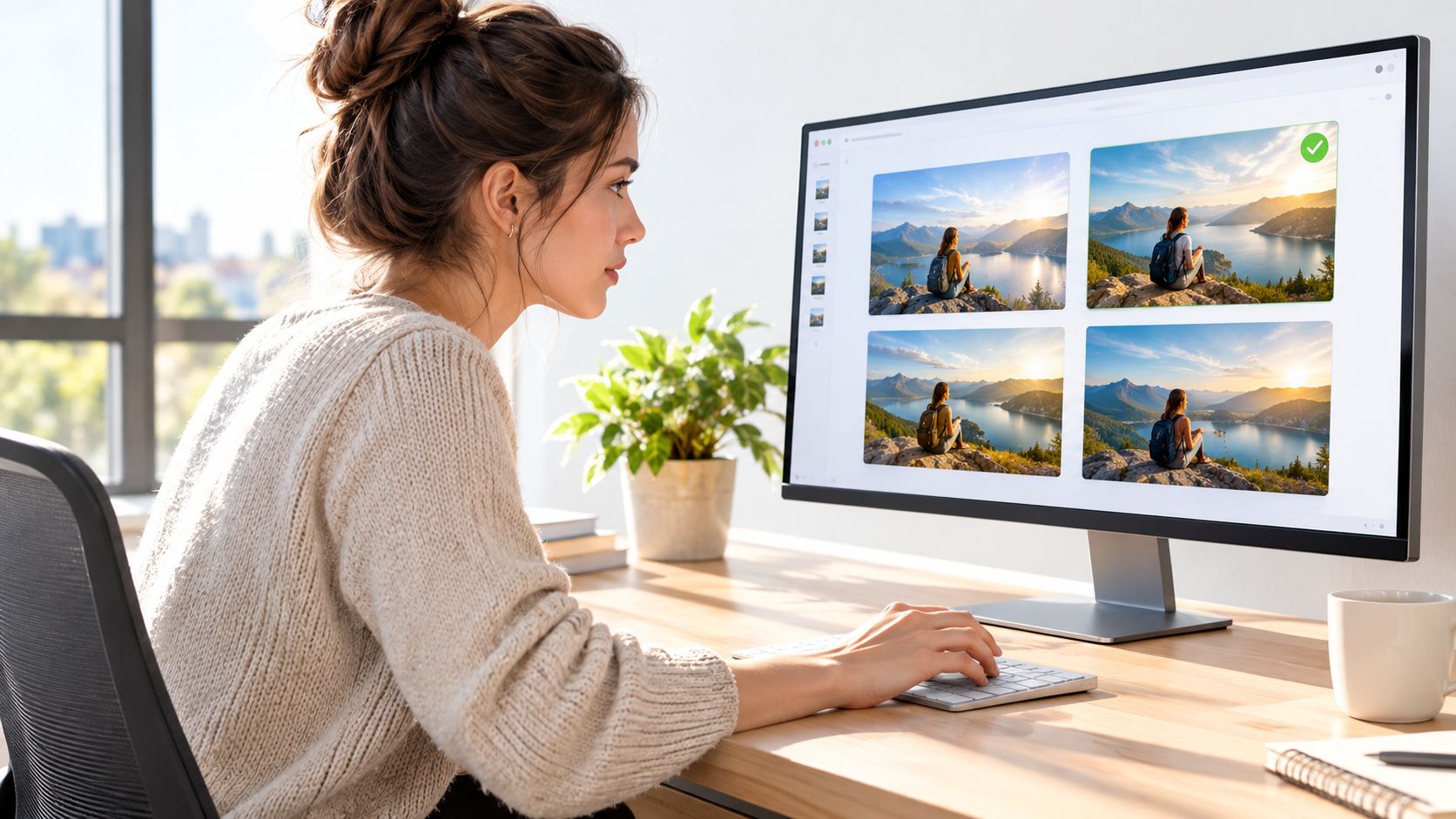
Open the result at full size and write down what works. Maybe the lighting is excellent, the composition has the right energy, and the background is on brand. The problem may be limited to a warped logo and an object that should be on the left but appears on the right.
Use a simple revision sequence:
Changing everything at once makes the result impossible to interpret. If the next image is better, you won't know whether the improvement came from the new camera angle, the shorter prompt, or a different sampling condition.
Adobe's survey of 1,041 people who create AI images examined prompt length, sentence count, wording patterns, and differences across generations, industries, and experience levels. Its practical lesson aligns with a structured brief: layer the subject, action, setting, composition, lighting, visual style, color palette, and intended use. Adobe's guide to AI image prompts offers additional prompt examples.
Use consistent model settings, aspect ratio, and seed where available. Otherwise, two outputs may differ because the generation conditions changed, not because your wording improved. Keep a small record of the prompt version, model, settings, selected output, and edit applied.
A multi-model workspace can reduce the friction of this comparison. Zemith's AI prompt optimizer is relevant when you're testing different prompt formulations and want to preserve the reasoning behind each variation instead of scattering drafts across browser tabs.
The goal isn't to generate endlessly. It's to stop when the remaining problems are easier to fix in an editor than in the generator. That decision saves time and usually produces a more controlled final asset.
A polished image can still fail at publishing. The final checkpoint should combine quality control, accessibility, rights documentation, and factual verification before the asset reaches a layout, campaign, or product page.
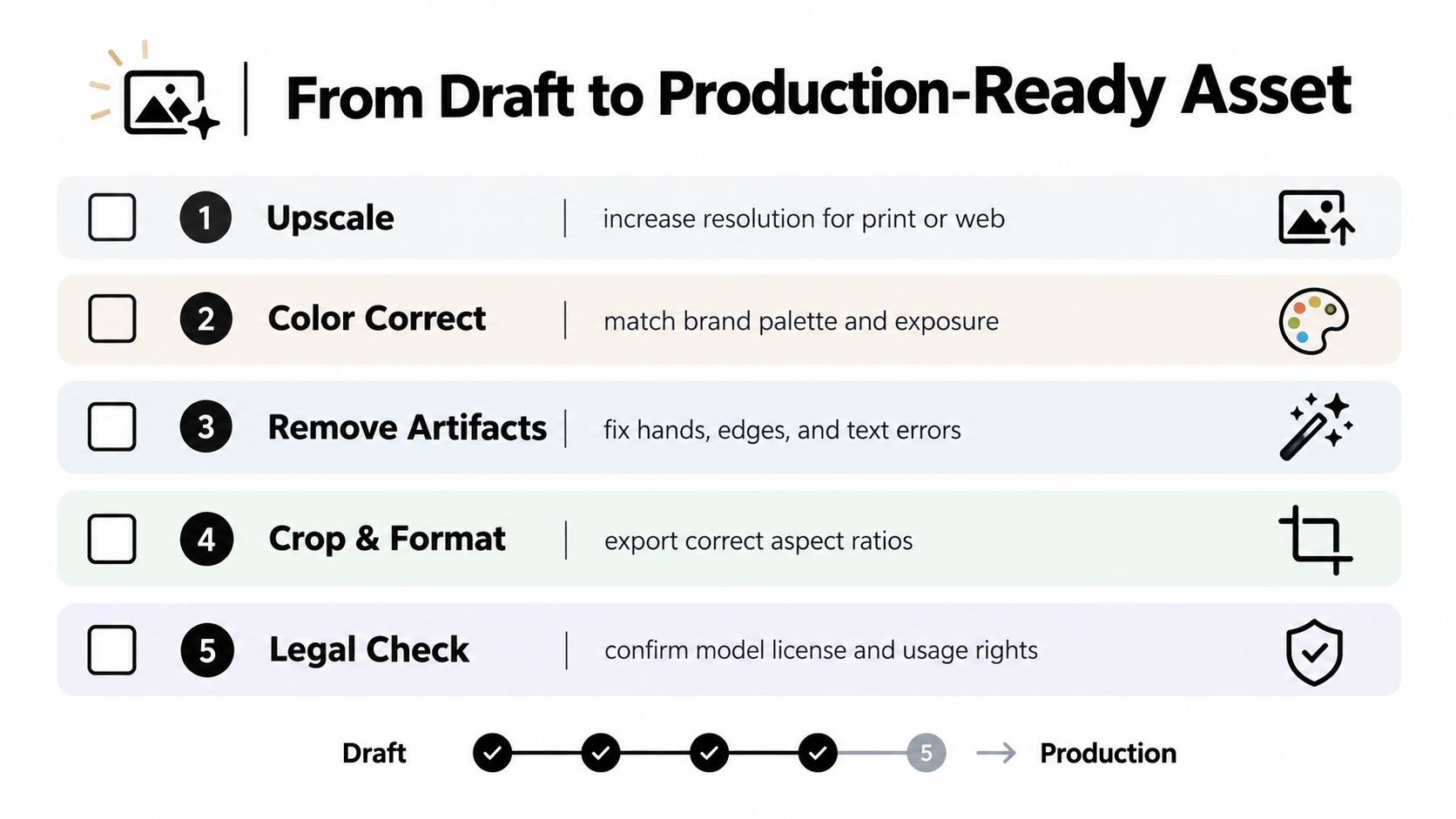
Inspect the file at full resolution, not only in a thumbnail. Check the details that commonly fail during export or publication:
Generate several variants, then judge them against the same checklist for prompt adherence, visual quality, brand consistency, and factual safety. In one 100-image comparison, Stable Diffusion and DALL-E received prompt-alignment scores of 84.3%, while Imagen 2 received 61.3%. Rankings differed for photorealism and detail, so these benchmark-specific results should not be treated as universal success rates. The evaluation guide from Labelbox shows why model choice depends on the criterion being measured.
Accessibility depends on the image's role. W3C guidance distinguishes meaningful images that need text alternatives, decorative images that can use a null alternative, functional images that need descriptions of their purpose, and complex charts that need an equivalent conveying the underlying information. W3C's image accessibility tutorial explains these distinctions.
Write alt text from the rendered image, not from the prompt. Describe the visible product and features in a product image. For a chart, state the information it communicates. For decorative background art, use an empty alternative so screen-reader users are not given unnecessary description.
For the editing step itself, Zemith's guide on how to edit images with AI covers inpainting, background replacement, and upscaling in detail.
For commercial work, save the model and version, prompt, generation date, seed or settings where available, reference files, selected output, editing history, and approval status. If the image includes a person, recognizable brand, or news-like event, complete a source and rights check before publication.
In the United States, copyright protection depends partly on how much human control shaped the work's expression. The Congressional Research Service summary of U.S. Copyright Office guidance explains that material whose expressive elements are determined by AI is not treated as human authorship, while sufficiently creative human arrangements or modifications may protect the human contribution. The CRS summary is a starting point. High-value campaigns still require jurisdiction-specific legal review.
Use editing, layout, retouching, compositing, and original typography deliberately. Save evidence of those contributions instead of exporting the first acceptable image as final_v7_really_final.png.
A polished preview can still fail at publication. The text may contain invented details, objects may change between variations, hands may look distorted, or a realistic scene may imply a fact the image cannot support. Review is part of generation, not a final formality.
Overloaded prompts create competing instructions. Asking for photorealism, flat vector shapes, cinematic grain, watercolor texture, and minimalist corporate styling gives the model conflicting priorities. Remove decorative adjectives, keep the visual direction that matters, and add complexity in stages.
Unspecified formats create avoidable rework. A wide hero image may crop badly in a portrait social placement. Set the aspect ratio before generation, then export the versions your layout needs. Check the subject's face, product, and text-safe space instead of trusting a last-minute crop.
Thumbnail review hides defects. Inspect the image at full resolution before approval. Repeated objects, edge artifacts, reflections, and lettering can look acceptable in a small preview and fail at the size your audience will see.
Prompt reuse can create false confidence. A phrase that works for one subject may fail when you add counting, spatial relationships, or several attributes. Build a base scene first, then make targeted edits. This keeps each review checkpoint focused.
Ownership isn't automatic. Commercial-use rights can vary by generator, subscription, model, and region. Check the applicable terms before client delivery, record the account or plan used, and save the terms or license reference with the project files. A rights checklist can prevent confusion when an asset is reused in another campaign.
Accessibility also belongs in the review. Confirm that the image has useful alternative text when it carries information, and use an empty alternative for decorative artwork so screen-reader users are not given unnecessary description.
The practical mindset is simple: AI supplies candidates, while people supply judgment. A checklist beats optimism when the asset matters.
Use Zemith to generate and edit images across AI models, compare visual directions, replace objects or backgrounds, upscale drafts, and analyze an existing image to create a stronger prompt. Visit Zemith to bring generation, iteration, and review into one workspace.







Trusted by teams at






The top models, plus image, video and voice tools, in one plan.
Without Zemith
ChatGPT PlusUS$20.00Claude ProUS$20.00Google AI ProUS$19.99SuperGrokUS$30.00Perplexity ProUS$20.00 MidjourneyUS$10.00
 ElevenLabsUS$6.00Le Chat ProUS$14.99
 RunwayUS$15.00Kling StandardUS$8.80
 Gamma PlusUS$12.00
 Otter ProUS$16.99
 QuillBot PremiumUS$19.95
 Photoroom ProUS$12.99
 Quizlet PlusUS$7.99
Total if paying separatelyUS$234.70/mo
"I love the way multiple tools they integrated in one platform. Going in the right direction."
— simplyzubair
"The quality of data and sheer speed of responses is outstanding. I use this app every day."
— barefootmedicine
"The credit system is fair, models are perfect, and the discord is very responsive. Quite awesome."
— MarianZ
"Just works. Simple to use and great for working with documents. Money well spent."
— yerch82
"The organization of features is better than all the other sites — even better than ChatGPT."
— sumore
"It lives up to the all-in-one claim. All the necessary functions with a well-designed, easy UI."
— AlphaLeaf
"The team clearly puts their heart and soul into this platform. Really solid extra functionality."
— SlothMachine
"Updates made almost daily, feedback is incredibly fast. Just look at the changelogs — consistency."
— reu0691
Hand off the research, writing, design and follow-ups. Zemith picks the tools it needs and brings back finished work.
Search the web, run deep research, read files, create images and run code with GPT, Claude, Gemini, Grok and more.
Zemith keeps working in the cloud and pings you when it's done.
Notion, Linear, Canva, Airtable and more. It asks before it creates or changes anything.
Docs, slides, sheets and PDFs, ready to send.
Chain models and tools on a visual canvas, from one prompt to a finished promo video.
Briefings, reports and reminders run on a schedule and are ready when you need them.
Real-time voice that can see your camera or screen.
The best image and video models, in one studio.
Turn PDFs, links and YouTube videos into podcasts, quizzes, flashcards and mind maps.














 Podcast
 Quiz
Quiz Flashcards
 Mind map
 Infographic