


Every top model, with tools built in.
Search the web, run deep research, read files, create images and run code with GPT, Claude, Gemini, Grok and more.
Discover what a medical virtual assistant does, the tasks they handle, pricing and how to hire the right one for your practice in 2026.
The waiting room is full, the phones are already lighting up, and a clinician is starting the day with an inbox that grew overnight. One patient needs an appointment, another wants a refill routed correctly, and a third has written three paragraphs about symptoms that still need a human decision. The team doesn't need another shiny dashboard. It needs help with the repetitive work, without creating a new safety problem.
That's where a medical virtual assistant can fit, provided its scope is narrow enough to test and its limits are visible. This guide is for practice managers, clinicians, informaticists, operations leaders, and builders who want to decide what the assistant should do, what it shouldn't do, how to validate it, and how to keep a qualified person in control.
The timing matters. Awareness and interest are already high, but routine adoption is lagging. The practical question is no longer whether the technology exists. It's whether your clinic can give it a job that is useful, measurable, private, and safe.
[blocked]
On a busy Monday morning, the first failure usually isn't dramatic. A message waits too long, an intake form arrives incomplete, or a staff member copies information from one system into another while a patient waits on hold. Multiply those small interruptions across a clinic and clinicians spend less time listening, examining, and deciding.
A medical virtual assistant can help by handling defined tasks around the visit. It might collect non-urgent information before an appointment, organize a patient's message, draft a summary, send a reminder, or route a request to the right queue. It shouldn't become the person making the clinical call.
Practical rule: Start with the work that consumes attention but doesn't require independent clinical judgment.
The market conversation often jumps straight to “AI doctor.” That framing creates the wrong buying test. A safer test asks whether the assistant can complete one bounded task while showing what it received, what it produced, what it doesn't know, and when it escalated.
A 2025 survey found that 89.7% of 504 physicians were aware of large-language-model-based medical assistants, while 97.2% expressed interest in using them. Only 21.0% had incorporated one into their routines. The figures are reported in the 2025 physician survey on medical assistants. That gap points to implementation friction, including validation, privacy, governance, workflow fit, and training, rather than a lack of curiosity.
[blocked]
By the end, you should be able to answer four practical questions:
Skip the integration details if you're still choosing a use case. Read the safety and measurement sections closely if a tool will interact directly with patients. The best deployment may be pleasantly boring. In healthcare, boring and dependable is a compliment.
[blocked]
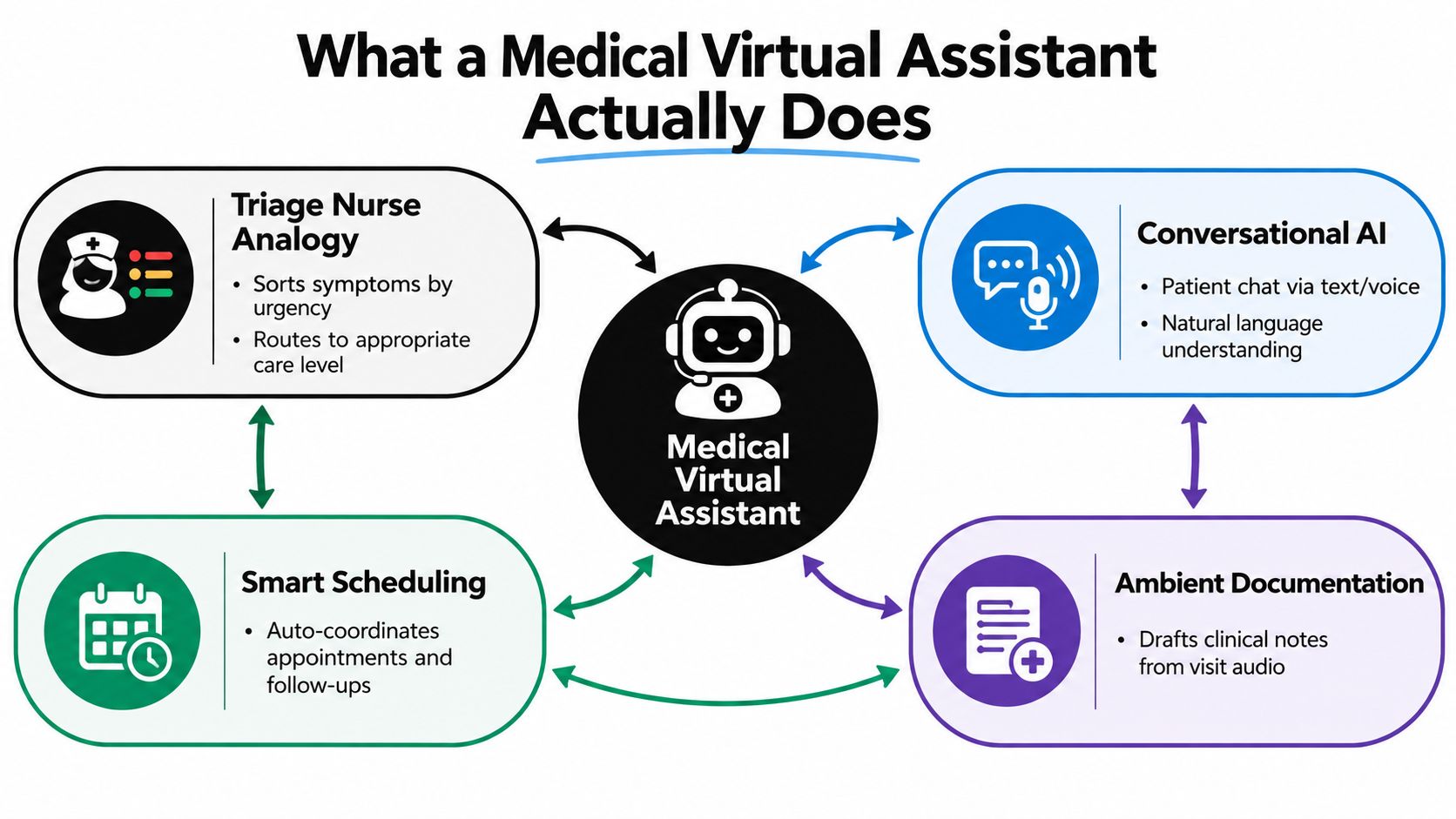
A medical virtual assistant is best understood as a workflow layer with a defined risk boundary. At the low-risk end, it collects information and handles routine coordination. At the medium-risk level, it drafts records or retrieves approved guidance. At the high-risk end, it may organize clinical information for a professional, but a clinician remains responsible for decisions that affect care.
Its capabilities usually fall into four groups:
Scheduling belongs beside these functions. The assistant can coordinate appointments and follow-ups, while rules define how it handles cancellations, urgent messages, accessibility needs, and transfer to staff. A bounded workflow is easier to test than a general-purpose “AI doctor.” Teams can start with one task, observe the handoffs, and expand only when the evidence supports it.
[blocked]
A clinic might begin with appointment preparation, add structured intake, and then introduce draft documentation. Each move increases the need for testing because the assistant is handling information that could influence care.
A retrospective evaluation of 102,059 virtual primary-care encounters found that clinicians selected an AI-generated diagnosis in 84.2% of cases and selected the system's top-ranked diagnosis in 60.9%. The evaluation of AI-assisted diagnosis in virtual primary care examined AI-assisted diagnosis in virtual primary care. It therefore informs clinician-facing decision support, not every medical virtual assistant and not autonomous diagnosis. The evaluation was retrospective and based in one care setting, so a new deployment still needs prospective validation.
A safe interface should show ranked hypotheses, supporting evidence, uncertainty, and missing information. It should preserve clinician override and record disagreement between the assistant and provider. Those details turn a fluent answer into a reviewable work product.
[blocked]
A medical virtual assistant is not a licensed professional, final diagnostic authority, or emergency service. It should not reassure a patient merely because the conversation sounds routine. If a situation falls outside the approved scope, the system must say so and hand off clearly.
For teams assessing a workflow tool, Zemith's AI agent illustrates how bounded research and information tasks can be supported. Apply the same safeguards: define the source set, show the evidence, test edge cases, and require human review before clinical action.
[blocked]
A human assistant and an AI assistant solve different bottlenecks. The human brings judgment, empathy, contextual memory, and the ability to notice that a patient's words don't quite match their tone. The AI brings availability, rapid sorting, and consistent execution of a narrow workflow.
Cost per interaction is difficult to compare without local staffing, licensing, integration, training, and oversight assumptions. AI may handle repetitive requests at scale, but it also creates expenses for monitoring, security review, exception handling, and clinical governance. A human may cost more per interaction while preventing an error that would be expensive in clinical, operational, or reputational terms.
Scalability is where AI often looks strongest. It can respond across shifts and handle multiple conversations, subject to capacity and system limits. Humans remain better at language nuance, rapport, cultural context, and conversations that change direction unexpectedly.
Consistency cuts both ways. An AI assistant can follow the same approved script every time, but it can also repeat the same wrong interpretation at speed. A trained human may vary in phrasing while applying judgment to unusual cases. In a safe hybrid model, the AI handles the predictable path and a person owns exceptions.
The strongest comparison isn't human versus machine. It's an unreviewed workflow versus a supervised workflow.
A systematic review of 31 studies on healthcare conversational agents found generally positive usability and effectiveness, but judged the evidence quality insufficient for strong claims about efficacy and safety. The review is available in this systematic assessment of healthcare conversational agents.
Use AI where speed and structure matter. Use people where trust, ambiguity, and accountability matter. For most clinics, the answer is not to remove the human assistant. It's to let that person spend less time copying, sorting, and chasing routine tasks.
[blocked]
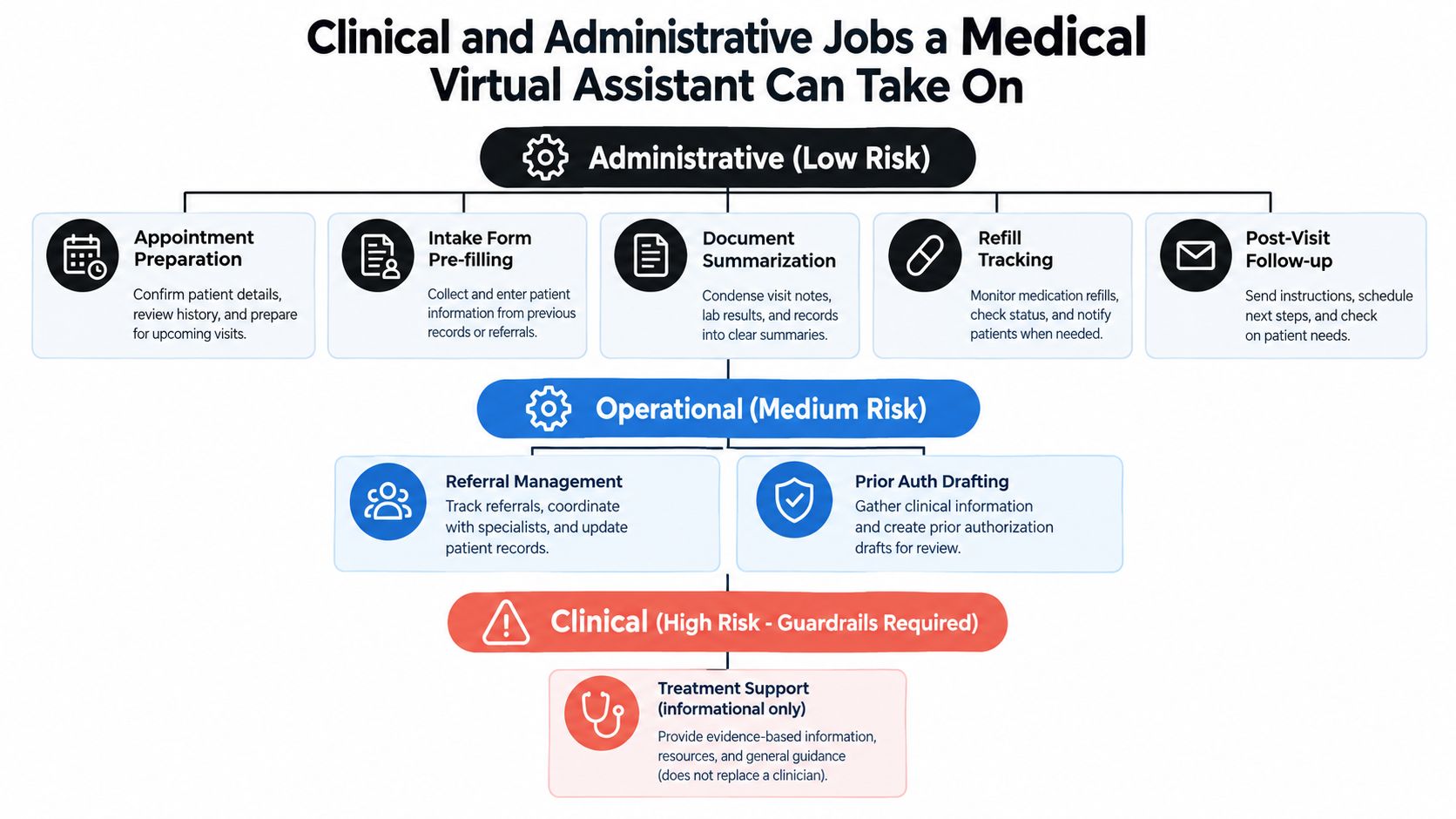
The safest starting point is a task with a clear input, a clear output, and a clear reviewer. Appointment preparation is a good example. The assistant can collect the reason for the visit, confirm forms, identify missing administrative details, and prepare a concise summary for staff. A person still handles urgent symptoms, accessibility needs, unusual requests, and anything outside the configured workflow.
Document summarization is similarly useful when the source documents are visible and the draft is reviewed. Billing questions, refill routing, referral-status messages, and post-visit reminders can also be structured around rules. The assistant shouldn't approve a refill or interpret a bill beyond its authorized information.
[blocked]
Administrative automation doesn't sound futuristic, but it often has the clearest path to adoption:
A voice-assistant review across chronic conditions found generally good usability and moderate adherence, with mixed clinical results. In a psoriasis study conducted over one year, the assistant recorded a System Usability Scale score of 70.1, and 26 of 34 participants agreed to continue using it. These findings appear in the systematic review of voice assistants in chronic care. Usability is encouraging, but it doesn't prove that every patient-facing workflow is clinically effective.
[blocked]
Referral management and prior-authorization drafting can save staff time, but both depend on accurate records and payer-specific requirements. The assistant can assemble a draft, identify missing documentation, and place the item in a work queue. A trained staff member should verify the details before submission.
Chronic-condition reminders, follow-up surveys, and patient education are clinical-adjacent. They can support adherence and self-management, but the content must be condition-specific, accessible, and easy to escalate. A reminder is not a treatment plan, and an educational answer is not individualized medical advice.
[blocked]
Autonomous triage and differential diagnosis require more than fluent conversation. The assistant must detect emergency intent, ask for missing red-flag symptoms, state uncertainty, and transfer the interaction when the case exceeds its indication.
Use Zemith's AI note taker for a documentation workflow where the output remains a draft and a clinician reviews it. That boundary is the point. The assistant can reduce clerical effort without being granted authority it hasn't earned.
[blocked]
A safe AI workflow still needs people who can configure it, test edge cases, review outputs, document incidents, and improve the handoff process. That creates a staffing problem of its own. A clinic may understand the clinical use case but lack an AI engineer, workflow designer, operations coordinator, or compliance-minded project manager.
LatHire connects US and Canadian companies with pre-vetted Latin American professionals across technology, marketing, sales, and operations. Its model combines AI assessments, skills evaluations, and human-led background checks, with a talent pool of more than 800,000 candidates. Businesses can import a job description or generate one with AI, match with candidates as fast as 24 hours, and receive support for HR, international payroll, benefits, and legal compliance.
That can be useful when you need someone to maintain an intake workflow, coordinate implementation, prepare test cases, manage a knowledge base, or support a patient-services team. It doesn't remove your responsibility for clinical governance. The hiring decision should still distinguish administrative support from licensed clinical work, define permitted access, and specify who reviews patient-facing outputs.
The platform offers profiles with validated skills, time-zone availability, and flexible engagement models. It can fit a practice that needs a specialist, such as an AI engineer, DevOps professional, or UX designer, as well as a generalist handling support, recruiting, or administration. LatHire describes potential savings of up to 80% in hiring costs and a time-to-hire reduction of over 80% on its service page. Treat those as provider-stated benefits to validate against your own role, location, supervision, and compliance requirements.
[blocked]
Privacy isn't a checkbox added after the demo. Before patient data enters a medical virtual assistant, decide what information the workflow needs, who can see it, how long it stays available, and what happens when the system fails.
For HIPAA-covered work, confirm the vendor relationship and Business Associate Agreement requirements. Minimize protected health information, encrypt data in transit and at rest, separate testing data from production data, apply role-based access, and retain audit logs. Set a retention window instead of allowing indefinite storage by default. Consent should be captured in language a patient can understand, especially when the assistant is patient-facing.
The FDA distinction is operationally important. The FDA differentiates clinical decision-support software that gives patient-specific recommendations from software intended to replace or direct a healthcare professional's judgment. That means a medical virtual assistant should show its reasoning, source information, and limitations, while leaving diagnosis and treatment decisions with a qualified clinician, as explained in the FDA clinical decision-support guidance.
[blocked]
The WHO principles cover autonomy, well-being and safety, transparency and explainability, accountability, inclusiveness and equity, and sustainability. In a product, those principles look concrete:
Zemith's privacy information is a useful reference when evaluating how an AI platform describes data handling. Regardless of vendor, ask direct questions about model training, subprocessors, deletion, access controls, incident response, and auditability.
[blocked]
During the first week, write the intended use, excluded uses, data flow, owner, reviewer, escalation route, and stop conditions. In the second, complete the security and privacy review, confirm agreements, configure role access, and assemble test cases.
In the third week, run simulated conversations and historical cases that have been de-identified. Check omissions, false reassurance, emergency escalation, and disagreement with clinicians. In the fourth, launch with a small monitored group, require human review, record incidents, and pause the workflow if a stop condition is triggered.
[blocked]
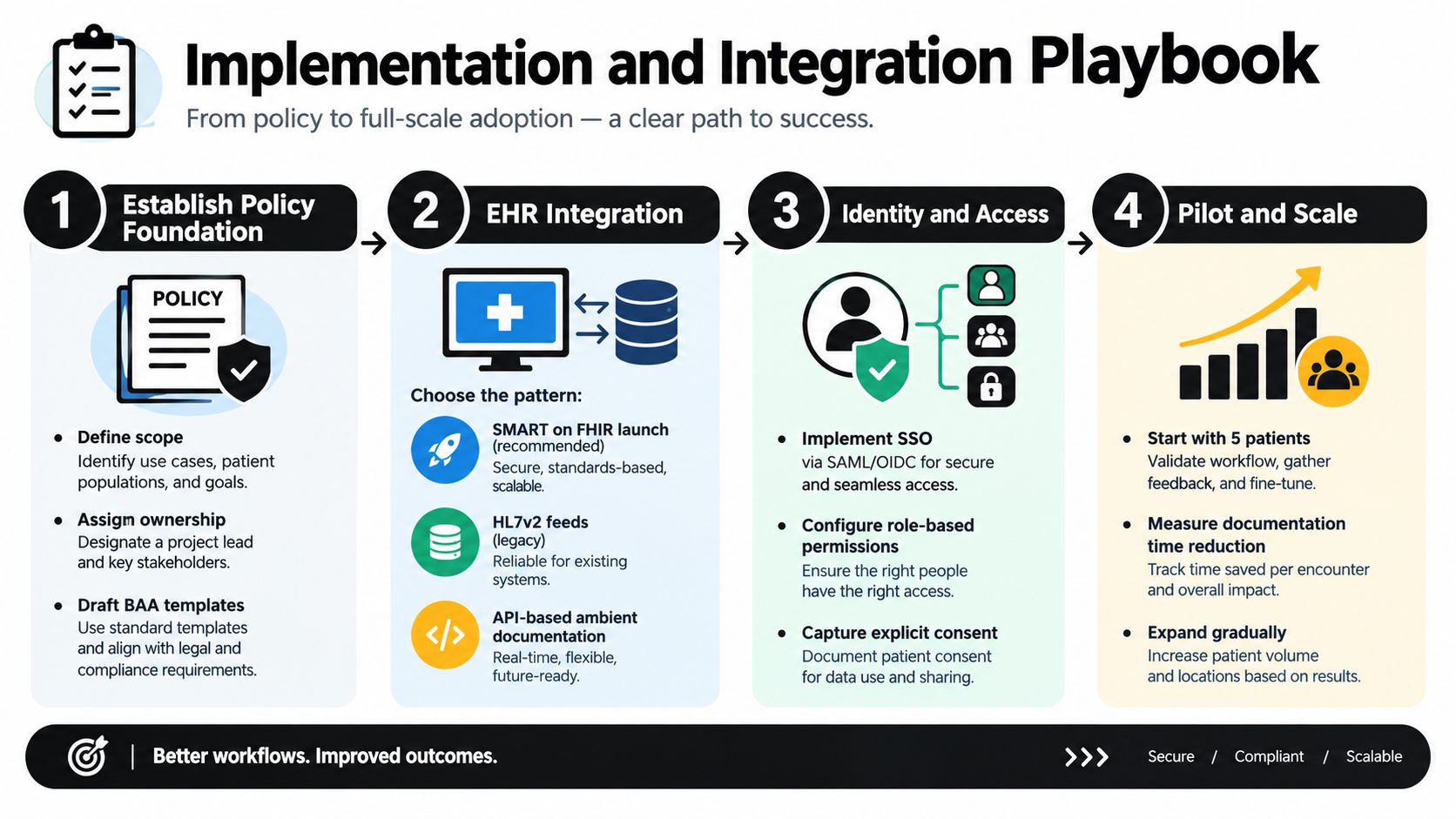
Integration should follow the workflow, not the other way around. Start by identifying where the assistant's output needs to go. A patient intake summary may belong in a review queue, while a documentation draft may need to appear inside the clinician's normal charting experience.
For EHR connectivity, teams commonly consider three patterns:
Identity needs the same attention as data. Use single sign-on through SAML or OIDC where supported, map roles to least-privilege permissions, and capture consent before processing begins. Don't let a convenient shared account erase the audit trail. If the system can't tell which person approved a note, it isn't ready for clinical use.
[blocked]
First 30 days, establish control. Choose a narrow non-clinical task, define the owner, write the approved response set, configure access, and test failure cases. Keep patient-facing autonomy low. A staff member should inspect every output before it changes a record or triggers an action.
By 60 days, expand carefully. If the first workflow is stable, consider chart summarization or draft documentation. Compare the draft with source material, track corrections, and look for patterns by specialty, language, age group, and communication style. Expansion should follow evidence, not excitement.
By 90 days, consider scoped clinical questions. Only move toward clinical decision support after prospective testing, clear indications, documented escalation, and clinician approval. Keep the assistant's answer linked to approved sources and make uncertainty visible.
[blocked]
Rate limits can interrupt a workflow at the busiest moment. PHI can remain in logs, prompts, transcripts, or analytics tools that the implementation team forgot to review. Model providers may have different policies for retention and training, so obtain a written answer about whether patient data is used to improve a model.
A 2025 cross-sectional study of 903 FDA-authorized AI medical devices found that clinical-performance studies had been reported for only about half, while one-quarter explicitly reported no clinical evaluation. The finding is summarized in this analysis of clinical evidence for AI medical devices. Clearance, a compelling demo, or a high benchmark score doesn't replace testing in your actual workflow.
For workflow design, Zemith's AI workflow builder can be considered for structured, reviewable automation around research, documentation, and internal operations. Keep patient-facing clinical actions behind your own governance and approval gates.
[blocked]
A safe deployment needs two scoreboards. The first measures whether the assistant is safe and useful. The second measures whether the workflow is worth maintaining.
Before launch, build a test set that includes routine cases, incomplete answers, ambiguous language, urgent phrases, accessibility needs, and cases where the correct response is “I don't know.” Review performance by relevant subgroup and setting. Track false reassurance, missed escalation, red-flag omission, hallucinated details, unsupported citations, and clinician override.
WHO guidance says healthcare AI needs quality control and ongoing improvement after deployment, with safety, accuracy, and efficacy defined for well-defined uses or indications, as described in its guidance on ethics and governance of AI for health. A launch review is not enough. Assign a recurring owner for monitoring and incident review.
[blocked]
Choose measures that connect directly to work:
[blocked]
Use a simple adjustable equation:
Net value = time recovered × loaded labor value + avoided rework value − license cost − integration cost − training cost − oversight cost.
Don't hide supervision inside the “free” column. If a clinician must review every output, that review time belongs in the model. If implementation creates new security and compliance work, include it. If the assistant saves minutes but increases corrections, the workflow may not be profitable.
A platform such as Zemith can fit behind the scenes for research, document comparison, draft summaries, and evidence organization. That keeps the immediate value in team productivity rather than making an unsupported promise about autonomous patient care.
[blocked]
Use prompts that make scope and uncertainty explicit. These examples are starting points, not clinical protocols.
Intake summary
Summarize this patient intake into presenting concern, relevant history, medications mentioned, unanswered questions, and potential escalation signals. Do not diagnose. Quote the source wording for any concerning symptom and mark missing information clearly.
Patient education rewrite
Rewrite the approved clinician-authored instructions in plain language. Preserve every warning, timing instruction, and follow-up condition. Do not add new medical advice. End with a clear instruction to contact the clinic or emergency services when the approved escalation language applies.
Referral letter draft
Draft a referral letter from the supplied chart information. Include only supported facts, the reason for referral, relevant tests, current medications, and the specific question for the receiving clinician. Mark every missing field as [REVIEW REQUIRED].
Clinical question retrieval
Answer the clinician's question using only the attached approved sources. Provide citations for each material claim, state where the sources disagree, identify limitations, and do not make a patient-specific treatment decision.
A safe workflow looks like this: the patient sends a message, the assistant acknowledges its role and captures structured information, an escalation detector checks for urgent signals, and the system routes the conversation to the appropriate queue. A staff member reviews the summary, a clinician handles clinical decisions, and the final action is logged.
WHO identifies six principles for AI in health, including autonomy, well-being, transparency, accountability, inclusiveness, and sustainability. Those principles become practical features such as consent, traceable summaries, citations, uncertainty labels, human handoff, and accessible fallback channels, as outlined in its AI ethics and governance principles.
Before launch, check:
For reusable prompt structures, Zemith's AI prompt generator can help teams turn these requirements into consistent templates. The assistant is most valuable when it makes clinicians faster and more informed, not when it pretends it can replace them.
Choose one low-risk workflow this week, write its exclusions, and appoint the person who will review every exception. Then test it with realistic cases before connecting it to patient-facing care. If you need a workspace for evidence-backed research, document summaries, prompts, and reviewable workflows, explore Zemith at zemith.com and build the first version around a task your team can safely measure.







Trusted by teams at






The top models, plus image, video and voice tools, in one plan.
Without Zemith
ChatGPT PlusUS$20.00Claude ProUS$20.00Google AI ProUS$19.99SuperGrokUS$30.00Perplexity ProUS$20.00 MidjourneyUS$10.00
 ElevenLabsUS$6.00Le Chat ProUS$14.99
 RunwayUS$15.00Kling StandardUS$8.80
 Gamma PlusUS$12.00
 Otter ProUS$16.99
 QuillBot PremiumUS$19.95
 Photoroom ProUS$12.99
 Quizlet PlusUS$7.99
Total if paying separatelyUS$234.70/mo
"I love the way multiple tools they integrated in one platform. Going in the right direction."
— simplyzubair
"The quality of data and sheer speed of responses is outstanding. I use this app every day."
— barefootmedicine
"The credit system is fair, models are perfect, and the discord is very responsive. Quite awesome."
— MarianZ
"Just works. Simple to use and great for working with documents. Money well spent."
— yerch82
"The organization of features is better than all the other sites — even better than ChatGPT."
— sumore
"It lives up to the all-in-one claim. All the necessary functions with a well-designed, easy UI."
— AlphaLeaf
"The team clearly puts their heart and soul into this platform. Really solid extra functionality."
— SlothMachine
"Updates made almost daily, feedback is incredibly fast. Just look at the changelogs — consistency."
— reu0691
Hand off the research, writing, design and follow-ups. Zemith picks the tools it needs and brings back finished work.
Search the web, run deep research, read files, create images and run code with GPT, Claude, Gemini, Grok and more.
Zemith keeps working in the cloud and pings you when it's done.
Notion, Linear, Canva, Airtable and more. It asks before it creates or changes anything.
Docs, slides, sheets and PDFs, ready to send.
Chain models and tools on a visual canvas, from one prompt to a finished promo video.
Briefings, reports and reminders run on a schedule and are ready when you need them.
Real-time voice that can see your camera or screen.
The best image and video models, in one studio.
Turn PDFs, links and YouTube videos into podcasts, quizzes, flashcards and mind maps.














 Podcast
 Quiz
Quiz Flashcards
 Mind map
 Infographic