


Every top model, with tools built in.
Search the web, run deep research, read files, create images and run code with GPT, Claude, Gemini, Grok and more.
Build onboarding documentation new hires actually use. Practical templates, checklists, and AI workflows to plan, write, and maintain great onboarding docs.
The new hire has the laptop, the calendar invite, the Slack login, and a smile that says they're trying very hard not to ask where the bathroom is for the third time. Meanwhile, the team is saying things like “the build matrix is in the wiki” and “just ping Ops for the expense tool,” which is corporate for “good luck, kid.”
That chaos is exactly where onboarding documentation earns its keep. It's not a dusty HR packet, and it's not a ceremonial PDF nobody reads after signature day. It's the difference between a person feeling useful by Friday and spending their first week collecting tiny embarrassments like trading cards.
By Wednesday, the new software hire is still hunting for the repository, the marketer is checking three campaign trackers, and the researcher is unsure who approves the next step. Nobody is failing through laziness. The information is scattered, stale, or written by a committee that appears to dislike verbs.

Onboarding documentation is working infrastructure. It can determine whether someone becomes useful by Friday or spends the week collecting small, avoidable embarrassments. Newly hired employees were 58% more likely to remain with an organization for three years after completing a structured onboarding process, and effective onboarding could increase employee performance by up to 11%, according to the SHRM summary of the Wynhurst Group findings. Those results are why I treat onboarding as a product with users, releases, and retention outcomes, rather than a welcome ritual.
Day one involves decoding the company's hidden geography. Where do requests live? Who owns access? Which system is authoritative? What counts as urgent? A useful document answers those questions before the scavenger hunt begins.
Practical rule: if a new hire has to ask the same question twice in week one, the document failed, not the person.
The first version should cover role expectations, procedures, policies, tools, contacts, and first-month priorities. It should also reduce dependence on the one heroic manager who remembers every exception. That matters in distributed teams, where instructions must work across time zones and remain useful after a tool or process changes.
Documentation needs release cycles. A new hire is the user, and their questions are product feedback. Track where they hesitate, which pages they search for, and which instructions still send them to a manager. Then revise the path, not just the prose. AI tools such as Zemith can turn a long internal knowledge base into staged, searchable, role-specific learning paths, so people receive the right material at the right point instead of a warehouse-sized handbook.
The how to build SE onboarding resource from PreSales Unleashed GmbH reinforces the same practical principle: onboarding should follow actual work. Whether the role is engineering, marketing, research, or sales, the goal by Friday is clear. The new hire should know how to find the right answer, not merely the loudest one.
A lot of onboarding fails because the document is built for delivery, not comprehension. Someone sends a giant packet, the new hire signs it, and everyone acts relieved. That is document shipping with a confetti cannon.
The Adobe survey makes the pattern hard to miss. Among 1,006 U.S. employees who had started a job in the previous two years, employees said only 60% of onboarding materials were necessary or important to their roles, 44% retained about half or less of the information, and 64% had to ask coworkers or managers for information that should have been covered during onboarding Adobe new-hire onboarding research. The document can be complete, while the learning stays incomplete.
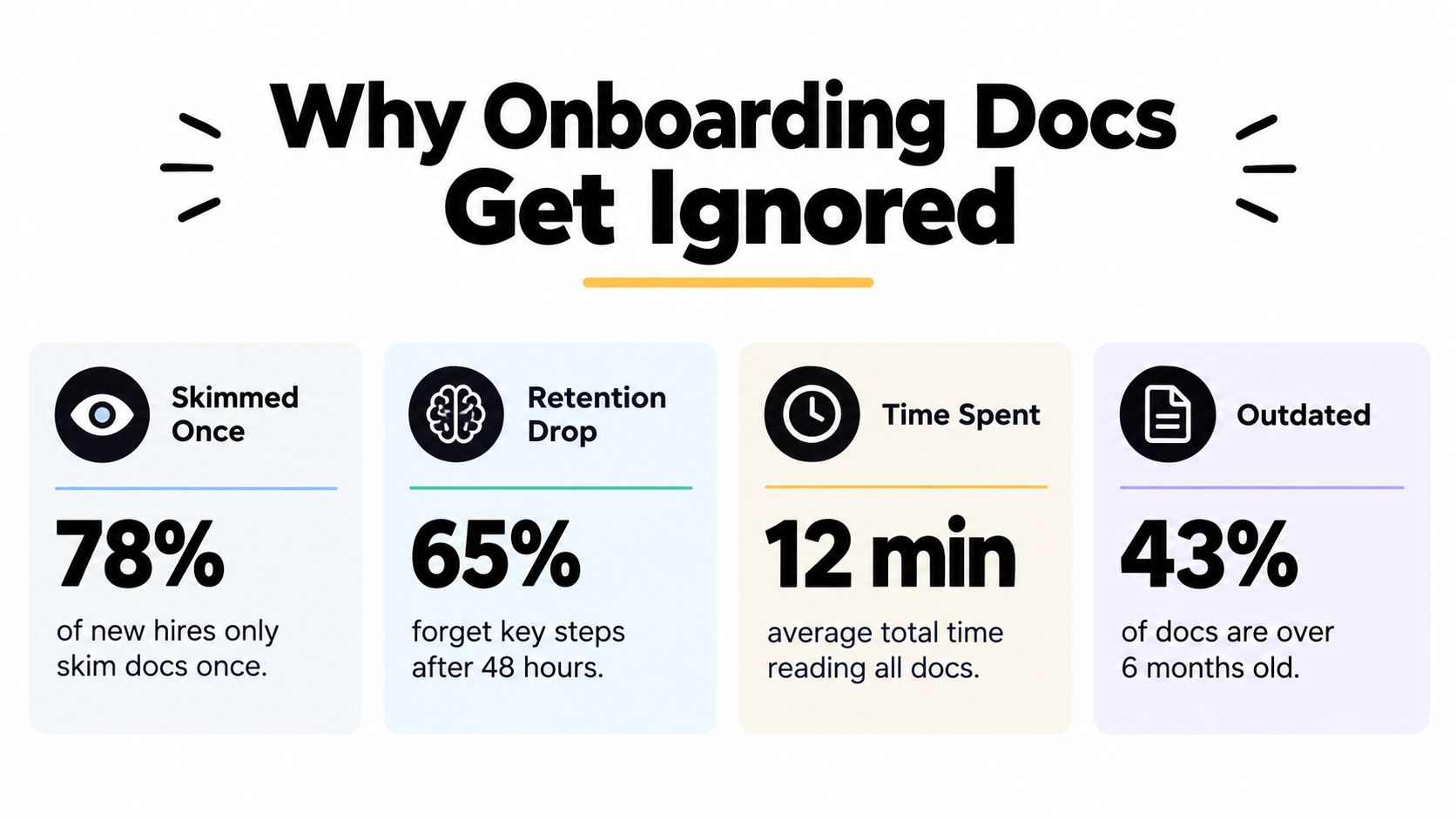
People do not need more pages. They need the right answer at the right moment. The Adobe findings point to a familiar failure mode, teams keep adding content while new hires still cannot quickly tell what matters now, what can wait, and what counts as authoritative.
A thick handbook can still produce a weak onboarding experience. A document may be thorough and still be hard to follow, fuzzy in its wording, or buried three links deep in a PDF. If a new hire has to interrupt a manager for basic guidance, the process has already leaked.
For leadership teams trying to clean this up, the practical guide for leadership teams is a useful companion on knowledge transfer and operational clarity. The point is simple, documentation should reduce friction rather than add another ritual people pretend to respect.
PDFs remain common because they are easy to make and hard to improve. That is the trap. A better onboarding system answers operational questions directly, then gives people a way to verify they understood the answer. If your docs do not help a new hire complete work, they are expensive background noise.
The useful mindset shift is this. Stop asking whether the handbook is finished. Start asking whether a new hire can find, trust, and use the answer without begging for it. If you want the mechanics, the guide to writing technical documentation that people actually follow is the right place to start.
Great onboarding documentation starts with the work. I've rebuilt onboarding enough times to know that company overviews are where good intentions go to die. New hires do not need a museum tour on day one. They need to know what to do first, who can unblock them, and how to tell whether they did it correctly.
Start with the first production-relevant task a newcomer must complete. For a developer, that might be spinning up the environment and shipping a small fix. For a marketer, it could be launching a campaign asset or editing a live page. For a researcher, it might be finding the authoritative dataset and preparing a first analysis.
From there, map the prerequisites, commands, expected output, owners, and escalation paths. Link each step to the authoritative reference material, not the nearest Slack answer from six months ago. Then test the workflow with a real newcomer, because the person who wrote the procedure is usually too close to it to spot where it breaks.
The study involving 32 developers and 15 managers found that task-related documents, presentations, tutorials, and demos were the main onboarding information sources, and developers usually searched documentation before asking teammates, then got frustrated when it did not answer their questions task-first onboarding study. Strong indexing was the fix that kept coming up. That is not glamorous, but it is practical.
A newcomer does not want your knowledge. They want the shortest path to the next successful task.
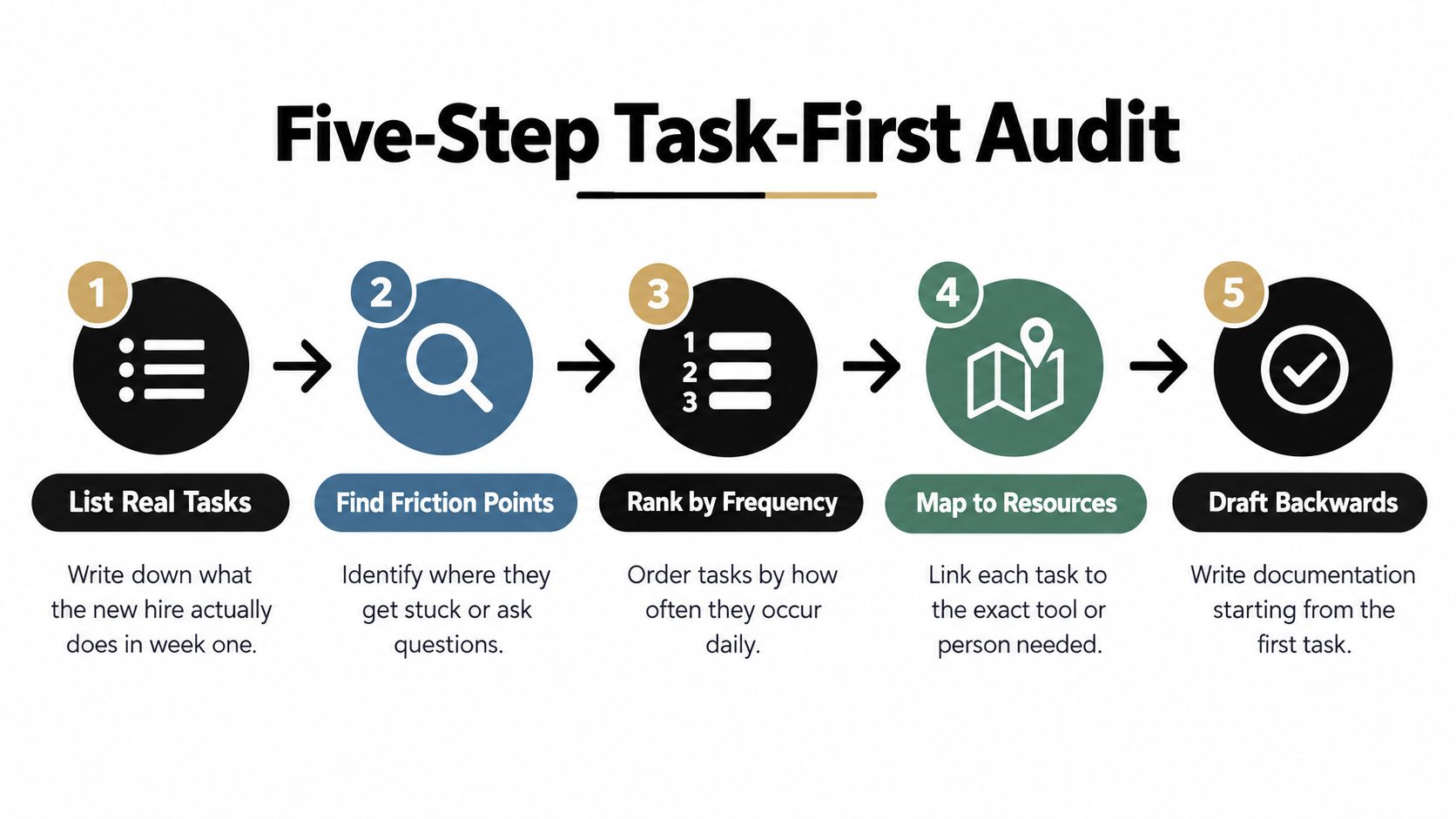
A practical five-step audit works well:
That same structure works for creators, researchers, and knowledge workers too. The role changes, but the logic stays the same. Start with the first useful output, then build the path that gets someone there without a rescue mission from the manager.
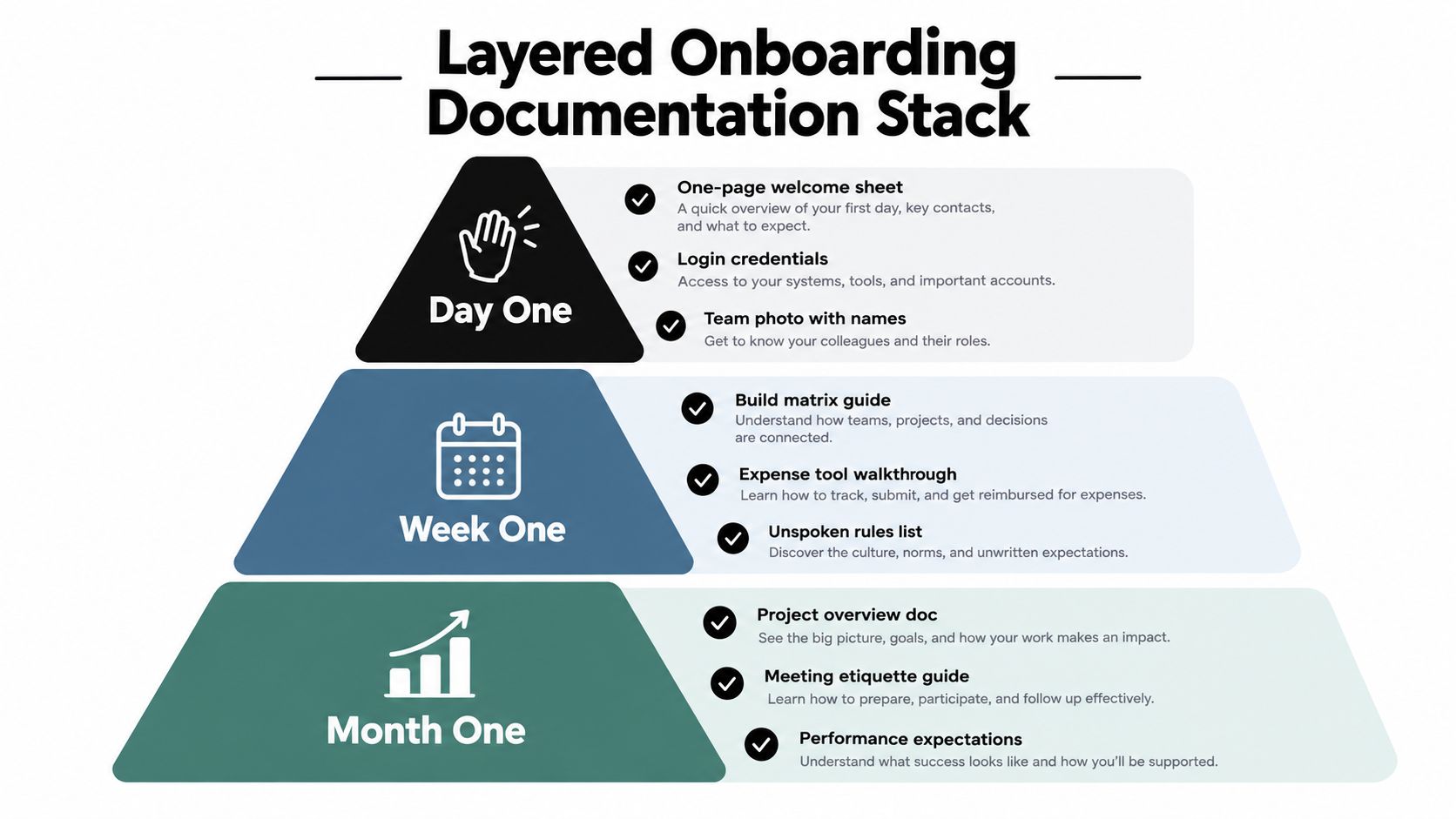
The best onboarding setup I've seen behaves like a stack, not a pile. Day one gets the essentials. Week one gets the working checklist. Month one gets the deeper role context. Everything after that lives in a searchable reference library so nobody has to pretend the answer is “somewhere in the folder.”
A one-page welcome brief is enough for the first day if it answers the obvious questions. Who's the manager? What's the first meeting? Where does the new hire go if they get locked out of something? Which task should be finished before lunch, not sometime before retirement?
That page should also include login credentials guidance, a team photo with names, and the first self-service task. It sounds minor, but people are calmer when they can match faces to names and stop asking, “Was that Rachel or Rebecca?” for the third time.
GitLab recommends at least two full weeks of general onboarding, with team-specific onboarding beginning in week three, and its onboarding issue template gives every new hire sequential tasks and a 30-day due date GitLab onboarding handbook. That structure is useful because it treats onboarding as a sequence, not a buffet. New hires need order.
A week-one checklist should cover the essentials, like the build matrix guide, expense tool walkthrough, and unspoken rules list. I'd rather see a short document with clean completion criteria than a sprawling folder that makes everyone feel productive while doing nothing useful.
By month one, the doc stack should shift from “how do I survive?” to “how do I work well here?” That's where role-specific expectations, project overviews, and meeting norms belong. The training should feel staged, not dumped.
For teams building this from scratch, how to build a knowledge base is a useful internal reference for structuring a searchable library instead of a graveyard of attachments. The point isn't elegance. The point is that someone on week three can still find the answer without starting another message thread.
Most onboarding docs rot because nobody has time to keep them alive. Policies change, screenshots age badly, and half the source material is trapped in a folder called “final_final2.” AI helps here if you treat it like an assistant, not a magical intern with access to your reputation.
Feed long policy PDFs, wiki pages, and meeting notes into a document assistant. Then generate role-specific summaries, not one giant summary for everyone. A developer does not need the same onboarding digest as a content editor, and a designer should not have to decode the same compliance notes as finance.
Then turn dense procedures into step-by-step checklists. The point is staging. A new hire should see the first task, then the next logical task, not fifty bullets that make them feel like they have accidentally enrolled in a tax audit.
Good onboarding does not just push content out, it checks whether the content landed. A quiz, a flashcard set, or a short task simulation gives you proof of understanding. If a new hire can answer the question and complete the task without help, the doc is doing its job. If they cannot, the doc needs a rewrite, not a pep talk.
Rule of thumb: if a document can't be turned into a question, it probably isn't teachable enough.
That is why why quizzes improve retention matters here. Recognition is cheap, but retrieval is the true test, and onboarding docs should measure recall instead of assuming it.
AI should surface unanswered questions back to the document owner, not invent answers to sound helpful. Human review still matters for compliance, sensitive policies, and screenshots that need to reflect the actual interface. The workflow works best when AI drafts, humans approve, and the library stays current enough that new hires do not have to become archeologists.
For teams that want to structure the drafting side better, AI for technical writing is a useful internal read. Used well, AI shortens the path from messy source material to something a real person can follow on a Tuesday morning, and it makes onboarding documentation behave more like a product with users, revisions, and clear signals about whether it is being read.
If the onboarding docs are working, new hires get productive faster. If they are not, the numbers will show it. Page counts, completion checkboxes, and smiley surveys feel tidy, but they do not tell you whether someone can do the job without hand-holding.
Google's developer-onboarding research followed more than 3,000 new developers and measured three ramp-up indicators, active coding time per line of code, reviewed lines of code, and submitted lines of code Google developer-onboarding research. That is the right shape of measurement. Track behaviors that show traction, not whether the handbook looks polished. The same source also found that rushed remote onboarding during early COVID slowed engineering ramp-up by roughly three to six weeks, which is a reminder that docs never work in isolation.
A practical measurement sequence looks like this:
Keep the yardstick stable. If the metric changes every quarter, the dashboard turns into decoration.
Docs fail when the surrounding system fails. Access is missing, the right tools are not provisioned, or support channels are slow, and even solid content starts to look bad.
The cleaner way to judge quality is to watch task completion without live assistance. Note where new hires stall, what they search for, and which pages trigger extra questions. Then fix the highest-friction pages first.
Data-driven insights is useful here because measurement only matters when it changes the next edit. In onboarding, that usually means the same thing every time, rewrite the page people cannot find, then check whether the next group finds it faster.
Onboarding docs don't die because the wording was bad on day one. They die because nobody owns them after the launch party. A page without an owner becomes a fossil. A page with an owner becomes a living asset that can survive tool changes, team reshuffles, and the usual corporate chaos.
Each onboarding page needs a named owner, an update date that means something, and a review cadence that isn't aspirational nonsense. Quarterly review works well, with a change log for major rewrites and a 30-60-90 day check-in to catch drift before new hires do.
A stale screenshot is not a small issue. It's a broken promise.
The warning signs are easy to spot once you care to look. Search terms that return nothing, support tickets that match a doc page, and screenshots that point to an outdated UI all mean the library is rotting. None of that gets fixed by asking people to “be more diligent.”
Treat maintenance as part of onboarding, not as a side quest. The owner should review what new hires asked for, what they failed to find, and where the content needs editing. Then the team should update the page, not just the title.
Knowledge management strategies is useful here because the job is keeping institutional knowledge usable, not merely stored. If the system helps new hires get from question to answer without drama, the docs are doing the work they were hired to do.
A strong onboarding library doesn't have to be perfect. It has to get a little better every quarter, because that's how you stop new hires from reenacting the same first-week circus forever.
If you want onboarding documentation that behaves like a product instead of a forgotten PDF, build it around tasks, searchability, verification, and upkeep. Zemith helps teams turn dense internal knowledge into staged, searchable, role-specific learning paths, with quizzes, summaries, and document chat that make the material workable. Visit Zemith and start cleaning up the first-week chaos before your next hire becomes the office cartographer.







Trusted by teams at






The top models, plus image, video and voice tools, in one plan.
Without Zemith
ChatGPT PlusUS$20.00Claude ProUS$20.00Google AI ProUS$19.99SuperGrokUS$30.00Perplexity ProUS$20.00 MidjourneyUS$10.00
 ElevenLabsUS$6.00Le Chat ProUS$14.99
 RunwayUS$15.00Kling StandardUS$8.80
 Gamma PlusUS$12.00
 Otter ProUS$16.99
 QuillBot PremiumUS$19.95
 Photoroom ProUS$12.99
 Quizlet PlusUS$7.99
Total if paying separatelyUS$234.70/mo
"I love the way multiple tools they integrated in one platform. Going in the right direction."
— simplyzubair
"The quality of data and sheer speed of responses is outstanding. I use this app every day."
— barefootmedicine
"The credit system is fair, models are perfect, and the discord is very responsive. Quite awesome."
— MarianZ
"Just works. Simple to use and great for working with documents. Money well spent."
— yerch82
"The organization of features is better than all the other sites — even better than ChatGPT."
— sumore
"It lives up to the all-in-one claim. All the necessary functions with a well-designed, easy UI."
— AlphaLeaf
"The team clearly puts their heart and soul into this platform. Really solid extra functionality."
— SlothMachine
"Updates made almost daily, feedback is incredibly fast. Just look at the changelogs — consistency."
— reu0691
Hand off the research, writing, design and follow-ups. Zemith picks the tools it needs and brings back finished work.
Search the web, run deep research, read files, create images and run code with GPT, Claude, Gemini, Grok and more.
Zemith keeps working in the cloud and pings you when it's done.
Notion, Linear, Canva, Airtable and more. It asks before it creates or changes anything.
Docs, slides, sheets and PDFs, ready to send.
Chain models and tools on a visual canvas, from one prompt to a finished promo video.
Briefings, reports and reminders run on a schedule and are ready when you need them.
Real-time voice that can see your camera or screen.
The best image and video models, in one studio.
Turn PDFs, links and YouTube videos into podcasts, quizzes, flashcards and mind maps.














 Podcast
 Quiz
Quiz Flashcards
 Mind map
 Infographic