


Every top model, with tools built in.
Search the web, run deep research, read files, create images and run code with GPT, Claude, Gemini, Grok and more.
Discover how to build a knowledge base that helps customers and teams fast. Step-by-step planning, content, AI tips, and launch.
Building a knowledge base isn't just about throwing together a fancy FAQ page and calling it a day. It's about creating a central brain for your company—a library of everything anyone needs to know about your product, service, or how your team operates. This is your big move to get all that critical knowledge out of a few key people's heads and into a place where everyone can find it, fast.
The goal? Make life ridiculously easier for your team and your customers, slash those repetitive support questions, and just generally make things run a whole lot smoother. Basically, it’s like giving your company a much-needed software update.
I get it. Building a knowledge base sounds like a massive project. Is it really worth the effort, or is it just another corporate to-do item that’ll gather digital dust in a few months?
Honestly, a great knowledge base is one of the smartest investments you can make. Think of it as your first line of defense against the tidal wave of repetitive questions that eats up your support team's day. It's like cloning your top expert and putting their brain on call 24/7 for anyone who needs it. Who wouldn't want that?
This is how you get new hires up to speed in record time. It's how you give customers the instant gratification they crave by letting them find their own answers. No more waiting around for an email reply to a simple "how do I change my password?" question.
When your company’s information is all over the place—scattered across Slack DMs, buried in ancient Google Docs, and trapped in someone's inbox—you've got a recipe for chaos. A well-kept knowledge base changes that. It becomes your single source of truth.
This ensures everyone is working from the same script, giving customers consistent answers and, just as importantly, preventing crucial know-how from walking out the door when a key employee moves on. It’s your business’s memory bank.
This isn’t just a nice-to-have, either. The market for knowledge base software is expected to balloon to USD 21.94 billion by 2030. That’s a huge signal that companies everywhere are realizing the power of structured information. In fact, 72% of global organizations are already using systems like these to connect with customers and help their teams work better, often cutting down the time people spend searching for info by up to 50%. You can read more about the knowledge base software market forecast to see the full picture.
Here’s a quick peek at what a clean, modern knowledge base—like one you could build with a tool like Zemith—looks like.
See how simple that is? The clear categories and can't-miss-it search bar are the keys to helping people find what they need without a headache.
Before you dive in, it’s crucial to define what you're actually trying to achieve. Are you focused on making your internal team more efficient, or is this all about improving the customer experience? Spoiler: it’s usually a bit of both.
Use this table to nail down what success looks like for your project. Don’t be shy—get specific!
Having these goals clearly defined from the start will guide every decision you make, from the content you create to the features you choose to implement.
Beyond just tidying up your documents, a knowledge base delivers some serious wins that make your business smarter and your day-to-day work easier. It empowers everyone who interacts with your company.
Here’s what you can expect:
Jumping straight into writing articles without a plan is like trying to build a LEGO castle without the instructions. You might end up with something that looks like a wall, but it'll be wobbly, chaotic, and won't help anyone. This initial planning stage is your "measure twice, cut once" moment, and trust me, getting it right makes everything that follows surprisingly smooth.
Before you type a single word, you have to answer the most important question: who are you actually writing for? Is it for a team of developers who live and breathe acronyms, or is it for your grandma who just discovered emojis? Knowing this from the get-go dictates the tone, the language, and the level of detail for every single article you create.
Think about it. Writing an internal guide for engineers on a new deployment process is a world away from writing a help doc for a customer who just wants to reset their password. One needs hardcore technical precision; the other needs to be as simple and clear as humanly possible.
Once you’ve figured out your "who," you need to lock down your "why." What does success for this project actually look like? Don’t just settle for a vague goal like "we want a knowledge base." Get specific.
Having clear, measurable goals transforms your knowledge base from a simple content library into a serious business tool. It helps you decide what to write first and makes it way easier to prove its value down the line. A great knowledge base becomes an asset that defends your support team's time, onboards new people efficiently, and keeps customers happy.
This simple flow shows how a well-planned knowledge base delivers value at every stage.
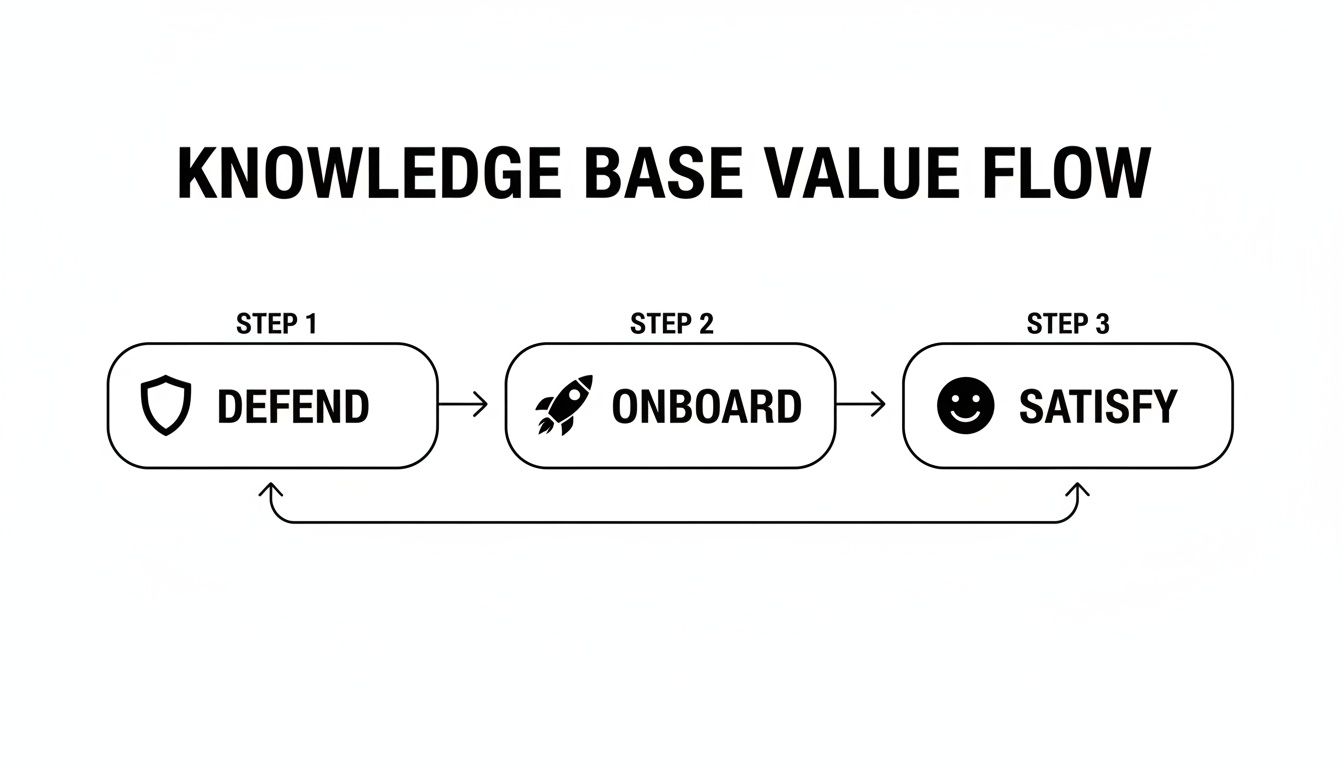
This process really highlights how good planning helps you build something that actively supports the business, from protecting your team’s sanity to making users’ lives easier.
Alright, let's talk architecture. This is where you map out the main categories and subcategories so people can actually find what they’re looking for. We've all been lost in a digital labyrinth before, clicking through an endless maze of confusing links. Don’t build one of those.
A good approach is to start with broad "content pillars" and then break them down into smaller, more specific topics.
Pro Tip: Your support ticket categories are a goldmine for this. Just look at the top 5-10 reasons people contact you. Boom—those are your first knowledge base categories, right there. You're welcome!
Let's say you run a project management tool. A logical structure might look something like this:
This simple table creates a clear path for users. They can easily go from a general topic to a specific answer without getting frustrated. If you’re just starting out, there are some great guides on getting started with your knowledge base that can give you a solid foundation.
This blueprinting phase is absolutely critical. To get a better handle on the high-level thinking behind organizing all this information, you should check out our guide on powerful knowledge management strategies. A solid plan is the difference between a meticulously organized library and a chaotic pile of books nobody wants to touch.
So, you've mapped everything out and have a solid plan. Fantastic. Now for the big decision: where is all this great information going to live? Picking your knowledge base software is a lot like buying a car. That slick two-seater convertible looks amazing, but it’s useless if you need to haul a new desk home from IKEA.
The same logic applies here. The flashiest, most expensive platform might be total overkill, but a free, bare-bones option could leave you stuck with a frustrating system that everyone hates using.
Your software is the foundation of your entire knowledge hub, so don’t get sidetracked by a long list of shiny features. The real goal is to focus on what actually moves the needle. Can your team easily write and update articles? Even more importantly, can your users find what they're looking for in just a few seconds? If not, you’ve picked the wrong tool.
Before you get lost comparing a dozen different platforms, let's nail down the non-negotiables. These are the core functions that will either make your knowledge base a roaring success or a frustrating failure.
A modern, all-in-one platform like Zemith really shows what’s possible when everything works together seamlessly.
This is what you're aiming for—a single place where content creation, powerful search, and analytics all live under one roof. The last thing you want is your team having to juggle five different apps just to publish one simple help article.
As you start looking at different options, keep these pillars in mind:
To help you stay focused during your evaluation, I've put together a checklist. Use this to compare different software options and make sure you're prioritizing the features that will actually make a difference for your team and your users.
This isn't an exhaustive list, but it's a solid starting point. Don't let a sales demo pull you in with a dozen "nice-to-have" features if the "must-haves" aren't rock-solid.
The market is crowded with options, from basic wikis to massive enterprise systems. The real trick is finding the "Goldilocks" solution—the one that's just right for your team's size, needs, and budget. It’s a classic mistake to overpay for a bloated system packed with features you’ll never touch. On the other hand, choosing a tool that’s too basic means you’ll outgrow it in a year and face a painful migration process.
A knowledge base is only as good as its ability to deliver the right answer at the right moment. The platform you choose should feel less like a stuffy library and more like a helpful expert who's always available.
Ultimately, it’s all about balancing today's needs with tomorrow's growth. A platform like Zemith, for instance, is designed to scale by combining a powerful knowledge base management system with AI tools that help both with creating content and digging up deep insights. It’s built to grow with you.
To really get a feel for what a modern system can do, it’s worth reading up on what makes a great knowledge base management system. It'll give you a much clearer picture of how an integrated platform can truly elevate your support and internal knowledge sharing.

Alright, you’ve got your plan and your software is ready to go. Now comes the most important part: actually writing the stuff people will use. Let's be honest, a knowledge base filled with corporate jargon, ridiculously long paragraphs, and zero personality is where helpful information goes to die.
Our goal isn't just to dump information; it's to empower people. You want someone to finish reading an article feeling confident and capable, not like they need a PhD to understand your billing system. This is all about clarity, simplicity, and a genuine human touch.
First things first, you need to decide who you are. Are you the quirky, fun best friend? The calm, reassuring expert? Or the straightforward, no-nonsense pro? There's no wrong answer, but you have to pick one and stick with it. Consistency builds trust and makes your knowledge base feel like a cohesive library, not just a folder of random documents.
Remember, you're writing for real people who are probably a little confused or even frustrated. So, drop the robotic language. Write like you're explaining something to a colleague over coffee. This simple shift in mindset makes a world of difference.
Our Golden Rule: Write for a smart person who is in a hurry. Assume your reader is intelligent but has zero context about the problem. Get to the point, and get there fast.
This approach respects their time and ensures your content is accessible to everyone, from total newbies to seasoned pros. It’s a core part of building a knowledge base that doesn't just store information but actually solves problems.
Nobody wants to face a wall of text. It's intimidating, and it's a nightmare to scan when you're looking for a quick answer. Your job is to take complicated ideas and break them down into simple, digestible steps. Think of it like a recipe—you wouldn't just throw all the ingredients in a list and say "go for it."
Here’s how to make your content easy to follow:
Think from your user's perspective. They’re hunting for a specific answer. Making that answer jump off the page is half the battle. If you're looking for more tips, our article on the best practices for documentation has some fantastic advice.
Words are powerful, but sometimes a picture really is worth a thousand of them—especially when you’re explaining software. Visuals are your secret weapon for making confusing instructions crystal clear.
Here are a few of my favorites:
Visuals do more than just explain; they break up the text, make the content more engaging, and cater to different learning styles. Platforms like Zemith make embedding these into your articles a total breeze. Your users will definitely thank you for it.

Let's be honest. If your users can't find what they're looking for in a few seconds, that article you spent hours writing might as well not exist. This is where you can turn your search bar from a basic keyword-matcher into an intuitive, mind-reading assistant. A truly great search experience is the beating heart of a knowledge base that people actually use.
Modern AI is what gets you there. It moves beyond simple text matching to understand what someone really means, even if they use the wrong jargon or have a typo. It's the difference between a search for "can't log in" hitting a dead end and the system intelligently suggesting an article called "How to Reset Your Password."
Imagine a system that’s smart enough to suggest a help article based on what a user is actually doing in your app right now. That's the magic of contextual AI. It can see someone struggling on the billing page and proactively pop up a guide to understanding invoices.
This isn’t some futuristic idea; it's a real feature in modern platforms like Zemith that makes your knowledge base feel alive and genuinely helpful. If you’re curious about the tech making this possible, you can check out these real-world applications of Natural Language Processing.
A great AI-powered search doesn't just wait for a question. It anticipates what the user needs and offers the answer before they even have to ask.
There's a reason the personal knowledge base AI market is expected to jump from $1.27 billion in 2024 to $1.65 billion in 2025. This explosive growth signals just how essential AI is becoming. In fact, companies that tag their content semantically see up to 50% better search accuracy, and 35% report higher employee satisfaction because they have smart, fast learning tools at their fingertips.
Your knowledge base shouldn't be an island. Its real power is unlocked when you connect it to the other tools your teams live in every day.
Think about these must-have integrations:
This creates an interconnected ecosystem where information flows exactly where it's needed most. To really dig into how AI can change the game for your search, check out this fantastic guide to an AI-powered knowledge base. It’s all about building a system that helps everyone—customers and employees alike—work smarter, not harder.
You did it. The articles are written, the categories make sense, and the search bar is polished and ready. But simply flipping a switch and hoping for the best is a surefire way to launch to the sound of digital crickets. A successful launch is a full-on promotional event, not just a technical task.
Your first job is to get this amazing new resource in front of as many people as you can, right out of the gate. A dedicated announcement email to your entire user base is a great start. But don't just tell them it's live—sell them on the benefit. Show them exactly how it's going to make their lives easier with instant answers and less waiting around.
Now, you need to weave your knowledge base into the very fabric of your digital presence. Make it so easy to find that users stumble upon it by happy accident.
The whole point is to gently nudge people toward self-service. You're trying to build a new habit, and you can't do that if the resource is buried three clicks deep.
Here’s a hard truth I've learned over the years: a knowledge base is a living, breathing entity. The second you treat it as a "set it and forget it" project, it starts to become useless. Honestly, outdated information is often worse than no information at all because it actively breaks your users' trust.
I always tell people to think of it like a garden. It needs constant attention—weeding out old content, pruning articles for clarity, and planting new topics as they come up. This means you need a simple, no-fuss maintenance plan. Who on your team is in charge of reviewing articles? And how often—every quarter? Twice a year? Get a basic schedule on the calendar and assign owners to different content categories. This is a huge part of our recommended document management best practices.
So, how do you know what to fix, update, or write next? Stop guessing. Your analytics dashboard is basically a treasure map leading you directly to the most important work.
A great knowledge base doesn't just answer questions. It tells you what your users are struggling with, sometimes before they even realize it themselves. It's the ultimate source of proactive customer feedback.
Most modern platforms, including our own at Zemith, come with built-in analytics. You don't need to be a data scientist, just focus on these three things to start:
This ongoing management cycle is what separates a world-class knowledge base from a digital document graveyard. There's a reason the market for these tools is valued at a staggering $23.58 billion. When they're done right, they deliver massive results. We're talking about 39% of organizations improving their execution and 35% cutting service volumes simply by maintaining a scalable, updated knowledge hub. You can read more about these knowledge management software market trends to see just how big the impact can be.
Got questions? We've got answers. As you start figuring out how to build a knowledge base, a few common questions always seem to pop up. Let's tackle them head-on so you can move forward with confidence.
Honestly, it depends. There’s no magic number here. It’s like asking "how long is a piece of string?"
I’ve seen a simple internal wiki for a 10-person team get up and running in a week. On the other hand, a comprehensive, public-facing help center for a complex SaaS product could easily take 3-6 months from planning to launch.
The biggest variables are how much content you already have, how complicated your topics are, and—most importantly—how much time your team can actually dedicate. My best advice? Start small. You don't need to document everything on day one.
Actionable Tip: Pinpoint your top 10 most frequent support questions right now. Seriously, go ask your support team. Write articles that solve those specific problems first. Getting those initial wins on the board builds momentum and delivers real value immediately.
It all comes down to the audience. Think of it as your company's private journal versus its public-facing user manual.
Great question. You can’t just hope it's working; you need to prove its value.
Modern platforms like Zemith often come with built-in analytics, but regardless of your tool, you should be tracking a few key metrics. This is how you show the higher-ups that this wasn't just a side project.
Here are the big ones I always focus on:
The number one mistake I see is the "set it and forget it" mindset.
An out-of-date knowledge base with broken links and old screenshots is often worse than having none at all. It actively erodes customer trust and makes your company look like it doesn't care.
Other common pitfalls include:
Treat your knowledge base like a living product, not a one-off project. Gather feedback from users, analyze the data to see what’s working, and continuously improve it.
Ready to stop answering the same questions over and over? Zemith provides an all-in-one AI platform with a powerful knowledge base system built right in. Create, manage, and supercharge your content with AI to build a resource your team and customers will actually love using. Start building your knowledge base with Zemith today.







Trusted by teams at






The top models, plus image, video and voice tools, in one plan.
Without Zemith
ChatGPT PlusUS$20.00Claude ProUS$20.00Google AI ProUS$19.99SuperGrokUS$30.00Perplexity ProUS$20.00 MidjourneyUS$10.00
 ElevenLabsUS$6.00Le Chat ProUS$14.99
 RunwayUS$15.00Kling StandardUS$8.80
 Gamma PlusUS$12.00
 Otter ProUS$16.99
 QuillBot PremiumUS$19.95
 Photoroom ProUS$12.99
 Quizlet PlusUS$7.99
Total if paying separatelyUS$234.70/mo
"I love the way multiple tools they integrated in one platform. Going in the right direction."
— simplyzubair
"The quality of data and sheer speed of responses is outstanding. I use this app every day."
— barefootmedicine
"The credit system is fair, models are perfect, and the discord is very responsive. Quite awesome."
— MarianZ
"Just works. Simple to use and great for working with documents. Money well spent."
— yerch82
"The organization of features is better than all the other sites — even better than ChatGPT."
— sumore
"It lives up to the all-in-one claim. All the necessary functions with a well-designed, easy UI."
— AlphaLeaf
"The team clearly puts their heart and soul into this platform. Really solid extra functionality."
— SlothMachine
"Updates made almost daily, feedback is incredibly fast. Just look at the changelogs — consistency."
— reu0691
Hand off the research, writing, design and follow-ups. Zemith picks the tools it needs and brings back finished work.
Search the web, run deep research, read files, create images and run code with GPT, Claude, Gemini, Grok and more.
Zemith keeps working in the cloud and pings you when it's done.
Notion, Linear, Canva, Airtable and more. It asks before it creates or changes anything.
Docs, slides, sheets and PDFs, ready to send.
Chain models and tools on a visual canvas, from one prompt to a finished promo video.
Briefings, reports and reminders run on a schedule and are ready when you need them.
Real-time voice that can see your camera or screen.
The best image and video models, in one studio.
Turn PDFs, links and YouTube videos into podcasts, quizzes, flashcards and mind maps.














 Podcast
 Quiz
Quiz Flashcards
 Mind map
 Infographic