Productivity Tools Comparison for 2026 Workflows
Read our detailed productivity tools comparison to stop app hopping. Discover how to consolidate your stack and boost focus with an all-in-one AI workspace.
You open your laptop to answer one message and discover a digital junk drawer: a document editor, project board, AI chatbot, meeting recorder, image generator, calendar, research tab, and three unread “quick updates” blinking for attention. Somewhere in that pile is the actual task. The rest are subscription-shaped furniture.
A sensible productivity tools comparison shouldn't ask which app has the longest feature list. It should ask a sharper question: how much work does each tool remove, and how much switching does it create? In 2026, the winning stack isn't necessarily the one with the most specialist apps. It's the one that keeps research, creation, coordination, and execution close enough together that your brain doesn't need a map.
The Great App Hoarding Epidemic
How many tabs are open right now? Don't count them. You'll only feel worse.
Knowledge workers have been trained to treat every inconvenience as a shopping opportunity. Need notes? Add a notes app. Need better notes? Add an AI notes app. Need to turn notes into tasks? Add a project tool. Need to summarize a meeting about those tasks? Add a transcription tool. Then add integrations to make the apps communicate, followed by another app to explain why the integrations stopped working.
That isn't productivity. It's unpaid software administration.
The market reflects this appetite. One independent 2026 index tracked 1,720 productivity tools, representing 16% of a 10,571-tool directory, with 1,613 tools added during 2026 alone. Across 930 rated tools, the average rating was 4.41 out of 5, based on 1,481,924 third-party reviews, while 65% offered a free tier in the same dataset (productivity-tool market statistics). Choice is abundant, ratings are reassuring, and free tiers make experimentation feel harmless. The monthly charges eventually disagree.
The practical test: If a tool helps you complete a task but forces you to maintain another workspace, it may be moving work rather than removing it.
Specialization isn't automatically bad. A dedicated meeting assistant can outperform a general workspace at transcript search. A serious developer may need a proper code environment. A regulated enterprise may have no choice but to preserve approved systems. The problem starts when every small gap gets its own permanent home.
A lean operator asks three questions before adding anything:
- What job is missing? Name the exact bottleneck, not the vague desire to “work smarter.”
- Where does the output go next? If the answer involves copying and pasting into another app, account for that cost.
- What existing tool could absorb this? A feature you already own is usually cheaper than a new workflow to remember.
The smartest professionals aren't downloading every promising app. They're deleting duplicates, reducing handoffs, and making the remaining tools earn their place. Your stack should support the work. It shouldn't become a second job with its own onboarding process.
The Hidden Tax of Context Switching
At 9:10, a marketer opens the brief in one app, checks a customer detail in another, asks an AI assistant for a draft, pastes that draft into a document, then returns to the project board. By lunch, the workday contains plenty of activity and surprisingly little uninterrupted work.
The cost is measurable. Research cited in reporting found that employees switch between apps and websites around 1,200 times per day, spend about 9% of their time navigating between tools, and lose roughly 4.7 hours per week to that navigation burden (research on switching between tools). The same reporting cited a benchmark showing that frequent context switching can cost about 23 minutes of productive time per interruption.
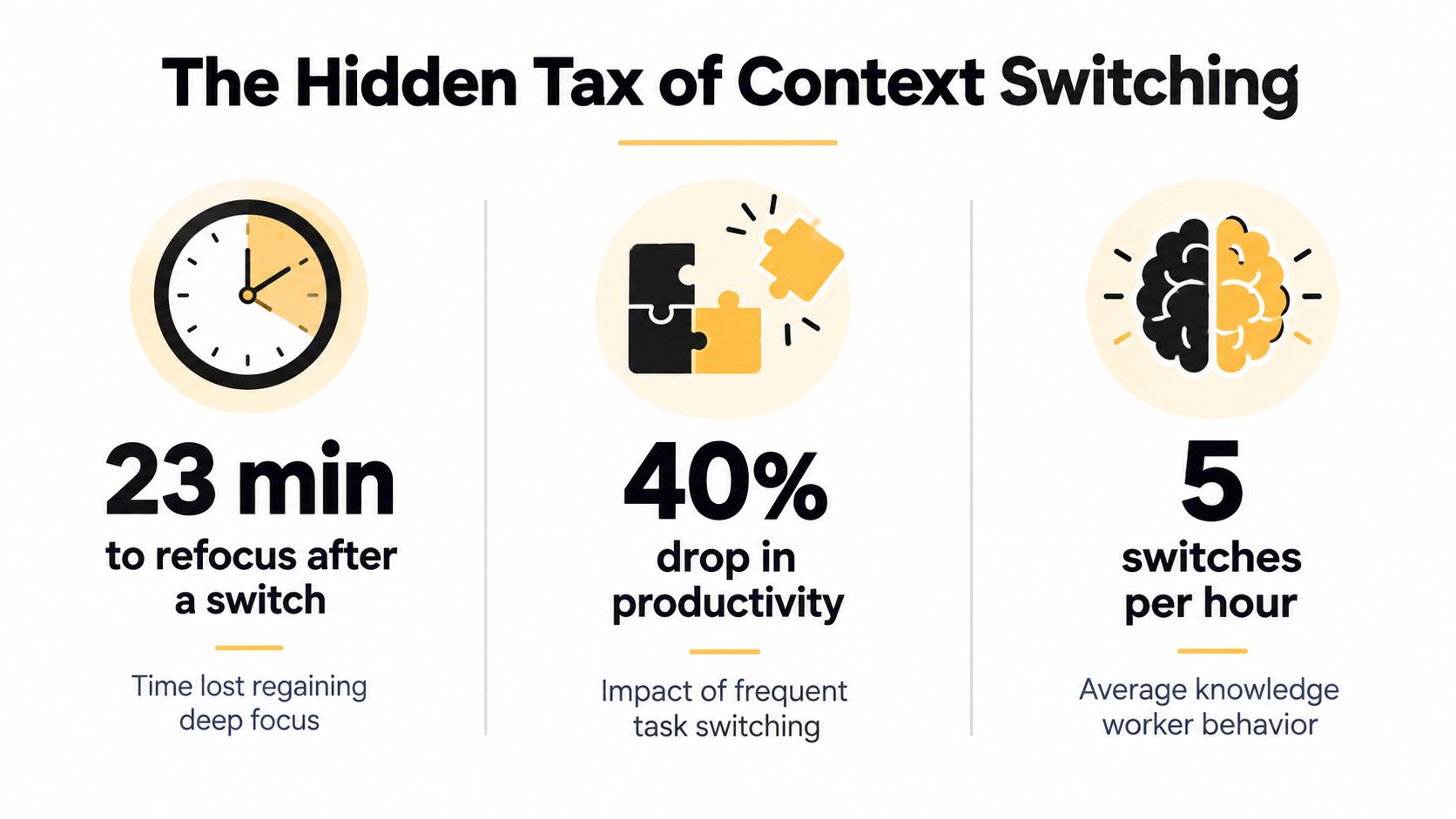
That time goes into refocusing, reconstructing the task, and checking whether copied information is still current. The problem is operational, not motivational. A feature-rich app becomes a poor productivity tool when every result must be carried into another system.
Why fragmented work creates rework
Fragmented tools also hide ownership and duplicate effort. A survey of 1,000 workers found that digital-tool context switching hampered productivity for 45% of workers, while 44% said siloed tools made it difficult to tell whether work was being duplicated (Qatalog app-switching survey coverage). Two people can solve the same problem in separate tabs while both believe they are making progress.
Another workplace survey found that U.S. employees change through an average of 13 apps 30 times per day. More than one-quarter said app switching caused them to miss actions and messages, and 26% said app overload made them less efficient (workplace app-overload survey). The exact count matters less than the workflow pattern. Each additional surface creates another place for context, decisions, and source material to disappear.
Measure the tax instead of arguing about feature checklists. Track how often work leaves its primary workspace, how frequently someone searches for the same source, and how many times a deliverable is pasted between systems. Those measures produce a more useful productivity tools comparison than counting calendars, boards, prompts, templates, or other decorative buttons.
Use these tips for reducing mental overload to reduce unnecessary cognitive demands. Before approving another subscription, understand the cost of context switching and identify which handoffs an all-in-one AI workspace can remove.
My rule: A tool saves time only when it removes the surrounding steps, not merely when it automates one step.
Evaluating the Usual Suspects by Job Function
Generic labels such as “AI assistant” hide the useful differences between products. The right question is what the tool does natively, what it expects you to supply, and where it leaves you once the first task is complete.
Independent 2026 comparisons separate major tools by job-to-be-done rather than treating them as interchangeable. ChatGPT is positioned for broad-purpose reasoning and ecosystem breadth, Claude for long-document reasoning and writing quality, Notion AI for workspace-native search and multi-step page actions, Google Gemini for AI embedded in Workspace apps, and Fireflies.ai for searchable meeting transcripts and summaries (2026 AI productivity comparison).
Market Leaders by Primary Job-to-Be-Done
ChatGPT is the flexible generalist. It works well when you need to reason through an unfamiliar problem, draft an explanation, or explore several approaches without caring which department owns the task. Its weakness is workflow continuity. The answer may be excellent, but you still need to organize the source material, turn the conclusion into an action, and share it with the right people.
Claude is the better fit for long documents and careful prose. That makes it useful for policy review, research synthesis, and substantial drafting. It doesn't automatically become your project system, calendar, or publishing pipeline.
Notion AI makes the most sense when your team already lives in Notion. Search, page actions, and workspace context are valuable because the assistant knows where the information belongs. If your work is split across cloud drives, email, code repositories, and meeting platforms, the advantage narrows.
Gemini is a logical choice for teams already invested in Google Workspace. Embedded assistance reduces friction inside Docs, Gmail, and related tools. Fireflies.ai solves a narrower but real problem, capturing meeting intelligence so people can search summaries instead of relying on heroic note-taking.
For a wider look at categories and use cases, see this practical AI tools list. The editorial conclusion is simple: specialists are often excellent at their primary job. The gap appears between jobs, when research becomes a brief, a brief becomes an asset, and an asset becomes an approved deliverable.
The Rise of the All-in-One AI Workspace
The all-in-one workspace isn't just a larger toolbox. Its useful idea is continuity. Research, documents, creative work, coding, and project context can stay connected instead of being passed through a chain of browser tabs like a relay baton nobody asked for.
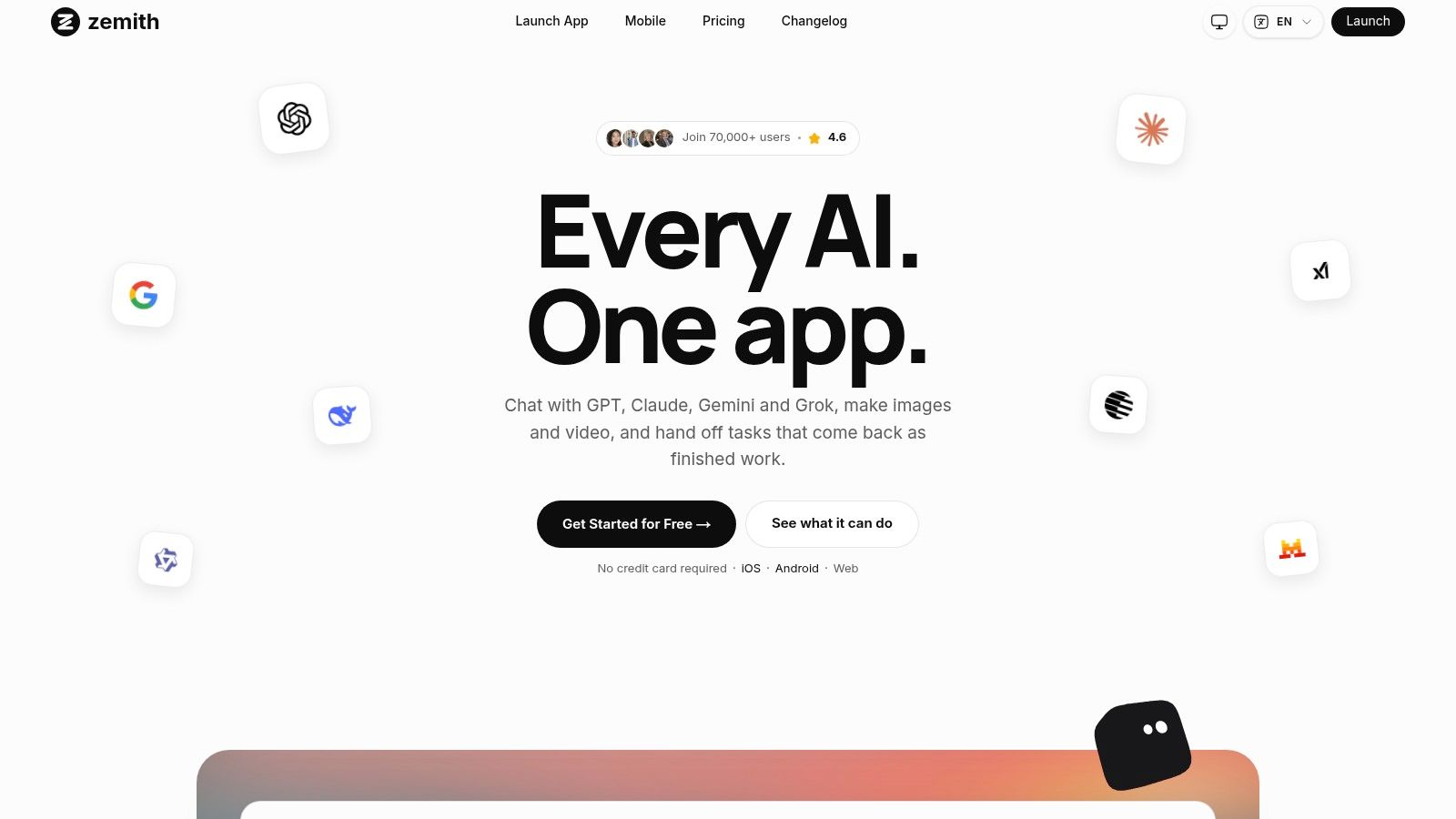
A unified platform such as Zemith brings multiple AI models, document assistance, creative generation, coding support, research, workspaces, and a whiteboard into one environment. Its document assistant can summarize files, create quizzes and flashcards, and convert documents into podcasts. Its smart notepad supports autocomplete, rephrasing, style adjustments, paragraph generation, and conversion of bullet points into polished copy. The point isn't that every user needs every feature. The point is that the next step doesn't require exporting the current one.
This matters most for work with several transformations. A researcher can collect sources, ask questions about a document, draft a finding, and organize the material in a project workspace. A marketer can move from research to copy to visual concepts without maintaining separate AI subscriptions for each stage. A developer can ask for code, inspect an explanation, and use live previews for React or HTML without treating the generated snippet as an orphaned text block.
What consolidation actually fixes
A unified workspace can reduce three forms of friction:
- Context loss: The system can retain relevant material across files, chats, and projects instead of making you restate the brief.
- Output transport: Drafts, summaries, prompts, code, and visual ideas can remain near the source material.
- Subscription sprawl: One broader environment can replace several narrowly overlapping tools, provided it meets the actual workflow requirements.
That last condition matters. “All in one” doesn't mean “automatically good at everything.” You still need to test output quality, permissions, export options, collaboration, and the boring operational details that determine whether a team sticks with it.
Some users may also appreciate the logic behind tools that let people browse AI-powered product tabs, where product information and intelligent assistance sit closer together. The principle is the same: reduce the distance between finding information and acting on it.
The strongest unified platforms also add contextual memory, organized projects, and a shared knowledge base. That turns “please reread this” into a less frequent sentence. Zemith's coding assistant, deep research tools, image workflows, mobile access, AI Live Mode, and integrated whiteboard are designed around that connected model. You can learn more about the practical model in this guide to an AI assistant for work.
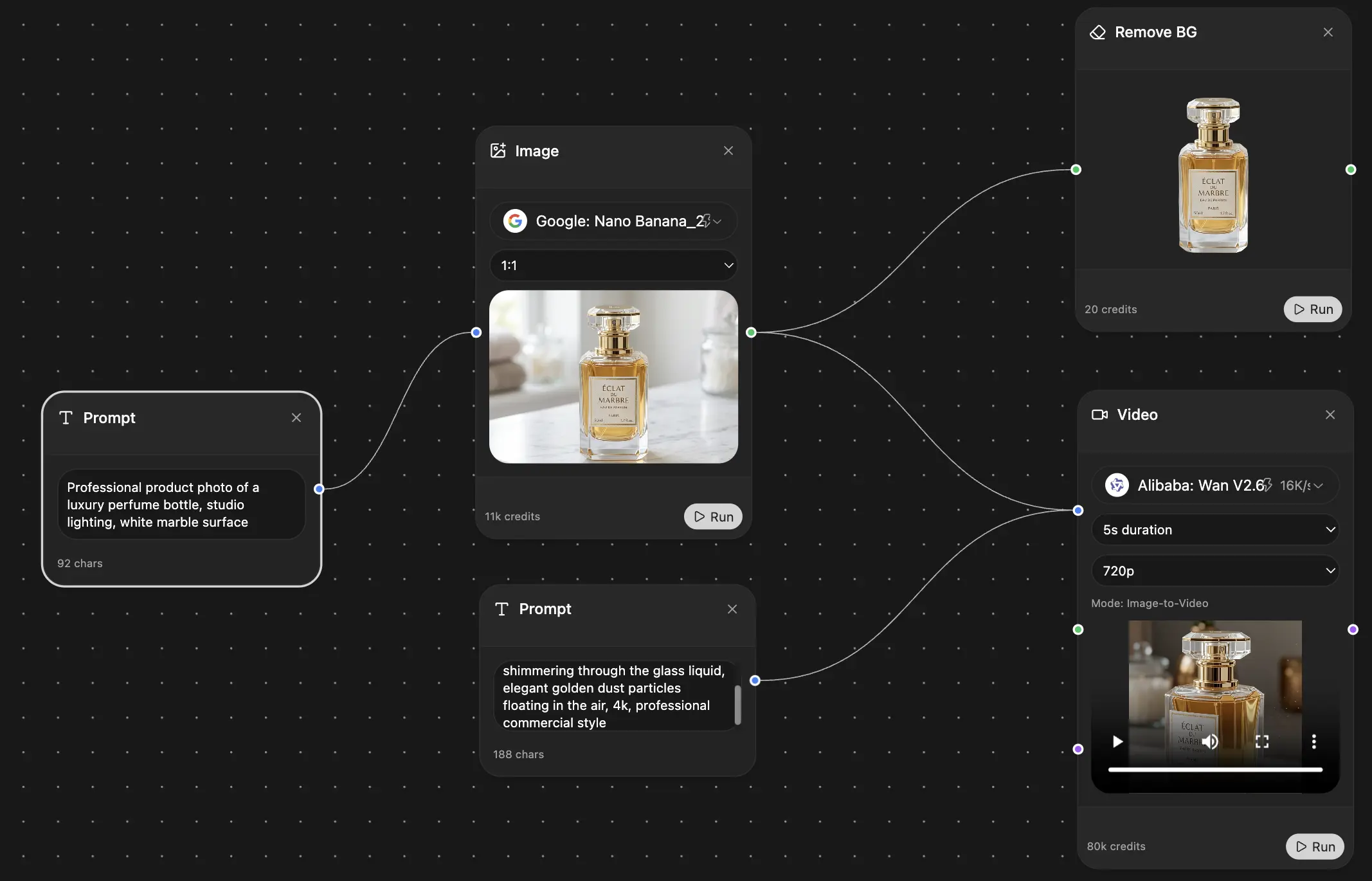
Here's the visual proof of the kind of consolidated workspace this approach supports:
The best consolidation decision isn't “replace every tool tomorrow.” It's “move the highest-friction workflow into one environment first.” If that trial removes copying, searching, and repeated setup, expand it. If it merely gives you another dashboard, send it back to the app store.
How to Audit and Consolidate Your Tech Stack
A team can lose hours before anyone notices. One person searches for a file, another copies notes between apps, and a third checks a renewal for software nobody remembers approving. Audit the route work takes before cancelling anything.
Record every application your team pays for, opens regularly, or relies on. Include browser extensions, free tools, shared accounts, meeting bots, storage platforms, and the app someone installed “just for this project.” Software clutter persists because ownership is missing.
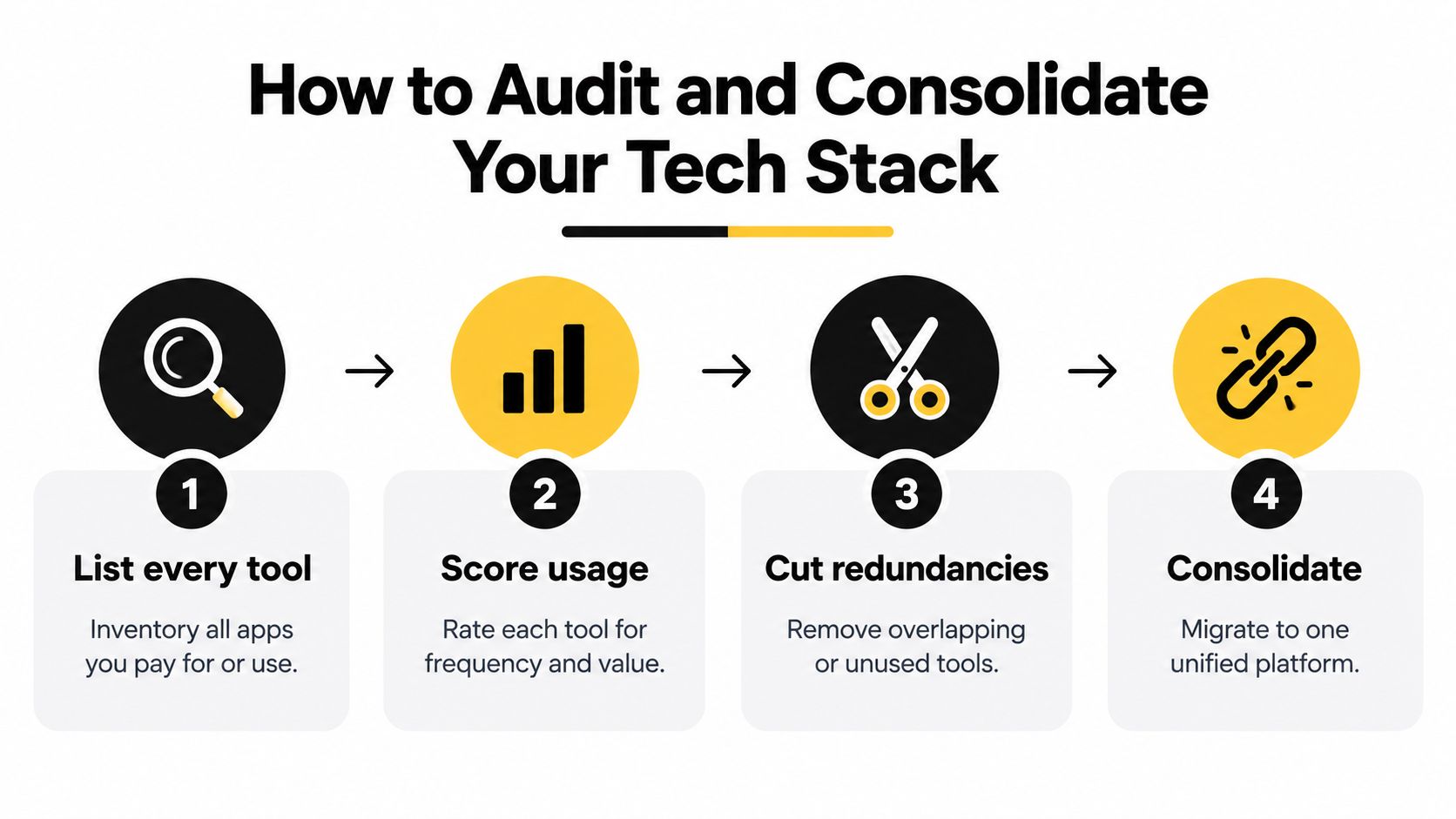
Four decisions for a leaner stack
List every tool. Record its job, owner, users, stored data, integrations, renewal date, and the workflow that would fail if it vanished. Memory is not an inventory system. It is how a “temporary” app survives for years.
Score usage. Rate each product by frequency, business value, switching burden, integration quality, and output reliability. Daily use does not protect a tool from review. Rare use does not automatically make it disposable. Require a clear reason for both.
Cut redundancies. Identify overlapping note systems, AI writing assistants, schedulers, and project boards. Keep the option with clear ownership and fewer manual handoffs. Export data before cancellation, then test the replacement on real work rather than a polished demo.
Consolidate deliberately. Move one workflow at a time into a unified workspace. Set the source of truth, naming rules, import limits, and a short operating rule. “Everything goes somewhere in the workspace” is a slogan, not a process.
As noted earlier, surveys of workers connect siloed tools with productivity loss and duplicated work. Treat that pattern as an operational risk, not a minor inconvenience. The actual comparison criterion is the context-switching tax: every extra app adds searching, copying, sign-ins, and another place for decisions to disappear.
Keep, kill, or combine
Use this decision matrix:
- Keep: The tool has a distinct job, a named owner, and reliable connections to the rest of the workflow.
- Kill: Nobody can explain its current value, usage is sporadic without a clear reason, or an approved product already covers the same task.
- Combine: The function matters, but a broader workspace can handle it without losing capability the team uses.
Track recurring charges separately. A subscription tracker app can reveal renewals that rarely appear in workflow discussions. Assign someone to confirm the cancellation date, export responsibility, and replacement owner. An ignored renewal is still an operational decision, just one made by inertia.
Review the benefits of consolidation alongside migration effort, data access, and user adoption. All-in-one AI workspaces make sense when they remove handoffs across research, writing, files, and decisions. The target is not fewer logos. It is fewer places where work can vanish.
Real World Workflows for Different Professionals
The value of consolidation becomes obvious on an ordinary Tuesday, not during a polished software demo.
A software developer starts with a product request in a document, researches an unfamiliar library, asks an AI assistant to explain an approach, generates a React component, previews it, and records the decision for the team. In a fragmented setup, that means a document tab, search tab, chatbot, coding tool, local environment, and project board. In a unified workspace, the developer can keep the request and technical reasoning together, use coding assistance for the first implementation, inspect a live preview, and save the explanation beside the project context. The developer still needs proper testing and version control. Consolidation doesn't repeal engineering discipline. It removes the clerical relay race around it.
The content creator's Tuesday
A content creator begins with a target topic and a pile of research. The useful sequence is straightforward:
- Research: Gather current information and identify competing angles.
- Draft: Turn the notes into an outline and a first version.
- Refine: Rephrase weak sections, shorten bloated sentences, and adapt the tone.
- Create assets: Generate visual concepts, remove a distracting background, or produce a prompt for an image tool.
- Package: Convert the final material into the format needed for publishing or internal review.
A smart notepad, deep research area, document assistant, and creative tool in the same workspace make that sequence easier to maintain. The creator still needs editorial judgment. AI can produce ten variations of a weak idea with impressive confidence, which is the digital equivalent of putting a spoiler on a bicycle.
The researcher or student
A researcher may start with a long report, a set of web sources, or lecture material. Instead of reading every document linearly and creating separate study materials by hand, they can ask questions of the document, summarize key points, create quizzes and flashcards, and convert the material into a podcast for review away from the desk. The workflow becomes retrieval, understanding, testing, and reinforcement rather than repeated formatting.
That doesn't make the output automatically reliable. The researcher should verify important claims against the original material and preserve citations. The advantage is that the workspace keeps the source and derived materials close together, which makes checking less annoying and therefore more likely to happen.
The marketing operator
A marketer often moves between competitor research, campaign briefs, copy variations, visual concepts, approval notes, and performance reviews. A prompt gallery can standardize recurring tasks, while a project workspace can hold the brief, audience assumptions, draft assets, and feedback. A whiteboard helps when the campaign is still messy. A document assistant helps when the mess needs to become a plan.
The common thread across these professionals is not a desire for one enormous app. It's a desire to stop rebuilding context at every stage. Specialized tools still have a place when they deliver depth that a general workspace cannot match. But for everyday knowledge work, keeping the chain intact usually matters more than owning the most impressive isolated feature.
Making Your Final Software Decision
Your final choice should depend on the shape of the work, not the excitement level of the product launch.
Stay with specialized tools when a task requires unusual depth, strict compliance, or a mature team process that already works. A large enterprise with approved systems, complex permissions, and a serious code or support operation may need separate products. Consolidation is not an excuse to replace a system that safely handles a critical job.
For most generalist teams, freelancers, marketers, researchers, students, and small businesses, the default should be more aggressive: consolidate first, specialize only where the gap is real. If one workspace can handle documents, research, writing, images, coding, project context, and collaboration at an acceptable quality level, another subscription needs to justify its existence with more than a colourful landing page.
Workplace adoption is already concentrated around established suites. One survey found 82% of companies use an on-premises version of Microsoft Office, 53% use Office 365, and 26% use some version of Google's cloud productivity apps (workplace productivity-suite survey). That concentration means new tools must fit existing habits or remove enough friction to make a migration worthwhile.
Use this AI platform comparison to pressure-test the decision, then run a real pilot. Pick one workflow with visible switching costs, move it into the candidate workspace, and check whether people can find the source, produce the output, and hand it off without extra copying. If the pilot creates another island, stop. If it removes handoffs, expand.
My verdict is blunt:
- Choose specialists for mission-critical depth, regulated workflows, and tools your team already uses consistently.
- Choose a unified workspace when your work jumps between research, documents, creative production, coding, and planning.
- Avoid both extremes when a supposedly simple task requires a complicated stack of overlapping subscriptions.
A good stack feels slightly boring. That means the work is getting the attention, not the software.
Zemith brings multi-model AI access, document chat and transformation, writing support, image creation, coding assistance, deep research, organized projects, a whiteboard, and mobile access into one workspace. If app switching and subscription sprawl are slowing your team down, visit Zemith and test it against one real workflow before adding another specialist tool.
Explore Zemith Features
Every top AI. One subscription.
ChatGPT, Claude, Gemini, DeepSeek, Grok & 25+ more








Always on, real-time AI.
Voice + screen share · instant answers
What's the best way to learn a new language?
Immersion and spaced repetition work best. Try consuming media in your target language daily.
Voice + screen share · AI answers in real time
Image Generation
Flux, Nano Banana, Ideogram, Recraft + more

Write at the speed of thought.
AI autocomplete, rewrite & expand on command
Any document. Any format.
PDF, URL, or YouTube → chat, quiz, podcast & more
Video Creation
Veo, Kling, Grok Imagine and more

Text to Speech
Natural AI voices, 30+ languages
Code Generation
Write, debug & explain code
Chat with Documents
Upload PDFs, analyze content
Your AI, in your pocket.
Full access on iOS & Android · synced everywhere
Your infinite AI canvas.
Chat, image, video & motion tools — side by side
Transparent, High-Value Pricing
Free
No credit card required
- Limited daily usage
- Selected AI models to try
- Limited features
Plus
- Choose from multiple leading models — GPT, Claude, Gemini and Grok.
- 25× more usage than Free.
- Create and edit images with Creative Studio.
- Connect your favorite apps and get work done in one place.
- Research the web and turn sources into clear answers.
- Turn documents, websites and YouTube into podcasts, flashcards and reports.
- Build repeatable workflows and stay focused with FocusOS.
Professional
- Everything in Plus, and:
- Unlock every model on Zemith, including GPT 6 Astra, Claude Opus and Sonar Pro.
- 50× more usage than Free.
- Create more with the full Creative Studio toolkit.
- Let agents work in the background — run Cloud tasks and schedule recurring work.
- Push further on complex work with Max Mode.
- First access to new features.
Trusted by teams at






What Our Users Say
Great Tool after 2 months usage
"I love the way multiple tools they integrated in one platform. Going in the right direction."
— simplyzubair
Best in Kind!
"The quality of data and sheer speed of responses is outstanding. I use this app every day."
— barefootmedicine
Simply awesome
"The credit system is fair, models are perfect, and the discord is very responsive. Quite awesome."
— MarianZ
Great for Document Analysis
"Just works. Simple to use and great for working with documents. Money well spent."
— yerch82
Great AI site with accessible LLMs
"The organization of features is better than all the other sites — even better than ChatGPT."
— sumore
Excellent Tool
"It lives up to the all-in-one claim. All the necessary functions with a well-designed, easy UI."
— AlphaLeaf
Well-rounded platform with solid LLMs
"The team clearly puts their heart and soul into this platform. Really solid extra functionality."
— SlothMachine
Best AI tool I've ever used
"Updates made almost daily, feedback is incredibly fast. Just look at the changelogs — consistency."
— reu0691