


Every top model, with tools built in.
Search the web, run deep research, read files, create images and run code with GPT, Claude, Gemini, Grok and more.
The ai coding assistant productivity impact is ~26% more tasks in real teams and ~56% faster on small coding tests. Here is what still slows you down.
Give a team an AI coding assistant and the field evidence says 26.08% more completed tasks. Point the same tool at a tightly specified coding exercise in a controlled trial and the work finishes 55.8% faster than it does unassisted. Neither number is your team's output: one is a noisy average from three companies, the other comes from a task small enough to verify before lunch, and neither includes the architecture, review, security checks or maintenance that fill an actual sprint.
That gap is the whole conversation around ai coding assistant productivity impact in 2026. The speed is real and measurable. The quality bill arrives weeks later, on a different chart, often to a different person. The number worth carrying into planning is validated work shipped: merged changes that pass tests, review and a security read, with warnings and rework holding flat. A faster draft is a genuine gain. It's just a gain you can spend badly, and the teams that spend it well instrument the loop instead of trusting the demo.
4,867 software developers make the field result hard to dismiss. Across three randomized experiments run at Microsoft, Accenture and an anonymous Fortune 100 company, developers given an AI code-completion tool completed 26.08% more tasks than control groups, with a standard error of 10.3%, as reported in Microsoft Research's account of the three field experiments. These were ordinary corporate codebases, not a benchmark harness. The wide error band is part of the finding: treat 26.08% as a portfolio average, then expect your own repository to land somewhere else based on task complexity, codebase familiarity, review practice and how long people spend checking generated code.
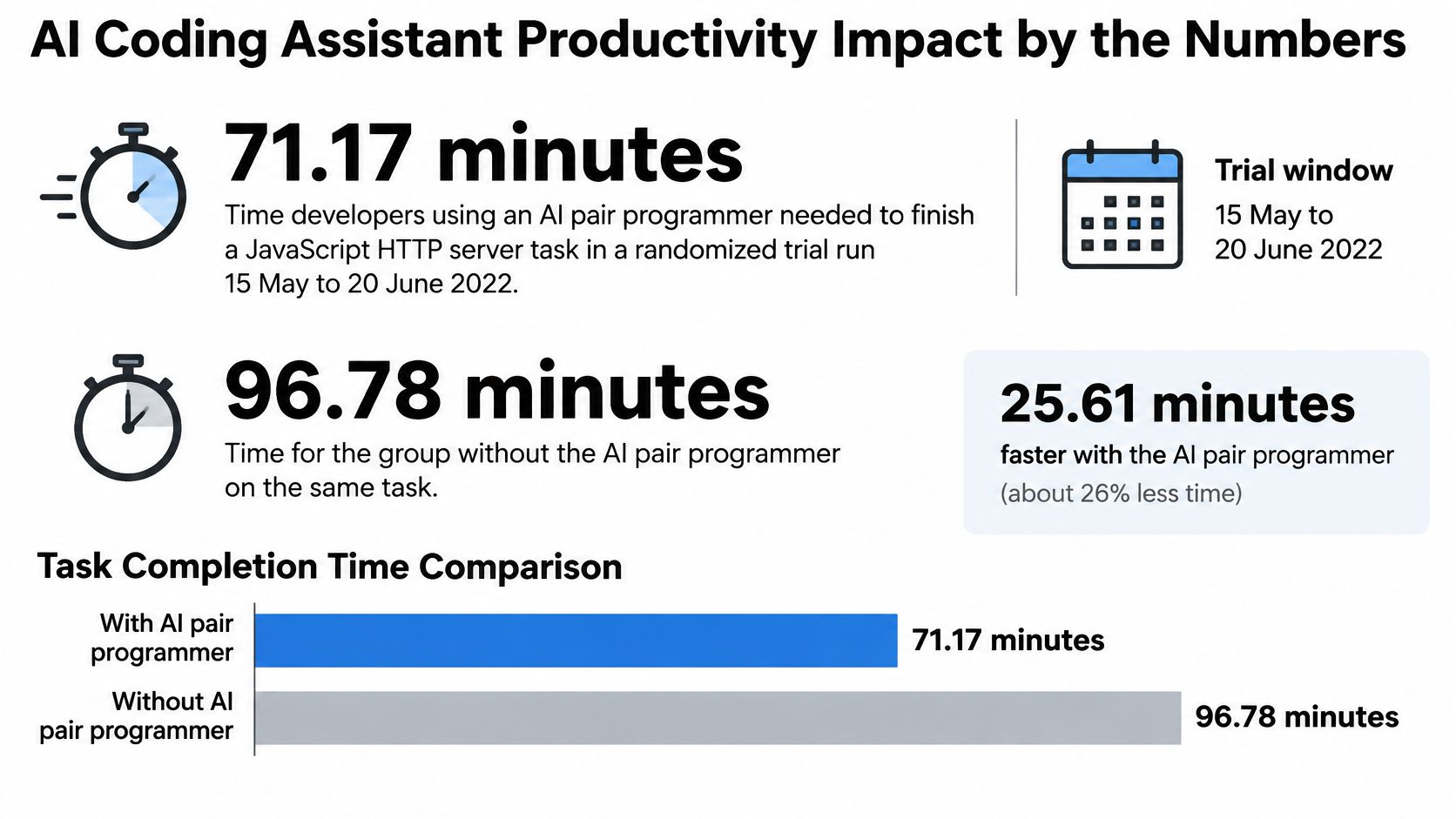
The lab result sets the ceiling. A randomized trial with 95 professional developers on a standardized JavaScript HTTP-server task finished in 71.17 minutes on average with the assistant against 160.89 minutes without it, 55.8% faster, significant at p = .0017 with a 95% confidence interval of 21% to 89% and a completion rate of 78% versus 70%, per the arXiv report on the 2022 coding-assistant experiment. Read that as the upper bound for a tidy, testable ticket: stated request shape, known response, a test you can run before the standup ends.
Two rows in the table below do completely different jobs. The company trials estimate what a quarter of team throughput might do. The bounded task shows what happens when the work is small and checkable. The enterprise row is the counterweight for hard production changes: the gain shows up, but the uncertainty is too wide to promise a quota.
Measured AI coding assistant productivity impact
Here's the same comparison in one frame:
For 2026 quotas, quote roughly a quarter more finished tasks at team level and keep the 55.8% figure for small, checkable work. Anyone claiming the assistant doubled engineering output hasn't read the confidence intervals. The useful line item is merged work that survives tests, review and security while warnings and rework stay flat; a faster draft only counts after it clears that loop.
An assistant works like a colleague who has read every public doc and none of your incident history. On the ticket it understands, that is a shortcut worth having. On the ticket that woke you up in March, it hands back a pattern your team tried and reverted two quarters ago, delivered with total confidence and immaculate formatting.
The randomized experiment behind the headline speed figure ran from 15 May to 20 June 2022 and measured a single programming task under controlled conditions. The researchers behind it are careful to say the result should not be read as an end-to-end engineering lift, and the design explains why. Production development carries architecture, testing, review, coordination, maintenance and security alongside the typing. The assistant compresses the typing.
Take a POST handler with a described payload, a stated status code and a failing test already written. The assistant drafts the route, the validation and the happy-path test in minutes. You read it, notice it forgot to reject an empty body, fix one line. An hour of tab-switching and doc-reading collapses into a few minutes of review. That is the good case, and it is common.
Now take a change that touches a shared billing service, an unclear requirement about proration, a migration with a rollback plan and a reviewer who wants the rationale in the description. The assistant types the code faster. It does not shorten the conversation with the product manager, the migration rehearsal or the security review. Those were most of the ticket.
The draft itself carries a smaller bill too. Generated code tends to arrive longer than what you would have written, with helper functions nobody asked for and error handling for cases the service can never reach. Every extra line is a line a reviewer has to clear, and it stays in the codebase long after the time saving is spent.
Faster implementation isn't faster delivery. A change is finished when someone other than the author has validated the behavior, and the assistant can't be that someone.
The review step is where the difference between those two tickets becomes visible:
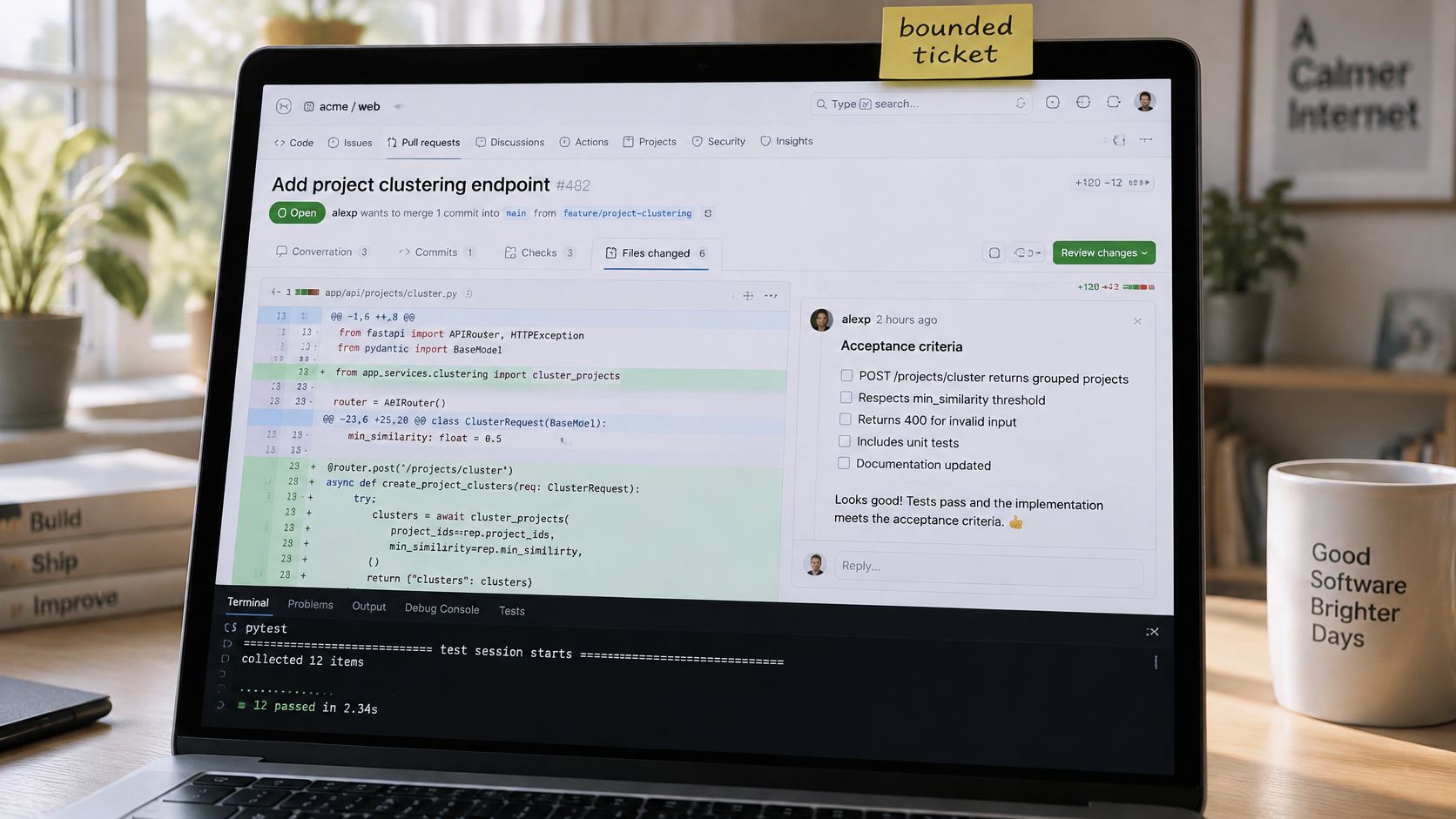
That is the split worth carrying forward: generation time, which the tool compresses a lot, and time to a working, reviewed change, which it compresses a little. Count the second one.
Sort the backlog before turning anything on. The gain from an assistant isn't spread evenly across a sprint, and treating every ticket as an AI ticket is how a team ends up with a review queue that looks like a car park.
Ask for the why in the same breath as the code. A two-line explanation attached to each suggestion is the cheapest onboarding material a junior developer will get all year, and it costs one extra sentence of prompting. The people who paste end up with a diff they can't defend in review.
Architecture, vague product decisions, cross-team design and anything security-sensitive stay human-paced. The lab ceiling doesn't follow you there. A randomized controlled trial with 96 full-time Google software engineers found AI features cut time on a complex, enterprise-grade development task by about 21%, with a confidence interval wide enough that the researchers themselves treat it as no universal promise, per the ICSE-SEIP 2025 study of AI assistance for professional engineers. The same trial found developers who already spent more hours per day on code-related activities got faster with the tool. Judgment is what converts a suggestion into a saving.
A developer who can spot a wrong suggestion in a minute feels the gain immediately. A developer who can't spends the saved typing time being confused at higher speed. When review keeps catching the same class of bug the assistant introduced, that's a signal about context, not about the model's intelligence.
The fix isn't a longer prompt. It's reading and debugging the diff like you own it, which is the habit set out in this guide to debugging code you didn't write.
Sprint rule: if you can't write the acceptance check in one sentence, don't ask the model to invent the ticket.
The velocity chart is the part everyone screenshots. The pull request lands before lunch, the ticket count climbs, the sprint review goes well, and then the invoice arrives in a different currency: warnings, complexity, review rework and a debugging session nobody budgeted for.
Recent causal work on AI coding agents found the pattern cleanly. Adopting an agent produced a large but temporary increase in project velocity, while static-analysis warnings and code complexity rose and stayed up, according to the 2025 study of AI coding agent adoption and code quality. Velocity came back down when the agent went away. Complexity didn't.
That trade looks like this:
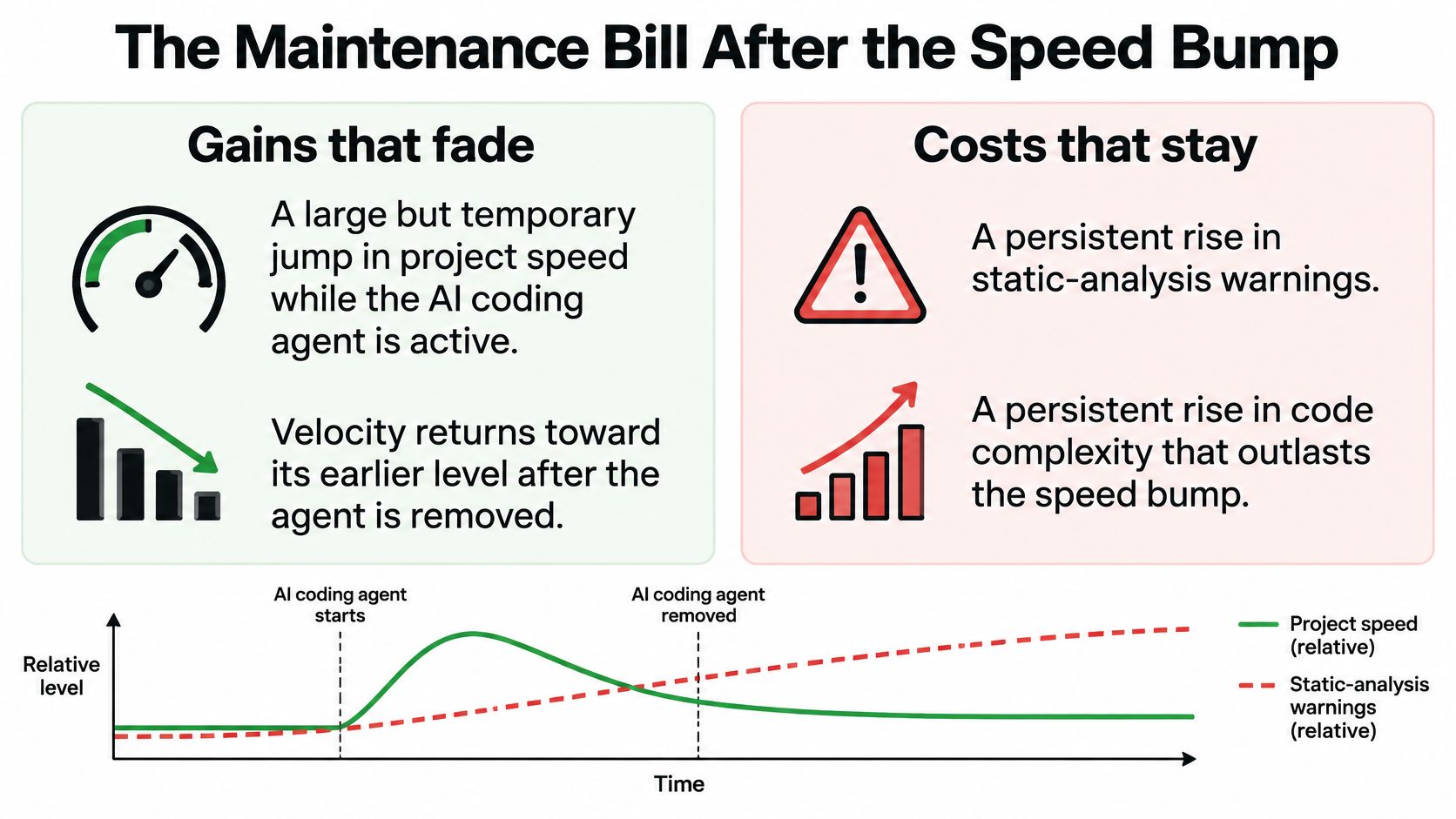
Does AI-assisted coding lower the long-term cost of ownership once review, debugging, security remediation and future maintenance are counted? Time to first diff says nothing about it. A quarter of rising ticket closure followed by three quarters of escaped defects, rewrite comments and incidents isn't a productivity gain. It's a loan with a variable rate.
The risk concentrates where the draft is trusted most. A developer early in their career can ship a diff they can't yet critique, and the cost lands months later on whoever inherits the file. Shipping the draft is the easy part, like leaving the dishes because you cooked faster.
If you'd rather hear the maintenance argument than read it:
The bill shows up later as technical debt you can measure and pay down, and it shows up in the review queue first. So the decision isn't whether to use the assistant. It's whether verification ships inside the same workflow or gets deferred to a Friday nobody has. Keep the speed only when the check travels with the change.
Here's a loop you can run on the next pull request, in order, without a new tool budget.
Rule six is where trust breaks. A qualitative study of developers found mistrust of AI assistants was driven mainly by concerns about code quality, and the empirical research summarized in this review of developer trust and security flaws in AI-generated code reports that generated code can carry vulnerabilities, particularly in security-critical domains.
The model can draft the pull request. It can't be the only person approving it, or code review becomes a very polite group chat with one participant.
Four of those checks compress into a loop you can draw on a whiteboard:
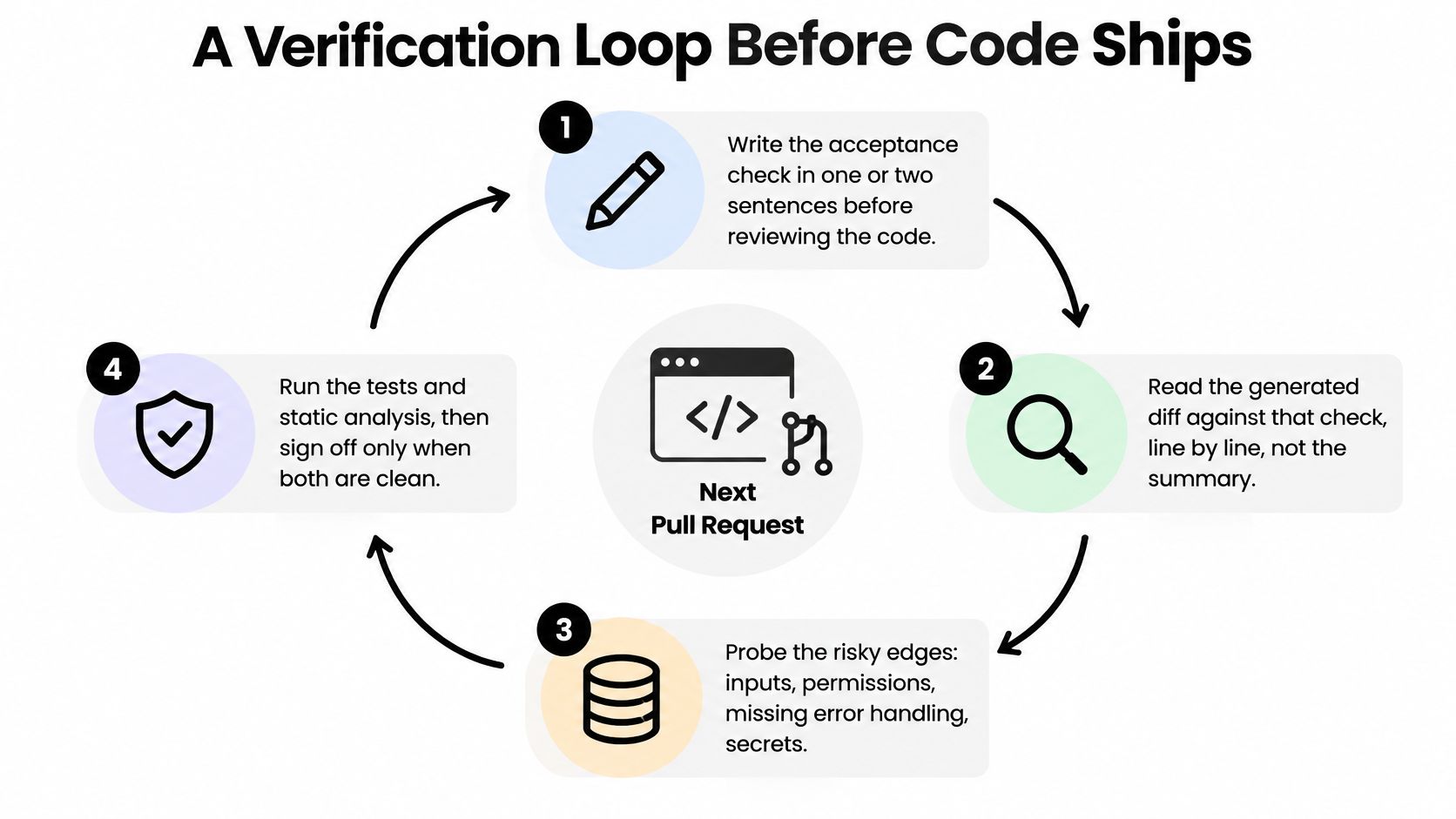
A workspace that keeps the explanation, a debugger and a live preview for React or HTML beside the draft turns step three from a scavenger hunt into a two-minute check. That's the difference between a loop people run and a loop people bookmark, and it's the same territory covered in these software testing practices that catch real defects. Run the loop and the task bump turns into software you'd be willing to be paged for at 2am.
Run the measurement on one squad, one language, one service, for two weeks before and two weeks after. A company-wide average hides a thrilled new hire and a sleepy senior codebase in the same number, and the MIT economics working paper behind the three-company trials is explicit that its headline estimate is a portfolio-level average whose individual results vary substantially across repositories, languages, review practices and governance constraints.
Accepted suggestions are a side note, not a KPI. They measure how often someone presses Tab, and pressing Tab isn't shipping.
Team scoreboard for AI coding help
Read a week as healthy when more work finishes while warnings and rework stay flat. Read it as a fake win when suggestion volume climbs, the diff looks pretty and every review comment starts with "please rewrite."
Defects and code health are the two rows that decide whether the earlier speed was real. If CI failures and post-release incidents rise a few weeks after the velocity bump, the speed was borrowed against work nobody scheduled.
This is what measuring ai coding assistant productivity impact comes down to: validated work shipped. It's also the answer to the version of the question your director asks, namely how to measure developer productivity with an AI coding tool without counting keystrokes. For the broader frame, engineering efficiency metrics that survive a reorg cover the parts this scoreboard leaves out.
Drop any metric the team won't still care about in a month. Keep the rest on one page.
A one-week trial beats a new religion. Pick one service and five routine tickets: an endpoint, a test suite, a small refactor, a bug with a clear reproduction, a dependency bump.
For each one, write the acceptance check first, use the assistant for the draft, run the verification loop, and log merges, rework and new warnings on the scoreboard. Five tickets is enough to see the shape of the answer.
If you'd rather run that trial without a browser tab per model, Zemith keeps a coding pane beside your notes and tickets, with Claude, GPT and Gemini in one workspace, a code sandbox for running snippets, and chat with your files in the same place. The whole experiment fits into a software development workflow that survives handoffs instead of adding another tab to it.
Keep one human in the loop: whoever didn't write the code approves it. Then take the scoreboard to planning and keep the assistant only on the rows where validated work moved.
Five routine tickets are enough to settle this for your team, and doing them in one place beats stitching five tabs together. Zemith puts the coding pane next to your notes and tickets, with a code sandbox, live React and HTML previews, code explanations and chat with your files, all running Claude, GPT and Gemini in a single workspace. Plus costs US$15.99 per month and includes every model listed on the page plus 50+ AI tools, so the trial, the debugging and the write-up live inside one subscription. Bring the scoreboard to your next planning meeting and let the numbers, not the demo, decide which tickets keep the assistant.
Ask the same question to different models without opening another subscription, then run the result in the sandbox. Claude 5.5 Opus and GPT 6.1 Sol are on Professional ($29.99/month); Plus covers the rest.
Free $0 (chat with the free models) · Plus $15.99/month · Professional $29.99/month. Prices in USD.
Pay less than one AI subscription and get GPT, Claude, Gemini and more, plus 50+ AI tools.


Trusted by teams at






The top models, plus image, video and voice tools, in one plan.
Without Zemith
ChatGPT PlusUS$20.00Claude ProUS$20.00Google AI ProUS$19.99SuperGrokUS$30.00Perplexity ProUS$20.00 MidjourneyUS$10.00
 ElevenLabsUS$6.00Le Chat ProUS$14.99
 RunwayUS$15.00Kling StandardUS$8.80
 Gamma PlusUS$12.00
 Otter ProUS$16.99
 QuillBot PremiumUS$19.95
 Photoroom ProUS$12.99
 Quizlet PlusUS$7.99
Total if paying separatelyUS$234.70/mo
"I love the way multiple tools they integrated in one platform. Going in the right direction."
— simplyzubair
"The quality of data and sheer speed of responses is outstanding. I use this app every day."
— barefootmedicine
"The credit system is fair, models are perfect, and the discord is very responsive. Quite awesome."
— MarianZ
"Just works. Simple to use and great for working with documents. Money well spent."
— yerch82
"The organization of features is better than all the other sites — even better than ChatGPT."
— sumore
"It lives up to the all-in-one claim. All the necessary functions with a well-designed, easy UI."
— AlphaLeaf
"The team clearly puts their heart and soul into this platform. Really solid extra functionality."
— SlothMachine
"Updates made almost daily, feedback is incredibly fast. Just look at the changelogs — consistency."
— reu0691
Hand off the research, writing, design and follow-ups. Zemith picks the tools it needs and brings back finished work.
Search the web, run deep research, read files, create images and run code with GPT, Claude, Gemini, Grok and more.
Zemith keeps working in the cloud and pings you when it's done.
Notion, Linear, Canva, Airtable and more. It asks before it creates or changes anything.
Docs, slides, sheets and PDFs, ready to send.
Chain models and tools on a visual canvas, from one prompt to a finished promo video.
Briefings, reports and reminders run on a schedule and are ready when you need them.
Real-time voice that can see your camera or screen.
The best image and video models, in one studio.
Turn PDFs, links and YouTube videos into podcasts, quizzes, flashcards and mind maps.













 Podcast
 Quiz
 Flashcards
 Mind map
 Infographic