


Every top model, with tools built in.
Search the web, run deep research, read files, create images and run code with GPT, Claude, Gemini, Grok and more.
Engineering efficiency explained with real KPIs, DORA metrics, and a practical playbook. Cut rework, ship faster, and use AI tools without the hype.
Stop telling engineers to type faster. That advice has survived three tooling cycles, two dashboard vendors, and one very expensive transformation deck, and it still misses where your week goes. You don't lose a sprint because someone wrote a for loop slowly. You lose it hunting for a decision buried in a doc, waiting on a review, or rebuilding context after the fourth tool switch before lunch. Engineering efficiency improves when you fix that mess, not when you count keystrokes and call it insight.
Most advice on engineering efficiency starts with the wrong villain. It blames slow coding, then prescribes another assistant, another plugin, another tab you now have to babysit. Meanwhile, your actual bottleneck is sitting in plain sight. It's the ticket that contradicts the spec, the reviewer who lacks context, and the answer that exists somewhere in a repository nobody can find.
The 2025 State of Developer Experience research on non-coding time loss found that 50% of developers reported losing at least 10 hours per week to non-coding work, while 90% reported losing at least six hours, with the largest friction coming from finding information, switching between tools, and unclear direction. Read that again before your next productivity offsite. That's not a typing problem. That's an information-flow problem wearing a hoodie.
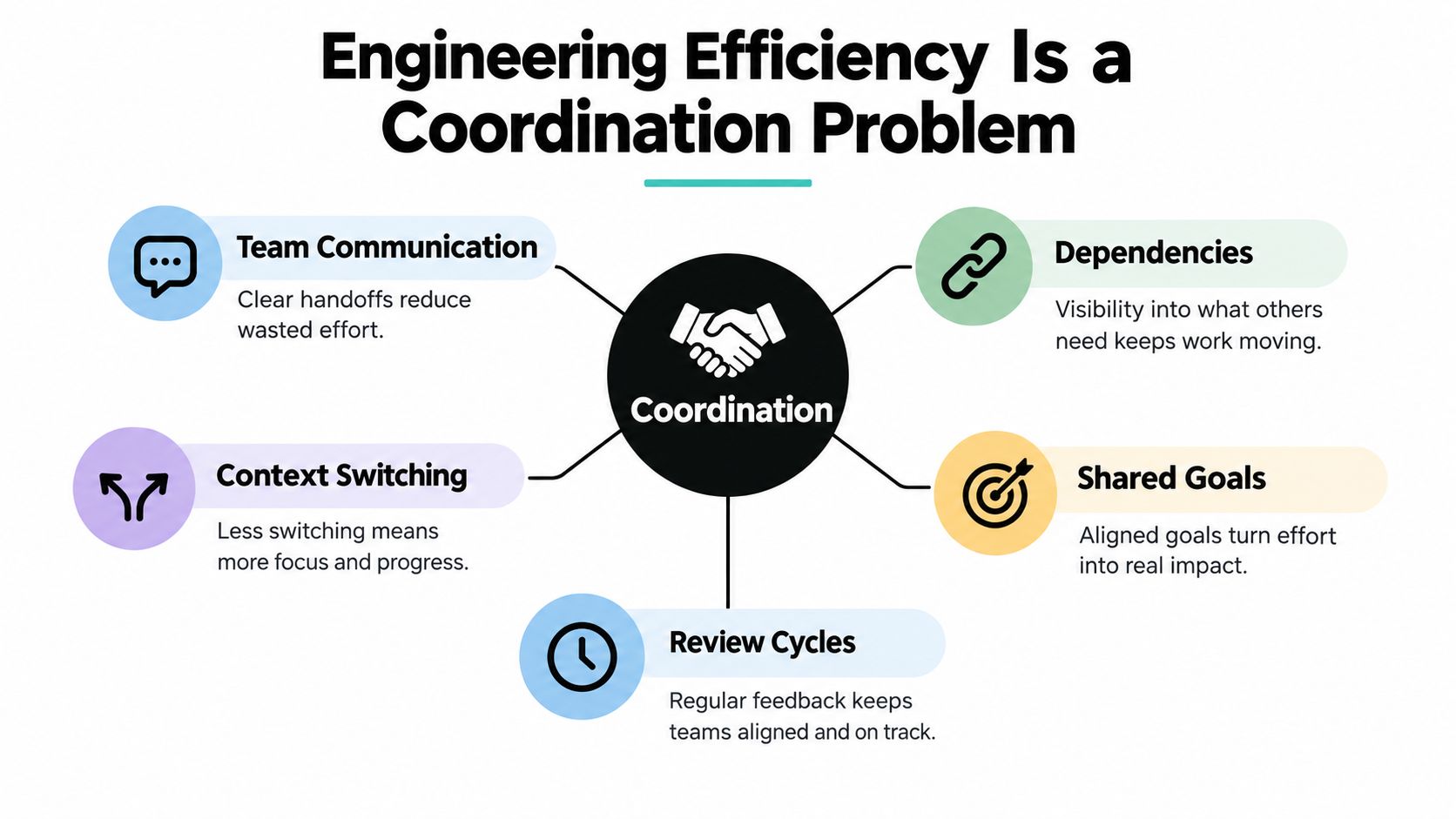
It hides in handoffs. A product question waits in chat, an architecture note lives in a personal doc, and the test failure points to a service owned by a team in another timezone. Each delay looks small in isolation, which is why managers underestimate it and engineers feel vaguely exhausted by Thursday.
If your team cannot find the truth quickly, faster code generation only helps you produce the wrong answer sooner.
That's why how to assess team dynamics matters here, and this guide on how to assess team dynamics is useful context if you're trying to separate a tooling gap from a trust, ownership, or communication gap. Pair that lens with practical habits for improving team collaboration without adding more meetings, and you get a definition you can defend in planning. Engineering efficiency is the rate at which a team turns shared understanding into safe, useful change. Everything else is decoration.
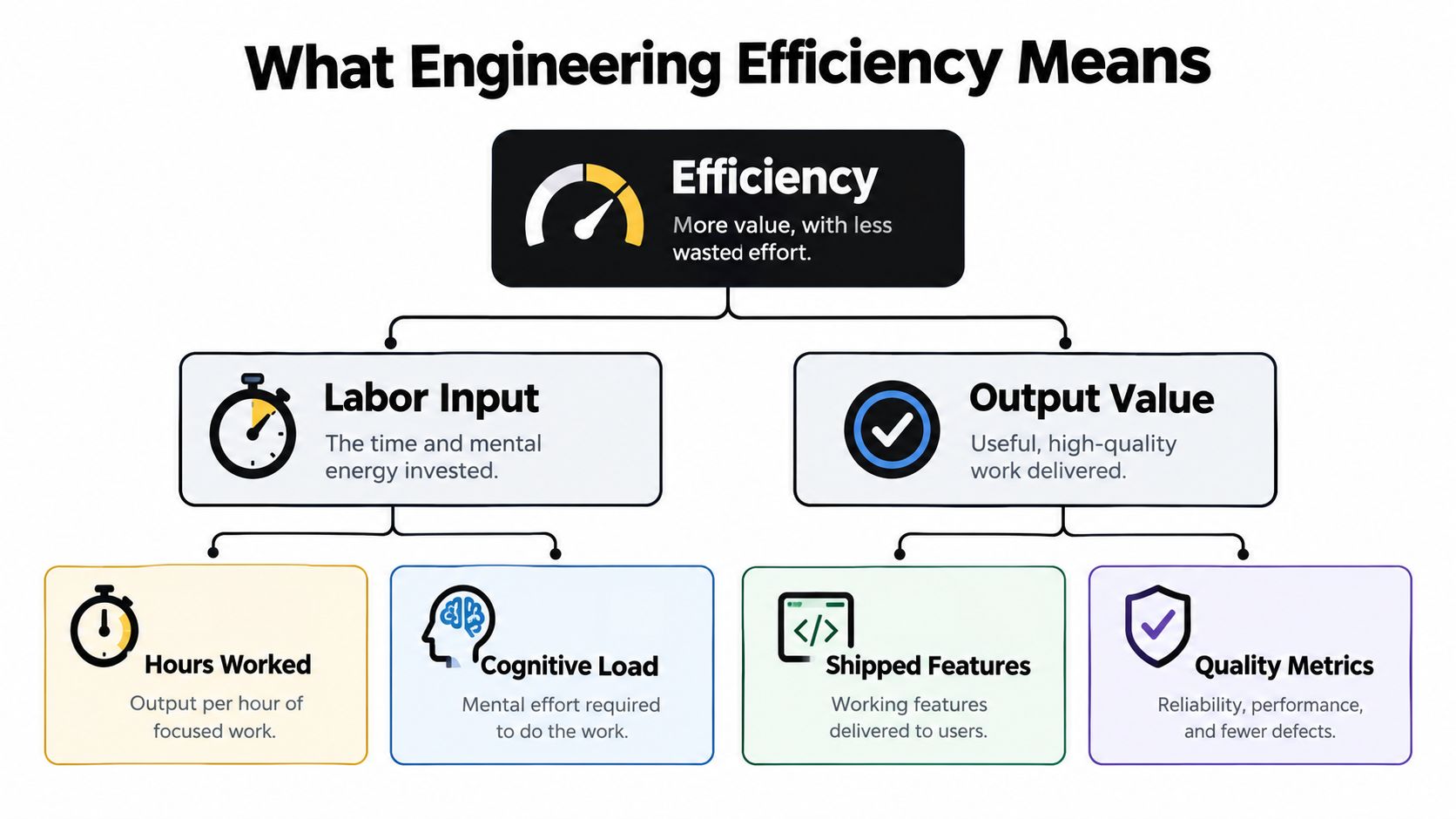
The textbook definition isn't wrong, it's just incomplete. Efficiency is commonly measured as output per unit of labor input, such as deliverables per labor-hour or value added per worker. That framing works until a team games it by shipping more documents, more tickets, and more code that somebody else has to fix later. Congratulations, your spreadsheet improved and your system got worse.
A better mental model uses three concentric circles. The inner circle is per-hour output, which tells you whether focused work produces artifacts. The middle circle is per-deliverable quality, which asks whether those artifacts survive review without redesign. The outer circle, the one executives feel, is per-project value, meaning whether early engineering choices reduce downstream cost, delay, and chaos.
Cross-industry history makes the point bluntly. The McKinsey construction productivity comparison across major economies showed that from 1994 to 2012, manufacturing productivity nearly doubled while construction productivity remained broadly flat, with engineering decisions made during design shown to influence later construction performance, rework, material use, and schedule reliability. Software teams like to think they're immune because their mistakes deploy instead of getting poured in concrete. They're not. A sloppy interface decision still taxes every team that touches it for years.
That history gives you a practical test for any efficiency claim. Ask whether the change prevents downstream corrections, improves information quality, or increases value per engineering hour across the whole delivery chain. If it only accelerates the first draft, it's a local optimization. Local optimizations are how you get faster pull requests and slower releases.
Use this working definition with your team. Engineering efficiency means delivering useful change with less wasted effort across planning, design, implementation, review, release, and recovery. It includes cognitive load, because an engineer juggling five tools and three ambiguous priorities isn't slow, they're overloaded. It also includes rework, because work you do twice should count against you twice.
Notice what's missing. Lines of code, story points burned, hours logged, and commits per day don't appear. Those numbers measure activity, and activity is the easiest thing to inflate when a dashboard needs feeding. Measure outcomes and waste instead. You'll annoy fewer engineers and learn more.
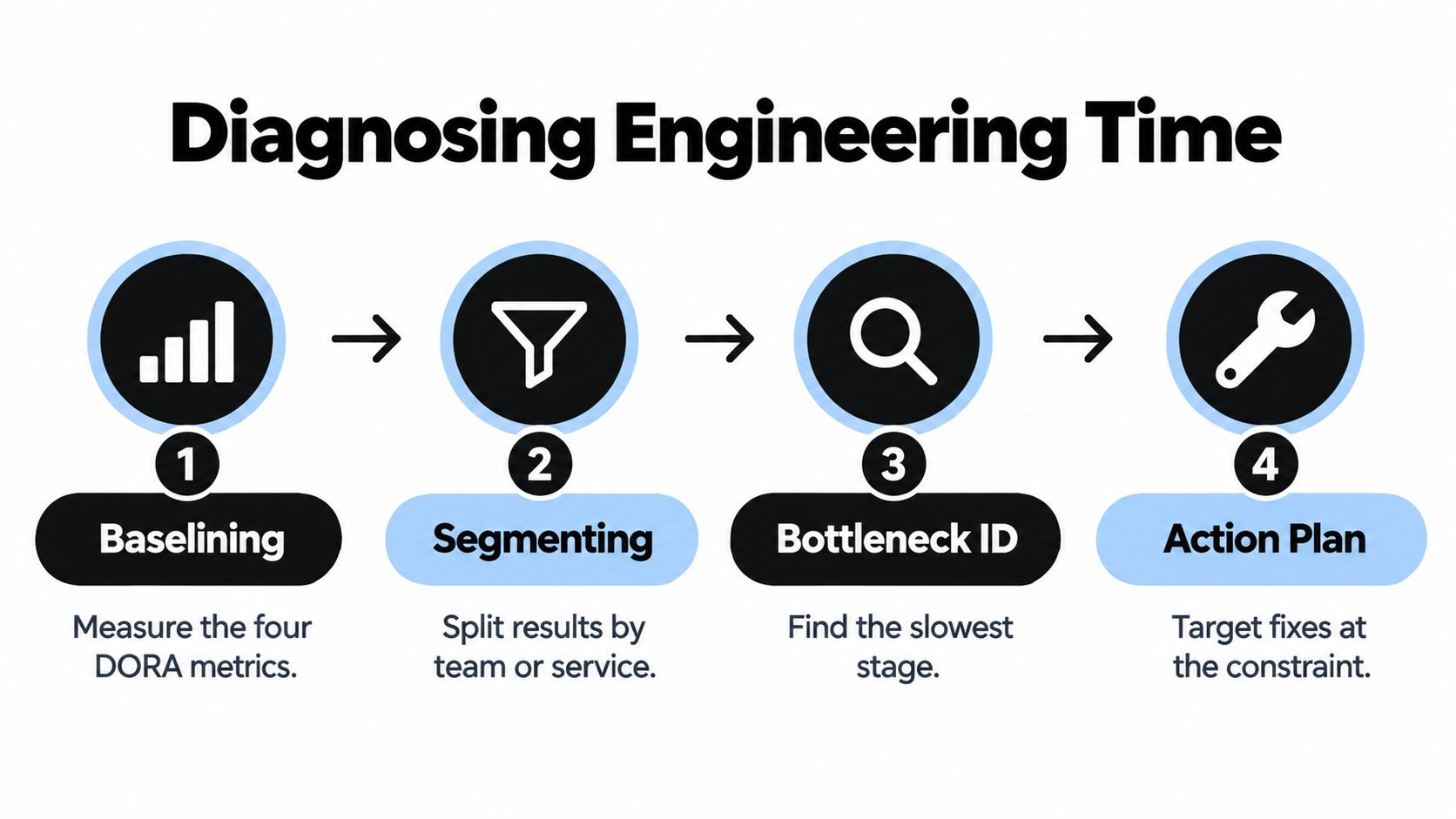
If you want fewer arguments about productivity, measure delivery as a balance of throughput and stability. That's the logic behind DORA's four core delivery metrics, which are deployment frequency, lead time for changes, change-failure rate, and time to restore service, with change-failure rate treated as a proxy for avoidable engineering rework. Together they stop you from celebrating speed that manufactures incidents behind the scenes.
Run them as a weekly scorecard, not a quarterly performance horoscope. Count successful production deployments, take the median time from commit to production, track how long failed deployments take to recover, and divide failed deployments by total deployments. Segment everything by service or team, because an org-wide average mostly tells you that averages are great at hiding pain.
Metrics tell you where it hurts. Process design decides whether it stops hurting. Sequential workflows, where design finishes before review starts and feedback arrives like a surprise exam, create redesign loops. Parallel feedback, shared context, and earlier review shrink those loops because disagreements surface while changing course is still cheap.
That principle shows up in ordinary technical work too. When a team documents an integration pattern clearly, the next engineer doesn't reverse-engineer it from production logs at midnight. A practical example is this Redis cache REST API guide, the kind of concrete reference that turns tribal caching knowledge into something reviewers can check and newcomers can reuse. Pair shared references like that with a tight code review checklist for catching defects before merge, and review becomes a quality gate instead of a rubber stamp with comments.
Practical rule: Never report deployment frequency without change-failure rate next to it. Speed without stability is just incident generation with better branding.
Small changes, automated testing, reliable pipelines, and rapid recovery let teams improve both sides at once. That's the tradeoff worth rejecting. You don't have to choose between moving fast and sleeping at night, but you do have to stop measuring one and hoping for the other.
Diagnosis starts with a baseline, not a shopping list. Measure your four delivery numbers for a few weeks before you change anything, then segment them by team and service. An aggregate lead time can look healthy while one service waits days for review and another deploys hourly. Averages are where bottlenecks go to hide from leadership.
Then audit your internal platform with the same honesty. The 2024 DORA findings on dedicated platform teams and self-service use reported a 6% team-level productivity gain with a dedicated platform team, a further 5% gain when platform users could complete tasks without involving an enabling team, but also an 8% throughput decrease among platform users relative to non-users when the platform added friction. Translation, your platform is either a product that removes handoffs or a portal that manufactures them. There isn't much middle ground.
Measure task completion time, adoption, failure rates, and developer experience for the platform itself. If engineers open tickets to use the self-service tool, it isn't self-service, it's a queue with a logo. This is also where mapping your end-to-end software development workflow from request to release helps, because it forces you to name every handoff instead of blaming the last person who touched the work.
Watch for the classic diagnostic mistake. Teams measure the happy path, declare victory, and ignore the rework loop of hotfixes, rollbacks, and review ping-pong. If your diagnosis doesn't include failed changes and waiting time, you've measured the brochure version of your engineering org. The one is less flattering and much more useful.
Every efficiency conversation in 2026 eventually becomes an AI conversation, usually right after someone shares a vendor chart with an arrow going up and to the right. Here's the honest version. One analysis of DORA findings on generative AI use and throughput reported that a 25% increase in generative-AI use was associated with an 8% reduction in throughput, while the 2025 Stack Overflow Developer Survey reported that 84% of developers were using or planning to use AI tools and about 70% of AI-agent users said agents reduced time on specific development tasks. Both signals can be true, and that's exactly why adoption screenshots make terrible strategy.
The image below is the part vendors skip, an engineer staring at generated output and deciding whether it deserves to exist.

AI makes individual tasks feel faster. Boilerplate appears, an unfamiliar function gets explained, a test draft materializes before your coffee cools. But if that output increases review burden, introduces subtle defects, or lands in an architecture nobody checked, the saved minutes reappear downstream with interest. You've moved the bottleneck from writing to reviewing and called it transformation.
Other industries are learning the same lesson about bounded automation. If you browse quoting automation for fabrication shops, you'll see the pattern clearly, automation helps most when it attacks a specific, measurable bottleneck rather than vaguely promising to make everything faster. Engineering is no different. The unit of analysis should be the task and its downstream cost, not your org-wide license count.
This short video is a useful palate cleanser before you set policy, because it keeps the focus on workflow rather than hype.
Generated code is a draft, not a deployment strategy. Treating it as production-ready is how teams invent new categories of rework.
The question isn't whether AI belongs in your workflow. It clearly does for specific tasks. The question is whether your review, testing, and architecture can absorb the extra output without converting speed into incidents. If you can't answer that with delivery data, you're running productivity theater, and the tickets are expensive.
Adoption alone doesn't fix fragmentation. The 2025 Stack Overflow Developer Survey on AI tool adoption reported that 84% of developers were using or planning to use AI tools in development, up from 76% in 2024, with about 70% of AI-agent users saying the agents reduced time spent on specific development tasks. Useful, yes. But if those tools live in six tabs with six logins and zero shared context, you've automated the typing and preserved the treasure hunt.
Think about a normal debugging session. You read an incident summary in one tool, search internal docs in another, paste a stack trace into a chat window, then rewrite your findings into a ticket somewhere else. Every hop costs attention and loses context. Multiply that by every engineer, every day, and your coordination tax stops looking mysterious.
An integrated workspace attacks that hop count. Zemith, for example, combines multi-model AI access with a document assistant, a smart notepad, a coding assistant with debugging and live previews, deep research, and Library and Projects workspaces that keep documents and conversations together. Stated plainly, it's one option for keeping research, notes, document Q&A, and code help in a single context instead of scattering them across subscriptions.
Map the features to friction you already diagnosed, not to a feature bingo card.
The deeper point connects to the cost of context switching for engineering teams. Switching isn't just the seconds spent alt-tabbing. It's the mental reload, the lost thread, and the small errors that creep in when you reconstruct what you were doing. Reducing the number of places context lives reduces all three.
Don't migrate your whole org on a hunch. Pick one team and two workflows, say incident write-ups and unfamiliar code explanation. Baseline how long each takes and how many tools each touches, then run both inside the integrated workspace for two weeks. Compare completion time, review comments, and whether anyone still pastes context between tabs like it's a part-time job.
If the workspace doesn't reduce retrieval time or switching, drop it. Consolidation that adds friction is just a platform problem in AI clothing, and you already know how that story ends. The win isn't more tools. It's fewer places for context to get lost.
Thirty days won't transform your org, and anyone promising otherwise is selling something. It will give you a baseline, one tested workflow change, and evidence about what to do next. That's more than most efficiency programs produce in a quarter, because most of them start with a dashboard purchase and end with a dashboard nobody opens.
There's a reason to favor parallel feedback during this rollout. A 2025 study comparing concurrent with sequential engineering design across 1,151 real design-time records found the concurrent approach reduced average design time by 30.33% and redesign rates by 43.16%. You won't copy those exact numbers into software delivery, but the mechanism transfers. Earlier feedback means less redesign, and less redesign means the calendar stops lying to you.
Watch three failure modes as you go. The productivity theater trap celebrates adoption and generated output while delivery stays flat. The dashboard as deliverable trap treats measurement as the outcome, as if charting lead time were the same as shortening it. The consolidation trap buys one workspace but keeps old habits, so engineers still scatter context everywhere out of muscle memory.
End the month with a short written verdict per team. What bottleneck did you attack, what changed, and what will you stop doing? That last question matters most. Efficiency programs fail by accumulation, one more meeting, one more metric, one more tool. Yours can succeed by subtraction.
Ready to cut the tab-hopping that eats your engineering week? Zemith brings multi-model AI chat, document Q&A, a smart notepad, coding assistance with debugging and previews, and organized Library and Projects workspaces into one place, so your research, specs, and code help share the same context. Try it on one real workflow, measure the delivery numbers that matter, and keep it only if the switching tax decreases.
Pay less than one AI subscription and get GPT, Claude, Gemini and more, plus 50+ AI tools.







Trusted by teams at






The top models, plus image, video and voice tools, in one plan.
Without Zemith
ChatGPT PlusUS$20.00Claude ProUS$20.00Google AI ProUS$19.99SuperGrokUS$30.00Perplexity ProUS$20.00 MidjourneyUS$10.00
 ElevenLabsUS$6.00Le Chat ProUS$14.99
 RunwayUS$15.00Kling StandardUS$8.80
 Gamma PlusUS$12.00
 Otter ProUS$16.99
 QuillBot PremiumUS$19.95
 Photoroom ProUS$12.99
 Quizlet PlusUS$7.99
Total if paying separatelyUS$234.70/mo
"I love the way multiple tools they integrated in one platform. Going in the right direction."
— simplyzubair
"The quality of data and sheer speed of responses is outstanding. I use this app every day."
— barefootmedicine
"The credit system is fair, models are perfect, and the discord is very responsive. Quite awesome."
— MarianZ
"Just works. Simple to use and great for working with documents. Money well spent."
— yerch82
"The organization of features is better than all the other sites — even better than ChatGPT."
— sumore
"It lives up to the all-in-one claim. All the necessary functions with a well-designed, easy UI."
— AlphaLeaf
"The team clearly puts their heart and soul into this platform. Really solid extra functionality."
— SlothMachine
"Updates made almost daily, feedback is incredibly fast. Just look at the changelogs — consistency."
— reu0691
Hand off the research, writing, design and follow-ups. Zemith picks the tools it needs and brings back finished work.
Search the web, run deep research, read files, create images and run code with GPT, Claude, Gemini, Grok and more.
Zemith keeps working in the cloud and pings you when it's done.
Notion, Linear, Canva, Airtable and more. It asks before it creates or changes anything.
Docs, slides, sheets and PDFs, ready to send.
Chain models and tools on a visual canvas, from one prompt to a finished promo video.
Briefings, reports and reminders run on a schedule and are ready when you need them.
Real-time voice that can see your camera or screen.
The best image and video models, in one studio.
Turn PDFs, links and YouTube videos into podcasts, quizzes, flashcards and mind maps.














 Podcast
 Quiz
Quiz Flashcards
 Mind map
 Infographic