


Every top model, with tools built in.
Search the web, run deep research, read files, create images and run code with GPT, Claude, Gemini, Grok and more.
Weigh AI coding assistant speed quality trade-offs, the benchmarks that matter, and how to pick a setup that ships code you won't have to redo.
The usual advice is to pick the AI coding assistant that answers fastest. That's a great way to optimize the cheapest part of software development: producing a draft. The useful measure is time to an accepted, tested change, including the work you spend understanding, correcting, and reviewing what the assistant wrote.
Balancing AI coding assistant speed and quality means treating verification as part of the job, not an inconvenient extra. A fast answer is valuable only if you can establish that it belongs in your codebase without spending the rest of the day interrogating it.
Say a developer gets a complete function in four seconds. They feel like a wizard, paste it in, and then spend the afternoon chasing an edge case involving an empty response. The assistant won the typing contest. Nobody shipped anything.
Latency measures how quickly an answer appears. Correctness asks whether the change survives tests, review, and integration. A demo can show the former without establishing the latter, and autocomplete doesn't get a bonus for typing fast.
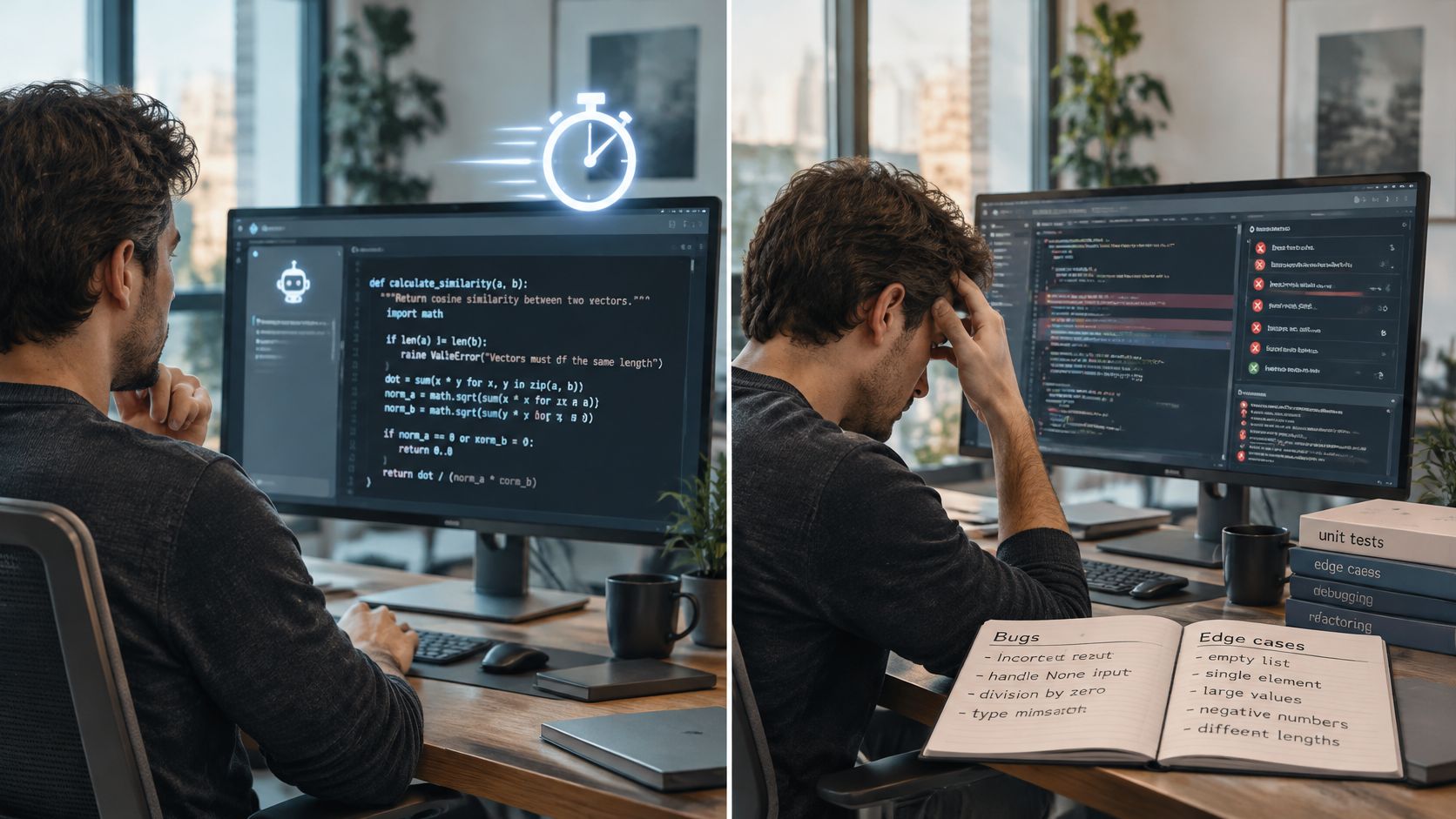
The perception gap is substantial: in a 2025 trial, experienced open-source developers predicted AI would make them 24% faster, believed afterward that they'd been about 20% faster, yet took 19% longer, according to Reuters' account of the METR experiment.
That's the central tension. You can feel productive while spending more time getting the work accepted.
Before comparing assistants, separate the questions that matter:
For developers exploring prompt-led implementation, MeshBase's guide to understanding vibe coding provides useful context. The practical distinction is whether you can explain and verify the resulting behavior, not merely request it.
Use the same distinction when applying these ways to code faster: remove unnecessary effort, not necessary checks.
Don't pay for speed twice, once at generation and again in rework.
Published results on AI coding assistants
These results measure different things: task duration, output volume, trust, and learning. None alone shows how long it takes to get a tested change accepted. Read each finding alongside its caveat rather than combining them into one productivity score.
The Copilot experiment asked participants to implement an HTTP server in JavaScript. Participants without the assistant could still use internet resources, so the comparison was not against developers working without documentation.
Among participants who completed the task, the assisted group finished much sooner. The study did not directly measure code quality, so it supports a claim about faster implementation in that exercise, not fewer defects or lower maintenance costs.
The field trials measured completed tasks across working developers. Less-experienced developers gained more, making routine implementation a reasonable starting point for an evaluation. The result does not establish that every developer or ticket benefits equally.
The experienced contributors in the METR trial worked on actual repository issues rather than a standalone implementation exercise. In a familiar codebase, a locally plausible patch can still conflict with architectural intent, compatibility requirements, or established patterns. Time saved on the first draft may disappear during verification and repair.
Trust is a separate measure. The Stack Overflow survey records developers' attitudes toward accuracy, not a measured defect rate. It helps explain adoption friction, but it cannot estimate how many generated functions will fail.
The coding-skills study points to a different trade-off: completing a task with assistance does not necessarily mean understanding the solution afterward. For learning tasks, requesting a complete solution can weaken the skill the exercise is meant to build.
Interpretation rule: Match each result to the activity measured. Faster task completion does not establish better security, maintainability, or debugging skill.
The practical conclusion is conditional. AI can speed up short, well-scoped implementation, while comprehension and production readiness still require independent checks. Measure the time to an accepted, tested change, not just the time to a first draft.
A fair evaluation needs a clock and a correctness check. Run real tickets against a frozen repository state, then grade the results with your existing test suite rather than the assistant's explanation of why its patch should work.
The benchmark analysis in SWE-bench+ reports production-derived solve rates ranging from 53.2% to 72.2% across four foundation models, with more frequent testing and static analysis associated with higher solve rates. A headline score doesn't tell you which tool will handle your repository's fixtures, dependencies, and failure modes.
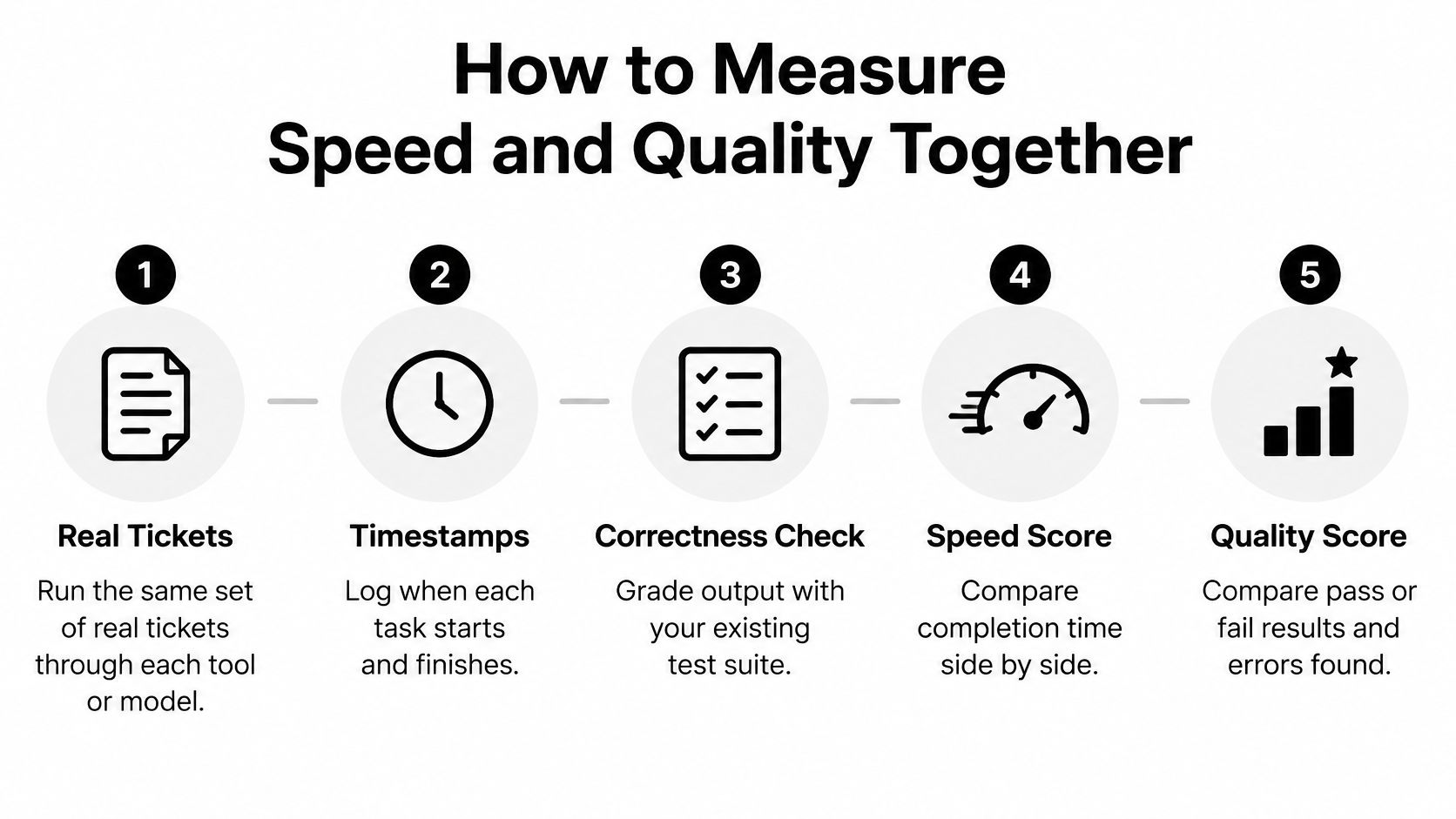
For a pilot, I'd choose 15 to 20 tickets spanning easy, medium, and hard work. That's a proposed evaluation size, not a research-backed minimum.
Avoid having the same developer solve an identical ticket repeatedly without accounting for learning. Rotate comparable tasks or counterbalance tool order. Otherwise, you may accidentally measure how well someone remembers the solution.
Metrics for measuring speed and quality together
Consider a pagination ticket. A suggestion can arrive immediately, pass the basic response test, and still mishandle the final page or an invalid cursor. Record when the developer identifies those cases and when the final patch satisfies them.
Also log review revisions and time spent understanding generated code. If a reviewer needs an extended explanation to approve a small helper, that's part of its cost.
Keep queue time separate from active engineering time so a delayed review doesn't get mistaken for a model failure. This distinction makes an engineering efficiency evaluation useful rather than merely decorative.
Report speed beside correctness every time. A fast failed task is still a failed task.
One model rarely deserves every job. Choose a tier according to the cost of a wrong answer and the difficulty of checking it, not the prestige of the model name.
A fast, smaller model is a reasonable starting point for boilerplate, test stubs, and bounded transformations. A stronger reasoning model deserves consideration when the task requires tracing behavior across files or evaluating competing explanations for a failure.
Which model tier to use for each task
The field evidence on larger gains among less-experienced developers makes routine implementation worth testing first. That's not permission to delegate unfamiliar behavior blindly. If you don't know the API, check its versioned documentation before accepting the generated call.
For renames, prefer your IDE's language-aware refactoring when it can perform the operation deterministically. An AI assistant is useful for explaining consequences, but there's no prize for replacing a reliable compiler-backed operation with a creative guess.
For risky changes, ask the stronger model to identify invariants before proposing code. A payment change should preserve idempotency; a migration should explain rollback and compatibility; an authentication change should make authorization boundaries explicit.
The smartest model is always the slowest one at 2 a.m., at least according to the person staring at the spinner. Set a latency budget before you're tired enough to confuse impatience with engineering judgment.
Use a task-based AI model comparison, then apply this selection routine:
Before adopting a default, check context handling, tool permissions, review requirements, and request cost. Switching models won't fix missing tests, and agreement between models isn't proof of correctness.
Say a feature lands in a million-line service. The assistant produces a tidy first draft in minutes, but the developer spends the afternoon checking conventions nobody documented: which errors get retried, where transactions begin, and why that oddly named adapter must remain.
The code can look clean while violating a local rule. The METR study of experienced open-source developers identifies inspection, correction, and integration as reasons assistance can add work. The mechanism matters more than how impressive the initial draft looks.
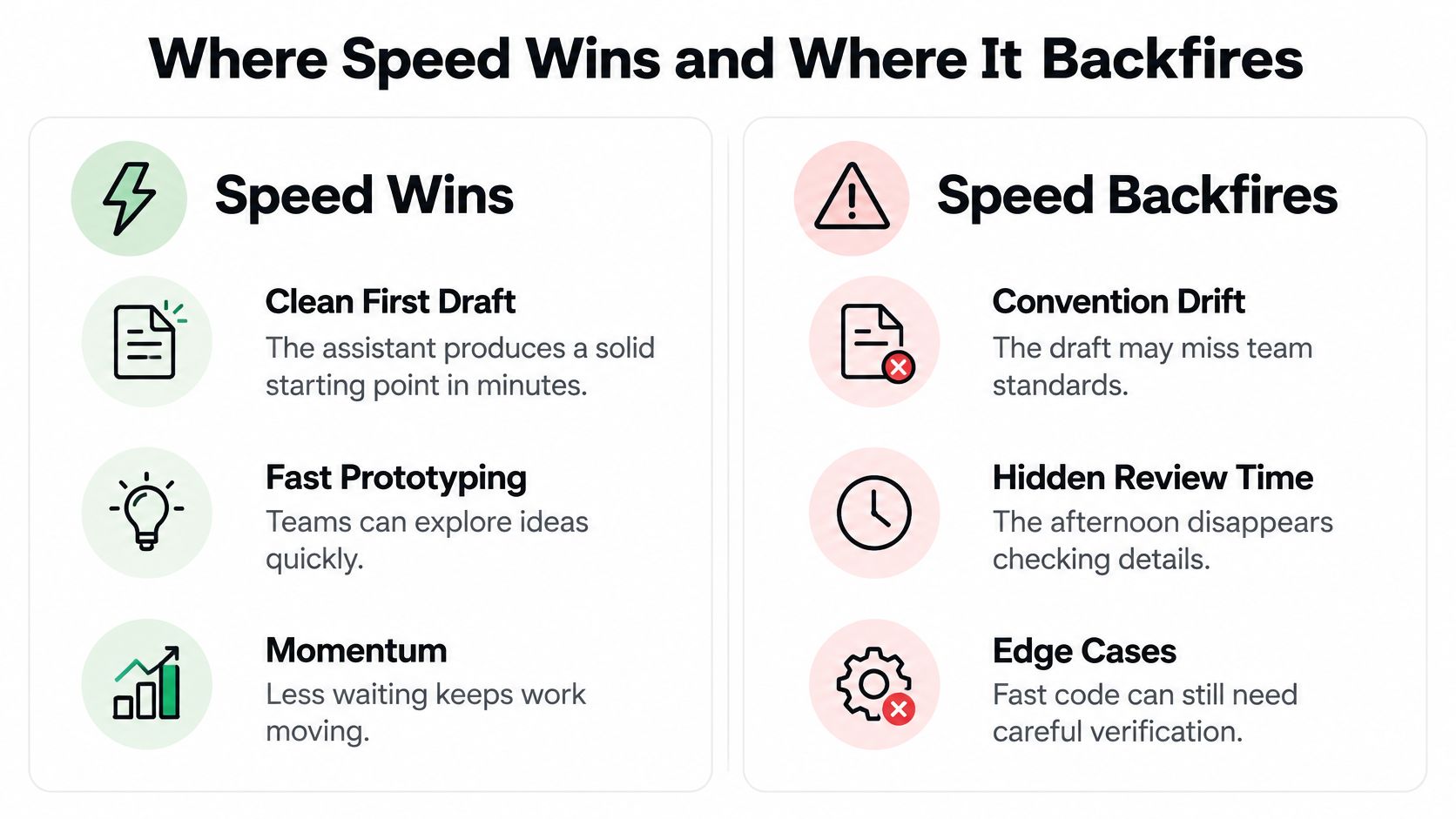
The strongest candidates have a visible boundary and a cheap way to reject bad output.
The benefit isn't merely fewer keystrokes. You can explore an idea without committing the team to its architecture. Keep the prototype disposable until somebody has evaluated that architecture.
The backfire cases have hidden constraints or expensive recovery.
For onboarding, ask the assistant to trace a request through existing files before requesting changes. Then verify that trace in the debugger. Learning the path gives you a better basis for rejecting a polished but incompatible implementation.
Go speed-first when the task is scoped, testable, and easy to revert. Increase scrutiny when it touches money, identity, or user data.
And inspect the supposedly harmless configuration edit. Nothing says “small change” quite like discovering it requires a migration.
Start with the symptom, not a larger prompt. When generated code fails, another page of instructions won't necessarily address the missing assumption, incomplete test, or misunderstood dependency.
A large-scale analysis of AI-generated code identified 484,606 issues across more than 6,000 real-world repositories, with code smells accounting for 89.1% of the issues. The evaluation also found no direct correlation between passing unit tests and overall code quality or security, so a green suite shouldn't end the review.
Quality symptoms, causes and fixes
Happy-path code: Ask for assumptions before implementation. For an upload endpoint, require cases for empty files, unsupported formats, interrupted requests, and authorization failure. Budget minutes for the initial checklist, then watch test pass rate and repair iterations.
Reviewer objections despite passing tests: Run your language's linter, type checker, dependency scanner, and security analysis. Inspect exception handling, logging of sensitive values, and unnecessary abstractions. Running existing checks may take minutes; introducing missing checks across a repository can require sprint-level work.
Convention drift: Supply a nearby implementation, the relevant interface, and the team's conventions. Ask the assistant to name which pattern it followed. Preparing a focused context packet is a minutes-scale task when documentation exists, and review revisions reveal whether it helped.
When behavior breaks later, write a regression test that reproduces the actual failure before asking for a repair. Check whether the assistant copied logic that should call an existing helper. A local regression test may fit into the current ticket; consolidating duplicated behavior may deserve a separate sprint item.
For a large, low-value diff, reject unrelated cleanup and request only the smallest behavior change. Review time and time to accepted change should improve if scope was the actual problem.
For a recurring bug, stop generating replacements. Ask for the failing execution path, inspect runtime values, and form a falsifiable hypothesis. Fix it manually when necessary, then compare repair iterations rather than counting how many suggestions you received.
These software testing best practices work best when tests challenge the implementation rather than repeat its assumptions. Don't let the assistant invent both the behavior and the definition of success.
Agree on the rules while everyone is calm, not while somebody is trying to merge before lunch. The default should make safe behavior easy and exceptions visible.
Choose a bounded ticket type, such as serializer changes or isolated validation helpers. Keep the acceptance criteria stable during the trial, and record failed attempts as carefully as successful merges.
Use your software development workflow to assign responsibility for collecting results and reviewing exceptions. At the end of the trial, keep the setting that reduces accepted-change time without increasing escaped defects or repair effort.
Nobody earns a medal for shipping the bug faster. Start the trial this week, then let the results determine your default inside Zemith.
Zemith brings multiple AI models, code generation, debugging, explanations, and live React and HTML previews into one workspace. Visit Zemith, bring a scoped ticket and its acceptance tests, and compare how quickly you reach a change you can confidently approve.
Pay less than one AI subscription and get GPT, Claude, Gemini and more, plus 50+ AI tools.


Trusted by teams at






The top models, plus image, video and voice tools, in one plan.
Without Zemith
ChatGPT PlusUS$20.00Claude ProUS$20.00Google AI ProUS$19.99SuperGrokUS$30.00Perplexity ProUS$20.00 MidjourneyUS$10.00
 ElevenLabsUS$6.00Le Chat ProUS$14.99
 RunwayUS$15.00Kling StandardUS$8.80
 Gamma PlusUS$12.00
 Otter ProUS$16.99
 QuillBot PremiumUS$19.95
 Photoroom ProUS$12.99
 Quizlet PlusUS$7.99
Total if paying separatelyUS$234.70/mo
"I love the way multiple tools they integrated in one platform. Going in the right direction."
— simplyzubair
"The quality of data and sheer speed of responses is outstanding. I use this app every day."
— barefootmedicine
"The credit system is fair, models are perfect, and the discord is very responsive. Quite awesome."
— MarianZ
"Just works. Simple to use and great for working with documents. Money well spent."
— yerch82
"The organization of features is better than all the other sites — even better than ChatGPT."
— sumore
"It lives up to the all-in-one claim. All the necessary functions with a well-designed, easy UI."
— AlphaLeaf
"The team clearly puts their heart and soul into this platform. Really solid extra functionality."
— SlothMachine
"Updates made almost daily, feedback is incredibly fast. Just look at the changelogs — consistency."
— reu0691
Hand off the research, writing, design and follow-ups. Zemith picks the tools it needs and brings back finished work.
Search the web, run deep research, read files, create images and run code with GPT, Claude, Gemini, Grok and more.
Zemith keeps working in the cloud and pings you when it's done.
Notion, Linear, Canva, Airtable and more. It asks before it creates or changes anything.
Docs, slides, sheets and PDFs, ready to send.
Chain models and tools on a visual canvas, from one prompt to a finished promo video.
Briefings, reports and reminders run on a schedule and are ready when you need them.
Real-time voice that can see your camera or screen.
The best image and video models, in one studio.
Turn PDFs, links and YouTube videos into podcasts, quizzes, flashcards and mind maps.














 Podcast
 Quiz
 Flashcards
 Mind map
 Infographic