


Every top model, with tools built in.
Search the web, run deep research, read files, create images and run code with GPT, Claude, Gemini, Grok and more.
Find the right AI image generator program for your workflow. Compare models, features, and tips for creating, editing, and disclosing AI-generated images.
You're halfway through a product brief, the deadline's close, and the image you need is somehow still a cat with the wrong number of paws. Seven browser tabs are open, each with a different AI image generator, login, pricing page, and interpretation of what “warm, natural lighting” means.
That's why people search for an AI image generator program rather than just an image generator. They're looking for more than a box to type a prompt into. They want a practical way to create, compare, revise, and manage images without turning every project into a small subscription-management exercise.
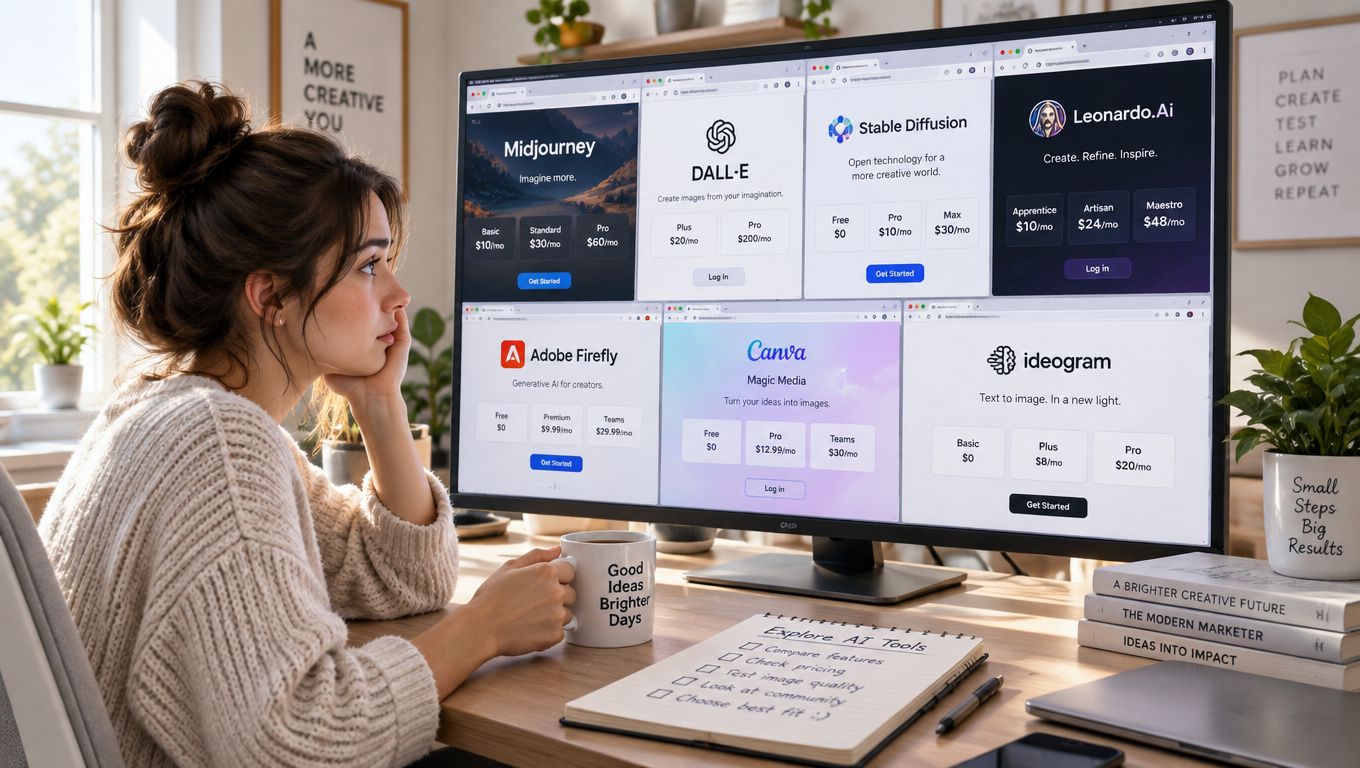
The term can refer to a standalone app, an integrated creative platform, or an API that developers connect to their own software. What matters is how well it fits the work: a marketer might need campaign variations, a teacher might want a clear classroom illustration, and a designer might need precise control over composition and editing.
The tools are capable, but they don't all work the same way. Before paying for another plan, it helps to understand what these programs do, how to judge their outputs, and what to check before sharing an image publicly. If your project involves planning a real outdoor space, a dedicated garden AI design tool can also offer a more focused starting point than a general-purpose image generator.
Most modern image generators don't pull a finished picture from a secret drawer. They build an image through a process called diffusion. Think of starting with a screen full of TV static, then gradually removing the noise until a recognizable image appears.
The model learns this denoising process during training, using relationships between images and their descriptions. When you write a prompt, the system uses those words to guide what should emerge. Ask for “a ginger cat curled on a blue velvet chair,” and the prompt conditions the generation toward a cat, a chair, and the details that distinguish the scene.
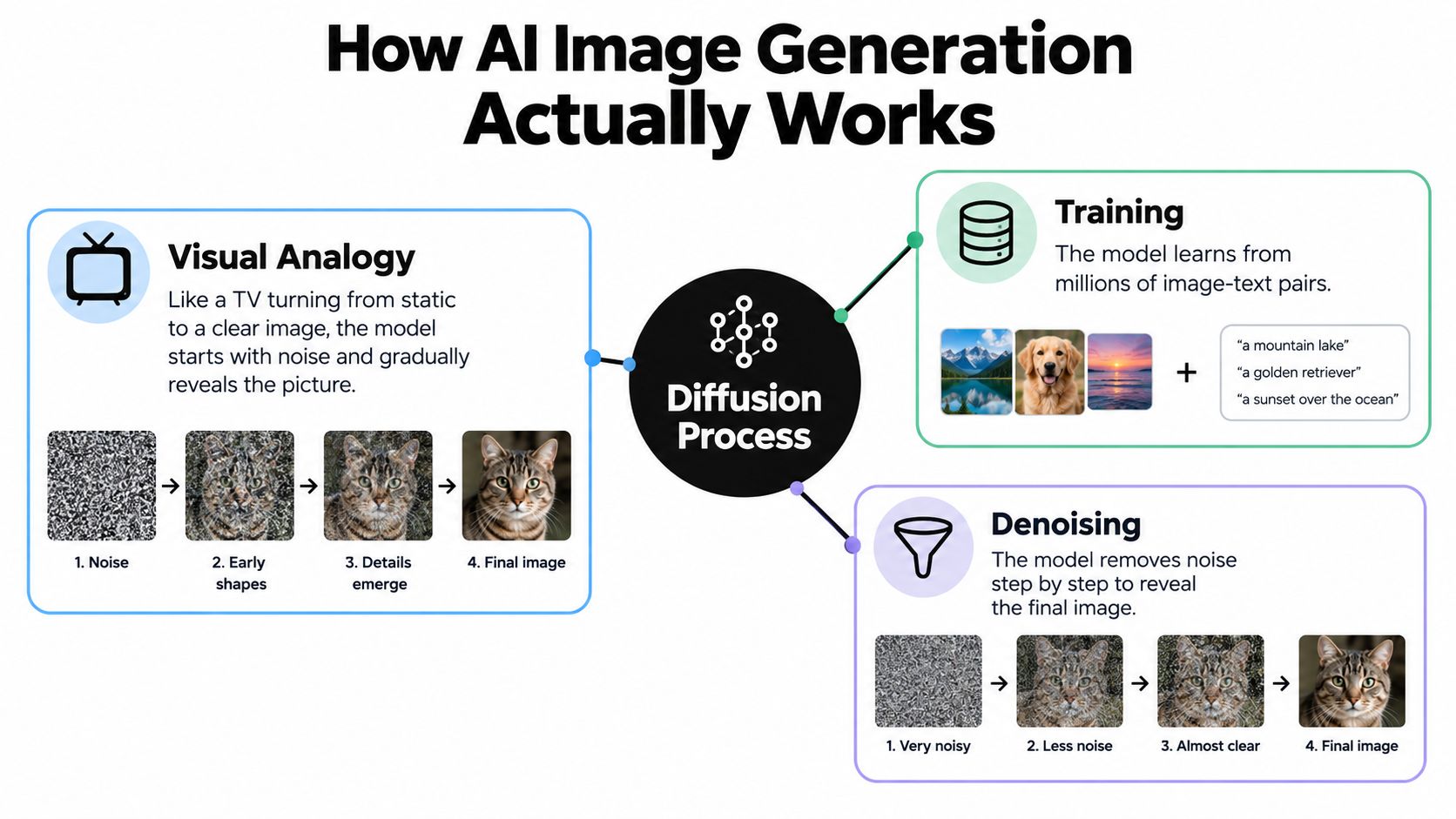
A denoising step is one pass in the gradual process of turning noise into an image. More steps can improve detail or make the result follow a prompt more closely, but they can also take more time and computing power. That's why an interface may offer speed or quality settings. A “step” isn't a creative revision; it's part of the model's image-making process.
Earlier image-generation systems often used generative adversarial networks, or GANs. One network produced images while another tried to detect whether they were real or generated, like a counterfeiter and a detective continually trying to outwit each other. GANs helped advance image synthesis, but training could be difficult, and some models struggled to produce enough variety.
Diffusion models later showed strong results on established image-synthesis benchmarks. In the 2021 paper “Diffusion Models Beat GANs on Image Synthesis”, researchers reported state-of-the-art results on LSUN and ImageNet 64×64. Those experiments used small images, not today's polished marketing visuals, but they helped establish diffusion as a foundation for many modern text-to-image systems.
You don't need to memorize the math to use a generator well. It's more useful to know that your prompt steers the result, denoising steps take time, and image quality can vary across models. For practical examples of how wording changes results, explore these AI image prompt examples.
Model names can sound like a row of sports cars: impressive badges, unclear differences, and one driver insisting theirs handles corners better. A more useful comparison starts with the work you need done. Some models lean toward artistic styling, others offer more control or photorealistic output, and no model consistently gets every detail right.
DALL-E, Midjourney, Stable Diffusion, Adobe Firefly, Imagen, and Flux are names users may encounter across image tools. Their availability and behavior depend on the product offering them, so treat broad descriptions as a starting point, not a guarantee that every version has the same features.
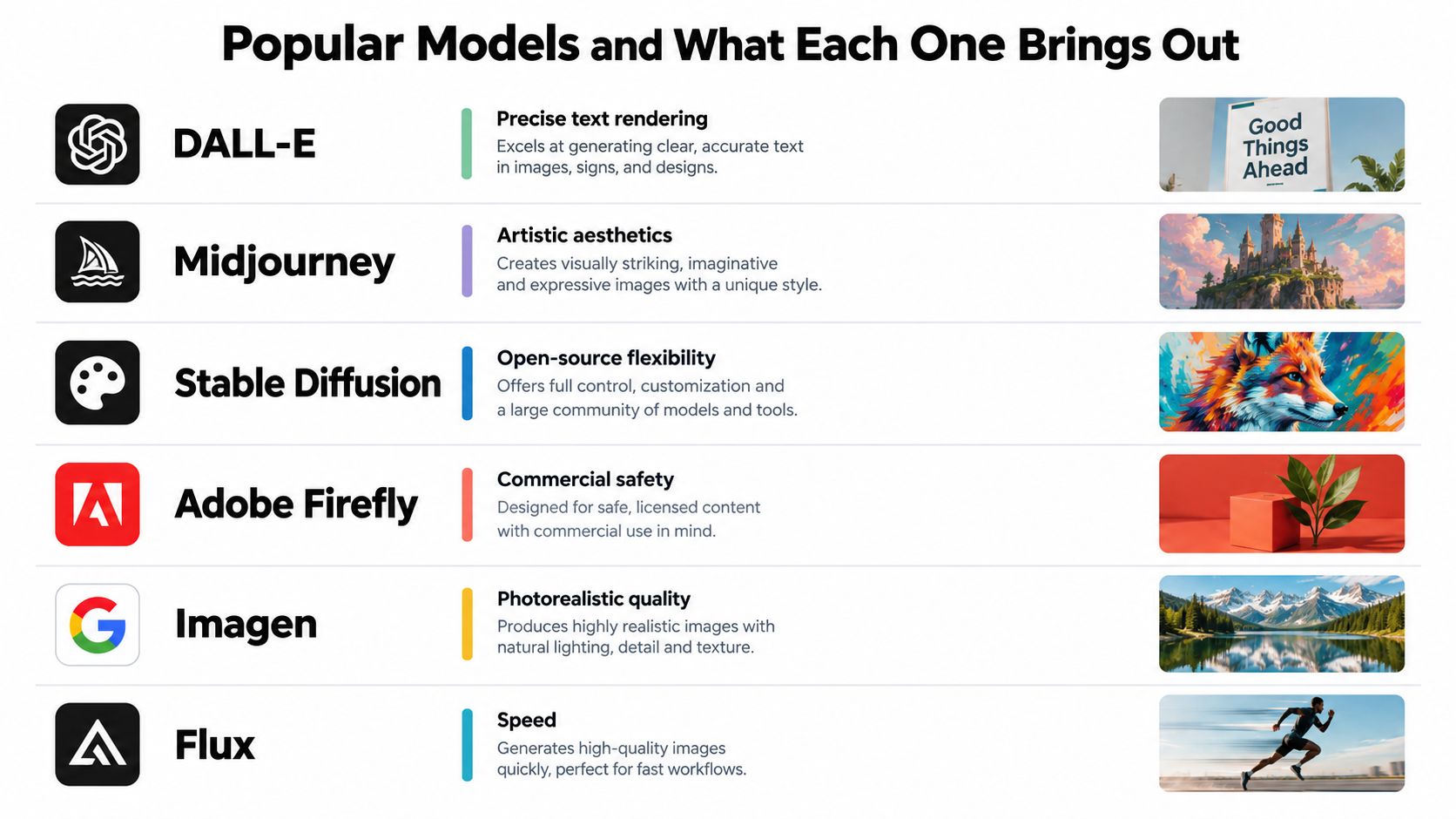
The table describes tendencies, not official promises. A model that looks excellent for a dramatic scene may be less reliable when you need exact packaging text or the same character across several images. Test the actual model in the tool you plan to use, with a prompt close to your real assignment.
Benchmarks can help compare systems, but they don't tell you whether an image is useful for your project. On MS-COCO, reported Fréchet Inception Distance scores were 7.27 for Imagen, 10.39 for DALL-E 2, 12.63 for Stable Diffusion, and 17.89 for DALL-E, with lower FID indicating greater similarity between generated and real-image distributions in that evaluation (benchmark discussion). The scores don't measure every quality a creator cares about, such as whether the image includes the right subject or fits a brand.
For a more detailed look at the available options and their differences, use this AI image generator model guide. Then test a small set of candidates against the same brief. The best choice is the one that produces usable work with an acceptable amount of correction, not the one with the flashiest model name.
A reliable workflow starts with the job the image needs to do, not with a prompt full of adjectives. Are you making a blog illustration, a product concept, a social post, or a moodboard for a client? That decision shapes the composition, style, and level of detail you need.
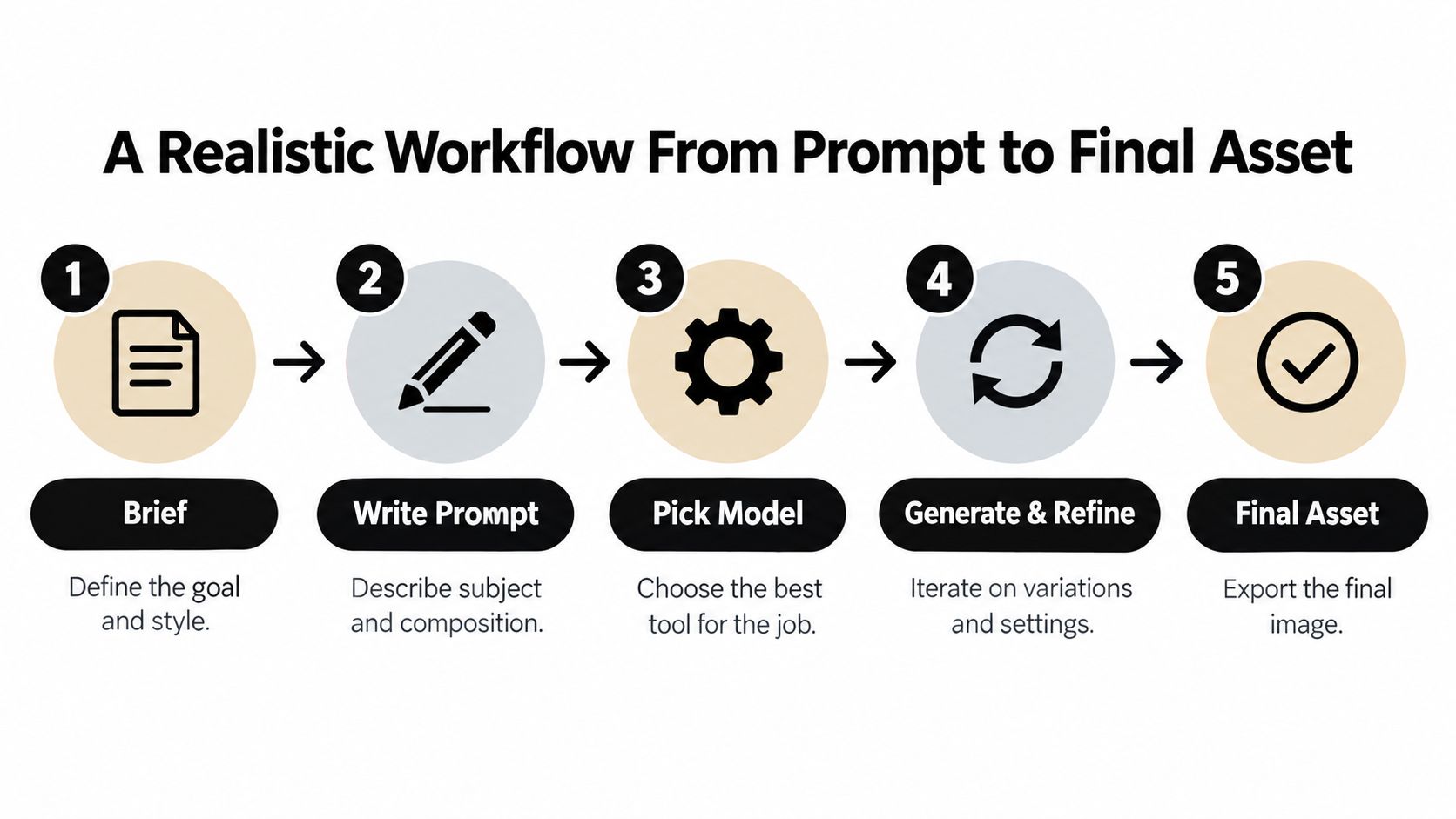
Start with a brief. Write down the subject, audience, intended use, and visual feel. “A spring campaign image for a neighborhood bakery” gives you more direction than “make something nice.”
Write a prompt that describes what viewers should see. Name the subject and setting, then add composition, lighting, and style. For example: “A loaf of sourdough on a wooden counter, morning window light, close editorial food photography, open space on the right for a headline.” If the tool accepts a reference image, use one only when you have the right to use it.
Choose a model and generate drafts. Try a modest batch of variations before spending time on high-quality renders. Review the results for composition and basic prompt fit, not tiny texture details.
Shortlist, then refine. Pick the strongest direction and make targeted changes, such as adjusting the background or adding space for text. Editing a promising image can be more efficient than starting over every time a detail is off.
Research on SnapFusion showed an 8-step diffusion model achieving better FID and CLIP results than Stable Diffusion v1.5 using 50 steps on MS-COCO, illustrating that fewer denoising steps don't automatically mean worse results (SnapFusion research). That's useful context when a program offers speed settings, but it doesn't mean every model or prompt will behave the same way.
Export and keep the context. Save the final image alongside its prompt, model, edits, and intended use. If your project is image-led, an AI fashion model generator is an example of a focused tool for building fashion visuals. For workflows that begin with an existing picture, this guide to generating an AI image from an image covers a useful variation on text-only prompting.
A better prompt can clarify what you want. It can't guarantee that a model will represent people fairly. Generators learn patterns from training material, and those patterns can carry assumptions about race, disability, age, gender, and body type into an image that looks polished at first glance.
A 2025 case study found that prompts describing an Asian woman who is blind were interpreted through stereotypes connecting disability with older age (case study on intersecting bias). The practical lesson isn't to avoid generating people. It's to inspect what the model adds when your prompt leaves room for assumptions.
Before publishing an image featuring people, use a quick review:
This is an image-quality check as much as an ethical one. A picture that misrepresents its subject can undermine the message even when the lighting is perfect. More accessible creative tools can help more people make images, but accessibility alone doesn't make the outputs inclusive.
When an image looks photographic, viewers may take it as a record of something that happened. Decide how to label it before publication, especially if it depicts people, products, a news-like scene, or a sensitive event.
A 2025 consumer test found that 57 percent of participants failed to identify AI-generated photos, while 84 percent considered disclosure important, and nearly 40 percent said undisclosed AI imagery would reduce their trust in a brand (consumer test findings). A label isn't a confession that the image is bad. It gives the audience context they may not be able to infer from the picture alone.
Copyright needs its own careful check. The U.S. Copyright Office's policy, effective March 16, 2023, distinguishes AI-generated material from human-authored contributions. In a February 2023 decision, the Office found that a graphic novel combining human-written text with Midjourney-generated images could be protected as a whole, while the individual generated images weren't protected on their own (U.S. Copyright Office guidance). For commercial or client work, keep records of meaningful human contributions such as editing, composition, arrangement, or accompanying text, and seek legal advice when the stakes warrant it.
C2PA Content Credentials can record an image's creation and editing history in a cryptographically bound manifest. The record can document tools and changes, but it doesn't prove that an image is truthful, legally owned, or untouched (C2PA Content Credentials explainer).
A workable routine is straightforward: label images when a reasonable audience could mistake them for documentary photography, retain the prompt and revision history, and preserve provenance information when your workflow supports it. For a broader system for keeping files and their context together, review these digital asset management best practices.
Separate image tools can be useful when one does a particular job especially well. But a scattered setup makes it easy to lose prompts, forget which model produced an image, and leave revisions in whichever tab you happened to use last. Subscription management is not a creative medium.
A shared workspace offers another way to work: test the same brief across models, compare outputs, and keep iterations attached to a project. That approach can help teams decide whether a particular model suits the assignment instead of committing every brief to the same generator.
For example, Zemith's Creative Studio brings image generation and editing options into a broader AI workspace. Its listed image models include Black Forest Labs Flux 1.1 Pro Ultra, Stability Diffusion 3.5, and Google Imagen 3. The platform also offers object and background removal or replacement, image upscaling, and image-prompt analysis. The available models and features can differ by product version, so check the current offering before choosing a workflow.
An integrated setup won't automatically produce better images, solve bias, or remove the need to disclose AI use. It can make comparisons and project organization less fragmented, which matters when prompts, edits, and provenance records are part of the deliverable. This overview of multi-model AI platforms can help you think through whether that kind of setup fits your work.
Compare tools by the usable image, not just the number of buttons on the screen. Ask whether the model suits your visual style, how easily you can revise outputs, whether you can organize prompts and files, and whether its disclosure and provenance support fits your publishing process. A single-purpose app may be enough for occasional images; a workspace can make more sense when projects move between models or collaborators.
Do AI image generators replace designers? No. They can help with drafts, concepts, and visual variations, but a person still needs to judge the brief, refine the result, and make sure it works in context.
How should I handle images of real people? Use images only when you have appropriate permission, review likeness and context carefully, and label generated or materially altered images when viewers could mistake them for documentary photos.
Should I worry about energy use? Model choice can affect resource use, especially for large batches. Start with draft settings, reject weak directions early, and reserve more compute for candidates worth refining.
How do I keep prompts organized? Save the prompt, model, revisions, and final export together with the project. That makes it easier to recreate a result or explain how it was made.
Zemith brings image generation, editing, and access to multiple models into one creative workspace, so you can compare outputs and keep project context close at hand. If you're ready to spend less time switching tabs and more time refining useful images, visit Zemith.







Trusted by teams at






The top models, plus image, video and voice tools, in one plan.
Without Zemith
ChatGPT PlusUS$20.00Claude ProUS$20.00Google AI ProUS$19.99SuperGrokUS$30.00Perplexity ProUS$20.00 MidjourneyUS$10.00
 ElevenLabsUS$6.00Le Chat ProUS$14.99
 RunwayUS$15.00Kling StandardUS$8.80
 Gamma PlusUS$12.00
 Otter ProUS$16.99
 QuillBot PremiumUS$19.95
 Photoroom ProUS$12.99
 Quizlet PlusUS$7.99
Total if paying separatelyUS$234.70/mo
"I love the way multiple tools they integrated in one platform. Going in the right direction."
— simplyzubair
"The quality of data and sheer speed of responses is outstanding. I use this app every day."
— barefootmedicine
"The credit system is fair, models are perfect, and the discord is very responsive. Quite awesome."
— MarianZ
"Just works. Simple to use and great for working with documents. Money well spent."
— yerch82
"The organization of features is better than all the other sites — even better than ChatGPT."
— sumore
"It lives up to the all-in-one claim. All the necessary functions with a well-designed, easy UI."
— AlphaLeaf
"The team clearly puts their heart and soul into this platform. Really solid extra functionality."
— SlothMachine
"Updates made almost daily, feedback is incredibly fast. Just look at the changelogs — consistency."
— reu0691
Hand off the research, writing, design and follow-ups. Zemith picks the tools it needs and brings back finished work.
Search the web, run deep research, read files, create images and run code with GPT, Claude, Gemini, Grok and more.
Zemith keeps working in the cloud and pings you when it's done.
Notion, Linear, Canva, Airtable and more. It asks before it creates or changes anything.
Docs, slides, sheets and PDFs, ready to send.
Chain models and tools on a visual canvas, from one prompt to a finished promo video.
Briefings, reports and reminders run on a schedule and are ready when you need them.
Real-time voice that can see your camera or screen.
The best image and video models, in one studio.
Turn PDFs, links and YouTube videos into podcasts, quizzes, flashcards and mind maps.














 Podcast
 Quiz
Quiz Flashcards
 Mind map
 Infographic