


Every top model, with tools built in.
Search the web, run deep research, read files, create images and run code with GPT, Claude, Gemini, Grok and more.
Discover how AI powered creative tools reshape design, writing, and content workflows in 2026. A practical guide with examples, tips, and workflow ideas.
At 9 a.m., a freelance designer opens a laptop, takes one sip of coffee, and starts hunting for a social post that should've taken twenty minutes. One tab holds Midjourney, another has ChatGPT, Notion is buried underneath a stock-photo library, and the design file keeps producing slightly different versions of the same logo. By lunchtime, the designer has made plenty of things, but still hasn't made the right thing.
That's the awkward middle of AI powered creative tools in 2026. These systems can generate, edit, summarize, resize, research, and automate at remarkable speed, but speed alone doesn't produce good creative work. The useful question isn't “Which tool has the most features?” It's “Where does this tool belong in my process, and how do I keep its output accurate, distinctive, and legally usable?”
A product launch can begin with one brief and quickly become a pile of deliverables: a landing page, social variations, email copy, product visuals, video snippets, captions, and internal notes. While the brief is still changing, the team is already expected to produce, revise, and publish across every channel.
That workload has changed the role of creative software. OpenAI's introduction of DALL-E in January 2021 helped text-to-image generation become a mainstream product category, according to this history of generative AI. Since then, AI creative software has grown into a substantial commercial market. One industry forecast estimates growth from $2.3 billion in 2023 to $11.8 billion by 2030, representing a 26.1% CAGR (World Metrics).
The practical shift is simple: producing a first draft takes less time, so deciding what deserves refinement takes more of the team's attention.
Practical rule: Let AI handle repeatable production work, but keep humans responsible for the brief, judgment, and final approval.
For a small marketing team, a writing model might propose subject-line directions, an image model might explore visual concepts, and a research assistant might organize source material. Those outputs are useful starting points, like rough sketches spread across a desk. Someone still has to choose the direction, check the facts, protect the brand's voice, and decide whether the finished work says something specific.
Adobe's 2025 Creators' Toolkit report found that 86% of creators actively use generative AI, while 76% say it has helped grow their business or personal brand (Adobe's creator survey). The adoption story points to a working reality rather than a passing experiment. AI now sits beside the brief, the asset library, and the review process.
The desk-level problem is the clutter. More tools can mean more tabs, duplicated subscriptions, scattered prompts, and a file named final_final_really-final.png. A useful setup should reduce that mess instead of automating it faster. A practical AI tools list can help map the options, but the harder decision is choosing a small stack that fits the team's existing habits and leaves room for human judgment.
Think of an AI creative tool as a very fast, very literal junior assistant. It can produce a first pass, transform an existing asset, spot patterns, or suggest alternatives. It can also misunderstand a simple instruction with impressive confidence, especially when the brief depends on context, taste, or an unstated brand rule.
The category includes software that uses machine learning models to generate, transform, or analyze creative outputs. Those outputs can include images, writing, audio, video, code, layouts, summaries, and research notes. The easiest way to understand the tools is to separate what they do into two broad groups.
Generative models create new material. You provide a prompt, reference, outline, or rough direction, and the system produces something that wasn't sitting in your project folder before. Image generators, text generators, music systems, and video generators belong here.
Assistive models improve or interpret existing material. They can clean up a transcript, summarize a document, remove an object from an image, critique a draft, rewrite a paragraph, or explain code. They don't always create the central asset. Often, they reduce the small bits of friction that interrupt creative concentration.
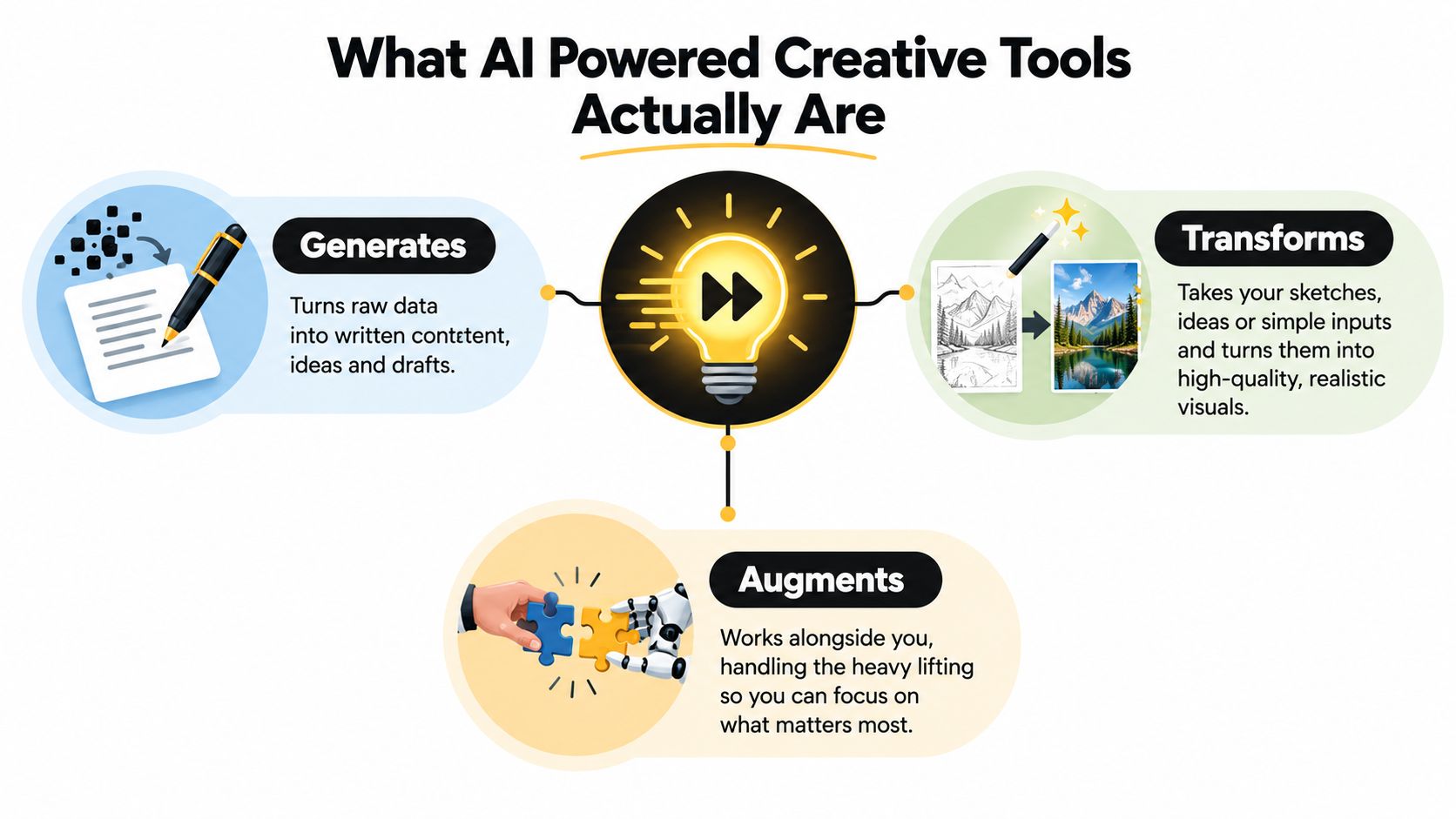
Many image generators use diffusion models. In plain language, the system learns visual patterns by working with images and noise. When you type a prompt, it starts with a noisy field and gradually removes noise until an image emerges that matches the learned relationships between words, shapes, colors, and visual styles.
Transformer-based generators work differently but follow a similarly practical idea. They predict what should come next, whether that's a word in a sentence, a frame in a sequence, a code token, or another element in a structured output. They don't understand art as a person does. They recognize statistical patterns at enormous scale and use those patterns to produce a plausible response.
That distinction matters because “plausible” isn't the same as “true,” “original,” or “on brand.” If you're learning how to give clearer instructions, this guide to what prompt engineering is is a useful companion. You can also explore Sprello AI creative workflow tools for a broader look at how generation and workflow support can fit together.
Most AI powered creative tools fall into a handful of practical capability groups. You don't need to master every platform. You need to recognize the job in front of you and call on the right kind of assistance.
Image generation and editing can turn a description into a visual, restyle an existing image, remove an object, replace a background, or fill a missing area. It's strong at rapid concept exploration and repetitive variations, but it can stumble on hands, text inside images, persistent identity, and precise brand details. A product team might use it to explore a campaign moodboard before commissioning final photography. For image-specific workflows, this guide to an AI image generator and editor offers a useful starting point.
Writing assistance handles drafting, rewriting, summarizing, outlining, and tone changes. It's useful when a blank page is blocking progress, yet it can flatten a distinctive voice or make confident factual errors. A content editor might use it to turn interview notes into several possible article structures, then rebuild the strongest version with human judgment.
Research and synthesis helps organize large amounts of reading, extract themes, and surface connections across documents. It can save time during discovery, but it may miss context, confuse sources, or present an incomplete interpretation. A strategist could use it to cluster competitor messaging before checking every important claim against the original material.
Audio and video tools can clean transcripts, remove silence, generate captions, create short clips, and support voice workflows. They're convenient for repurposing a long recording, though pronunciation, emotional timing, consent, and identity-related risks require care. A podcast producer might start with an automatic transcript, mark strong sections, and then make the editorial decisions manually.
Code and automation assistants generate boilerplate, explain unfamiliar libraries, create small scripts, and connect services through APIs. They're helpful for prototypes and repetitive tasks, but they can introduce security issues, outdated methods, or code that works only in the narrow example provided. A developer might use one to scaffold a React component, then test and review every line before merging it.
Specialized use cases can make the difference between a fun demo and a useful production aid. For example, an AI fashion studio shows how visual generation can support a focused industry workflow rather than trying to serve every creative task at once.
The best way to understand these tools is to follow the trigger moment. Nobody wakes up thinking, “Today I'll use a transformer model.” They think, “I'm stuck on this opening,” or “I need six background options before the client call.”
A freelance writer hits a dead end in the first paragraph of an article. A writing assistant produces several openings with different levels of energy, while a research tool organizes primary sources into a short evidence brief. The useful output isn't the untouched draft. It's a clearer direction saved alongside the article notes.
A product designer has a rough visual concept but needs to explore it quickly. An image generator creates logo and composition directions, then an editing tool removes backgrounds, replaces objects, and prepares variations for different channels. The project folder receives a selected concept board, not every strange result the model produced while trying to draw a sneaker with twelve laces.
A junior developer gets asked to work with an unfamiliar library. A coding assistant scaffolds a React component, then a chat model explains the library's terminology and likely integration points. The saved output includes the component, a short explanation, and the developer's test notes.
A marketer might generate blog outlines, email subject lines, and ad variations, then compare tone and length before choosing a direction. A graduate student can turn dense PDFs into flashcards and practice questions, while a research analyst can feed a dataset into a model to surface possible patterns and draft a report structure.
The important habit is to name the tangible output before opening the tool. “I need a campaign brief” is a workable request. “I should play with AI” usually ends with twenty tabs and no campaign brief. For creators who want practical ideas for applying these systems, this guide to AI tools for content creators keeps the focus on actual deliverables.
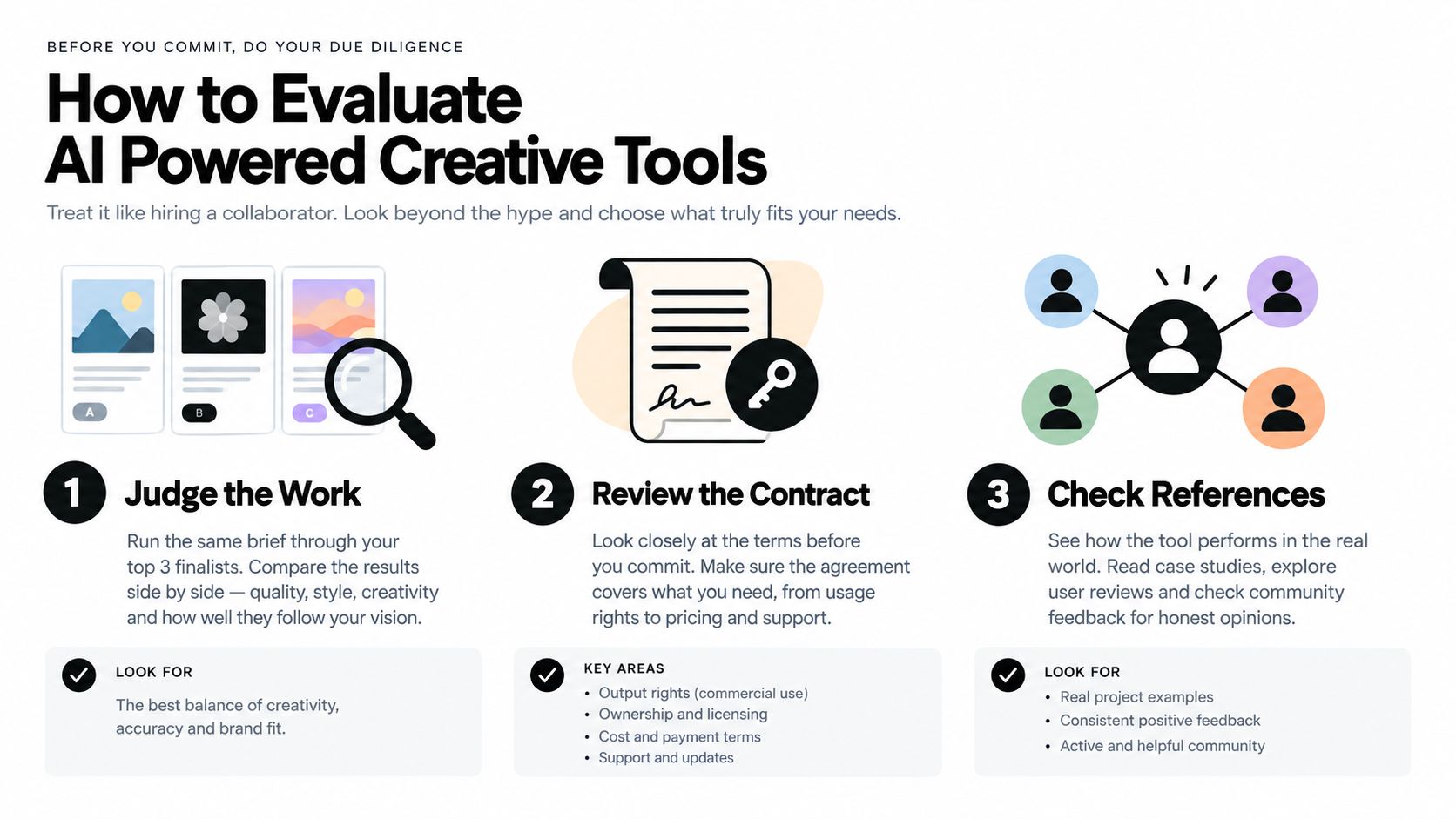
Treat tool selection like hiring a collaborator. First, judge the work. Then read the contract. A polished interface can be charming, but it won't rescue a tool that produces weak output, hides its data practices, or makes commercial use unclear.
Choose one realistic brief from your own workflow and run it through three finalists. Keep the prompt, reference materials, desired format, and review standard consistent. Compare the results side by side for coherence, originality, instruction-following, and the amount of editing needed before delivery.
Test control deliberately. Ask each model for the same tone, structure, style, and length, then introduce a small revision. Does it preserve the important constraints, or does it wander off like a dog that has spotted a squirrel? A tool that produces a beautiful first result but ignores revisions may cost more time than it saves.
Check reliability under normal working conditions, including busy periods and larger batches. A creative tool should fit your deadline, not turn every export into a small emotional journey.
A useful test: The strongest tool is often the one that needs the fewest corrections, not the one that creates the flashiest first draft.
Transparency deserves its own review. Look for the underlying model, a meaningful summary of training-data practices, data-retention controls, and clear information about whether your inputs may be used for improvement. Adobe's 2025 creator survey identified high cost at 38%, unreliable output quality at 34%, and uncertainty about how models were trained at 28% as barriers for creators (Adobe's creator survey).
Read licensing terms for commercial use, derivative works, attribution, client work, and ownership of uploaded assets. The U.S. Copyright Office says an AI output may receive copyright protection when a human has selected or arranged enough expressive elements, but entering a prompt alone isn't enough (U.S. Copyright Office summary). The European Parliament's 2025 study takes a similar practical position for the EU, stating that purely AI-generated outputs without meaningful human creative input don't meet the originality threshold and can fall into the public domain (European Parliament study).
Finally, calculate the total cost. Include per-seat fees, usage caps, overages, export restrictions, prompt-rewriting time, and the labor needed to review results. Then check integrations, native exports, plugins, file formats, project boards, and asset libraries. A tool that works beautifully in isolation may be a poor teammate inside your existing process.
A workflow survives when it follows the shape of your work instead of forcing you to think like an app. Keep five familiar phases in view: research, ideation, drafting, editing, and publishing.
During research, use AI to summarize long reads, cluster competitor pages, identify possible evidence, and flag statistics worth verifying. Keep the original sources attached to your notes. The model can point toward a useful thread, but you still need to check the thread before quoting it.
During ideation, ask for several angles quickly, then pressure-test the strongest options against your audience, channel, and available assets. Quantity helps at the beginning, but selection is the creative act. Don't ask the model to choose just because choosing is uncomfortable.
During drafting, provide the structure and voice rules, then let the model create a rough pass. Add the point of view, anecdotes, examples, and specific judgments yourself. Those details turn generic competence into work people can recognize.
Editing belongs primarily to human judgment. Check claims, tighten logic, adjust rhythm, remove repetition, and make sure the piece sounds like the brand rather than a polite robot who has just discovered semicolons. AI can catch grammar slips, suggest headlines, generate alternate cuts, and identify awkward transitions, but it shouldn't approve its own work.
Publishing is where automation can earn its keep. Resize images, generate alt text, format metadata, convert files, and prepare channel-specific versions. Keep a simple asset log containing prompts, source files, model outputs, revisions, and final approvals.
A weekly review keeps the stack healthy. Retire tools that duplicate another subscription, create more cleanup than value, or don't connect to the files your team already uses. This practical guide to content creation workflow can help you turn scattered experiments into a repeatable system.
A short visual walkthrough can also help teams discuss the process together:
After evaluating individual tools, many creators discover a less glamorous problem: the stack itself has become the bottleneck. One app handles images, another handles writing, a third stores research, and a fourth helps with code. Every switch carries context, files, settings, and version history with it.
Subscription fatigue is only part of the issue. Separate tools can create overlapping capabilities, incompatible exports, scattered asset libraries, and uncertainty about which draft is current. You may save money on one specialist platform and lose that saving while rebuilding context in another. The work doesn't stop when the model finishes. It continues through downloading, renaming, uploading, formatting, and explaining what happened to the next person.
Consolidation makes sense when related tasks naturally happen together. A creator might research a topic, draft a blog post, create a hero image, analyze a reference visual, and prepare supporting assets during one session. Keeping those materials close together makes it easier to preserve context and compare decisions.
Zemith brings document assistance, writing support, image generation and editing, coding assistance, research features, organized projects, shared asset libraries, and multiple model options into one workspace. Its creative functions include image generation, object and background removal or replacement, generative fill, and image-to-prompt analysis. The platform also supports document summaries, quizzes, flashcards, code explanations, live previews, web research, and formats such as document-to-Markdown and YouTube-to-blog conversion.
That doesn't mean one workspace removes the need for specialist software. A professional editor may still need a dedicated video timeline, and a designer may still finish a campaign in a specialized layout application. The point is to keep the surrounding research, exploration, drafting, and asset preparation from becoming a relay race between browser tabs.
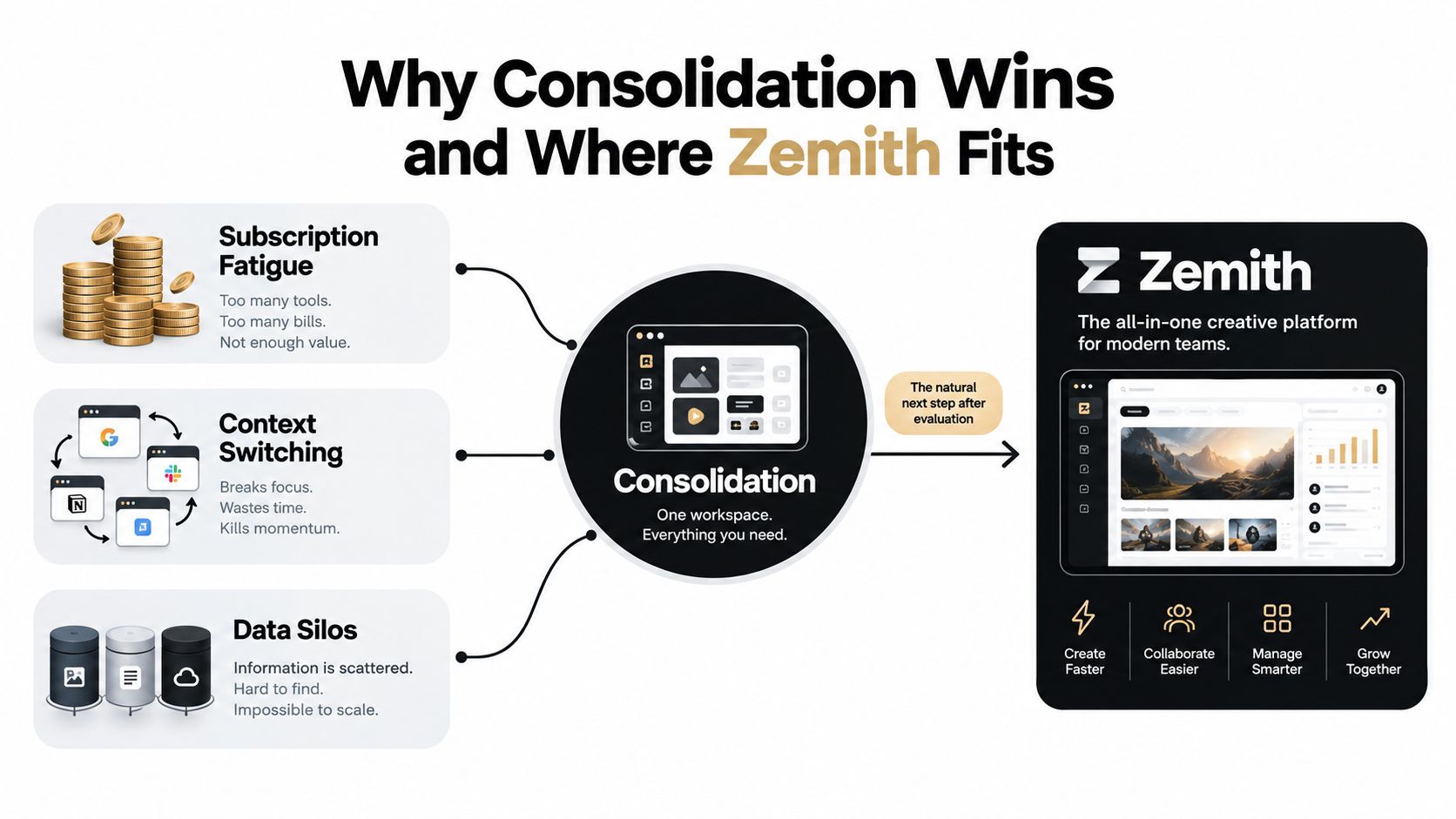
If your current AI setup feels like a drawer full of chargers, try Zemith as a consolidated creative workspace for research, writing, visual production, and coding support. Visit Zemith to explore a calmer way to move from a rough idea to a reviewed, usable deliverable.
Pay less than one AI subscription and get GPT, Claude, Gemini and more, plus 50+ AI tools.







Trusted by teams at






The top models, plus image, video and voice tools, in one plan.
Without Zemith
ChatGPT PlusUS$20.00Claude ProUS$20.00Google AI ProUS$19.99SuperGrokUS$30.00Perplexity ProUS$20.00 MidjourneyUS$10.00
 ElevenLabsUS$6.00Le Chat ProUS$14.99
 RunwayUS$15.00Kling StandardUS$8.80
 Gamma PlusUS$12.00
 Otter ProUS$16.99
 QuillBot PremiumUS$19.95
 Photoroom ProUS$12.99
 Quizlet PlusUS$7.99
Total if paying separatelyUS$234.70/mo
"I love the way multiple tools they integrated in one platform. Going in the right direction."
— simplyzubair
"The quality of data and sheer speed of responses is outstanding. I use this app every day."
— barefootmedicine
"The credit system is fair, models are perfect, and the discord is very responsive. Quite awesome."
— MarianZ
"Just works. Simple to use and great for working with documents. Money well spent."
— yerch82
"The organization of features is better than all the other sites — even better than ChatGPT."
— sumore
"It lives up to the all-in-one claim. All the necessary functions with a well-designed, easy UI."
— AlphaLeaf
"The team clearly puts their heart and soul into this platform. Really solid extra functionality."
— SlothMachine
"Updates made almost daily, feedback is incredibly fast. Just look at the changelogs — consistency."
— reu0691
Hand off the research, writing, design and follow-ups. Zemith picks the tools it needs and brings back finished work.
Search the web, run deep research, read files, create images and run code with GPT, Claude, Gemini, Grok and more.
Zemith keeps working in the cloud and pings you when it's done.
Notion, Linear, Canva, Airtable and more. It asks before it creates or changes anything.
Docs, slides, sheets and PDFs, ready to send.
Chain models and tools on a visual canvas, from one prompt to a finished promo video.
Briefings, reports and reminders run on a schedule and are ready when you need them.
Real-time voice that can see your camera or screen.
The best image and video models, in one studio.
Turn PDFs, links and YouTube videos into podcasts, quizzes, flashcards and mind maps.














 Podcast
 Quiz
Quiz Flashcards
 Mind map
 Infographic