


Every top model, with tools built in.
Search the web, run deep research, read files, create images and run code with GPT, Claude, Gemini, Grok and more.
Learn what a coding assistant AI really does, where it saves time, where it slows you down, and how to review its code safely in 2026.
You've got a ticket open, three tabs of documentation, and a function someone wrote two years ago that works for reasons nobody can explain. You paste it into a coding assistant AI, ask for a fix, get back something clean and confident, and then spend forty minutes figuring out why it broke something else. Sound familiar? That loop, not the typing, is where your day goes. Used as a drafting and checking partner, an assistant can save you real time. Used as an autopilot, it'll happily generate a very elegant bug and a commit message to match.
A coding assistant AI reads your prompt plus whatever code you show it, then returns code, an explanation, a fix, or a preview. Think of it as a fast pair programmer who's read a mountain of documentation but has never sat through your standup, so it doesn't know why your team avoids that one library.
Say you need a date formatter. You describe the inputs and edge cases, it drafts the function, and you check it against your tests before it touches the repo. That's the pattern for every feature below. It's also now the normal way people work, since Stack Overflow's 2025 Developer Survey found that 84% of respondents were using or planning to use AI tools in their development process, while 51% of professional developers reported using AI tools daily.
Don't try all five this week. I would pick the one feature that matches your current bottleneck, maybe explanations if you're onboarding onto a messy codebase, and test only that for a week. You'll learn what good input looks like much faster than if you bounce between tricks.
The clearest wins are boring, and that's good news. Boilerplate, documentation, autocompletion, unit test scaffolding and first-pass debugging are repetitive, well patterned, and easy to verify. You're not asking the model to invent your architecture. You're asking it to do the typing you'd otherwise do while muttering at your screen.
A 2024 real-world evaluation of GitHub Copilot across 15 software-development tasks found that the assistant saved up to 50% of time on code documentation and autocompletion, while repetitive coding, unit-test generation, debugging, and pair programming showed 30% to 40% time savings. Those are task level numbers, and they make sense. Writing a docstring for a function you already understand is mostly transcription.
Now the reality check. Bain's 2024 report on generative AI in software development put average efficiency improvements at approximately 10% to 15% across total engineering time for organizations using these tools. The gap between the two figures is the whole story. Individual tasks speed up a lot, but your job also includes design, review, meetings, integration, and waiting on CI, and those parts barely move.
Junior developers often gain the most, because the assistant fills syntax and API gaps that would otherwise cost an afternoon of searching. If you're senior, your gain is more about skipping grunt work. Either way, if your debugging process is shaky you'll spend the savings right back, so it's worth tightening up how you debug code step by step before you generate more of it.
Good first tasks to try this week:
Here's the result that should make every team a little nervous. A randomized METR study of experienced open-source developers found that early-2025 AI tools slowed developers by 19% rather than accelerating them. The study involved 16 developers working on repositories averaging more than 22,000 stars and 1 million lines of code, with 246 real issues randomized between AI allowed and AI prohibited. Developers initially expected a 24% speed improvement, and participants still believed they had been faster after experiencing the slowdown.
Feeling fast and being fast are two different things.
The mechanism isn't mysterious. The assistant cuts typing and searching, then hands you a bill for review, correction, context switching and integration. In a mature codebase that bill is large, because you have to preserve implicit conventions the model can't see and validate changes across files it never read. It's like a GPS that keeps rerouting you down side streets. The drive feels busy and clever, and you still arrive late.
So stop measuring lines generated. That's a vanity metric with a nice dashboard. Measure these instead:
A sensible split helps too. Use the assistant freely for bounded work like test scaffolding, API adaptation and localized refactors. Slow down and review harder for architecture changes and unfamiliar legacy code. If your team doesn't have that split written down, building it into your software development workflow is worth an hour. A tool that helps you verify code will beat a tool that just produces more of it, every time.
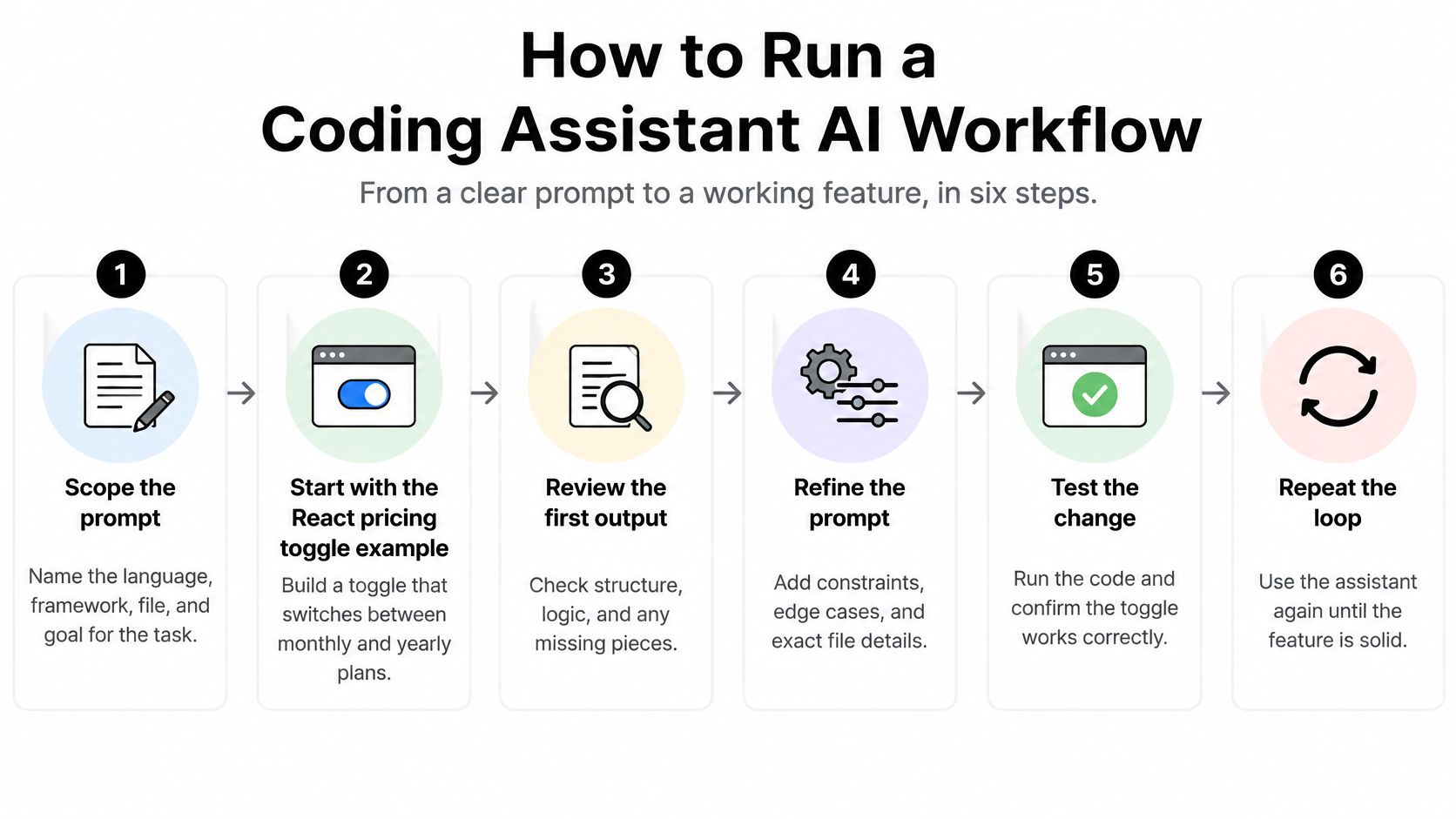
Let's run one small, real task through the loop: a React pricing toggle that switches between monthly and yearly plans. It's small enough to finish, and big enough to go wrong in interesting ways.
The diagram below shows the loop at a glance before we walk through it.
This video walks through a similar generate, preview and refine loop so you can see the rhythm before trying it.
Verification belongs inside the workflow, not after it. In the 2025 Stack Overflow survey, only 29% of respondents said they trusted AI outputs to be accurate, down from 40% in 2024, and experienced developers were particularly cautious, with only 2.6% highly trusting AI output and 20% highly distrusting it. Those developers aren't being stubborn. They're pricing in exactly the review cost this loop is built to control.
Passing tests and being safe are different claims, and generated code routinely proves it. A review of generated-code security research reports that approximately 27.3% of analyzed generated-code samples contained security weaknesses spanning 43 CWE categories. Benchmarks like HumanEval mainly check whether isolated functions pass predefined tests, so narrow unit tests can miss unsafe input handling, injection, weak randomness, insecure deserialization and authorization flaws that only show up under hostile inputs.
Polishing code with repeated prompts can make it worse, not better. A 2025 controlled experiment covering 400 code samples and 40 rounds of improvements reported a 37.6% increase in critical vulnerabilities after only five iterations. Treat every revision as a brand new change that needs the full check again, because the model will happily swap a safe pattern for a shorter unsafe one while sounding completely confident.
Run dependency scanning whenever the assistant suggests a package, since it will cheerfully recommend an outdated or abandoned one. Secret detection belongs in a pre-commit hook, not in your memory. Static analysis on every pull request catches the injection and input handling patterns that unit tests walk straight past, and adversarial tests are where you feed the code the malformed inputs a real attacker would try. A solid code review checklist for catching these issues before merge keeps the human gate consistent instead of mood dependent.
Track CWE findings per accepted change and how fast your team fixes what scans surface. A rising pass rate on its own can hide a growing pile of vulnerable code. Two last checks before shipping: confirm your team's policy on sending proprietary code to hosted models, and check the license terms of any generated snippet you keep. Neither takes long. Both are much cheaper now than later.
An assistant doesn't replace your other tools. It sits in a different slot, and confusing the slots is how bad code ships with great confidence. Autocomplete finishes the line you're typing. Docs explain what the library does. Linters and test runners give you an objective pass or fail. The assistant drafts and explains, fast and sometimes wrong.
That last point is worth sitting with. The assistant is the only tool in the table that produces new code and new risk at the same time, which is why your verification tools matter more once you adopt it, not less. It also helps to keep your changes small and reversible, and decent version control best practices turn a bad generation into a quick revert instead of an archaeology project. Generate with the assistant, decide with the boring tools. Boring is a compliment in this context.
Don't decide based on vibes, yours or the model's. Run a one-week trial with two real tasks from your backlog: one bug fix and one small feature. Time both the honest way first, from picking up the ticket to an accepted change, and write the numbers down before you touch the assistant. Memory is a generous liar here.
Then run comparable tasks through the full loop: scoped prompt, repository context, explanation, preview or test run, diff review and the security checklist. Log the assisted time and, just as important, the review effort. If the assistant saved twenty minutes of typing and cost thirty minutes of checking, you have your answer for that task type.

If tool switching is eating your savings, consolidating helps. Zemith brings together more than 20 AI models in one app, and you can switch AI models at any time, even in the middle of a chat, which is handy when one model struggles with your stack. It also includes tools such as web search, deep research, chat with files, code sandbox, live voice, memory, image generation, video generation, workflow editor, scheduled tasks, image to prompt, remove background, image upscaler, generative fill and replace objects, plus live previews for React components and HTML with detailed code explanations. Run your same two tasks there and compare the numbers against your baseline. Keep what the log supports, drop what it doesn't, and you'll have a setup based on evidence instead of a demo.
Ready to test whether an assistant speeds you up? Run your bug fix and small feature in Zemith, where code generation, explanations and live previews for React and HTML sit in one workspace, so you can measure time to an accepted change without juggling separate tools. Bring your baseline numbers, run the trial, and let the log make the decision.
Pay less than one AI subscription and get GPT, Claude, Gemini and more, plus 50+ AI tools.


Trusted by teams at






The top models, plus image, video and voice tools, in one plan.
Without Zemith
ChatGPT PlusUS$20.00Claude ProUS$20.00Google AI ProUS$19.99SuperGrokUS$30.00Perplexity ProUS$20.00 MidjourneyUS$10.00
 ElevenLabsUS$6.00Le Chat ProUS$14.99
 RunwayUS$15.00Kling StandardUS$8.80
 Gamma PlusUS$12.00
 Otter ProUS$16.99
 QuillBot PremiumUS$19.95
 Photoroom ProUS$12.99
 Quizlet PlusUS$7.99
Total if paying separatelyUS$234.70/mo
"I love the way multiple tools they integrated in one platform. Going in the right direction."
— simplyzubair
"The quality of data and sheer speed of responses is outstanding. I use this app every day."
— barefootmedicine
"The credit system is fair, models are perfect, and the discord is very responsive. Quite awesome."
— MarianZ
"Just works. Simple to use and great for working with documents. Money well spent."
— yerch82
"The organization of features is better than all the other sites — even better than ChatGPT."
— sumore
"It lives up to the all-in-one claim. All the necessary functions with a well-designed, easy UI."
— AlphaLeaf
"The team clearly puts their heart and soul into this platform. Really solid extra functionality."
— SlothMachine
"Updates made almost daily, feedback is incredibly fast. Just look at the changelogs — consistency."
— reu0691
Hand off the research, writing, design and follow-ups. Zemith picks the tools it needs and brings back finished work.
Search the web, run deep research, read files, create images and run code with GPT, Claude, Gemini, Grok and more.
Zemith keeps working in the cloud and pings you when it's done.
Notion, Linear, Canva, Airtable and more. It asks before it creates or changes anything.
Docs, slides, sheets and PDFs, ready to send.
Chain models and tools on a visual canvas, from one prompt to a finished promo video.
Briefings, reports and reminders run on a schedule and are ready when you need them.
Real-time voice that can see your camera or screen.
The best image and video models, in one studio.
Turn PDFs, links and YouTube videos into podcasts, quizzes, flashcards and mind maps.














 Podcast
 Quiz
 Flashcards
 Mind map
 Infographic