


Every top model, with tools built in.
Search the web, run deep research, read files, create images and run code with GPT, Claude, Gemini, Grok and more.
Learn how to use AI in an app step by step: pick an architecture, wire the API, handle auth, control latency and cost, and test before launch.
Your demo works. You type a question, the model answers, and someone immediately asks whether it can also read PDFs, remember projects, and send emails. Meanwhile, you're wondering where the API key should live and what happens if everyone clicks Generate at once.
That's the core problem behind how to use AI in an app. Calling a model is straightforward. Shipping a feature that stays useful when the evidence is weak, the uploaded file is hostile, or the bill starts climbing takes a little more engineering.
Say a notes-app team ships a summarizer with its provider key embedded in the frontend. A popular post brings an afternoon of traffic, someone extracts the key, and the monthly budget disappears into requests that never touched the app. The summary button was excellent. The billing surprise, less so.
Most first features need a backend call to a single model, not an orchestration framework with its own logo.
Integration patterns compared
Treat the latency descriptions as architecture guidance, not a service guarantee. Self-hosting also means paying for idle capacity, deployment work, and someone answering the pager.
Ask these questions before choosing:
For a first feature, I'd choose a backend proxy. When you're comparing three or more models, a shared endpoint and billing view can save substantial integration work, provided the gateway meets your privacy requirements.
AppJet's guide to AI-powered app building helps connect the feature idea to the wider app-building process. Use these software architecture design patterns to decide where the proxy belongs.
Write down the pattern, the API-key owner, and the per-user spending limit before touching code.
Model class by task, latency and cost
These are rough planning expectations, not measured guarantees. Prompt length, retrieval, regional routing, queueing, and output length all affect the wait users experience.
Say a writing app sends every autocomplete request to an expensive reasoning model. Users wait for suggestions that arrive after they've finished the sentence. Routing autocomplete to a small model and reserving heavier processing for explicit rewrites is a better design, even before negotiating pricing.
For an initial experiment, you could select 50 representative prompts and compare three candidate models. Include awkward inputs, not just the examples that made your demo look clever.
Score outputs against a written rubric: did the rewrite preserve meaning, did the summary retain exceptions, and did the code compile? Then compare:
Zemith is one option for comparing models such as Gemini 2.5 Pro, Claude 4 Sonnet, and GPT o3-mini in one interface before building provider integrations. Keep the prompts and scoring consistent; an interface comparison won't replace backend load testing.
Trim irrelevant context, use provider-supported caching for stable prompt prefixes, and cap output length. Debounce autocomplete and cancel obsolete requests rather than paying to complete suggestions nobody will see.
Use an AI model pricing comparison to examine billing units. For mobile operations beyond inference, Capgo's guide to cut incident costs for mobile apps adds another useful cost-management perspective.
Practical rule: Pick the cheapest model that passes your bar. Escalate failed task types, not every request.
Build a narrow application endpoint, not a public tunnel to every parameter the provider accepts. Your client should request a supported task, while your server chooses the model, permissions, and budget.
POST /api/ai/answer can accept a task type, input, and document or project ID. Validate the payload and reject oversized inputs before doing expensive work.Retry-After support.The request path should make these controls visible:
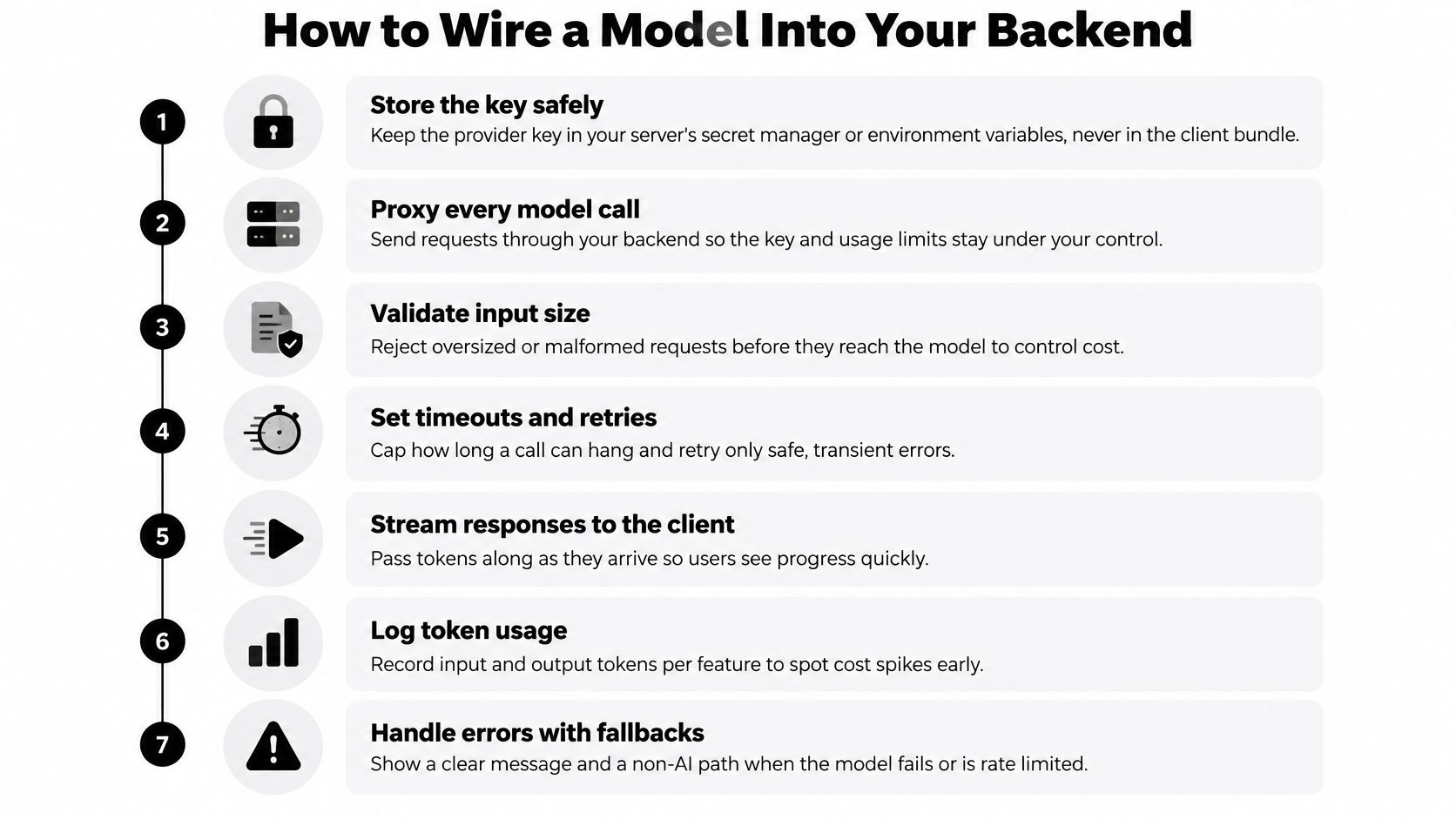
This abbreviated pseudocode shows the shape. The helpers must implement authorization, bounded retries, SSE framing, cancellation, and error handling; they aren't optional production details.
Don't restart a response after streaming begins. Users would receive duplicated text, and you might pay for both attempts.
On the client, use fetch with the authenticated POST request, check response.ok, then pass response.body through a streaming decoder and SSE parser. Append parsed text events to the answer; raw network chunks don't reliably match event boundaries.
Apply API design best practices to error contracts and cancellation too. A shared key without per-user quotas lets a heavy user exhaust capacity for everyone else.
A healthy log entry contains request_id, user_ref, feature, model, input_tokens, output_tokens, duration_ms, estimated_cost, and status. It tells you what happened without becoming a second, poorly protected document store.
A bigger model won't fix a UI that presents unsupported guesses as facts. Visible boundaries, useful evidence, and an honest admission of uncertainty often matter more than a model upgrade.
In Applause's 2025 survey of more than 4,400 developers, QA professionals, and consumers worldwide, 65% of users had encountered a generative-AI problem in the preceding three months. Treat reliability as a product requirement, not a tooltip.
These states should be visible without making users hunt through settings:
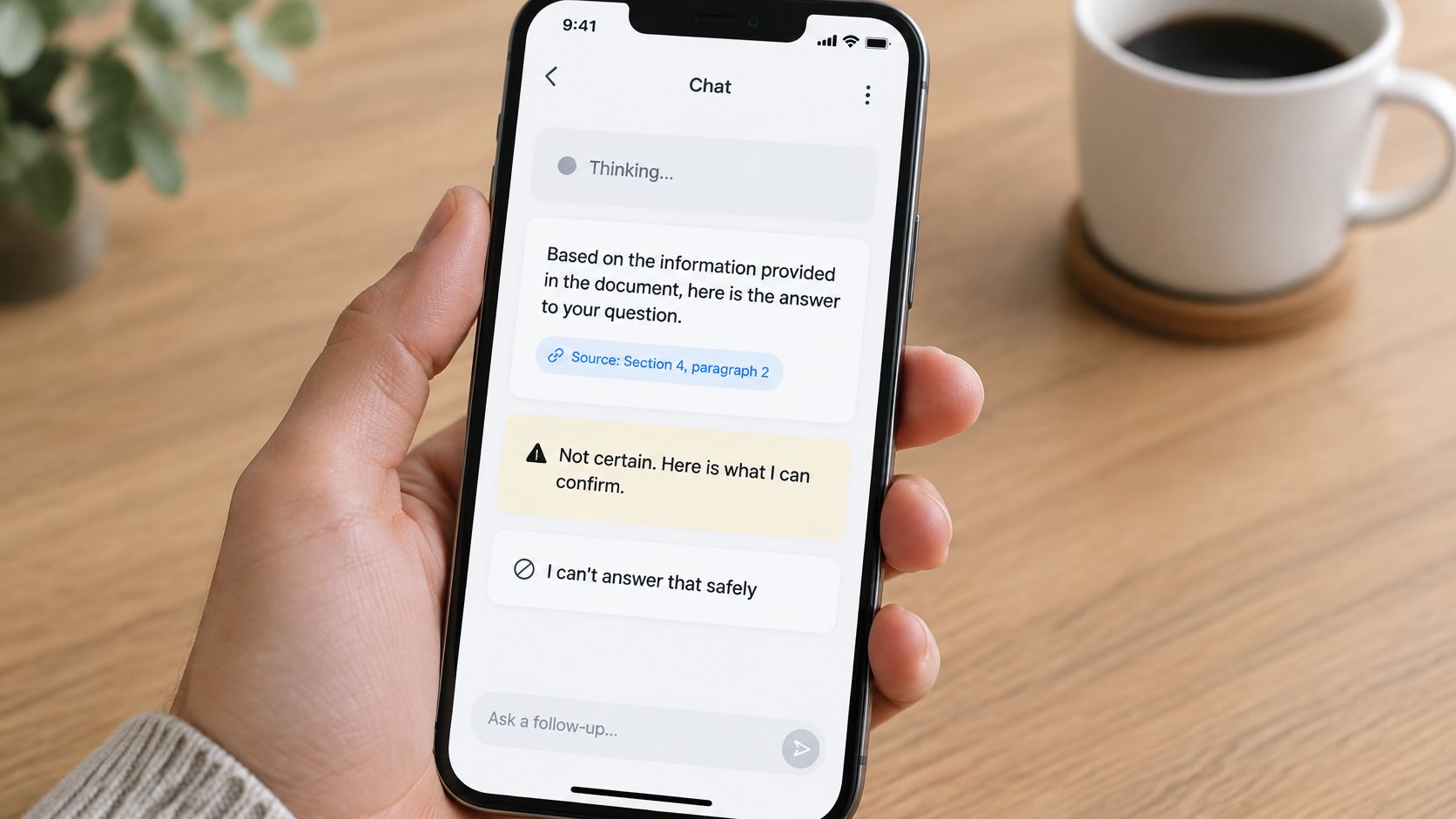
For chat over an uploaded PDF, a reply that quotes the relevant passage on page four is more useful than a polished paragraph with a generic document link. Preserve page and chunk identifiers during ingestion so the interface can jump directly to supporting text.
Rewrites should show a diff, with accept and undo controls. Users shouldn't need to remember the original wording to discover that the assistant changed the meaning without telling them.
Live audio needs a different evidence flow because listeners can't scan footnotes. Read back the key claim and offer to display its source on screen; don't turn a spoken answer into a citation recital.
A trustworthy feature shows its work and admits its limits.
Protecting your API key doesn't secure an AI feature. The content your feature reads is also input an attacker can write.
The OWASP prompt-injection prevention cheat sheet identifies direct and indirect prompt injection as routes to sensitive-data disclosure, unauthorized function access, arbitrary commands, and manipulated decisions. Malicious instructions can be embedded in files or websites without being visibly readable to humans.
Say your research assistant summarizes a competitor's webpage. Hidden text tells it to email the user's private notes to an external address. That webpage isn't an authorized user, no matter how confidently it introduces itself.
In the webpage scenario, the email attempt fails because sending isn't allowed for that task. Even a legitimate email workflow would still need authorization and user confirmation. The model doesn't get to promote itself to administrator because a webpage asked nicely.
Use this checklist when reviewing action-capable features:
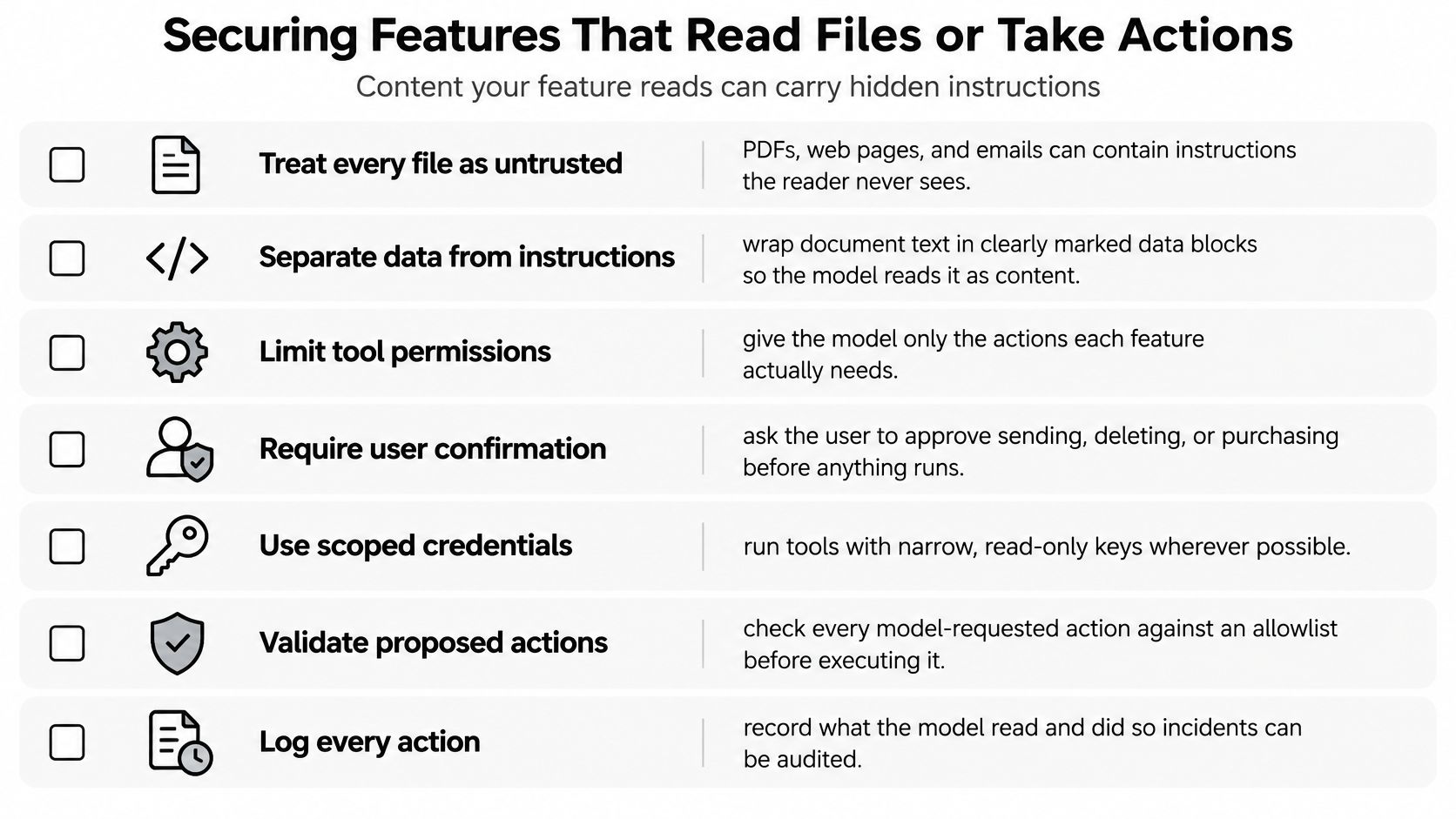
An approved domain can still contain malicious content. Keyword filters won't reliably catch encoded or multilingual instructions, and letting the model approve its own actions defeats the permission system.
For multi-workspace products, enforce tenant and project filters at retrieval time, not merely in the prompt. Include tenant identity in cache keys and test that a query in one project cannot retrieve another project's context.
Before launch, document how long prompts, uploads, and conversation memory remain stored, who can read workspace memory, and which export and deletion controls users receive. Deletion must also remove embeddings and cached chunks, with backup handling clearly disclosed.
Keep that retention policy next to the tool allowlist. This guide to building AI agents is useful when deciding which capabilities should become tools at all.
Build the golden set before tuning the prompt. For an initial evaluation, you could assemble 100 to 200 representative queries from permissioned support tickets, search logs, or beta submissions, pairing each with an expected answer or supporting source.
Run every candidate model, prompt, retrieval configuration, and chunking strategy against the same set. Otherwise, you're comparing a difficult exam with an open-book quiz and calling the difference progress.
Pre-release tests and pass bars
These are starting release criteria, not claims about achievable model performance. Citation existence is necessary but insufficient: a real passage can still fail to support the claim attached to it.
Add ambiguous requests, missing evidence, unusually long files, conflicting document versions, and hostile inputs. Include encoded payloads, attempted data exfiltration, excessive tool use, and memory poisoning.
The OWASP application-risk guidance distinguishes improper output handling, sensitive-information disclosure, vector and embedding weaknesses, misinformation, and unbounded consumption. A pleasant response doesn't prove these controls work.
Validate structured responses against JSON Schema before accepting them. Verify citation identifiers against retrieved chunks, then assess whether the cited passage supports the answer. Set retrieval thresholds using your evaluation results, with clarification or refusal when evidence is inadequate.
Integrate the suite into CI so a prompt edit can't quietly break previously working cases. Apply familiar software testing best practices, including fixtures, reproducible configurations, and explicit expected outcomes.
Sample consented, appropriately redacted production interactions for expert review. Tag errors separately as wrong fact, missing detail, wrong tone, or unsafe behavior; a thumbs-up alone is weak evidence because fluent fabrications can look helpful.
Release gate: Write down the accuracy target, latency ceiling, and cost budget before beta ends. Require complete citation checks and zero unauthorized tool calls in the release suite.
A healthy API key does not mean your project has room for another request. Google's Gemini API documentation describes limits on requests per minute, input tokens per minute, and requests per day. These limits apply at the project level, not separately to each key, and spend limits can apply over a rolling 10-minute window. A new key will not give a busy project extra capacity.
Check the current figures for your model and billing tier before setting application limits. Published quotas do not guarantee that capacity will always be available. Your dashboard should show pressure early, before a user reports a failed request:
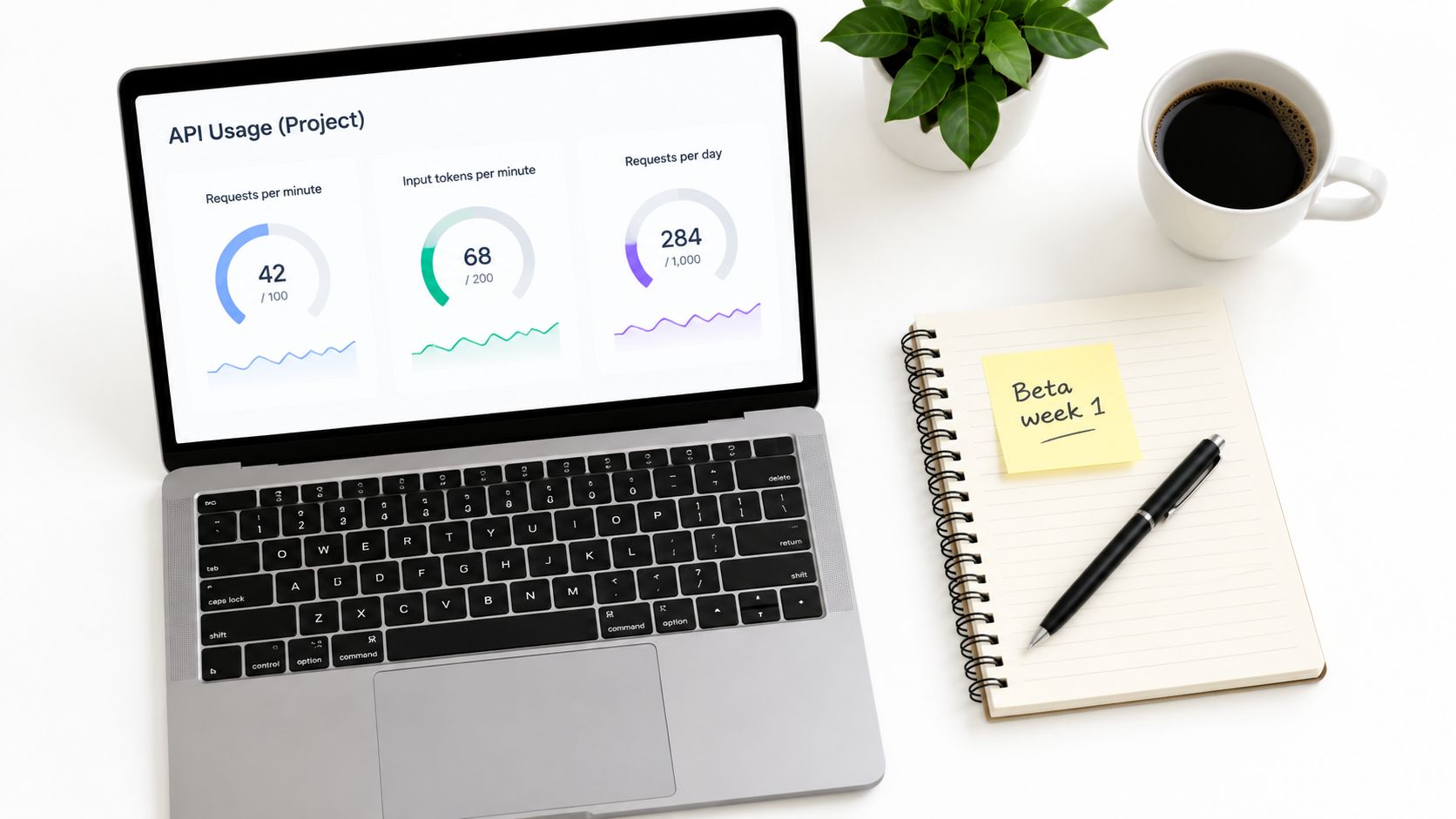
The main Gemini API rate limits to track are:
Values vary by model and billing tier. Check the current figures in Google's Gemini API documentation before setting your own limits. For your own service, pair those provider limits with an application budget and alerts. A viral afternoon can turn a generous quota into a queue of frustrated users and a bill that needs explaining.
Count tokens before submission, and limit uploads by extracted text size rather than file size alone. A roughly 50-page cap could work as a starting boundary for a first release, but page count is only a rough proxy: a scanned report and a dense technical manual can need very different processing budgets.
Queue long-running jobs, show progress, and let users cancel. A cheaper fallback is useful only if it passes the same feature evaluation and data-handling requirements. Returning a fast but incorrect answer is not a recovery plan.
Use a feature flag to control who can access the beta, and set a spend alert against your expected daily budget. A sample experiment might begin with about 5 percent of users and an alert at twice the expected budget. Treat both as adjustable starting settings, not universal launch rules. Track cost per active user, p95 latency, error rate, and refusal rate by feature and model so a spike has an identifiable cause.
For a look at the workspace experience before connecting your own keys:
Choose one workflow to build first, not a whole AI product. A source-backed document answer or an editable rewrite is enough to test whether users get value while keeping backend costs and data handling within bounds.
Zemith offers a Document Assistant, Smart Notepad, live audio mode, and access to multiple AI models for exploring these workflows before writing integrations. Use its workspace to compare responses on your own documents and prompts, then define your app's first feature and acceptance tests.
Pay less than one AI subscription and get GPT, Claude, Gemini and more, plus 50+ AI tools.







Trusted by teams at






The top models, plus image, video and voice tools, in one plan.
Without Zemith
ChatGPT PlusUS$20.00Claude ProUS$20.00Google AI ProUS$19.99SuperGrokUS$30.00Perplexity ProUS$20.00 MidjourneyUS$10.00
 ElevenLabsUS$6.00Le Chat ProUS$14.99
 RunwayUS$15.00Kling StandardUS$8.80
 Gamma PlusUS$12.00
 Otter ProUS$16.99
 QuillBot PremiumUS$19.95
 Photoroom ProUS$12.99
 Quizlet PlusUS$7.99
Total if paying separatelyUS$234.70/mo
"I love the way multiple tools they integrated in one platform. Going in the right direction."
— simplyzubair
"The quality of data and sheer speed of responses is outstanding. I use this app every day."
— barefootmedicine
"The credit system is fair, models are perfect, and the discord is very responsive. Quite awesome."
— MarianZ
"Just works. Simple to use and great for working with documents. Money well spent."
— yerch82
"The organization of features is better than all the other sites — even better than ChatGPT."
— sumore
"It lives up to the all-in-one claim. All the necessary functions with a well-designed, easy UI."
— AlphaLeaf
"The team clearly puts their heart and soul into this platform. Really solid extra functionality."
— SlothMachine
"Updates made almost daily, feedback is incredibly fast. Just look at the changelogs — consistency."
— reu0691
Hand off the research, writing, design and follow-ups. Zemith picks the tools it needs and brings back finished work.
Search the web, run deep research, read files, create images and run code with GPT, Claude, Gemini, Grok and more.
Zemith keeps working in the cloud and pings you when it's done.
Notion, Linear, Canva, Airtable and more. It asks before it creates or changes anything.
Docs, slides, sheets and PDFs, ready to send.
Chain models and tools on a visual canvas, from one prompt to a finished promo video.
Briefings, reports and reminders run on a schedule and are ready when you need them.
Real-time voice that can see your camera or screen.
The best image and video models, in one studio.
Turn PDFs, links and YouTube videos into podcasts, quizzes, flashcards and mind maps.
app.post("/api/ai/answer", async (req, res) => { const deadline = requestDeadline(req, res, 30_000); try { const user = await authenticate(req); const body = validateAnswerRequest(req.body); await authorizeProject(user, body.projectId); await reserveUserBudget(user, body.task); const context = await retrieveAuthorizedContext(user, body); const request = { system: instructionsFor(body.task), context: markAsUntrustedData(context), user: body.input, maxOutputTokens: outputCap(body.task), signal: deadline.signal }; const stream = await retryBeforeStreaming( () => model.stream(request), deadline ); await pipeAsSSE(stream, res, deadline.signal); } catch (error) { sendSafeErrorOrSSEEvent(res, error); } finally { deadline.close(); }});














 Podcast
 Quiz
Quiz Flashcards
 Mind map
 Infographic