


Every top model, with tools built in.
Search the web, run deep research, read files, create images and run code with GPT, Claude, Gemini, Grok and more.
Multimodal AI mixes text, images, audio and video. Learn how it works, where it fails, and how to put those jobs in one workflow.
Multimodal AI is a system that takes more than one kind of input, usually text plus images, audio or video, and answers or creates something from that mix.
You're probably already working that way, just with four tabs open and a lot of copying and pasting between them. The useful question isn't whether a model can describe a photo in a demo. It's whether you can trust the combined answer when the chart is blurry, the transcript is noisy, and the deadline is still today.
It's 9.40 on a normal Tuesday and your desk, digital or otherwise, looks like a small crime scene. There's a PDF someone wants summarized, a chart screenshot with no source file, a voice note from a call you half remember, and a brief that's three bullet points pretending to be a plan.
Each item lives in a different app. The PDF reader can't hear the voice note. The chatbot can't see the chart unless you upload it again. The transcript tool has no idea what the brief needs. You're the integration layer, and you're doing it by hand.
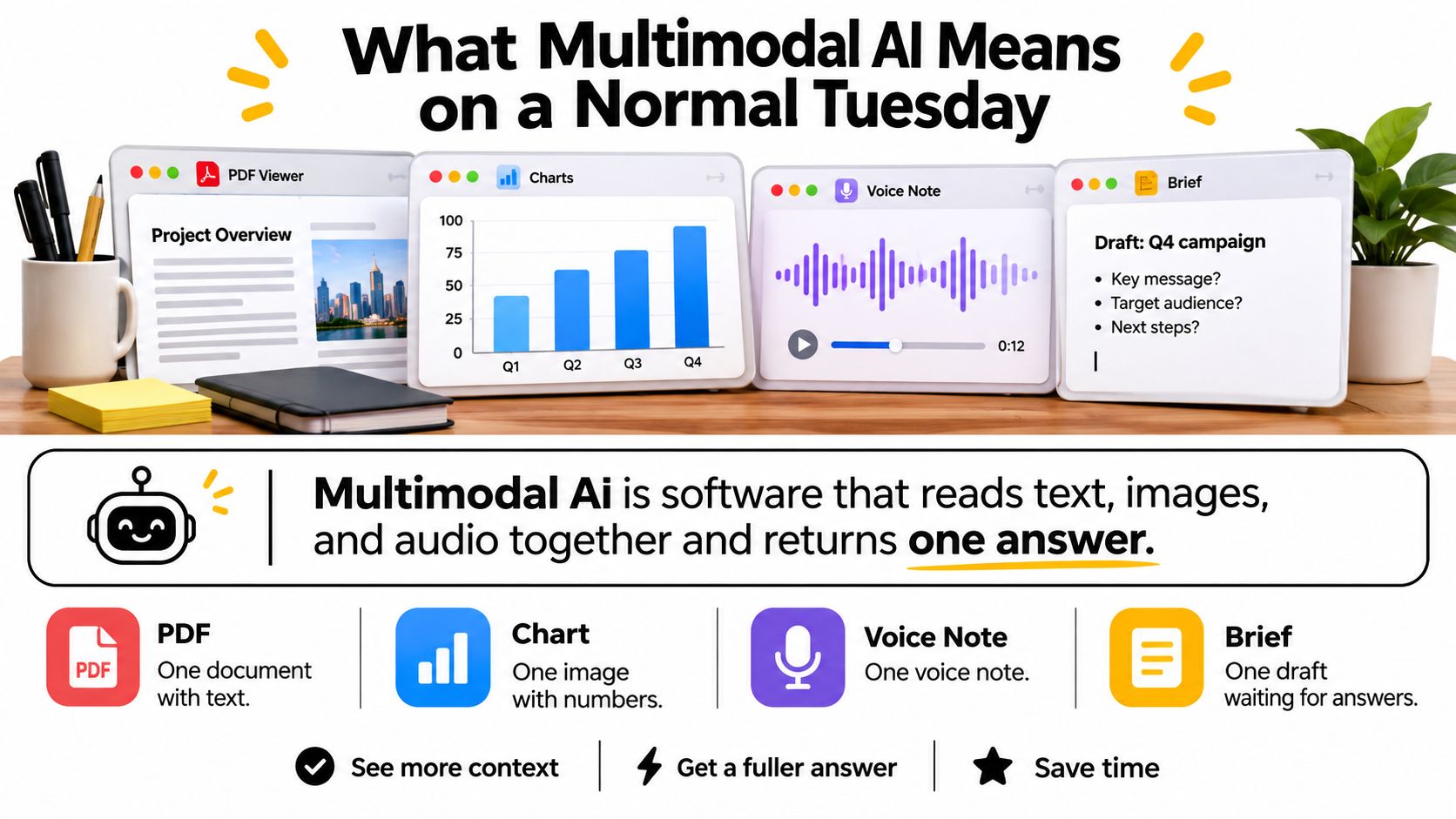
Multimodal AI is software that accepts more than one kind of input, usually text plus images, audio or video, and returns an answer or a new file built from the combination. That sounds modest, and it should. The magic isn't a new sense organ. It's that one system can keep the paper, the figure and your spoken question in the same conversation.
A single-sense tool does one job well and then stops. A captioner can label the chart but can't read the paragraph that explains why the numbers dropped. A text chatbot can rewrite your brief but can't check whether the screenshot supports your claim.
A multimodal system lets you ask a better question. Say you've got a product photo, a rough spec and a customer voice note. You can ask what's visible in the photo, what the spec promises, and where the customer complaint clashes with both. That's a long-tail job people search for, something like an AI assistant that reads a PDF and its charts together, not a party trick.
This is already real spending, not a hobby project. The global market was estimated at USD 2.3 billion in 2025, according to Grand View Research's multimodal AI market report.
Multimodal AI market snapshot
Those firms don't agree on the starting line, so don't take any one figure to your finance team as gospel. Treat the range as a signal that buyers are paying for mixed-media tools, mostly as software. The more useful test is closer to home. If a job needs two senses at once, and you're currently the glue between them, that's where multimodal AI earns its keep.
Think of a coat check in a busy restaurant. Text arrives in one coat, pixels in another, sound in a third, and they look nothing alike. The attendant doesn't merge the coats. She hangs items that belong together on nearby hooks, so she can find them again when someone describes what they're looking for.
A multimodal model does a version of that with numbers. It turns words, image patches and audio chunks into vectors, which are just lists of numbers that capture meaning. Items with similar meaning end up close together in that space, even if one started as a sentence and the other started as a photograph.
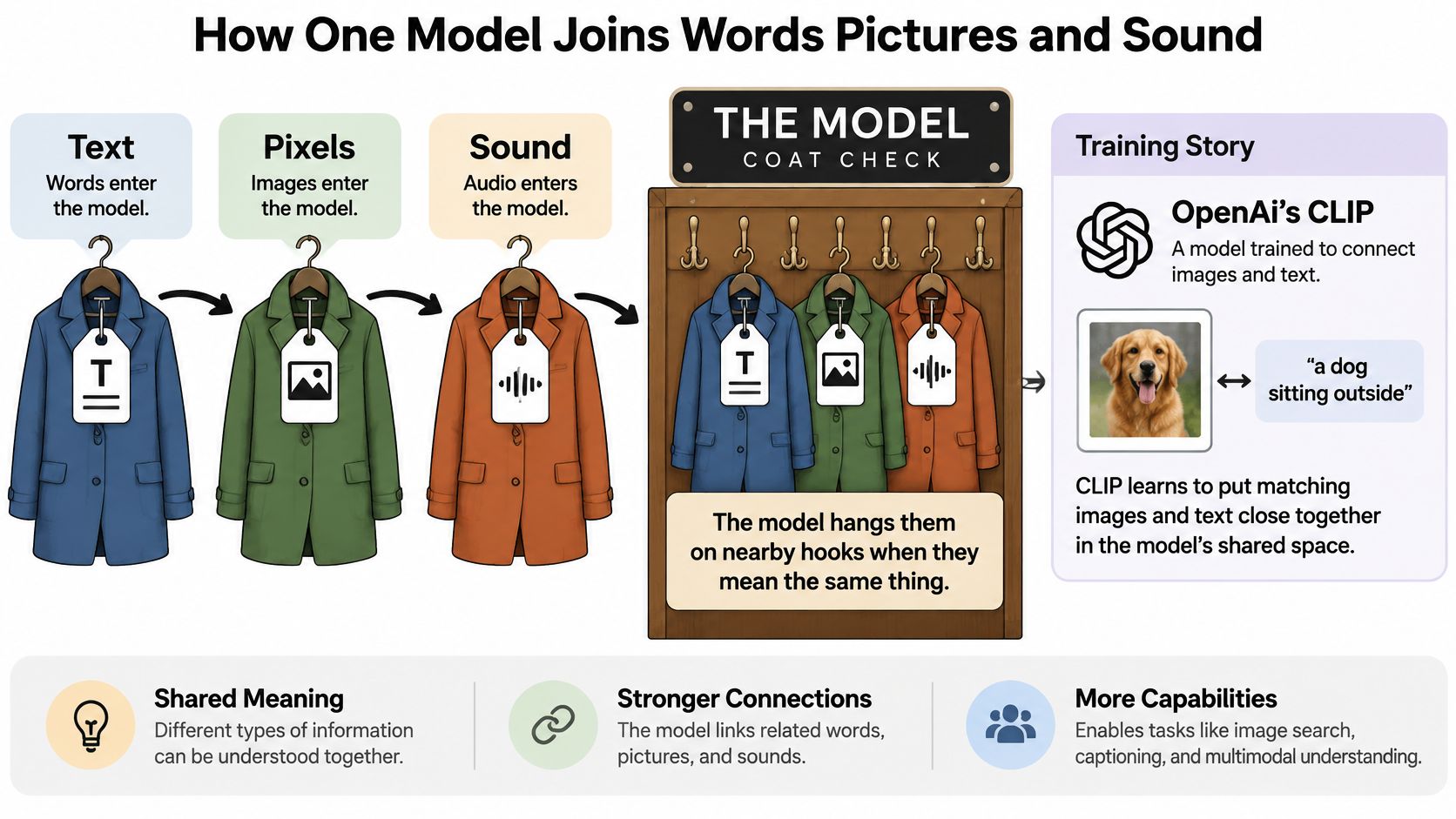
OpenAI's CLIP, released in January 2021, learned a shared representation of images and natural-language descriptions from approximately 400 million image-text pairs, according to OpenAI's CLIP announcement. It could classify images using textual labels rather than requiring task-specific supervised training for every new category.
On the standard 1,000-category ImageNet benchmark, the largest released CLIP model achieved 76.2% zero-shot top-1 accuracy, matching a supervised ResNet-50 while using no ImageNet training examples. It also reached 70.1% on ImageNet-V2, a distribution-shifted version of the test. In plain terms, it could name things it hadn't been drilled on, because you'd handed it language as the label.
Language became the flexible interface for visual recognition, not a magic eye.
That's the kitchen rule worth keeping. Language works like a remote control for vision. You type a category, a question or a description, and the model looks for the visual pattern that lives near those words in the shared space. It's powerful, and it's also why a clever prompt can sometimes make a weak visual match sound more certain than it is.
Audio joins the same hallway. Speech gets chopped into tokens, much like text, so a model can attend across what was said, what was written and what's on screen. If you want the practical end of that pipeline, our guide to turning audio into usable text with AI walks through where transcripts help and where they drop words.
Video adds time. Frames become a sequence, subtitles and audio ride alongside, and the model has to track what changed, not just what's present in one still image. That's harder, and it's why a model can summarize a short clip neatly while losing the middle of a long tutorial.
The job people describe in searches is often very specific, like multimodal AI that reads a figure together with the paragraph under it. That's exactly the coat-check trick applied to work. The figure, the caption and your question land near each other, so the answer can use all three instead of guessing from one.
Generation is the same hallway walked in reverse. Start with a prompt near a cluster of meanings, and the model walks back out as an image, a voice or a short clip. You're not retrieving a file someone stored. You're asking the system to build a new one that fits the neighborhood you described, which is why generated output needs a different trust check than retrieved evidence.
Before the caution, here's the lookup I wish someone had taped to my monitor. Each modality carries a different kind of evidence, and each one fails in its own predictable way.
What each modality is for
Text is where instructions, citations and code live, and it's still the easiest input to check. You can search it, quote it and diff two versions. Its blind spot is literal. Text can't see the coffee stain over the total on a scanned invoice, or notice that the chart's axis starts at a sneaky nonzero value.
Images carry layout, objects and charts, which is why they're great for extraction and for turning a screenshot into a prompt. If you're building that habit, our walkthrough of AI image analysis for everyday files covers what to ask for beyond a generic description. But images are also where fluent models embarrass themselves, especially on depth, counting and fine matching between two similar objects.
Audio carries meetings, tone and the question you'd rather speak than type while you're making tea. It slips when people overlap, when a room echoes, or when a name sounds like another name. Video carries change over time, which makes tutorials and product demos searchable, but long clips still lose detail in the middle.
The perception gap isn't a vibe. The BLINK benchmark reformulates 14 classic computer-vision tasks, including relative-depth estimation, visual correspondence, image forensics and multi-view reasoning, into 3,807 multiple-choice questions, according to the BLINK paper in the ACM Digital Library. Humans achieved 95.70% average accuracy, while GPT-4V reached 51.26% and Gemini reached 45.72%.
Those margins over random guessing were just 13.17 and 7.63 percentage points. So yes, a model can write a confident paragraph about a photo and still lose a game of which mug is closer to the camera. The joke writes itself, but the lesson is serious. Don't treat a smooth explanation as evidence that the model saw the spatial relationship you're asking about.
The benefits are real when you use the mix properly. One tool can read mixed inputs, keep context across them, and point to the page, region or timestamp behind an answer. That beats re-uploading the same file into three services and hoping your notes stay consistent.
The limits are just as concrete. You get the perception gaps above, plus missing or conflicting inputs, plus transcripts and captions that sound polished while inventing details. University-style multimodal reasoning has improved a lot, and research use is getting useful, but that progress doesn't cancel a weak sense of depth.
Use boring checks, not hope.
A photo may be blurry, its transcript noisy, and the page cited beside it out of date. Yet a multimodal model can still deliver a smooth verdict. That confidence can be misleading: combining weak signals may make an answer sound more certain without making the evidence stronger.
Practical rule: When inputs conflict or one is missing, do not average them into false confidence. Use the strongest available source, state what is missing, and stop where the evidence stops.
Part of handling this safely is null handling: deciding what the system should do when an input is absent or unusable. A production guide to multimodal AI failures from SciForce recommends falling back to a single modality when one input fails, sending uncertain cases for human review when multiple inputs fail, and withholding output below a confidence threshold. The everyday version is simple: a missing audio track should not turn into a made-up quote.
Try this with a real file this afternoon. The point is not to prove that a model is good or bad; it is to see which evidence its answer depends on.
For claims others may repeat, fact-checking AI output before you publish it offers a useful way to think about that final human check: trace the claim back to evidence before it leaves your desk.
Trust test by failure mode
A caption that calls a building welcoming does not show that a wheelchair user can get inside. A ramp, entrance, toilet, or route decision needs evidence from the relevant place and time, and often a human check. An old photo and a cheerful review can reinforce each other while still giving the wrong impression.
Alt text needs the same care. For a STEM diagram, useful alt text should cover the information the diagram carries, avoid invented details, and describe its states and transitions rather than merely sounding plausible. Keep observation separate from inference in your notes: write what the image supports, mark what you are guessing, and ask what evidence you would need before acting. That question is a better safety check than a prompt that asks the model to sound certain.
Start with research, because that's where the mix pays off fastest. The three-step pattern below works whether you're a student with a dense paper or an analyst checking a claim before a meeting.
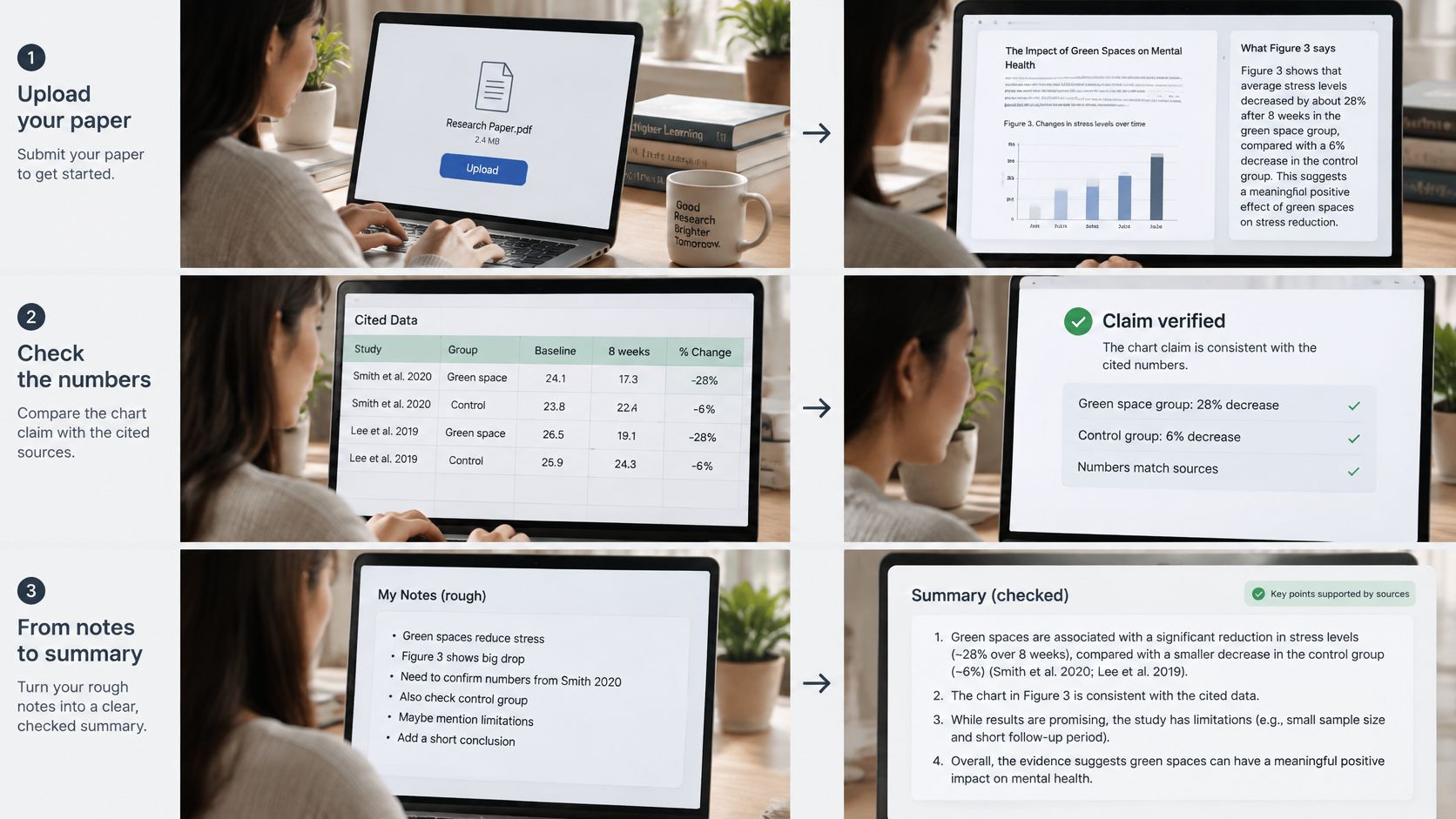
Say a student uploads a paper and stops at Figure 3, the chart everyone cites and nobody explains. Before multimodal tools, she'd copy numbers by eye, guess at the trend and hope the caption agreed. Now she can attach the paper, ask what Figure 3 shows, check that reading against the cited data, and turn the result into a short quiz she can fail privately before the exam does it publicly.
That shift tracks measured progress. The Stanford AI Index 2025 reports that AI performance improved by 18.8 percentage points on the multimodal MMMU benchmark in one year, according to Stanford HAI's AI Index 2025 report. MMMU tests university-level questions that combine text with images, diagrams, charts and other visual material, which is a lot closer to real study than labeling cats.
Now say a marketer has a rough concept, one decent product photo and a headline she doesn't love. She can generate a first visual, tighten the paragraph next to it, and get a spoken read-through to catch clunky sentences on the commute. Treat the generated image as a sketch for direction, not the finished campaign, and keep the original photo beside it so nobody ships the model's invented version of the product by accident.
Video jobs follow the same pattern, with moving parts. If you're learning that craft, a grounded walkthrough of how to create AI music videos is a useful companion, because it treats prompts, clips and audio as separate inputs you still have to check against each other. Our own primer on analysis of video with AI tools covers the reading side, like pulling claims and timestamps out of a clip instead of scrubbing through it ten times.
Watch a short multimodal workflow end to end before you try your own.
The third scene is quieter and more important. Say you're describing a venue, a classroom slide or an app screen for someone who can't see it the way you do. Describe only as far as the picture supports. Separate what's visible, like a step at the entrance, from what a wheelchair user or screen-reader user still needs confirmed, like whether there's another entrance around the side.
An invented ramp is the failure to design around. It's kinder, and more accurate, to write that the photo shows steps and no visible ramp, and that access needs checking. That sentence helps someone plan. A poetic guess does not.
Whatever the scene, steal the same three moves.
Running those moves across a PDF reader, an image model, a search box and a separate doc is the productivity version of assembling furniture with four instruction manuals. Each handoff loses a little context, and you're the one who notices at 6 p.m. One workspace doesn't make the model smarter. It makes your checking habit much easier to keep.
A generated image slips into a presentation. A rewritten paragraph goes into a report. Later, no one can tell which parts came from the source and which the model created. A simple labeling habit makes that distinction clear before an asset is published.
General-purpose AI obligations began applying on 2 August 2025. Article 50 transparency rules are scheduled to apply on 2 August 2026, according to the EU AI Act Service Desk FAQ on the implementation timeline. The rules include informing people when they are interacting with AI and making certain AI-generated or altered content detectable.
The broader rollout extends beyond that milestone. The European Commission's AI Act implementation timeline began with prohibitions, definitions and AI-literacy provisions on 2 February 2025, and includes implementation milestones through 2 August 2028. The dates matter, but the practical job is simpler: record what the model made or changed, and keep that record with the asset.
In plain terms, people should know when they are interacting with AI, and certain generated or altered content should be identifiable as such. Providers of systems that generate or manipulate content may also have disclosure obligations. For anyone publishing work, the useful habit is to distinguish the original evidence from material the model created or changed.
That distinction supports reliable research, too. A reader, student or client should be able to tell a chart from a paper apart from an image generated to illustrate it. A caption or watermark can make that clear. If an image, transcript and source document disagree, labeling the generated material does not settle which one is right. Keep the original evidence available so the claim can be checked.
The same habit is useful outside the EU. Schools, clients and publishers may ask which parts a machine made, often when a piece is already about to go out. Label the output, retain the original and make the distinction easy to verify.
Four short rules cover most of what matters. Use multimodal AI when the task needs two senses at once. Keep the original file beside the answer. Refuse a combined verdict when inputs conflict. Label what the model made.
Those rules are easier to keep when the research question, the image pass and the voice pass happen in one place instead of across separate logins. On Zemith, we bring together more than 20 AI models in one app, with tools such as text to speech, voice cloning, speech to text, document to podcast, quiz generator, flashcards, mind maps, AI rewriter, humanize AI text, translate, YouTube to blog, PDF tools, AI notes, whiteboard, slides and FocusOS. If you want the wider picture, our overview of a multi-model AI platform and when it beats single tools explains the tradeoffs without the sales voice.
Zemith Plus costs US$15.99 per month and includes every model listed on the page plus 50+ AI tools, so check current plans and features on the site rather than trusting any number here. A PDF can become something you hear, and a brief can become a picture, without exporting files between tools and losing the thread.
Try one afternoon test instead of reorganizing your life. Take a real document, ask about one figure, generate one image from your notes, and make one short audio version. Then run the trust steps against each output, pointers, degraded copies and all. If the job is safety-critical or a real-world access decision, your next step is still a human, not a bigger model.
Bring one messy Tuesday job, a paper with a stubborn figure, a brief that needs a visual, or notes you'd rather hear than read, and run it through a single workspace that keeps your sources attached. Zemith puts document chat, image generation and analysis, audio tools and research help in one app, so your checking habit survives the whole workflow. Start that first test today at Zemith and see which outputs earn your trust.
Pay less than one AI subscription and get GPT, Claude, Gemini and more, plus 50+ AI tools.


Trusted by teams at





The top models, plus image, video and voice tools, in one plan.
Without Zemith
ChatGPT PlusUS$20.00Claude ProUS$20.00Google AI ProUS$19.99SuperGrokUS$30.00Perplexity ProUS$20.00 MidjourneyUS$10.00
 ElevenLabsUS$6.00Le Chat ProUS$14.99
 RunwayUS$15.00Kling StandardUS$8.80
 Gamma PlusUS$12.00
 Otter ProUS$16.99
 QuillBot PremiumUS$19.95
 Photoroom ProUS$12.99
 Quizlet PlusUS$7.99
Total if paying separatelyUS$234.70/mo
"I love the way multiple tools they integrated in one platform. Going in the right direction."
— simplyzubair
"The quality of data and sheer speed of responses is outstanding. I use this app every day."
— barefootmedicine
"The credit system is fair, models are perfect, and the discord is very responsive. Quite awesome."
— MarianZ
"Just works. Simple to use and great for working with documents. Money well spent."
— yerch82
"The organization of features is better than all the other sites — even better than ChatGPT."
— sumore
"It lives up to the all-in-one claim. All the necessary functions with a well-designed, easy UI."
— AlphaLeaf
"The team clearly puts their heart and soul into this platform. Really solid extra functionality."
— SlothMachine
"Updates made almost daily, feedback is incredibly fast. Just look at the changelogs — consistency."
— reu0691
Hand off the research, writing, design and follow-ups. Zemith picks the tools it needs and brings back finished work.
Search the web, run deep research, read files, create images and run code with GPT, Claude, Gemini, Grok and more.
Zemith keeps working in the cloud and pings you when it's done.
Notion, Linear, Canva, Airtable and more. It asks before it creates or changes anything.
Docs, slides, sheets and PDFs, ready to send.
Chain models and tools on a visual canvas, from one prompt to a finished promo video.
Briefings, reports and reminders run on a schedule and are ready when you need them.
Real-time voice that can see your camera or screen.
The best image and video models, in one studio.
Turn PDFs, links and YouTube videos into podcasts, quizzes, flashcards and mind maps.












 Podcast
 Quiz
 Flashcards
 Mind map
 Infographic