


Every top model, with tools built in.
Search the web, run deep research, read files, create images and run code with GPT, Claude, Gemini, Grok and more.
Upload a picture with the look you want and get a free prompt that puts that look on your own photo in ChatGPT or Gemini, without changing your face.
Drop a reference picture here
The look you want to copy, not your own photo.
Try it without an account. A free account gets 2 photo edit prompts a day. A free tool from Zemith, the all-in-one AI app for chat, images and video.
A good ChatGPT or Gemini photo editing prompt says what must not change, your face, your features and everyone in the photo, before it describes the change. Without that, both apps redraw the face along with everything else. Every prompt this tool writes opens that way.
Instead of describing the look yourself, you show it. The tool reads the reference picture for the setting, outfit, pose, lighting, colors and camera, and writes them out in words, because ChatGPT and Gemini will only see your photo. It describes the look, never the person in the reference, so the result still looks like you.
Want ready-made prompts instead? 20 ChatGPT photo editing prompts that keep your face
Real prompts this tool wrote from a reference picture.
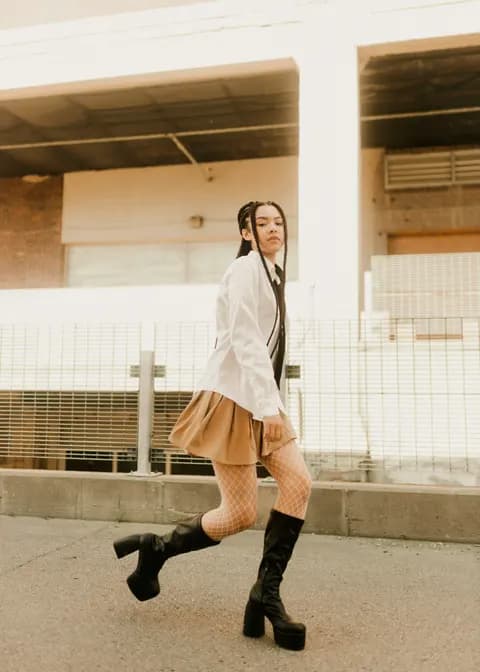
Prompt
Using the uploaded photo as the reference, keep the person's face, facial features, identity, skin tone and body shape exactly as they are in the uploaded photo, and keep them fully clothed and recognizable. Restyle the scene into this look: a street-style fashion portrait taken outdoors in front of a pale concrete parking structure with horizontal slatted grilles, a metal wire fence and a low concrete kerb, the ground light grey asphalt. The outfit is a crisp oversized white button-down shirt left untucked, a thin black tie loosely knotted, a short pleated camel-tan skirt, fine white fishnet tights and black knee-high block-heel platform boots. Pose the person mid-stride, stepping forward with one leg lifted behind, torso angled away and head turned back over the shoulder toward the camera with a calm confident expression. Hair styled in long tight braids falling forward over the shoulders. Bright hazy backlight with warm sun flare bleeding across the top of the frame, soft washed-out highlights, warm cream and beige color grade, light film grain and a slightly faded analog finish. Subject placed slightly off-center, full body in frame, vertical 4:5 portrait framing. Photorealistic result with natural skin texture and clean, undistorted hands and face.
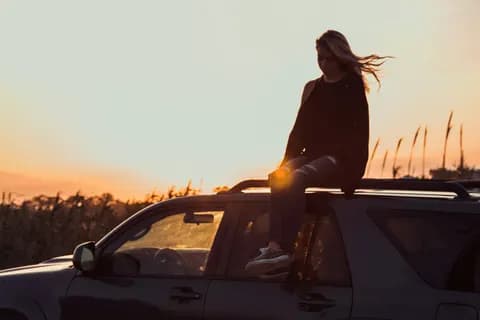
Prompt
Using the uploaded photo as the reference, keep the person's face, facial features, identity, skin tone and body shape exactly as they are, and keep their expression natural. Recreate the whole scene and look of the following description with the person from the photo. The person sits on the roof rack of a dark SUV, perched near the front edge with one leg bent and the other foot resting lower against the side of the car, hands relaxed, head tilted down and slightly away, calm and contemplative. Long hair blows sideways in the wind. Outfit: a loose black sleeveless top over a black long-sleeve layer, dark ripped jeans with a torn knee, and worn grey-and-white sneakers. Setting: open countryside at sunset, a field of tall dry corn stalks and grasses in the background with thin silhouetted posts on the horizon, the car windows catching warm reflections. Golden-hour backlight from low behind the subject, strong rim light along the hair and shoulders, deep shadowed silhouette of the body against a soft gradient sky of pale cream fading to warm orange. Warm film-like color grade, slight grain, gentle lens glow and flare, shallow depth of field, shot from a slightly low side angle with the car filling the lower half and the sky the upper half, wide horizontal framing around 3:2. Photorealistic, natural skin texture, sharp hands and face, no distortion.
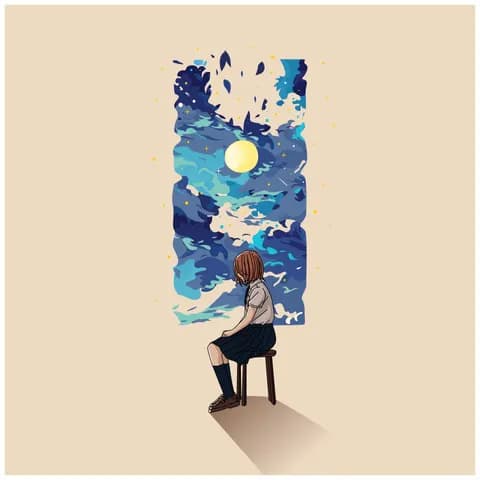
Prompt
Using the uploaded photo as the reference, turn it into a flat vector-style illustration while keeping the person's face, facial features, identity and body shape fully recognizable, and keeping everyone in the photo as they are without adding or removing anyone. Draw the person seated in profile on a simple four-legged wooden stool, facing left, shoulders slightly rounded, hands resting near the knees, one leg bent with the foot flat on the ground, the other tucked back. Dress them in a light beige short-sleeved button-up shirt with a collar and chest pocket, a dark navy pleated knee-length skirt, dark navy knee-high socks and brown lace-up shoes; hair falls in a straight chin-length bob. Place them low in the frame against a large plain warm sand-beige background. Behind them rises a tall irregular vertical rectangle of swirling stylized night sky in layered flat shapes: deep navy, cobalt, teal, pale blue and cream clouds, a round pale-yellow moon low in the middle, small yellow and cream four-point stars and scattered dot specks floating past the panel's torn edges. Use crisp clean outlines, flat unshaded color fills, minimal texture, and a soft diagonal cast shadow on the ground. Square 1:1 framing, person small in the lower center.
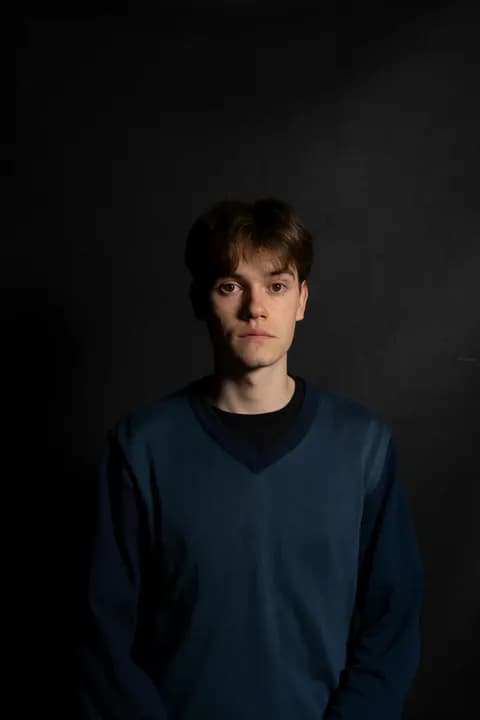
Note: Only the lighting and the dark background, keep my own outfit
Prompt
Using the uploaded photo as the reference, keep the person exactly as they are: the same face, facial features, identity, skin tone, body shape and expression, and keep their own outfit unchanged, including its colors, cut and layers. Only change the lighting and the background. Recreate a moody low-key studio portrait look: the background becomes a plain dark charcoal-black wall, matte and slightly uneven in texture, with faint subtle scuffs and marks and no objects or props. Light the person with a single soft directional lamp from slightly above and in front on one side, so one side of the face and body falls into gentle shadow while the other is lit with warm, natural skin tones. Keep the shadows deep but open, with soft gradual falloff and no harsh edges, and let the darkness wrap around the shoulders so the figure separates cleanly from the near-black wall. The overall palette stays dark and desaturated, cool in the shadows with a faint warm cast in the highlights, low contrast and quiet, serious mood. Finish with realistic photographic detail, natural skin texture, crisp focus on the face, gentle depth of field, no distorted features or hands, vertical 4:5 portrait framing from the waist up with the person centered and calm space above the head.
Add a picture with the look you want: a trend photo, an outfit, a pose, a light or a setting. Add a short note if you only want part of it.
Press Generate prompt. You get one prompt that describes the look and keeps your face. A free account gets 2 a day.
Copy the prompt into ChatGPT or Gemini with your own photo attached, or open it in Zemith's image editor.
Prefer one place? Do it for me in Zemith opens Zemith's image editor in Creative Studio with the prompt filled in. You add your photo there and pick the model, such as Nano Banana Pro or GPT Image. Editing photos is on Zemith's paid plans, and the cost is shown before each edit.
FAQ
Pay less than one AI subscription and get GPT, Claude, Gemini and more, plus 50+ AI tools.


Trusted by teams at





The top models, plus image, video and voice tools, in one plan.
Without Zemith
ChatGPT PlusUS$20.00Claude ProUS$20.00Google AI ProUS$19.99Grok PremiumUS$30.00Perplexity ProUS$20.00 MidjourneyUS$10.00
 ElevenLabsUS$6.00Le Chat ProUS$14.99
 RunwayUS$15.00Kling StandardUS$8.80
 Gamma PlusUS$12.00
 Otter ProUS$16.99
 QuillBot PremiumUS$19.95
 Photoroom ProUS$12.99
 Quizlet PlusUS$7.99
Total if paying separatelyUS$234.70/mo
"I love the way multiple tools they integrated in one platform. Going in the right direction."
— simplyzubair
"The quality of data and sheer speed of responses is outstanding. I use this app every day."
— barefootmedicine
"The credit system is fair, models are perfect, and the discord is very responsive. Quite awesome."
— MarianZ
"Just works. Simple to use and great for working with documents. Money well spent."
— yerch82
"The organization of features is better than all the other sites — even better than ChatGPT."
— sumore
"It lives up to the all-in-one claim. All the necessary functions with a well-designed, easy UI."
— AlphaLeaf
"The team clearly puts their heart and soul into this platform. Really solid extra functionality."
— SlothMachine
"Updates made almost daily, feedback is incredibly fast. Just look at the changelogs — consistency."
— reu0691
Hand off the research, writing, design and follow-ups. Zemith picks the tools it needs and brings back finished work.
Search the web, run deep research, read files, create images and run code with GPT, Claude, Gemini, Grok and more.
Zemith keeps working in the cloud and pings you when it's done.
Notion, Linear, Canva, Airtable and more. It asks before it creates or changes anything.
Docs, slides, sheets and PDFs, ready to send.
Chain models and tools on a visual canvas, from one prompt to a finished promo video.
Briefings, reports and reminders run on a schedule and are ready when you need them.
Real-time voice that can see your camera or screen.
The best image and video models, in one studio.
Turn PDFs, links and YouTube videos into podcasts, quizzes, flashcards and mind maps.










 Podcast
 Quiz
 Flashcards
 Mind map
 Infographic