


Every top model, with tools built in.
Search the web, run deep research, read files, create images and run code with GPT, Claude, Gemini, Grok and more.
AI in R, explained like a colleague: pick caret or tidymodels, train and check models, call an LLM safely, and verify generated code.
You've got a dataset open in RStudio, a deadline that's getting louder, and three browser tabs arguing about AI in R. One tells you to install caret. One wants you to write Python. One pastes a cheerful chunk of code that runs, produces a plot, and leaves you wondering whether any of it is right.
That's the normal starting point, not a personal failure. AI in R lumps together three different jobs, and each job wants different tools, different checks, and different privacy rules. Sort the job first and most of the confusion disappears. Sort it wrong and you'll spend a weekend teaching a boosted tree to summarize meeting notes, which is a bit like asking a calculator to proofread your essay. It'll try. It shouldn't.
AI in R is three jobs wearing one trench coat. Job one is tabular machine learning on rows and columns. Job two is neural nets for images, sequences, and patterns a tidy table can't express. Job three is calling a language model for text, embeddings, or code help. The package that wins one job usually loses the other two, so pick by job, not by hype. If you're weighing model families before you commit, an AI model comparison tool helps you map the choice before the installs start multiplying.
Caret is the older train() wrapper. Keep it for legacy posts and maintenance work, and start new projects elsewhere. Tidymodels is the default for new classification and regression because its pieces share one grammar instead of teaching you a new dialect per package. TidyAML runs a tidy bake-off, but only after you've confirmed your R version and your splits. Broom never trains anything. It tidies the messy model object into data frames you can read and audit.
Keras with the TensorFlow R interface, and torch for R, handle the nets. Reticulate is a hallway into Python rather than a model itself, so it belongs in your infrastructure notes, never in the algorithm line of a methods section. For chat and embeddings, use httr2 or a dedicated client. A boosted tree has never seen a sentence and will not start now.
Whichever row you pick, the trust layer stays the same. Set a seed, keep the generated code in the script instead of the chat window, and test the output on data the model never saw. Package choice changes the syntax. It changes nothing about verification.
The shelf is huge on purpose. The CRAN Machine Learning and Statistical Learning task view lists an ecosystem so broad that no single package covers it, which is why you combine specialists instead of hunting one mega-algorithm that does everything badly. That crowded shelf is also the trap: more options means more chances to grab the wrong tool for the job at the top of this section.
Rule of thumb: data frame means tidy modeling, pixels or sequences mean torch or keras, prose means an API call tonight.
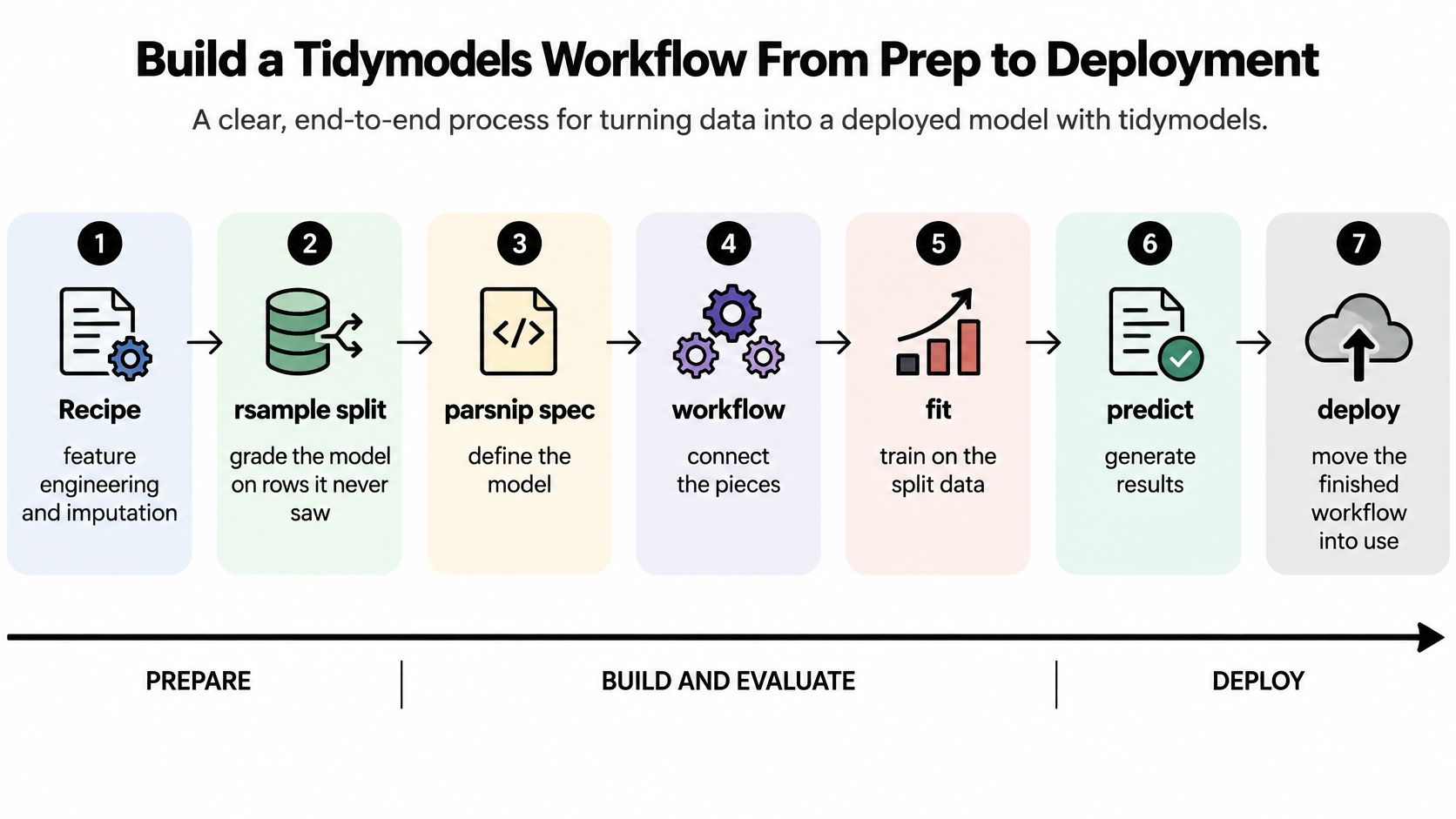
Start with the objects in the order a script should create them. A recipe handles feature engineering and imputation. An rsample split grades the model on rows it never saw. A parsnip spec defines the model so swapping a random forest for regularized regression is a one-line change. A workflow binds prep to the model, tune searches hyperparameters, and yardstick reports accuracy or RMSE. The tidymodels CRAN package page describes this as a collection built on tidyverse principles, with recipes for feature engineering, rsample for resampling, parsnip for a unified model interface, tune for hyperparameter optimization, workflows for combining preprocessing with models, and yardstick for metrics such as accuracy and RMSE.
The diagram below shows that sequence from prep through deployment.
Before any of this, look at your data properly. The checks in a good exploratory data analysis workflow catch the weird factor levels and silent missing values that later pretend to be modeling problems.
rec <- recipe(outcome ~ ., data = train) |> step_impute_median(all_numeric_predictors())spec <- rand_forest(trees = tune()) |> set_engine("ranger") |> set_mode("regression")wf <- workflow() |> add_recipe(rec) |> add_model(spec)fit <- fit(wf, data = train)preds <- predict(fit, test) |> bind_cols(test)rmse(preds, truth = outcome, estimate = .pred)One warning before you copy any of that. A random 80/20 split misleads on time series and grouped patients, because future rows or the same person leak into training. Use a time split or group split there.
A model with no metric is a spreadsheet that bought a lab coat.
When an assistant writes this script for you, ask for each object by name, plus a metric with a one-line reason. Require tidy(), glance(), and augment() from broom so results come back as data frames, not console clutter. You still own the metric and the split.
Think of it as a workshop. Tidymodels is a well-labeled toolbox. Torch and Keras are the machine shop, where you build custom parts. Reticulate is the door between the R shop and the Python one next door. Confusing the door for a machine is where a lot of projects stall.
Stay in torch for R when you want tensors and autograd in R itself, with training loops you control line by line. Use keras and TensorFlow for R when a Keras-style net or transfer learning is the point and you're happy with that backend. Cross with reticulate when a colleague already trained something in Python PyTorch or TensorFlow and you refuse to export a CSV as a peace treaty.
That hallway is useful. The reticulate manual describes how it automatically converts common R objects to equivalent Python types and converts returned Python objects back into R, so you can combine native statistical modeling and reporting with TensorFlow or PyTorch without writing serialization code or dumping intermediate files.
Projects rot at this stage, so don't skip it.
py_require() before Python starts, not after something breaks.RETICULATE_PYTHON when the interpreter must be a known one, so your script doesn't grab whatever Python it finds first.AI pipelines usually fail from dependency drift, not model logic. A pinned environment keeps two projects from fighting over versions and makes the same run reproducible on a teammate's laptop.
set.seed() isn't enough here. The TensorFlow for R manual provides set_random_seed(), which sets the R seed, Python and NumPy seeds, and TensorFlow's random seed together, and can disable GPU execution because GPU parallelism may introduce nondeterministic results. Uncontrolled randomness changes minibatch ordering, parameter initialization, and floating-point reduction order, so two runs follow different training paths and your model comparison turns into astrology.
Record the seed, R and Python versions, lockfile, model config, hardware, and whether the GPU was disabled. Use the slower deterministic run for benchmarks and validation. For production training, test whether your hardware and kernels behave deterministically before treating a tiny gain as real.
If the only thing you pinned is your hopes, the next laptop won't reproduce the loss curve.
Don't buy hardware before you've checked the cheap wins. Most slow R scripts have one slow line and several innocent bystanders. Optimize the guilty line.
bench::mark() on one function and profvis on a whole script, so you fix the slow line and not the one that looks ugly.Try this tomorrow. Time the same script twice, once cold and once warm, and put both numbers in the README next to the metric. It takes two minutes and saves you from the classic "it felt faster" debate in a code review three weeks later.
Speed check: a faster run that changes the metric is a bug, not a win.
Check every speedup against the metric you saved earlier in your workflow. If accuracy moved after you parallelized something, you didn't optimize the pipeline. You changed it. Find out why before you celebrate, because the machine is very happy to be wrong at high speed.
So far you've trained models. Now you're renting one. The call itself is short. Build the request with httr2 or a maintained client, send a prompt plus optional context, parse the text or embedding, and store the model name, timestamp, and prompt hash beside the script. That's the easy part. The hard part is deciding what is allowed to leave your laptop in the first place, and it's worth seeing how teams use AI inside an app before you wire a hosted model into a real workflow.
The comparison below frames the train-versus-rent choice and the safe API steps.
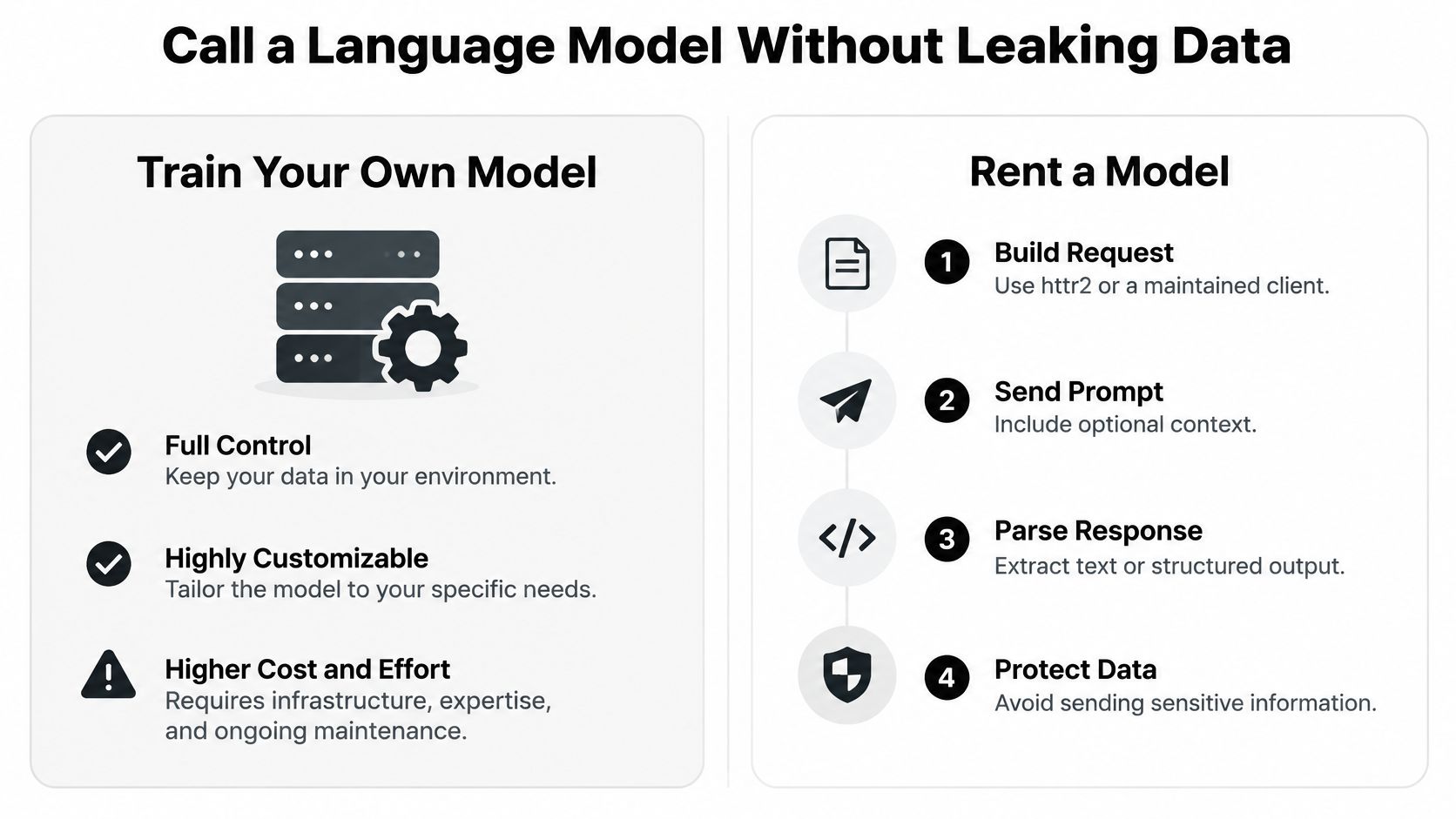
Those caution rows aren't paranoia. A worldwide study of 574 developers who use generative AI found 38% said AI use could compromise sensitive or proprietary information, while 31% reported organizational concern about legal implications. Participants specifically flagged data provenance and tracking generated code as priorities.
Keep two kinds of provenance separate. Statistical provenance is where your rows, transformations, and assumptions came from. Code provenance is who generated, edited, tested, and approved the script. Auditors ask about both, and "the chatbot wrote it" answers neither.
The short walkthrough below shows an LLM call in practice, so you can see the request shape before applying the table above.
De-identify only when the identifier leaves. A rare combination of age, site, and date is still a fingerprint. Prefer a local model when the table is personal, clinical, or commercially sensitive, log the license of any package the assistant suggests, and keep a small software bill of materials so you know what you shipped.
Here's the uncomfortable pattern. A 2025 survey of 868 scientists who program found adoption was highest among students and less-experienced programmers, and greater perceived productivity lined up with weaker use of testing, code review, and version control. The researchers cautioned that perceived productivity isn't a measure of actual code quality. The same source reports a large developer survey where 96% of respondents did not fully trust AI-generated code to be functionally correct and 61% said AI often produces code that looks correct but is unreliable.
Put plainly, the speed shows up first for the people least likely to spot a silent factor bug. That's not an insult, it's a design problem. Your fix is beginner-friendly verification that runs before anyone sees a chart. If you want a sense of how detection tools flag machine-written code in the first place, the Humantext guide to AI code detection is a useful companion read, though detection is no substitute for the checks below.
The checklist below turns those checks into five habits.
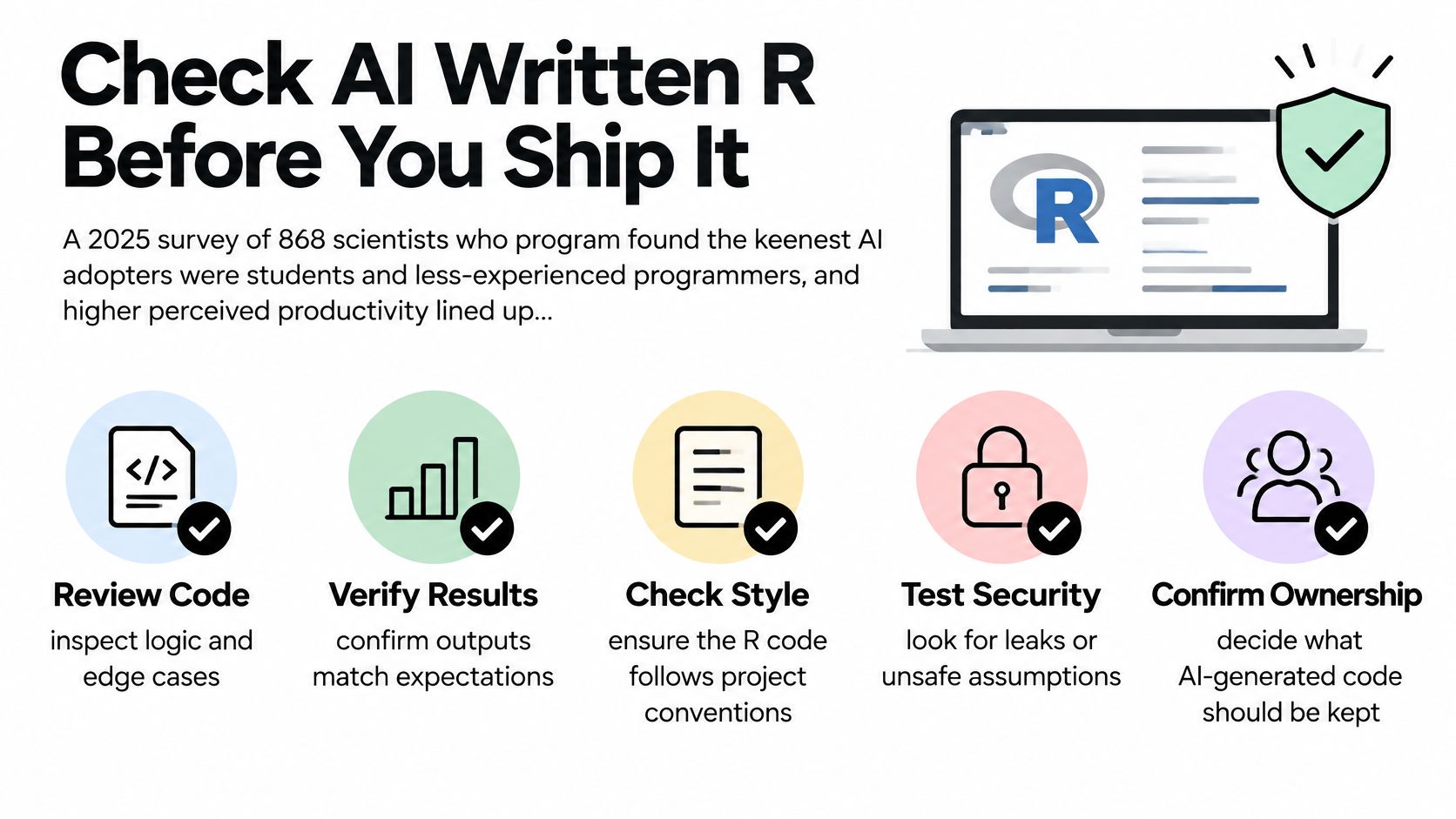
group_by() counts are hand-computed, a missing-value case, and a factor with a level absent at score time. If the code survives all three, it's earned some trust.set.seed() or the deep-learning seed helper, the split id, the metric, package versions, and one sentence on how missing data was treated.If you can't rerun it next month from the lockfile and the note, it's a demo, not an analysis.
For next reading, R-bloggers, the CRAN machine learning task view, and the tidymodels and torch docs beat random prompt threads. They're references, not substitutes. The tests you run on your own small example will catch more real bugs than any amount of confident documentation, because your data has its own weird factor levels and missing value habits that no tutorial anticipated.
Don't build a new stack. Pick one dataset you're allowed to share, one metric, and one row from the package table. Small and defensible beats ambitious and mysterious every time, especially when someone asks you in three months why the number changed.
Create a repo with a renv lockfile, a README that states the question in plain words, and a script that fails loudly if the metric or seed is missing. Pair it with the habits in a solid version control best practices guide so every change, human or machine drafted, leaves a trail you can follow.
If a language model helps draft the tidymodels steps or the httr2 call, keep the prompt, model name, and your edits in the project notes so future you can see what was machine-written. We built Zemith to work as that workspace around your R session. You can chat with your design notes and data dictionary in an AI library, draft the script in an AI-powered notepad, keep related material in a Media Collection, and switch AI models at any time, even in the middle of a chat, when the first one invents a function CRAN has never heard of.
Use that switch on purpose. Get a second draft, compare the two, then bring the candidate back into R and run your checks before anyone sees a chart. Keep the explanation, code, and sources together in one workspace instead of hopping between subscriptions for the write-up.
Tonight's action is boring and correct. One pinned project, one metric written down before the fit, and no row uploaded until you can say where it went.
Bring your next R project into Zemith, where you can chat with your data dictionary, draft and compare model code across different AI models in one conversation, and keep prompts, notes, and sources together while you test everything back in R. Start with one small, pinned analysis tonight and let the workspace hold the evidence while you hold the judgment.
Pay less than one AI subscription and get GPT, Claude, Gemini and more, plus 50+ AI tools.







Trusted by teams at






The top models, plus image, video and voice tools, in one plan.
Without Zemith
ChatGPT PlusUS$20.00Claude ProUS$20.00Google AI ProUS$19.99SuperGrokUS$30.00Perplexity ProUS$20.00 MidjourneyUS$10.00
 ElevenLabsUS$6.00Le Chat ProUS$14.99
 RunwayUS$15.00Kling StandardUS$8.80
 Gamma PlusUS$12.00
 Otter ProUS$16.99
 QuillBot PremiumUS$19.95
 Photoroom ProUS$12.99
 Quizlet PlusUS$7.99
Total if paying separatelyUS$234.70/mo
"I love the way multiple tools they integrated in one platform. Going in the right direction."
— simplyzubair
"The quality of data and sheer speed of responses is outstanding. I use this app every day."
— barefootmedicine
"The credit system is fair, models are perfect, and the discord is very responsive. Quite awesome."
— MarianZ
"Just works. Simple to use and great for working with documents. Money well spent."
— yerch82
"The organization of features is better than all the other sites — even better than ChatGPT."
— sumore
"It lives up to the all-in-one claim. All the necessary functions with a well-designed, easy UI."
— AlphaLeaf
"The team clearly puts their heart and soul into this platform. Really solid extra functionality."
— SlothMachine
"Updates made almost daily, feedback is incredibly fast. Just look at the changelogs — consistency."
— reu0691
Hand off the research, writing, design and follow-ups. Zemith picks the tools it needs and brings back finished work.
Search the web, run deep research, read files, create images and run code with GPT, Claude, Gemini, Grok and more.
Zemith keeps working in the cloud and pings you when it's done.
Notion, Linear, Canva, Airtable and more. It asks before it creates or changes anything.
Docs, slides, sheets and PDFs, ready to send.
Chain models and tools on a visual canvas, from one prompt to a finished promo video.
Briefings, reports and reminders run on a schedule and are ready when you need them.
Real-time voice that can see your camera or screen.
The best image and video models, in one studio.
Turn PDFs, links and YouTube videos into podcasts, quizzes, flashcards and mind maps.














 Podcast
 Quiz
Quiz Flashcards
 Mind map
 Infographic