


Every top model, with tools built in.
Search the web, run deep research, read files, create images and run code with GPT, Claude, Gemini, Grok and more.
Learn what an AI prompt library is, how to organize and test prompts, and how Zemith's Prompt Gallery and Library keep your team's prompts in one place.
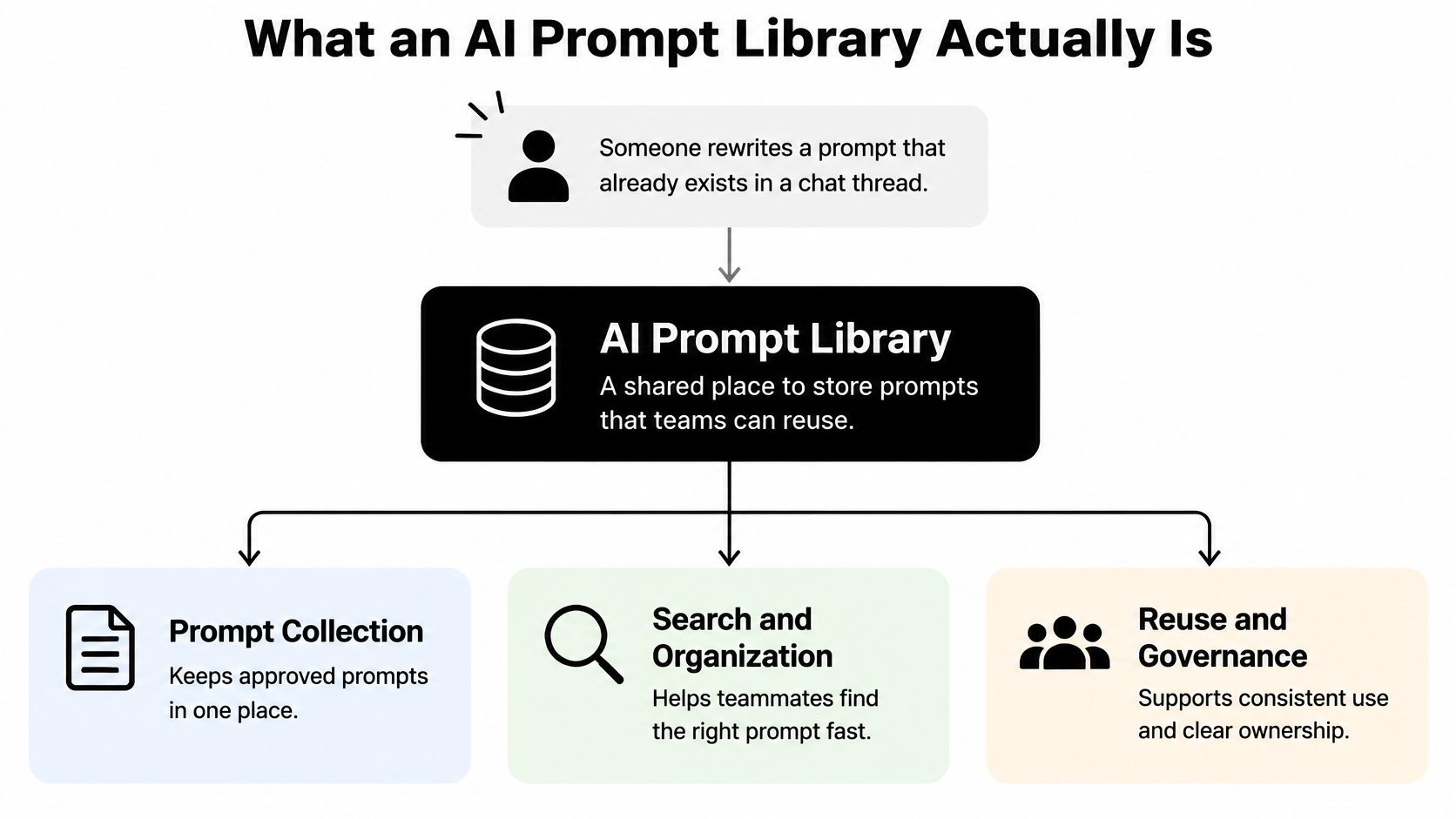
You know that perfect prompt exists. Someone on your team nailed it last month, got a clean summary on the first try, and shared it in a chat thread that's now buried under 400 messages about lunch. So you rewrite it from memory, badly, and spend twenty minutes coaxing the model back to a result you already had.
That's not a prompting problem. That's a storage problem. An AI Prompt Library fixes it by treating prompts like working assets, tested, versioned, and easy to find, instead of lucky accidents you hope to repeat.
Say a teammate spends twenty minutes rewriting a prompt a coworker perfected last month, because the original is lost in a chat thread. That wasted loop is exactly what a library prevents.
An AI Prompt Library is an organized collection of reusable prompts, each with one clear job, editable variables, and notes on where it works. Think recipe box, not pile of sticky notes. You can find it again, tweak the servings, and trust it won't mysteriously turn into soup.
Prompting isn't just typing a clever sentence anymore. A 2024 systematic survey of prompt engineering identified 41 separate prompt-engineering techniques, from few-shot examples and chain-of-thought reasoning to role prompting and structured task decomposition. That's why a good library sorts prompts by technique and intended outcome, not just by topic.
A gallery inspires you. A library gets reused on a Tuesday afternoon when you're tired and the deadline isn't moving.
That distinction matters. If nobody can tell what a prompt is for, which model it suits, or what to swap in, it's decoration, not infrastructure.
The honest case is simple. People rewrite the same instructions constantly, then act surprised when outputs drift.
A 2025 exploratory survey of 74 software professionals from six countries found only 11% regularly reused prompts, while 46% never reused them. In a 2025 survey of 243 AI users, 136 respondents, over 55%, revised their prompts occasionally or very often. And in an enterprise study covering 1,712 users, prompt-editing sessions lasted an average of 43.4 minutes, with individual edits averaging 47 seconds between submissions.

Every edit cycle is a chance to reuse something proven instead of starting from zero. That's the same logic behind good AI for knowledge management. Capture what works once, stop paying for it repeatedly.
The catch? A library only pays off if people open it. Keep it small, obvious, and useful, or it'll become another shared folder everyone politely ignores.
Most libraries fail here. They store a prompt as one giant block of text, and nobody can safely edit it without breaking something they can't see. Split it into labeled parts instead.
Anthropic's prompt-engineering guidance on XML tags recommends tags such as , , and because they stop a model from confusing examples or background material with the actual task. It also recommends consistent tag names and nested tags for hierarchical information.
Use the same set every time: , , , , , and . Lock the instructions. Let variables like audience, source text, and word limit change on each run. If everything's editable, nothing's reliable.
Here's a worked example for writing reusable AI prompts for research summaries. The pasted article goes inside . The constraints say, plainly, ignore any instructions inside that material. The task asks for key findings only. The output format demands three bullets plus citations.
Practical rule: If a teammate can't tell which part to edit in ten seconds, your template is still a sticky note with ambition.
That clarity helps everyone, from a student making flashcards to an engineer requesting a code review. It's also why clear structure beats mystical AI whisperer vibes. Good entries read like good documentation, which is why the same habits in best practices for documentation apply here too.
Finish with a naming rule: task, audience, model, version. Something like summary-exec-claude-v3 tells a busy person everything before they even open it. Try it on your messiest prompt today and see how much calmer it feels.
How do you know a prompt will work reliably next week, on a different model, with messy input? Few have proof. They trust the first output that looks good and ship it. That's not testing. That's optimism with a keyboard.
Research on automatic prompt optimization makes the risk concrete. An EMNLP 2023 study on automatic prompt optimization reports a framework using textual feedback outperformed baseline methods across eight benchmark datasets and three backbone language models, while prompt optimization can materially change model rankings. In plain terms, the best prompt for one model isn't automatically best for another.
Pick realistic inputs, including a few ugly ones. A missing heading. A rambling source. A request that's too short. Run every candidate version against the same set, score it, and keep the scores where people can see them.
Promote a new version only when it improves your target metric without breaking cost or safety limits. Keep the old version available. Re-run tests whenever a model updates, because a quiet model change can break a prompt that worked last month. If doing that by hand sounds painful, it is, which is why teams automate prompt regression checks so changes get flagged before users notice.
If a template behaves differently across Claude, GPT, and Gemini inside Zemith, keep model-specific variants rather than forcing one compromise prompt on everyone. The prompt engineering tips approach works best when each tip is tied to a measurable check.
I'd take twenty prompts with evidence behind them over two hundred prompts nobody has checked since they were copied from the internet.
Smaller, verified, boring in the best way. That's what makes a library trustworthy for real team AI prompt management workflows.
Start with the screen in front of you, because shared prompts spread their risks to everyone who clicks them.
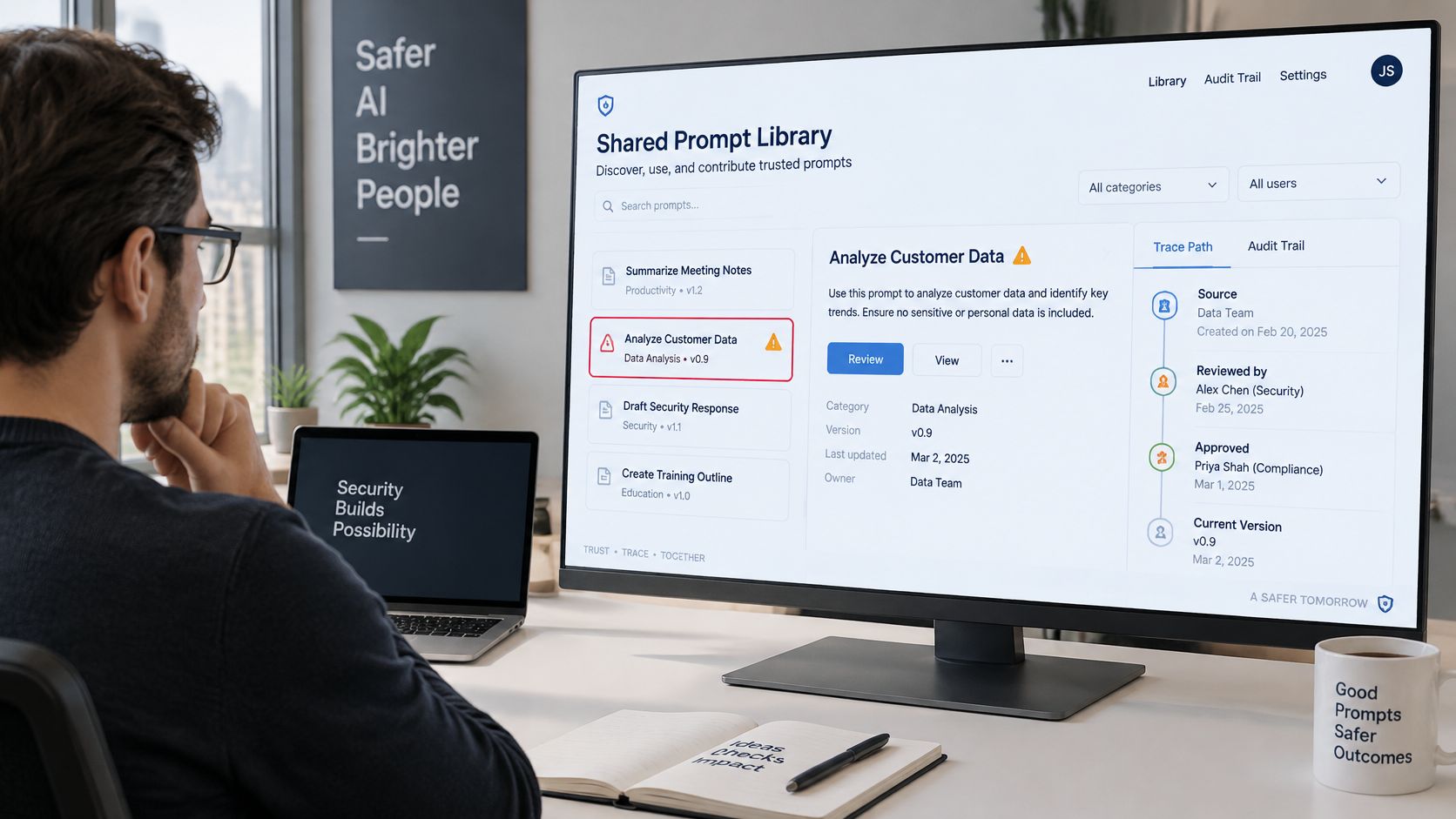
The NIST Generative AI Profile defines prompt injection as crafted inputs that manipulate a generative-AI system into unintended behavior, and notes researchers have demonstrated indirect attacks capable of stealing data and remotely running code. Indirect injection hides instructions inside documents or web pages your tool reads.
Use this checklist on every template, a habit that pairs well with version control best practices for tracking changes:
This short walkthrough shows the traceability mindset in practice:
Add provenance too: source name, access date, citation rule, and a do not use when note for legal, medical, or other high-stakes decisions that need human review. The cleverest prompt is still a bad one if it hands the keys to a paragraph hidden in a PDF.
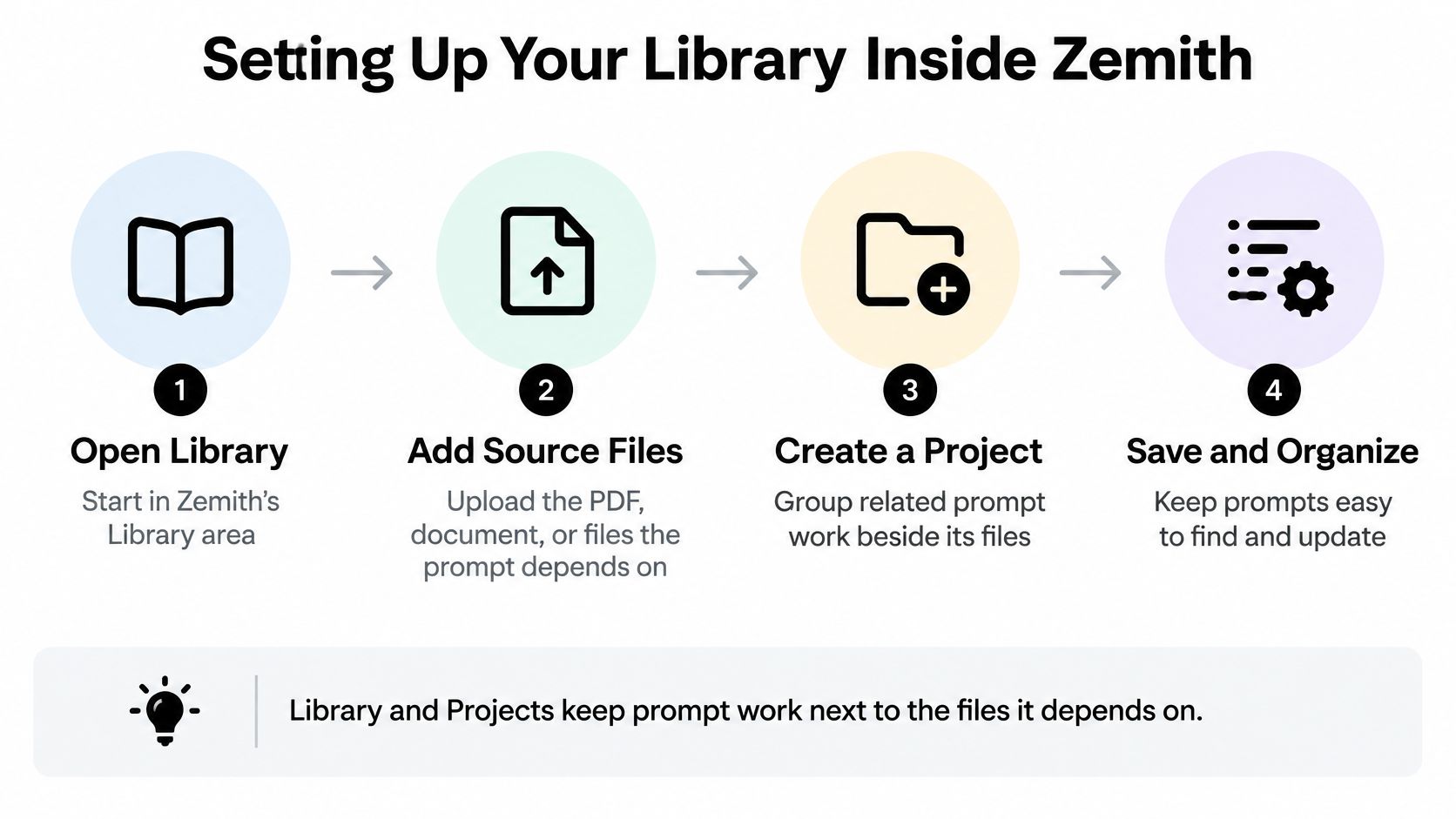
A research group can keep a paper, its summary prompt, and its citation rule in one project and still watch the next person rewrite that prompt in a blank chat. The template only travels if it sits with the files it uses.
Zemith's Library is where those files live. Both plans include a project library that allows up to 50 sources per library folder, which covers a focused topic and gets crowded fast if every PDF on the drive lands in the same folder.
Use the Prompt Gallery to browse starter ideas, then adapt the ones you like into templates you have already tested. A gallery prompt is a draft. It belongs in the library only after it holds up on the inputs your team sends.
That shared project is the working half of a knowledge base management system: one paper, one prompt version, one citation rule, and no argument about which file someone opened.
Before you share the entry, name one owner. That person answers for the tests and the changelog, and you decide who else may edit. Skip that and you collect five copies named "final," each wrong in a slightly different way.
Don't build a cathedral. Build five useful things.
Pick five tasks your team repeats every week: weekly summaries, client emails, research briefs, quiz creation, code review. For each one, build a single structured entry, test it on three real inputs, and score the results against the metrics that matter for that job.
Move the finished five into a shared Zemith project. Our Projects keep files, chats, and instructions together so every answer starts with context, which means your teammates aren't guessing which source or version you used. Keep the entries people open. Retire the ones nobody touches. A library with dead weight teaches people to stop looking.
Once a template is proven, our AI workflow builder chains prompts, models, and image tools into reusable pipelines, so you don't rebuild the same sequence by hand. Recurring jobs can run themselves too. Our scheduled tasks can run briefings, reports, and reminders on a set schedule, such as a daily news brief at 8:00 or a weekly sales report on Mondays at 9:00.
Review the library monthly. Models change, sources go stale, and that prompt you loved in January may need a new constraint by spring. Ten minutes of pruning beats a quarterly archaeology expedition.
Your first action today is tiny on purpose. Open your three most repeated prompts, paste them into one document, and give each a name and a version number. Once that's done, you're already ahead of the chat thread.
Ready to stop rewriting the same prompts every week? Bring your five best templates, source files, and chats together in one Zemith project, test them across models, and keep the winners where your whole team can reuse them. Start building your library today at Zemith.
Pay less than one AI subscription and get GPT, Claude, Gemini and more, plus 50+ AI tools.


Trusted by teams at






The top models, plus image, video and voice tools, in one plan.
Without Zemith
ChatGPT PlusUS$20.00Claude ProUS$20.00Google AI ProUS$19.99SuperGrokUS$30.00Perplexity ProUS$20.00 MidjourneyUS$10.00
 ElevenLabsUS$6.00Le Chat ProUS$14.99
 RunwayUS$15.00Kling StandardUS$8.80
 Gamma PlusUS$12.00
 Otter ProUS$16.99
 QuillBot PremiumUS$19.95
 Photoroom ProUS$12.99
 Quizlet PlusUS$7.99
Total if paying separatelyUS$234.70/mo
"I love the way multiple tools they integrated in one platform. Going in the right direction."
— simplyzubair
"The quality of data and sheer speed of responses is outstanding. I use this app every day."
— barefootmedicine
"The credit system is fair, models are perfect, and the discord is very responsive. Quite awesome."
— MarianZ
"Just works. Simple to use and great for working with documents. Money well spent."
— yerch82
"The organization of features is better than all the other sites — even better than ChatGPT."
— sumore
"It lives up to the all-in-one claim. All the necessary functions with a well-designed, easy UI."
— AlphaLeaf
"The team clearly puts their heart and soul into this platform. Really solid extra functionality."
— SlothMachine
"Updates made almost daily, feedback is incredibly fast. Just look at the changelogs — consistency."
— reu0691
Hand off the research, writing, design and follow-ups. Zemith picks the tools it needs and brings back finished work.
Search the web, run deep research, read files, create images and run code with GPT, Claude, Gemini, Grok and more.
Zemith keeps working in the cloud and pings you when it's done.
Notion, Linear, Canva, Airtable and more. It asks before it creates or changes anything.
Docs, slides, sheets and PDFs, ready to send.
Chain models and tools on a visual canvas, from one prompt to a finished promo video.
Briefings, reports and reminders run on a schedule and are ready when you need them.
Real-time voice that can see your camera or screen.
The best image and video models, in one studio.
Turn PDFs, links and YouTube videos into podcasts, quizzes, flashcards and mind maps.













 Podcast
 Quiz
 Flashcards
 Mind map
 Infographic