You're trying to decide whether a new research tool is worth paying for. An AI answer gives you a tidy comparison, but the feature that matters most might come from an old review. Traditional search gives you the vendor's documentation, a pricing page, and enough open tabs to qualify as a minor renovation project.
The useful question in AI search vs traditional search isn't which one wins. It's which one gets you to a defensible answer with the least total work, including the checking you'll have to do afterward.
AI Search vs Traditional Search at a Glance
AI search gives you a synthesized response. Traditional search gives you ranked pages to judge yourself. For that software purchase, start by deciding whether you need help understanding the options or evidence that a specific feature exists. AI answers save time when the question is messy. Conventional results earn their keep when the decision needs traces you can inspect.
AI search vs traditional search on the criteria that matter
Those click differences describe Google summaries, not every conversational search tool. Treat the pattern as a prompt to check the original page when the answer affects a purchase, a citation, or a decision someone else will question.
Read the scorecard as a starting point
The speed row describes a typical interaction, not a service guarantee. An immediate explanation can be useful for learning a concept, while finding the exact document may be faster with a targeted conventional query. The hidden cost sits after the answer: a clean summary can make weak sourcing look tidy, so the faster response only wins if checking it stays cheap.
The two modes also don't necessarily consult the same material. A 2026 empirical benchmark found AI Overviews appeared for 51.5% of representative queries, with average source-set Jaccard similarity below 0.2 compared with conventional results. That's a low overlap score, so don't assume an AI response summarizes the links you'd otherwise see.
For a tool-level comparison, our guide to Perplexity vs Claude helps separate search-oriented work from other kinds of AI assistance.
Practical rule: Use AI search to understand a question, and traditional search to confirm it.
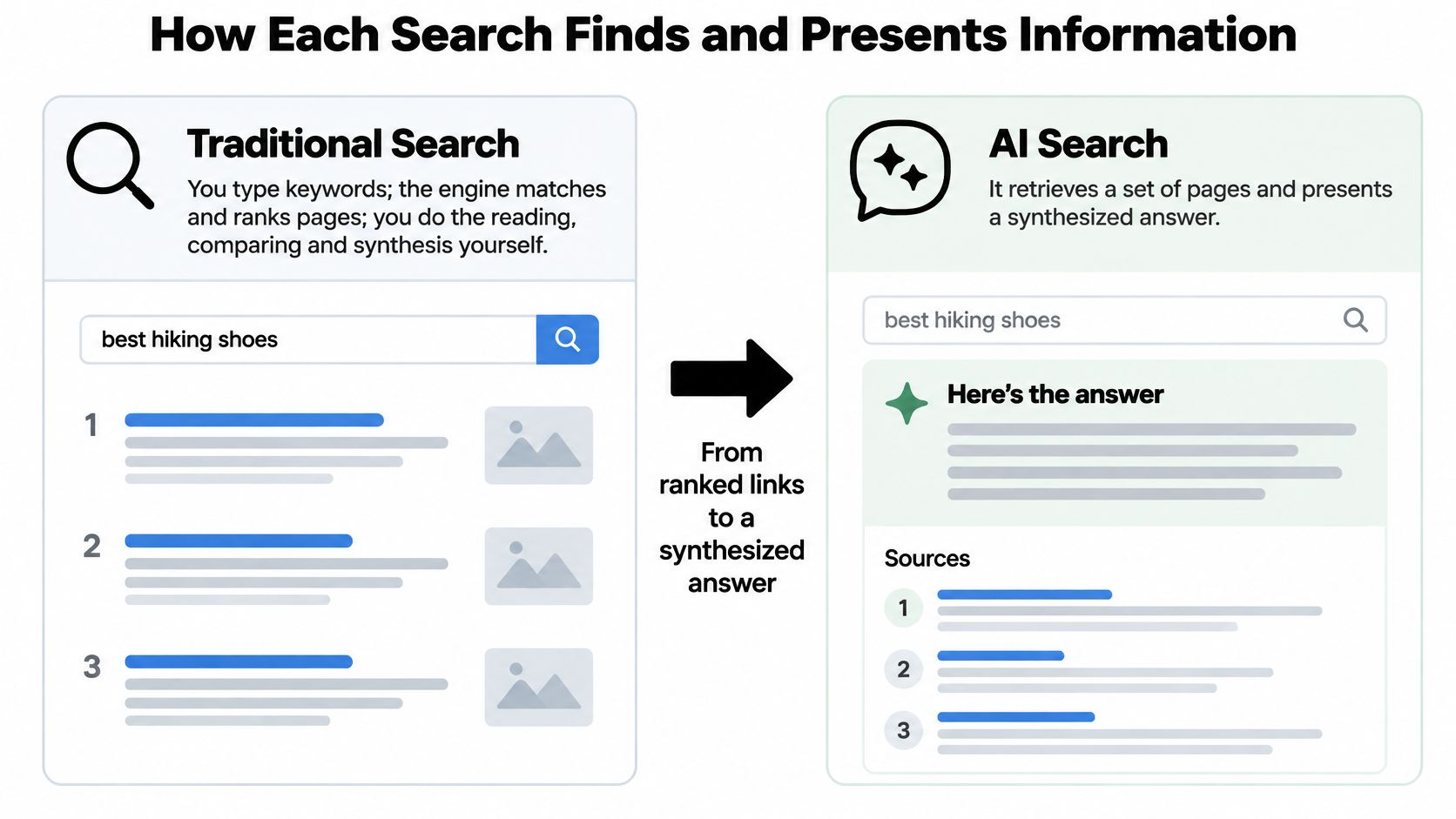
How Each Search Finds and Presents Information
Traditional search starts with a query. The engine matches and ranks pages, then presents snippets to help you decide what to open. You're responsible for reading the pages, comparing their claims, and writing your own conclusion.
AI search adds a writing stage. A web-connected tool retrieves material and generates a combined response, often attaching citations. Not every AI chat response includes live retrieval, so check whether web search was used before treating an answer as current.
The difference is easier to see side by side.
Follow the path from query to conclusion
Say you're searching for the best note apps for researchers. Traditional search presents vendor pages, reviews, academic workflows, and discussion threads. You decide whether offline access, citation export, or PDF annotation deserves the most weight.
AI search might instead produce a shortlist with pros and cons. That's convenient, but the tool has already made editorial choices about which products to include, which sources to trust, and what counts as a disadvantage.
Think of the process as retrieve, rank, summarize. A weak answer can come from missing documents, poor source selection, or a summary that misreads otherwise useful evidence. Asking for smoother prose won't fix missing evidence.
Our explanation of semantic search vs keyword search helps clarify why concept-based queries and exact terminology can surface different material.
Keep interpretation separate from evidence
For academic work, finding relevant material isn't the same as establishing a position. Thesis Book Project's guide to building an argument from your reading is useful when you need to move beyond summaries and explain how sources support, qualify, or contradict your argument.
Use the accompanying video as another way to explore the distinction between search modes.
Before accepting any generated answer, ask: Where did this claim come from, and could I locate the supporting passage quickly without AI? If the second task feels unexpectedly difficult, the answer isn't ready to carry much weight.
Speed, Clicks and Where Your Traffic Goes
An answer can arrive before you have finished forming the follow-up question. A researcher might ask for the difference between two search modes, skim the response, and move on. That feels fast. The hidden cost starts when the decision depends on the passage behind the summary.
In a 2025 study of 1,526 U.S. participants, ChatGPT users reached correct answers faster than Google users, but relied significantly less on primary web sources. That is the practical trade-off: faster completion can come with less contact with the evidence.
For an everyday explanation, that may be fine. For a research memo, purchase recommendation, or published article, skipping the original page can mean missing qualifications that change your conclusion. A product limitation may apply to an older version. A recommendation may rest on one narrow use case. The page you did not open often holds the detail that decides whether the answer travels.
Key click-through numbers from recent studies
These studies measure different things. Pew examined browsing behavior, Ahrefs compared top-ranking-page click-through rates, and Seer tracked query performance over time. Do not combine them into a universal traffic-loss forecast. Use them as separate signals when deciding where AI search fits in the workflow and where traditional results still need a click.
Researchers lose context, publishers lose visits
For researchers, the practical problem is context you never knew to request. A summary might accurately repeat a software limitation while omitting that it applies only to a retired version. Opening the documentation gives you a chance to notice the version selector. It also lets you see neighboring details the answer never mentioned, such as setup requirements or exceptions.
For publishers, visibility isn't the same as a visit. Treat search impressions, AI mentions, referral traffic, and useful reader actions as separate measures. A cited page can contribute to someone's answer without bringing that person onto your website. That may still have value, but it will not look like a normal session in analytics.
If you publish comparison content, give readers a reason to open the original: a reproducible test, a downloadable worksheet, a detailed methodology, or screenshots that answer a real implementation question. Another generic definition won't add much. Put the useful artifact where the summary cannot absorb it.
Recognize queries that invite summaries
Pew's analysis of query characteristics found AI summaries were more likely for longer searches and questions than for short, simple queries.
- Use full questions for exploration. Ask how competing approaches differ when you need an explanation.
- Use exact terms for retrieval. Search a document title, error message, or named specification when you need the original.
- Write for real decisions. Answer complete questions with evidence and clear limitations, rather than stretching a keyword into a page.
The workflow distinction is simple. AI search is useful for shaping the question and getting a first map. Traditional search is where you recover the source trail, inspect the wording, and collect the page that can carry the claim later. If speed matters now but attribution will matter later, save the pages you skimmed. Your future self shouldn't have to reconstruct a source trail from a half-remembered sentence.
Accuracy and How Hard an AI Answer Is to Check
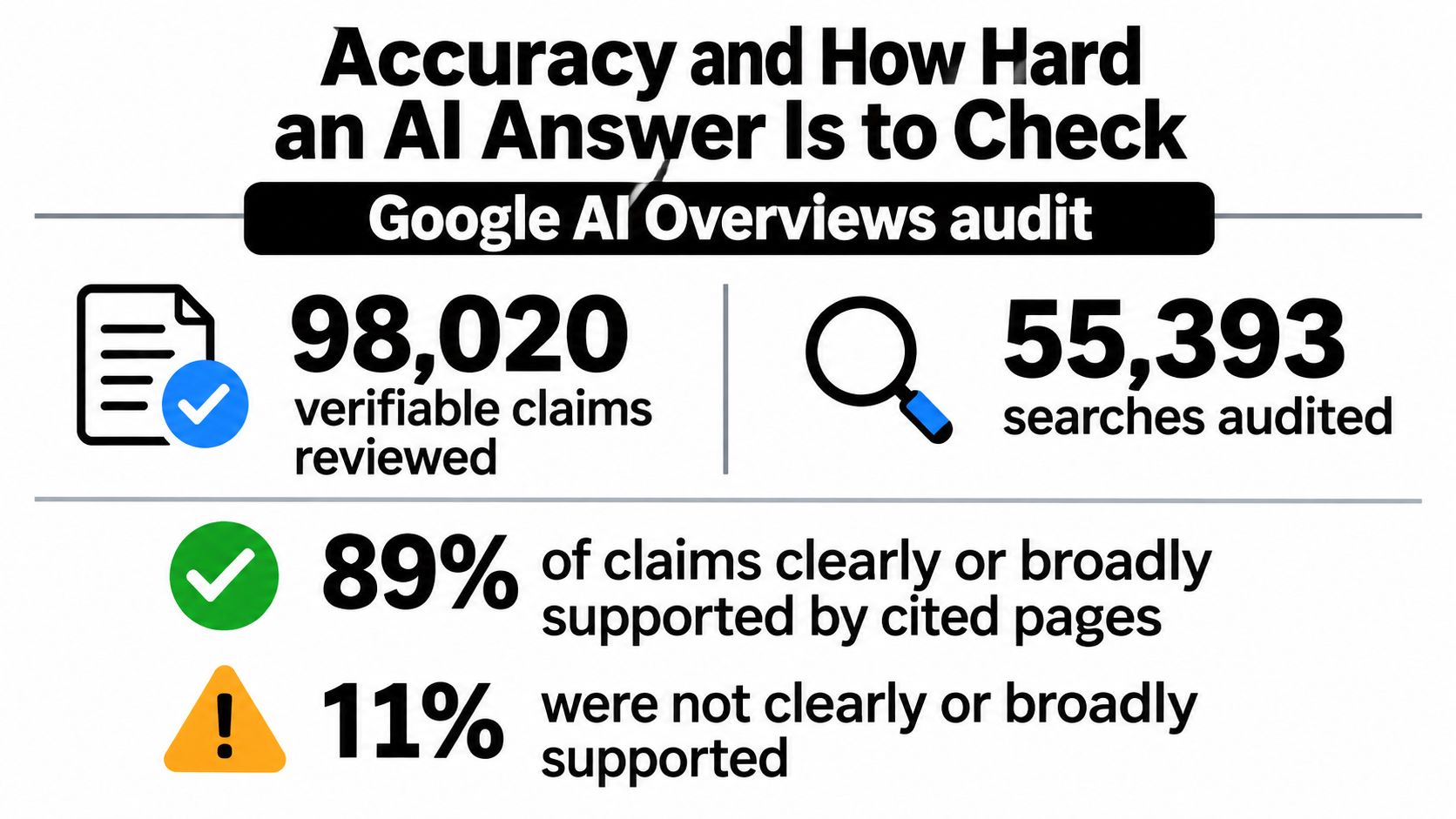
An independent audit of Google AI Overviews examined 98,020 verifiable claims from 55,393 searches: approximately 89% were clearly or broadly supported by cited pages, 11% were unsupported or contradicted, and only 41.9% of complete overviews had every verifiable claim supported.
That distinction matters. A mostly supported answer can still contain the unsupported detail you use to make a decision.
The audit's claim-level findings are summarized below.
A citation isn't proof of support
The Tow Center's evaluation of eight generative search tools found a common tendency to cite the wrong news article. A visible citation therefore isn't enough. You have to establish that the linked page supports the particular claim beside it.
The difficult errors aren't always spectacular fabrications. They can be small shifts: a recommendation presented as a requirement, an association described as a cause, or a feature attributed to the wrong plan.
Polished wording makes those mistakes easy to overlook. Confidence is a writing style, not a verification method.
Check the claims that determine your decision
Use this checklist before promoting an AI answer into a report, recommendation, or implementation plan.
- Find the exact passage behind each number, date, or name. Open the cited page and locate the supporting text. A relevant title isn't sufficient.
- Confirm that the source says what the summary claims. Check the subject, conditions, units, and scope. Watch for caveats that disappeared during compression.
- Check recency and applicability. Look at publication dates, update notes, software versions, and the jurisdiction or population involved.
- Look for missing context or a counterpoint. Search beyond the cited material when the conclusion sounds unusually clean or absolute.
- Route high-risk claims to a qualified human reviewer. Medical, legal, financial, and technical-specification decisions deserve more than a plausible paragraph.
Our guide to fact-checking AI can help turn those checks into a repeatable review habit.
Traditional search doesn't make webpages correct. Its advantage here is a clearer separation between what the document says and what you conclude from it. You still have to evaluate the author, evidence, and relevance, but you aren't also untangling an additional generated synthesis.
Measure time to a verified answer, not time to the first confident paragraph.
Say an instant answer takes twenty minutes to audit. That hypothetical workflow isn't faster than a careful search that gets you directly to usable evidence, even if the first screen looked more impressive.
Which Search Fits Your Task
Where to start for common search tasks
Treat the table as a routing guide, not a guarantee. For local information, use the official listing or business website, and confirm directly if a closure would derail your trip.
Start with the kind of evidence you need
A graduate student working through a hypothetical set of twelve papers can ask AI to map recurring themes and disagreements. Then they should open the papers for exact quotations, methods, and limitations. For educators, turning checked notes into flashcards or an outline is a useful downstream task, not a replacement for reading.
A developer debugging an API error should search the exact error text and official documentation first. Once the relevant version and endpoint are clear, AI can explain the response or help compare the documented behavior with the code. Don't let a fluent explanation introduce a parameter the API doesn't support.
For a software comparison, collect feature notes from official documentation and current plan pages before requesting a comparison matrix. Record unknowns explicitly rather than letting AI fill empty cells with confident guesses.
Switch when the job changes
A writer researching a trend can start with AI to generate possible angles. Switch to traditional search for the publication dates, original announcements, and figures that will appear in the finished piece.
A marketer checking competitors' claims should reverse that order. Find the original product pages first, preserve the wording, then ask AI to compare coverage, positioning, and omissions. Our guide to deep search offers another way to approach questions that need more than a quick response.
For sensitive claims, gather authoritative documents and send the proposed conclusion to an appropriately qualified reviewer. AI can organize the questions you need answered without making the final call.
Zemith's Projects fit the source-first workflow: you can add PDFs, documents, websites, and YouTube videos to a project and ask questions about them. That's useful when you've already chosen your evidence and want help connecting it, rather than asking an open-ended search to choose everything for you.
Keep unsupported points labeled as unresolved. An honest blank in your comparison is more useful than a fabricated feature with excellent formatting.
Build Your Hybrid Search Workflow Today
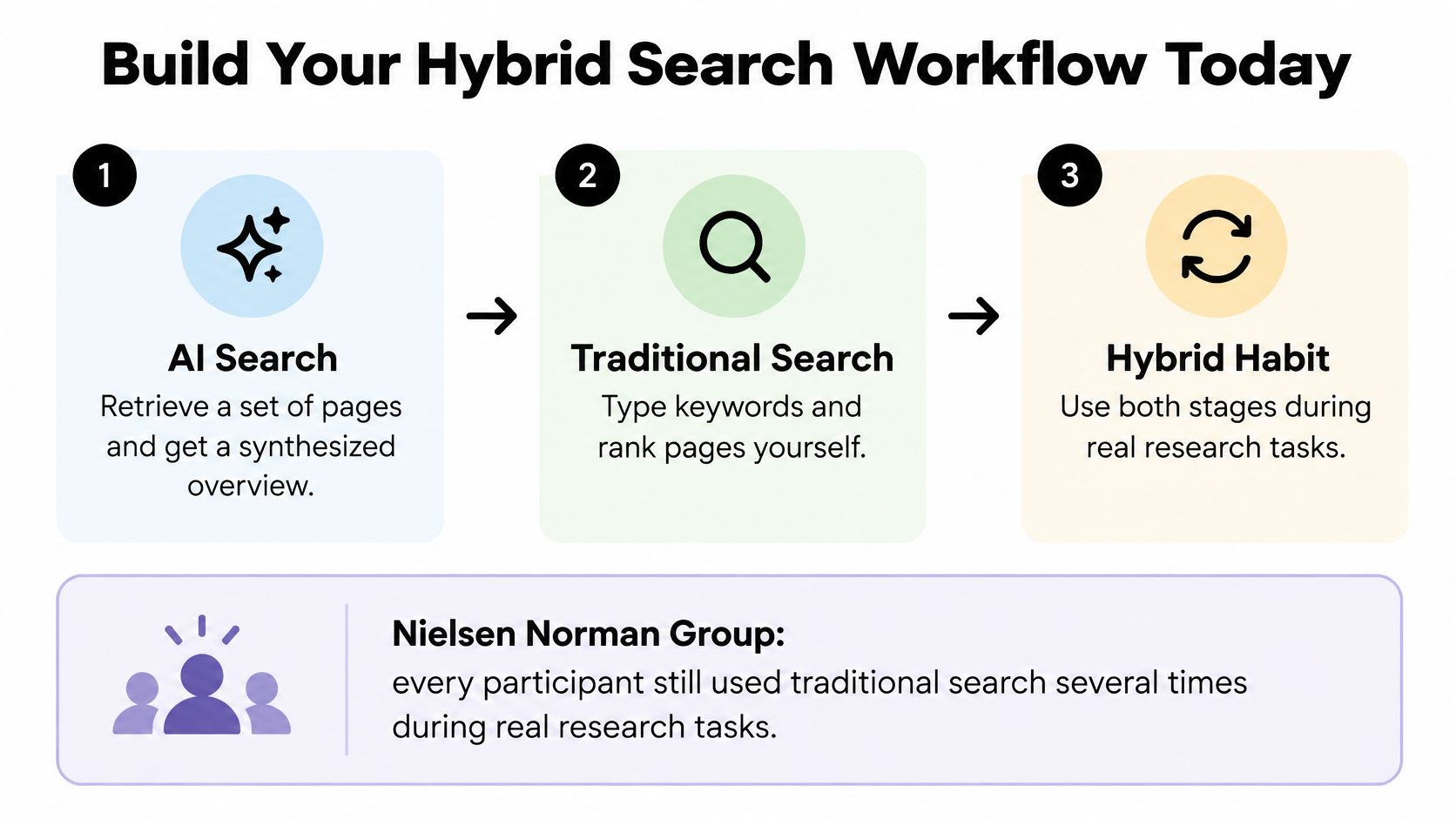
In Nielsen Norman Group's qualitative study of real research tasks, every participant still used traditional search multiple times, including entering keywords, evaluating results pages, and visiting content pages. The practical opportunity isn't abandoning one interface. It's making the handoff deliberate.
Before opening a search box, ask yourself:
- Do I need the exact source or the shape of the topic? A named document calls for retrieval; an unfamiliar subject may need an initial map.
- Would a wrong detail cost me something? Consider money, implementation time, health, legal exposure, or credibility.
- Will I need to show where this came from? If someone else must review your conclusion, preserve the evidence from the start.
An exact-source need plus a yes to either risk or attribution means start with traditional search. A new topic that needs a map is a reasonable place to begin with AI, provided you reserve time for verification.
The combined workflow looks like this.
Build the evidence before polishing the answer
Frame the question with AI search. Describe the decision, constraints, and intended audience. Ask for useful terminology, subquestions, and competing explanations, because unfamiliar vocabulary can make a conventional search unnecessarily difficult. The common slip is accepting the initial framing without asking what it leaves out.
Pull a working set of primary sources through traditional search. Aim for five to eight sources as a practical starting range, not a completeness standard. Search the subquestions separately and favor original studies, official documentation, release notes, or direct announcements. Don't stop at the first relevant page or collect several articles that all repeat the same original claim.
Open and skim each source. Note the author or issuing organization, publication date, relevant section, and reason for including it. Check whether you have the original document or somebody else's interpretation. The easy mistake is saving a promising title without checking whether the page answers your question.
These steps create a bounded evidence set. That boundary matters because you can then tell the AI what it should use, what it should ignore, and where it should admit uncertainty.
For example, when comparing research software, keep vendor documentation separate from independent usability commentary. Both may be useful, but they answer different questions and shouldn't substitute for each other.
Synthesize with an audit trail
Ask AI to summarize across your selected sources. Request a source and supporting passage for each important conclusion, plus an explicit list of disagreements and gaps. Specify that unsupported statements should remain unresolved. The common slip is trusting the output because you recognize the document names.
Spot-check every number, quotation, and date against the original. Also check claims that would change your recommendation, even when they contain no numbers. Keep interpretation labeled as interpretation. Don't spend all your review time checking harmless background facts while leaving the decisive assumption untouched.
Save sources and notes together in a project. Keep the question, selected documents, useful passages, unresolved issues, and final conclusion together. Preserve the wording of your query and the model used when reproducibility matters. A clean final answer without its supporting trail is difficult for a colleague to review or for you to update.
Our guide on how to use AI for research can help you adapt that sequence to longer assignments.
In our workspace, FocusOS keeps chats, notes, and whiteboards open side by side, so you can switch between them without losing your place. You can select the model that suits the task or keep the default models and settings. Choosing a different model can help with a particular task, but it doesn't remove the need to check evidence.
Tools such as PDF utilities, AI notes, translation, rewriting, slides, and YouTube-to-blog conversion are most useful after you've established what the source material supports. Keep the checked notes intact before transforming them into a presentation or article.
Useful stopping point: Finish when the evidence supports the decision you need to make, not when the answer sounds comprehensive.
This week, run one real question both ways. Log the total time, what you verified, what remained uncertain, and where the answers disagreed. Include the checking time, otherwise you're comparing a draft with a finished result.
Zemith brings web search, deep research, file chat, and organized project context into one workspace, so you can move from exploration to source-based synthesis without scattering your notes. Visit Zemith, create a project for that real question, and keep your evidence beside the answer you're building.













 MidjourneyUS$10.00
 ElevenLabsUS$6.00
 RunwayUS$15.00
 Gamma PlusUS$12.00
 Otter ProUS$16.99
 QuillBot PremiumUS$19.95
 Photoroom ProUS$12.99
 Quizlet PlusUS$7.99














 Podcast
 Quiz
 Flashcards
 Mind map
 Infographic