The most popular advice about a blog post generator is also the least useful: type a topic, request 2,000 words, and publish whatever appears. That workflow produces plenty of text, but text volume isn't the same as authority, usefulness, or search visibility. A generator should remove drafting friction, not remove editorial judgment.
Blogging has grown into a mass publishing channel. Estimates for 2025 placed the number of blogs worldwide above 600 million, roughly one-third of the approximately 1.9 billion websites on the internet, while 77% of internet users reportedly read blogs (MediaValet's digital marketing statistics). That audience creates a real opportunity, but it also makes generic content easy to ignore.
The practical answer is a staged workflow: research first, outline second, draft in controlled sections, edit for readers, verify every material claim, and approve the result manually. Zemith fits that operating model by bringing research, documents, multiple AI models, rewriting, and project context into one workspace instead of scattering the work across tabs like a detective board made of browser windows.
Why Raw AI Output Fails the Modern Web
A blog post generator isn't a magic “publish” button. It predicts plausible language, which means it can produce a confident sentence without having retrieved or verified the fact behind it. Google explains that generative models predict likely word sequences rather than function as factual databases, so generated content can contain hallucinations and needs human review (Google's guidance on AI-generated content).
That matters because raw output usually fails in predictable ways:
- Unsupported claims: Statistics appear without a traceable source.
- Synthetic expertise: The article sounds informed but contains no firsthand observation, original example, or meaningful judgment.
- Search-shaped prose: Every paragraph repeats the keyword while answering nobody's real question.
- Editorial mush: Transitions multiply, caveats disappear, and the conclusion says what the introduction already said.
Readers notice the last problem quickly. A fluent article can still feel empty when it offers familiar summaries instead of decisions, evidence, or practical detail. The fix isn't a longer prompt. It's separating tasks that require different kinds of judgment.
Practical rule: Use AI as a research and drafting collaborator, not as an unattended publishing system.
A sustainable process defines the audience and search intent, gathers evidence, builds an outline, drafts one section at a time, and runs separate checks for factuality, originality, readability, and SEO. Human approval remains the final gate. Google also warns that producing many pages without adding user value may qualify as scaled-content abuse, regardless of whether the pages were created by AI, humans, or both (Google's scaled-content-abuse policy).
For a detailed operating habit, keep a separate fact-checking pass rather than asking the writing model to grade its own homework. The workflow described in fact-checking AI content is useful because verification needs explicit evidence, not just a reassuring “looks good” from the same system that generated the draft.
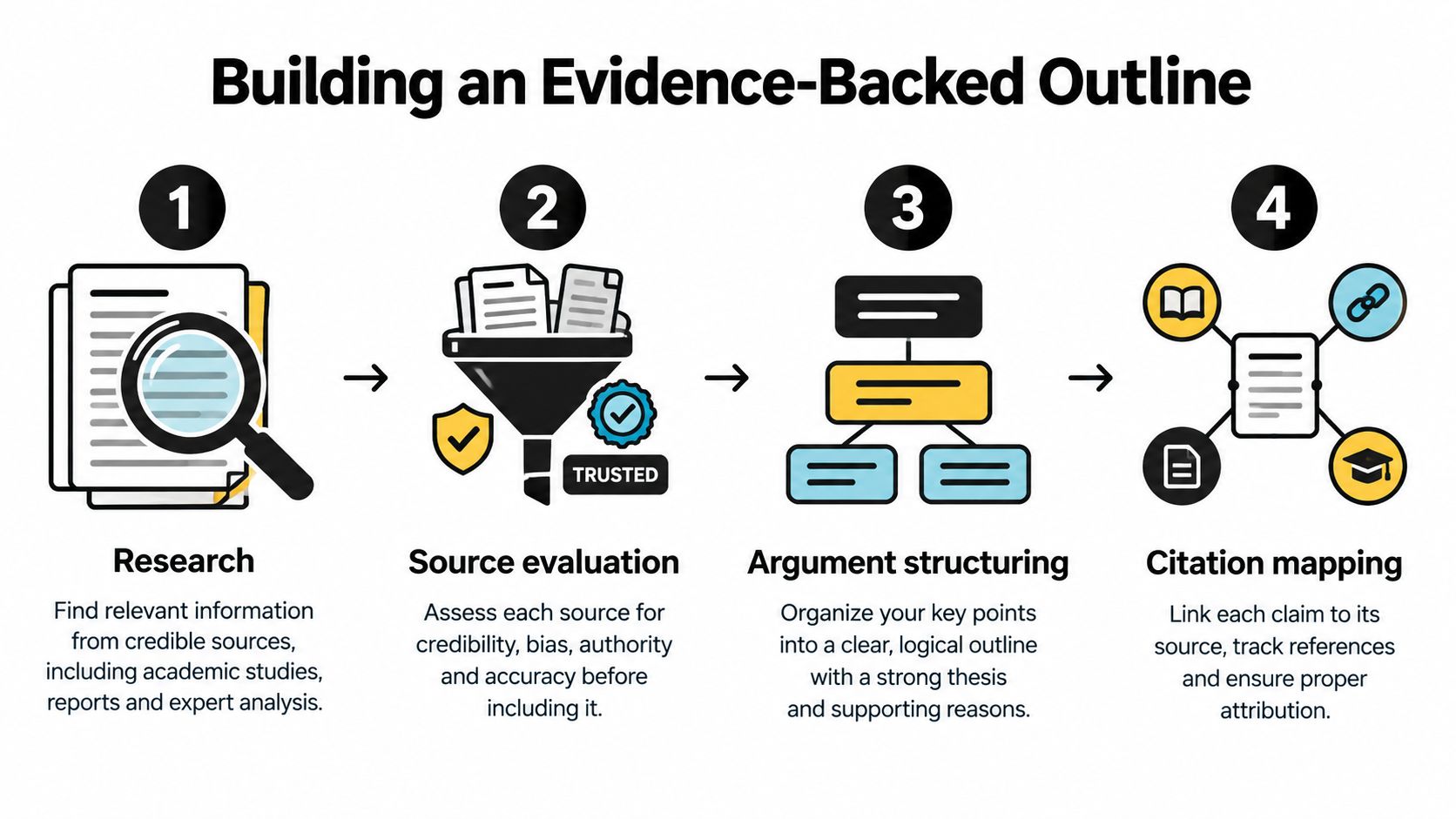
Building an Evidence-Backed Outline
Good blog posts start before the first paragraph. Begin with one reader, one problem, one search intent, and one original angle. “Blog post generator” is a broad topic, for example, but “how to use a blog post generator without publishing hallucinated SEO content” gives the article a sharper audience and a more useful promise.
Use deep research to collect sources before asking for prose. The research prompt should force the system to distinguish evidence from interpretation:
Research prompt: “Research [topic] for [audience]. Find primary sources, official documentation, original studies, and credible industry sources. For every factual claim, provide the exact URL, publication date where available, the supporting passage, and a confidence note. Do not create statistics. If evidence is unavailable, mark the claim as unverified.”
Then ask for a gap analysis:
“Review the leading pages for [keyword]. Identify what each page covers, what it fails to explain, which questions remain unanswered, and what original contribution this article can make. Separate observations from recommendations. Do not assume that repeated claims are verified.”
This approach prevents a common research mistake: treating ten copied summaries as ten independent sources. It also gives the writer a defensible reason for choosing an angle. For readers interested in using evidence to strengthen professional content, build LinkedIn authority with data offers a relevant resource on turning research into credibility rather than decorative statistics.
Map claims before paragraphs
Create the outline as a claim map, not a list of attractive headings. Each section should answer a defined reader question and identify the evidence it needs.
A useful outline prompt is:
“Create an outline with H2 and H3 headings for [audience]. For each section, include the reader question, the central claim, required evidence, a practical example, and one opportunity for original analysis. Flag any claim that needs primary-source verification. Do not draft full paragraphs yet.”
That last sentence matters. Drafting too early encourages the model to fill gaps with plausible fluff. Research and outline review give you a checkpoint where missing evidence is visible, affordable to fix, and not buried under polished prose. A document-focused workflow such as AI for literature review follows the same principle, source material first, synthesis second.
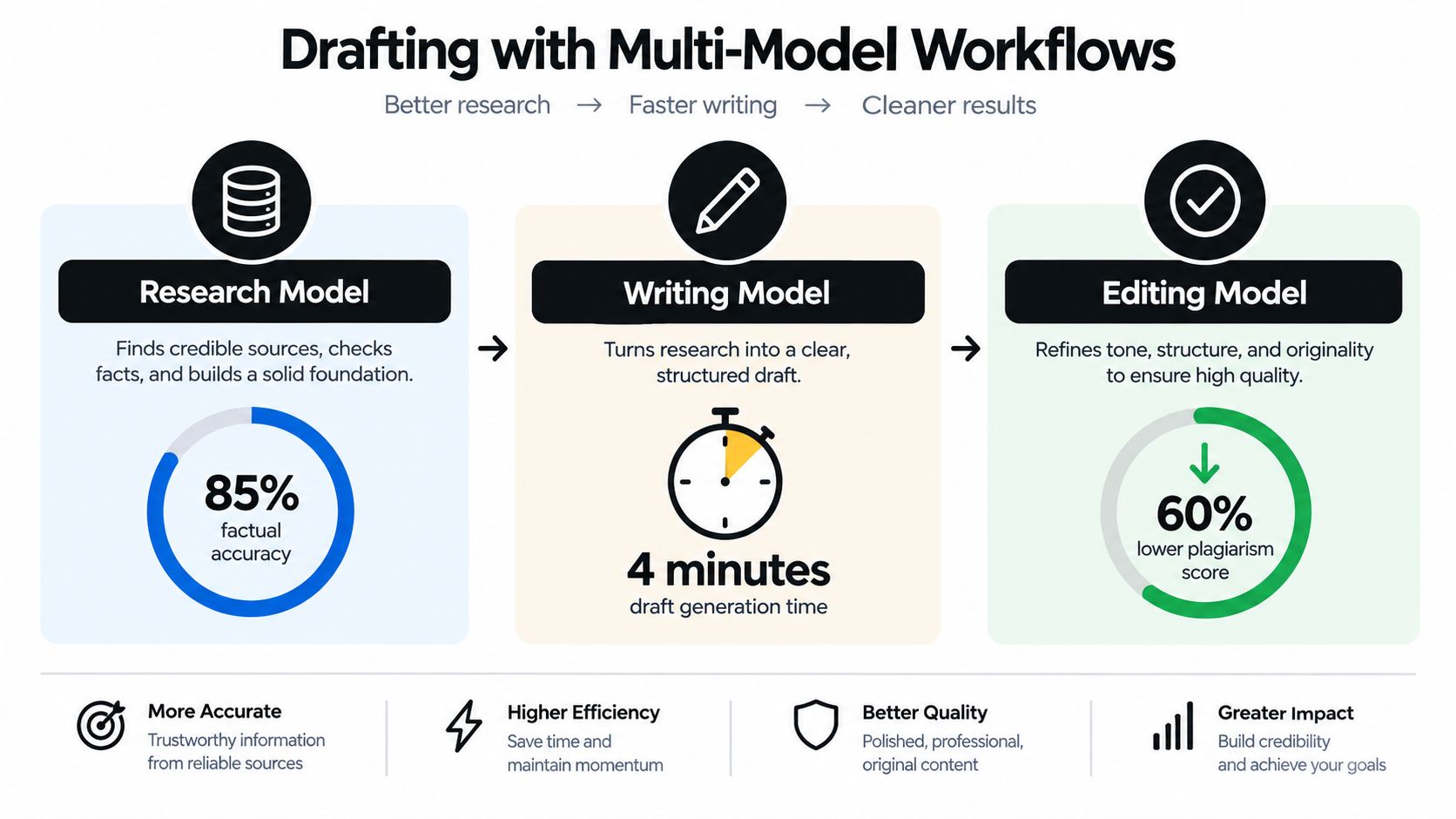
Drafting with Multi-Model Workflows
Treating every AI model as the same text factory wastes the main advantage of a unified workspace. Different models and tools can handle different jobs, and the human editor can decide when to switch instead of forcing one system to research, entertain, explain, and police itself.
Assign each model a job
A reasoning-oriented model is better suited to technical distinctions, source comparison, and outlining an argument with dependencies. A creative writing model can generate alternative openings, analogies, examples, and less predictable phrasing. An editing model can then challenge ambiguity, repetition, unsupported certainty, and awkward structure.
The workflow looks like this:
- Research model: Extract claims from supplied documents and web sources. Ask it to preserve citations and identify conflicts.
- Reasoning model: Turn the verified material into an argument. Require it to label assumptions and explain why each section belongs.
- Writing model: Draft from the approved outline and evidence packet. Instruct it not to introduce facts absent from the source set.
- Editing model: Shorten sentences, remove repetition, test headings, and flag claims that still lack provenance.
- Human editor: Add firsthand knowledge, approve wording, resolve uncertainty, and decide whether the post deserves publication.
The Smart Notepad is useful at the handoff points. Store the approved angle, audience description, source notes, prohibited claims, brand voice examples, and outline there. Feed the writer only the context needed for the current section. That reduces the chance that a long conversation loses the original brief halfway through, a phenomenon familiar to anyone who's watched a model begin with “for senior engineers” and end with kindergarten metaphors.
Use a drafting prompt with firm boundaries:
“Write only the section titled [heading]. Use the approved claims below and cite each factual statement with its assigned source. Add no statistics, examples, product features, or named entities that aren't in the evidence packet. Use a direct, conversational tone. End with a practical action, not a generic summary.”
A separate creative prompt can improve the opening without contaminating the research:
“Generate three introductions for this verified argument. Each should name the reader's problem, avoid unsupported claims, and use a different rhetorical approach. Do not add new facts.”
For teams comparing approaches to brand-aware AI writing, this guide to automated branded content with Claude provides useful context. The broader principle is simple: model choice matters less than assigning a clear responsibility to each model and preserving the evidence between stages.
A unified workspace such as a multi-model AI platform can make those transitions easier by keeping research, documents, prompts, and revisions together. It doesn't eliminate review. It makes review less chaotic.
Editing for Scanability and Reader Retention
A correct article can still fail if readers can't find their way through it. Nielsen Norman Group found that 79% of test users scanned new pages, while only 16% read word for word. Its usability measurements reported a 47% improvement for a scannable version, 58% for a concise version, and 124% when concise, scannable, and objective writing were combined (Nielsen Norman Group's web-writing research).
Those figures are usability benchmarks, not promises about rankings or conversions. They do establish a sensible editing target: help a busy reader understand the page before asking for deep attention.
Run a compression pass
First, ask the editor to find repetition rather than beautify it:
“Shorten this draft without removing qualifications, citations, or necessary context. Flag repeated ideas, vague transitions, filler phrases, and sentences that make claims without evidence. Preserve the author's meaning and return a list of material changes.”
Then format for scanning:
- Lead with the answer: Put the practical conclusion near the start of each section.
- Use descriptive headings: A heading should tell readers what they'll learn, not merely label a topic.
- Keep paragraphs focused: Give each paragraph one job.
- Convert sequences into lists: Procedures, comparisons, and criteria are easier to inspect as bullets or tables.
- Cut machine habits: Remove repeated phrases such as “in today's digital landscape” and predictable conclusion language.
A useful second prompt is:
“Rewrite this section for a reader scanning on a phone. Keep the evidence and caveats. Replace dense passages with bullets only when the information is genuinely list-shaped. Vary sentence openings and retain the author's specific point of view.”
Don't ask the system to make everything shorter. Excessive compression can remove uncertainty, conditions, and source context, turning a careful statement into false certainty. The editor's task is to reduce friction while protecting meaning.
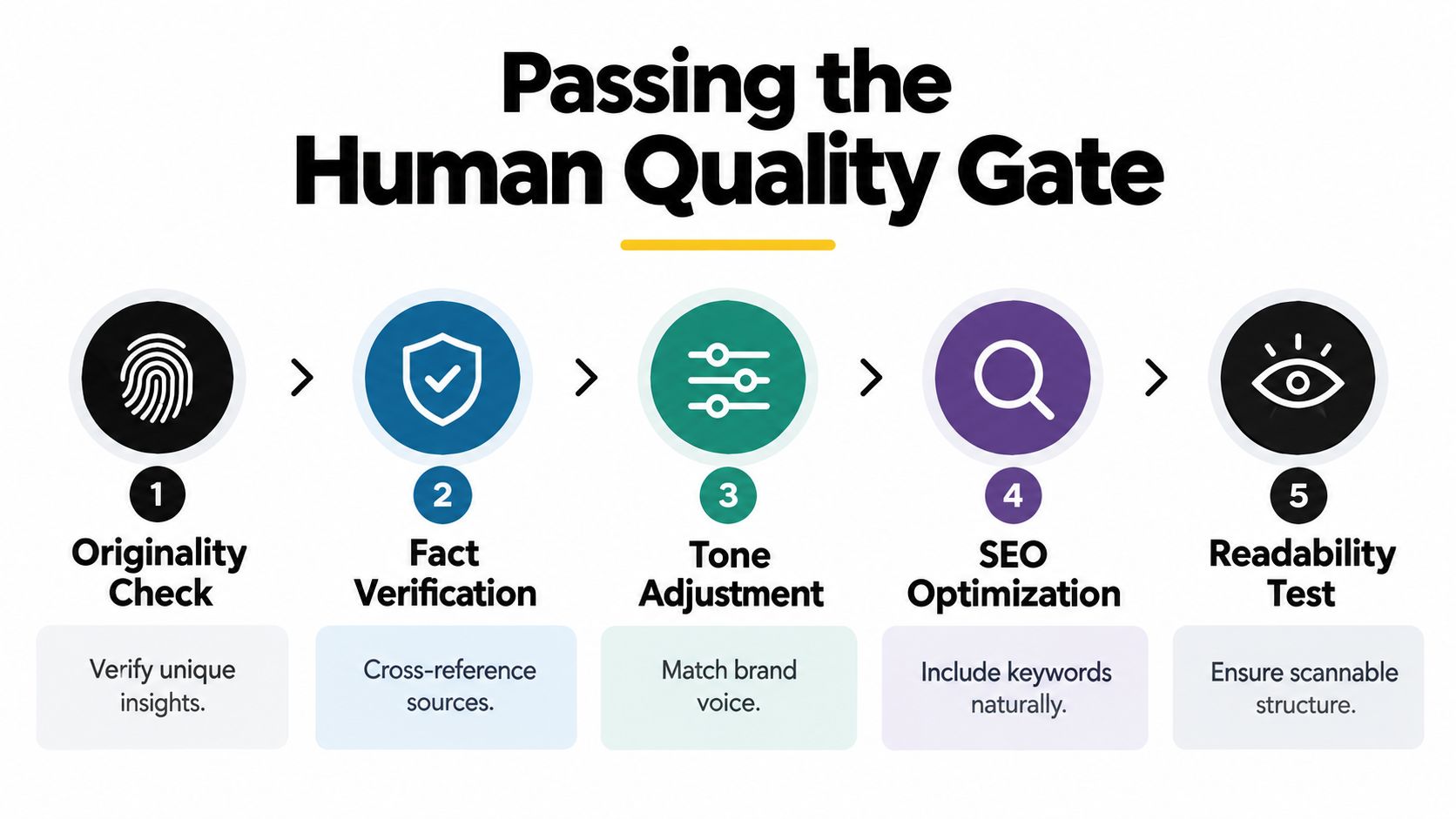
Passing the Human Quality Gate
Search systems don't need you to hide the use of AI. They need the finished page to help a real audience. Google's people-first guidance asks whether a site has a clear audience and purpose, demonstrates firsthand expertise, gives readers enough knowledge to achieve their goal, and leaves them satisfied (Google's helpful-content guidance).
That standard makes human review more than a grammar check. The reviewer must decide whether the article says anything worth publishing. A polished summary of competing pages may be accurate and still contribute nothing new.
Use a hard approval checklist
Originality comes first. Ask what the article adds that a reader couldn't get from the first page of search results. That contribution might be a tested process, an internal example, a technical explanation, a useful comparison, or a clear opinion supported by evidence.
Verification comes next. Open every source behind a material statistic, product claim, technical detail, date, or attributed statement. If the source doesn't support the wording, change the wording or remove the claim. Never allow an AI-generated citation to pass because the URL looks respectable.
Then review the reader experience:
- Voice: Does the language sound like the brand and the named author?
- Intent: Does the article answer the question implied by the search?
- Specificity: Could a competitor publish the same paragraph without changing a word?
- Structure: Can a scanner find the answer, evidence, and next action?
- Metadata: Do the title, description, slug, image alt text, and structured data accurately represent the page?
Editorial gate: If the reviewer can't explain the article's original contribution in one sentence, the draft isn't ready.
Keep the evidence packet, voice guidance, reviewer notes, and approved revisions in the same project workspace. A practical guide to using AI for writing can help teams formalize the division between machine assistance and human responsibility. The final decision should belong to a person who understands the audience and is accountable for the published claim.
Your Repeatable Content Production Checklist
Use this sequence for the next post, regardless of which writing model you choose:
- Brief the article: Define one audience, problem, search intent, angle, and desired action.
- Research the evidence: Gather primary sources and record the passage supporting each material claim.
- Approve the outline: Map questions, claims, sources, examples, and original analysis before drafting.
- Draft in sections: Give the model only the relevant evidence packet and section instructions.
- Review the language: Use rewriting and sentence-shortening tools to remove repetition without deleting caveats.
- Run the quality gate: Check originality, factuality, voice, intent, readability, internal links, metadata, and alt text.
- Publish selectively: Merge overlapping drafts, reject thin pages, and publish only when the article adds user value.
For teams that need a documented operating procedure, this content creation workflow provides a useful framework for turning research, drafting, review, and publishing into repeatable work. The advantage isn't producing the most pages. It's making each page easier to trust, easier to read, and more useful than the generic alternative.
Zemith brings deep research, document assistance, multi-model drafting, Smart Notepad editing, and content workflows into one workspace for teams building evidence-backed blog posts. Visit Zemith to organize your next topic from source collection through human review, without turning your browser into a maze of disconnected AI tools.













 MidjourneyUS$10.00
 ElevenLabsUS$6.00
 RunwayUS$15.00
 Gamma PlusUS$12.00
 Otter ProUS$16.99
 QuillBot PremiumUS$19.95
 Photoroom ProUS$12.99
 Quizlet PlusUS$7.99














 Podcast
 Quiz
 Flashcards
 Mind map
 Infographic