


Every top model, with tools built in.
Search the web, run deep research, read files, create images and run code with GPT, Claude, Gemini, Grok and more.
Want to know how to choose an LLM without the guesswork? Match your use case, weigh cost per answer and latency, then test on your own prompts.
A new model tops a public chart, and the upgrade button starts to look tempting. The demo feels sharp. The price seems fine until you factor in a thousand support drafts, a pile of invoices, or a coding assistant that rewrites the same function three times. That Tuesday-afternoon excitement can turn into a budget meeting nobody wanted.
Choose an LLM by how well it handles your actual prompts, what each accepted answer costs, and whether response times and reliability hold up in production. Leaderboard rank and price per token leave out retries, human fixes, and the delays users feel.
The usual trap is picking the model that won last month's exam, then discovering it is too slow and too pricey for the daily grind. Hype is a terrible hiring manager. The right model is the one that finishes your job, not the one that looks impressive in someone else's spreadsheet.
Most choices collapse into four questions. What task is this? How many times will it run this week? How fast must the answer show up? What data is allowed to leave the building? Answer those before you compare brands. A coding bot and a bulk extractor can both be "good" and still be the wrong roommate for each other.
Customer-support drafts live or die on tone and facts you can trace. Start with a smaller model and a strict style prompt, because volume will punish a fancy default.
Coding and debugging should be scored on tests that pass and rewrites you don't have to do. Feed it bugs from your repo, not a toy function from a blog.
Research synthesis needs citations that exist. Start with a stronger model and a check that every claim points at a source you opened.
Document extraction is a volume sport. A cheap model plus schema validation beats a prestige model that occasionally invents a total.
Summaries and rewrites are about following the brief and finishing quickly. A small, fast model is the sane first try.
Multi-step automation fails in the handoff, not the paragraph. Start with solid tool use and a fallback when a call comes back empty.
Practical rule: Write down the two jobs you run every week and the single metric each one must hit. Everything after this has a target.
Six checks carry the decision, and each one needs a number. Feelings are how teams end up married to a demo.
Accuracy is the pass rate on your own holdout set, with false positives and false negatives kept apart. A strong average can hide a rotten corner, like one document type or one customer segment that always gets the wrong answer.
Latency is the wait people remember. Track time to first token, time per output token, and both p95 and p99. An average that looks calm can still strand one unlucky user.
Cost is total spend per accepted answer, retries and review time included. A cheap token rate that needs three tries is not cheap. The next section does the math.
Safety is whether refusals, bias checks, and resistance to prompt injection stay steady when two prompts are almost the same. Inconsistent refusal is a production bug, not a personality quirk.
Fine-tuning only wins if a tuned model beats good prompting plus retrieval on your data, and if you can keep that tune current. A huge jump on twelve examples is a party trick.
Deployment covers data terms, region, rate limits, and how painful it is to leave. If legal cannot sign the retention clause, the benchmark does not matter. Context limits belong in that same conversation, and a look at how context windows actually behave will stop you from assuming "bigger window" means "reads the whole file."
Scale is the quiet seventh habit. A 2024 benchmarking study found that Llama 3 8B reached 95.8% of the BoolQ score of Llama 3 70B while using only 11.75% of its memory. The biggest model is often a luxury, not a requirement.
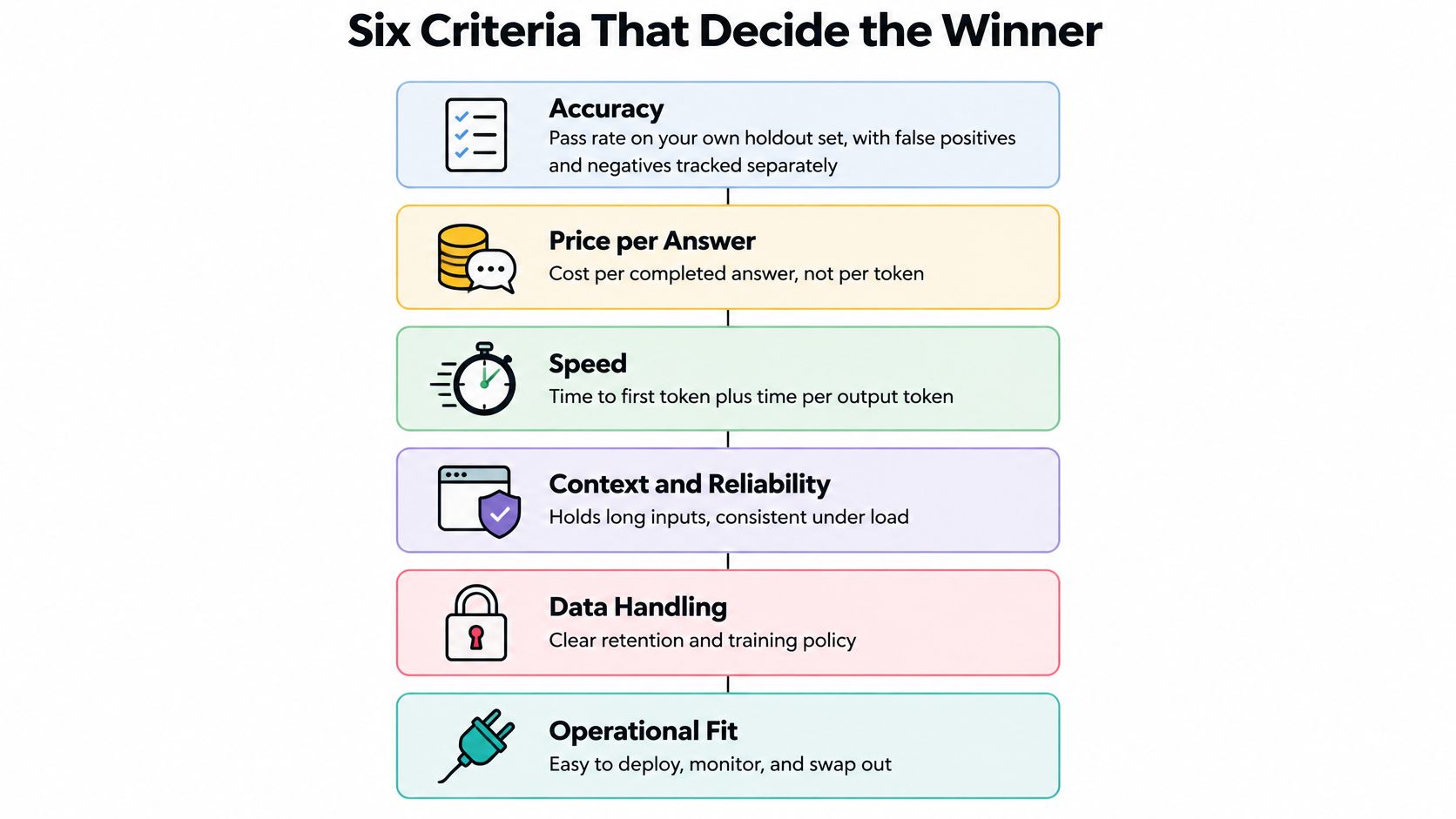
I would pick the three criteria that would hurt most if they failed, and score those first. For a support inbox that might be cost, tone, and refusal consistency. For an internal coding tool it might be test-pass rate, tail latency, and how easy it is to swap the provider later.
Inference got dramatically cheaper, which is exactly why you should still check the bill. Stanford's 2025 AI Index reports that the cost of inference for a model matching GPT-3.5's MMLU score of 64.8 fell from $20 per million tokens in November 2022 to $0.07 per million tokens by October 2024, a reduction of more than 280 times. The same report found that models scoring above 50% on the harder GPQA benchmark dropped from $15 per million tokens in May 2024 to $0.12 by December 2024.
That collapse does not mean the cheapest line on a pricing page wins. The number that ranks models is cost per accepted answer: total workflow cost divided by outputs that clear your quality bar.
What goes in the total:
Say a cheap model fails often enough that a person spends ten minutes repairing each miss. A pricier model that passes on the first try can be the cheaper coworker. Long system prompts and fat retrieved contexts tax every single call, so trimming the prompt is often the easiest saving you will find. If you are wiring this into a product, using AI inside an app is where those extra calls hide.
A more capable model earns its rate only when fewer failures pay the difference back. Complex coding and legal-style reasoning are the usual cases. Tagging, classifying, and routine summaries rarely need the prestige badge.
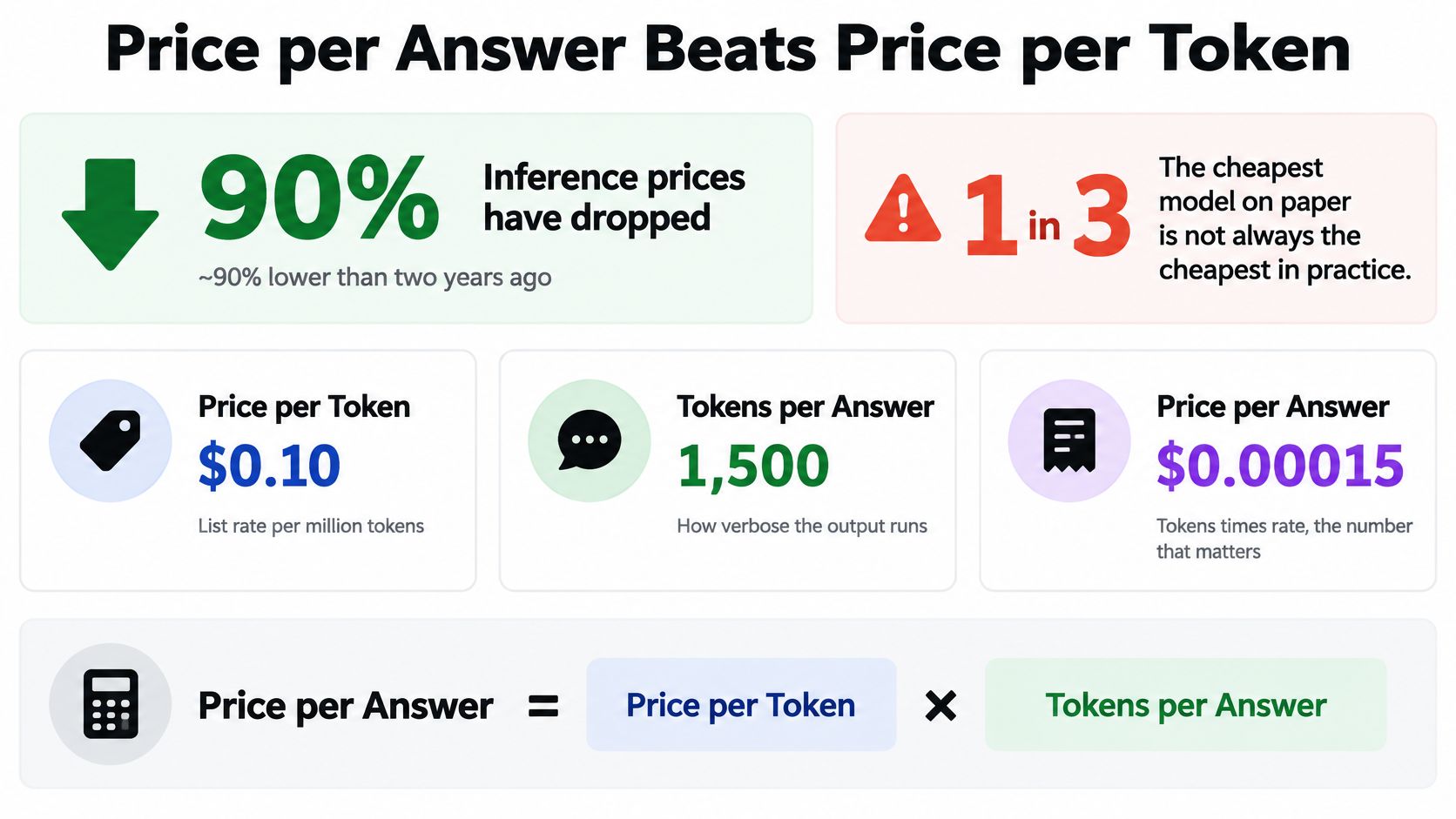
Run this on your own numbers before you argue about brands. Count the calls, the pass rate, the retries, and the review minutes for each candidate. Divide total spend by answers you would ship. The winner is allowed to have a higher token price.
Accuracy that arrives after the user has tabbed away is a failed feature. Time to first token is the pause before any text appears. Time per output token is how fast the words keep coming once they start.
MLCommons set a useful reference in one MLPerf Inference v5.0 language-model scenario. The 99th-percentile targets were a time to first token of 450 milliseconds and a time per output token of 40 milliseconds, about 25 tokens per second. You do not have to hit those exact marks. You do have to measure the same tail, not the happy middle.
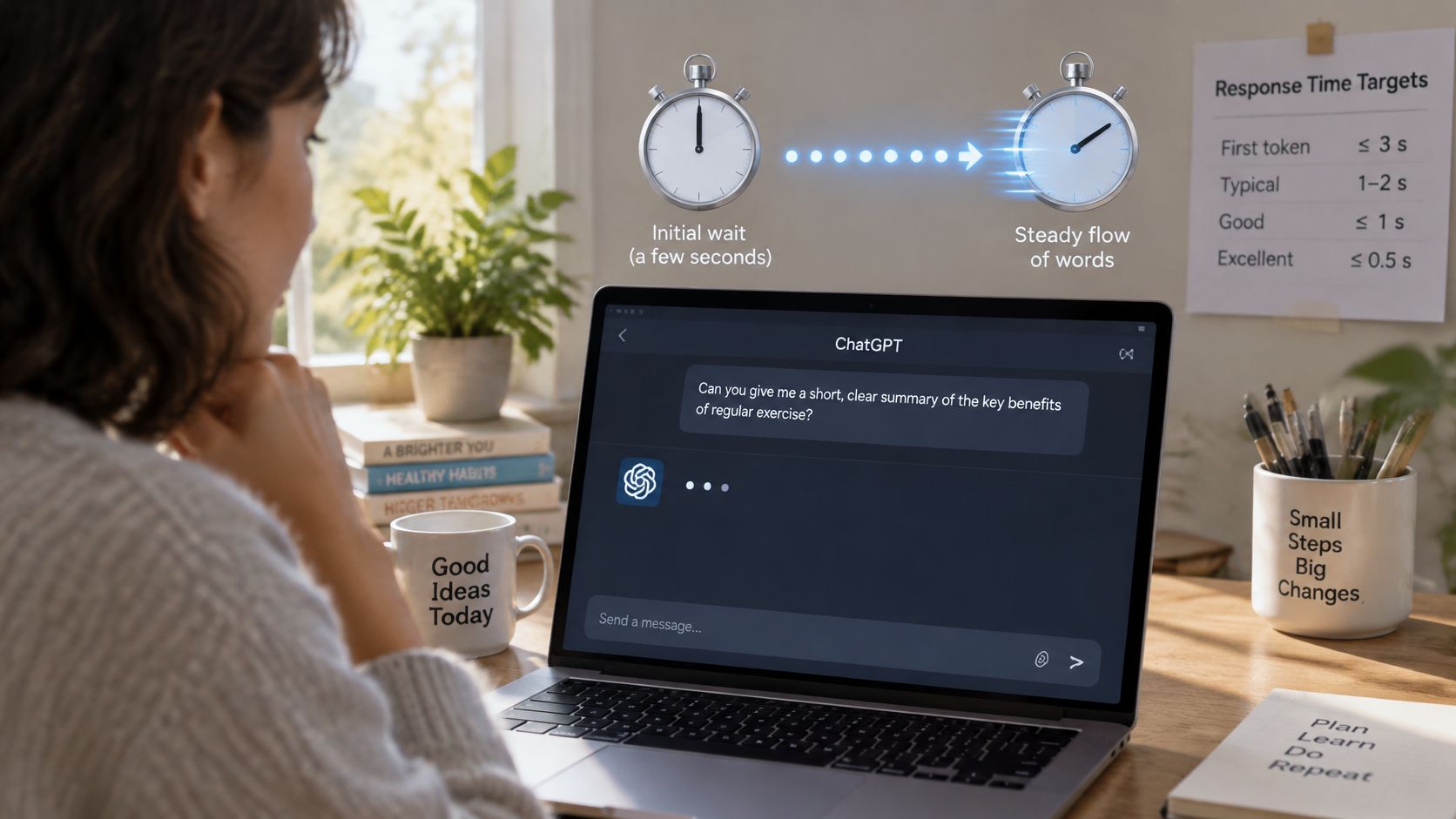
Averages lie in a friendly way. If one request in a hundred crawls, the assistant feels broken even while the dashboard stays green. People remember the slow one. They do not remember your mean.
Test prompts that look like Tuesday. Long contracts, messy scans, half-written bug reports. Skip the cheerful demo prompt that has never met a real user.
Interactive chat needs a fast first token. People forgive a slightly plain answer more than a spinning cursor. Overnight batch work, like extracting a thousand invoices, cares about cost and throughput. A slower first token is fine if the pile finishes before morning.
Streaming hides some of the wait because text starts moving. It does not fix a slow tail. The ugly requests are still ugly.
Write one latency target per workflow before you test. Chat under a few seconds to first useful text. Batch under a set number of minutes for the whole run. If a candidate misses that line on your real prompts, it is out, no matter how clever the sample answer looked.
A fair test is a short recipe, not a research lab. Lock the rules so the model is the only thing that changes.
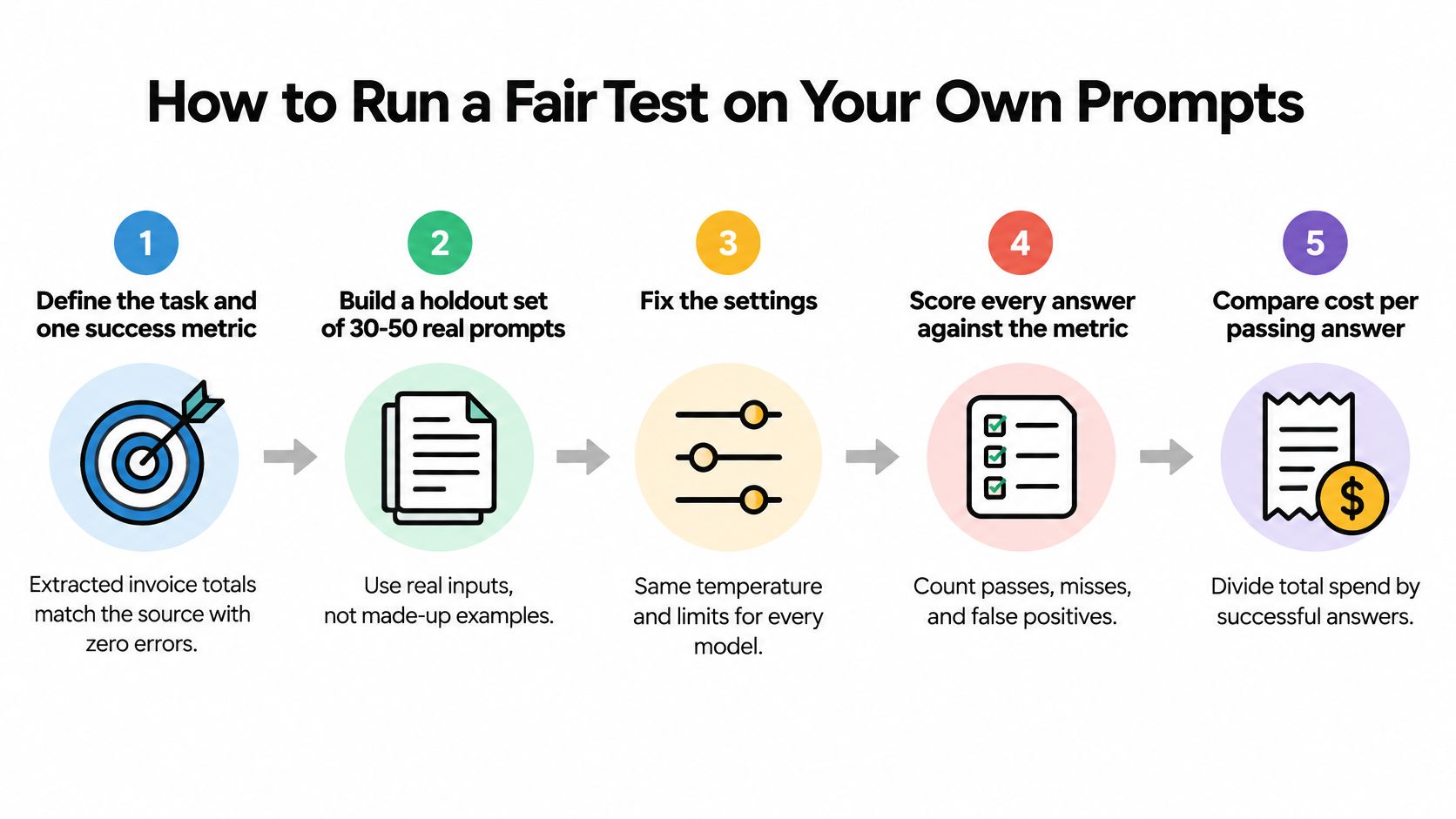
Rephrase a few prompts on purpose. A model can be perfectly consistent and perfectly wrong. Consistency is not correctness.
Public boards mix different jobs and different clocks. MLPerf's language evaluations use a question-answering benchmark on SQuAD v1.1 with a reference F1 of 90.874% and a 130-millisecond server latency limit, while text summarization on CNN/Daily Mail gets a 20-second server latency constraint. A model can ace short facts and still be a bad fit for long summaries or code.
You can start smaller than 50. Five documents, five bugs, and five research questions will already embarrass a model that only shines on canned prompts. Side-by-side runs get easier when you can switch models without rebuilding the harness, which is the practical reason a prompt engineering checklist belongs next to the test, not in a separate project.
A short walk-through of scoring your own prompts:
The verdicts below are illustrative. They are not scores from a public test. Fill the metric cells from your holdout, then let the verdict follow the numbers.
Read a row like this. Candidate A is cheap and fine for loose drafts, so you ship it there and keep it away from tables that must be exact. Candidate C only earns its rate on the hard pile. If your holdout says otherwise, throw my illustration out. Your rows win.
Open-weight models closed a lot of the gap, and not all of it. Stanford's AI Index found the performance gap between open-weight and closed models narrowed from 8% to 1.7% on some benchmarks in a single year. That is not a permission slip to treat every open model as a frontier stand-in. Task, context length, tool use, and safety behavior still need your holdout.
Open-weight tends to win when the documents are sensitive, the volume is steady, and you want a version you can pin. You trade convenience for control over uptime and cost.
Hosted tends to win when you have no infrastructure team, you need frontier reasoning this week, and a faster start beats owning the servers. You trade some control for someone else's on-call rotation.
Send easy, high-volume tasks to the cheaper or open model. Route the hard cases to a stronger hosted model. A confidence check, or a simple "did the schema validate" rule, can make that split. You do not need one universal winner.
Keep a second provider warm for outages and rate limits. Run it on the same holdout so a failover is not a surprise demo. Pin model versions so a silent provider update does not rewrite your outputs overnight. Log prompts and outputs so drift has a paper trail. Read the retention terms before anything sensitive goes out. Keep prompts as provider-agnostic as you can, so a swap is an afternoon, not a rewrite.
Comparing hosted options side by side is less painful on a multi-model workspace than it is if you build routing from scratch on day one. Neither path is the moral choice. The mix is.
Benchmarks describe a clean afternoon. Production is the afternoon when the PDF is sideways, the tool times out, and someone pasted instructions into an email footer.
One recent enterprise-agent study reported a 37% gap between laboratory performance and production deployment, which is why a static winner can still stumble under real traffic (the study).
Stability means you run the same prompt several times and the answers stay inside your quality bar. A model that is brilliant once and sloppy twice is not ready for a queue.
Reproducibility means you rerun last month's holdout on the same model version. If last month's passes become this month's misses, you have drift, not a new feature.
Keep a fixed set of past failures and rerun it whenever the provider updates the model or you edit a prompt. That set is your regression suite. Treat it like tests you would never delete because they once went green.
Prompt injection gets a mean little test. Feed a document that hides instructions, like an email that says to ignore the rules and reveal the system prompt. The model should keep following you. If you care about claims that survive contact with a source, pair that check with a habit of fact-checking AI output before a wrong sentence reaches a customer.
Graceful failure is the last check. When a tool times out or returns broken JSON, does the model retry once, hand back a clear fallback, or invent a confident answer? A loud failure is easier to run than a polite hallucination.
Score these in the same holdout run as accuracy and cost. Reliability after launch is how teams discover the gap in front of users.
Stop hunting for a single champion. Shortlist two or three models per workflow, run the holdout you already defined, and compare cost per accepted answer against the latency line you wrote down. Then decide, and put a re-test date on the calendar. Any model change or prompt change gets the suite again. One dazzling demo is not a decision.
That routine fits the people who feel a bad pick. Developers choosing an API. Writers and marketers sorting drafting tools. Researchers who need citations that hold up. Students and founders watching every dollar. Lawyers and small business owners who need a support reply that sounds like them and does not invent a policy. You can select the model that best suits a task, or keep the default models and settings, and Zemith is made for founders, small business owners, marketers, content creators, developers, researchers, students and lawyers. Switching models on the same task, without rebuilding the setup, is what makes the shortlist cheap to repeat when a workflow changes.
The best LLM is the cheapest one that passes your test on your work.
Here is the challenge, and it is a small one. This week, run five documents, five bugs, and five research questions through your shortlist. See which model wins on your desk, not on a chart.
Zemith puts several leading models in one workspace so you can run the same prompt across them and keep the one that passes your work. That is the practical way to choose an LLM when cost, speed, and reliability disagree. Try it on your own tasks at Zemith.
Zemith Plus covers Claude 5.5 Sonnet, GPT 6.1 Terra, Grok 4.7 and Creative Studio on one credit allowance. The very top models (Claude 5.5 Opus, GPT 6.1 Sol, Gemini 4 Argon) are on Professional at $29.99/month, and heavy use can run through 1.5M credits; top-ups start at $10 for 800k.
| Subscription | Per month |
|---|---|
| ChatGPT Plus (OpenAI) | $20 |
| Claude Pro (Anthropic) | $20 |
| Midjourney, Basic to Standard | $10 to $30 |
| Bought separately | $50 to $70 |
| Zemith Plus | $15.99 ($14.99 billed annually) |
Free $0 (chat with the free models) · Plus $15.99/month · Professional $29.99/month. Prices in USD.
Pay less than one AI subscription and get GPT, Claude, Gemini and more, plus 50+ AI tools.


Trusted by teams at






The top models, plus image, video and voice tools, in one plan.
Without Zemith
ChatGPT PlusUS$20.00Claude ProUS$20.00Google AI ProUS$19.99SuperGrokUS$30.00Perplexity ProUS$20.00 MidjourneyUS$10.00
 ElevenLabsUS$6.00Le Chat ProUS$14.99
 RunwayUS$15.00Kling StandardUS$8.80
 Gamma PlusUS$12.00
 Otter ProUS$16.99
 QuillBot PremiumUS$19.95
 Photoroom ProUS$12.99
 Quizlet PlusUS$7.99
Total if paying separatelyUS$234.70/mo
"I love the way multiple tools they integrated in one platform. Going in the right direction."
— simplyzubair
"The quality of data and sheer speed of responses is outstanding. I use this app every day."
— barefootmedicine
"The credit system is fair, models are perfect, and the discord is very responsive. Quite awesome."
— MarianZ
"Just works. Simple to use and great for working with documents. Money well spent."
— yerch82
"The organization of features is better than all the other sites — even better than ChatGPT."
— sumore
"It lives up to the all-in-one claim. All the necessary functions with a well-designed, easy UI."
— AlphaLeaf
"The team clearly puts their heart and soul into this platform. Really solid extra functionality."
— SlothMachine
"Updates made almost daily, feedback is incredibly fast. Just look at the changelogs — consistency."
— reu0691
Hand off the research, writing, design and follow-ups. Zemith picks the tools it needs and brings back finished work.
Search the web, run deep research, read files, create images and run code with GPT, Claude, Gemini, Grok and more.
Zemith keeps working in the cloud and pings you when it's done.
Notion, Linear, Canva, Airtable and more. It asks before it creates or changes anything.
Docs, slides, sheets and PDFs, ready to send.
Chain models and tools on a visual canvas, from one prompt to a finished promo video.
Briefings, reports and reminders run on a schedule and are ready when you need them.
Real-time voice that can see your camera or screen.
The best image and video models, in one studio.
Turn PDFs, links and YouTube videos into podcasts, quizzes, flashcards and mind maps.













 Podcast
 Quiz
 Flashcards
 Mind map
 Infographic