


Every top model, with tools built in.
Search the web, run deep research, read files, create images and run code with GPT, Claude, Gemini, Grok and more.
Learn how to edit writing with a professional framework. Discover proven techniques to refine your drafts, boost clarity, and create polished content.
Editing is so much more than just running a quick spellcheck. It’s a craft. A proper, professional edit involves peeling back the layers of your draft to refine its clarity, sharpen its flow, and amplify its impact.
The most effective way to do this is to break it down into three distinct passes: the big-picture structural edit, a line-by-line copyedit, and that final, meticulous proofread.
Let’s be real for a moment. Hitting that "check grammar" button and calling it a day just doesn't cut it if you want your writing to stand out. An effective editing process is systematic. It forces you to put on different hats, shifting your focus from the 10,000-foot view of your argument all the way down to the tiniest misplaced comma.
A classic mistake I see all the time is writers jumping straight into fixing typos. Why waste time perfecting a sentence you might end up deleting entirely? It’s like painting the walls of a house before you're even sure the foundation is solid.
This layered approach saves you a ton of rework by tackling the big, foundational issues first. It’s a methodical process, and its value is massive. Just look at the content marketing industry, which is on track to blow past $107 billion in global revenue by 2026. That boom is built on perfectly polished writing that gets results. You can dig into more content writing statistics to see just how much the market values well-edited content.
To give you a clearer picture, I've broken down the process into its core components. Thinking about your workflow in these stages will make your editing far more efficient and effective.
Tackling your edits in this order—from macro to micro—is the key to a professional-grade final product.
The first pass, your structural edit, is all about making sure the bones of your piece are strong. This is where you look at the fundamental building blocks: the introduction, the body, and the conclusion.
This image really helps visualize how those core elements need to be arranged and refined before you get into the weeds.
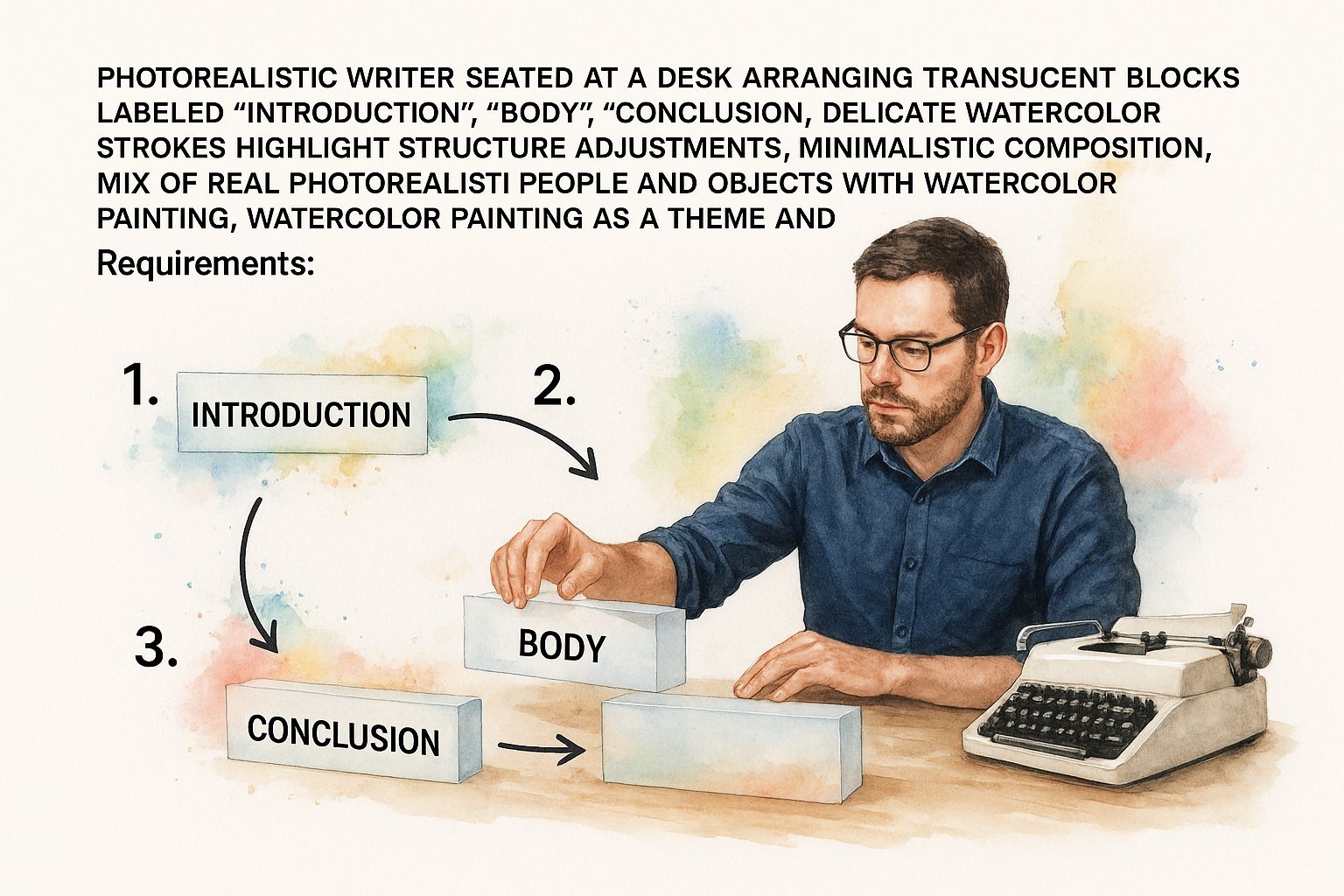
As you can see, it's about strategically placing these components to build a narrative that’s both coherent and powerful. Modern tools can certainly help here. For example, using the AI document assistant in Zemith to generate an outline from your draft instantly gives you a high-level view. It helps streamline that structural work so you can stay focused on the message itself.
Before you even think about comma placement or swapping out a single word, you have to zoom all the way out. This is what we call structural editing, and it’s essentially creating the architectural blueprint for your writing. It’s where you ask the big, tough questions about the overall flow, logic, and impact of your piece.
So many writers get this backward. They dive right into fiddling with sentences, but perfecting a paragraph that doesn't even belong there is a complete waste of time. Your first real editing pass should always be about making sure the foundation is solid.
The goal here isn't a flawless sentence—it's coherence. A reader needs to be able to move from your first sentence to your last without ever feeling lost or confused. This is where you really learn how to edit writing; you start thinking like a reader, not just the person who wrote the words.
Every single piece of writing makes a promise to the reader. Your core argument is that promise, and a good structural edit is how you make sure you deliver on it from beginning to end.
Let’s say you’re writing an article about the benefits of remote work. If you suddenly go off on a tangent for three paragraphs about the best office snack policies, you’ve lost the plot. The structure is broken, and your reader's attention is gone. You have to stay ruthlessly focused on your central theme.
This is where a tool like Zemith can be a game-changer. Actionable insight: Instead of manually outlining, you can use Zemith's AI to analyze your draft and generate a clean, visual outline. This lets you drag and drop sections to experiment with the flow, instantly spotting any gaps in logic or clunky transitions.
It’s incredibly hard to be objective when you’re staring at your own words. That’s why a checklist is so valuable—it forces you to step back and evaluate your work from a distance.
Here are the key things I always look for:
A structural edit is about making tough decisions. It’s recognizing that a beautifully written paragraph might be in the wrong place—or need to be cut entirely—for the good of the whole piece.
Think of yourself as a film director in the editing bay. You're arranging scenes to create the most impact. You might realize that what you wrote as the opening actually works better in the middle, or that a long-winded explanation needs to be trimmed to keep the pace up.
This is the process that turns a collection of interesting ideas into a powerful, cohesive message. By getting the architecture right first, you're making sure all the fine-tuning you do later has a solid structure to stand on.
Now that you've sorted out the big-picture structure, it’s time to zoom in. This is where we get granular with a copyediting pass, focusing on the nuts and bolts of every sentence. Your mission here is to make every single word count.
This isn’t just about running a spell check. We're talking about polishing the rhythm, clarity, and overall style of your writing to make it not just technically correct, but genuinely engaging.
Let's be honest—first drafts are often messy. They're filled with awkward phrases, repetitive words, and jargon that seemed like a good idea at the time. Copyediting is your chance to cut through that noise. You’re essentially sculpting the raw text into something lean and readable.
Look for easy wins. For example, a phrase like "in order to" can almost always be trimmed down to "to." The same goes for "due to the fact that," which is just a wordy way of saying "because." These little edits accumulate, giving your writing a much more direct and powerful punch.
The essence of copyediting is transforming functional sentences into memorable ones. It’s about ensuring the reader doesn’t just understand your message but feels its impact.
Actionable insight: Use an intelligent writing assistant to accelerate this process. The Zemith Smart Notepad, for instance, goes beyond catching typos. It actively flags convoluted sentences and offers simpler alternatives, helping you get straight to the point without the fluff. This turns a tedious manual task into a quick review process.
Consistency is what separates the pros from the amateurs. A thorough copyedit is where you lock in a consistent voice, tone, and style from beginning to end. Are you writing a formal, academic paper or a casual, conversational blog post?
Whatever you choose, you have to commit. Watch out for sudden shifts in formality or bits of slang that feel out of place. This also applies to nitty-gritty style choices, like how you write out numbers or use capitalization. For a great example of the kind of detail that matters, check out this guide on mastering capitalization rules for job titles.
To keep your voice consistent, here are a few things to keep an eye on:
Paying attention to these details creates a smooth, uninterrupted experience for your reader. You can use Zemith to define your brand voice, and its AI assistant will ensure every sentence you edit aligns with it, maintaining consistency automatically.
Copyediting requires a meticulous eye, but it’s the stage where good writing truly becomes great. It’s the final polish that lets your ideas shine through with absolute clarity.
After you’ve hammered out the structure and polished the prose, it’s time for one last, meticulous pass. Think of proofreading as the final inspection. This is your last chance to catch those small but mighty errors—typos, stray commas, and formatting quirks—that can sneak past even the most careful writer. At this point, you're not making creative changes; you're doing a purely technical check to get it perfect.
Why does this matter so much? Because an error-free piece of writing screams professionalism and builds instant trust. Take the freelance writing world, for example. Back in 2019, the US had 82,656 self-employed writers, a figure that dwarfed the 48,544 writers working in-house. In such a competitive field, flawless editing isn't a bonus; it's the price of entry. You can dig into the growth of freelance writing to see just how critical this final polish has become.
Here’s a fun fact about your brain: it’s fantastic at auto-correcting. It sees what it thinks should be there, not what’s actually on the page. This is exactly why you can read your own draft a dozen times and still miss a typo that seems obvious to someone else.
The trick is to force your brain to see the text in a new light. Here are a few battle-tested techniques I rely on:
Proofreading isn't really about writing skill. It's about discipline and a sharp eye for detail. This is the quality control step that ensures all your hard work gets the flawless presentation it deserves.
Before you even think about hitting "publish," you need a final, systematic inspection. Treat it like a pilot’s pre-flight check—every single detail counts.
While a grammar checker is a great first pass for catching common slip-ups, it can't replace a human's understanding of context. Your final review is what makes the difference.
Run through this list one last time:
Actionable insight: Before your manual read-through, run your final draft through a comprehensive tool like Zemith. Its AI proofreader will catch the easy-to-miss errors in seconds, allowing you to focus your human attention on nuances the AI might miss, like tone and context.
Great editing is more than just raw talent—it's about having a smart, repeatable process. The best editors I know don't just rely on instinct; they build an efficient system that blends their human judgment with the precision of modern tools. This isn't about just running a spellchecker; it's about creating your own personal "tech stack" for writing.
The real magic happens when you let technology handle the tedious stuff. Instead of manually hunting for every passive-voice sentence or a misplaced comma, you can have an AI assistant flag those for you. That frees up your brainpower to focus on what really matters—strengthening your arguments, honing your unique voice, and making sure your message lands.
This integrated approach is becoming more critical every day. The demand for professional editing is absolutely booming; the global fiction editing services market alone is projected to hit USD 15.3 billion by 2033. That number tells a story: people understand that polished, high-quality content is no longer a nice-to-have, but a necessity. You can get a deeper look at the expanding editing market to see just how big this trend has become.
Your workflow should mirror the natural stages of editing we’ve already covered: the big-picture structural pass, the sentence-level copyedit, and the final proofread. The problem is, most people are bouncing between fragmented apps—one for outlining, another for grammar, a third for sharing feedback. It’s chaotic and inefficient.
This is where having an all-in-one platform like Zemith.com can be a total game-changer. It’s built to be your entire editing command center. You can use its AI document assistant for your structural edit, then dive into the Smart Notepad for AI-powered suggestions on style and clarity during your copyedit. Everything stays in one clean, organized workspace.
Bringing all your work into one place also helps you maintain consistency, which is a hallmark of professional writing. A centralized system is a core principle of any effective workflow, a topic we explore more in our guide on document management best practices.
The best editing workflow doesn't replace your critical thinking with AI. It uses AI to handle the grunt work, freeing you up to apply your uniquely human expertise to things like tone, clarity, and impact.
Let’s make this concrete. Here’s a simple but powerful workflow you can adapt for any project, especially when using an integrated tool like Zemith.
The Big-Picture Pass (Structural Edit): First, drop your draft into Zemith. Use the "Generate Outline" command to get that 30,000-foot view of your document's flow. Start dragging and dropping sections in the outline view to see if a different order works better. Is your argument sound? Does it build logically from one point to the next?
The Sentence-Level Polish (Copyedit): Now, switch to the Smart Notepad. Highlight any clunky paragraph and use the "Improve Writing" command. Let the AI do the heavy lifting by suggesting clearer phrasing, trimming repetitive words, and simplifying complex sentences. Your job is to approve or reject the suggestions, focusing on making your prose sing.
The Final Polish (Proofread): Time for one last sweep. Run Zemith's built-in proofreader to catch any lingering typos, punctuation mistakes, or formatting quirks. Once the AI has done its pass, do one final read-through yourself. I always recommend reading it aloud—you’d be amazed at what your ears will catch that your eyes missed.
Following a structured process like this in a unified platform like Zemith turns a messy, overwhelming task into a clear, manageable system that delivers consistently better results.
Even the most seasoned writers run into questions during the editing phase. It's just part of the process. Learning how to edit your own writing really comes down to navigating these common roadblocks. Let's tackle some of the biggest ones I hear all the time.
This is a great question. The short answer? At least 24 hours.
When you've just finished a draft, you're too close to it. Your brain knows what you meant to say, so it automatically fills in gaps and skims over clunky phrasing. Stepping away for a day creates a crucial mental disconnect. You come back with "fresh eyes" and can suddenly spot all the awkward sentences and typos that were invisible before.
If you're slammed with a deadline, even a few hours can make a difference. Go for a walk, work on something else, do anything to shift your brain out of "creator mode" and into "critic mode."
Don't worry, you're not alone. The good news is you can absolutely produce professional-level work yourself. The trick is to be disciplined and treat editing like a distinct process, not an afterthought.
Follow the same sequence the pros do: start with the big-picture structural edit, then move to the sentence-level copyedit, and finish with a final, meticulous proofread. Trying to do it all at once is a recipe for missing things.
Modern tools have also been a game-changer here. A platform like Zemith can act as a second pair of eyes, catching everything from grammar mistakes to awkward sentences. It won't replace a human editor's intuition, but it can get you 90% of the way there without the hefty price tag.
Think of editing as a skill you build over time. Each piece you meticulously edit makes you better at spotting errors in the next one. It's an investment in your own quality.
This is the million-dollar question. An edit is finished not when it's "perfect"—a standard that doesn't exist—but when it's effective.
Step back and ask yourself if the piece accomplishes its mission. Is the core message crystal clear? Does the tone feel right? Will the reader walk away with something valuable?
You'll know you're done when you start making tiny, preferential changes. Swapping a synonym for another one, then changing it back? You've hit the point of diminishing returns. It's time to let it go.
Writer's block is the worst. It can derail the entire process before you even get to the editing stage. Trying to brute-force your way through it usually just leads to more frustration.
The best move is to take a breath and figure out what’s really going on. Are you burnt out? Unsure about the topic? Feeling overwhelmed? There are many strategies for overcoming writer's block that can help you diagnose the root cause. For a deeper dive, our guide on how to overcome writer's block is packed with practical exercises to get you unstuck.
Ready to transform your editing workflow? Zemith combines a powerful document assistant, a smart notepad, and deep research tools into one seamless workspace. Stop juggling multiple apps and start producing polished, impactful content with ease. Discover the all-in-one AI powerhouse at https://www.zemith.com.







Trusted by teams at






The top models, plus image, video and voice tools, in one plan.
Without Zemith
ChatGPT PlusUS$20.00Claude ProUS$20.00Google AI ProUS$19.99SuperGrokUS$30.00Perplexity ProUS$20.00 MidjourneyUS$10.00
 ElevenLabsUS$6.00Le Chat ProUS$14.99
 RunwayUS$15.00Kling StandardUS$8.80
 Gamma PlusUS$12.00
 Otter ProUS$16.99
 QuillBot PremiumUS$19.95
 Photoroom ProUS$12.99
 Quizlet PlusUS$7.99
Total if paying separatelyUS$234.70/mo
"I love the way multiple tools they integrated in one platform. Going in the right direction."
— simplyzubair
"The quality of data and sheer speed of responses is outstanding. I use this app every day."
— barefootmedicine
"The credit system is fair, models are perfect, and the discord is very responsive. Quite awesome."
— MarianZ
"Just works. Simple to use and great for working with documents. Money well spent."
— yerch82
"The organization of features is better than all the other sites — even better than ChatGPT."
— sumore
"It lives up to the all-in-one claim. All the necessary functions with a well-designed, easy UI."
— AlphaLeaf
"The team clearly puts their heart and soul into this platform. Really solid extra functionality."
— SlothMachine
"Updates made almost daily, feedback is incredibly fast. Just look at the changelogs — consistency."
— reu0691
Hand off the research, writing, design and follow-ups. Zemith picks the tools it needs and brings back finished work.
Search the web, run deep research, read files, create images and run code with GPT, Claude, Gemini, Grok and more.
Zemith keeps working in the cloud and pings you when it's done.
Notion, Linear, Canva, Airtable and more. It asks before it creates or changes anything.
Docs, slides, sheets and PDFs, ready to send.
Chain models and tools on a visual canvas, from one prompt to a finished promo video.
Briefings, reports and reminders run on a schedule and are ready when you need them.
Real-time voice that can see your camera or screen.
The best image and video models, in one studio.
Turn PDFs, links and YouTube videos into podcasts, quizzes, flashcards and mind maps.














 Podcast
 Quiz
Quiz Flashcards
 Mind map
 Infographic