


Every top model, with tools built in.
Search the web, run deep research, read files, create images and run code with GPT, Claude, Gemini, Grok and more.
Learn how to improve writing speed with proven warm-ups, drafting workflows, time blocks, and AI tools that actually help. Practical guide for writers and pros.
You're probably here because the draft in front of you is moving like a shopping cart with one bad wheel. The cursor blinks. You type a sentence, delete half of it, open three tabs to “quickly check something,” and forty minutes later you've produced two paragraphs and a vague sense that your laptop is judging you.
Calling this a typing problem misses the point. It usually isn't.
If you want to know how to improve writing speed without turning your draft into oatmeal, treat writing speed as a system design problem. The fingers matter. The workflow matters more. What slows writers down isn't usually the keyboard. It's doing idea generation, sentence shaping, self-editing, and fact checking in the same minute, then wondering why the brain starts smoking.
You sit down to write at 9:00. By 9:40, you have 180 words, three open tabs, one half-fixed sentence, and a sudden urge to reorganize your notes folder. That does not mean you are a slow typist. It usually means your drafting system is making you do too many kinds of work in one sitting.
A large analysis of 136 million keystrokes from 168,960 people found average physical-keyboard speed at 52 WPM, with trained typists in earlier studies often reaching 60 to 90 WPM (large typing-speed analysis). Useful context. Still, keyboard speed explains less than writers hope.
I've seen fast typists crawl through a draft because every paragraph turns into a decision pileup. They are choosing the angle, shaping the sentence, checking a fact, trimming wording, and adjusting formatting in the same ten minutes. That workflow burns time even if your hands can keep up. The bottleneck sits upstream.
Writers usually stall for one of four reasons, and the ugly version is doing all four at once:
That last one wrecks momentum fast. Writers who bounce between draft, notes, search, and document cleanup pay a real attention tax. The cost of context switching is not abstract productivity lore. It shows up as longer restarts, weaker phrasing, and that annoying feeling that you were just about to get somewhere.
The first is late decisions.
If a paragraph has no clear job, the draft slows before you type the second sentence. You are not really writing yet. You are deciding what belongs, what can wait, and what the section is trying to do. That hidden planning work is why some writers stare at a blank document, then suddenly “write fast” once the structure clicks.
The second is editing inside the draft.
Research on writing process found a clear difference between drafting and editing behavior. Drafting shows more continuous typing with pauses around idea generation, while editing produces longer pauses and local revision patterns (ETS-based writing-process analysis). If you force both modes into the same minute, output drops and the line of thought gets choppy. The sentence may improve. The draft usually does not.
The third is tool friction.
Messy notes, buried research, awkward templates, switching between apps, and references you cannot find when you need them. None of that sounds dramatic. It still slows the work. A bad setup kills speed in tiny slices, which is somehow more irritating than one obvious problem.
Practical rule: If you can type faster than you can decide what belongs in the paragraph, your problem is not typing speed.
Words per minute matter less than process measures that show whether your system is working.
This is also why AI can help some writers and barely help others. If your system is chaotic, AI often speeds up the wrong part. You get more text, but not more progress. If your workflow is clean, AI can reduce setup time, help with structure, and handle low-value drafting chores without flattening your voice. The difference is the system, not the novelty.
Historical typing records are fun, but they do not solve drafting problems. Earlier reporting on famous speed typists mostly shows what practice, technique, and equipment can do at the keyboard. Fine. Good for them. Your deadline does not care whether you could win a 1923 typing contest.
A slow draft usually means one of three things: you made key decisions too late, you started editing too early, or your tools keep interrupting the work. Fix those, and writing speed starts to improve in a way that survives revision.
The cleanest fix I know is brutally simple. Draft first. Edit later. Not emotionally later. Later.
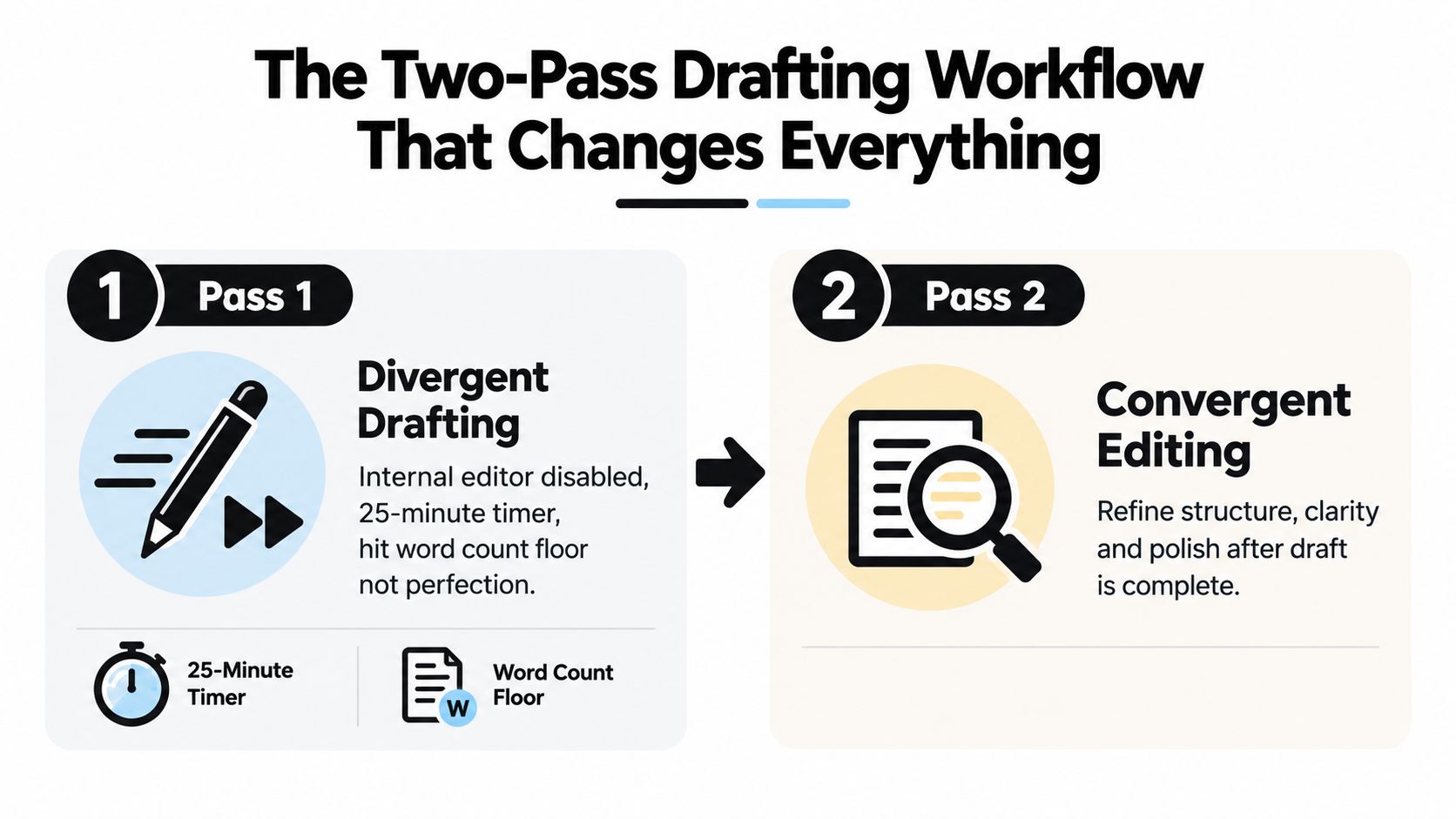
The reason this works isn't motivational fluff. It matches how the writing process behaves. Drafting and editing are different modes. Ask the brain to do both at once and it responds by getting theatrical. Suddenly a decent sentence needs seven rewrites and a snack.
Set a 25-minute timer. Your only job is to produce a rough draft section by section. Before you start each section, write one line about its purpose. Keep it plain. “Explain why outlining removes decision drag.” Good enough.
Then draft with these rules:
A lot of writers need permission to write a bad first pass. Consider this permission, stamped and notarized.
Take a short break after the draft block. If energy holds, do a second 25-minute drafting block. Save editing for a separate window, ideally after some distance. Fresh eyes catch structural nonsense much faster than exhausted eyes trying to repair the sentence they just birthed.
When you come back, review for:
If you need a practical model for building repeatable content routines, this blueprint for busy professionals is worth a look because it treats content as a workflow, not a mood.
Later, when you're in revision mode, this guide on how to edit writing pairs well with the two-pass method because the editing questions change once a full draft exists.
A quick visual if you want to copy the cadence into your calendar:
Rough drafts look rough. That's not a bug. That's the point.
The trade-off is obvious. Pass one can look mildly embarrassing. The payoff is that total time to a finished piece usually drops because you stop interrupting yourself every other sentence.
Most writing sessions go badly before the “real writing” even starts. The brain is cold. Your fingers are cold. Your standards are weirdly hot. That's a bad mix.
So here's a Tuesday routine I like because it's short, repeatable, and just structured enough to keep you honest.
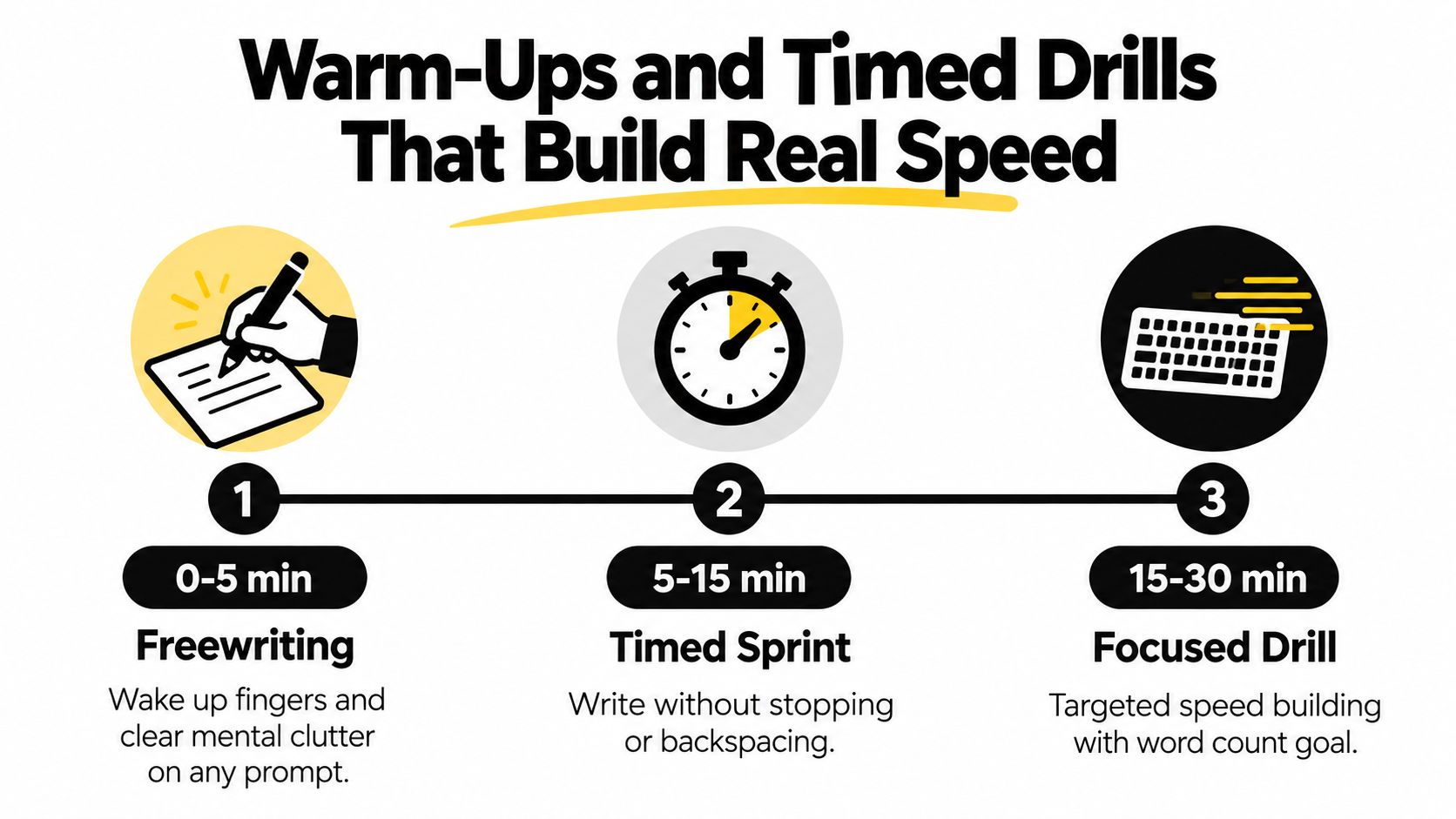
Minute 0 to 5: freewrite on anything. What annoyed you yesterday. What this article needs. Why your coffee betrayed you. The point is motion, not quality.
Minute 5 to 15: do a focused burst on one topic. No stopping. No backspacing unless the text becomes unreadable.
Minute 15 to 20: rewrite a paragraph from the burst in a different tone. Make it simpler, sharper, warmer, or more technical.
Minute 20 to 27: run a constraint drill. Single-sentence paragraphs only. This forces cleaner thought grouping.
Minute 27 to 30: cool down by marking sticky spots without fixing them.
There's research support for the idea that timed transcription-style drills and performance feedback can improve writing fluency, while some generic self-regulation or sensory-motor advice doesn't seem to move fluency much in the same way (2022 meta-analysis on writing-fluency interventions).
A fixed-copy mechanic also matters. Research on handwriting assessment used timed copying of a 26-word sentence as a practical, reproducible task (handwriting assessment report). The lesson for digital writers is simple. If you want improvement, use drills you can repeat under the same conditions.
When the page still feels hostile, this article on how to overcome writer's block is useful because speed drills work best when you remove the startup freeze first.
One dry truth from doing these often: the second drill is usually faster than the first, not because inspiration arrived on a white horse, but because the machinery is finally awake.
A lot of writers don't hate focus blocks. They hate being interrupted by a timer right as a paragraph starts behaving.
That's why I prefer time blocks shaped around cognitive rhythm instead of strict kitchen-timer theology. If Pomodoros work for you, great. If they make you want to argue with produce, use one of these instead.
Don't spend the break checking messages “for one second.” That's how a writing block turns into accidental admin.
Use breaks for things that reset attention:
If you need a softer approach to scheduling, especially if your brain doesn't love rigid systems, this piece on gentle daily planning for ADHD offers a humane framing that adapts well to writing work.
Use one block style for a few sessions, then compare it with another over a couple of weeks. Track which block gives you the best sustained output and the least mental residue afterward. “Least residue” is a technical term I just invented for “you don't feel like a wrung-out sponge.”
This guide on how to improve concentration helps here because block quality depends less on timer philosophy and more on whether you can protect attention inside the block.
AI is useful for writing when you give it a job. It becomes annoying when you ask it to become you.
That distinction matters. A drafting co-pilot can save time. A fake clone of your voice usually creates cleanup.
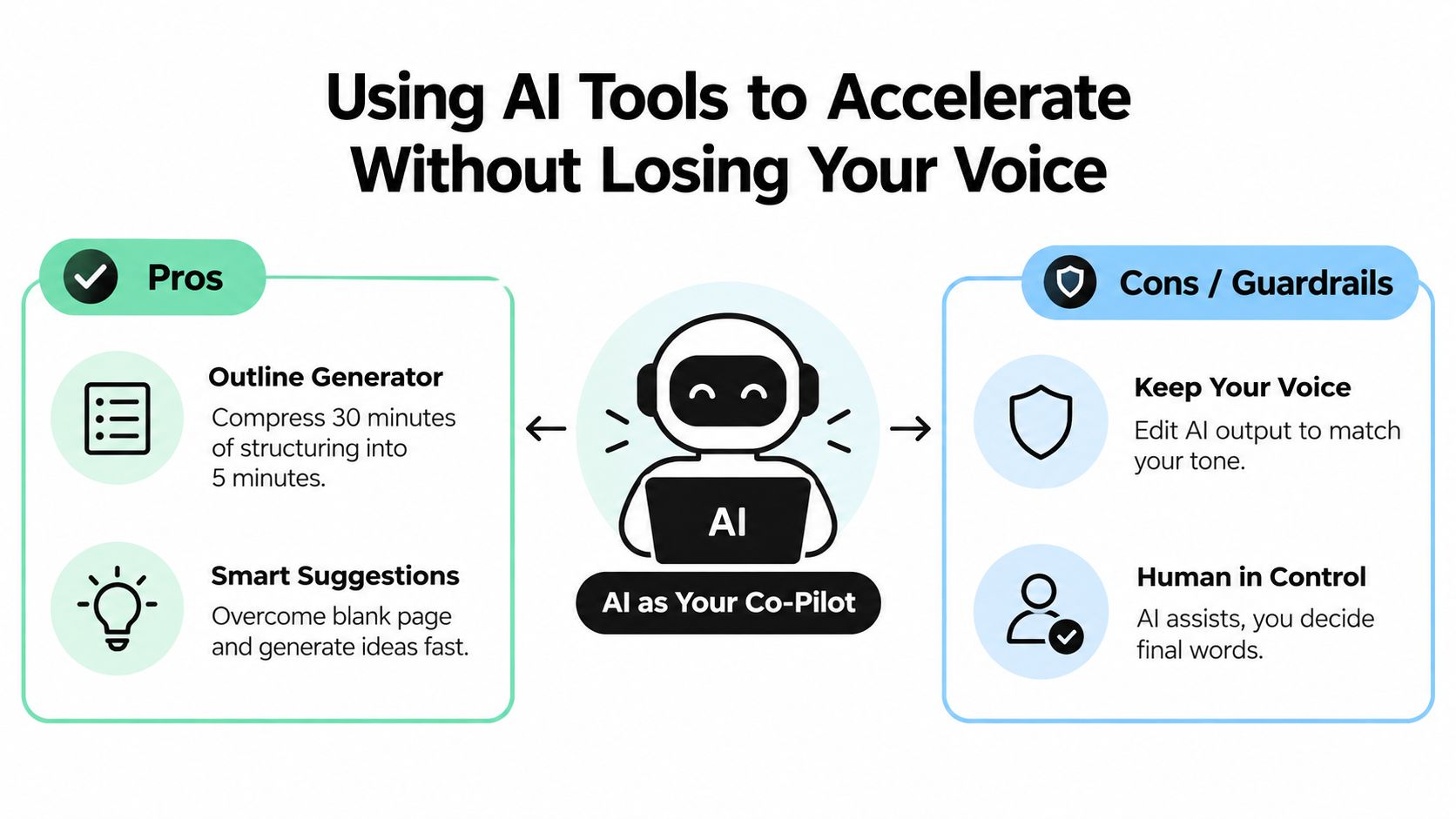
Use AI for bounded tasks with clear inputs and outputs:
A 2025 review reported that generative AI often speeds up writing and coding by 20 to 55% in bounded tasks, but the same source also notes mixed outcomes in end-to-end writing workflows. A 2025 marketing study in that review found only a 10% average time reduction for content-marketing articles among AI users, and a 2026 survey summary reported 47% of users said AI made their writing slower or unchanged (review of AI productivity findings). That matches what many working writers notice: AI shines in chunks, not automatically across the whole process.
First, write your own opening paragraph before touching AI. If you outsource the opening, the piece often starts in a generic accent you'll spend the rest of the draft trying to undo.
Second, feed AI your notes, not your finished paragraphs. It performs better as a structure helper than as a mimic.
Third, rewrite any generated text through your own sentence patterns. If a line sounds like a committee wrote it in an airport lounge, it goes.
Fourth, use AI after the point of friction appears, not as a substitute for thinking. If you don't know what you want to say, the tool can multiply vagueness with impressive efficiency.
If you enjoy testing workflows and prompts, the AI productivity blog has useful examples of where AI supports work rather than replacing it.
For an all-in-one option, how to use AI for writing is relevant if you want to combine outlining, summarization, rewrite support, and autocomplete in one workspace. Zemith, for example, includes document tools, a smart notepad, and AI writing assistance in a single interface, which can reduce the app-switching friction that slows many drafts.
AI should remove friction from your process. It should not turn every paragraph into a hostage negotiation with blandness.
You finish a 90-minute session, your fingers are tired, the doc is longer, and somehow the draft still feels slow. That usually means the bottleneck is not typing. It is rework, hesitation, or a workflow that keeps forcing you to make decisions at the wrong time. Annoying, yes. Useful, also yes.
Good metrics separate real progress from keyboard aerobics. The goal is to measure how fast your drafting system produces usable copy, not how busy you looked while staring at a blinking cursor.
Research on typing performance has found that text length, accuracy, and word familiarity all affect speed, which lines up with what working writers run into every week: familiar material moves faster, messy correction loops slow everything down, and long sessions expose every crack in your process (typing-performance discussion).
That is why I watch clean output more closely than headline speed. A fast first pass that collapses in revision is expensive. A slightly slower first pass that keeps more of its sentences usually wins on total time.
Field note: If your second pass keeps turning into a rewrite, your first pass is producing unstable copy.
Use a plain spreadsheet, note, or whatever file you will open again next week. Track three numbers:
Then add one sentence on the main blocker.
That sentence does more work than people expect. “Stopped to look things up.” “Section order was unclear.” “Checked messages, lost the thread, came back with the mental grace of a dropped plate.” After a few sessions, the pattern is usually obvious. Many writers blame finger speed. The log usually points to decision speed, context switching, or a draft structure that asks for polish before the ideas are even settled.
Speed without quality is just deferred work. Evidence on composition and typing points in that direction too. Some research suggests slower drafting can support better word choice and more careful sentence construction, especially when the task is cognitively heavier. That trade-off matters because writing speed is not one skill. It is a stack of smaller ones: retrieval, planning, transcription, and revision control.
Handwriting research shows the same pattern from another angle. A review of handwriting measures notes that speed tests only mean much when legibility holds up. Once quality drops, the score stops reflecting useful output and starts reflecting strain instead (handwriting measurement overview).
Development matters too. A school-based study on handwriting speed found that fluency changes over time with practice and maturity, which is a helpful reminder that speed is trainable and uneven, not a character trait (school handwriting-speed study).
If drafting WPM rises but edit ratio gets worse, you are probably outrunning your clarity.
If session word count stays flat but edit ratio improves, that is still progress. Cleaner raw material often shortens the full cycle.
If none of the numbers move, look at the blocker note first. The problem is often upstream in research, outline quality, or session setup. That is the whole point of treating writing speed as a system problem instead of a typing contest. Fast hands do not rescue a confused workflow. I wish they did. It would be cheaper than fixing the workflow.
You don't need a heroic reinvention. You need two weeks of boring consistency. Boring is underrated. Boring ships drafts.
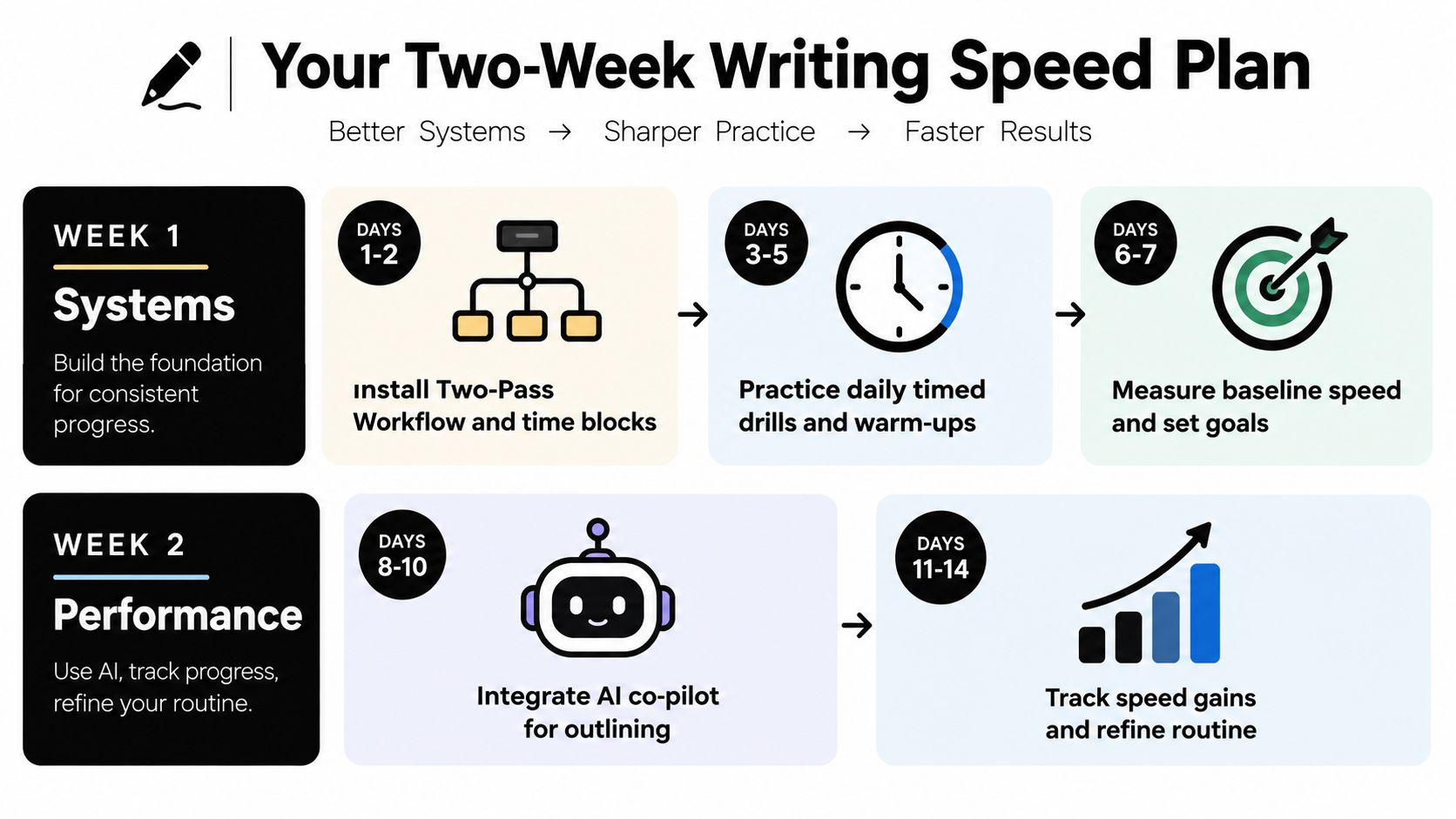
Use 60 to 90 minutes on weekdays and 45 minutes on the weekend.
Days 1 and 2
Install the two-pass workflow. Pick one time-block style and use it for both days. End each session by noting what interrupted momentum.
Days 3 and 4
Add the warm-up routine. Keep it short. Freewrite, burst, variation, constraint, cool-down.
Day 5
Bring in AI for one bounded task only. Outline generation or note summarization works well. Don't let it write the whole piece unless you enjoy editing beige paste.
Day 6
Audit your metrics. Log drafting WPM, session words, and edit ratio. Write one sentence about the main blocker.
Day 7
Rest, or do a light handwritten or low-pressure session.
Alternate between drafting-focused days and accuracy-focused days.
On drafting days, run your normal warm-up and do one main block using the two-pass method. On accuracy days, slow down slightly and concentrate on cleaner sentences, stronger section purposes, and fewer mid-draft corrections. Keep logging the same three numbers daily.
On day 14, do a timed 1,000-word piece from blank page through second pass. Don't chase elegance. Compare your notes with day one. You're looking for less hesitation, cleaner structure, and fewer avoidable rewrites.
After two weeks, keep the parts that improved output and ditch the parts that just made you feel industrious. Those are not the same thing. Sadly, color-coded dashboards won't write the article for you. I checked.
If you want one place to tighten this whole process, Zemith gives you a practical setup for faster outlining, note summarizing, rewrite support, and autocomplete without bouncing between separate tools. That matters when writing speed is really a workflow problem, because fewer switches usually means fewer broken trains of thought.
Pay less than one AI subscription and get GPT, Claude, Gemini and more, plus 50+ AI tools.







Trusted by teams at






The top models, plus image, video and voice tools, in one plan.
Without Zemith
ChatGPT PlusUS$20.00Claude ProUS$20.00Google AI ProUS$19.99SuperGrokUS$30.00Perplexity ProUS$20.00 MidjourneyUS$10.00
 ElevenLabsUS$6.00Le Chat ProUS$14.99
 RunwayUS$15.00Kling StandardUS$8.80
 Gamma PlusUS$12.00
 Otter ProUS$16.99
 QuillBot PremiumUS$19.95
 Photoroom ProUS$12.99
 Quizlet PlusUS$7.99
Total if paying separatelyUS$234.70/mo
"I love the way multiple tools they integrated in one platform. Going in the right direction."
— simplyzubair
"The quality of data and sheer speed of responses is outstanding. I use this app every day."
— barefootmedicine
"The credit system is fair, models are perfect, and the discord is very responsive. Quite awesome."
— MarianZ
"Just works. Simple to use and great for working with documents. Money well spent."
— yerch82
"The organization of features is better than all the other sites — even better than ChatGPT."
— sumore
"It lives up to the all-in-one claim. All the necessary functions with a well-designed, easy UI."
— AlphaLeaf
"The team clearly puts their heart and soul into this platform. Really solid extra functionality."
— SlothMachine
"Updates made almost daily, feedback is incredibly fast. Just look at the changelogs — consistency."
— reu0691
Hand off the research, writing, design and follow-ups. Zemith picks the tools it needs and brings back finished work.
Search the web, run deep research, read files, create images and run code with GPT, Claude, Gemini, Grok and more.
Zemith keeps working in the cloud and pings you when it's done.
Notion, Linear, Canva, Airtable and more. It asks before it creates or changes anything.
Docs, slides, sheets and PDFs, ready to send.
Chain models and tools on a visual canvas, from one prompt to a finished promo video.
Briefings, reports and reminders run on a schedule and are ready when you need them.
Real-time voice that can see your camera or screen.
The best image and video models, in one studio.
Turn PDFs, links and YouTube videos into podcasts, quizzes, flashcards and mind maps.














 Podcast
 Quiz
Quiz Flashcards
 Mind map
 Infographic