You asked for a small function to parse invoice rows out of a CSV. The model came back with type hints, a docstring, and tidy error handling. It looked like something a senior engineer wrote on a good day. Then you ran it against a real export, it choked on a trailing comma, and somewhere in the cleanup you noticed it had dropped the currency column.
That's the bargain with AI coding right now. The output is fluent, plausible, and usually close. Close isn't correct, and the gap between the two is where your afternoon disappears.
The numbers back that up. Stack Overflow's 2025 Developer Survey found 84% of respondents were using or planning to use AI tools, up from 76% a year earlier, yet only 52% agreed AI had positively affected their productivity (Stack Overflow 2025 Developer Survey). Adoption and satisfaction are two different things.
So the working stance is simple. Every response is an untrusted draft until it passes a check you designed.
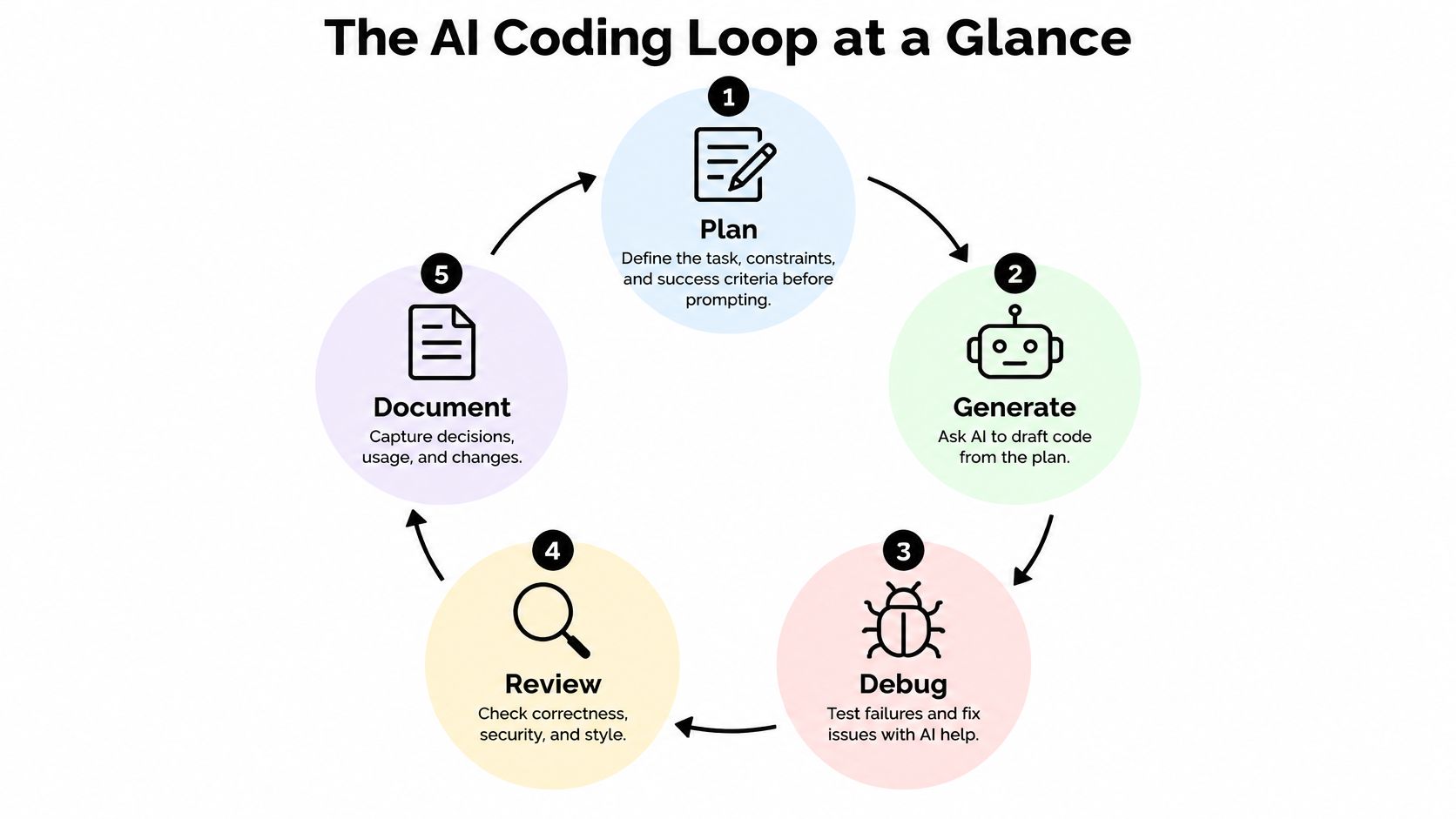
The AI Coding Loop at a Glance
Five stages: plan, generate, debug, review, document. Most developers drift into some version of this. The ones who get burned skip straight to generate and improvise the rest.
Each stage asks something different of you, and each has a check that tells you it's safe to move on.
Say a Flask route returns a 500 whenever the request body is empty. Plan: write down the endpoint, the expected JSON shape, and the two files involved. Generate: one validator function, nothing else. Debug: the traceback plus the empty-body payload. Review: ask which edge cases the validator misses and get back "a body that's valid JSON but not an object." Document: three tests, one per case, committed with the fix. Ten minutes of work instead of an hour of guessing.
The stages matter more each year. In the 2024 Developer Survey, 81% of surveyed developers expected AI tools to become more integrated into code documentation, 80% into code testing, and 76% into code writing (Stack Overflow 2024 Developer Survey). Documentation and testing stopped being side quests.
If you're still picking a tool, browse leading AI coding assistants and compare how they handle context and review, not just how fast they autocomplete.
Pick the stage that eats the most time this week and start there. Don't rewrite your project to fit a workflow.
Reading Unfamiliar Code With AI
Before you change code, understand it. This is the cheapest use of a model and the one people skip, because pasting a function and asking "what does this do?" feels too simple to be worth it.
Paste the file or function that confuses you, plus the entry point that calls it, then ask for a plain-language walkthrough before you touch anything.
- Ask for a one-sentence summary of what the function is meant to do. Compare it with the name and with what the tests assert.
- Ask for inputs, outputs and side effects, including anything that writes to a database, a file, or the network.
- Ask where the explanation is least certain. "Which two parts of this are you least confident about?" is the single highest-value question you can ask, because it points you at the lines to read yourself.
- Ask for a small example input with its expected output, then run it in a scratch file or a sandbox.
- Write down the one question you still can't answer and ask only that next. Stacking five questions gets you five shallow answers.
Picture a new hire facing a 300-line billing helper with no comments and no owner on the team. Two rounds of that routine and she can state the rounding rule and the retry behavior out loud, without interrupting anyone.
A fluent explanation can be wrong about the one detail that matters. Check every claim against the code or a test before you rely on it.
The internal link worth keeping open for this: a good breakdown of what does this code do gives you the vocabulary for asking better follow-ups.
Generate Code and Verify It Before It Merges
Generation quality is mostly a context problem. A vague prompt gets you generic code that compiles and does something adjacent to what you wanted. A tight prompt gets you something you can review in ninety seconds.
What a prompt that works actually contains
- Language and framework version. Naming the exact version you're on prevents suggestions that need a feature you don't have.
- The exact function signature you want, including return type and whether it's async.
- One real input and its expected output, copied from a fixture or a bug report.
- Constraints. No new dependencies, 40 lines maximum, no bare
except, pure function with no I/O.
- What not to touch. Naming the files that are out of scope keeps the diff small.
Ask for tests before the implementation, so the tests define success instead of describing whatever the model happened to write. A test generator that works from a spec rather than from the finished function is worth the detour: here's how to set up a unit test generator so the assertions come first.
The merge gate
For anything larger than a single function, don't trust a patch because it compiles. Run this gate:
- Convert the requirement into explicit behavioral examples and edge cases.
- Create or inspect tests before implementation.
- Ask the model to name affected modules, invariants, and likely regressions.
- Generate the smallest patch that passes.
- Run the full suite plus mutation, dependency, and security scans.
- Read the tests yourself and check whether they're weak, bypassed, or unrelated to the requirement.
- Reject or revise any patch that can't explain its assumptions.
Step 6 is where many teams leak. A test written after the code passes by construction, so a green suite proves nothing. When you're deciding whether a change is shippable, Galliot's guide to release readiness covers the pipeline checks that catch what a local run misses.
Why benchmarks flatter these tools
Controlled evidence does show real gains on bounded work. A Microsoft Research randomized study assigned 95 professional developers to build an HTTP server in JavaScript with or without GitHub Copilot, and the assisted group finished 55.8% faster, with a 95% confidence interval of 21% to 89% (Microsoft Research). That's a real effect on a well-specified task. It is not a promise about your monolith.
Production benchmarks are harsher. Coding agents reached at most 23.3% resolution on SWE-Bench Pro's public set and 17.8% on its commercial set, against more than 70% on SWE-Bench Verified, and an audit found roughly 34.4% of trials judged correct still violated task requirements (benchmark-and-gate analysis). Realistic user phrasing dropped success rates by another 20% to 40% relative to formal issue descriptions.
Writing code is also the single most common use of these tools, which is exactly why the gate matters: 85% of professional developers used AI tools to write code, and 69% used them to search for answers (Stack Overflow 2024 AI survey). Volume without review is how slop enters a repo.
Practical rule: before you read the diff, ask for a one-paragraph change summary listing the assumptions made. If the summary doesn't match the requirement, you don't need to read the diff.
How to Debug With AI Without Chasing Ghosts
The first suggested fix is often the wrong one, and accepting it is how a one-line bug becomes a rewritten module.
The reason is mechanical. "It's broken" gives the model almost nothing to work with, so it pattern-matches against the most common cause of anything, which is rarely your cause. Feed it the specific material and the answers get specific.
Then run it in rounds. Paste the full error, the smallest input that fails, the runtime version, and what you've already tried. Ask for three hypotheses ranked by likelihood, each with a quick check that would confirm or rule it out. Test one per round. If you change three things and the bug disappears, you've learned nothing about which change mattered.
Here's the common pattern. A Node service works on a laptop and times out in CI. The cause is a missing environment variable. The first suggestion proposes restructuring the database access layer. It's coherent, it's confident, and it's irrelevant.
The other trap is scope. The model rewrites half the file, and now your diff has three unrelated changes in it. Ask it to modify only the failing function and to show the diff first.
No fix is accepted until the failing test passes and the original input is confirmed fixed.
Debugging is where the time goes for a lot of people: 45% of developers say debugging AI-generated code is time-consuming, and 46% actively distrust its accuracy (Stack Overflow 2025). A structured request is how you shrink that number. When you're stuck on a specific failure, a walkthrough of what is wrong with this code is a faster starting point than another blind paste.
Security Rules for Pasting Code Into AI
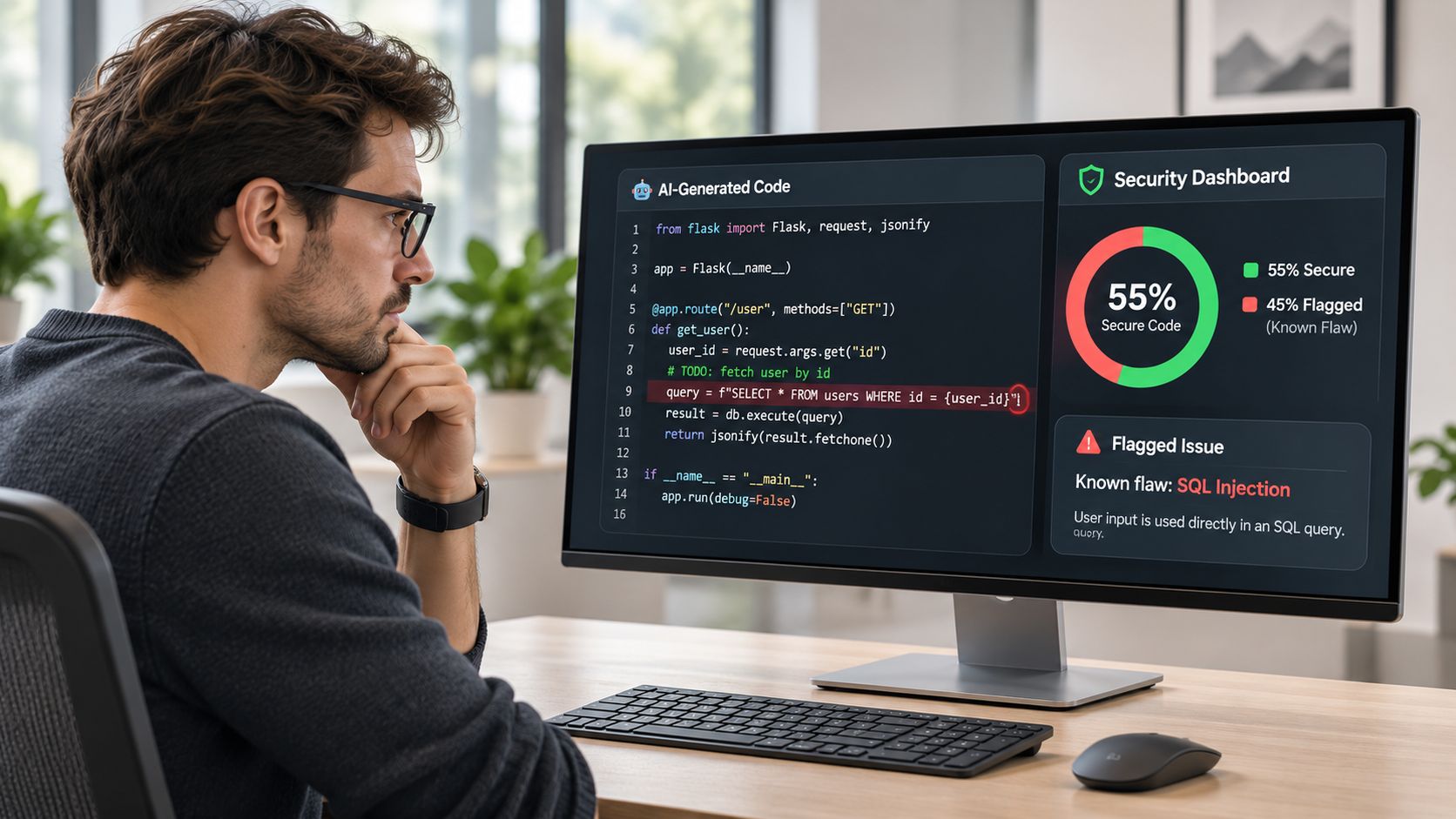
Start with the uncomfortable number. Veracode's 2025 testing found that only 55% of AI-generation tasks produced secure code, meaning 45% introduced a known flaw across the tested security tasks (Veracode 2025 GenAI Code Security Report). Security performance stayed roughly flat across model sizes and over time, so waiting for a better model is not a plan. Process is the plan.
Generated code needs review proportional to what it touches, not to how clean it looks.
These habits are essential. Never paste secrets, production credentials, or customer records into a prompt; use API_KEY_PLACEHOLDER instead. Verify that every package the model suggests exists and is maintained before you install it, because invented package names are a live supply-chain attack surface. Run static analysis and dependency scanning on the result. Add adversarial tests: malformed input, oversized payloads, strings that look like SQL.
NIST's July 2024 guidance for generative AI names the risks plainly, including malicious content in inputs or outputs, prompt-driven denial-of-service, supply-chain attacks, and unauthorized information disclosure, and recommends validating and sanitizing prompts and outputs in context (NIST AI guidance).
A login handler is the classic case. The generated code hashes correctly, compares in constant time, and looks textbook. It has no rate limiting, so credential stuffing works fine. Tests pass. Only a human reading with an attacker's mindset catches it.
Authentication, payments, and data deletion always get a human reviewer and a dry run, even with green tests. A structured code review checklist makes that repeatable instead of mood-dependent.
Team wiki rule: anything that touches who a user is, what money moves, or what gets deleted gets a second human pair of eyes.
Run a Five-Day Test and Decide Whether to Keep AI
Every headline productivity number is somebody else's baseline. Across three experiments involving 4,867 developers, access to an AI code-suggestion tool was associated with a 26.08% increase in completed tasks, with a standard error of 10.3% (MIT Economics working paper). That's a wide error bar and a different population from your team. Measure your own.
The six-task comparison
Pick six similar backlog tasks, do three with AI and three without, and keep requirements and tests identical. Then record:
Check escaped defects two weeks after merge, not the next morning. Bugs surface late, and the whole point of the exercise is to catch the ones that slip past review.
The pattern that shows up most often in a small CRUD team: AI saves real time on boilerplate, migrations, and test scaffolding, then adds review minutes on validation logic because the generated code makes assumptions nobody wrote down.
The five-day version
Pick one recurring task, not your hardest feature. Parser tests, CI failures, internal docs, or the migration you keep postponing. Run it through the loop for five working days with a personal review checklist open on every pull request. If you want to see how other teams have framed the measurement, this breakdown of AI coding assistant productivity impact is a useful reference before you start. At the end, decide one of three things: adopt for that task type, keep for drafts only, or pause. Write the decision down, because "AI is great" and "AI is useless" are both unhelpful conclusions.
Zemith is a reasonable home for that experiment: generation, code explanations, debugging and React or HTML previews sit in one workspace, and you can switch models mid-chat when one stalls on a problem. Its workflow builder chains prompts and tools into a reusable pipeline, and the code sandbox runs a snippet before it goes anywhere near your project.
The goal was never to accept every suggestion. It's to delete repetitive work while keeping the judgment calls where they belong, with you.
Zemith puts the whole loop in one place: multiple AI models you can swap mid-conversation, a code sandbox for testing snippets before they touch your repo, and debugging and explanation tools sitting beside generation instead of in another tab. If you want to run the five-day test without juggling four subscriptions, try it on the tasks that annoy you most. Start at Zemith and see whether the review minutes go down.













 MidjourneyUS$10.00
 ElevenLabsUS$6.00
 RunwayUS$15.00
 Gamma PlusUS$12.00
 Otter ProUS$16.99
 QuillBot PremiumUS$19.95
 Photoroom ProUS$12.99
 Quizlet PlusUS$7.99














 Podcast
 Quiz
 Flashcards
 Mind map
 Infographic