


Every top model, with tools built in.
Search the web, run deep research, read files, create images and run code with GPT, Claude, Gemini, Grok and more.
Tired of broken workflows? Learn how to start improving developer productivity with smarter tools and a focus on flow, not just lines of code.
Improving developer productivity isn't about counting lines of code or pushing more commits. It's about getting rid of the constant friction that interrupts deep, focused work. Let's be real—it’s about declaring war on the tiny, soul-crushing interruptions that derail a perfectly good coding session. We need to stop tracking busywork and start optimizing the entire developer experience with smarter processes and integrated, AI-powered tools.
Let's be honest. For years, leadership tried to measure software development like an assembly line, grabbing onto metrics that were easy to count but told a completely misleading story. This led to an obsession with the usual suspects: lines of code (LOC), commit frequency, and story points.
We've all seen how this plays out. A manager "gently" inquires about your commit numbers, so you start breaking a simple bug fix into ten tiny commits. Your stats look fantastic, but did you actually accomplish more? Not a chance. You just learned how to game the system.
This approach doesn't just miss the mark; it actively hurts morale and leads to sloppy code. It incentivizes developers to write bloated functions to hit a LOC target or rush features to inflate their velocity, racking up technical debt that someone else will have to deal with later. Who's going to clean that up? Probably future you, and future you is already tired.
True productivity has nothing to do with typing faster. It’s about the quality of uninterrupted, focused time you can protect. It’s about clearing out the roadblocks that pull you out of that priceless 'flow state' where the real, complex problem-solving happens.
Thankfully, the conversation is finally shifting. The smartest companies now realize their most valuable asset isn't the code itself—it's the creative, problem-solving developers who write it. Boosting productivity starts with improving the Developer Experience (DevEx). This means taking a hard look at the entire workflow and asking some tough questions:
This is exactly where AI comes in, not to replace developers, but to act as a powerful friction-killer. The latest industry data is eye-opening. A recent survey from JetBrains found that 85% of developers are now using AI coding assistants.
The impact is huge. For those who've adopted these tools, nearly 90% report saving at least one hour per week, and an incredible 20% are saving a full workday. Just as important, 66% of developers agree that old metrics like build times are no longer enough to capture their true contribution.
Instead of chasing vanity metrics, the real goal is to build an environment where developers can think deeply. This requires a shift toward evidence-based decision-making to figure out what genuinely helps your team.
Here’s a quick look at how the thinking has evolved:
It's less about counting things and more about fostering a seamless workspace. This is the whole idea behind a unified platform like Zemith—to keep everything a developer needs in one place, minimizing the context switching that kills focus and creativity.
You know the feeling. You're deep in the zone, finally untangling a gnarly function, and then it starts. A Slack ping. A quick alt-tab to find that one Stack Overflow answer from yesterday. Another switch to your AI chatbot. Then you're digging through a separate app to find your notes.
Each jump seems harmless, but they're the silent killer of a good coding day. They add up to a massive cognitive tax. Research shows it can take over 20 minutes to get back into a state of deep focus after just one tiny interruption. A dozen of those, and your whole day is spent just trying to get back to where you started. It’s not just lost time—it's the mental energy you burn simply navigating your own tools.
This fragmentation is more than just exhausting; it's expensive. Look at the monthly credit card charges for five different SaaS tools that barely speak to each other. You're paying for a patchwork of solutions that actively work against your own productivity.
The fix isn't just another single-purpose tool. It’s about a fundamental shift in how you structure your work. Think of an integrated AI workspace as a command center for your development tasks. It’s about bringing your code, your documentation, and your AI assistants into one cohesive environment.
Imagine debugging a tricky bit of code, referencing the official API docs, and generating the perfect commit message—all without ever leaving the context of your project. This isn't some futuristic dream; it's the whole idea behind platforms like Zemith, built from the ground up to eliminate this digital friction.
This shift also means rethinking how we measure success, moving away from old, broken metrics toward a more holistic approach that values the entire developer experience.
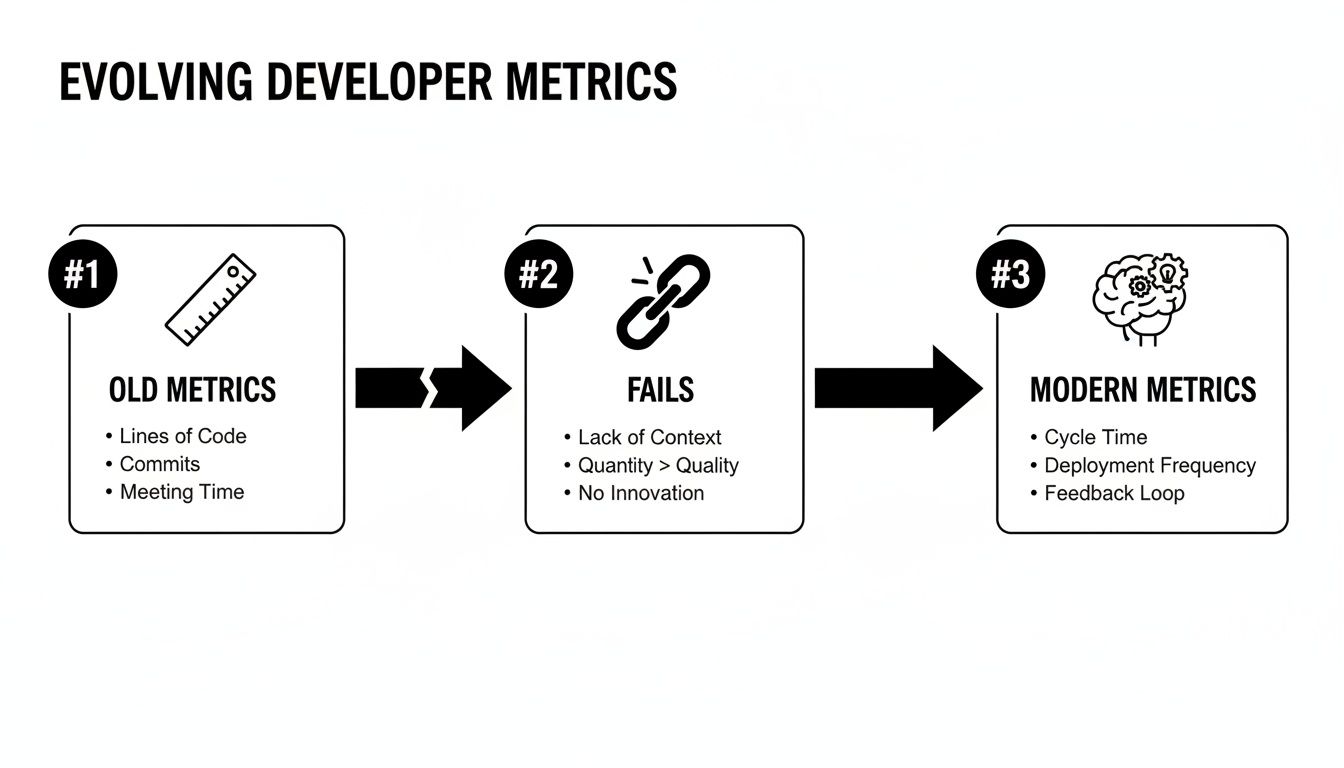
True progress comes from ditching those failed metrics and embracing a modern mindset that supports a developer's end-to-end workflow.
Let's walk through a real-world coding task to see what this actually looks like.
The Old Way (The Multi-App Shuffle):
The Zemith Way (Seamless Flow):
This isn't just a niche idea; it’s rapidly becoming the new standard. A recent DORA report found that a staggering 90% of software professionals are now integrating AI into their core workflows. On top of that, over 80% report significant boosts in their daily output because of this shift.
Zemith takes these gains even further by housing multiple AI models and tools under one roof, slashing the context-switching overhead that can easily eat up 20% of a developer's day.
To really break the cycle of constant interruptions, it's also worth implementing some solid strategies for asynchronous updates with your team to cut down on those "quick question" pings in the first place.
Using a single AI coding assistant is kind of like hiring a junior developer. They're great for knocking out boilerplate code and handling routine stuff, but you probably wouldn't ask them to architect a complex new system on their first day.
Now, imagine having a whole team of specialized senior developers on call. Each one is a world-class expert in a different area—one for algorithms, another for documentation, and a third for front-end refactoring.
That’s the massive difference between a single AI model and a multi-model approach.

The reality is, not all AI models are created equal. One might be a Python genius, another a master of crafting complex SQL queries, and a third amazing at explaining that weird chunk of legacy code nobody wants to touch. Why would you chain your team to just one? Improving developer productivity with the right AI models really comes down to using the right tool for the right job, and that absolutely applies to AI.
Think about it this way: you wouldn't use a hammer to tighten a screw. Sure, you might be able to force it, but the result will be messy, and you'll waste a ton of energy. Sticking to a single, general-purpose AI model is pretty much the same thing.
A multi-model approach lets you tap into a diverse set of strengths for any given problem. This is a core idea behind Zemith’s Coding Assistant, which gives you access to a whole roster of models like Gemini, Claude, and others all in one place. It’s less of a single tool and more of a developer's Swiss Army knife, letting you match the AI's "personality" to the task at hand.
The real unlock isn't just having AI; it's having a team of AIs. This gives you a serious advantage, allowing you to delegate tasks to the model best suited to excel, which dramatically boosts both the speed and quality of your code.
Let's make this real. Imagine you're building a new dashboard feature. You've got three distinct tasks ahead of you: writing a complex data-fetching algorithm, documenting the new API endpoint, and refactoring some dated front-end code.
Here's how you could tackle this with a multi-model assistant:
In just one feature workflow, you've used three different AI "specialists" to get the job done right, all without ever leaving your workspace. To dig deeper into this, check out our guide on choosing the best AI coding assistant.
Picking the right AI model for a specific task can feel a bit overwhelming at first, but it gets much easier once you start to recognize their unique strengths. To help you get started, I've put together a quick cheat sheet.
A practical guide to selecting the best AI model for common development tasks, highlighting their unique strengths.
This table is just a starting point, of course. To truly get the most out of a multi-model setup, you'll want to implement some form of AI observability and monitoring. This is crucial for understanding how different models are performing, diagnosing issues quickly, and ensuring they’re actually helping your team's productivity. By tracking which models work best for which tasks, you can continuously refine your workflow.
At the end of the day, having access to multiple AIs is a massive strategic advantage. It transforms your coding assistant from a simple tool into an entire team of experts, ready to tackle whatever challenge you throw at them.
Let's be brutally honest. Nobody enjoys slogging through dense, outdated, or just plain confusing documentation. It’s that part of the job that feels like a necessary evil, grinding development to a halt while you hunt for one critical piece of information.
We've all been there—lost in a 200-page PDF of API specs, trying to remember the exact syntax for a function last updated when dial-up was still a thing. It’s a massive time sink and a major source of frustration that torpedoes developer productivity.

This is a huge opportunity to turn a common pain point into a genuine productivity win. Imagine having a personal research librarian who has already read every single document you’ve ever been handed and can answer your questions instantly. That's the magic of an AI Document Assistant.
The core idea is simple but incredibly effective: Instead of you reading the docs, the AI reads them. You just ask the questions. This flips the script entirely, shifting from a slow, manual search to an immediate, interactive conversation.
This isn't just about finding keywords faster. A good AI assistant actually understands the context of your documents. You can feed a massive technical specification into a tool like Zemith and then just ask it plain English questions.
Think about a real-world scenario. You're trying to integrate a new third-party API, and the documentation is a chaotic mess. Instead of burning an hour trying to find the right section, you just ask Zemith's Document Assistant:
"What are the required parameters for the user auth endpoint, and what's the expected format for the 'X-API-Key' header?"
In seconds, you get a clear, concise answer with the exact information you need, pulled directly from the source material. No more Ctrl+F and hoping for the best. No more skimming irrelevant sections. You get the answer, right now. This is how you win back hours you used to spend just searching.
Getting instant answers is just the beginning. The real power move is turning static documents into active, intelligent resources. A platform like Zemith allows you to interact with your documentation in ways that were impossible before.
Here are a few other tricks you can pull off:
Building a system like this is all about creating a central source of truth that actually works for you, not against you. If you want to explore this concept further for your whole team, our guide on how to build a knowledge base is a great place to start.
Ultimately, an AI document assistant transforms documentation from a passive, frustrating roadblock into a dynamic, intelligent partner in your workflow. It clears one of the biggest hurdles to staying in a state of deep focus, making your development cycle faster and a lot less stressful.
Great code isn't just written; it's conjured during those rare, magical periods of deep, uninterrupted focus. We all know this state—the "flow state"—it's where we solve the gnarliest problems and do our absolute best work. But it's also incredibly fragile. It's like building a house of cards; one rogue Slack ping or an unexpected email can send the whole thing tumbling down.
The modern work environment seems almost engineered to destroy this focus. The constant barrage of notifications, the siren song of your inbox, and the mental load of juggling different projects are the natural enemies of deep work. Honestly, improving developer productivity isn't about typing faster. It's about fiercely guarding the time and mental space you need to actually think.
This is exactly why having a 'Focus OS' isn't just a nice-to-have, it's a necessity. Your workspace should be your ally, not another thing you have to fight. We built Zemith to create this protective bubble, pulling your essential tools into one place to cut down on the reasons you'd need to switch contexts and leave your work in the first place.
Notifications are the obvious culprits, but there's a quieter, more insidious enemy of flow: death by a thousand cuts. I'm talking about all those little administrative chores that pop up throughout the day, each one siphoning off a bit of the cognitive energy you should be spending on code.
Think about it for a second. Drafting a status update, writing up a project brief, turning meeting notes into a coherent document, or even just formatting a code snippet for a presentation. None of these tasks are hard, but every single one demands a context switch that yanks you out of your coding headspace.
These small interruptions create a massive drag on your momentum. It’s like trying to run a marathon while someone keeps asking you to stop and tie your shoes. This is where AI-powered automation really shines, by taking on the busywork so you can save your brainpower for the complex problems that truly matter.
The most productive developers I know aren't necessarily the fastest coders. They are masters of focus. They've learned how to delegate the non-essential stuff to smart systems so they can stay locked in on the work that moves the needle.
Picture this: you've just wrapped up a brainstorming session and have a messy page of notes. The old way meant opening up a new doc, painstakingly rephrasing every bullet point, and agonizing over tone and structure. The new way? You dump those notes into Zemith’s Smart Notepad and just tell it to "turn these notes into a polished project brief." And just like that, it's done.
You can apply this same idea to all sorts of things. Use built-in converters to instantly turn a CSV file into a clean Markdown table for your docs or transform a YouTube tutorial link into a quick blog post summary. Each one of these automated actions is a small win, buying you back precious minutes of uninterrupted focus.
The data backs up this idea of focusing on individual efficiency first. A recent Stack Overflow survey found that 69% of developers feel AI agents have boosted their personal output, and 70% said they spend less time on certain tasks. Interestingly, only 17% have seen a big improvement in team collaboration, which shows there's a gap between solo gains and team-wide wins. Zemith bridges this by embedding these powerful tools right into a shared workspace, so your personal productivity gains don't happen in a silo.
The end goal is simple: kill as many of these small, disruptive tasks as you can. When your tools handle the administrative friction, you're free to stay in your flow state longer and, ultimately, ship better work. If you're struggling to juggle different workstreams, our guide on how to manage multiple projects has some great strategies.
Alright, we've walked through everything from ditching old-school metrics to building a whole new process around AI. But let's be honest, this is where the rubber meets the road, and you've probably got some questions buzzing around.
Let's tackle a few of the big ones head-on.
This is the elephant in the room, isn't it? The short answer is a hard no.
Think of AI less as a replacement and more as the ultimate pair programmer—one that never needs a coffee break and genuinely enjoys writing boilerplate code. The point isn't to make developers obsolete; it's to supercharge their skills and eliminate the soul-crushing grunt work.
AI is brilliant at handling repetitive, predictable tasks: churning out unit tests, translating code from one language to another, or drafting basic functions. That frees you up for the stuff that actually requires a human brain: architecting complex systems, creative problem-solving, and having the kind of breakthrough ideas an algorithm simply can't.
The developers who embrace these tools and learn to work with them will become exponentially more valuable, not redundant. It’s all about evolving your skillset.
This conversation is all about speaking their language: Return on Investment (ROI). You have to frame your argument in terms of time, money, and developer happiness. "This tool is cool" won't cut it. You need to show them the numbers.
Start by tracking the "hidden costs" of your team's current workflow. A simple time audit can be incredibly eye-opening.
Build a clear business case: "With an integrated platform like Zemith, we can cut our subscription costs by X dollars and give each developer back an estimated Y hours per week. We can use that time to ship features faster." A tool like this isn't an expense; it's an investment in efficiency that directly boosts your team's output and morale.
That's a totally fair question. The last thing anyone wants is a new tool that just adds another layer of complexity. The good news is that modern platforms are built for a smooth on-ramp, not a hostile takeover. The trick is to avoid trying to boil the ocean.
Start small. Pick a single, high-impact use case that solves a real, nagging pain point for your team.
Don't force a massive, top-down mandate. Instead, find a small, enthusiastic group to pilot the new tool on a specific project. Let them become your internal champions. Their success will generate organic interest far more effectively than any memo.
For example, you could use Zemith’s Document Assistant to create a searchable, queryable knowledge base for that one gnarly legacy project everyone hates working on. Once the team sees they can get instant answers instead of digging through ancient Confluence pages, they'll naturally start asking what else the platform can do. Organic adoption is always more powerful and longer-lasting.
Focusing only on typing speed. It’s a classic rookie mistake.
True productivity is about creating sustainable, high-quality output. A developer who writes code twice as fast but introduces twice as many bugs—or burns out in three months—is a net negative for the team.
The real goal is to get into a state of deep focus, minimize distractions, and automate as much of the non-coding busywork as you can. Instead of asking, "How can I code faster?" you should be asking, "How can I remove the obstacles that are slowing me down?"
Often, the answer has nothing to do with individual effort. It’s about having better tools, a smarter process, and more protected time for the deep work that actually creates value. Stop trying to run faster on a treadmill covered in banana peels. Focus on getting rid of the banana peels. That's how you truly start improving developer productivity for the long haul.
Ready to eliminate the friction and reclaim your focus? With Zemith, you get a full suite of AI tools—from a multi-model coding assistant to an interactive document reader—all in one seamless workspace. Stop juggling apps and start building. Explore what's possible at https://www.zemith.com.







Trusted by teams at






The top models, plus image, video and voice tools, in one plan.
Without Zemith
ChatGPT PlusUS$20.00Claude ProUS$20.00Google AI ProUS$19.99SuperGrokUS$30.00Perplexity ProUS$20.00 MidjourneyUS$10.00
 ElevenLabsUS$6.00Le Chat ProUS$14.99
 RunwayUS$15.00Kling StandardUS$8.80
 Gamma PlusUS$12.00
 Otter ProUS$16.99
 QuillBot PremiumUS$19.95
 Photoroom ProUS$12.99
 Quizlet PlusUS$7.99
Total if paying separatelyUS$234.70/mo
"I love the way multiple tools they integrated in one platform. Going in the right direction."
— simplyzubair
"The quality of data and sheer speed of responses is outstanding. I use this app every day."
— barefootmedicine
"The credit system is fair, models are perfect, and the discord is very responsive. Quite awesome."
— MarianZ
"Just works. Simple to use and great for working with documents. Money well spent."
— yerch82
"The organization of features is better than all the other sites — even better than ChatGPT."
— sumore
"It lives up to the all-in-one claim. All the necessary functions with a well-designed, easy UI."
— AlphaLeaf
"The team clearly puts their heart and soul into this platform. Really solid extra functionality."
— SlothMachine
"Updates made almost daily, feedback is incredibly fast. Just look at the changelogs — consistency."
— reu0691
Hand off the research, writing, design and follow-ups. Zemith picks the tools it needs and brings back finished work.
Search the web, run deep research, read files, create images and run code with GPT, Claude, Gemini, Grok and more.
Zemith keeps working in the cloud and pings you when it's done.
Notion, Linear, Canva, Airtable and more. It asks before it creates or changes anything.
Docs, slides, sheets and PDFs, ready to send.
Chain models and tools on a visual canvas, from one prompt to a finished promo video.
Briefings, reports and reminders run on a schedule and are ready when you need them.
Real-time voice that can see your camera or screen.
The best image and video models, in one studio.
Turn PDFs, links and YouTube videos into podcasts, quizzes, flashcards and mind maps.














 Podcast
 Quiz
Quiz Flashcards
 Mind map
 Infographic