


Every top model, with tools built in.
Search the web, run deep research, read files, create images and run code with GPT, Claude, Gemini, Grok and more.
Learn how to say it better in emails, meetings, marketing copy, and academic writing with practical before-and-after rewrites and prompt templates.
You've written the sentence three different ways, deleted two of them, and now the cursor is blinking beside a phrase that still sounds wrong. Maybe it's an email that begins with “I hope this message finds you well.” Maybe it's a meeting update you've rehearsed until it no longer sounds like something a human would say. You know what you mean. The problem is getting the words to carry that meaning without stiffness, fog, or accidental drama.
Saying it better isn't about stuffing polished vocabulary into a sentence. It's about making the action, audience, tone, and intended meaning easier to recognize. Plain-language rewriting has produced measurable gains in controlled testing: readers were 38% more likely to understand plain-language text and 41% more likely to retain key information, while 64% perceived it as well-written and 34% were more likely to call it well-organized. (Business Wire reports the plain-language findings)
The useful question isn't only “How can I make this sound nicer?” It's “What does this sentence need to do, and what's getting in its way?” That question works in email, meetings, marketing, academic writing, and even the message you're about to send when “quick question” has somehow become a paragraph.
The email is open. Your recipient's name is in the address field, the subject line is acceptable, and the body contains one sentence that refuses to behave. You type, “I hope this message finds you well,” then stare at it as if it's asking for a passport. It isn't offensive. It's just doing no useful work.
You replace it with, “I am writing to follow up regarding the matter we discussed previously.” That sounds professional in the same way beige office carpeting looks professional. The cursor keeps blinking because the point is simpler: you need an answer before Friday.
Most unclear sentences fail for familiar reasons. A passive construction hides the person responsible for an action. Throat-clearing delays the point with phrases such as “I wanted to reach out” or “It is important to note.” Abstract nouns take over the sentence, turning an action like “decide” into “the making of a decision.” Once you spot those habits, revision becomes less mysterious.
For example:
“The completion of the review process will facilitate the implementation of the revised policy.”
Ask who will do what. The answer might be, “The team will review the policy, then implement the changes.” The revised version gives readers actors and actions instead of asking them to excavate meaning from a pile of formal nouns.
If you're working on workplace messages, the practical examples in this guide to writing professional emails can help you adjust directness without sounding abrupt. For a broader look at sentence-level craft and honing your creative voice, line editing is useful because it treats clarity and personality as connected skills, not competing goals.
The same sentence won't sound right in every setting. An email needs a clear request, a meeting update needs to be easy to hear, marketing copy needs a reader-centered benefit, and academic prose needs precision about scope. Good writers rewrite constantly because clarity is a craft habit, not a personality trait. The polished sentence usually started life as the awkward one you nearly sent.
A sentence can sound official and still make readers do unnecessary work. Before replacing words, decide what the reader should understand or do next. That purpose gives the rewrite a target and keeps editing from becoming synonym-swapping.
Use this test case:
“It has been determined by the team that the proposed initiative will be implemented across departments in Q3.”
The announcement is simple, yet the sentence hides its actors and action. Who decided? Who will carry out the initiative? Does “implemented” mean the rollout starts in Q3 or finishes then? Passive grammar and abstract phrasing leave those questions unanswered.
State the sentence's job in plain language: tell readers that the team will roll out an initiative across departments in Q3.
This prevents a common editing failure, making prose smoother without making it more useful. If the sentence were asking for approval, it would need a different verb and ending. Purpose controls every later choice.
Find the subject and main verb. “It has been determined” is a passive shell, while “implementation” turns an action into an abstract noun. Put the actor and action where readers can see them:
“The team determined that the proposed initiative will be implemented across departments in Q3.”
That version is clearer, but it still includes material the reader may not need. “Determined that” emphasizes the decision process rather than the announcement, and “proposed initiative” may repeat information already established elsewhere.
Rewrite around who did what to whom:
“The team will implement the initiative across departments in Q3.”
If the audience needs a more concrete verb, choose “roll out”:
“The team will roll out the initiative across all departments in Q3.”
The final version has 13 words, within the practical 8 to 20-word range recommended for sentence-level clarity work. (Yomu's sentence rewriting workflow recommends identifying the sentence's job, isolating the subject and verb, answering “who did what to whom,” keeping sentences roughly within that range when possible, and reading aloud.)
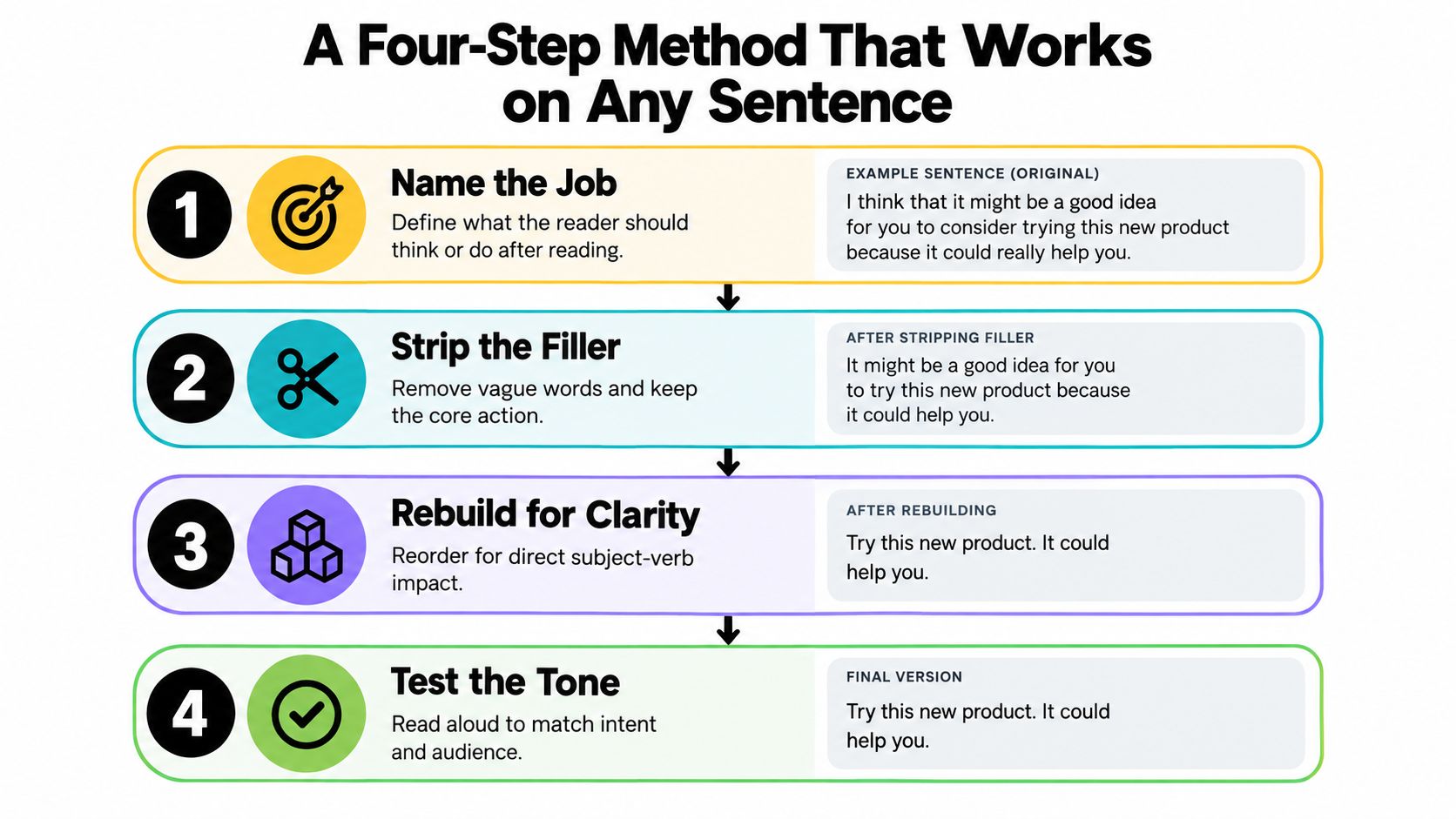
Say the final sentence at a normal pace. If “all departments in Q3” makes you hesitate, clarify whether the rollout occurs during the quarter or is complete by its end. If “roll out” sounds too casual for a board document, use “implement.” Reading aloud exposes syntax and rhythm problems that silent reading often misses.
A practical guide to editing writing can help you apply the same checks beyond this example. For AI-assisted editing, keep the prompt narrow. In a controlled evaluation, a simple editing prompt lowered SMOG readability from 13.88 to 11.26, and the simple strategy produced greater readability gains than a complex one, with both differences reported as highly significant in the study. (The AI plain-language editing evaluation)
The useful lesson is modest: ask the tool to improve one defined quality at a time. A request to fix clarity, tone, structure, originality, persuasion, rhythm, and everything else usually produces a sentence that is polished but less recognizably yours.
The right rewrite depends on where the sentence will live. A phrase that works in a formal report may sound wooden when spoken, while a lively marketing line can be inappropriate in academic prose. The four-step method stays consistent, but the finish changes with the reader's expectations.
The email rewrite adds a direct question and a deadline. “Could you share” keeps the request courteous without hiding it behind “I am writing to inquire.” If the deadline isn't real, don't add one merely because deadlines make sentences look decisive. Precision includes honesty.
Meeting language needs to survive the ear. The original packs “optimization,” “workflow,” “actioned,” and “relevant stakeholders” into one sentence that sounds like it was assembled by a committee trapped in an elevator. The revised version gives each idea room, uses “improved” and “removes,” and tells listeners what comes next.
Marketing copy has a different job. It shouldn't merely list capabilities. “Automated document processing” becomes “process documents faster,” and “integrated collaboration functionality” becomes a shared review workspace. The benefit must remain truthful, but the reader should see the outcome before the machinery.
Academic writing needs restraint rather than sparkle. “In today's complex world” doesn't identify a research problem, and “many challenges” gives no boundary. The revised opener names the variable, population, setting, and outcome without pretending to cover online learning as an entire civilization.
Editing test: If a reader can't identify the actor, action, or practical consequence, the sentence probably needs another pass.
AI can speed up a rewrite when each request has one clear job. A vague command such as “say this better” may produce polished wording that shifts the emphasis. A constrained prompt gives you an output you can inspect against the source.
Paste the original text after each template.
Rephrase for clarity
Rewrite the text for clarity. Keep the original meaning, facts, level of certainty, and intended audience. Replace vague or passive wording with direct language. Do not add information. Return the revised text followed by a short list of meaning changes you avoided.
Shift the tone
Rewrite the text in a [direct, warm, formal, or academic] tone. Preserve the meaning, facts, and degree of confidence. Keep the sentence structure natural for [email, meeting, marketing, or academic writing]. Do not add claims or intensify the message.
Shorten the text
Shorten this text to about [target word count] words. Keep every essential fact, qualification, deadline, and request. Remove repetition and filler. If the target length would force a meaning change, explain what must remain.
Polish selected lines
Return only the lines that need revision. For each line, provide the original, the edited version, and a brief reason. Focus on clarity, grammar, tone, and unnecessary words. Don't rewrite lines that already work.
Use the templates as a chain, not a blender. Shorten first, then polish, then apply a tone shift after fixing the content. Each pass has a narrow responsibility, which makes it easier to see whether a change improved the sentence or merely made it shinier. You can also browse more examples in this collection of AI prompt templates.
In Zemith's Smart Notepad, paste the draft, run a rephrase request, and accept or reject suggestions inline. Apply a tone request only to the accepted version. Zemith also provides tools for rephrasing, shortening, expanding, and adjusting tone, so you can match the tool to the problem instead of sending every sentence through the same rewrite button.
For younger learners, simplifying vocabulary for students can help you improve accessibility without removing the underlying idea. Targeted prompting also has support in academic text editing. A study using ChatGPT on 136 academic texts found that every tested prompting approach improved readability, while the strongest strategies made more than 90% of the texts readable at newspaper or middle-school level under the study's LIX thresholds. (The ChatGPT academic readability study)
Before placing any generated sentence in a final document, compare it with the original. The tool proposes language. You remain responsible for the meaning.
A rewrite can improve the surface while damaging the message underneath. Meaning drift is what happens when new wording changes the strength, scope, cause, responsibility, or certainty of the original idea.
Take this polite email:
“I have concerns about the timeline and would appreciate a chance to discuss it.”
A careless rewrite might say:
“There are problems with the timeline, and we need to discuss them.”
That version is more forceful. It may also be wrong. “Concerns” can signal uncertainty or a request for review. “Problems” asserts that the timeline is defective. “Would appreciate a chance” invites discussion, while “we need to discuss” creates an obligation. Three small edits have changed the relationship between the sender and recipient.
The risk grows when you run several broad rewrites in succession. One tool softens the tone, another shortens the sentence, and a third makes it sound more authoritative. By the end, the prose may read smoothly while the original intent has wandered out for coffee and never returned.
Research on AI paraphrasing tools identifies recurring concerns around plagiarism, dependence on automated suggestions, and loss of original meaning or context. Student-focused research also raises concerns about superficial revision and academic dishonesty. (The independent study on AI paraphrasing risks) In academic work, a paraphraser is a drafting aid, not an authorship substitute. Cite the ideas you use, disclose tool use when your institution requires it, and never paraphrase borrowed phrasing to disguise its origin. The practical guidance in paraphrasing without plagiarizing belongs beside any rewriting workflow.
Non-native English speakers often need more than grammatical fluency. A user study on explainable AI paraphrasing found that participants valued fluency, appropriate tone, and real-world applicability, while preferring simple indicators and explanations. (The explainable AI paraphrasing study) That matters for technical, academic, and long-form writing, where a fluent sentence can still lose a qualification or flatten a writer's voice.
Use this self-check before accepting a rewrite:
For more senior-level communication tips, focus on the judgment behind the wording, not just the wording itself. The best rewrite is often less impressive and more faithful.
Keep this beside your writing app when a sentence starts wearing a suit it did not earn. The checklist works because it forces decisions before decoration.
Ask: Does this sentence have a clear job? If you cannot answer, do not polish it yet. Write the plain version first, even if it sounds rough. “Ask for the file by Thursday” gives you something real to revise. “I wanted to reach out regarding the possibility of obtaining the file” gives you a fog machine.
Ask: Is every word earning its place? Circle passive verbs, abstract nouns, filler openings, and hedges that do not reflect your actual confidence. Keep a hedge when it carries truth. Remove it when it only protects you from making a clear statement.
Ask: Does the tone match the reader and situation? A customer email, an executive summary, a product page, and a seminar paper may describe the same fact in different language. If the sentence sounds unlike you, revise the voice manually instead of sanding away every distinctive edge.
A quick tool rule keeps the edit controlled:
The history of “had better” shows that concise, directive phrasing has long belonged to English. The idiom appears in written records from the 10th century, the modern form emerged by the 16th century, and the shortened informal form was documented from the 1830s in British and American English. (Grammarphobia's history of “had better”) Shorter wording is not automatically crude. Its effect depends on whether the sentence keeps its meaning and suits its setting.
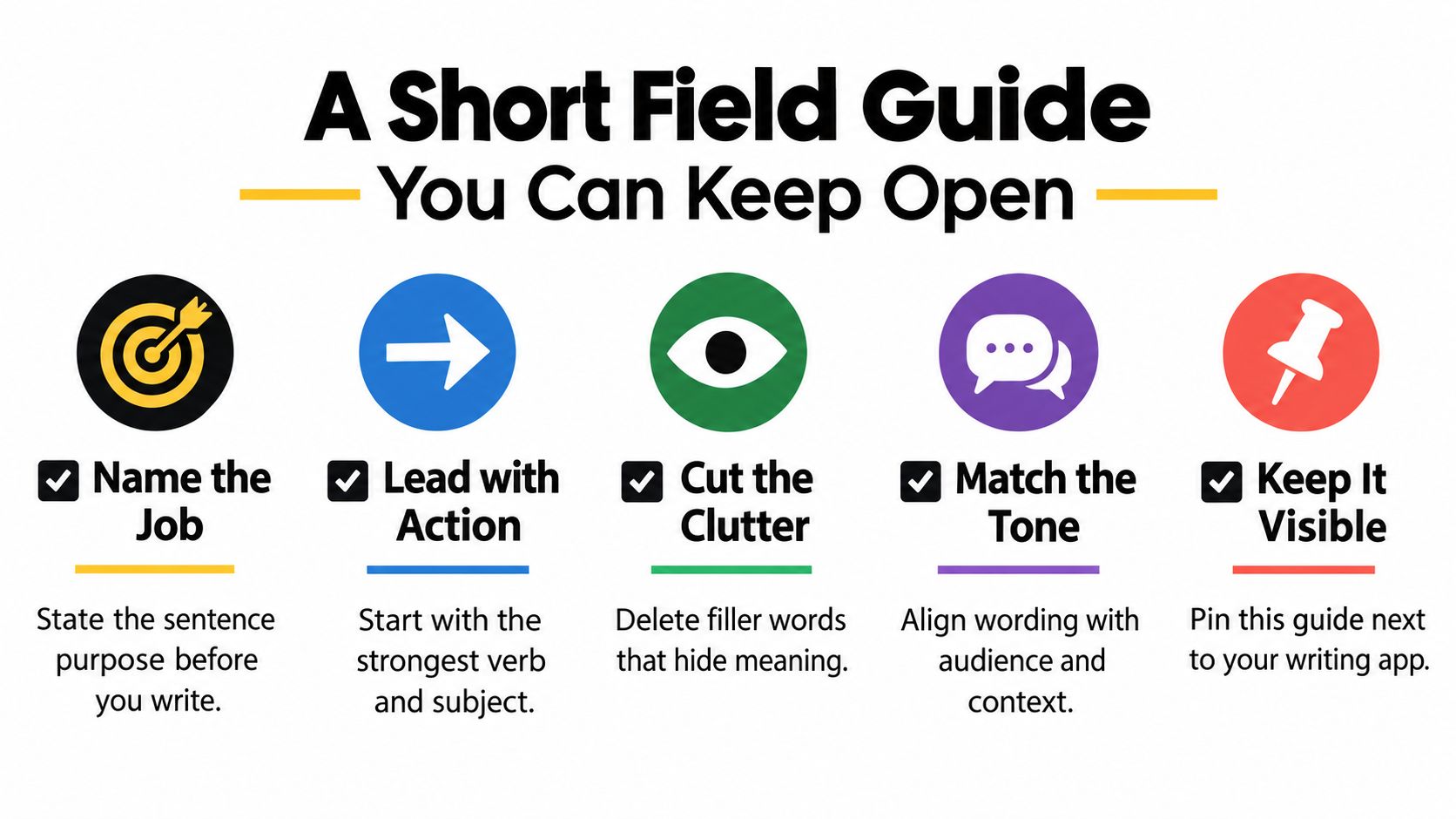
For a reusable reference, keep a writing style guide template with your preferred tone, words to avoid, audience notes, and examples of sentences that sound like you. Return to the four-step method when a draft stalls: name the job, surface the action, cut the excess, and read the result aloud. That makes “say it better” a repeatable editing habit rather than a desperate search typed late at night.
Zemith brings rephrasing, sentence shortening, tone adjustment, and other AI writing tools into one workspace, including Smart Notepad for revising drafts while you keep control of each change. Visit Zemith to turn an awkward sentence into a clear, audience-ready version without losing the meaning behind it.
Pay less than one AI subscription and get GPT, Claude, Gemini and more, plus 50+ AI tools.







Trusted by teams at






The top models, plus image, video and voice tools, in one plan.
Without Zemith
ChatGPT PlusUS$20.00Claude ProUS$20.00Google AI ProUS$19.99SuperGrokUS$30.00Perplexity ProUS$20.00 MidjourneyUS$10.00
 ElevenLabsUS$6.00Le Chat ProUS$14.99
 RunwayUS$15.00Kling StandardUS$8.80
 Gamma PlusUS$12.00
 Otter ProUS$16.99
 QuillBot PremiumUS$19.95
 Photoroom ProUS$12.99
 Quizlet PlusUS$7.99
Total if paying separatelyUS$234.70/mo
"I love the way multiple tools they integrated in one platform. Going in the right direction."
— simplyzubair
"The quality of data and sheer speed of responses is outstanding. I use this app every day."
— barefootmedicine
"The credit system is fair, models are perfect, and the discord is very responsive. Quite awesome."
— MarianZ
"Just works. Simple to use and great for working with documents. Money well spent."
— yerch82
"The organization of features is better than all the other sites — even better than ChatGPT."
— sumore
"It lives up to the all-in-one claim. All the necessary functions with a well-designed, easy UI."
— AlphaLeaf
"The team clearly puts their heart and soul into this platform. Really solid extra functionality."
— SlothMachine
"Updates made almost daily, feedback is incredibly fast. Just look at the changelogs — consistency."
— reu0691
Hand off the research, writing, design and follow-ups. Zemith picks the tools it needs and brings back finished work.
Search the web, run deep research, read files, create images and run code with GPT, Claude, Gemini, Grok and more.
Zemith keeps working in the cloud and pings you when it's done.
Notion, Linear, Canva, Airtable and more. It asks before it creates or changes anything.
Docs, slides, sheets and PDFs, ready to send.
Chain models and tools on a visual canvas, from one prompt to a finished promo video.
Briefings, reports and reminders run on a schedule and are ready when you need them.
Real-time voice that can see your camera or screen.
The best image and video models, in one studio.
Turn PDFs, links and YouTube videos into podcasts, quizzes, flashcards and mind maps.














 Podcast
 Quiz
Quiz Flashcards
 Mind map
 Infographic