


Every top model, with tools built in.
Search the web, run deep research, read files, create images and run code with GPT, Claude, Gemini, Grok and more.
What are AI agents? Learn how they work, the main types, real examples, and how to start safely in 2026.
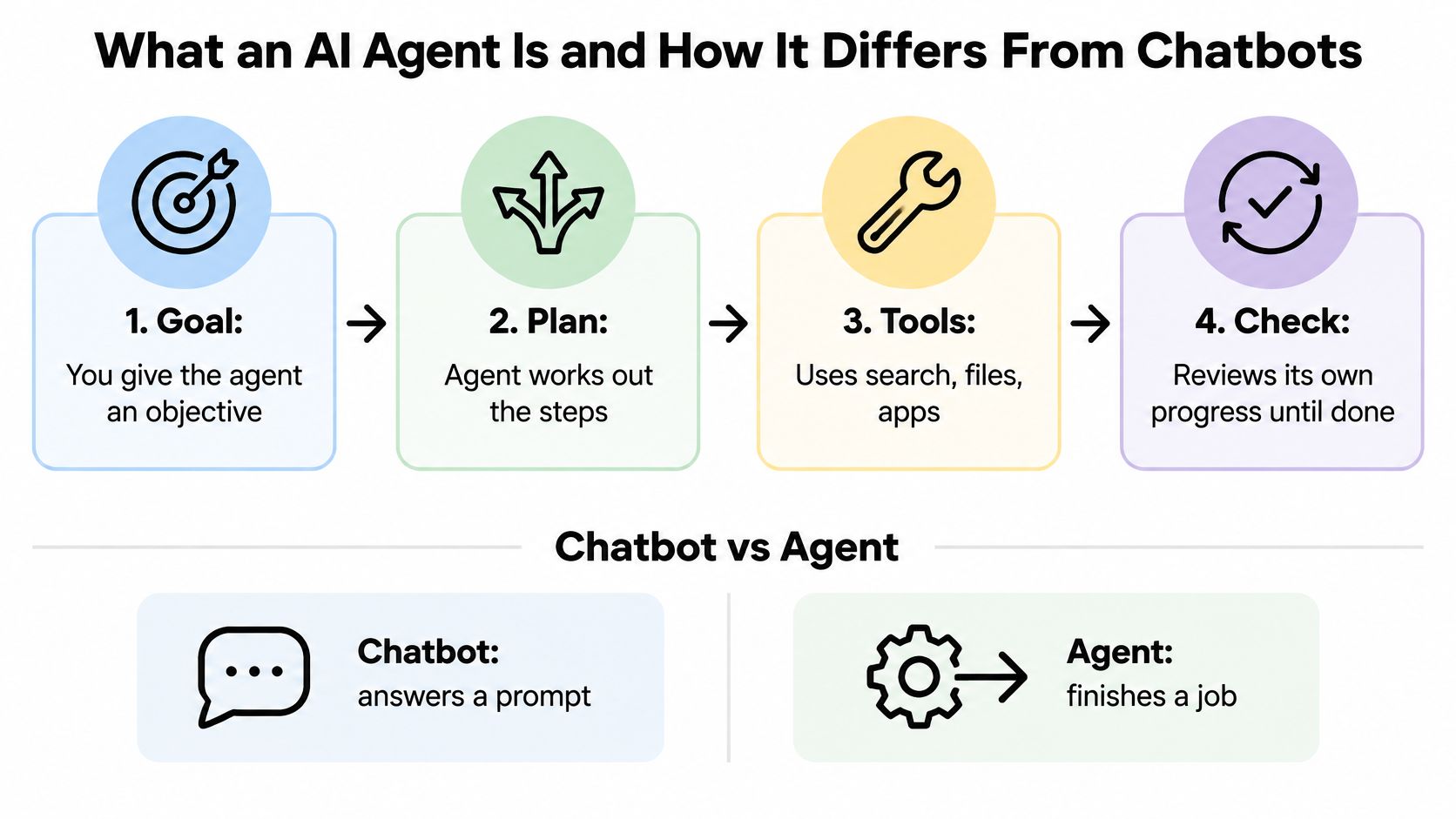
An AI agent takes a goal, chooses steps, uses tools such as search or files, and checks its progress as it works. A chatbot usually replies to a prompt and stops. The agent's degree of independence can vary, so it helps to decide how much control to give it for each task.
You probably know the scene: someone on Slack asks whether your team should use agents for the weekly report. You open four vendor pages, and each defines the term differently. One shows a chat window, another a flowchart, and a third a robot doing your taxes while you relax on a beach.
The practical question is how much autonomy to allow on a particular job. Set it according to what happens if the agent makes a mistake: a reversible draft can tolerate more freedom than a consequential change. Then measure the time saved only after counting the time spent checking its work.
A useful rule: Set autonomy by the impact of an error, not by how impressive the demo looks.
Say you want to know what three competitors changed on their pricing pages this month. Paste that into a chatbot and you get one reply. Then you spend twenty minutes opening the live pages, checking the claims, and fixing the two that don't match.
Hand the same goal to an agent and it searches, opens several pages, compares them, drafts the summary, and comes back with a short list of what it couldn't confirm. The output isn't just a reply, it's a small piece of finished work with a paper trail.
That gap is the definition. A review of agent architectures in Artificial Intelligence Review frames it as an operational difference: a conventional AI feature responds to an instruction, while an agent manages a multi-step process and chooses intermediate actions within defined limits. The same paper traces the lineage to Pattie Maes in 1993 and to Franklin and Graesser's 1996 description of an agent as a system that senses and acts over time in pursuit of an agenda. Wooldridge and Jennings had already named four properties back in 1995: autonomy, social ability, reactivity and proactiveness.
What are AI agents, then, if not chatbots with extra buttons? The cleanest way to see it is to put all three options side by side.
Everyone expects the tools row to differ. Fewer expect the human checks row to.
Tools change the economics. A chatbot with no tools can only rearrange what it already knows. An agent that can search, read a file, call an API or run code can go and find out.
Memory is the row people underrate. Chat context resets when the tab closes. An agent keeps state across steps, which is why it can pick up a half-finished comparison instead of starting over, and also why one stale note can poison the next three decisions.
Human checks have to be designed, not assumed. An automation bakes its checks into the rules, so a form submission either lands in the sheet or fails loudly. An agent can take three correct steps and then confidently do something nobody asked for. Approval gates are the seatbelt. Annoying right up until they aren't.
Practical rule: if the steps never change, write a script. If the next step depends on what the last one found, you want an agent.
The grey zone is where most buying decisions go wrong. Plenty of products are chatbots with a couple of tools bolted on, and they'll happily call themselves agents. Ask one question: does it run multi-step work without you pressing send at every step?
Here's the test I use on any product claim. Does it pursue a goal, choose its own steps, and act in the outside world? Three yeses and you're looking at an agent. Two, and you're looking at a very good assistant.
Narrow agents are already in your life, and they're the least scary version. A voice AI assistant for service businesses answers the phone, works out what the caller wants, books the slot and updates the calendar, all inside a small, predictable set of tools.
If the single-turn side of this is still fuzzy, our explainer on conversational AI and how it differs from an agent covers what a system can do when it only gets one turn.
The language model is the engine, not the car. A paper in Business and Information Systems Engineering describes an agent as a compound software system that operates inside an environment, keeps context, and selects actions through tools such as APIs, databases or code execution. Take the model out and nothing reasons. Leave everything else out and you have an expensive autocomplete.
That loop is what separates real tool use from a model that just sounds more confident. Research on agentic systems in Cognitive Computation defines tool use as the control loop explicitly invoking an external function, receiving the result programmatically, and using it in the next round of reasoning. A research agent searches, pulls evidence, notices a missing figure, searches again, then revises the draft. It isn't thinking harder. It's cycling.
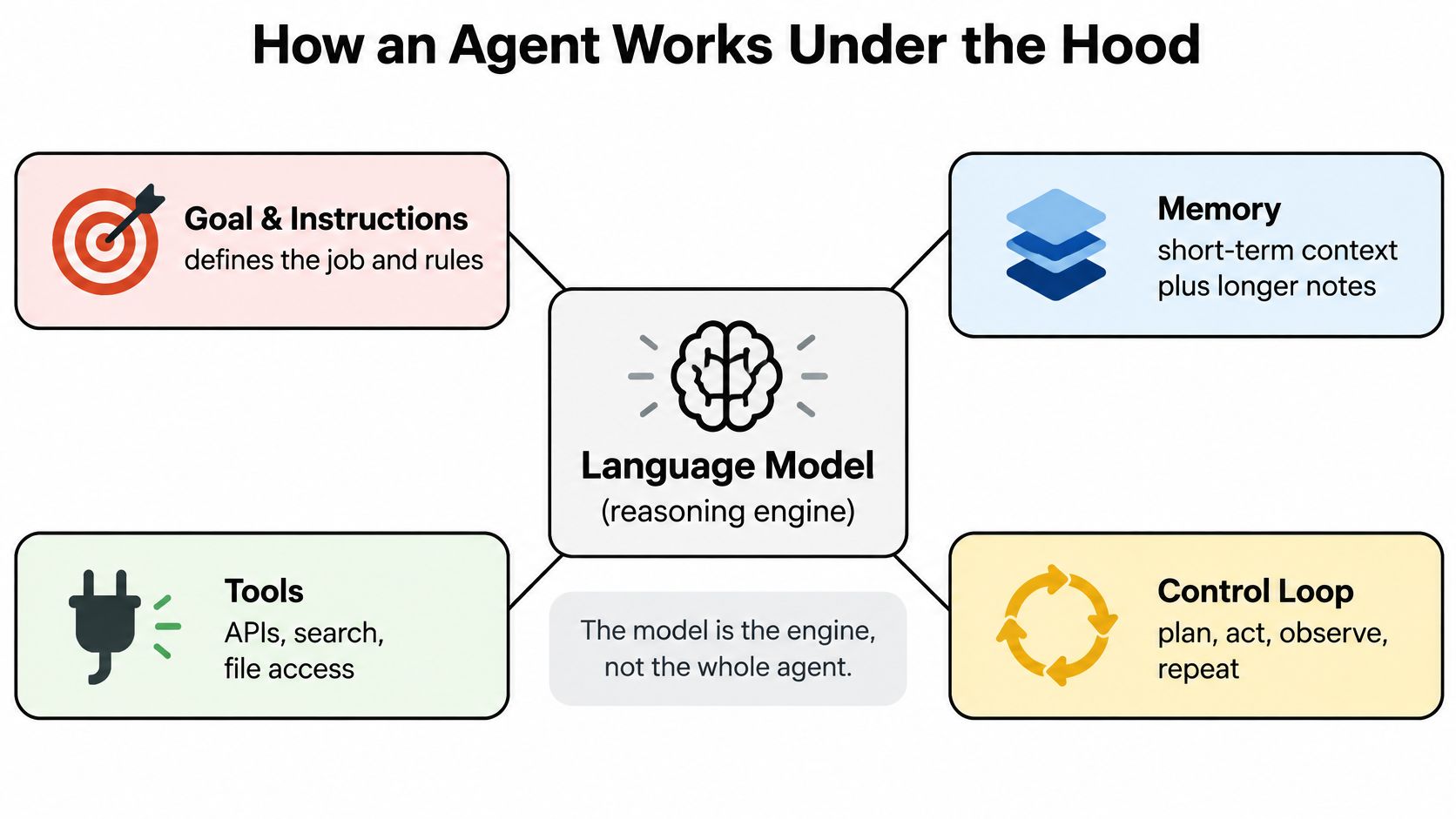
Permissions set the boundary of all this. Tool access decides what an agent can see or change, and memory decides what it remembers. A brilliant planner with read-only access is safe and useless for anything that writes back. A mediocre one with delete permissions is a liability with good manners.
When a run goes wrong, name the failure before you fix it: bad reasoning, bad retrieval, or a broken tool call. Step logs are what make that possible, and they're the difference between debugging and guessing.
If you want the plumbing underneath a normal assistant, how AI assistants work covers the simpler version of this stack.
Vendors use one word for six different things. Here's the map, and the right-hand column is the one to read first.
Notice that the last column doesn't track how impressive the demo was. It tracks how much the system decides without asking. A tool-using assistant that searches a PDF is barely more autonomous than a chatbot. A multi-agent setup where one agent hands work to another can compound a small error three times before anyone looks.
Rule-based agents are the oldest branch and still the most predictable. MYCIN diagnosed bacterial infections and recommended antibiotics in the 1970s, with human experts encoding every rule by hand, which is exactly why it degraded outside its narrow domain, as a literature review on agentic AI describes.
Planning agents are where the current excitement lives, and where the disappointment does too. They break a goal into steps and revise as results come in, which is powerful on research and fragile on anything with a fixed format and a Friday deadline.
Coding agents earn their own row because they can check themselves. They edit files, run the test suite, read the failure and try again. That feedback loop is why they've landed faster than most other categories.
Matching these types to roles is its own puzzle, and this guide to AI staffing solutions works through which jobs to hand to a system and which to hire for.
When a vendor says agent, ask which row it is and what it does with you out of the loop. A product that needs a click for every step is a perfectly good assistant, and calling it an agent is a pricing decision.
Five roles, five handoffs, one pattern. The work looks like this when it goes well.

A developer before standup. The agent reads the open issue, edits the two files involved, runs the test suite, sees one failure, patches the import and opens a draft pull request with a note explaining what changed. The developer reviews the diff in four minutes instead of writing it in forty.
A writer on deadline. Brief in, outline out, then a round of source gathering and a draft with inline flags wherever a claim still needs checking. The flags are the valuable part, because they show where the thinking stopped.
A marketer on Friday afternoon. Campaign numbers pulled, compared against last week, drafted into a two-paragraph update with the odd result called out instead of buried.
That kind of handoff only works when the agent can see the numbers, which is where tools stop being a detail and start being the job.
A student the night before a quiz. Lecture notes in, flashcards and a practice quiz out, sorted by topic, with the weak areas listed first.
An office worker with a spreadsheet. Data in, a finished deck out with charts included, which is the sort of task nobody enjoys and everybody gets asked for.
Adoption is already broad. In 2025, 79% of surveyed US business executives said AI agents were already being adopted in their companies, and 66% of organizations adopting them reported increased productivity, according to PwC's survey of 308 executives. Broad adoption isn't the same as uniform results. The gains cluster around repetitive, multi-step work, not judgement calls.
The mental model that holds up best is a junior colleague with a clear brief and a checklist, not a calculator. A calculator is exact and helpless on an ambiguous request. A junior colleague asks two clarifying questions, does the work, and flags what they weren't sure about. Give an agent the same brief and the same review.
Agents earn their keep on repeated, multi-step work where most of the cost is waiting: gathering sources, reformatting a spreadsheet, drafting the version you were going to rewrite anyway. The honest case for them is time returned, not genius delivered.
Long-horizon planning is the weak spot. Planning benchmarks cited in a 2026 study of tool-use reliability find that current agents are generally stronger at short-term tactical decisions than at strategic multi-step plans, and can still trail classical symbolic planners on structured tasks. Reality then adds uncertainty a clean demo never has. APIs time out, data arrives malformed, a system changes state between two calls, and the assumption the agent made two steps ago is suddenly wrong.
Security is the second crack. Tool access, prompt injection and credential misuse can turn a small reasoning error into an action outside your building, which is why permissions belong in the design conversation rather than the appendix.
The cheapest test available: run the agent on three real jobs and count the minutes you spend checking. That number is the real price.
The cost that gets left out of the business case is verification. A 2026 G2 survey on agents moving into production found that 45% of organizations said oversight and rework consumed more than a quarter of expected productivity gains, while 52% required human quality review before production, 48% required security review, and 41% required legal, risk or compliance review.
Capability itself is still uneven. A benchmark of 34 programmable tasks found that three open-source agent frameworks paired with two language-model backbones completed roughly 50% of tasks, with failures traced to poor planning, nonfunctional code and thin refinement across iterations. Completion ranged from 38.24% for AutoGen to 50.00% for TaskWeaver, which tells you the harness matters almost as much as the model.
Treat any agent claim as unproven until you've run it on your own tasks and kept the failure log. For the review step itself, our guide to fact-checking AI output covers the habits that catch the confident wrong answer.
Read that last column as a starting setting, not a final one. Three things decide where the line sits: whether you can undo the action, how bad a wrong version looks, and whether you can see afterwards what happened. How new the technology feels doesn't enter into it.
Gartner's assessment of the agent market reports that many agents remain unreliable in complex or business-critical settings, and predicts that 40% of agentic AI projects could be cancelled by the end of 2027 because of cost, unclear value or inadequate controls. In a 2026 survey reported alongside it, only 7% of B2B software buyers were comfortable with fully autonomous agents, 48% preferred guardrails, and 29% wanted agents restricted to specific tasks.
The controls follow from that. Security guidance submitted to NIST on agent security recommends positively scoped permissions, time-limited rather than persistent access, non-transferable agent privileges, a simple way for users to terminate an agent and revoke credentials, and logging that lets them review what it did. For a small team that translates to three habits: each tool is its own permission, access expires, and one button ends everything.
A shopping agent is the tidiest example of the dial. Filling a cart is reversible and low impact, so let it run; paying is neither, so it asks. Our piece on what an AI shopping assistant should and shouldn't do alone works through that line.
The best agent isn't the most autonomous one. It's the one whose permissions match the cost of being wrong, which usually means less rope than the demo offered.
Setup, integration, monitoring, exception handling, review and correction all land on your side of the ledger. That's why value should be counted after verification, not at the moment the agent produces an answer.
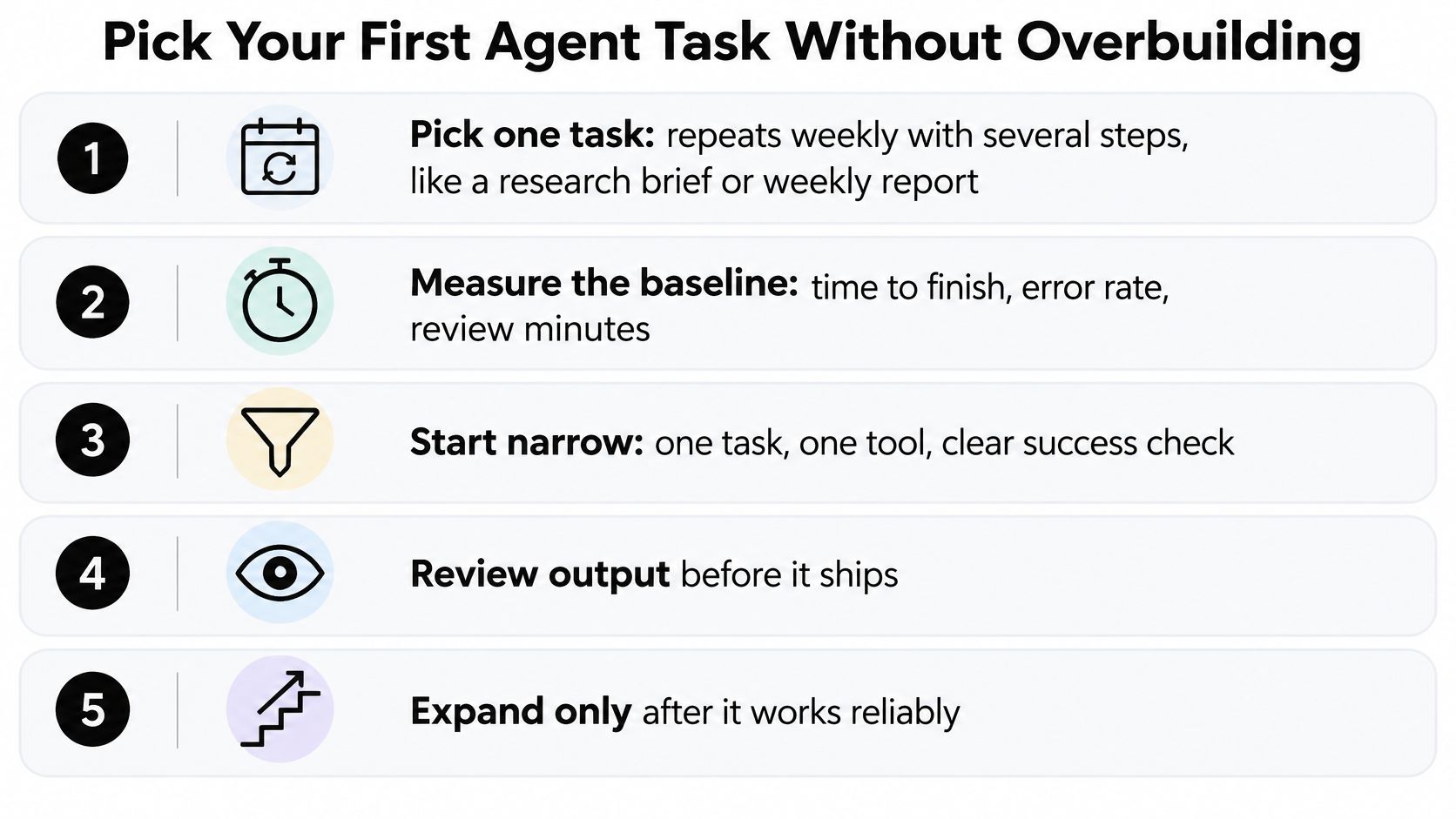
Expect a share of runs to fail in ways you'll have to catch. That's a reason to keep the review step and build the checklist first, not a reason to skip agents. And if the steps never change, a plain script is cheaper, more predictable and easier to audit. Agents earn their place where inputs vary, where the next tool depends on what the last step found, and where more than one outcome is acceptable.
That's the setup we build for. Our agent asks for your approval before it creates or changes anything in connected apps, it reaches Notion, Linear, Canva and Airtable through plugins, and the workflow builder chains prompts, models and image tools into reusable pipelines.
The pipeline is the second move, not the first. Once one agent runs reliably on one task, chain the steps with a checkpoint between stages, which is the approach in our guide to AI workflow optimization.
Before you build anything, ask whether you'd hand this task to a new intern with no checklist. If the answer is no, write the checklist first. It's the same document, and the agent will follow it more closely than any intern ever did.
Zemith puts an agent, deep research, document chat and a workflow builder in one workspace, so you can try the setup this guide describes without stitching four subscriptions together. The agent runs tasks in the background and asks for approval before it changes anything in your connected apps, which makes it a sane place to set your first autonomy dial. Pick one weekly job, run it on three real attempts, and count the review minutes against your baseline at Zemith.
Switch models mid-chat, search the web, build Word, PowerPoint, Excel and PDF files, and generate images and video, on web, iOS and Android with one plan.
Free $0 (chat with the free models) · Plus $15.99/month · Professional $29.99/month. Prices in USD.
Pay less than one AI subscription and get GPT, Claude, Gemini and more, plus 50+ AI tools.


Trusted by teams at






The top models, plus image, video and voice tools, in one plan.
Without Zemith
ChatGPT PlusUS$20.00Claude ProUS$20.00Google AI ProUS$19.99SuperGrokUS$30.00Perplexity ProUS$20.00 MidjourneyUS$10.00
 ElevenLabsUS$6.00Le Chat ProUS$14.99
 RunwayUS$15.00Kling StandardUS$8.80
 Gamma PlusUS$12.00
 Otter ProUS$16.99
 QuillBot PremiumUS$19.95
 Photoroom ProUS$12.99
 Quizlet PlusUS$7.99
Total if paying separatelyUS$234.70/mo
"I love the way multiple tools they integrated in one platform. Going in the right direction."
— simplyzubair
"The quality of data and sheer speed of responses is outstanding. I use this app every day."
— barefootmedicine
"The credit system is fair, models are perfect, and the discord is very responsive. Quite awesome."
— MarianZ
"Just works. Simple to use and great for working with documents. Money well spent."
— yerch82
"The organization of features is better than all the other sites — even better than ChatGPT."
— sumore
"It lives up to the all-in-one claim. All the necessary functions with a well-designed, easy UI."
— AlphaLeaf
"The team clearly puts their heart and soul into this platform. Really solid extra functionality."
— SlothMachine
"Updates made almost daily, feedback is incredibly fast. Just look at the changelogs — consistency."
— reu0691
Hand off the research, writing, design and follow-ups. Zemith picks the tools it needs and brings back finished work.
Search the web, run deep research, read files, create images and run code with GPT, Claude, Gemini, Grok and more.
Zemith keeps working in the cloud and pings you when it's done.
Notion, Linear, Canva, Airtable and more. It asks before it creates or changes anything.
Docs, slides, sheets and PDFs, ready to send.
Chain models and tools on a visual canvas, from one prompt to a finished promo video.
Briefings, reports and reminders run on a schedule and are ready when you need them.
Real-time voice that can see your camera or screen.
The best image and video models, in one studio.
Turn PDFs, links and YouTube videos into podcasts, quizzes, flashcards and mind maps.













 Podcast
 Quiz
 Flashcards
 Mind map
 Infographic