


Every top model, with tools built in.
Search the web, run deep research, read files, create images and run code with GPT, Claude, Gemini, Grok and more.
An AI shopping assistant is for research and comparison, not silent checkout. See real usage, safe approvals, and how to judge a recommendation.
An AI shopping assistant researches products, compares options, and explains trade-offs before you pay, and 53% of AI shoppers use it for product research, while only 23% of U.S. consumers trust generative AI to handle payments. The useful version is a research partner with clear limits, not a robot with permission to spend.
That distinction changes what you should ask for. Instead of handing over a vague wish list and hoping for magic, give the assistant a job, a set of constraints, and a requirement to show its evidence. A polished recommendation isn't much help if the product won't fit through your door.
38% of U.S. consumers had used generative AI for online shopping, and 52% planned to during the year, according to McKinsey's analysis of agentic commerce, which summarizes an Adobe survey. Those figures point to a practical role: an AI shopping assistant can help research products, compare options, and clarify trade-offs. It can guide a decision without becoming the buyer.
The useful output depends on the job. For product research, a shortlist should show specifications and trade-offs. For a deal, the answer should make the price and promotion clear enough for you to check.
Take a desk lamp. A useful assistant compares brightness, desk footprint, adjustable height, and replaceable bulbs instead of treating a bestseller as the right choice for everyone. If it cannot verify a specification, it should say so. Personal recommendations can still favor popular products, so ask why each pick fits your criteria rather than accepting rank as proof.
For clothing, you might need help interpreting size charts or finding specific materials. A checklist for choosing clothing assistants can help you identify which apparel-specific capabilities to look for.
The discovery channel is changing too. Adobe Analytics reported that traffic from generative-AI sources to U.S. retail websites was 1,200% above July 2024 levels in February 2025. That measures referral growth, not the accuracy of the advice shoppers received.
Start with one job you want done this week: compare laptop docks, find a gift, or check whether a discount is worth considering. Then judge the assistant by whether it returns useful evidence for that task.
A good shopping conversation behaves like a helpful clerk with an index card. The clerk writes down your budget, material restrictions, and delivery region rather than trying to replay every sentence you've said.
An assistant needs the same discipline. If it forgets your no-leather rule halfway through, it's just a very confident search box.
Use this sequence to judge how an assistant handles a complicated request:
The visible conversation can stay simple even when the underlying process is structured.
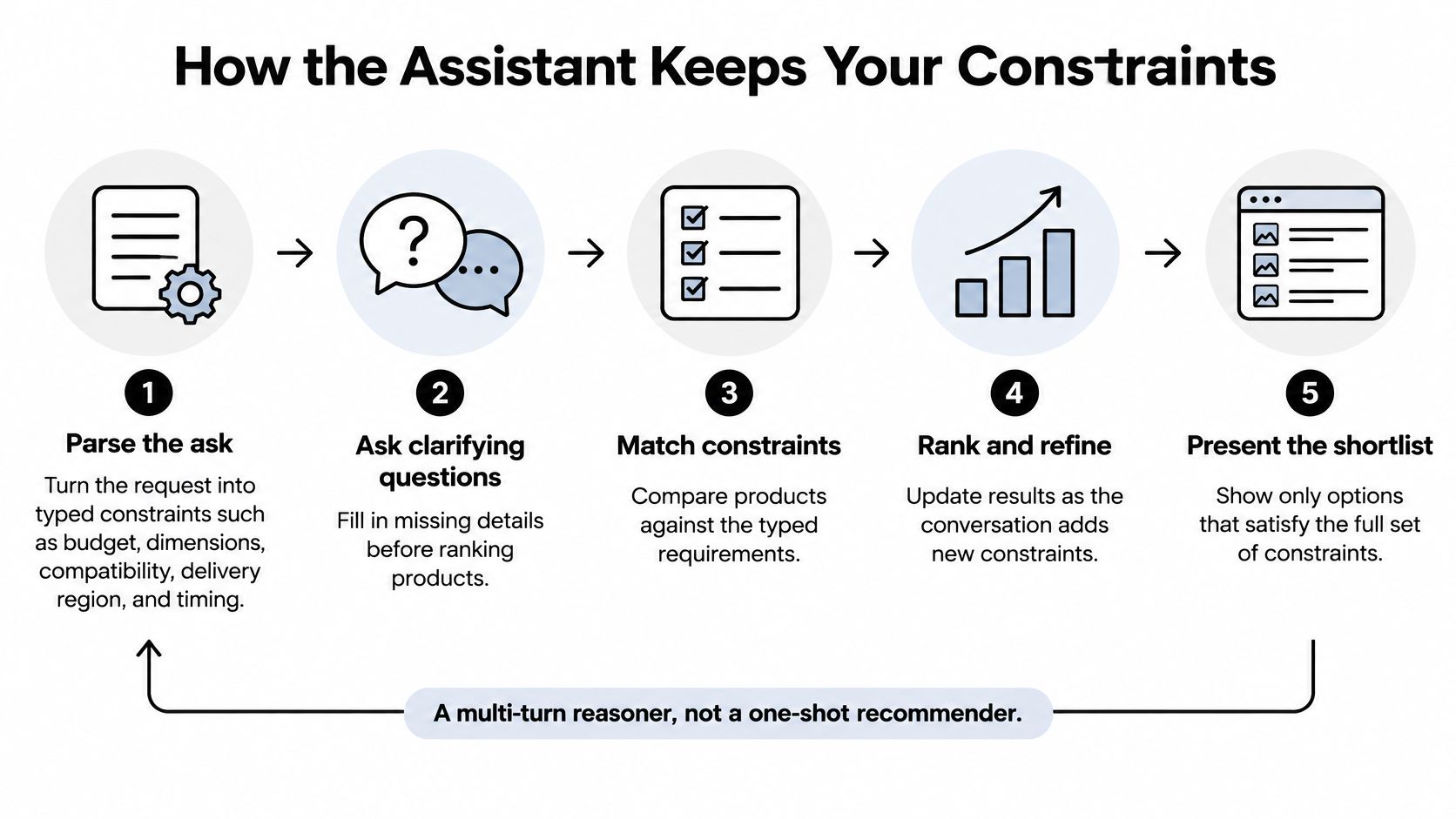
The Shopping Reasoning Bench contains 525 expert-authored missions, including 293 multi-turn missions and 10,863 importance-weighted yes-or-no evaluation criteria; across nine models from the GPT, Claude, and Gemini families, overall pass rates were 57–77%, performance declined 4–18 percentage points as conversations progressed, and optional extra helpfulness lagged required-task performance by 13–29 points.
Those are benchmark results, not a prediction of your next shopping chat. They do explain why a charming opening answer isn't enough: the assistant must preserve the details that matter when you're ready to choose.
Our explanation of how AI assistants work gives useful context for separating the conversational interface from retrieval, memory, and action-taking. For shopping, inspect the visible requirements rather than assuming a long transcript guarantees understanding.
Practical rule: A preference matters only if the assistant can show how it changed the shortlist.
Write your own card before asking anything. Include must have, must avoid, acceptable trade-off, and still unknown. If a requirement conflicts with another, ask the assistant to identify the conflict instead of relaxing whichever rule is inconvenient.
A useful shopping assistant can research and monitor options without taking control of your wallet. Only 23% of U.S. consumers trusted generative AI to handle payment transactions, according to the Visa survey announcement. Treat that gap as a reason to set clear limits between advice and action.
Shoppers are generally much less willing to let an assistant purchase without approval than to let it research. Finding a jacket and charging someone for it are different jobs.
Use this as a control policy, not a promise about what every shopping tool supports. The assistant can gather information within the task you authorize. You decide which actions require a fresh yes.
A price watch can collect information and alert you when a threshold is reached. That alert is not permission to buy. Adding an item to a cart also deserves a visible list of assumptions, while substitutions need extra scrutiny because changing the size, material, or model can defeat the reason you chose the original.
Recurring orders need both an amount limit and an interval. If the price changes, make a new decision based on the updated total rather than treating earlier interest as standing approval.
Before a consequential step, check the price, availability, shipping, return window, and exact variant again. The approval screen should name the merchant and state what will happen. A vague continue button doesn't tell you what you're authorizing.
Keep spending controls and privacy controls separate:
A spending cap is not consent. An assistant can stay within budget and still choose the wrong item.
The strongest assistant may be a research and monitoring partner, not an autonomous buyer. Set permissions before connecting a wallet, and require explicit approval whenever the assistant is about to create or change something on your behalf.
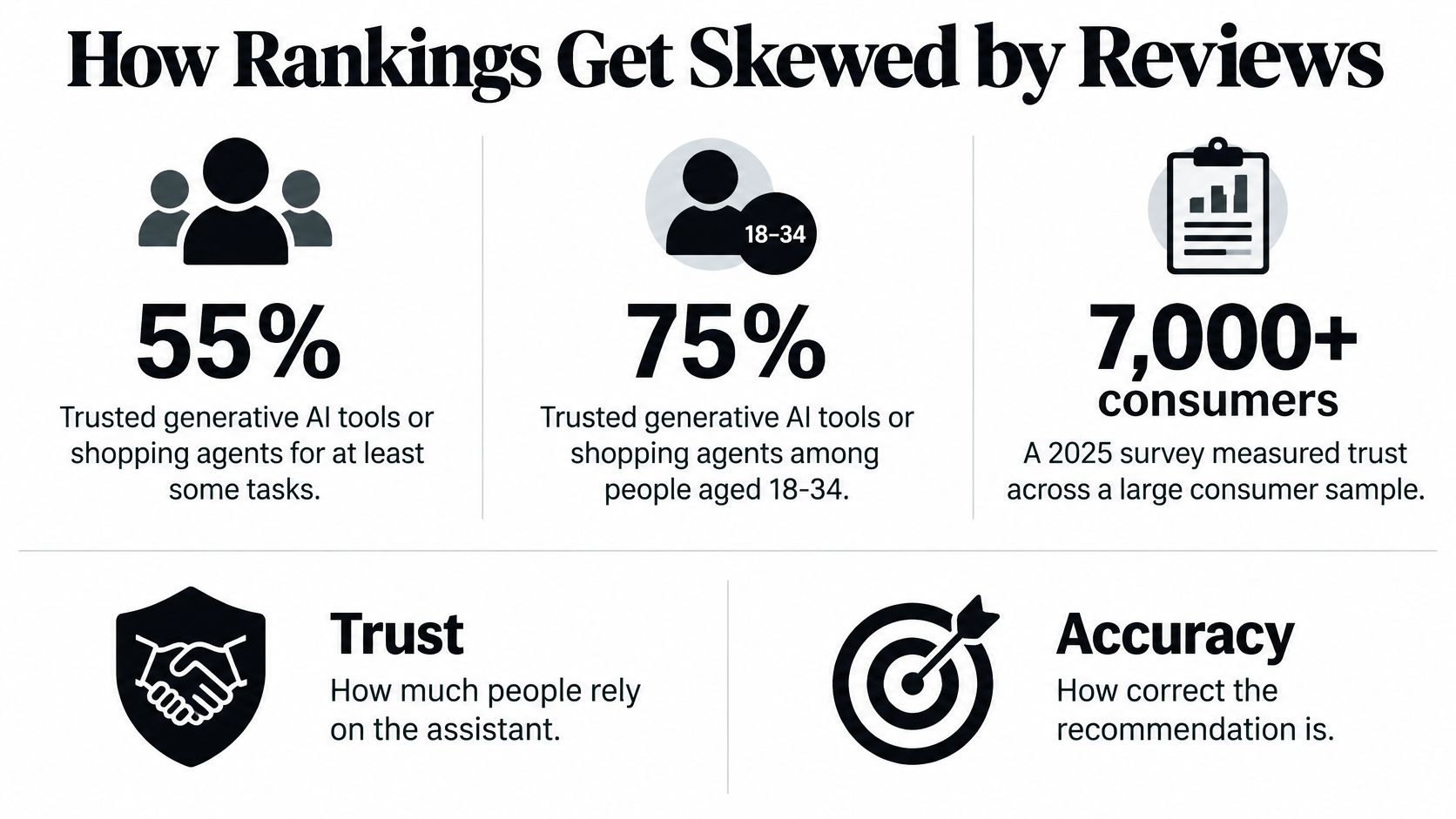
Trust and accuracy aren't the same measurement. A 2025 multinational survey of more than 7,000 consumers, described in Bazaarvoice's Shopper Experience Index coverage, found that 55% trusted generative AI tools or shopping agents for at least some tasks, rising to 75% among consumers aged 18–34.
That coverage also cites Columbia and Yale research indicating that products combining high ratings with high review volumes receive the strongest preference boost from AI agents. The concern isn't that popular products are necessarily bad. It's that popularity can stand in for suitability.
The distinction is worth keeping visible when you read a recommendation.
Say you're choosing a blender for a cramped kitchen. In this hypothetical comparison, a five-star model with 40,000 reviews looks impressive, but a less-reviewed compact model is the one that fits your shelf.
A weak ranking praises the crowd favorite and mentions its height near the bottom. A useful ranking excludes it on dimensions before comparing the remaining products.
Personalized doesn't necessarily mean best match. Ask which evidence actually determined the order.
New, local, niche, or specialized brands can be worth examining even when they lack a mountain of reviews. Ask for an alternative that satisfies the same requirements without using review volume as the main ranking signal.
A good recommendation should carry readable labels:
Our guide to writing useful product reviews offers a helpful lens for evaluating the evidence an assistant summarizes. Specific use conditions and limitations are more informative than enthusiastic adjectives.
Privacy also belongs in this conversation. In the eight-country survey discussed in the same Bazaarvoice coverage, 43% named privacy or data use as their leading AI concern, while 15% worried about not knowing whether they were interacting with a person or machine.
Don't respond to an unexplained ranking by supplying more personal information. Ask for a clearer ranking method first. Before treating a shortlist as advice, ask: What did you ignore? What is paid?
Start with a purchase you can describe clearly. These are hypothetical prompts, so the budgets and dimensions are inputs you can replace, not claims about available products.
For gifts
I need a gift under $60 for a coworker who bikes to work and hates logo gear. Give three options, the one I should skip, and why. Show sources and flag anything you can't verify.
For compatibility
Find a sleeve for a 14-inch laptop, under 1 inch thick, that fits a bag I already own. Ask me anything you cannot infer, including the laptop's actual dimensions and the bag's usable opening.
For deals
Watch this exact model, not similar ones. Tell me if the price drops under $120 and whether shipping and tax change the total. If you can't monitor it continuously, say so and help me set up a supported reminder or alert.
The setup can be as ordinary as a shopping question on your laptop or phone.
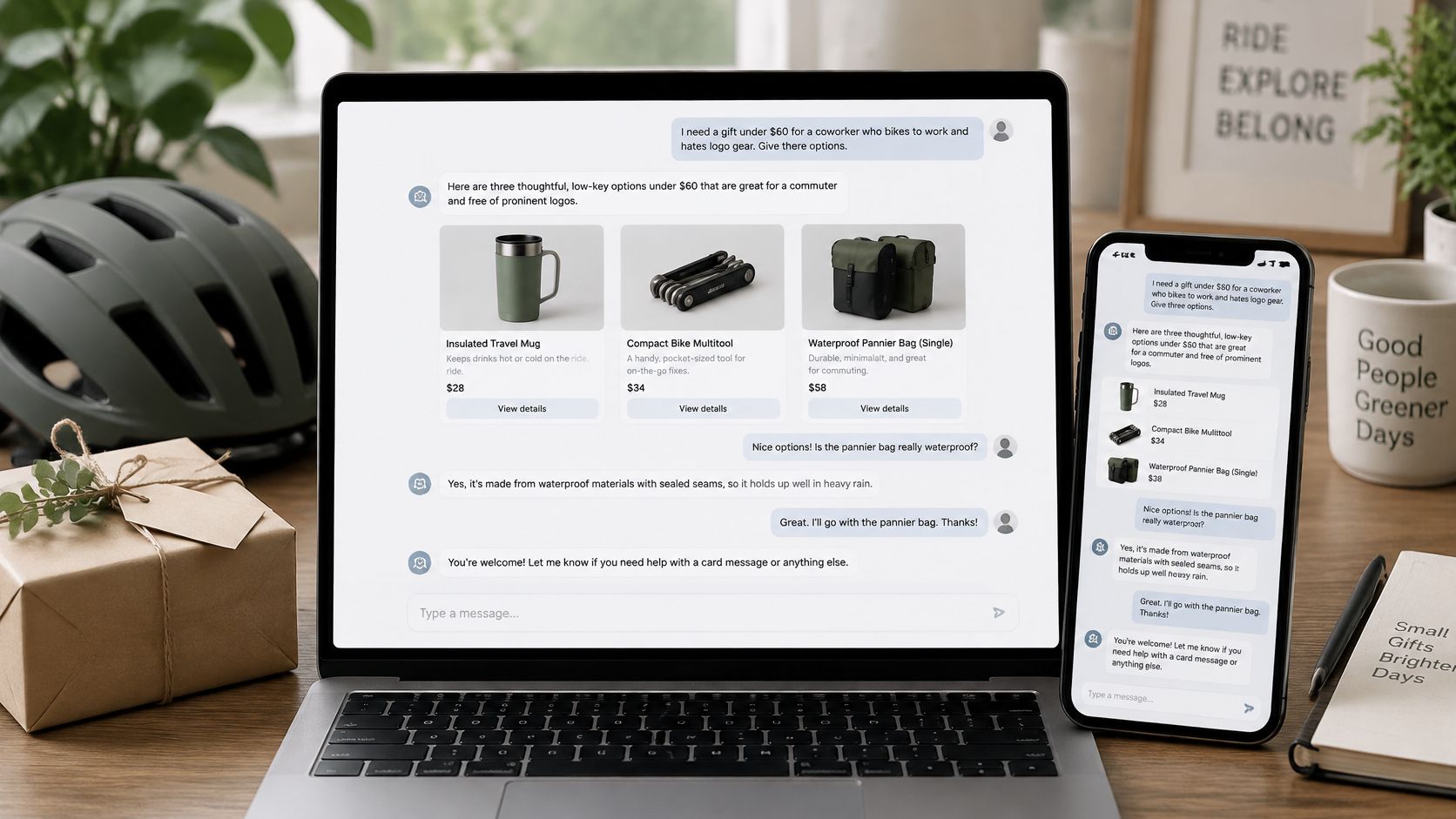
Consider this fictional bag-shopping conversation. The prices below are invented scenario values, not offers.
Shopper: I need a work bag under $80. No leather, including trim. It must ship to Texas.
Assistant: What size laptop does it need to hold? Please give the actual dimensions if you have them.
Shopper: I'll paste the dimensions from the manufacturer's page.
Assistant: Here's the constraint card: budget below $80, no leather anywhere, laptop fit checked against supplied dimensions, delivery to Texas. Here's how the candidates compare.
Shopper: The tote is too heavy. Prioritize the lightest qualifying option.
Assistant: I'll remove the tote from the shortlist, add low weight to the ranking criteria, and move the compact backpack first. The satchel remains excluded; I'll look for another qualifying alternative rather than bringing it back.
That final move matters. The assistant changed the selection instead of apologizing and serving the same list with fresh adjectives.
For another conversational reference, this video can accompany your practice session.
The mechanics are straightforward: a clarifying question, a visible constraint card, evidence attached to the decision, and a correction that changes the ranking. Our introduction to conversational AI explains the broader interaction pattern.
Surprise me is how you end up with a fondue set. Run a real purchase question instead, and reject any answer that can't explain what it filtered out.
An assistant can't reliably recommend a product it can't identify. For retailers, that makes accurate product information an operational requirement, not a decorative SEO exercise.
Google's Product structured data documentation explains that merchants can supply product information through Product structured data, Merchant Center feeds, or both. Structured data can expose price, availability, review ratings, and shipping information, while Merchant Center participation is required for visibility in the Google Shopping tab.
Product names, prices, billing intervals, images, availability, and terms should agree across the visible page, markup, and feed. For software offers, include plan limits and promotional conditions in that agreement.
Google Merchant Center's product-data guidance reinforces the need for matching product values and markup available in the HTML returned by the server, rather than information generated only after JavaScript loads. Check the delivered page, not just what appears in your own browser after everything finishes rendering.
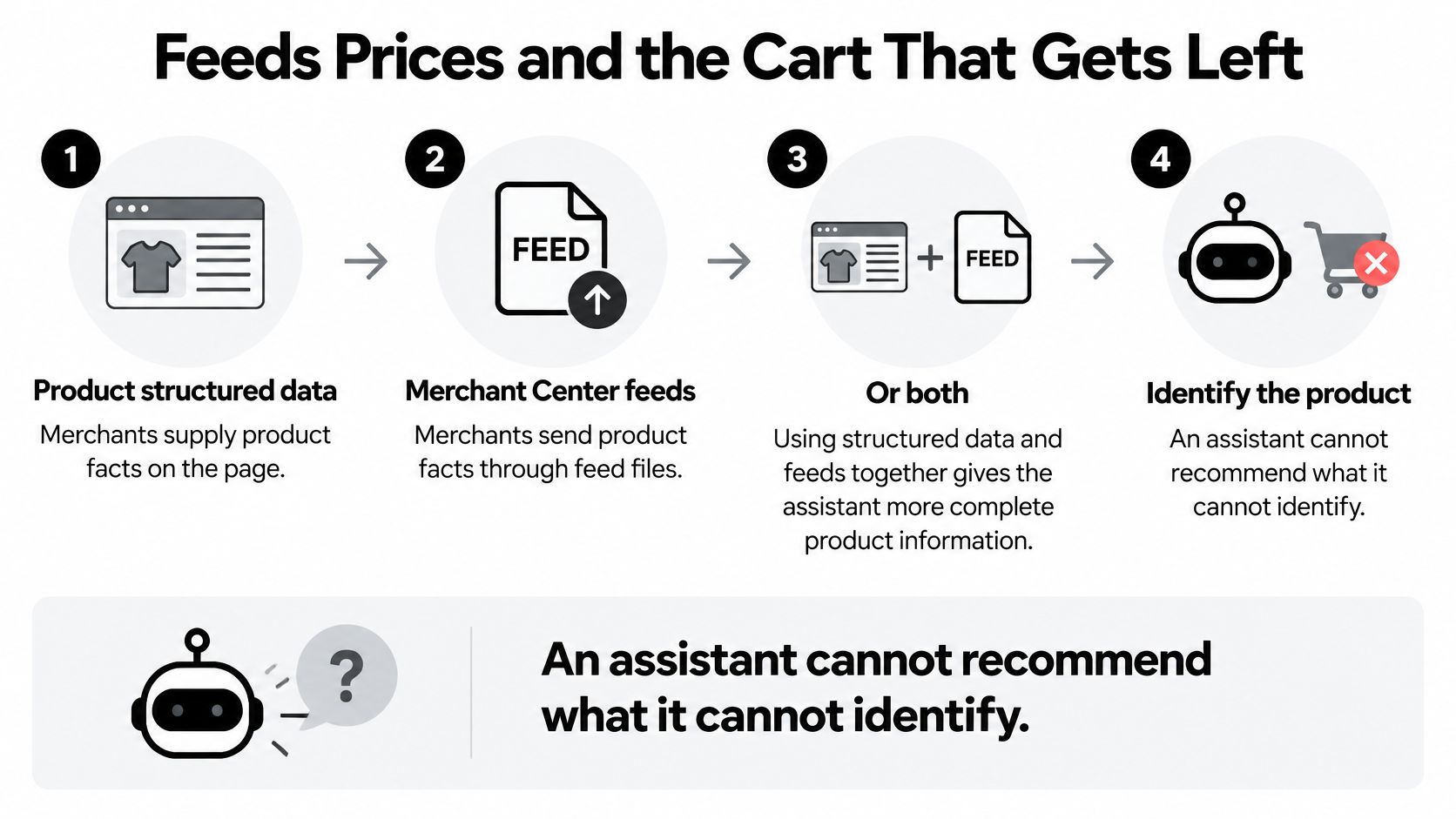
If different pages quote different prices, an assistant may confidently recommend the wrong deal. It's the digital equivalent of a waiter delivering someone else's order with excellent pronunciation.
For a practical view of machine-readable storefronts, Agentable explains how to make online stores accessible to agents. Pair that technical work with clear human-facing copy, using our guide to writing product descriptions to make fit and limitations explicit.
Baymard's cart-abandonment benchmark places average online cart abandonment at 70.22%, and its research found that 42% of U.S. online shoppers abandoned because they were only browsing or weren't ready to buy. Neither figure means an assistant can persuade every browser to purchase.
A better use of the assistant is qualification. Explain who the product suits, how versions differ, what the total includes, and which unresolved question should stop the purchase.
For a software subscription, distinguish a researcher's document needs from a developer's coding workflow. For a physical product, explain which accessories are required and whether they're included.
Resolve discrepancies before adding persuasive recommendations. Otherwise, you're giving an assistant better language for describing an unreliable offer.
Start with the data path, not the chat bubble. Every integration needs an answer to the same question: Where does this product fact come from?
A feed or catalog API can supply names, prices, stock, and policies. A retrieval index makes those records searchable, but it doesn't make an old record current.
Choose based on what you can maintain. A catalog API is useful when fresh inventory matters, but the implementation needs a fallback when access fails. That fallback should report an unavailable check, not invent a stock status.
A feed paired with schema markup is a sensible starting point when both can use the same maintained product record. Don't assume it's automatically the cheapest option; compare the maintenance work your team would own.
For each retrieved fact, log:
Our guide to SaaS integrations provides context for connecting tools without treating every connection as permission to act.
An embedded widget should come after shortlist evaluation, not before it. Test whether the system retrieves the correct variants and handles corrections, then decide whether an on-site interface adds value.
Keep the initial scope narrow enough to inspect manually. A useful comparison flow is a better starting point than a checkout agent whose mistakes you discover through support tickets.
Start with constraint satisfaction, not message count. A friendly conversation that ends with an incompatible product is a failed shopping interaction.
Review completed tasks alongside their source records. Don't score only the first answer; inspect the final shortlist after the shopper changes their mind or supplies missing information.
These are operational evaluation criteria, not universal industry benchmarks. Set targets against your own task definitions and review failures individually before attributing improvements to the assistant.
Build evaluation conversations that include an inconvenient clarification. Change the delivery region, reject a material, or add a compatibility requirement after the assistant has already formed a shortlist.
Then inspect whether it:
A longer chat isn't a success metric. It may mean the shopper is doing the assistant's quality assurance.
For return-rate comparisons, separate product mismatch from damaged delivery and other causes the assistant couldn't reasonably influence. Compare similar purchase categories rather than treating every return as the same event.
Instrument constraint satisfaction and confirmation on irreversible steps first. Those checks expose the difference between an assistant that sounds useful and one that respects the shopper's actual decision.
Use Zemith as the research desk, not the checkout counter. Start a project around a real purchase, then add manuals, return policies, and comparison notes to its library so your questions have a defined evidence base.
Ask for quoted specifications from the files, with unresolved details marked explicitly. A manufacturer manual can answer a compatibility question that a glossy product page avoids.
Zemith brings together web search, deep research, chat with files, live voice, memory, and scheduled tasks. You can switch models at any time, even in the middle of a chat, so compare which answer follows your constraint card rather than choosing whichever sounds most confident.
A practical session might look like this:
Live voice is useful when you're walking around describing a shelf or discussing what you see instead of retyping the entire request. Give actual measurements when fit matters; a spoken impression isn't a substitute for dimensions.
Scheduled tasks can run briefings, reports, and reminders on a set schedule. Use that capability to organize a buying-review reminder, without assuming that a reminder is a continuous stock monitor or permission to order.
Builders can apply the same workspace pattern to catalog evaluation, with policy documents and test conversations kept together. The agent asks for your approval before it creates or changes anything in connected apps.
Zemith can help you read the reviews without turning your shopping session into an unsolicited fondue acquisition. Keep any external payment or account decision under your control, and finish the research with an explicit list of what still needs checking.
Bring your next buying question to Zemith, attach the manuals or product pages, and use its research and file-chat tools to build an evidence-backed shortlist. Ask for a constraint card and the ignored alternatives, then approve nothing irreversible until the exact variant, price, stock, and shipping details match.
Pay less than one AI subscription and get GPT, Claude, Gemini and more, plus 50+ AI tools.







Trusted by teams at






The top models, plus image, video and voice tools, in one plan.
Without Zemith
ChatGPT PlusUS$20.00Claude ProUS$20.00Google AI ProUS$19.99SuperGrokUS$30.00Perplexity ProUS$20.00 MidjourneyUS$10.00
 ElevenLabsUS$6.00Le Chat ProUS$14.99
 RunwayUS$15.00Kling StandardUS$8.80
 Gamma PlusUS$12.00
 Otter ProUS$16.99
 QuillBot PremiumUS$19.95
 Photoroom ProUS$12.99
 Quizlet PlusUS$7.99
Total if paying separatelyUS$234.70/mo
"I love the way multiple tools they integrated in one platform. Going in the right direction."
— simplyzubair
"The quality of data and sheer speed of responses is outstanding. I use this app every day."
— barefootmedicine
"The credit system is fair, models are perfect, and the discord is very responsive. Quite awesome."
— MarianZ
"Just works. Simple to use and great for working with documents. Money well spent."
— yerch82
"The organization of features is better than all the other sites — even better than ChatGPT."
— sumore
"It lives up to the all-in-one claim. All the necessary functions with a well-designed, easy UI."
— AlphaLeaf
"The team clearly puts their heart and soul into this platform. Really solid extra functionality."
— SlothMachine
"Updates made almost daily, feedback is incredibly fast. Just look at the changelogs — consistency."
— reu0691
Hand off the research, writing, design and follow-ups. Zemith picks the tools it needs and brings back finished work.
Search the web, run deep research, read files, create images and run code with GPT, Claude, Gemini, Grok and more.
Zemith keeps working in the cloud and pings you when it's done.
Notion, Linear, Canva, Airtable and more. It asks before it creates or changes anything.
Docs, slides, sheets and PDFs, ready to send.
Chain models and tools on a visual canvas, from one prompt to a finished promo video.
Briefings, reports and reminders run on a schedule and are ready when you need them.
Real-time voice that can see your camera or screen.
The best image and video models, in one studio.
Turn PDFs, links and YouTube videos into podcasts, quizzes, flashcards and mind maps.














 Podcast
 Quiz
Quiz Flashcards
 Mind map
 Infographic