


Every top model, with tools built in.
Search the web, run deep research, read files, create images and run code with GPT, Claude, Gemini, Grok and more.
AI for technical writing is here to stay — learn how to use it productively without losing quality. Practical workflows, prompts, and Zemith tips inside.
AI works best for technical writing as a drafting and structuring partner, while a human remains responsible for accuracy, audience fit, and domain correctness. In a 2026 survey, 68.97% of technical documentation professionals reported productivity gains from AI, but the strongest results still come from collaboration rather than unattended generation.
You know the scene. A release is approaching, the API reference needs updating, onboarding content is already stale, and someone has just asked for a polished FAQ by Friday. You open an AI tool hoping it will remove the pressure, then spend half an afternoon correcting confident nonsense about a parameter that doesn't exist.
That experience doesn't mean AI has no place in technical writing. It means the handoff was poorly designed. AI is useful when it handles structure, repetition, summarization, and rough drafting. Humans need to stay close to source truth, product context, audience needs, and final approval.
A technical writer rarely performs one task called “writing.” The work arrives as a chain of smaller jobs: finding the relevant engineering ticket, comparing a previous API version with the current one, outlining a tutorial, turning notes into prose, checking terminology, formatting examples, and asking an engineer whether a behavior is intentional.
That chain is exactly where AI fits. It can turn a messy meeting transcript into a candidate outline, group repeated support questions, suggest headings for a reference page, summarize a long design document, or identify sentences that use inconsistent product names. None of those tasks requires the system to understand the entire product. They require a useful assistant with carefully limited responsibility.

The adoption data reflects that practical reality. A 2026 survey of technical documentation professionals found that 77.74% used general-purpose AI tools, while 41.89% used internally developed tools. Smaller groups used AI features embedded in documentation platforms or dedicated writing assistants. The important detail isn't that every writer has handed over the keyboard. It's that AI is appearing inside ordinary research, editing, and publishing routines.
A writer handling release notes might use AI to extract candidate changes from source material, then manually decide which changes matter to customers. The same writer might ask for three versions of a paragraph, one for developers, one for administrators, and one for beginners, but still verify every example against the product.
That is a human-in-the-loop workflow. The machine produces options and patterns. The writer supplies judgment, context, and accountability.
The survey also found that adoption is uneven. 13.22% had experimented with AI but weren't using it in production, 7.44% were interested but hadn't started, and 2.75% didn't plan to use it, according to the same technical documentation AI survey. Those figures suggest that the decision isn't whether to become an AI-only team. It's how to introduce assistance without weakening review standards.
Practical rule: Give AI the boring parts first. Keep the decisions that depend on product knowledge, risk, and reader empathy with a person.
For a useful introduction to task-level applications, see this guide to using AI for writing. The strongest technical writers aren't chasing a magic documentation generator. They're building a dependable sequence in which each AI handoff has a clear input, a narrow output, and a named reviewer.
A release note can start with a messy change log, a few issue comments, and an engineer's shorthand. AI can turn that material into a structured draft in minutes. The writer still decides which changes affect customers, checks the terminology, and verifies every example against the product.
That division of labor captures where AI helps. It creates a workable shape from incomplete notes, applies a consistent structure, and finds surface-level repetition quickly. It does not establish whether the content is true. A polished explanation may omit an edge case, confuse two permissions, invent a package name, or describe behavior that the current build does not support.
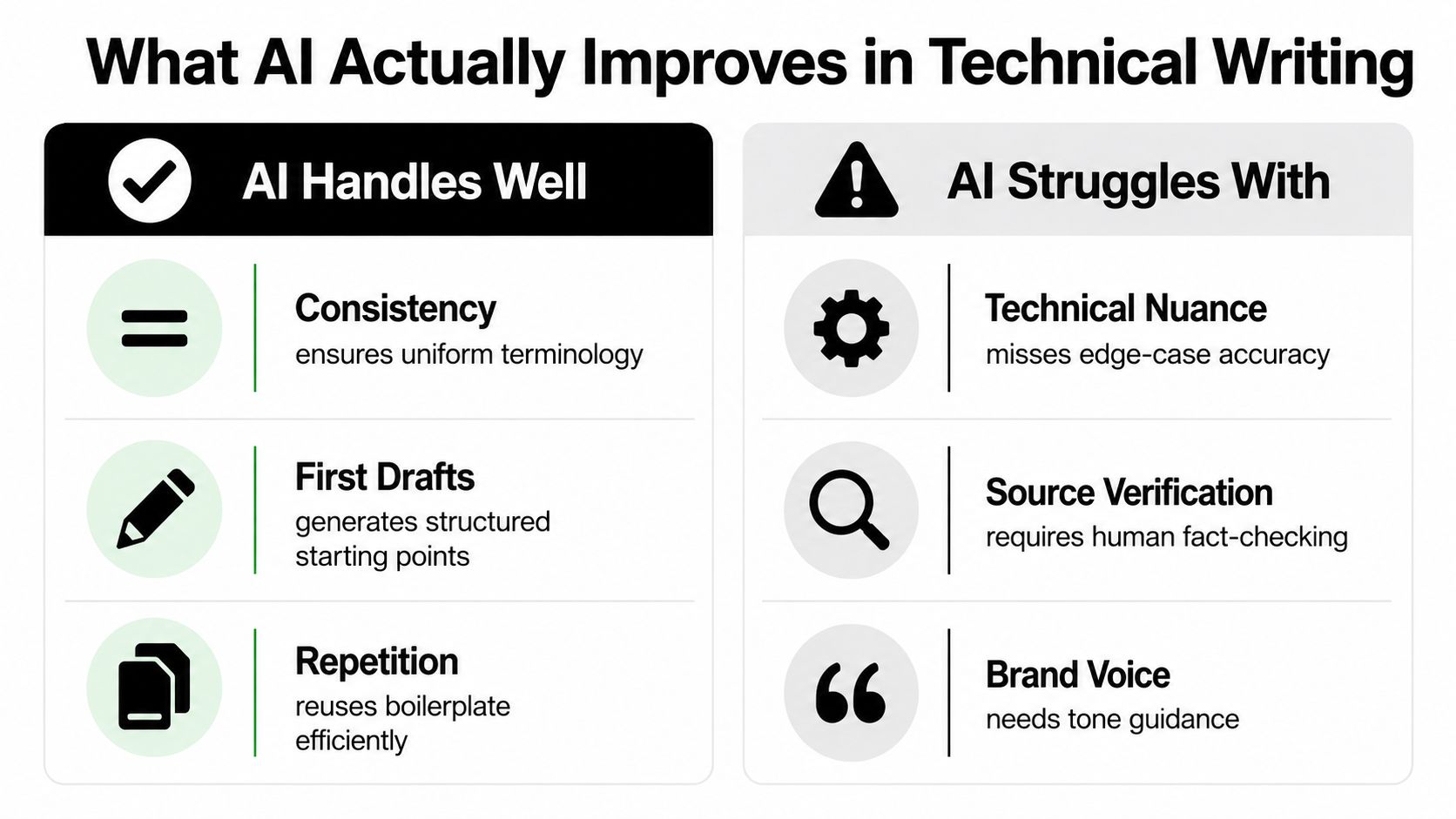
A 2026 survey of 109 technical communicators found that 62% used AI regularly or daily, while 8% didn't use it at all, according to this technical communication AI survey. The same research found that 76% hadn't received formal training in AI for technical writing. Teams are adopting these tools faster than they are building reliable habits for checking the output.
AI can handle the first pass when the source material is confirmed and the output has a clear boundary:
The task's breadth affects the result. WritingBench evaluates generative writing across 1,239 prompts, 6 primary domains, and 100 subdomains, including technical writing. Its value is less about one final score than about showing why documentation evaluation must cover structure, format, length, and domain constraints as well as grammar.
Keep a person directly involved when content covers security implications, migration behavior, permission rules, regulatory requirements, performance conditions, or specialized terminology. Audience fit also requires judgment. A technically correct explanation can fail if it assumes knowledge the reader does not have.
Model selection changes the outcome. A comparative code documentation study found that several language models generally outperformed original human-written documentation on accuracy, completeness, relevance, understandability, readability, and time taken, with StarChat as the reported exception. The same source describes industrial documentation research in which expert raters preferred fine-tuned outputs 68% of the time. Domain adaptation may improve results, but verification remains part of the writer's job.
Use these documentation best practices to define source control, terminology rules, and review ownership. The practical question is which parts AI may propose and which claims a qualified person must prove.
A reliable workflow starts before the prompt. Collect the material that defines truth for the task, decide what the reader needs to accomplish, and specify what the model must not assume.
A prompt such as “write API documentation for this endpoint” is an invitation to improvise. A better version provides the source reference, target audience, required headings, terminology rules, examples, and explicit instructions to mark uncertainty instead of filling gaps.
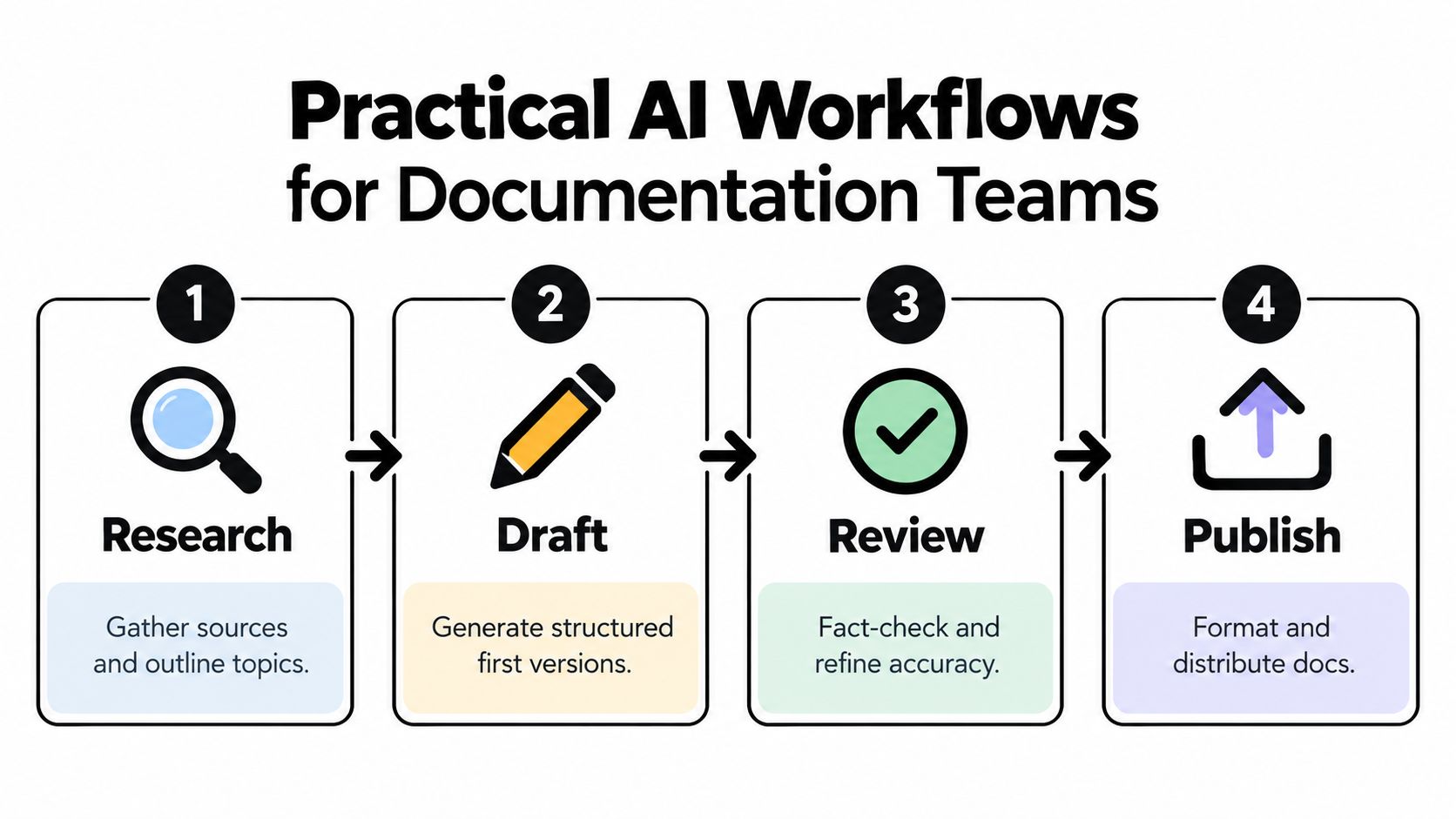
1. Research. Assemble the product specification, relevant issue or change record, current reference page, and any known support questions. Ask the AI to identify missing information and conflicting statements. Don't ask it to resolve conflicts by guessing.
2. Draft. Provide a fixed outline and a content contract. For example: “Write an administrator-facing setup guide. Include prerequisites, configuration, verification, rollback, and troubleshooting. Use the product terms exactly as supplied. If the sources don't answer a question, write [needs verification].”
3. Review. Check claims against source material, run code examples, inspect permissions, and ask a subject-matter expert about behavior that isn't visible in the prose. AI can perform a second-pass comparison, but it shouldn't be the sole approver.
4. Publish. Apply the documentation system's format, links, metadata, and accessibility requirements. Then preserve the approved version and the source context used to create it. A draft that can't be traced back to evidence becomes difficult to maintain.
For release notes, ask for a table with “change,” “affected audience,” “user impact,” “required action,” and “verification source.” For an API page, require a fixed order such as purpose, authentication, request, response, errors, limits, and example. For a beginner guide, state what the reader already knows and what they should be able to do at the end.
This approach reduces structural drift, but it won't catch an incorrect source. If an engineer's ticket says a feature is available while the product build keeps it behind a flag, the AI may produce a beautifully organized mistake. Your process needs a checkpoint for source truth before drafting begins.
A workspace that keeps research, drafts, and reference material together can reduce context switching. AI workflow optimization for documentation is useful when designing that handoff, especially if several writers work from the same product material.
A simple operating pattern works well:
The workflow is not glamorous. That is its advantage. Documentation quality improves through boring, repeatable controls, not through a heroic prompt discovered at 2 a.m.
Tool consolidation only helps if it preserves context and makes review easier. The useful setup is not “send every document to AI.” It is a workspace where a writer can move from source material to draft to critique without losing the evidence behind the page.
Zemith brings multiple AI models, document chat, writing assistance, research, format conversion, and organized workspaces into one interface. Its Document Assistant can summarize uploaded material and answer questions about it, while Smart Notepad supports autocomplete, rephrasing, style adjustments, and paragraph generation. Those features suit different points in the documentation cycle, but the writer still decides which output belongs in the published document.
Use a Library for stable reference material, such as product terminology, approved architecture notes, and current documentation standards. Use Projects for a defined initiative, such as a major release, migration guide, or new developer portal. The distinction helps prevent a temporary draft from being treated as permanent product truth.
When you ask for a rewrite, include the audience and the intended action. “Make this simpler” is vague. “Rewrite this authentication explanation for a developer who understands HTTP but hasn't used OAuth, preserve all parameter names, and flag any missing prerequisites” gives the assistant a reviewable target.
Model selection should follow task risk. A stronger language model may be appropriate for a nuanced first draft, while a reasoning-oriented option may help compare conflicting specifications or organize a complex API surface. Whatever model you use, keep the source packet and the final review in the same working context where possible.
A practical sequence looks like this:
The product's broader research and conversion tools can also help when a team needs to move material between notes, Markdown, and other working formats. The benefit isn't that the software becomes the author. It is that fewer fragments disappear across browser tabs, chats, and disconnected subscriptions.
Here is a short visual overview of that kind of workspace in use:
The quality bar remains human. A centralized tool can make evidence easier to find and revisions easier to manage, but it can't grant authority to an unsupported sentence.
The fastest way to damage a documentation program is to confuse fluent writing with finished writing. AI output should face the same tests as human output, and in some cases a stricter audit because its confidence can hide uncertainty.
Start with a side-by-side comparison. Put the generated page beside the approved specification, current product behavior, and an existing page that demonstrates the team's preferred style. Look for what is missing, not only what sounds wrong.
Break the draft into assertions. “The token expires after the configured interval” is a claim. “This endpoint returns a list of active projects” is a claim. “Administrators need the billing permission” is a claim. Each assertion needs either a source, a test, or a qualified owner who can confirm it.
A useful review pass asks:
The applied education study in the research on ChatGPT-generated technical instructions gives a useful warning. Across 73 students in five undergraduate writing courses, ChatGPT instructions were often well structured and easy to follow, but they lacked detail, audience awareness, and accuracy. In the Google Docs task discussed by the study, student-authored instructions reached a 67% task-completion success rate, compared with 57% for ChatGPT's version. Structure helped, but it didn't compensate for imprecision.
Don't review instructions only at the sentence level. Follow them in a clean environment. Use the stated permissions, inputs, version, and expected result. If the page says “you'll see,” verify that the interface shows it.
For specialized material, ask a domain reviewer to challenge assumptions rather than proofread commas. For regulated or quality-sensitive workflows, define what requires mandatory human approval, what can be sampled, and what must never be generated from unapproved sources.
The strongest process is lightweight enough to use consistently. A reviewer can mark each claim as verified, needs evidence, intentionally qualified, or out of scope. That creates a record without forcing the team to inspect every adjective as if it were a crime scene.
For a practical approach to this work, see AI document review. Evaluation should judge the content, not reward or punish it merely because a machine produced the first draft.
A generated release note can omit a rollback step, describe a preview feature as generally available, or turn an assumption into a supported configuration. The tidy headings and confident verbs make those errors easy to miss. The writer's first decision is therefore not whether AI can produce the text, but whether a mistaken first pass would create real risk.
AI works well on bounded transformations: outlining an onboarding page, applying a consistent format to similar endpoints, summarizing a meeting, correcting grammar, and finding repeated explanations. These tasks give a writer useful material to shape. The handoff should stop before the system decides what the product does, what a reader must do, or what failure looks like.
An idea outline can contain uncertainty. A public API reference cannot. An internal FAQ may accept broad editorial assistance, while security guidance, migration instructions, and regulated content require approved sources, specialist review, and explicit sign-off. Match the model's role to the consequences of an error.
The 2025 study of AI-powered technical report writing surveyed 83 technical writers and found AI use in grammar correction, referencing, and document structuring, along with reported time savings in repetitive work. It also identified continuing difficulty with domain-specific accuracy and contextual interpretation, particularly in specialized engineering and business settings. The practical split is clear: let AI handle mechanical transformations, then keep human judgment on meaning, scope, and risk.
Retrieval and fine-tuning can give an assistant better product context and more consistent terminology. They do not make it an authority. Outdated, contradictory, or incomplete source documents still produce outdated, contradictory, or incomplete drafts, only faster.
A technical writer decides whether a warning belongs before an instruction, whether an example teaches the correct mental model, whether a term is too broad, and whether a product claim can be defended. Those choices affect reader behavior and product trust, so grammar checks cannot replace them.
The 2026 evidence on AI-assisted medical documentation reports note quality comparable to or slightly better than traditional workflows in a multilingual Swiss hospital, with no major quality degradation. That result supports careful assistance, not the removal of accountability. Concerns about agent-authored edits, review, and reliability still matter. In quality-sensitive work, a responsible person must be able to explain why the published version is safe and supported.
Give AI narrow jobs, current context, and a clear handoff back to the writer or subject-matter expert. It can be a capable co-writer, but it cannot carry responsibility for the document.
The most credible productivity gains come from removing friction around a task, not pretending the task disappeared. A writer can start with engineering notes, ask AI to produce a structured draft, compare the draft with the current reference, and send only uncertain claims to an engineer. That workflow shortens the blank-page phase while keeping approval where it belongs.
For API documentation, the before state is often a pile of source comments, issue descriptions, and scattered examples. The after state is a candidate reference page with a consistent heading structure, missing fields marked for investigation, and examples ready for execution. The gain comes from faster organization and clearer review queues, not from publishing whatever the model generated.
The survey evidence gives a grounded measure of the opportunity. In the 2026 technical documentation survey, 49.59% said they used AI regularly, 27% occasionally, and 68.97% reported productivity gains. Those results support adoption, but they don't specify that every task improved or that every team used the same workflow.
A second example is onboarding maintenance. Feed a confirmed product change and the existing guide into an assistant, ask it to identify affected steps, then have a writer revise only the sections that need a new screenshot, permission note, or explanation. The machine accelerates comparison. The writer decides whether the reader's path still makes sense.
Track practical signals rather than vanity output:
Scale the workflow when those signals improve together. Slow down when draft volume rises but reviewers spend more time repairing context, accuracy, or audience fit.
Start with a low-risk task that happens often, such as summarizing source material, standardizing headings, or creating a first outline. Define the source documents, the output format, and the person who approves the result before you write the first prompt.
Use this compact checklist:
A reusable writing style guide template can help teams define terminology, tone, structure, and review expectations before AI enters the process. Consistency matters more than novelty. The best system is the one writers can use on an ordinary Tuesday when the release is late and everyone wants the docs yesterday.
Zemith brings multi-model AI access, Document Assistant features, Smart Notepad editing, research tools, format conversion, and organized Library and Projects workspaces into one place for technical writing workflows. Use Zemith to centralize source material, create reviewable drafts, and keep a human accountable for the final documentation.







Trusted by teams at






The top models, plus image, video and voice tools, in one plan.
Without Zemith
ChatGPT PlusUS$20.00Claude ProUS$20.00Google AI ProUS$19.99SuperGrokUS$30.00Perplexity ProUS$20.00 MidjourneyUS$10.00
 ElevenLabsUS$6.00Le Chat ProUS$14.99
 RunwayUS$15.00Kling StandardUS$8.80
 Gamma PlusUS$12.00
 Otter ProUS$16.99
 QuillBot PremiumUS$19.95
 Photoroom ProUS$12.99
 Quizlet PlusUS$7.99
Total if paying separatelyUS$234.70/mo
"I love the way multiple tools they integrated in one platform. Going in the right direction."
— simplyzubair
"The quality of data and sheer speed of responses is outstanding. I use this app every day."
— barefootmedicine
"The credit system is fair, models are perfect, and the discord is very responsive. Quite awesome."
— MarianZ
"Just works. Simple to use and great for working with documents. Money well spent."
— yerch82
"The organization of features is better than all the other sites — even better than ChatGPT."
— sumore
"It lives up to the all-in-one claim. All the necessary functions with a well-designed, easy UI."
— AlphaLeaf
"The team clearly puts their heart and soul into this platform. Really solid extra functionality."
— SlothMachine
"Updates made almost daily, feedback is incredibly fast. Just look at the changelogs — consistency."
— reu0691
Hand off the research, writing, design and follow-ups. Zemith picks the tools it needs and brings back finished work.
Search the web, run deep research, read files, create images and run code with GPT, Claude, Gemini, Grok and more.
Zemith keeps working in the cloud and pings you when it's done.
Notion, Linear, Canva, Airtable and more. It asks before it creates or changes anything.
Docs, slides, sheets and PDFs, ready to send.
Chain models and tools on a visual canvas, from one prompt to a finished promo video.
Briefings, reports and reminders run on a schedule and are ready when you need them.
Real-time voice that can see your camera or screen.
The best image and video models, in one studio.
Turn PDFs, links and YouTube videos into podcasts, quizzes, flashcards and mind maps.














 Podcast
 Quiz
Quiz Flashcards
 Mind map
 Infographic