The most popular advice in an AI image generator comparison is to pick the tool with the prettiest samples. That's a great way to choose a wallpaper generator and a terrible way to choose a production tool. Your client won't care about cinematic lighting if the product label is misspelled or the bottle has grown another cap.
Choose by the mistake you can't afford. Start with composition, editing reliability, text accuracy, and publishing risk. Then compare how long each model takes to deliver something you can use, not something you can almost use after a small emotional recovery.
Which AI Image Generator Scored Best in Testing
Matched-prompt scores for four production image systems
These figures come from a future-dated manuscript, not an established current leaderboard: the matched-prompt evaluation reports testing four production systems on 48 difficult prompts, with the scores and group-level failure patterns shown above. Treat its results as provisional starting points, not independently verified purchasing advice.
The useful distinction is the type of failure. The leading systems mostly lost points through incorrect counts and geometric artifacts, while the lower-scoring group more often omitted requested elements or garbled rendered text. That doesn't establish that every output from a particular model will have those defects. It tells you where to aim your inspection.
What to try first
I'd start a mixed creative test with Gemini 3 Pro Image and FLUX.2, then add Ideogram 3.0 as a text-heavy challenger. That's a testing shortlist, not a claim that Ideogram wins typography. Give it the actual headline, label, or poster you need and make it earn the job.
Don't let the overall ranking choose your winner automatically:
- For a product arrangement, reject missing objects before discussing lighting.
- For an advertising graphic, inspect the headline before admiring the color palette.
- For a concept sketch, tolerate a fixable detail if the composition gives you a useful direction.
The leaders sit close enough in this provisional comparison that your prompt category should drive the decision. An average combines mistakes that have very different consequences: a slightly awkward background might be harmless, while an omitted safety label makes the asset unusable.
Keep the shortlist small. You need a reliable default and a useful alternative, not a collection of model subscriptions that requires its own project manager.
Models Side by Side on Styles, Control and Speed
Start with prompt length, because it is the only behaviour here with a cited pattern. TIIF-Bench found more consistent instruction-following across prompt lengths for DALL-E 3 and GPT-Image-1, while Stable Diffusion 3.5 and PixArt-Sigma were sensitive to prompt length.
Model lookup by prompt-length behaviour
Treat every other model as unlabelled until your own briefs say otherwise. A model that stays steady from a one-line prompt to a full creative spec is easier to hand to a team. A length-sensitive model can still be useful, but it needs a fixed template with placement rules, exclusions, and brand constraints in the same order every time.
That matters when a creative director sends a dense brief. More detail can clarify the job, or it can give the model more chances to drop a requirement.
Fill in the practical columns yourself
Style, controls, speed, and cost belong in a separate worksheet because the interface and generation settings shape the working experience.
Use the same subject across styles. A ceramic mug rendered as a studio photograph, an editorial illustration, and a flat packaging graphic exposes stylistic range better than three unrelated showcase images.
For prompt construction, start with AI image prompt examples, then replace the decorative language with your own deliverable requirements. Keep the short and expanded versions semantically equivalent so prompt length is the variable, not the brief itself.
Measure time per usable result, not just time per generation. A fast first draft is slow production if you spend the afternoon repairing it. A lower-scoring model can still earn a place for disposable sketches when its outputs help you make decisions quickly.
What Image Quality Really Measures Across Models
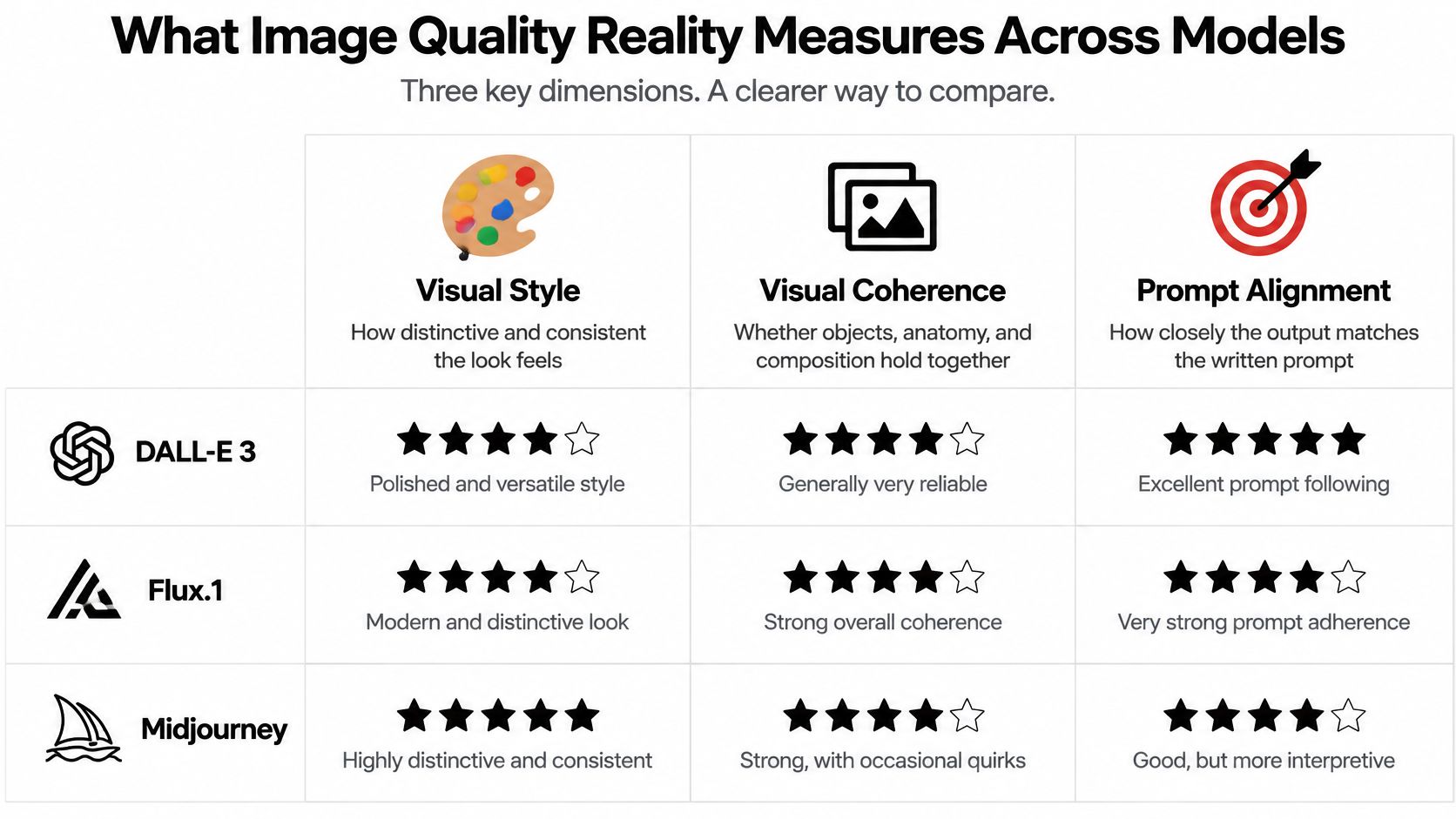
Image quality isn't one property. A comparative study of DALL-E 3, Flux.1, Midjourney, and Stable Diffusion collected more than 2 million human annotations across 4,512 images, separating style preference, visual coherence, and text-to-image alignment in its human-preference evaluation.
Those dimensions answer different questions. Keep them separate when you judge your own outputs.
Judge the look separately from the brief
Visual style means the output has a deliberate, suitable appearance. For editorial illustration, ask whether the image expresses an idea through shape, texture, and composition rather than merely looking expensive.
Visual coherence means the scene holds together. Inspect anatomy, perspective, connected objects, reflections, and contact points. A beautifully lit chair still fails if its legs couldn't support it.
Prompt alignment means the requested content survived generation. If you asked for an empty background and the model added decorative plants, that's not a thoughtful creative contribution. It's something you now have to remove.
A universal winner hides the question that matters: which model delivers the quality your particular job requires?
Automated ratings don't eliminate this judgment. A 2025 evaluation summarized in the ImageReward benchmark overview reported accuracy of 65.14% for ImageReward, compared with 62.8% for PickScore, 60.8% for HPS, and 54.8% for CLIP. Those are metric-evaluation results, not success rates for the image generators themselves.
Keep a small judging sheet
Use a small set of identical prompts and rate style, coherence, and alignment separately. Write a concrete reason beside each rating, such as good lighting, broken handle, or missing requested object. A structured photo-rating approach can help replace vague reactions with consistent observations.
Record:
- Generation context: Exact prompt, model version, seed when exposed, aspect ratio, and reference images.
- Quality decisions: Separate style, coherence, and alignment ratings, plus the defect behind each deduction.
- Delivery suitability: Intended placement, crop, export format, and any required manual work.
Delivery deserves its own check. If you're developing merchandise artwork, Raccoon Transfers' file format guide for small apparel brands is a useful resource for thinking through raster versus vector handoff. An attractive preview isn't proof that the file suits the production process.
Can You Actually Publish the Output
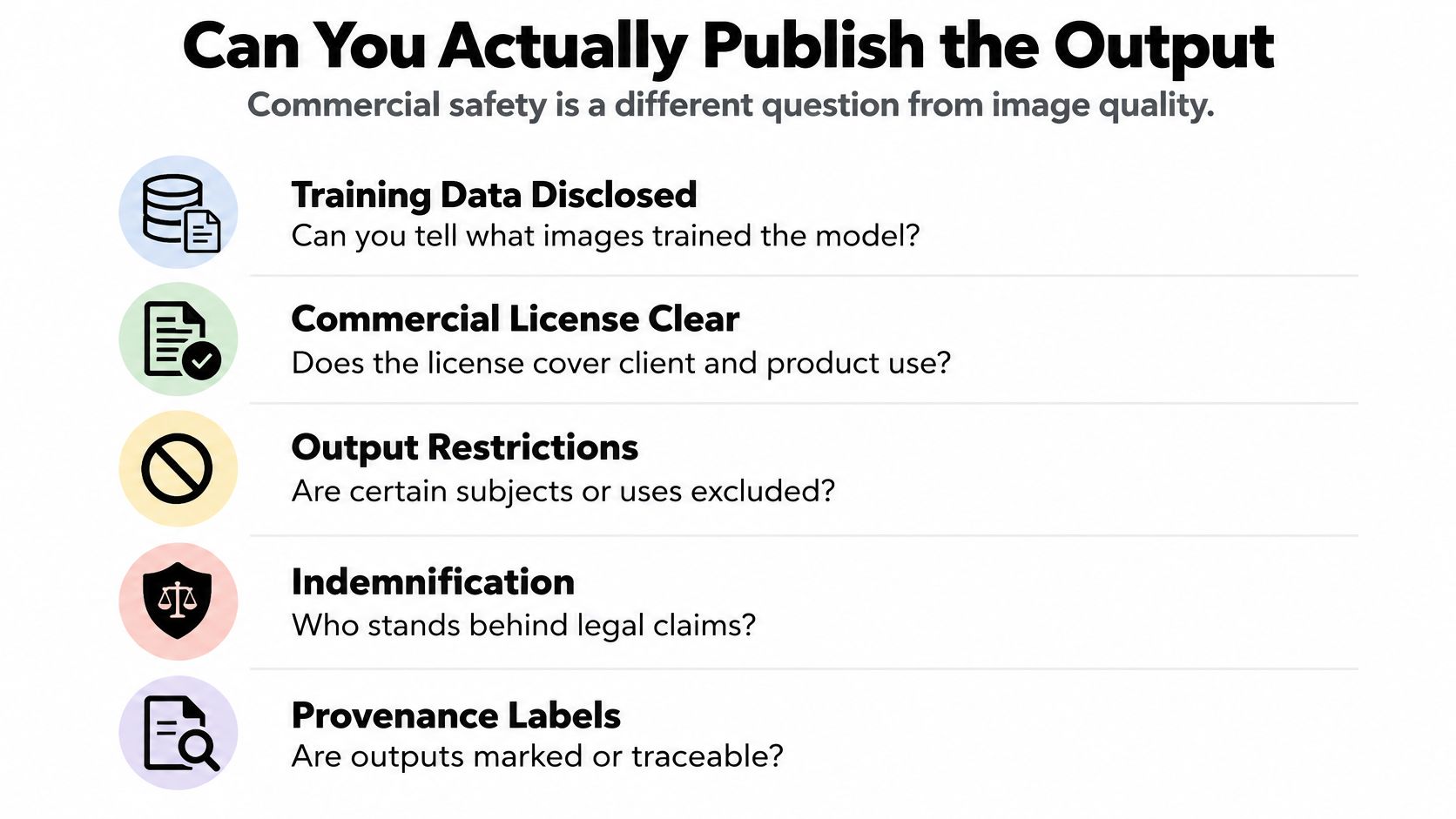
A paid plan isn't a blanket promise that an image is safe to sell. Payment, contractual permission, copyright ownership, and protection against third-party claims are different questions. Don't compress them into a reassuring commercial-use checkmark.
A study involving 459 artists found that a majority wanted disclosure of artwork used in training and opposed automatically assigning output ownership to model creators. The same source discusses public-opinion findings in which more than 60% assigned rights to users creating the images, while approximately 50% also identified training-data contributors as rights-holders.
Those opinions aren't legal permission. They do explain why a polished output and a straightforward subscription checkout shouldn't end your review.
Separate permission from protection
Contractual commercial-use permission concerns what the applicable terms allow you to do. Copyright ownership concerns whether and how the finished work receives legal protection. Permission to use an output doesn't itself establish exclusivity, copyrightability, or freedom from claims.
For client work, identify the exact platform, underlying model, account tier, and intended use. A packaging illustration, a recognizable-person campaign, and an internal mood board deserve different levels of scrutiny. Use an AI image generator program checklist to organize the software evaluation, but keep rights approval as a separate sign-off.
Build a rights worksheet
Save evidence rather than relying on your memory of a pricing page.
- Training transparency: Record what the developer discloses about training sources and where that disclosure stops.
- Artist consent and opt-out: Note the stated mechanism, eligibility, and limitations. Don't treat an opt-out process as evidence that every training contributor consented.
- Commercial permission: Confirm whether the applicable terms cover client deliverables, products for sale, advertising, and your intended distribution.
- Free versus paid rights: Record which account tier generated the asset and whether different conditions apply.
- Indemnification: Check whether protection exists, who receives it, what claims it covers, and which conditions or exclusions apply.
- Jurisdiction and restrictions: Save the governing terms, prohibited uses, and any subject-specific requirements relevant to the project.
- Attribution and provenance: Record required credits, labels, metadata, and disclosure duties.
- Version history: Keep the terms date, model version, prompt record, source-image permissions, and approval correspondence.
If a condition is unclear, mark it unresolved, not probably fine. For a consequential campaign, route unresolved issues to qualified legal counsel before committing production spend.
Check the terms on the day you buy or generate for the project. Get written confirmation for client work when permission is ambiguous, and don't promise the client exclusive ownership unless you have a defensible basis for that promise.
Editing Control and Bias in Everyday Use
Say you're adapting a product photograph for a seasonal promotion. The brief is simple: keep the bottle, lighting, camera angle, and label wording unchanged, but revise the label color over successive editing rounds.
The first edit looks good. In a hypothetical later round, the bottle shoulder becomes narrower and the label lettering shifts, even though you asked only for another color change. That's the drift moment: the model hasn't merely edited the product, it has redesigned it without permission.
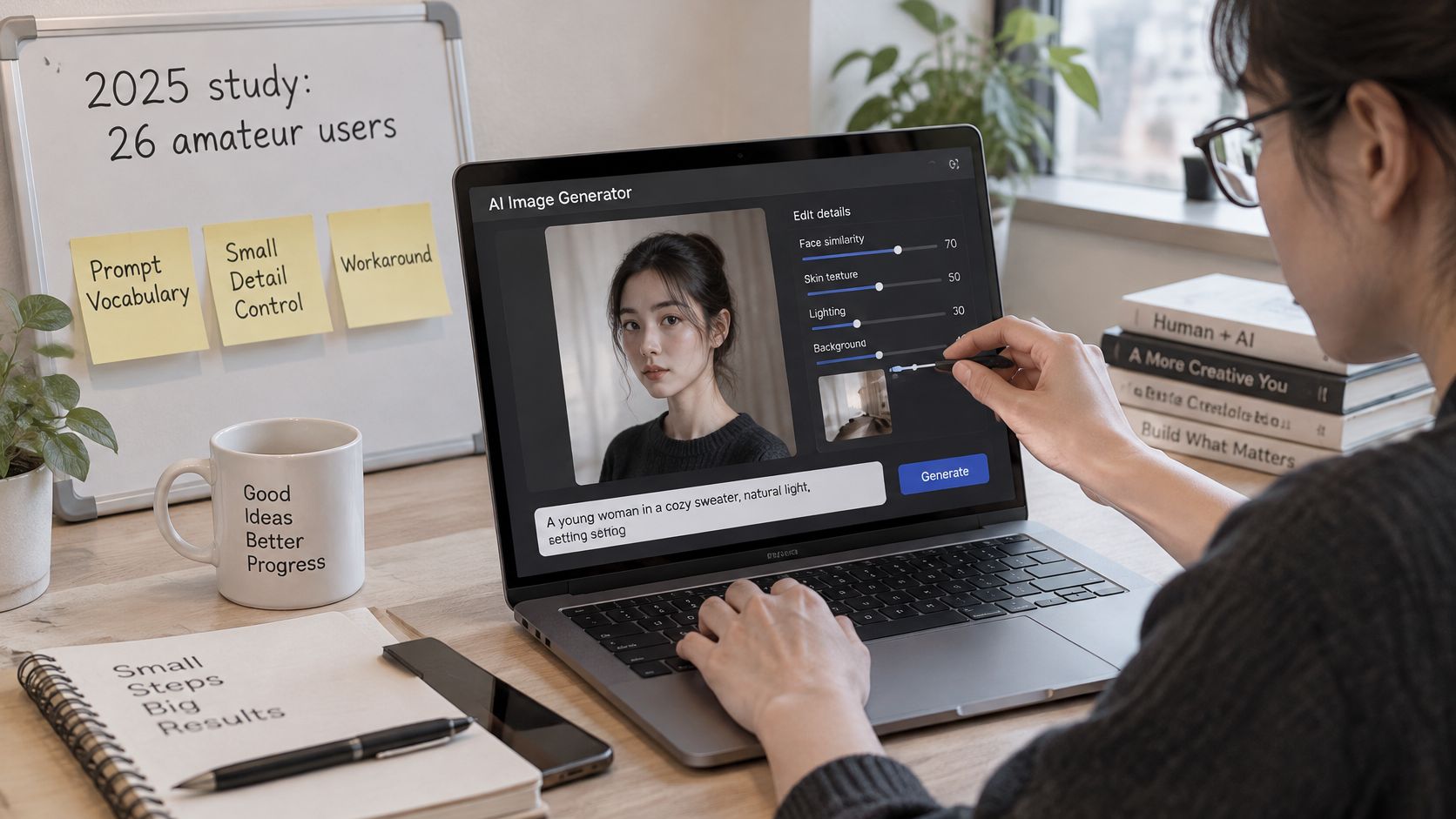
A 2025 study involving 26 amateur users documented difficulty developing prompting vocabulary, communicating modifications, controlling precise details, and working around model limitations; participants also identified ethnicity and identity stereotypes, while 40% emphasized disclosure of technical details such as the tools or models used. The participants' concerns included misinformation and deepfakes.
Test what must remain unchanged
For the bottle exercise, save every intermediate output. Compare the silhouette, cap, label boundaries, wording, shadow, and background against the original. Record when the first unrequested change appears and how much effort it takes to correct it.
Use image-to-image generation as a starting point for reference-based work, but don't assume that supplying a reference guarantees preservation.
Your editing test should include:
- Multi-turn revision: Change a localized detail while explicitly preserving the rest.
- Object preservation: Keep product proportions, distinguishing marks, and essential text intact.
- Pose and layout control: Move the subject without accidentally changing identity or clothing.
- Series consistency: Reuse a character or product across different scenes.
- Text accuracy: Inspect labels after editing, not only after the initial generation.
- Accessibility-oriented requests: Test clear contrast, uncluttered layouts, and readable visual hierarchy.
- Representation: Vary names, skin tones, ages, disabilities, cultures, and regional settings without changing the professional role or quality expectations.
Report the correction burden
Don't publish only the successful example. Record attempted edits, failed edits, and the manual work required to reach an acceptable file. Separate a recoverable color mismatch from a product-identity change that forces you to restart.
For representation checks, inspect whether the model adds stereotyped clothing, settings, or occupations that weren't requested. A technically sharp image can still be unsuitable for the audience.
Keep provenance notes with the final asset: tool, model, source material, significant edits, and appropriate disclosure. That makes internal review easier and gives the next person handling the file something better than a mysterious filename ending in final-final-really-final.
Which Model to Pick for Your Creative Task
Pick a model for a deliverable, not for your identity as a creator. You don't need to become a loyal supporter of whichever tool made your favorite image last month.
Match the tool to the expensive mistake
Marketing visuals with text. Start with Ideogram as a challenger alongside GPT Image and a general-purpose model available in your workspace. Test the exact headline, punctuation, and brand name. If wording is business-critical, generate the visual without embedded copy and typeset it in a design tool rather than repeatedly negotiating with an invented alphabet.
Exact-composition product mockups. I'd put Gemini and FLUX on the initial shortlist, then judge placement before surface finish. Ask for the required arrangement and compare it against a simple layout sketch. Watch for objects that merge, overlap incorrectly, or change scale.
Editorial illustration and concept art. Compare Midjourney and Flux.1 using the same concept, not just the same style adjective. Prioritize an image that communicates the story and leaves room for your publication's crop. Decorative complexity isn't a substitute for a readable idea.
Pick the model by the failure you can live with, then reject the output when it makes the failure you can't.
Photoreal campaign images. Test a scene with human interaction and product contact. Inspect fingers around handles, reflections in packaging, and shadows beneath objects. A coherent, slightly less glamorous image is a better production starting point than a spectacular scene with impossible physical details.
Educational slides and diagrams. Start with labels, relationships, and factual review rather than illustration style. For a process diagram, build editable arrows and labels in presentation software if the generated version won't preserve their meaning. Never let a convincing visual substitute for subject-matter checking.
Social posts needing quick variations. Compare the total time required to produce acceptable alternatives in the needed crops. A model that gives you usable visual directions with little cleanup can beat a more impressive but slower option for this job.
Decide whether another tool adds useful control
Before adding a specialist tool, define what it must improve: reference handling, revision precision, visual style, or delivery workflow. Genpire's explanation of how Genpire differs from Midjourney can help frame that kind of interface and workflow comparison; validate the relevant differences with your own brief.
Route work deliberately rather than reopening the entire selection process for every asset. Keep one default, one text-oriented alternative, and a specialist only when it solves a recurring problem.
Otherwise, you're juggling twelve browser tabs and calling it a creative pipeline. The browser fan may disagree.
Run a One-Afternoon Test and Decide Your Default
Start with a difficulty ladder. GenEval finds that single-object and color prompts are relatively easy, while two-object, position, and attribute-binding tasks expose larger performance gaps. A gorgeous blue bicycle that forgets the helmet still loses the brief, beautifully, but still loses.
Text needs an independent check: the STRICT benchmark specifically evaluates coherent, instruction-aligned text rendering rather than treating lettering as background decoration.
Prompt test categories and what to check
Run the test without turning it into a second job
Choose real deliverables. For example, use a website hero, an educational diagram, and a product shot. Write acceptance criteria before generating anything so an attractive surprise doesn't change the assignment.
Write short and expanded prompts. Preserve the same requirements while adding explanatory context to the expanded version. Include the categories in the table across your test set rather than forcing every challenge into every image.
Compare a small shortlist. Run the same briefs across your selected models. Keep resolution and aspect ratio comparable, and record seeds where exposed, but don't assume identical seed values produce equivalent starting conditions across architectures.
Inspect the actual files. Open exports at full resolution. Record missing objects, incorrect placement, broken geometry, misspelled words, retries, elapsed time, and credits consumed.
Approve publishing conditions. Save the applicable terms and model version with any asset you intend to publish. Keep uncertain assets out of the approved delivery folder.
Save a reusable recipe. Preserve the winning prompt, references, settings, and acceptance checks. Include the known failure that should trigger a switch to your backup.
Zemith brings together more than 20 AI models in one app; its image and video options include Nano Banana, GPT Image, Flux, Veo, Kling, and Seedance. Our AI workflow builder chains prompts, models, and image tools into reusable pipelines, while generative fill, background removal, upscaling, and object replacement provide targeted cleanup options.
For workflows that also involve writing or research, apply the same task-first logic when deciding how to choose an LLM. Keep the image-model decision tied to the visual deliverable rather than the chat model you happen to prefer.
Finish with a written decision: your default model, your backup for text-heavy jobs, and the defect that triggers a switch. Choose this week based on acceptable outputs and correction effort, not brand loyalty or the most flattering sample in a gallery.
Zemith gives you a shared workspace for comparing image models and turning the winning settings into reusable workflows. Visit Zemith, bring a real creative brief, and choose your default and backup from the results you'd publish.







 MidjourneyUS$10.00
 ElevenLabsUS$6.00
 RunwayUS$15.00
 Gamma PlusUS$12.00
 Otter ProUS$16.99
 QuillBot PremiumUS$19.95
 Photoroom ProUS$12.99
 Quizlet PlusUS$7.99












 Podcast
 Quiz
 Flashcards
 Mind map
 Infographic