An AI suite is one workspace that sends writing, research, images and code to the right models instead of making you juggle separate apps.
The need is easy to recognize: 80% of the global workforce lacked enough time or energy to complete their work, according to Microsoft's 2025 Work Trend Index. Adding another app doesn't automatically fix that. A useful suite should remove handoffs, not give you another dashboard to babysit.
The important question isn't how many models you can access. It's whether you can take a real task from source material to a checked, usable result without repeatedly explaining what you're doing.
What an AI Suite Actually Means
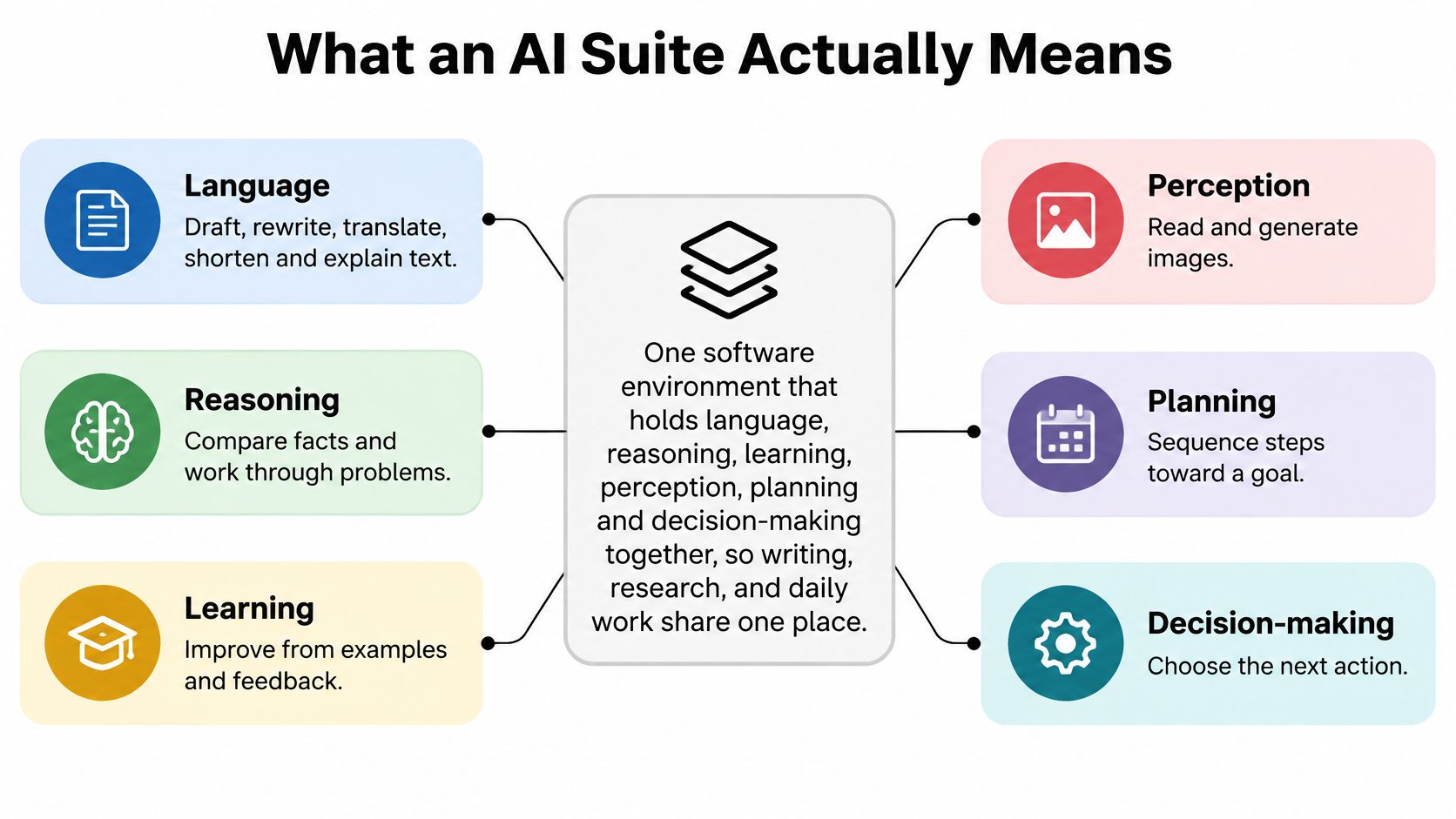
An AI suite is an integrated software environment for multiple AI capabilities and workflows. Language, reasoning, learning, perception, planning and decision-making support writing, research, documents, images, code and notes in a shared workspace.
A lone chatbot is an appliance. A suite is the kitchen. Owning a blender, an oven and a refrigerator helps, but cooking dinner also requires somewhere to prepare ingredients and a sensible sequence for using them.
Say you're preparing a product launch. You have interview notes, a specification document and a rough announcement. You need to compare customer concerns, extract supported product claims, draft the announcement and develop an accompanying image.
With disconnected tools, you become the delivery service between applications. In a working suite, you organize the materials around the project and use the appropriate capabilities as the job develops.
Why the label matters
AI use has already spread beyond isolated experiments: 78% of surveyed organizations used AI in 2024, compared with 55% in 2023, according to Stanford University's 2025 AI Index. That makes organizing the work a practical concern, not just a software-shopping preference.
The capabilities fit together like this:
The labels describe different jobs, not guarantees of human-like understanding. Language tools can rewrite your announcement; reasoning can help compare competing claims; perception can interpret an image. Learning may involve adapting to examples or feedback, but it doesn't necessarily mean your account permanently trains a model whenever you correct it.
Practical rule: Define a suite by the work you can finish, not by the collection of buttons you can click.
For the launch project, a good outcome isn't just a fluent announcement. It's an announcement whose claims match the specification, whose tone matches the brief and whose supporting materials remain accessible for review.
That distinction answers the search behind “what is AI suite” more usefully than a model list: it's a way to coordinate AI-assisted work, with enough continuity and control to make the result usable.
Suite Versus a Pile of Separate Tools
Separate AI tools aren't bad. A dedicated image editor or coding environment may be exactly what you need. The problem starts when you have to manually transport the project's instructions, evidence and decisions between them.
Read the comparison as a workflow test, not a promise that every product labeled “suite” supports every behavior. Some standalone tools retain files perfectly well, and some suites still make you repeat yourself.
Separate AI tools versus one AI suite
The first rows describe visible conveniences. You select a paragraph rather than copying it elsewhere. You inspect a source beside the draft rather than hunting through browser history. You keep the image instructions with the campaign brief instead of reconstructing them from memory.
Context is the less visible cost. When you transfer only the latest prompt, you may leave behind the intended audience, an earlier correction or a restriction on what the output can claim. Your new tool can produce a polished answer to the wrong version of the job.
If your tabs need their own organizational chart, the software isn't doing enough coordination.
Read the cost and risk rows carefully
Consolidation can simplify billing, but a subscription price isn't the whole calculation. Check usage allowances, which capabilities you need and how much manual correction remains. The practical benefits of consolidating AI tools come from removing duplicated work, not merely replacing several invoices with one.
The risk row deserves equal attention. A central workspace should have clear access boundaries, traceable sources and appropriate human review. NIST's Generative AI Profile frames risk management around governing, mapping, measuring and managing systems across their lifecycle.
In everyday terms, an uploaded document is evidence, not an instruction source. If a document tells an assistant to reveal another file or ignore workspace restrictions, the system should keep those boundaries intact.
Try this quick test: change capabilities halfway through a real task. Can you still inspect the original file, recover your instructions and finish the output without rebuilding the project? If not, you may have a bundle of tools rather than an integrated suite.
The Layers Inside a Working Suite
A working suite needs more than a conversational front end. It needs ways to interpret your request, find relevant evidence, prepare an output and, where appropriate, carry out an approved action.
There are two useful ways to describe its architecture. Capability layers describe what AI can do, such as language and perception. Workflow layers describe how the application uses those capabilities to finish your task.
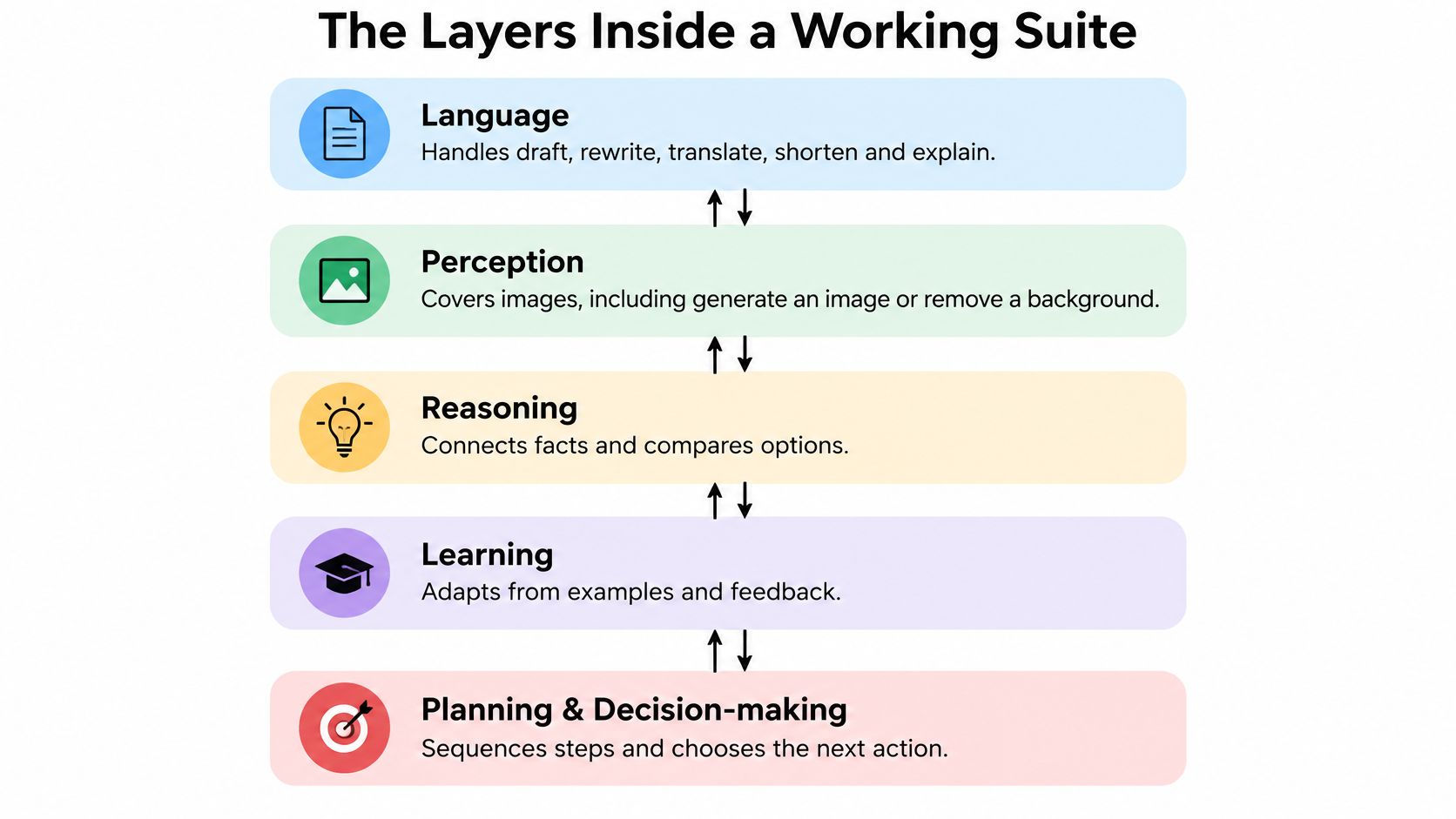
The capability view provides the foundation:
From capabilities to an actual workflow
Language handles drafting, translation and explanation. Perception handles visual material, such as describing a chart or interpreting a photograph. A multimodal AI workflow combines different kinds of input, but that alone doesn't ensure the application found the right evidence or performed the right action.
For that, examine the working layers.
Capability layers inside an AI suite
Retrieval is particularly easy to misunderstand. A model producing an answer about your document isn't enough. The application should retrieve the relevant passage and make it possible to check whether that passage supports the answer.
Planning is similarly practical rather than mystical. A reusable workflow might extract approved claims, turn them into slide text and prepare image instructions. If extraction fails, the application shouldn't confidently continue building a presentation from unsupported material.
Judge the connections, not the feature list
Action introduces a different standard. Drafting a proposed update is not the same as changing a connected application. A sound workflow separates preparation from execution and lets a person inspect the proposed change before approving it.
Shared context also needs boundaries. Keeping relevant project files available is useful; mixing unrelated client documents into the answer is not.
Use a small scorecard when evaluating an AI suite:
- Completion time: Include checking and editing, not just generation.
- Revision count: Record how often you must repair instructions or outputs.
- Factual misses: Check claims against the original material.
- Artifact quality: Confirm that the document opens, the explanation holds or the code runs.
A feature demonstration can look impressive while the connections between features remain weak. Measure the finished job.
How a Suite Picks the Right Model
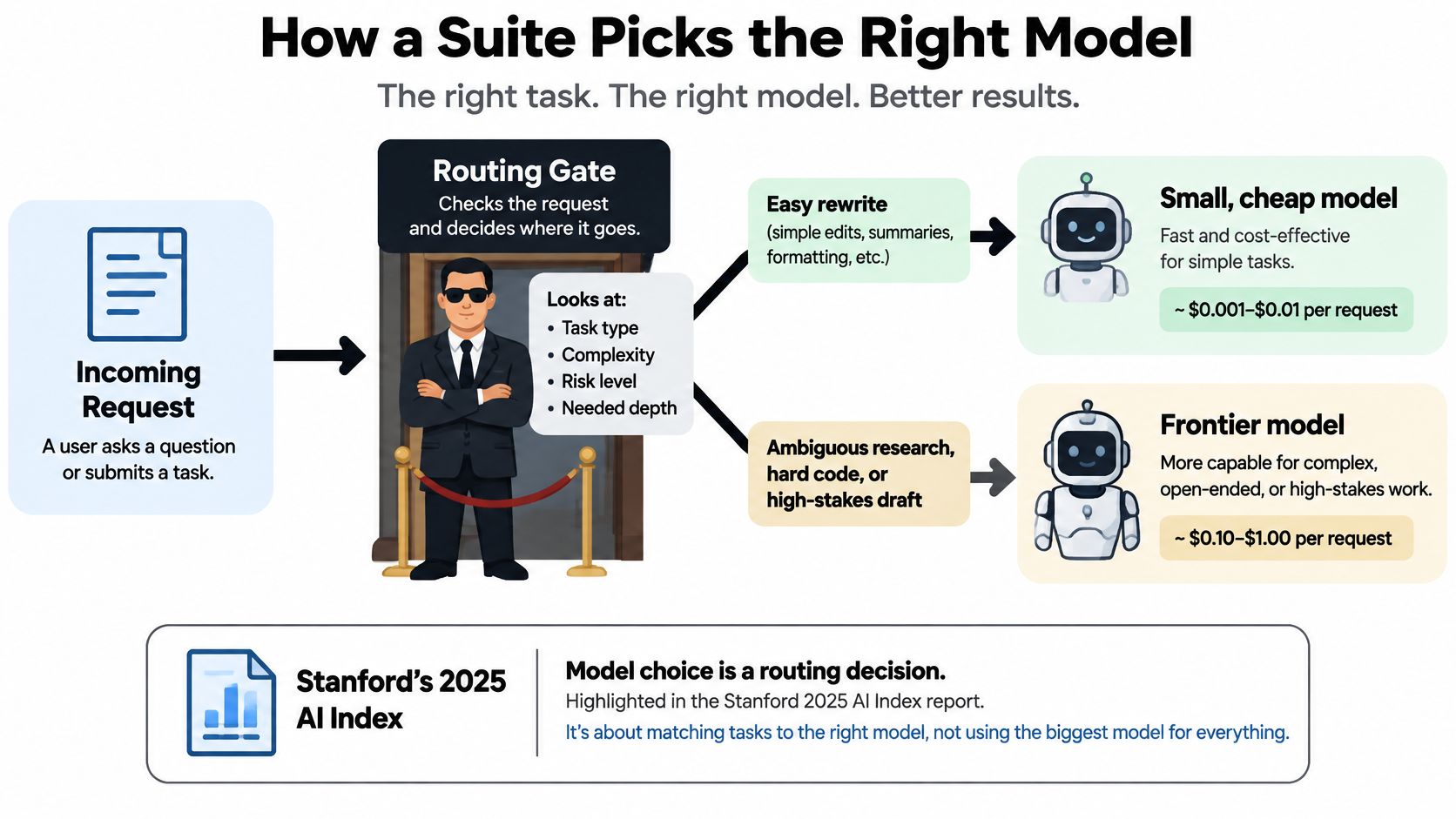
Model routing has a clear economic rationale. The inference cost for a system matching GPT-3.5 performance on the MMLU benchmark fell from $20 to $0.07 per million tokens between November 2022 and October 2024, according to Stanford's 2025 AI Index technical-performance chapter.
That's a benchmark-specific comparison, not a consumer subscription quote. Its practical lesson is narrower and more useful: capable models can become cheaper, so you shouldn't assume every task requires the largest available option.
Think of routing as a calm bouncer. A request arrives, the system checks what it needs and directs it to an appropriate capability. No velvet rope required.
The decision can follow this pattern:
A practical routing habit
- Name the job clearly. Specify rewrite, extract, compare, code or another concrete task. Include the output format and what must remain unchanged.
- Start with the smallest adequate model. Tightening a paragraph is a different challenge from reconciling contradictory technical documents.
- Escalate for a reason. Move to a more capable model when a spot check reveals weak reasoning, missed constraints or an inadequate explanation.
- Stop unnecessary regeneration. Change the prompt or supply missing evidence before sending the same unclear request to more models.
For example, a short rewrite prompt should say whether the model may change meaning. A document-extraction prompt should identify the fields to return and require the model to mark missing information rather than invent it.
A stronger model won't fix a missing source. Nor will a model switch repair an unreadable scan unless the workflow includes suitable document or image processing. This is why choosing an LLM for the task involves more than selecting the most impressive name.
When routing should pause
A confident answer is not evidence that the router chose correctly.
An effective fallback can mean retrieving another passage, asking a clarifying question or sending the result for human review. Escalating to a larger model is only one option.
A contract summary illustrates the stakes. The assistant may help identify clauses, but it should flag missing pages, uncertain wording and conclusions that require qualified review. It shouldn't turn incomplete source material into definitive legal advice.
Evaluate routing using task success, response time and total usage cost. A faster answer that takes longer to repair isn't a win. Neither is an elaborate answer to a simple rewrite request when a lighter option would have met the brief.
Three Jobs One Workspace Can Finish
The easiest way to understand an all-in-one AI workspace is to follow a task through its handoffs. Each handoff is a place where context can leak out, so the three scenarios below show both what to try and what to check.
A student studies from a lecture PDF
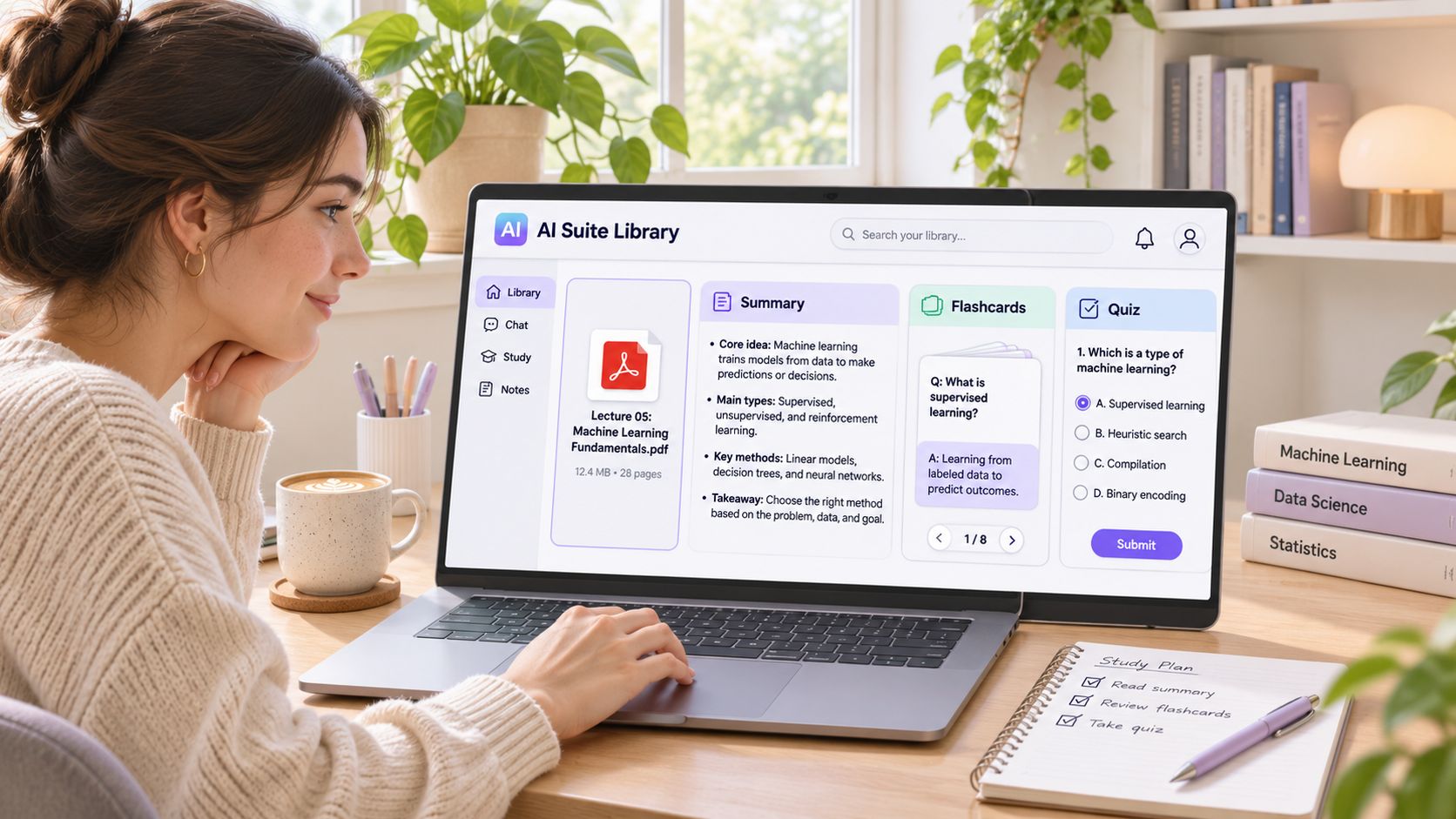
Start with a familiar study setup:
In a disconnected workflow, the student summarizes a PDF in one app, copies the output into notes and builds study questions elsewhere. If the summary contains a mistake, that mistake travels into the flashcards, and by exam day the error has been memorized as fact.
In a connected workflow, the student asks for an outline, requests explanations of difficult passages and generates practice questions from the same material, all without leaving the document. Shared context means the questions stay anchored to the source instead of drifting toward whatever a second app assumed. A useful prompt asks the assistant to separate what the lecture explicitly states from any additional explanation.
The quality check: open the relevant passage for each unfamiliar answer. A smooth explanation isn't enough if it teaches something the lecture doesn't support.
A marketer turns research into a campaign
A marketer begins with interview notes and a rough positioning document. The disconnected version involves a brief in one app, slide copy in another and captions in a chat window that never received the original customer language. Each asset drifts a little further from the interviews.
A connected workflow starts by extracting themes and linking them to the notes. The marketer then develops a brief, a presentation outline and captions from that approved material, so every output answers to the same source rather than to a retyped summary of it.
The video provides another way to explore the workspace approach:
The quality check: compare every substantive slide claim with the notes. If an interviewee said a feature was helpful, don't let the presentation transform that into a measured productivity improvement.
The useful outcome is a campaign package with defensible claims, not a prettier deck.
A developer investigates and implements a change
A developer needs to understand a library function, draft an implementation, write tests and explain the change. Disconnected tools can leave the explanation describing an earlier snippet while the tests cover a later version.
A project-based workflow keeps the technical question, proposed code, test cases and documentation together, so the explanation and the tests describe the same code. Ask for expected failure cases before accepting the implementation, then run the code in the actual development environment.
In GitHub's 2024 U.S. developer survey, 99% of respondents said they had used AI coding tools at work, and 92% used them to generate test cases at least some of the time. That supports looking beyond autocomplete when evaluating developer workflows.
The quality check: tests must exercise the intended behavior, not merely repeat the implementation's assumptions. Review security concerns yourself rather than treating generated approval as a security audit.
Questions to Ask Before You Upload
Will your prompts or files be used for training? How long are they retained, where are they processed, which underlying services receive them and who can access them in a shared workspace?
Those questions matter more than whether the upload button looks reassuring. Before using any AI suite with sensitive material, establish what export and deletion cover, including retained copies and any applicable exceptions.
Convenience isn't a security review
Separate provider responsibilities from user responsibilities. The provider should explain processing, access controls and deletion behavior. You should classify the material and decide whether the proposed processing is acceptable for that specific file.
Public course notes are different from unpublished research, client records or source code containing credentials. Remove secrets before upload, and keep restricted material within an approved private, local or enterprise-controlled environment when your obligations require it.
A careful AI document review workflow begins with that decision, not with summarization. If you can't establish where a confidential document will go, don't use the upload itself as an experiment.
Before sharing: Convenience is a benefit you can test. Confidentiality is a requirement you must establish.
The same skepticism belongs in environmental claims. A report on sustainable generative AI cites the International Energy Agency's projection that global data-center electricity demand could rise from 460 TWh in 2022 to 1,000 TWh in 2026 (Capgemini Research Institute). That is a projection for data centers, not a measurement of your individual prompt's footprint.
The U.S. Government Accountability Office also reports that generative-AI companies generally don't disclose detailed energy and water use. An all-in-one interface therefore isn't proof of lower environmental impact.
A short pre-upload checklist
- Classify the file. Identify public, internal and restricted material before selecting an upload.
- Use adequate capacity. Choose a model suited to the task rather than generating unnecessary alternatives.
- Keep human review. Check anything whose error could harm a person, expose information or mislead a decision.
- Clarify deletion. Establish what gets removed, where and under which retention rules.
You don't need to become an infrastructure specialist. You do need enough information to decide whether the workspace is appropriate for your material.
Try One Workspace on a Real Job
If your AI use consists of an occasional standalone question, separate tools may be fine. A suite could be extra furniture in a room that already works.
If a recurring project moves from research to drafting to visual work or code, test a connected workflow with a real deliverable. Choose something you understand well enough to evaluate, and leave confidential material out of the first run.
An afternoon test worth doing
- Choose familiar source material. Use a public document, your own nonconfidential notes or a technical example you can verify.
- Set an acceptance standard. Define what a usable summary, presentation or code explanation must contain.
- Finish an artifact. Don't stop at a promising chat response. Produce something you could send.
- Record the friction. Note corrections, repeated instructions and manual transfers, alongside time spent checking.
Use those observations to guide your AI workflow optimization. Keep an existing specialist tool if it still performs an important job better; consolidation doesn't require replacing everything.
For that trial, Zemith brings together more than 20 AI models in one app, and you can switch models at any time, even in the middle of a chat. Zemith Plus costs US$15.99 per month and includes every model listed on the pricing page plus 50+ AI tools.
Treat the trial as an evaluation, not a commitment. Did you finish an accurate result with fewer interruptions? Could you inspect its supporting material? Those answers matter more than the size of the model menu.
Zemith combines model access, document tools, an AI-powered notepad and creative tools in a shared workspace. Visit Zemith with a nonconfidential document and take it from source material to a checked final artifact. Keep it if the finished work, and the process of getting there, is better.








 MidjourneyUS$10.00
 ElevenLabsUS$6.00
 RunwayUS$15.00
 Gamma PlusUS$12.00
 Otter ProUS$16.99
 QuillBot PremiumUS$19.95
 Photoroom ProUS$12.99
 Quizlet PlusUS$7.99













 Podcast
 Quiz
 Flashcards
 Mind map
 Infographic