AI orchestration is the layer that decides which model, tool or person handles each step of a task, in what order, and what happens when a step fails.
You've probably already done the human version: search for information, paste it into a chatbot, move the draft into a document, then reopen the sources because a claim looks suspicious. By the time you're finished, you're not just doing the work. You're managing the handoffs.
That's the problem orchestration addresses. The useful question isn't whether an app offers lots of models. It's whether you can tell what ran, what failed, and who's responsible for the result.
What AI Orchestration Means in Plain English
AI orchestration coordinates models, tools, data and people so a multi-step task can move from request to checked result.
Think of a busy restaurant. One chef can cook a dish, but dinner service needs someone running the pass, calling for the grill, prep station and dessert chef in the right sequence. Otherwise, your ice cream arrives with the soup. Technically food, operationally disappointing.
The orchestrator is that coordinator. It doesn't have to prepare every ingredient itself. It needs to know what's ready, what's missing and whether the meal should leave the kitchen.
The model does work, the orchestrator manages it
Say you need a briefing about battery recycling. A model can explain recycling methods, draft paragraphs or interpret a document. But somebody still needs to find relevant papers, preserve their sources, decide what to compare and stop unsupported claims from entering the final draft.
The distinction described in Let's Data Science's explanation of enterprise orchestration is between isolated model responses and coordinated execution across models, agents, tools, databases and human reviewers. That coordination includes context management, permissions, handoffs and recovery, not just choosing a capable model.
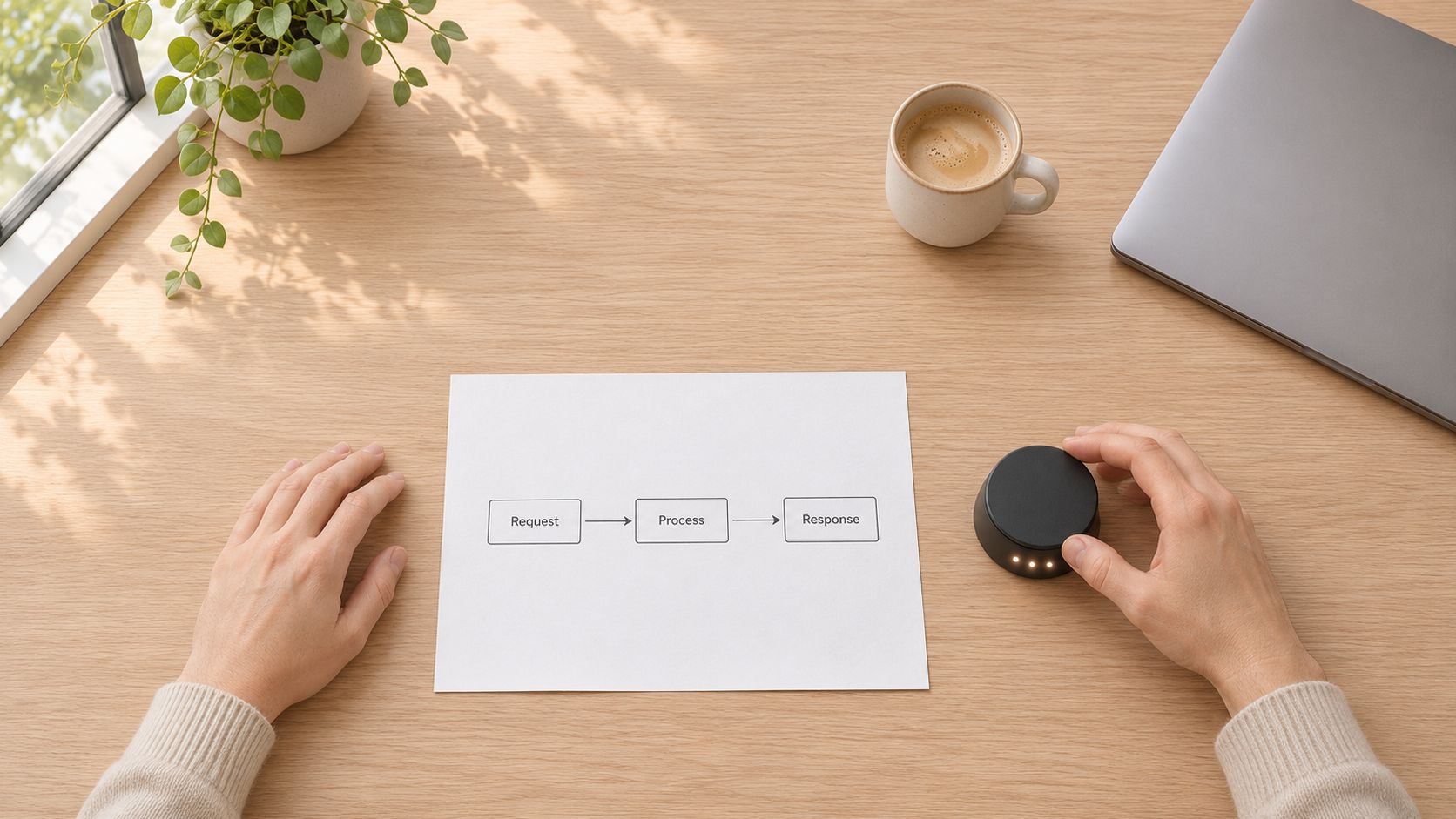
A workflow diagram makes those handoffs easier to see.
The orchestra analogy works too. A violinist can play beautifully alone. Put musicians together without agreed entrances, timing or a conductor, and individual talent won't guarantee a coherent performance.
Multi-agent orchestration applies that coordination to specialized agents. A researcher gathers evidence, an analyst compares it and a writer prepares the answer. Their job titles matter less than the rules governing their collaboration.
For someone asking “What is AI orchestration?”, the simplest practical checklist is:
- Break down the goal: Turn a broad request into work that can be assigned and checked.
- Route the work: Give each step the model, tool, data source or person it needs.
- Track the results: Keep enough context and execution history to know whether the task succeeded.
A collection of chatbot tabs doesn't do that automatically. Without coordination, you're still running the pass yourself.
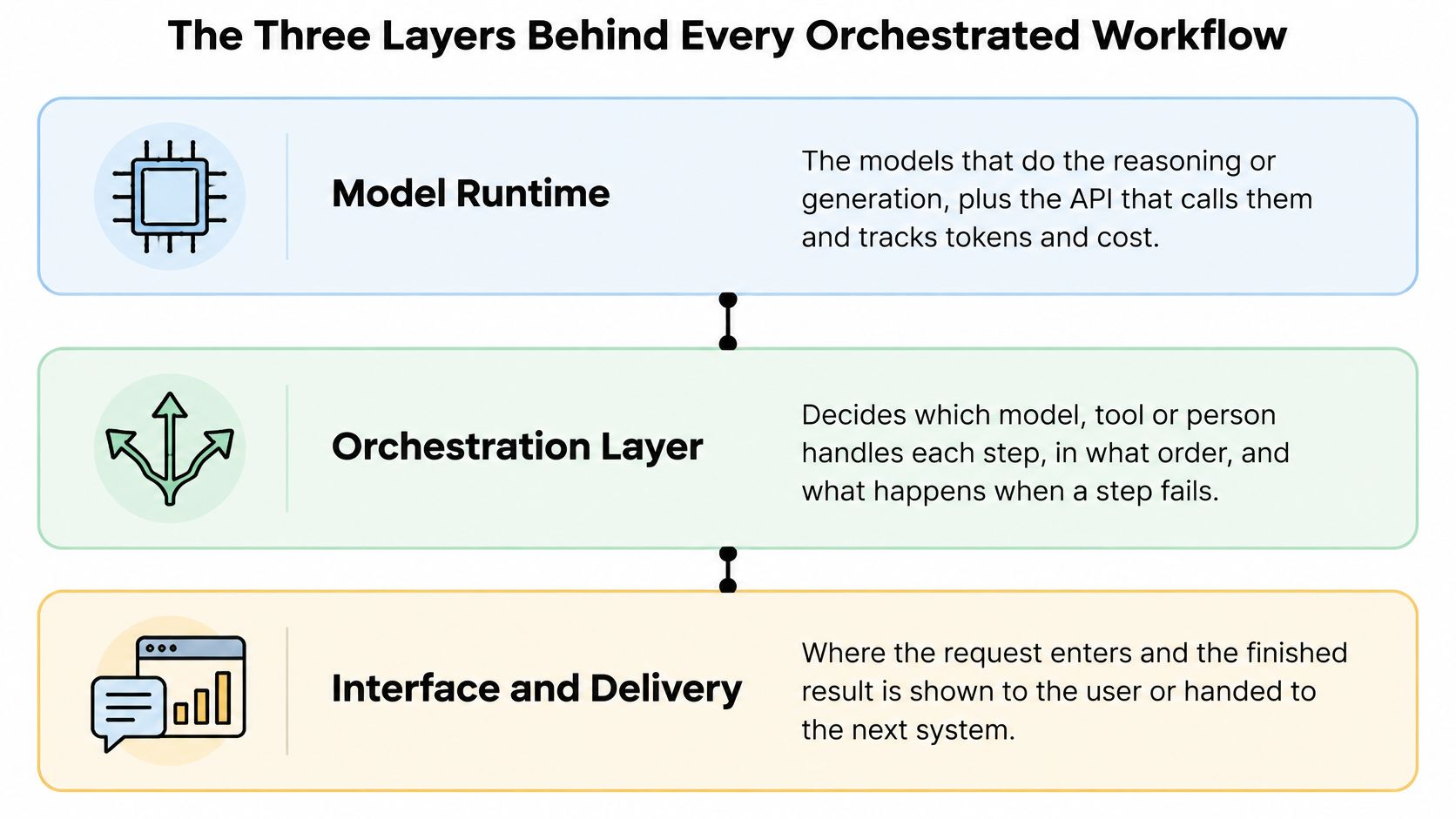
The Three Layers Behind Every Orchestrated Workflow
The three layers of an orchestrated AI system
These layers answer different questions. The runtime supplies the model's capabilities. The connector layer provides access to information and actions. The control plane determines how those capabilities and connections may be used.
A connector isn't a workflow, just as a kitchen's gas pipe isn't a dinner service plan. It makes an operation possible without deciding when that operation should happen.
Follow a competitor report through the stack
For a weekly competitor report, the connector layer retrieves public announcements and opens saved documents. The runtime summarizes the relevant material and drafts comparisons. The control plane checks whether required sources are present and holds the draft until a reviewer approves it.
If retrieval fails, buying access to a stronger reasoning model won't repair the connection. If a draft gets published without approval, rewriting the prompt won't necessarily fix the missing permission boundary.
That's why SaaS integrations belong in the discussion, but shouldn't be mistaken for the whole system. Connecting an app gives you a route into it. Orchestration determines what's allowed to travel along that route.
The visual below uses a complementary presentation view: it groups coordination in the middle and shows the interface where requests enter and results appear. Tool connectors support the execution underneath that view.
The quick orchestration test
Before trusting a workflow, ask someone to demonstrate these answers:
- Order: What decides which step runs next?
- Failure: Who gets notified when a step can't finish?
- Authority: What prevents an unapproved external action?
If nobody can show you the sequence, the failure path and the approval boundary, you haven't established that the product meaningfully orchestrates the task.
Don't accept a polished final answer as the demonstration. Ask to see an unsuccessful run. That's where coordination becomes visible, or conspicuously absent.
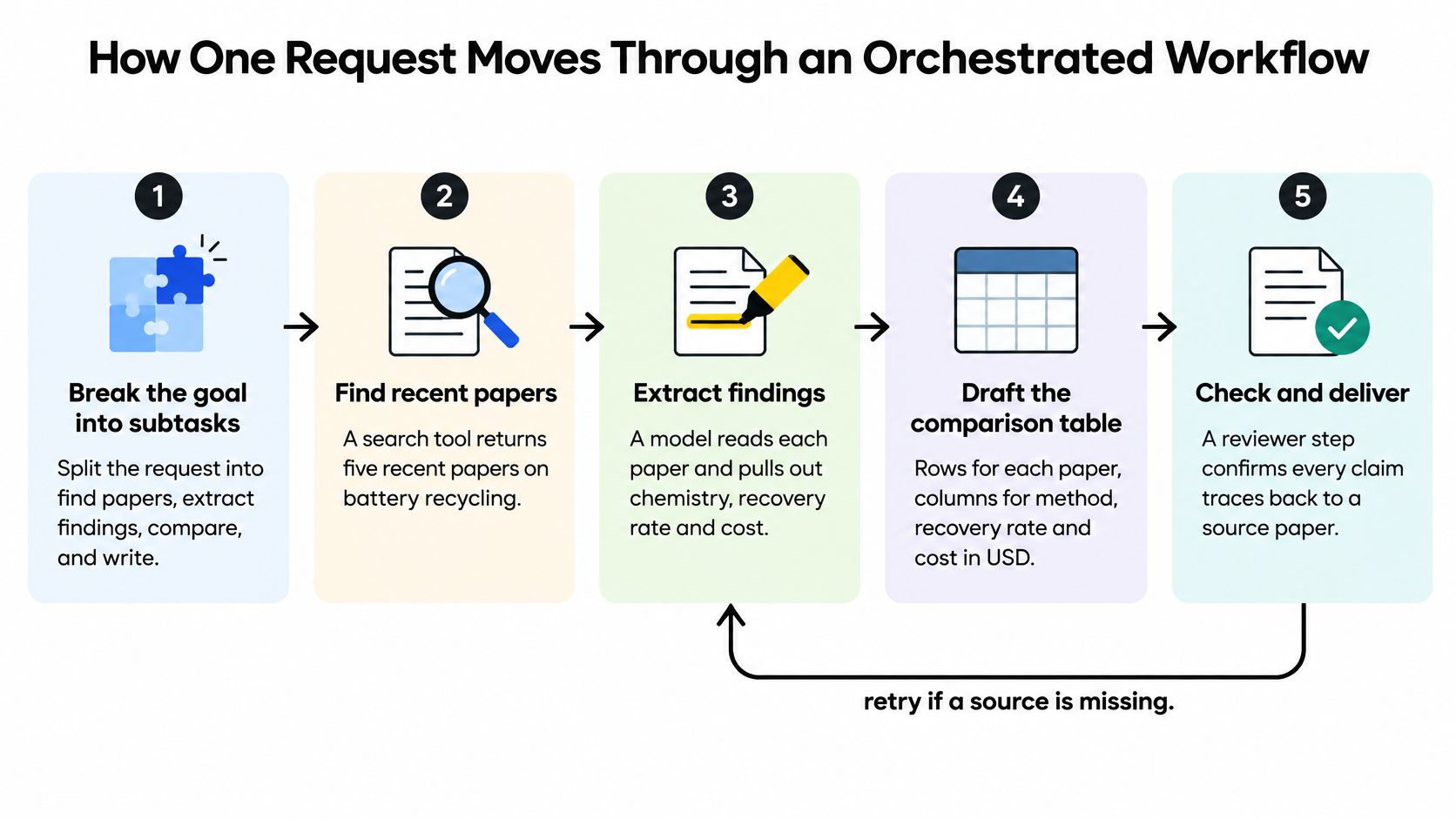
How One Request Moves Through an Orchestrated Workflow
A research request can sound simple: summarize recent papers on battery recycling and draft a comparison table. The work behind it is not. Before anything runs, define what “recent” means, which battery chemistries matter, and whether the comparison should cover technical performance, economics, or both. Otherwise, the workflow may complete each step correctly and still answer the wrong question.
The diagram shows the research stages. The checklist makes the decisions behind those stages visible.
From request to reviewable result
Break the goal into subtasks. Separate finding papers, extracting claims, comparing methods, and drafting the table. Specify the fields the table needs before retrieval begins, so the extractor knows what evidence to collect.
Route each subtask appropriately. Use search to locate papers, a document reader to extract findings, and a reasoning model to compare methods. A lighter model may be enough for formatting. The best model is not automatically the right choice for every step.
Preserve shared state. Keep each paper's identifier, source location, extracted findings, and processing status in a structured record. Pass relevant records to the next stage instead of copying the whole conversation each time. It works like a kitchen's order ticket: each station gets the details it needs, and the order's status stays visible.
Validate and recover. Check that claims have supporting passages and that measurements use comparable conditions. A temporary failure can be retried within a defined limit. Missing evidence should be escalated, not filled in by asking a model to guess.
Pause before external actions. Require human approval before posting the comparison to a shared folder or changing a connected ticket. Give the reviewer the supporting passages, not just a message saying the task is complete.
Deliver with provenance. Attach citations to claims and keep each table entry connected to its source document. If a paper does not report a cost, mark it as not reported instead of inventing an estimate.
These stages keep routing, shared context, intermediate results, and execution control distinct. Explicit inputs and outputs also make it easier to locate an extraction problem without rerunning the entire assignment. The key question is what happens when a stage fails: does the workflow expose the gap and pause, or pass a weak result downstream?
Why not use one giant prompt?
A giant prompt bundles retrieval, interpretation, and formatting into one operation. If the answer is wrong, it can be hard to tell whether a source was missing, a comparison was unfair, or a requirement was overlooked.
Separate stages make those boundaries easier to inspect. They can also avoid using heavyweight reasoning for routine formatting, although any savings depend on the workflow. Like an orchestra, the process needs more than capable players: someone must coordinate entrances, catch missed notes, and decide when the performance should stop for review.
For a visual companion to the execution flow:
How Orchestration Differs From Routing, Chaining and Agents
Orchestration compared with related AI terms
Routing is choosing the chef, not managing dinner service.
Chaining is a recipe followed in order, with additional control logic needed when an ingredient is missing.
Workflow automation is a reliable conveyor belt when the inputs and rules are predictable.
A single agent has some discretion about how to reach its assigned goal.
A multi-agent system distributes the work, which creates a coordination job as well as more working capacity.
Autonomy and orchestration aren't the same thing
An agent can decide to search again because its first result was incomplete. An orchestrator can restrict that agent's search budget, decide what evidence it must return and determine whether another step may use the result.
That distinction matters when evaluating what AI agents are. A tool-using agent may coordinate its own actions without providing the operating controls needed for a larger process.
Likewise, orchestration doesn't require every participant to be an autonomous agent. A straightforward document workflow might combine deterministic extraction, a model-generated summary and a human approval step.
Practical rule: Use the least complicated system that gives you the control the task needs.
For a question with a self-contained answer, start with a model. For a predictable sequence, a fixed chain or conventional automation may be enough.
Choose orchestration when the work has dependencies, conditional branches, recovery requirements or consequential handoffs. If several agents participate, make their coordinator explicit rather than assuming collaboration will sort itself out.
You don't need an entire orchestra to play a doorbell. You do need someone responsible when the performance involves more than pressing the button.
Real Workflows Where Orchestration Pays Off
A developer asks for a bug fix. A coding model proposes a patch, a test runner checks it and a writing step prepares the pull-request explanation. The developer reviews the diff and test results before merging, rather than treating generated code as verified code.
A content writer turns a video transcript into an outline and blog draft. A writing model adjusts tone, a translation tool prepares another-language version and a verification step checks factual claims against the transcript and original sources. A fluent translation doesn't excuse a claim the speaker never made.
Match the resource to the job
- Researcher: Search gathers candidate sources, a document reader extracts findings and a summarizer prepares evidence notes. The researcher checks the notes before adding them to a shared knowledge base.
- Marketer: A reasoning step interprets the campaign brief, a writing model drafts copy and an image tool produces matching creative. A brand reviewer checks claims, visual consistency and intended audience before release.
- Student: A document tool reads lecture notes, a model drafts quiz questions and a flashcard tool creates revision cards. The student checks that the answers reflect the course material rather than plausible-sounding additions.
For document-heavy work, the practical starting point is often intelligent document processing: identify what should be extracted, how it should be checked and where exceptions should go. Automating an unclear extraction rule just produces unclear results more quickly.
What the business evidence actually supports
IBM's global executive research associates coordinated, visible AI governance with 13 times faster scaling, six times greater productivity impact and 20% higher return on AI investment, while reporting 17% lower productivity gains, 22% lower revenue impact and 19% lower operating-profit impact among organizations with high AI sprawl and low visibility.
Reported IBM results by AI governance setup
These are associations, not guarantees that adding a workflow engine will produce the same results. The useful lesson is narrower: coordination and visibility matter alongside model capability.
Measure what changes in your own work:
- Switching time: Less hunting for the right tab, file or conversation.
- Copy-paste errors: Fewer opportunities to transfer an outdated draft or omit a source.
- Unnecessary model spend: Less heavyweight processing for simple extraction or formatting.
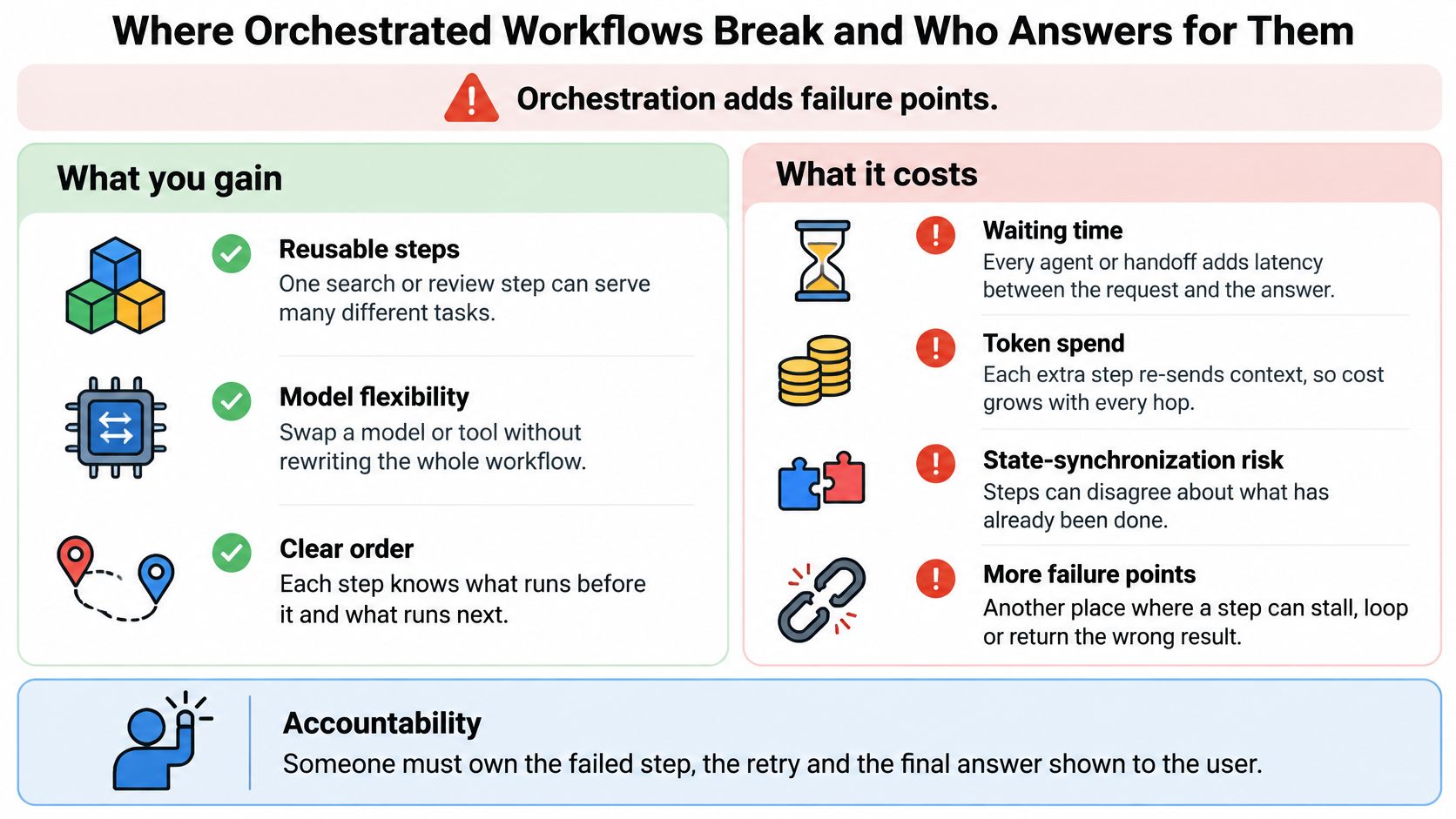
Where Orchestrated Workflows Break and Who Answers for Them
Orchestration adds failure points. Each sequential handoff can introduce waiting time, token spend, synchronization problems and another opportunity for a wrong result to reach the next stage.
In MAESTRO's controlled evaluation of 12 multi-agent systems, structurally stable executions still varied in latency, cost and failure modes, and architecture often mattered more than model or tool changes; benchmark evidence also reports framework-level choices increasing latency by more than 100x, reducing planning accuracy by up to 30%, and lowering coordination success from above 90% to below 30%. Those are evaluation findings, not predictions for every workflow, but they're a strong reason to test the complete system.
The trade-off is easier to assess when benefits and operating costs sit side by side.
Instrument the chain, then limit the damage
Log per-step latency, token use, tool errors, retries, routing decisions, quality checks and end-to-end success. A plausible final paragraph won't tell you that retrieval failed and a downstream model improvised the missing evidence.
- Parallelize independent work. Extract separate documents concurrently, but wait for the required evidence before comparing them.
- Set time and cost budgets. Define when the workflow should stop, return a partial result or request help.
- Bound retries and prevent duplicate actions. Use operation identifiers or equivalent checks so retrying a call doesn't create duplicate tickets.
- Cache stable intermediate results. Reuse unchanged extraction outputs, but invalidate them when their sources change.
- Repeat evaluations. Compare policies across repeated runs and inspect failures, not just the best-looking demonstration.
These controls complement practical ways to avoid AI hallucinations. Recovery logic can restore a failed connection; it can't make unsupported evidence true.
Name the accountable human
The NIST AI Risk Management Framework calls for defined, assessed and documented oversight processes, along with clear roles and responsibilities in human-AI configurations. Translate that into named owners for consequential approvals, uncertain outputs and incident response.
Write down who can authorize publication, who investigates a failed handoff and when automation must stop. Give reviewers enough source material and execution history to make a decision.
The answer to “Who approved this?” should be a person or a documented policy owner. “Several agents seemed confident” isn't an accountability model.
Pick One Workflow to Orchestrate This Week
Choose a repetitive task with a clear finish line: turning research notes into a briefing, or converting a video into a reviewed blog draft. Start with something reversible, not an operation that can email customers or overwrite shared records.
Draw a small workflow map before opening any builder:
- List the steps: Describe an observable output for each stage, such as extracted source notes or a draft with citations.
- Assign the resource: Name the model, search tool, document reader or person responsible for producing it.
- Mark the approval boundary: Show exactly where work must wait before being shared, published or written into another app.
Run one small experiment
At Zemith, our AI workflow builder chains prompts, models and image tools into reusable pipelines. You can switch AI models at any time, even mid-chat, and our agent can connect to Notion, Linear, Canva and Airtable through plugins; it asks for approval before creating or changing anything in connected apps.
Use that setup to test your map, not to automate every task you have. Keep the first experiment short, time yourself and compare the result with your usual process.
For ongoing AI workflow optimization, record whether the handoffs were visible, whether you could identify a failed step and whether the approval boundary held. Fix the weakest transition before adding another agent.
Which of your current tasks bounces between three apps before it's finished?
Zemith brings models, document tools and reusable AI workflows into one workspace, so you can build around the task rather than juggle disconnected chats. Visit Zemith and try one small pipeline, with a clear output, a visible review step and a plan for what happens if it fails.













 MidjourneyUS$10.00
 ElevenLabsUS$6.00
 RunwayUS$15.00
 Gamma PlusUS$12.00
 Otter ProUS$16.99
 QuillBot PremiumUS$19.95
 Photoroom ProUS$12.99
 Quizlet PlusUS$7.99














 Podcast
 Quiz
 Flashcards
 Mind map
 Infographic